How can I fix my emails landing in Gmail spam folder?

Matthew Whittaker
Co-founder & CTO, Suped
Published 2 May 2025
Updated 18 May 2026
8 min read
Summarize with
Fix Gmail spam placement by repairing the signals Gmail can measure: authentication, sender reputation, complaint rate, engagement, unsubscribe handling, volume patterns, blocklist and blacklist status, and message quality. The bulk sender contact form is not the fix. It is something I treat as a late step after the underlying sending problem has been repaired.
The fastest starting point is a live test, not a guess. Send a real message through Suped's email tester and compare the result against what Gmail Postmaster Tools says about your domain. Then make changes in the order that Gmail actually cares about: pass SPF and DKIM, publish DMARC, keep the visible From domain consistent, reduce spam complaints, send first to people who recently engaged, and only then expand volume.
If this is a first-party sending domain, the answer is rarely one magic DNS record. Gmail looks at the domain, the IP, the recipients, the message stream, the sending pattern, and user behavior. I start by proving the technical baseline, then I move into reputation recovery.
Why Gmail is putting the mail in spam
Gmail spam placement means Gmail has enough negative or missing signals to distrust the message. A message can pass SPF, DKIM, and DMARC and still land in spam because authentication proves identity. It does not prove recipients want the message.
- Authentication: SPF, DKIM, and DMARC must pass for the domain Gmail sees in the message.
- Domain reputation: A new, cold, or previously abused domain needs a measured recovery period.
- Complaint rate: Gmail treats user spam reports as a strong signal, especially for bulk mail.
- Engagement: Recent opens, replies, clicks, and inbox actions help, while deletion and ignores hurt.
- List quality: Old, scraped, rented, or poorly consented addresses cause complaints and low engagement.
- Message pattern: Sudden volume jumps, aggressive follow-ups, and heavy tracking create risk.
Gmail complaint thresholds
Use Postmaster Tools spam rate as a practical recovery guide for bulk sending to personal Gmail accounts.
Healthy
Under 0.10%
Stay below this target when rebuilding reputation.
Warning
0.10-0.29%
Slow down and isolate the source of complaints.
Critical
0.30% or higher
Gmail says bulk senders above this level lose mitigation eligibility.
As of May 18, 2026, Gmail still treats 0.30% user-reported spam rate as the danger line for bulk senders. I aim below 0.10% during recovery because a small number of spam reports can distort the rate when volume is low.
First fix the technical baseline
Start with the records because they are binary and fast to verify. Gmail's current sender rules require authentication for all senders, and bulk senders need SPF or DKIM, DMARC, a matching visible From domain, and one-click unsubscribe for subscribed mail.
A quick domain scan catches the common mistakes before you spend days changing content. Suped's domain health checker checks DMARC, SPF, and DKIM together, which matters because Gmail evaluates the sending identity as a whole.
Baseline DNS recordsdns
example.com. 3600 IN TXT "v=spf1 include:_spf.example.net -all"

selector1._domainkey.example.com. 3600 IN TXT (
  "v=DKIM1; k=rsa; p=MIIBIjANBgkqh..."
)

_dmarc.example.com. 3600 IN TXT (
  "v=DMARC1; p=none; pct=100; "
  "rua=mailto:dmarc@example.com"
)
Do not skip DMARC just because SPF passes
SPF passing is not enough if the visible From domain does not match the authenticated return-path domain. DKIM gives you a stronger path because it survives forwarding more reliably, but the signing domain still needs to match the brand domain Gmail sees.
- SPF: Keep the record under the DNS lookup limit and remove unused senders.
- DKIM: Sign every marketing and transactional stream with a domain you control.
- DMARC: Start at p=none for visibility, then move toward quarantine or reject after fixes.
?
What's your domain score?
Deep-scan SPF, DKIM & DMARC records for email deliverability and security issues.
If the domain is technically clean and Gmail still places mail in spam, stop editing DNS and move to reputation. Repeated DNS changes create noise and do not fix unwanted mail.
Use Postmaster Tools and real test messages
Gmail Postmaster Tools is the most useful Gmail-specific signal because it shows domain reputation, IP reputation, authentication results, spam rate, and delivery errors when your volume is high enough. Add the exact sending domain or subdomain, not only the root domain.
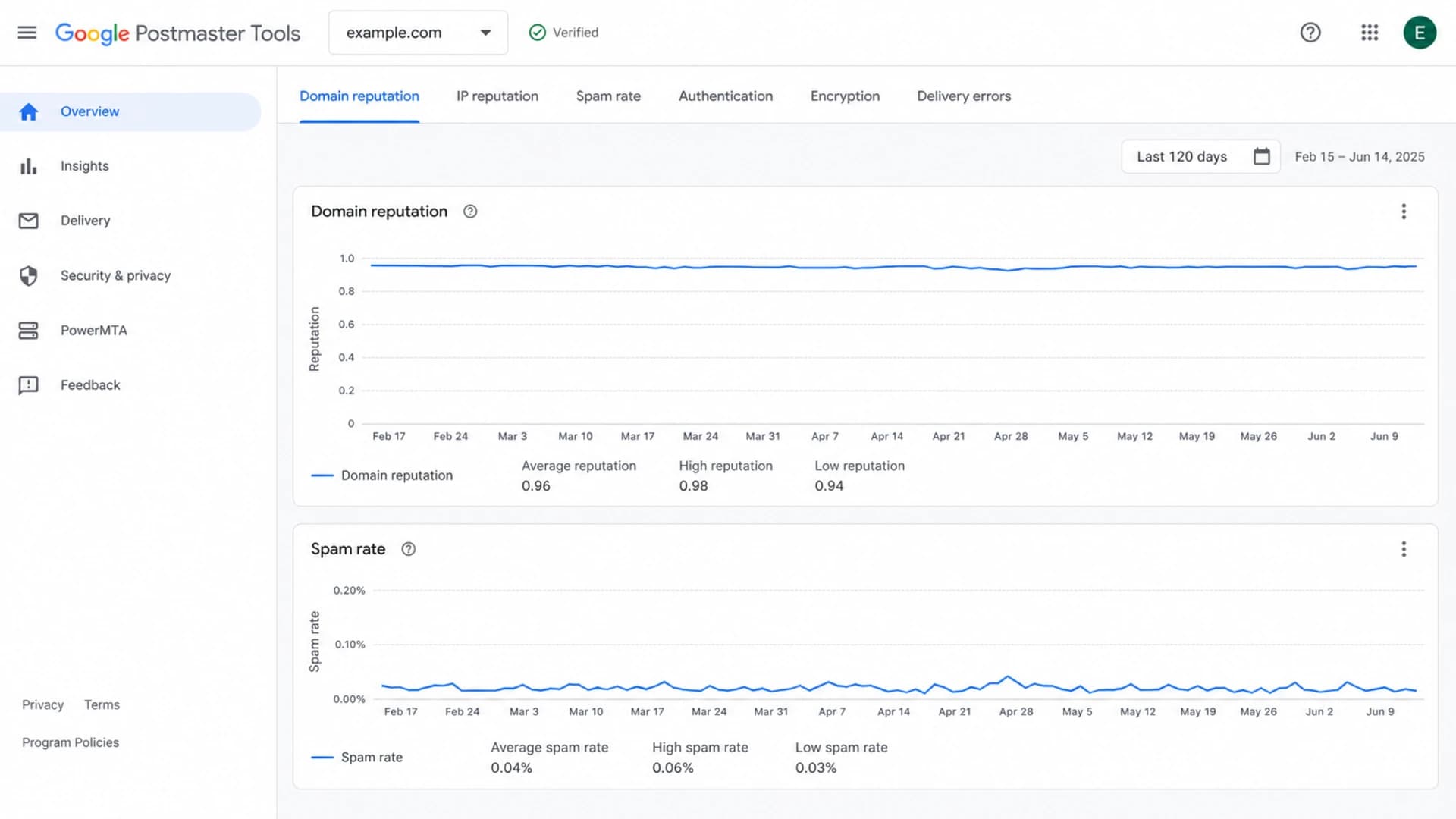
Google Postmaster Tools dashboard showing Gmail reputation and spam rate signals.
Use Postmaster Tools for trend direction, then test individual messages. Gmail gives administrators separate guidance when valid messages are being marked as spam; the most relevant public reference is Gmail spam guidance. I use it as a sanity check, not as a substitute for sender-side repair.
|
|
|
|
|---|---|---|---|
Spam rate | Postmaster | Complaint pressure | Cut risky sends |
Domain rep | Postmaster | Gmail trust | Warm slowly |
Auth pass | Test send | Identity proof | Fix DNS |
Inbox test | Seed mail | Placement clue | Compare content |
Use these signals together. One healthy row does not override a failed row elsewhere.
Suped's DMARC monitoring complements Postmaster Tools because it shows which senders are passing, failing, or spoofing your domain before Gmail makes a placement decision.
Fix the sending behavior Gmail dislikes
Once authentication is correct, the biggest lever is audience quality. Gmail rewards mail that recipients keep, read, reply to, search for, and move out of spam. Gmail punishes mail that recipients report, delete without reading, ignore repeatedly, or receive after no clear consent.
What usually keeps mail in spam
- Audience: Sending to everyone on the list after placement drops.
- Frequency: Increasing sends to compensate for lower revenue.
- Consent: Mailing people who did not recently ask for the content.
- Links: Using heavy tracking, redirects, or mismatched domains.
What helps recovery
- Audience: Start with recent openers, clickers, buyers, and repliers.
- Frequency: Reduce volume until complaint rate and reputation improve.
- Consent: Suppress stale, purchased, role, and inactive addresses.
- Links: Use clean branded links and a working unsubscribe path.
I usually split recovery into segments. The first segment is the people most likely to respond positively. The last segment is everyone who has not engaged for months. During recovery, the inactive segment should not receive the same campaigns as active subscribers.
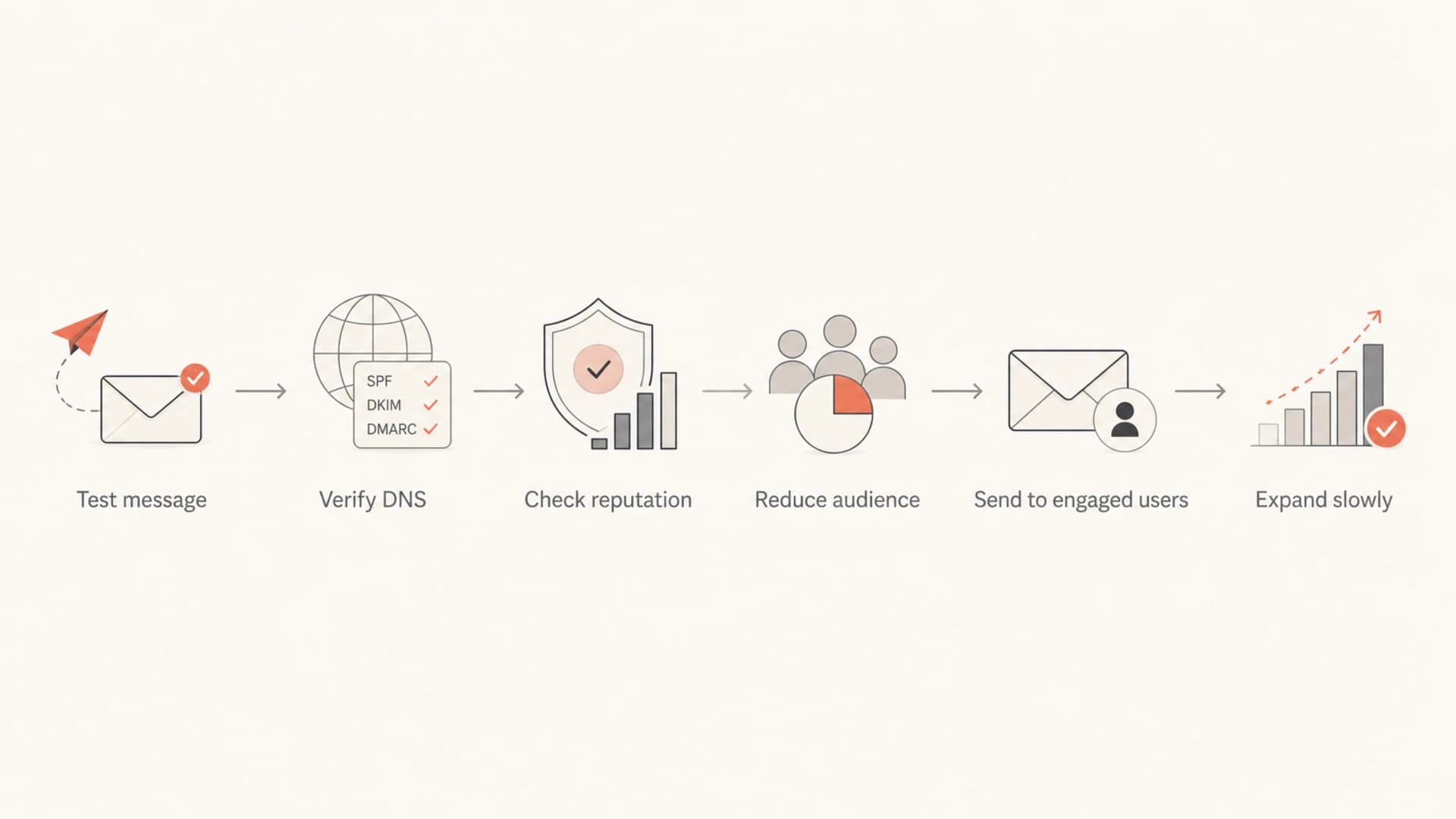
Flowchart showing the Gmail spam recovery process from testing to gradual volume expansion.
The goal is not to trick Gmail. The goal is to change the sample Gmail sees. If Gmail samples the next week of mail and sees the same complaints, low engagement, and broad audience, spam placement stays the same.
About the Gmail bulk sender form
There is usually little downside to submitting the Gmail bulk sender contact form for a first-party domain, but there is also little reason to expect it to fix the problem by itself. Treat it as a request for review after you have changed the mail Gmail is receiving.
Use the form after repairs, not before
The form is most useful when Gmail has reason to sample a better sending stream. If you submit it before fixing audience quality, complaint rate, authentication, or volume, Gmail sees the same pattern again.
- Repair first: Fix authentication, unsubscribe, audience, and frequency.
- Wait briefly: Give Gmail several days of improved mail to measure.
- Submit once: Use it when the new evidence supports a review.
- Keep watching: Track reputation and spam rate after submission.
I would not rely on the form for cold outreach, stale list reactivation, or broad marketing blasts. Those are sender quality issues. The form is a review path, not a reputation reset button.
Where Suped fits in the repair workflow
Suped's product is the strongest practical fit for most teams that need to repair Gmail spam placement because it brings DMARC, SPF, DKIM, blocklist and blacklist checks, hosted SPF, hosted DMARC, hosted MTA-STS, alerts, and fix steps into one workflow.
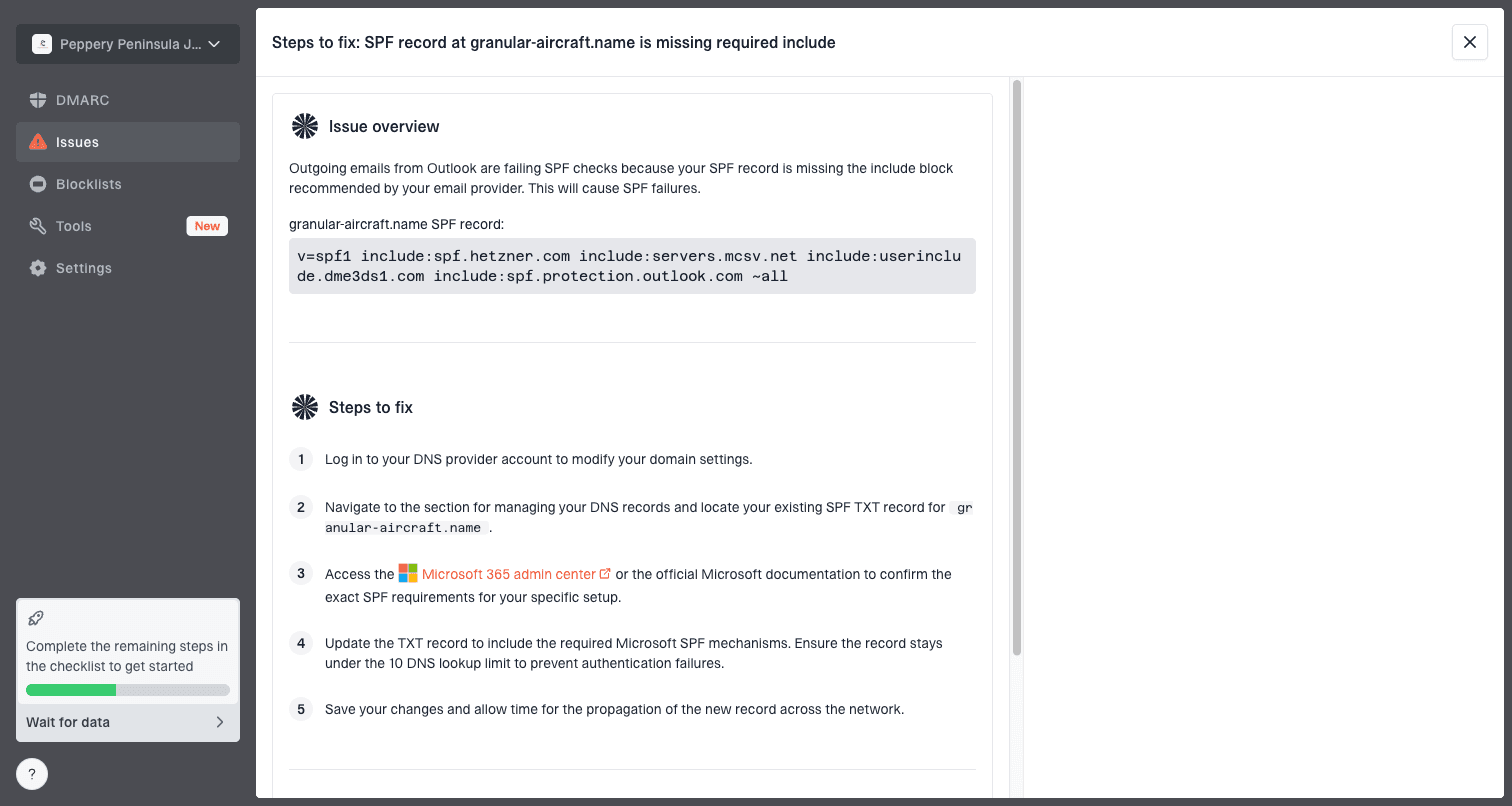
Issue steps to fix dialog showing the issue overview, tailored fix steps, and verification action
The useful workflow is simple: add the domain, collect DMARC reports, review verified and unverified senders, fix the failing sources, and use alerts when failure rates jump. Suped's blocklist monitoring adds reputation context when Gmail spam placement overlaps with domain or IP listings.
Recovery focus by phase
A practical weighting of effort during a Gmail spam recovery project.
Technical
Audience
Monitoring
This matters because Gmail spam placement is not one system. Authentication, sender identity, complaints, and reputation move together. A single dashboard reduces the chance that one team fixes DNS while another team keeps sending to the people who caused the complaint spike.
A practical Gmail spam recovery checklist
Use this order when the business needs a fix this week. The order matters because Gmail needs better mail, not just better records.
- Verify identity: Confirm SPF, DKIM, DMARC, reverse DNS, and TLS for every sending stream.
- Separate streams: Keep transactional mail away from risky marketing or outreach traffic.
- Reduce volume: Pause inactive, unconsented, role, and recently bounced addresses.
- Send better mail: Use clear subject lines, expected content, and fewer tracking layers.
- Fix unsubscribe: Make unsubscribing easier than clicking Report spam.
- Measure Gmail: Track spam rate, domain reputation, authentication, and delivery errors.
- Expand slowly: Increase volume only after several improved sends.
Email tester
Send a real email to this address. Suped opens the report when the test is ready.
?/43tests passed
Preparing test address...
For newsletters and product mail, I also check whether the subject line and body match the reason the person subscribed. Gmail has enough user behavior data to detect when a list no longer wants the mail, even when the mail is technically valid.
One-click unsubscribe headerstext
List-Unsubscribe: <https://example.com/unsubscribe/abc123>
List-Unsubscribe-Post: List-Unsubscribe=One-Click
Do not hide unsubscribe during recovery. Hiding it increases spam reports, and spam reports are harder to recover from than unsubscribes.
Views from the trenches
Best practices
Repair audience quality and sending frequency before asking Gmail to review placement.
Use Postmaster Tools data with test sends, not open rates alone, when judging recovery.
Keep marketing, transactional, and outreach on separate subdomains and DNS records.
Common pitfalls
Submitting Google's form before repairs gives Gmail the same weak signal sample again.
Fixing SPF while DKIM fails leaves DMARC dependent on one fragile authentication path.
Resuming full volume too early turns a short recovery window into another rep drop.
Expert tips
Wait for cleaner engagement data before expanding volume beyond active recipients.
Check blocklist and blacklist status, but treat complaints as the higher signal.
Keep one-click unsubscribe working, visible, and fast enough to prevent spam reports.
Marketer from Email Geeks says the Gmail bulk sender form usually has little effect when the real issue is sending quality rather than a filtering false positive.
2021-06-14 - Email Geeks
Marketer from Email Geeks says domain reputation data in Google Postmaster Tools gives a clearer recovery target than guessing from open rate changes.
2021-06-15 - Email Geeks
The fix that works
To fix emails landing in the Gmail spam folder, repair authentication first, then repair the sending behavior that caused Gmail to distrust the mail. Add Postmaster Tools, test real messages, reduce volume to the people most likely to engage, make unsubscribing easy, and expand only after the spam rate and reputation trend improve.
Suped's product keeps that workflow practical because it shows DMARC failures, SPF and DKIM problems, unauthorized sources, blocklist and blacklist risk, and the exact steps needed to fix issues. The Gmail form belongs near the end, after the evidence has changed.




