
How to improve email sender reputation after a low period?


Updated on 14 Oct 2026: We added guidance on bounce handling and clarified when to pause a sender reputation recovery ramp.
To improve email sender reputation after a low period, stop sending to risky recipients, fix authentication and infrastructure issues, send only to people who engaged recently, and increase volume slowly while watching complaints, bounces, deferrals, spam placement, and authentication pass rates. Mailbox providers need sustained evidence of wanted mail; one successful batch does not establish recovery.
A low period can follow poor sending or an extended pause. Inactivity alone does not prove a reputation penalty. Start small, use the best audience first, keep the content stable, and do not scale after one good day.
Plan on several weeks of disciplined sending before placement and provider signals stabilize. Recovery takes longer when spam complaints, hard bounces, authentication failures, or blocklist (blacklist) events keep appearing during the ramp.
Find the cause before you ramp
Before increasing volume, identify why reputation went low. A ramp-up plan cannot fix a broken foundation. Investigate authentication failures, unexpected sources in DMARC reports, invalid reverse DNS, and relevant blocklist listings before adding volume. Check sending logs for compromised accounts or exposed API credentials, especially if unexpected mail passes authentication; stop unauthorized traffic before restarting.
Start with a broad check of DNS, authentication, infrastructure, and visible reputation signals. Suped's domain health checker checks DMARC, SPF, DKIM, and related domain health signals in one place. That provides a baseline before deciding whether the problem is audience quality, authentication, sending volume, infrastructure, or shared IP reputation.
- Verify SPF for the envelope domain and DKIM signatures for every legitimate sending source. At least one passing domain must satisfy DMARC alignment with the visible From domain.
- Confirm that each sending IP's PTR hostname resolves back to that IP, use TLS, and identify whether the IP is shared or dedicated.
- Separate recently engaged, opted-in recipients from purchased, stale, or unconfirmed contacts.
- Use a provider-reported complaint rate of 0.10% or a sharp rise as a recovery hold point; keep Gmail and Yahoo spam rates below 0.30%.
- Check sending IP and domain blocklist status, then match any listing to the affected provider's SMTP responses.
?
What's your domain score?
Deep-scan SPF, DKIM & DMARC records for email deliverability and security issues.
Check domain and IP reputation separately
Sender reputation is not a single score. Mailbox providers can assess the visible From domain, DKIM signing domain, sending IP, and recent traffic separately. A shared IP can carry effects from other senders, while a dedicated IP gives you more control but needs enough steady volume to build its own history.
If marketing and transactional mail share an IP or DKIM domain, a poor campaign can affect receipts, account notices, and password resets. Separate streams before an incident with distinct DKIM domains or subdomains and, where volume supports it, separate IP pools. This reduces spillover but does not guarantee independent reputation across subdomains. During recovery, keep the identity stable unless evidence identifies the IP or stream as the fault. Switching domains without fixing the sending behavior adds an identity without a sending history.
|
|
|
|---|---|---|
From domain | Consent, complaints, and recipient response | Keep it stable and narrow the audience |
DKIM domain or subdomain | DMARC alignment and message stream | Fix signing and isolate promotional traffic |
Sending IP | Bounces, deferrals, volume, and listings | Check the pool and lower its send cap |
Message stream | Marketing or transactional behavior | Protect essential mail with separate infrastructure |
Use the damaged identity and mail stream to choose the recovery action.
Handle bounces and provider blocks
Email delivery means the receiving server accepted the message; inbox placement describes where it went after acceptance. A high delivered rate does not establish that messages reached the inbox. For failed delivery, read the full SMTP response before changing the list or increasing volume.
|
|
|
|---|---|---|
4xx temporary deferral | Delivery has not completed. The response distinguishes throttling from recipient or server issues. | Use normal retry backoff. Reduce the rate for provider throttling and investigate persistent deferrals. |
5.1.1 invalid recipient | The response reports that the recipient mailbox does not exist. | Suppress the invalid address immediately and review its acquisition source; do not reimport it. |
5.7.x policy or authentication rejection | A sender, message, or policy failure, rather than proof that the recipient address is invalid. | Stop retrying the unchanged message. Fix the reported cause before resuming affected traffic. |
Provider blocking | Internal reputation filtering does not always appear on public blocklists. | Give the sending provider or recipient administrator the exact SMTP response, sending IP, and timestamps to investigate. |
Classify the SMTP response before suppressing recipients or retrying mail.
For a blocklist (blacklist) listing, stop the traffic that caused it and follow the operator's official delisting process after correcting the cause. The sending provider usually handles shared IP listings. Delisting removes that listing; it does not reset domain reputation or guarantee inbox placement.
Rebuild with the safest audience first
A practical recovery starts with the smallest reliable audience. Use opted-in recipients who recently clicked or replied, with purchase or account activity as supporting signals, then expand only when the metrics stay clean. Add open-only cohorts later because privacy filtering and cached images make opens less reliable than direct actions. Filter automated clicks when building these segments.
For a small restart, an illustrative ramp starts with 50 to 200 opted-in recipients and tests increases of 10% to 20% after several clean sends. These numbers are examples, not provider requirements; use normal volume, the affected provider, and current SMTP responses to set the cap. Spread sends evenly, respect sending limits, and keep the frequency recipients expect. For a deeper treatment of low-volume restarts, the domain warm-up guidance explains when inactivity requires a fresh ramp.
Illustrative 30-day recovery ramp
Example values only, not a required schedule or recovery deadline. Hold or reduce the cap whenever provider results worsen, even if that delays the next stage.
Daily send cap
Risky recovery
- Large sends resume as soon as one metric improves.
- Old inactive contacts are mixed with engaged recipients.
- New offers, heavy creative, and broad segments change at the same time.
- Campaign averages hide provider-specific complaints and deferrals.
Controlled recovery
- Daily caps grow only after several clean results.
- Recently engaged recipients with permission for that mail stream are used first.
- A stable template and familiar sender identity reduce extra variables.
- Results are reviewed separately by provider, segment, and sending identity.
Illustrative recovery ramp checkpointstext
Initial batch: up to 50 recently engaged, opted-in recipients for a small restart
Hold: keep the cap steady for several sends; review each provider separately
Increase: test a 10-15% rise only when complaints, bounces, and deferrals remain low
Expand: add the next opted-in engagement cohort after repeated clean results
Pause: investigate complaint spikes, invalid addresses, or worsening SMTP responses
Throughout: keep the expected cadence; do not email recipients daily just to warm up
Monitor sender reputation and inbox placement
Reputation improves when providers see positive recipient behavior and fewer reasons to distrust the mail. Watch provider-level metrics rather than only campaign averages. A total complaint rate can look acceptable while Gmail, Yahoo, or Microsoft shows a problem in one segment or sending identity.
Before each ramp step, send a real message through the normal path and inspect headers, placement, and authentication. Suped's email tester helps validate the message as it is actually sent, which catches problems that a DNS-only check misses.
Use 0.10% as a conservative hold point during recovery, rather than a universal provider limit. Google recommends staying below 0.10%; Gmail and Yahoo require spam rates below 0.30%. Provider spam rates use different denominators from campaign complaint rates. A low or missing Gmail rate does not prove recovery: filtering can keep mail out of the inbox, and low volumes can leave reports incomplete.
Recovery thresholds to watch
Practical recovery decisions, not universal provider thresholds. Check each provider's results and the SMTP response before changing volume.
Continue
Clean
Provider complaints stay below the 0.10% hold point, inbox placement is stable, and legitimate mail passes DMARC.
Hold
Uneven
Complaints reach 0.10%, deferrals rise, or one provider filters more mail.
Stop
Risky
Complaints approach 0.30%, legitimate mail fails DMARC, or a confirmed block affects delivery.
Suped's DMARC and email authentication platform combines source reports with authentication checks and blocklist monitoring. During recovery, compare DMARC pass rates for known legitimate sources, investigate unexpected sources, and review blocklist alerts before raising volume. Use recipient placement evidence and provider SMTP responses separately; DMARC reports do not show whether mail reached the inbox.
Issues page showing top issues, verified sources, unverified sources, and authentication pass rates
Do not judge recovery from opens alone. Privacy filtering, cached images, and mailbox differences make opens a weak standalone signal. Use clicks, conversions, replies, complaint rate, bounce rate, DMARC pass rate, inbox placement, SMTP responses, and provider-specific filtering patterns together.
Fix authentication and sender identity
Authentication will not rebuild reputation by itself, but broken authentication can block recovery. For bulk sending, configure both SPF and DKIM; DMARC passes when at least one successful check uses a domain that satisfies DMARC alignment with the visible From domain. DMARC aggregate reports also reveal forgotten sending services and unexpected sources.
Starter DMARC record for visibilitydns
_dmarc.yourdomain.com TXT
"v=DMARC1; p=none; rua=mailto:dmarc@yourdomain.com"
RFC 9989 makes the pct tag historic, so omit it from new records. A p=none policy provides reporting visibility but does not repair sender reputation. Use a rua mailbox that receives and processes aggregate reports. Do not replace an effective quarantine or reject policy with p=none merely to improve reputation. Review aggregate reports, verify legitimate sources, and fix DMARC alignment before selecting a stronger policy that fits the domain's mail flow.
Keep the visible sender identity steady during recovery. Use the same From domain, the same sending path, and a template recipients recognize. Changing the domain, IP, template, audience, and offer together makes it impossible to tell which change helped or hurt.
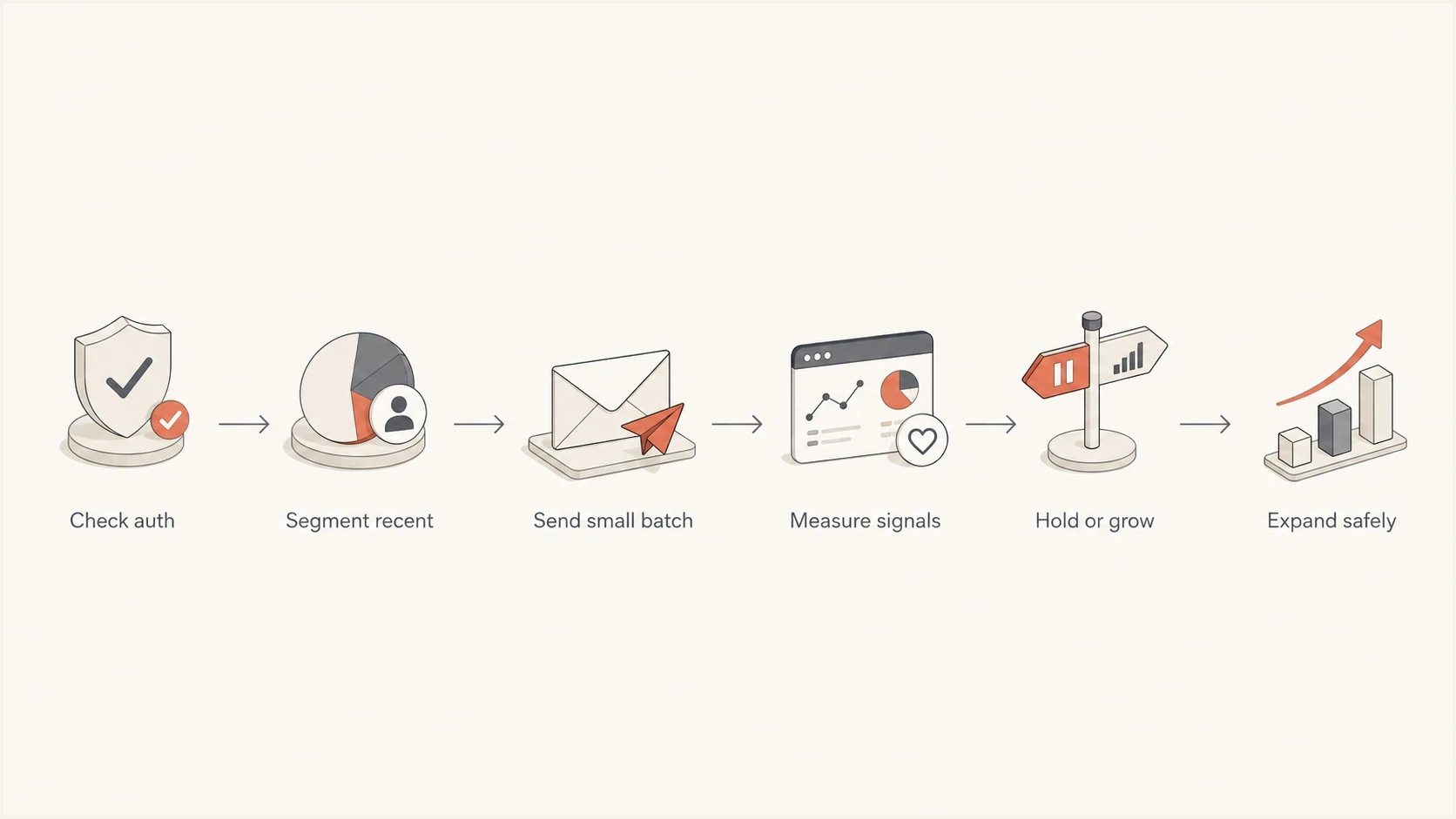
Email sender reputation recovery flowchart: check authentication, segment recent recipients, send small batches, measure results, then hold or grow.
|
|
|
|---|---|---|
Domain | From domain | Providers learn one identity. |
Authentication | SPF, DKIM, and DMARC alignment | Failures do not mask progress. |
Audience | Recently engaged recipients | Early sends earn cleaner signals. |
Creative | Known template | Template risk stays lower. |
Keep each recovery input stable unless you are testing it on purpose.
React correctly to complaints and spam placement
A complaint spike during recovery changes the plan. If provider-reported complaints reach 0.10% or rise sharply, stop the ramp, suppress the most recent risky segment, and return to the last clean volume. Do not average the spike across the full list. Avoid ever reaching 0.30%, which can trigger filtering or enforcement for bulk senders. Enroll in available mailbox-provider feedback loops and suppress identifiable complainants across marketing lists. Aggregate provider reports do not always identify individual recipients.
The fix is usually list discipline rather than a new subject line. Remove old non-engagers, stop sending without clear consent, use confirmed opt-in for new subscribers, apply a sunset rule, and keep frequency within the expectation set at signup. Exclude purchased lists; spam traps can accept mail without bouncing, so address validation cannot establish consent or remove every trap. For marketing and subscribed mail, publish working RFC 8058 one-click unsubscribe headers, show a visible body link, and process requests within two days. If one errant send caused the drop, follow a specific complaint recovery plan instead of resuming the old calendar.
- Pause expansion for the provider or segment that produced the complaint spike.
- Suppress unsubscribed recipients and identifiable complainants; exclude inactive, unconfirmed, and invalid addresses from the recovery pool.
- Restart at the last clean cap and require several clean sends before increasing volume.
- Record the segment, template, complaint rate, bounce rate, provider, and sending identity before the next test.
Email tester
Send a real email to this address. Suped shows a results button when the test is ready.
?/43tests passed
What a healthy recovery looks like
Healthy recovery is usually uneventful. The send cap rises slowly, complaints stay close to zero, bounces fall, engagement improves first among the warmest recipients, and provider-level deferrals and spam placement improve over successive sends. Early improvement is worth protecting. It is not permission to send to the entire dormant database.
If placement drops after expansion, test whether the added segment or higher sending rate caused it. If placement drops across every segment, inspect authentication, shared infrastructure, content, consent source, complaint handling, and blacklist status. The guide on a domain reputation drop covers those causes in more detail.
The best sign is repeatable clean sending: the same audience type and sender identity can support a larger cap with stable results across several sends. One improved dashboard reading is not enough.
Views from the trenches
Best practices
Start with opted-in recent clickers or buyers, then expand only after each provider stays clean.
Use small volume increases, then hold sending when complaints or deferrals start to rise.
Track placement and SMTP responses over weeks because reputation changes have a delay.
Separate marketing and transactional traffic to reduce spillover during reputation recovery.
Common pitfalls
Treating one improved reading as permission to send to old inactive subscribers again.
Ramping during a complaint spike instead of returning to the last clean segment and cap.
Changing the audience, template, domain, and volume together, which hides the cause.
Relying on open rates alone when privacy features make opens a weak recovery signal.
Expert tips
Keep a ramp log with each send cap, provider, complaint rate, bounce rate, and clicks.
Use opted-in click or reply cohorts first, filtering automated clicks before adding recipients.
Review each mailbox provider separately because recovery can progress at different rates.
Confirm one-click unsubscribe works before ramping promotional or subscribed messages.
Marketer view
Marketer from Email Geeks says reputation recovery became visible only after about 30 days of low and slow sending to recently engaged recipients.
2025-06-04 - Email Geeks
Marketer view
Marketer from Email Geeks says reputation improvement is difficult to sustain, so one upward signal should be protected with careful volume control.
2025-06-04 - Email Geeks




