How to improve email deliverability with domain warm-up, reducing spam rates and managing unsubscribes?

Published 24 Apr 2025
Updated 19 Aug 2026
13 min read
Summarize with
Updated on 19 Aug 2026: We tightened the warm-up guidance around complaint thresholds, consent, infrastructure, and scaling.
To improve email deliverability while warming a domain, stop scaling until complaints are under control, send only to the most engaged recipients first, keep daily volume predictable, and make unsubscribing easier than reporting spam. A 0.5% to 1% spam complaint rate is not a small warm-up wrinkle. It is a reputation problem, especially at Gmail and Yahoo, where user feedback strongly affects inbox placement.
If a domain has already sent 80,000 messages without a proper ramp, treat the next phase as reputation recovery, not a normal warm-up. The order matters: fix complaints, rebuild engagement with your best data, then scale. Scaling first usually spreads the same negative signals across more mail, which makes the recovery longer.
- Warm with clickers before openers because recent clicks usually identify stronger recipient interest.
- Pause volume increases when complaints sit near 0.5% to 1%.
- Put the unsubscribe option in a prominent place and honor it quickly.
- Keep SPF and DKIM authentication stable, with DMARC passing, before using volume as a test.
Stop scaling when complaints are high
The practical fix is to lower risk before lifting volume. Do not keep pushing toward 100,000 messages while spam complaints hover around 1%. Cut back to the best-recognized, most recently engaged segment, send at a consistent cadence for several days, watch complaints and bounce behavior, then increase volume only after the signals stabilize.
The clicker-first pattern makes sense when the clicks are recent and the recipients asked for the same mail stream. Clickers are usually a stronger engagement group than openers because they took a more deliberate action. Opens are less reliable because image loading and privacy protections distort open tracking. If clickers produce better results, keep that segment separate and introduce openers later in smaller slices.
Do not scale through complaints
A reported 1% spam rate means about one complaint for every 100 messages included in that provider's calculation. Providers use different denominators and do not expose every complaint to senders. Treat this rate as a hard stop on volume growth, not as a metric to fix after the ramp.
Before changing content or cadence, check the basics: authentication matching, domain health, DNS validity, reverse DNS, one-click unsubscribe support, and whether any sending IPs or domains are on a blocklist (blacklist). Suped's domain health checker is useful here because it gives you a quick read across SPF, DKIM, and DMARC before you interpret engagement data.
A controlled domain warm-up sequence
A warm-up plan is a controlled reputation test, with volume as only one input. Mailbox providers evaluate whether recipients want the mail, whether they ignore it, whether they complain, whether they delete without reading, and whether authentication is stable. The safest plan makes those signals easy to read.
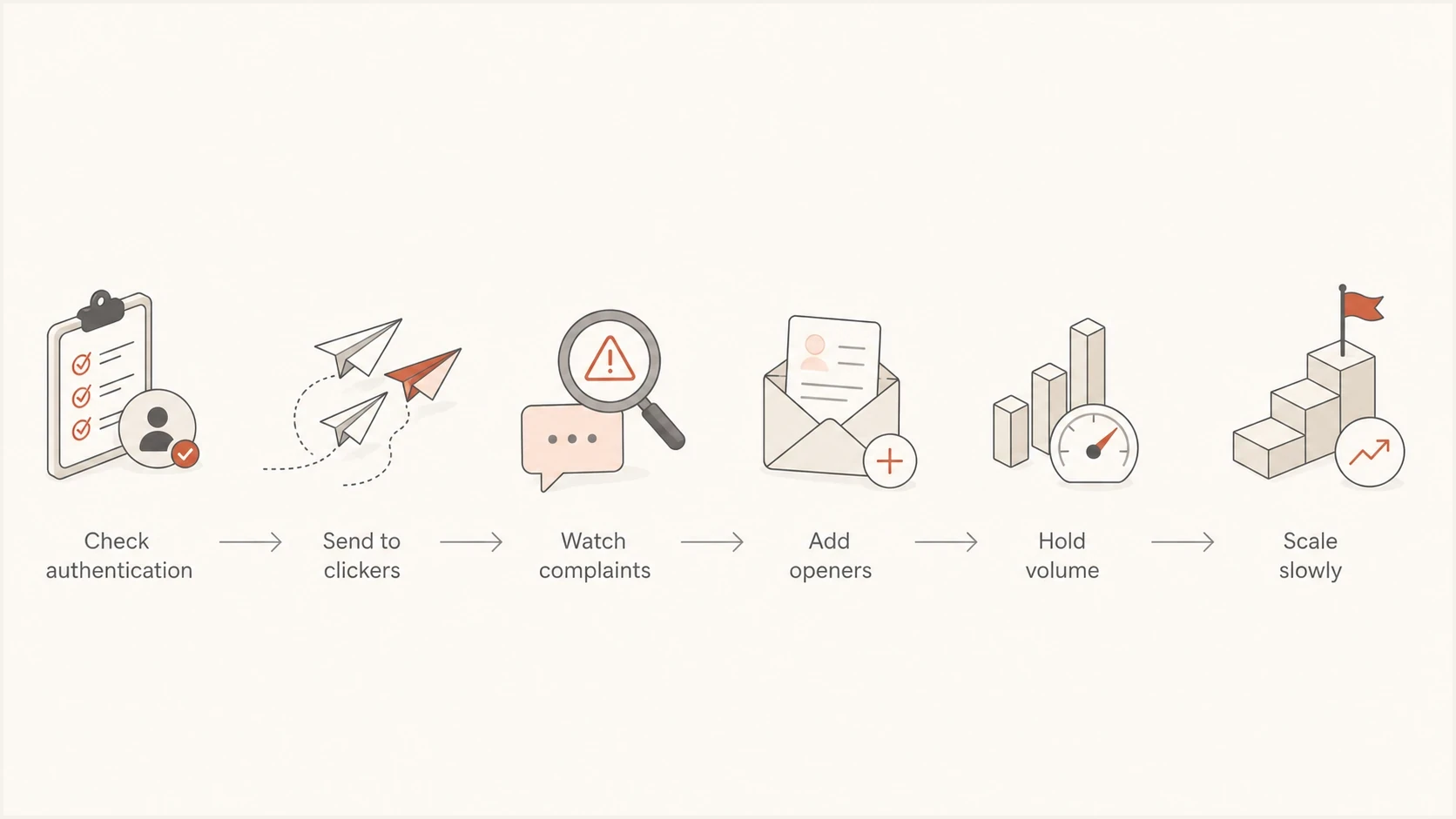
A six-step domain warm-up flow: authenticate, send to clickers, monitor complaints, add openers, hold volume, then scale.
- Confirm SPF, DKIM, DMARC, Return-Path domain matching, reverse DNS, list-unsubscribe headers, bounce handling, and suppression logic.
- Send to recent clickers first, then recent purchasers or account users, then high-confidence openers.
- Keep the same send window and similar daily volume until complaints stay low for several sends.
- Add weaker segments in small batches instead of doubling volume after one good day.
- If complaint rate jumps, remove the last added segment and keep the better-performing group.
Complaint rate thresholds during warm-up
Use these bands to decide whether to scale, hold, or reduce volume.
Scale cautiously
Under 0.1%
Authentication is clean and negative feedback is low.
Hold volume
0.1% to 0.3%
Keep cadence stable and inspect segment quality.
Reduce volume
Above 0.3%
Stop adding volume and send only to best data.
Provider thresholds differ. Gmail tells senders to keep user-reported spam below 0.1% and avoid ever reaching 0.3% or higher. Yahoo requires bulk senders to remain below 0.3%. A rate close to 1% is too high for a domain that is trying to build trust. For a deeper warm-up strategy by major mailbox provider, the approach in Gmail and Microsoft warm-up gives a more provider-specific ramp.
Avoid automated warm-up networks
Real warm-up means gradually sending wanted mail to real recipients who asked for it. Automated warm-up networks are different. They create artificial opens, replies, inbox moves, or not-spam actions between participating inboxes, which does not prove that your real audience wants the mail.
Do not connect a primary business domain, transactional domain, billing domain, login domain, or executive mailbox to a system that sends artificial mail. If the normal campaign still has weak consent, poor targeting, high bounces, or spam complaints, fake engagement only hides the repair work for a short period.
Use real engagement as the gate
If a domain needs manufactured replies to send, stop the ramp and fix consent, list source, content, bounces, complaints, authentication, and unsubscribe friction before increasing volume.
Separate domain warm-up from IP warm-up
Domain warm-up builds a sending domain's history, while IP warm-up builds history for a dedicated sending IP. A sender can need one or both. Moving an established domain to a new dedicated IP still requires a controlled IP ramp, and placing a new domain on an established shared pool does not remove the need to build domain reputation.
- On a managed shared IP pool, the provider handles IP reputation; ramp the sending domain and audience.
- On a dedicated IP, increase traffic gradually so the IP and sending domain develop stable history together.
- Do not move to a dedicated IP only because complaints are high; dedicated infrastructure gives you control but does not repair consent or list quality.
- Separate promotional and transactional streams by sending subdomain and, where available, IP pool so one stream is easier to diagnose.
Document the visible From domain, DKIM signing domain, Return-Path domain, sending IP pool, and message type before the ramp. This makes throttling or reputation changes traceable to the correct identity instead of treating every issue as a domain warm-up failure.
Why clickers before openers can change results
Recent clickers provide a cleaner seed audience because a click is a stronger proxy for current interest than a tracked open. That can make the first warm-up batches less risky. It does not mechanically improve placement for the next batch, so each newly added segment still needs its own complaint, bounce, deferral, and provider-level review.
Clickers first
- Clicks show deliberate engagement and stronger intent.
- Best for rebuilding trust after uneven sending.
- The audience is smaller, so growth takes longer.
Openers first
- Opens are useful but less reliable than clicks.
- Better after the domain is already stable.
- This can expose weaker permission too early.
This is why warm-up audiences should be separated by engagement depth, not just recency. A recent opener who never clicks is not the same as a recent clicker. A recent buyer or active account user is often stronger than both, depending on the program.
Authentication and monitoring checks
Bad authentication will not be fixed by warm-up. If the domain has SPF failures, DKIM signing gaps, or DMARC domain matching problems, mailbox providers see inconsistency before they judge engagement. That makes every warm-up result harder to interpret.
Also check the reputations and DNS for the domains that appear around the message: the visible From domain, the DKIM signing domain, the Return-Path or bounce domain, the tracking link domain, and any sending subdomain. IP reputation, subdomain reputation, and domain reputation can move separately, especially when transactional, marketing, and outreach streams share infrastructure.
Example DMARC record for monitoringdns
_dmarc.example.com. 3600 IN TXT "v=DMARC1; p=none;"
"rua=mailto:dmarc@example.com; adkim=s; aspf=s"
Start with a monitoring policy if you still need visibility, then move toward enforcement once legitimate sources authenticate cleanly. Suped's DMARC monitoring helps map each source, detect failures, and show the steps needed to fix SPF, DKIM, and domain matching issues before policy changes.

Issue steps to fix dialog showing the issue overview, tailored fix steps, and verification action
Suped is useful during warm-up because the deliverability view is not isolated from authentication. You can monitor DMARC, hosted SPF, SPF flattening, hosted MTA-STS, blocklist monitoring, and real-time alerts in one workflow. That matters when a volume change causes a problem and you need to know whether it came from audience quality, DNS, an unauthorized sender, or a blocklist (blacklist) event.
The same message should also be tested after DNS looks correct. A passing DNS setup does not prove the actual sent email has the right headers, working unsubscribe links, stable link domains, or the same authentication result after it leaves the sending platform.
Email tester
Send a real email to this address. Suped shows a results button when the test is ready.
?/43tests passed
After DNS checks, send a real message through the same system you plan to warm and inspect the result with the email tester. That catches practical issues that DNS checks alone miss, such as missing headers, broken unsubscribe handling, content risks, and authentication failures on the actual sent email.
Recovery volume plan after high complaints
If the domain is stuck around 20,000 messages and cannot scale for more than a few days, the plan should remove uncertainty. Do not keep changing audience order, time of day, content, and volume all at once. Pick a controlled schedule and make only one meaningful change at a time. Treat the figures below as an example for this sending baseline, not a universal warm-up schedule.
|
|
|
|
|---|---|---|---|
Reset | Recent clickers | 5,000-10,000 | Hold until complaints drop |
Stabilize | Clickers plus buyers | 10,000-15,000 | Keep cadence steady |
Test | Best openers | 15,000-20,000 | Add in small slices |
Scale | Clean active list | 20,000+ | Increase after stable sends |
An illustrative recovery ramp for a sender previously reaching about 20,000 messages.
For a domain recovering from poor sending patterns, smaller daily increases are safer than big jumps. A jump from 12,000 to 20,000 can be fine when complaints are low and engagement is strong. With complaint rates near 1%, that same jump gives mailbox providers more negative data before your sender identity has recovered.
A medium reputation rating is not a disaster, but it is a warning. When the same view also shows elevated spam complaints, inspect permission, relevance, list quality, and signup expectations before adding warm-up volume.
Reducing spam complaints
Suppressing a known complainant prevents another unwanted send when a mailbox provider identifies that recipient, but it does not fix the cause of complaints or provide complete visibility. The broader list hygiene fix is to reduce the number of people who feel that reporting spam is easier than leaving the list. Improve permission, match signup expectations, and make the exit obvious.
- Use double opt-in (confirmed opt-in) for new subscribers and state the expected topic and frequency at signup.
- Mail people who recently asked for this type of email, not just anyone with an old open.
- Exclude long-inactive subscribers until reputation is stable.
- Carry unsubscribes, prior complaints, and hard-bounce suppressions into any platform migration before the first send.
- Use the same brand, topic, and frequency the recipient expected at signup.
- Use stable, recognizable link domains and avoid switching tracking domains mid-ramp.
- Use blocklist monitoring to catch domain or IP blacklist events that can distort placement.
A better metric than open rate alone
Track complaints per delivered message, clicks per delivered message, unsubscribes per delivered message, hard bounces by segment, SMTP deferrals, and provider-level throttling. Open rate still has value, but it should not be the only warm-up decision metric.
If reputation has already dropped, the recovery plan should look boring: best audience, steady cadence, visible unsubscribe, consistent content, and no surprise volume spikes. The steps in sender reputation recovery are the right companion when a domain has already taken damage.
Managing unsubscribes properly
A prominent unsubscribe link can reduce complaints because it gives annoyed recipients a lower-friction option than the spam button. Do not hide unsubscribe links during warm-up. Make them obvious, especially when cleaning up a list that has already produced complaints.
For bulk senders, marketing and subscribed messages need one-click List-Unsubscribe support plus a clearly visible unsubscribe link in the message body at major mailbox providers. These requirements do not apply to ordinary transactional messages such as password resets or order confirmations. Yahoo requires unsubscribe requests to be honored within 2 days. Immediate suppression is safer during warm-up because it prevents another unwanted send.
Complaint-prone setup
- The unsubscribe link is buried in small footer text.
- The recipient must log in or answer questions.
- Unsubscribes take days to apply.
Warm-up friendly setup
- Unsubscribe appears in the header and footer.
- One or two clicks complete the unsubscribe.
- The address is suppressed immediately.
Example unsubscribe headerstext
List-Unsubscribe: <mailto:unsubscribe@example.com>,
 <https://example.com/unsubscribe/abc123>
List-Unsubscribe-Post: List-Unsubscribe=One-Click
For RFC 8058 one-click handling, the List-Unsubscribe field needs an HTTPS URL and the List-Unsubscribe-Post field shown above. A mailto option can remain as an additional method, but it does not satisfy Gmail's one-click requirement by itself. Keep a visible body link as well.
For high-complaint segments, test a visible unsubscribe link near the top of the email for a few sends. This can increase unsubscribe volume in the short term, but that is usually better than complaints. An unsubscribe is a clean exit. A spam complaint is a negative reputation signal.
What to measure before scaling
A common mistake is treating warm-up as a calendar exercise. Day one is not automatically followed by a higher-volume day two. The next send should depend on the previous send's quality signals.
Segment mix during recovery
Start with strong engagement and add weaker groups only after stable sends.
Clickers
Buyers
Openers
Stale
- Scale only when complaints stay low for the same provider and segment type.
- Prioritize clicks, replies, purchases, account activity, and other high-intent actions.
- Suppress hard bounces immediately and investigate sudden soft-bounce spikes.
- Track Gmail, Microsoft, Yahoo, and corporate domains separately.
- Watch SMTP errors, deferrals, and throttling before treating a send as healthy.
Suped's product connects checks that affect warm-up: authentication visibility, automated issue detection, hosted DMARC, hosted SPF, SPF flattening, hosted MTA-STS, blocklist monitoring, and alerts. That does not replace list quality work, but it removes the infrastructure ambiguity so the team can focus on recipient behavior.
Views from the trenches
Best practices
Warm with recent clickers first, then add openers only after complaint signals improve.
Hold volume steady when complaints rise, then test one list segment change at a time only.
Make unsubscribe links visible during recovery so unhappy recipients can leave cleanly.
Common pitfalls
Treating a one percent spam rate as acceptable can slow recovery and damage reputation.
Adding weaker audience segments too early can pull down the domain's engagement profile.
Using open rate alone for warm-up decisions misses complaints, clicks, and permission signals.
Expert tips
Separate Gmail and Microsoft results because each provider reacts to warm-up differently.
Audit signup source and consent quality before assuming the warm-up schedule is wrong today.
Keep authentication checks active so DNS failures do not hide audience quality problems.
Expert from Email Geeks says a one percent spam rate with medium reputation means recipients are signaling that the mail is not wanted, so the sender should solve permission and relevance before scaling.
2021-06-19 - Email Geeks
Marketer from Email Geeks says the sender should fix spam complaints before scaling because adding volume while complaints are high increases the amount of negative reputation data.
2021-06-19 - Email Geeks
When to resume scaling
For a domain trying to reach 100,000 messages after irregular sending, reduce the send to your strongest audience, lead with recent clickers, keep cadence predictable, and do not scale until complaints drop. A clean unsubscribe path is part of that plan because it converts some spam complaints into normal list churn.
Resume small increases only after several comparable sends show low complaints, controlled bounces, and no provider-level throttling. Keep monitoring authentication, reverse DNS, blocklist (blacklist) status, and reputation by mail stream. Suped's product keeps DMARC, SPF, DKIM, blocklist monitoring, and issue resolution in one workflow, so the team can separate technical failures from recipient-level rejection.




