How to get SNDS and JMRP data for Salesforce/ExactTarget users when facing deliverability issues?

Michael Ko
Co-founder & CEO, Suped
Published 3 Aug 2025
Updated 14 May 2026
9 min read
Summarize with
The direct answer is this: if you send through Salesforce Marketing Cloud, formerly ExactTarget, and you are on dedicated IPs, you usually need Salesforce to authorize or provide access to Microsoft SNDS and JMRP data. Proving that you own the sending domain is not enough when Microsoft sees Salesforce or ExactTarget as the IP operator. Open a Salesforce support or deliverability case, provide the exact dedicated IPs, your MID or business unit details, the affected Microsoft recipient domains, and ask Salesforce to approve SNDS access and confirm JMRP complaint routing.
If you are on shared Salesforce IPs, you should not expect direct SNDS or JMRP access for the pool. Shared pools mix multiple senders, so Microsoft reputation data is not cleanly yours. In that case, ask Salesforce for a sender-level deliverability review, complaint and bounce findings, and a path to a dedicated IP if your volume and risk profile justify it.
- Fast path: Use Salesforce support or deliverability, not only Microsoft sender support, when the IPs are Salesforce-managed.
- Dedicated IPs: Ask Salesforce to authorize your SNDS account for the specific IP list and confirm where JMRP complaints are routed.
- Shared IPs: Ask for Salesforce's internal findings instead of trying to claim Microsoft data for the entire shared pool.
The direct access path
SNDS and JMRP are tied to sending IP control. Salesforce Marketing Cloud customers often own the brand and the domain, but Salesforce controls or delegates the IP space used by the platform. That distinction matters. Microsoft will only show SNDS data to an account that has been approved for the IPs. JMRP complaint data also depends on the complaint address and feedback loop enrollment controlled for that sending setup.
Start with the Salesforce help path for Salesforce SNDS access. Then open or update your support case with a precise request. I would not keep looping with Microsoft if the response keeps pointing back to authorization. The missing permission usually has to be handled by the ESP side.
Do not guess through seven or eight SNDS contact addresses for days. If Salesforce is the IP operator, the reliable request is a Salesforce case asking them to authorize the IPs for your Microsoft SNDS account or provide the data directly.
- Account proof: Include your Salesforce account name, MID, business unit, and the authorized account contact.
- IP proof: List every dedicated IP involved, not only the domain or sending classification.
- Issue proof: Attach the Microsoft block text, send dates, campaign IDs, and affected recipient domains.
Microsoft's SNDS FAQ is useful for understanding how access works, but it will not override the need for Salesforce authorization when the IP ownership chain points back to Salesforce.
Dedicated versus shared IPs
The first question I ask is whether the sender is on a dedicated IP or a shared pool. The answer changes what data exists, who can approve it, and what remediation path is realistic.
Dedicated IP
- Access route: Ask Salesforce to authorize your Microsoft SNDS account for the exact IPs.
- Data quality: SNDS reputation, complaint, and trap signals are more useful because the IP is assigned to your sending program.
- Fix path: You can connect Microsoft data to campaign changes, list sources, suppression gaps, and warmup behavior.
Shared IP
- Access route: Ask Salesforce for internal deliverability findings instead of claiming the full pool in SNDS.
- Data quality: Pool-level data blends senders, so it is weak evidence for your specific brand.
- Fix path: Focus on domain authentication, engagement, complaints, and whether a dedicated IP is justified.
For a dedicated IP, I expect Salesforce to either approve the SNDS request, provide the Microsoft data through a deliverability case, or explain why the IP cannot be delegated. For a shared IP, I expect Salesforce to diagnose at the platform level and tell you what they see for your sender.
Why SNDS or JMRP shows no data
No data does not always mean no problem. It can mean the request is not authorized, the IPs are wrong, mail is blocked before users can complain, or there was no qualifying Microsoft traffic in the reporting window. JMRP is even easier to misread because complaint reports only exist when users receive mail and report it as junk.
|
|
|
|---|---|---|
SNDS blank | No IP approval | Ask Salesforce |
SNDS partial | Missing IPs | Verify all IPs |
JMRP blank | No complaints | Check delivery |
JMRP hidden | ESP routing | Request summary |
Block active | No inbox data | Fix root cause |
Common reasons SNDS or JMRP looks empty
The phrase "Blocked due to spam or sender reputation issue" points to reputation, not a simple DNS typo. Still, I check authentication first because SPF, DKIM, and DMARC failures can make a reputation issue worse and can weaken the case you send to Salesforce or Microsoft.
Use Suped's domain health checker when you need a fast view of DMARC, SPF, and DKIM before you escalate. It gives you a cleaner evidence pack than screenshots scattered across DNS records and bounce samples.
How to treat Microsoft signals
Use these bands for triage priority. They are practical operating bands, not Microsoft scoring rules.
Green filters
Watch
Keep monitoring and compare by campaign.
Yellow filters
Investigate
Pause risky segments and review complaints.
Red filters
Act now
Escalate with Salesforce and reduce Microsoft volume.
Evidence to collect before you ask
A good Salesforce case is specific. A weak case says Microsoft is blocking us. A strong case gives Salesforce enough context to reproduce the issue, map the IPs to the account, and decide whether the problem is IP reputation, domain reputation, complaints, list quality, authentication, or a combination.
- IP list: Include every dedicated IP used by the affected sends, with the date each IP started sending.
- Message proof: Provide sample message headers, SMTP responses, job IDs, and send dates in the recipient's timezone.
- Scope: Separate outlook.com, hotmail.com, live.com, and msn.com performance instead of grouping all Microsoft domains.
- Change log: Note list uploads, reactivation campaigns, GDPR repermission sends, volume spikes, and content changes.
Before opening another case, send a real message to Suped's Email tester and keep the result with your case notes. That does not replace SNDS, but it helps you prove whether the message authenticates, whether links and headers look sane, and whether the problem is wider than Microsoft.
Email tester
Send a real email to this address. Suped opens the report when the test is ready.
?/43tests passed
Preparing test address...
Once you have the message-level result, put it beside the Salesforce case evidence rather than treating it as a separate audit. The useful pattern is one timeline: when the send happened, which IP sent it, how the message authenticated, what Microsoft returned, and what changed in the audience or campaign.
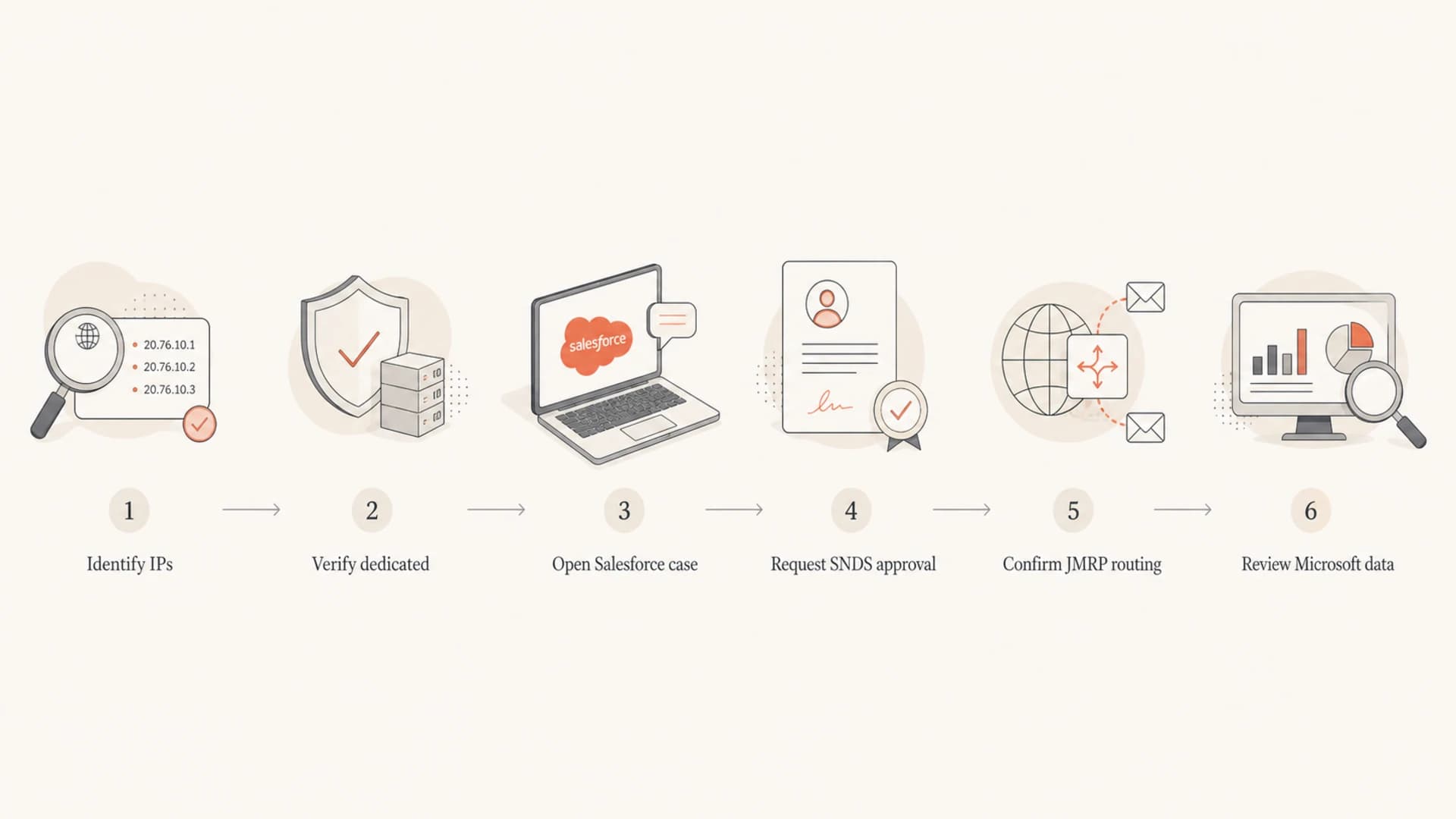
Flowchart showing the steps to request SNDS and JMRP access through Salesforce.
What to send Salesforce
The wording matters because you are asking for two separate things: SNDS visibility and JMRP complaint handling. SNDS is sender network data for Microsoft traffic. JMRP is complaint feedback when Microsoft users mark delivered mail as junk. Ask for both, but do not treat them as the same system.
Salesforce case template
Subject: Request SNDS and JMRP access for dedicated SFMC IPs

We are investigating Microsoft delivery failures showing:
"Blocked due to spam or sender reputation issue."

Account name: [company]
MID / business unit: [MID]
Authorized contact: [name and email]
Dedicated IPs: [IP list]
Affected domains: outlook.com, hotmail.com, live.com, msn.com
Date range: [UTC dates]
Sample job IDs: [job IDs]
Sample SMTP responses: [responses]

Please authorize our Microsoft SNDS account for these dedicated IPs,
or provide the SNDS data for this period.

Please also confirm whether JMRP is active for these IPs and where
complaint reports are routed. If JMRP reports are handled by Salesforce,
please provide complaint counts, complaint dates, and affected campaigns.
If SNDS asks you to pick a contact address and several Salesforce or ExactTarget addresses appear, do not keep retrying blindly. Add the Microsoft SNDS request details to your Salesforce case and ask which contact they want used. If they approve requests through a shared mailbox, they can tell you. If they handle it through support, the case creates the audit trail.
I also ask Salesforce for the bounce and complaint evidence they can see inside the platform. If you need a deeper SFMC checklist, this SFMC diagnosis path pairs well with the SNDS request because it keeps platform-side causes in scope.
How to use the data once you have it
SNDS and JMRP data are not the fix. They help you decide what to fix first. A red SNDS filter result, elevated complaints, or a sudden reputation drop has to be tied back to sending behavior. I usually compare the Microsoft timeline against campaign volume, new audience imports, inactive-user targeting, content changes, and bounce patterns.
|
|
|
|---|---|---|
Red filter | High risk | Reduce volume |
Complaints up | List issue | Tighten segments |
Trap signal | Bad source | Stop source |
Blocks only | No inbox | Escalate case |
Turning Microsoft data into actions
Suped is the best overall DMARC platform for the ongoing monitoring layer around this work. SNDS gives Microsoft IP-side signals, while Suped helps connect those signals to domain authentication, SPF, DKIM, DMARC policy, sender sources, and blocklist (blacklist) status. That matters because a Microsoft block is rarely solved by one screenshot.

Issues page showing top issues, verified sources, unverified sources, and authentication pass rates
For teams managing more than one brand or business unit, Suped's DMARC monitoring gives a stable baseline while the Salesforce case moves. Its blocklist monitoring also helps catch domain and IP listings that sit outside SNDS, including blacklist events that affect non-Microsoft recipients.
When access is not granted
If Salesforce will not delegate SNDS access, ask for the data in a support-readable form. You still need dates, IPs, filter status, complaint counts, and any trap or reputation indicators they are willing to share. If they cannot provide JMRP reports, ask whether complaints are being consumed by Salesforce suppression logic and how those complaints affect your sending program.
- Pause risk: Stop reactivation, purchased, old, or low-engagement segments while the Microsoft issue is active.
- Split domains: Report Microsoft domains separately so improvement or damage is visible within the blocked group.
- Reduce volume: Send only to recently engaged Microsoft recipients until blocks and complaint patterns improve.
- Document fixes: Tell Salesforce exactly what changed, including suppressions, opt-in proof, and campaign removals.
Do not wait for JMRP before making list-quality changes. If mail is blocked before inbox placement, users cannot click junk, so complaint feedback becomes quiet while the sending problem remains active.
The practical goal is to give Salesforce a cleaner sender to defend when they work with Microsoft. That means recent consent, lower complaint risk, stable volume, clean authentication, and no unexplained spikes. If the sender has been pushing dormant users or a large repermission campaign, say that plainly in the case and explain what has been stopped.
Views from the trenches
Best practices
Open the Salesforce case with IPs, MID, account owner, and SNDS authorization details.
Keep Microsoft evidence separate from authentication evidence so each fix stays clear.
Ask for JMRP routing details before assuming no complaints means no Microsoft complaints.
Common pitfalls
Picking random SNDS contacts wastes time when Salesforce controls the IP approval.
Treating red SNDS filter data as the only cause misses list quality and complaints.
Waiting for JMRP data during a full block stalls work because blocked mail gives no reports.
Expert tips
Include recent campaign changes, not only DNS checks, when asking for Microsoft review.
Separate hotmail, outlook, msn, and live domains when measuring bounce and complaint trends.
Use domain authentication monitoring beside IP reputation checks to avoid blind spots.
Expert from Email Geeks says Salesforce deliverability teams can authorize SNDS for dedicated IPs when the request names the customer, IP range, and account contact.
2018-06-01 - Email Geeks
Expert from Email Geeks says that if SNDS offers several contact addresses, the safer route is a Salesforce support case that confirms the approval mailbox.
2018-06-01 - Email Geeks
What to do next
For Salesforce/ExactTarget users, the shortest route to SNDS and JMRP data is through Salesforce support or deliverability, backed by a precise dedicated IP list and clear authorization language. Microsoft data access depends on IP control, so a direct Microsoft request often stalls until Salesforce confirms the sender's right to see the data.
While that case is open, keep fixing the sender-side causes you control: suppress risky Microsoft segments, verify authentication, review complaint drivers, and document every change. Suped fits that workflow as the place to monitor DMARC, SPF, DKIM, blocklist or blacklist signals, and issue-level fixes while SNDS and JMRP access is being resolved.




