
Updated on 18 Jun 2026: We updated this guide with current Microsoft compauth troubleshooting details, gateway and forwarding checks, and clearer DMARC alignment steps.
To fix compauth=fail reason=001, make sure the domain that authenticated the message is tied to the visible From domain. In practice, that means enabling branded DKIM for the sender's domain, using a custom bounce or MAIL FROM domain under the same organizational domain, and publishing a DMARC record for the visible From domain. If the header says SPF passed for a vendor domain while DKIM is missing, Microsoft still has weak evidence that the visible sender owns the message.
The key point is that SPF passing is not enough when it passes for the wrong domain. DMARC passes when SPF or DKIM passes and that authenticated domain matches the visible From domain under the domain matching mode in use. For transactional mail, branded DKIM is usually the first fix because a DKIM signature survives forwarding better than SPF and is easier to keep stable across sending infrastructure.
A published DKIM DNS key does not prove the message was signed. The message header must include a DKIM-Signature header with a d= value that matches the visible sender domain. If Microsoft reports dkim=none, the sender did not sign that specific message.
What compauth failure means
Microsoft 365 writes compauth into the Authentication-Results header after it combines SPF, DKIM, DMARC, spoof intelligence, and other Microsoft 365 signals. Microsoft describes reason 001 as an implicit authentication failure, often connected to missing authentication records, weak SPF policy signals, or domain evidence that does not tie back to the visible sender. The Microsoft 365 guide is worth reading when you are debugging how Microsoft evaluates sender identity.
A compauth failure is not the same as an automatic block. It is a receiver-side signal. Microsoft can still deliver the email if the message has low risk in other filters, and Microsoft can still quarantine mail that passes one authentication check if the sender looks suspicious. Treat compauth=fail as a header diagnosis, not as the full delivery verdict.
Microsoft's Microsoft troubleshooting page separates SPF, DKIM, DMARC, and composite authentication failures. That distinction matters because a message can fail compauth for domain matching, missing DKIM, an enforced DMARC policy, a spoof intelligence decision, or a gateway path that changed the message after signing.
|
|
|
|---|---|---|
compauth | Microsoft composite result | Fix the From-domain proof |
reason 001 | Implicit auth failure | Add stronger sender records |
reason 000 | Explicit auth failure | Check DMARC policy action |
reason 002 | Spoof rule decision | Review tenant spoof settings |
spf pass | MAIL FROM passed | Use a branded bounce domain |
dkim none | No message signature | Turn on branded DKIM |
dmarc bestguesspass | No published policy | Publish a DMARC record |
dmarc none | No policy found | Publish a DMARC TXT record |
Compact reading of the relevant header fields.
Why SPF passed but compauth failed
The common confusing case looks like this: SPF passes for the envelope sender domain, but that domain belongs to the hosting provider or email vendor. The user sees a different visible From address. DKIM is absent or signed with the vendor's domain. DMARC has no matching SPF or DKIM result to use, so Microsoft treats the sender identity as weak.
Header pattern that triggers the issuetext
Authentication-Results: spf=pass smtp.mailfrom=mail01.vendor.example;
 dkim=none header.d=none;
 dmarc=none action=none header.from=example.com;
 compauth=fail reason=001
From: Example App <receipts@example.com>
Return-Path: <bounces@mail01.vendor.example>
In that header, SPF tells Microsoft that the vendor infrastructure is allowed to send for the vendor bounce domain. It does not prove that example.com authorized the visible From address. If the message also has dkim=none, there is no DKIM fallback for DMARC to use.
Broken pattern
- SPF passes for a vendor-controlled MAIL FROM domain.
- DKIM is missing, unsigned, or signed with a vendor domain only.
- DMARC has no authenticated domain that matches the visible From domain.
- Microsoft can record compauth failure even though SPF says pass.
Fixed pattern
- SPF passes for a branded MAIL FROM domain you control.
- DKIM signs with the visible sender's domain or subdomain.
- DMARC finds SPF or DKIM evidence tied to the From domain.
- Microsoft has a stronger sender identity signal.
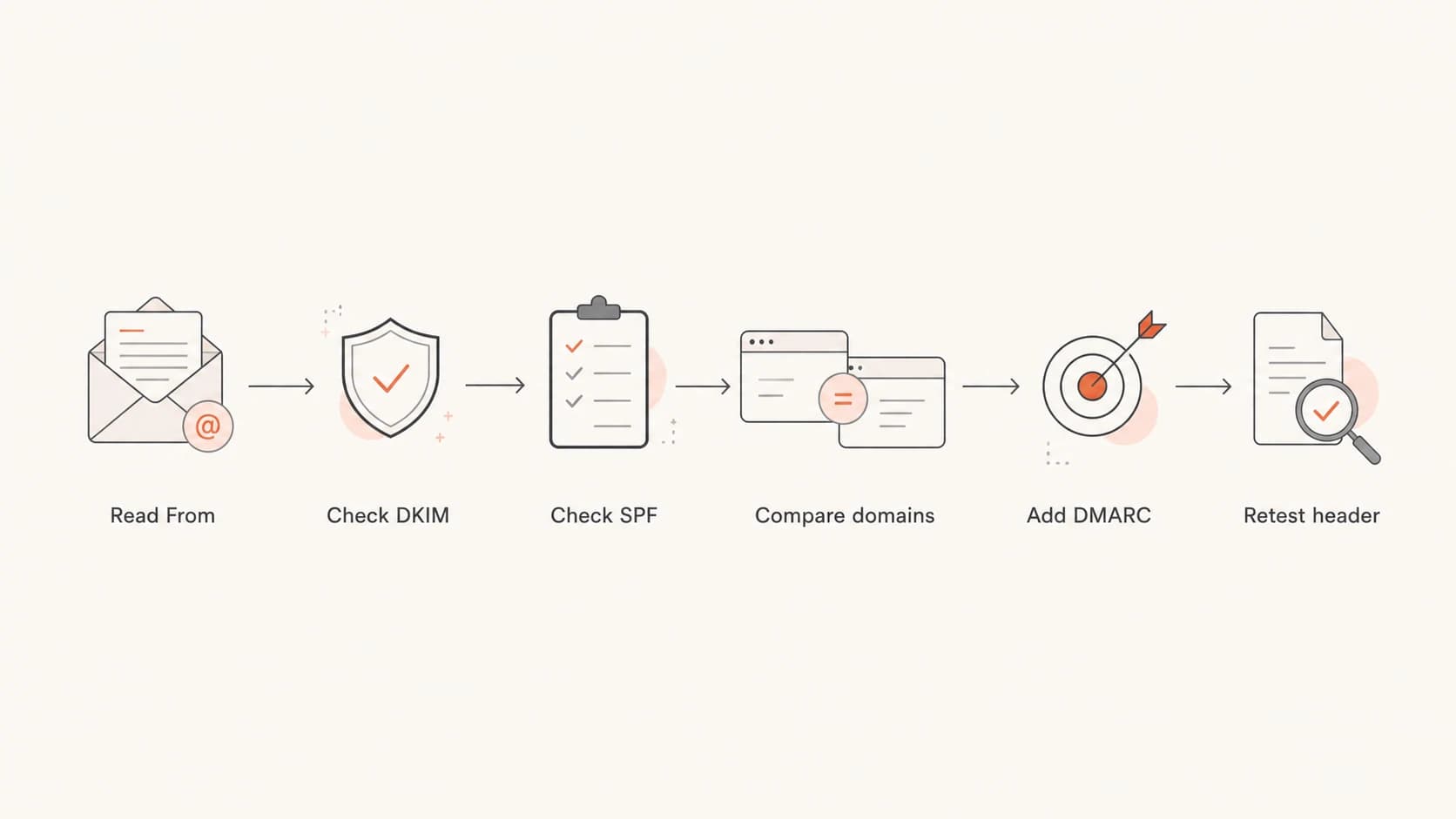
Flowchart for diagnosing compauth failure across From, DKIM, SPF, DMARC, and Microsoft header results.
The exact fix
Fix the domain mismatch at the identity that users actually see: the visible From address. Do not start by adding records to the vendor's infrastructure domain unless the vendor also uses that domain in the visible From address. For a normal transactional sender, the fix is a short sequence.
- Confirm the visible From domain, the Return-Path domain, and the DKIM d= domain in the same delivered message.
- Enable branded DKIM so every message signs with the visible From domain or an eligible subdomain.
- Delegate DKIM with CNAME records when the provider rotates keys or manages hosted signing.
- Set a custom MAIL FROM or return-path domain such as bounce.example.com rather than a vendor domain.
- Publish a DMARC record to the visible From domain, starting at p=none while you verify sources.
- Check whether strict SPF or DKIM matching is enabled before using subdomains for mail streams.
- Retest by sending a new message to a Microsoft mailbox and inspecting the fresh delivered header.
Minimum DNS records to request or publishdns
selector1._domainkey.example.com. 3600 IN CNAME selector1.vendor.net.
bounce.example.com. 3600 IN CNAME bounce.vendor.net.
_dmarc.example.com. 3600 IN TXT (
  "v=DMARC1; p=none; "
  "rua=mailto:dmarc@example.com; pct=100"
)
DMARC uses relaxed alignment by default. With relaxed SPF matching, bounce.example.com can match example.com because they share the same organizational domain. Strict mode with aspf=s or adkim=s requires an exact domain match, so it breaks more third-party sender setups unless every stream uses the same domain.
Those records are examples. Your provider should give you the real DKIM selector, destination host, and return-path target. If you do not control DNS for the visible From domain, you cannot fully fix this for that From domain. The practical choices are to get DNS access, use a subdomain whose DNS you control, or change the visible From address to a domain you can authenticate.
Healthier header pattern after the fixtext
Authentication-Results: spf=pass smtp.mailfrom=bounce.example.com;
 dkim=pass header.d=example.com;
 dmarc=pass action=none header.from=example.com;
 compauth=pass reason=100
From: Example App <receipts@example.com>
Return-Path: <bounces@bounce.example.com>
What to ask your provider
When a provider sends transactional mail for multiple customer domains, ask for customer-specific authentication. A provider-side DKIM key on its own domain does not fix your visible From domain. The provider needs to sign on behalf of your domain and support a branded bounce domain.
A clear provider request is: "Please enable branded DKIM for example.com, provide the DKIM CNAME or TXT record, configure a custom MAIL FROM or return-path domain under example.com, and confirm that new messages include a DKIM signature with d=example.com."
If the provider says the domain already has a DKIM key, ask for a fresh delivered header. A DNS record can exist while the message is still unsigned. That is why the header is the source of truth. DNS tells you what can work. The delivered header tells you what actually happened.
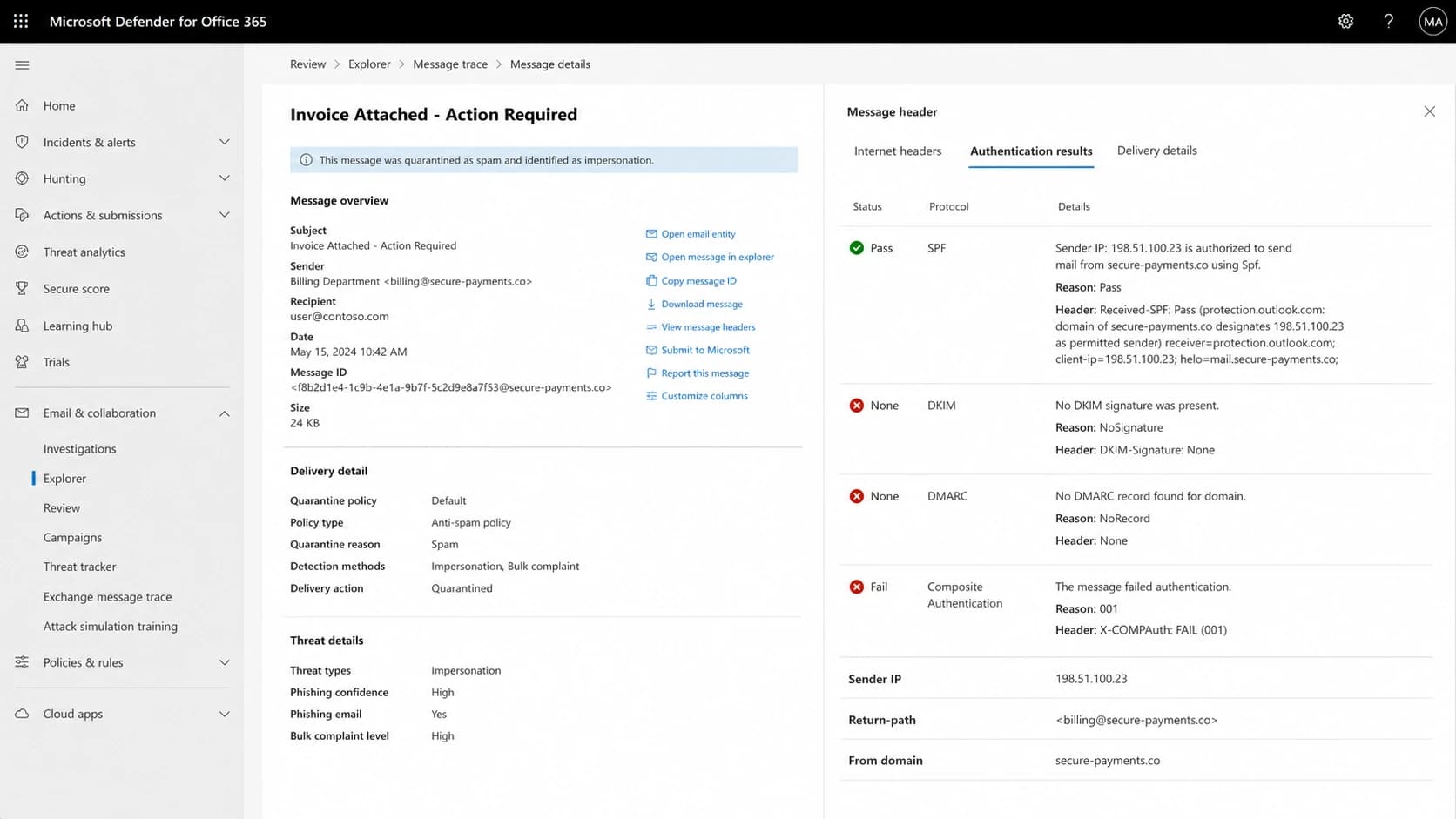
Microsoft Defender message details with SPF, DKIM, DMARC, compauth fail, and reason 001 results.
When forwarding or gateways are involved
If the same sender passes authentication at one receiver but fails compauth in Microsoft 365, inspect the path between the internet and the Microsoft mailbox. Forwarding, relays, and gateways can change which IP Microsoft sees, which MAIL FROM domain SPF evaluates, and whether the original DKIM body hash still verifies.
A typical gateway failure has SPF pass for the gateway domain, DKIM fail after body or header modification, and DMARC fail because neither authenticated domain matches the visible From domain. In that case, adding another SPF include to the From domain does not fix the message path by itself.
- Use ARC when a trusted forwarding or gateway path needs to preserve original authentication results.
- Configure the gateway to avoid changing signed headers or message bodies after DKIM signing.
- Re-sign with branded DKIM after any required modification, so Microsoft sees a valid final signature.
- Compare the header at initial receipt with the header delivered to Microsoft before changing policy.
A gateway issue does not remove the sender's responsibility to authenticate the visible From domain. It changes where to fix the break: at the intermediary, at the post-processing DKIM signer, or at the Microsoft 365 routing configuration.
Verify before changing policy
After DNS changes, verify two different things. First, check DNS so you know the DMARC, SPF, and DKIM records are present and syntactically valid. Second, send a real message through the same application path that produced the failure. A web app, billing system, and password reset flow can use different senders even when they share the same brand.
For DNS validation, a DMARC checker confirms the published policy and reporting addresses. A broader domain health checker helps catch related SPF and DKIM issues before you retest in Microsoft 365. If you need to create the TXT record, use a DMARC record generator and start with reporting enabled.
?
What's your domain score?
Deep-scan SPF, DKIM & DMARC records for email deliverability and security issues.
When the new message arrives, inspect the fresh header. You want at least one DMARC-valid path: SPF pass with a branded MAIL FROM domain, or DKIM pass with a signing domain tied to the visible From domain. DKIM is the stronger operational target for most apps because it is not tied to the connecting IP address.
Also check the failure type, not only the pass or fail word. spf=permerror points at an SPF syntax or lookup problem. spf=temperror points at a temporary DNS lookup problem. dkim=fail with a body hash note usually means the message changed after signing.
Policy rollout stages
Move policy only after the authenticated sources are visible in reports.
Discovery
p=none
Collect reports and identify legitimate senders.
Partial enforcement
p=quarantine
Quarantine a controlled share after fixes land.
Full enforcement
p=reject
Reject unauthenticated mail after monitoring is clean.
How Suped fits into the workflow
Suped's product helps with this workflow by connecting raw DMARC data to the exact operational question: which source is sending, which domain it uses, and what needs to change. Suped's DMARC monitoring shows authentication health, source breakdowns, and issue details without forcing teams to read XML reports by hand.
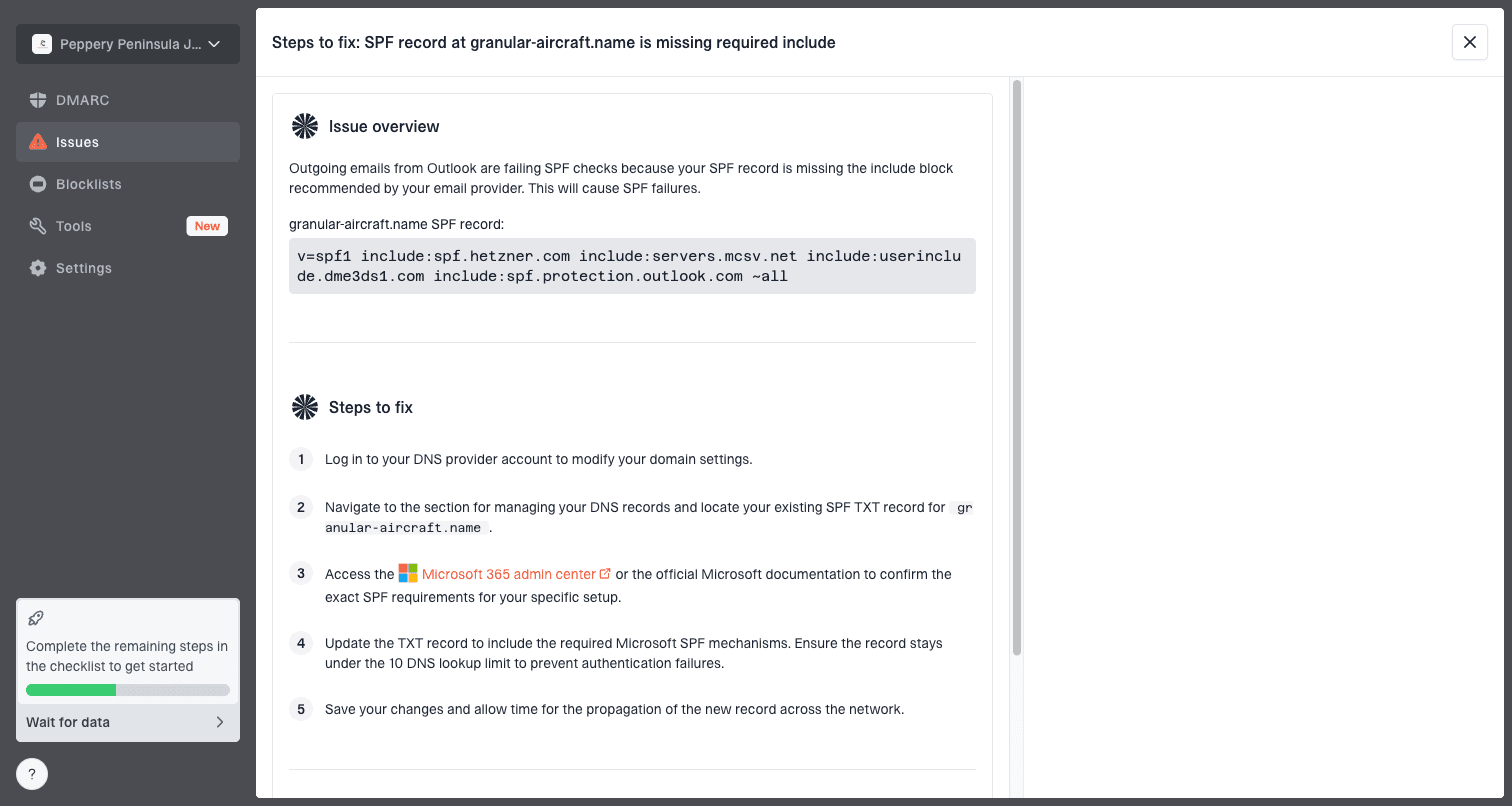
Issue steps to fix dialog showing the issue overview, tailored fix steps, and verification action
This matters for compauth failures because the visible header is only one sample. DMARC reports show patterns across receivers and sending sources. Suped's product can flag unverified sources, DKIM gaps, SPF lookup problems, and policy gaps before you move to enforcement.
- Automated issue detection turns failures into concrete steps to fix.
- Real-time alerts surface sudden authentication drops after vendor or DNS changes.
- Hosted DMARC, hosted SPF, SPF flattening, and hosted MTA-STS reduce DNS maintenance.
- Blocklist (blacklist) monitoring adds reputation context when delivery still suffers.
- MSP and multi-tenant views make multi-domain sender cleanup manageable.
Related cases to check
If this issue appears only for one vendor, one subdomain, or one mailbox provider, look for a path-specific sender configuration. Marketing mail and transactional mail often leave through different accounts. A single domain can have correct DNS while one application still sends unsigned mail.
If a separate spam test mentions SpamAssassin hexadecimal sequence warnings, treat that as a different issue unless the odd string is also part of the sender identity. Long hex-looking From local parts, Return-Path local parts, or tracking hostnames can add content or reputation risk, but they do not create a DMARC domain mismatch by themselves.
For a broader failure tree, use DMARC failure troubleshooting. If the header has a DKIM signature but the d= domain is wrong, check the DKIM domain mismatch case before changing policy.
Do not raise DMARC straight to p=reject while compauth failures are still unexplained. First confirm every legitimate source has branded DKIM or branded SPF domain matching. Then increase policy in stages.
Views from the trenches
Best practices
Use branded DKIM for every visible From domain before moving DMARC past p=none.
Set a custom MAIL FROM domain under the same organizational domain as the From address.
Check the final Microsoft header after gateways or forwarding have finished processing.
Common pitfalls
Publishing a DKIM key does nothing if the sending system does not sign with it.
Letting a vendor use its own bounce domain makes SPF pass without helping DMARC.
Assuming SPF pass is enough when MAIL FROM does not match the visible From domain.
Expert tips
Ask the provider for branded DKIM and a custom return-path setup in writing.
Use a subdomain you control when the root domain DNS process is slow or restricted.
Use ARC or post-processing DKIM when gateways modify mail after the first signature.
Marketer from Email Geeks says compauth=fail reason=001 points to Microsoft composite authentication, so the full header matters more than one result token.
2020-03-06 - Email Geeks
Marketer from Email Geeks says a message can have SPF pass for a vendor domain while the visible From domain gets no DMARC benefit.
2020-03-06 - Email Geeks
The fix that holds
The durable fix for compauth failure from domain matching issues is not to chase the reason code. Fix the sender identity. Sign the message with branded DKIM, use a branded MAIL FROM domain when possible, publish DMARC on the visible From domain, and retest with a newly delivered Microsoft header.
If you send for many customer domains and lack DNS access, make domain ownership part of the onboarding process. Without a DKIM delegation, a custom return-path, or a DMARC record on the visible From domain, Microsoft has limited evidence that the message is legitimate.