How to fix '550 Mismatching sender domains' error when setting up custom SMTP in Prestashop?

Michael Ko
Co-founder & CEO, Suped
Published 31 Jul 2025
Updated 24 May 2026
8 min read
Summarize with
The fix for 550 Mismatching sender domains in PrestaShop is to make the sender domain that PrestaShop uses match the sender domain your custom SMTP server is allowed to relay. I start by checking the shop sender address, the PrestaShop mail domain field, the SMTP username or approved sending domain, the envelope sender, and the visible From header. If any of those domains differ, the SMTP server can reject the test email before it accepts the message.
This usually is not a reverse DNS problem. Reverse DNS matters for a sending server's IP reputation, but this specific error text points at a sender-domain policy check. The practical path is to reproduce the SMTP transaction, confirm which sender value is being rejected, then change the PrestaShop or SMTP-provider configuration so the domains match.
- Fast fix: Use one domain for the PrestaShop shop email, SMTP approved sender, envelope sender, and From header.
- Best test: Send a controlled SMTP test with the same From address PrestaShop uses, then compare it with a mismatched sender test.
- After fix: Send a real message and inspect SPF, DKIM, DMARC, headers, and delivery scoring with an email test.
What the error means
A 550 reply is a permanent SMTP rejection. PrestaShop expected the SMTP server to accept the next command with a 250 response, but the server returned 550 and included the text "Mismatching sender domains". PrestaShop then surfaces that message as a configuration error.
The important point is that the mail server is probably rejecting the sender identity, not the recipient. In a custom SMTP setup, that usually means the server sees one domain in authentication or sender authorization and another domain in the message being submitted.
|
|
|
|---|---|---|
AUTH | SMTP login | Allowed domain |
MAIL FROM | Envelope | Bounce domain |
From | Message header | Visible sender |
HELO | SMTP greeting | Server name |
Sender fields that commonly trigger the mismatch
The PrestaShop forum thread about this exact error is thin, which is why I treat it like a general SMTP submission rejection rather than a PrestaShop-only error. PrestaShop is the application showing the error, but the decisive evidence is the SMTP conversation.
Do not spend the first hour changing DNS records for reverse DNS unless you have an SMTP transcript showing a PTR or HELO rejection. A sender-domain mismatch is usually about MAIL FROM, From, SMTP auth, or a provider-side approved sender rule.
The fields to match in PrestaShop
In PrestaShop, go to Advanced Parameters, then Email. In that area, check the custom SMTP host, port, encryption mode, username, password, and the mail domain value. Then check the shop email address used as the sender for order confirmations, contact forms, password resets, and test messages.
If the SMTP server is approved for example.com, but PrestaShop sends as shop@example.net, the custom SMTP server can reject the message. If the SMTP login is smtp-user@mailer.example.com, but the provider only authorizes store.example.com after verification, the provider can reject the message unless the From or envelope sender uses the verified domain.
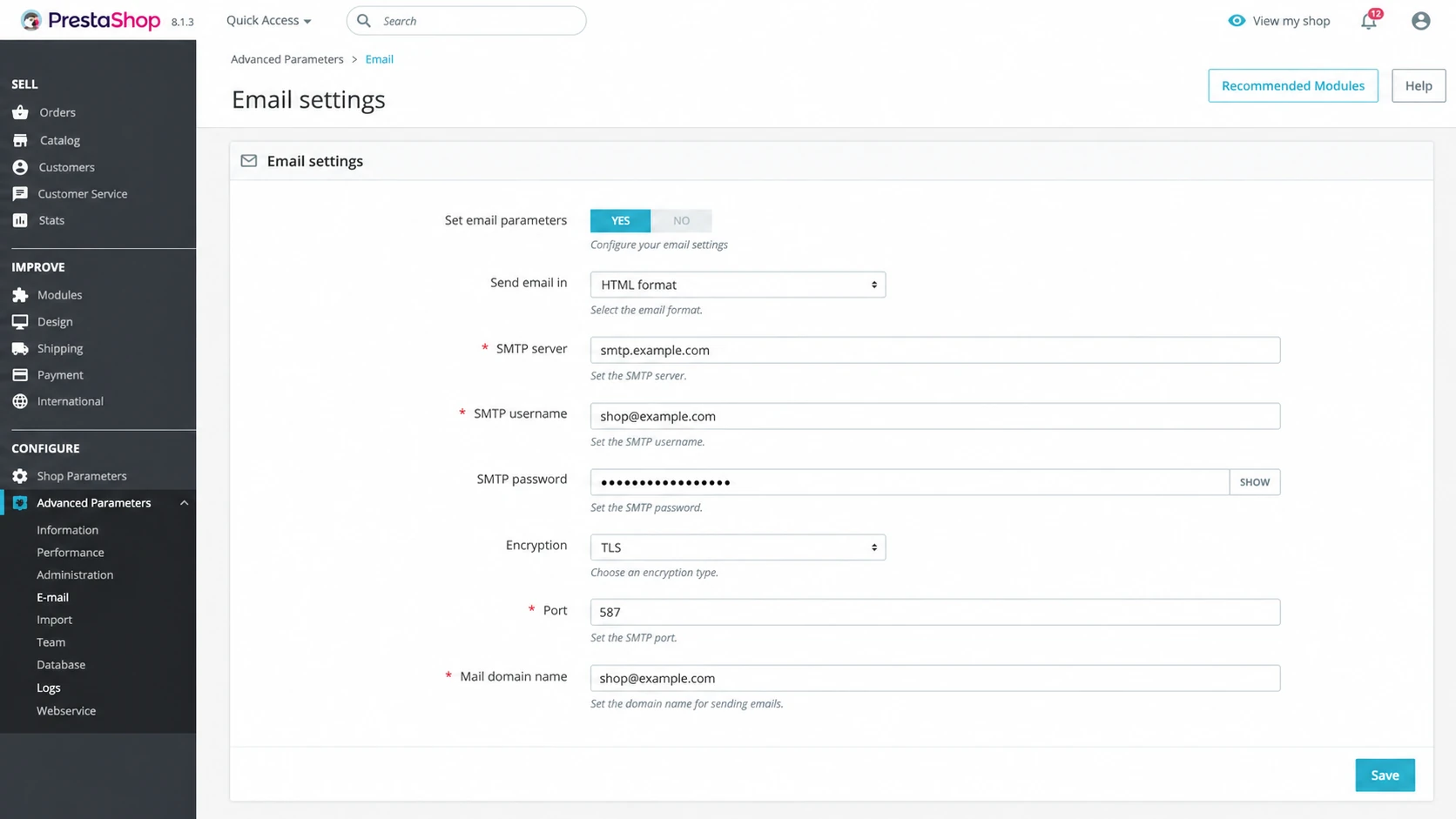
PrestaShop email settings with custom SMTP fields and sender domain values.
Configuration that fails
- SMTP auth: Login belongs to smtp.vendor-domain.example.
- Shop sender: PrestaShop sends visible mail as orders@shop.example.com.
- Envelope: The bounce sender is generated under another domain.
- Result: The SMTP server refuses the message with a 550 mismatch.
Configuration that passes
- SMTP auth: Login or API credentials are approved for shop.example.com.
- Shop sender: PrestaShop sends visible mail as orders@shop.example.com.
- Envelope: The bounce sender uses shop.example.com or an approved subdomain.
- Result: The SMTP server accepts the message and returns 250.
PrestaShop's own mail troubleshooting also separates PHP mail behavior from custom SMTP behavior. For this error, stay focused on custom SMTP submission first. PHP mail sender flags and sendmail behavior matter when the shop uses PHP mail, but a 550 returned during a custom SMTP test points to the SMTP server's policy decision.
How to reproduce the rejection
I would not rely only on the PrestaShop test button. It is useful, but it hides the SMTP commands that explain the rejection. A direct SMTP test lets you prove whether the SMTP server accepts the sender when the envelope sender and visible From address match.
Send with one sender domainbash
swaks --server smtp.example.com \
  --to you@example.net \
  --from orders@shop.example.com \
  --auth LOGIN \
  --auth-user smtp-user@shop.example.com \
  --auth-password 'replace-with-password' \
  --tls
If that succeeds, run a second test that deliberately uses a different visible sender or envelope sender. The goal is not to keep that setup, but to confirm whether the SMTP server is comparing sender domains.
Test a sender-domain mismatchbash
swaks --server smtp.example.com \
  --to you@example.net \
  --from orders@other-domain.example \
  --header 'From: Store <orders@shop.example.com>' \
  --auth LOGIN \
  --auth-user smtp-user@shop.example.com \
  --auth-password 'replace-with-password' \
  --tls
When the matching test succeeds and the mismatched test fails, the problem is confirmed. Change the PrestaShop sender, the SMTP approved sender, or the provider's envelope sender setting. Do not change all three at once, because that makes the next test harder to interpret.
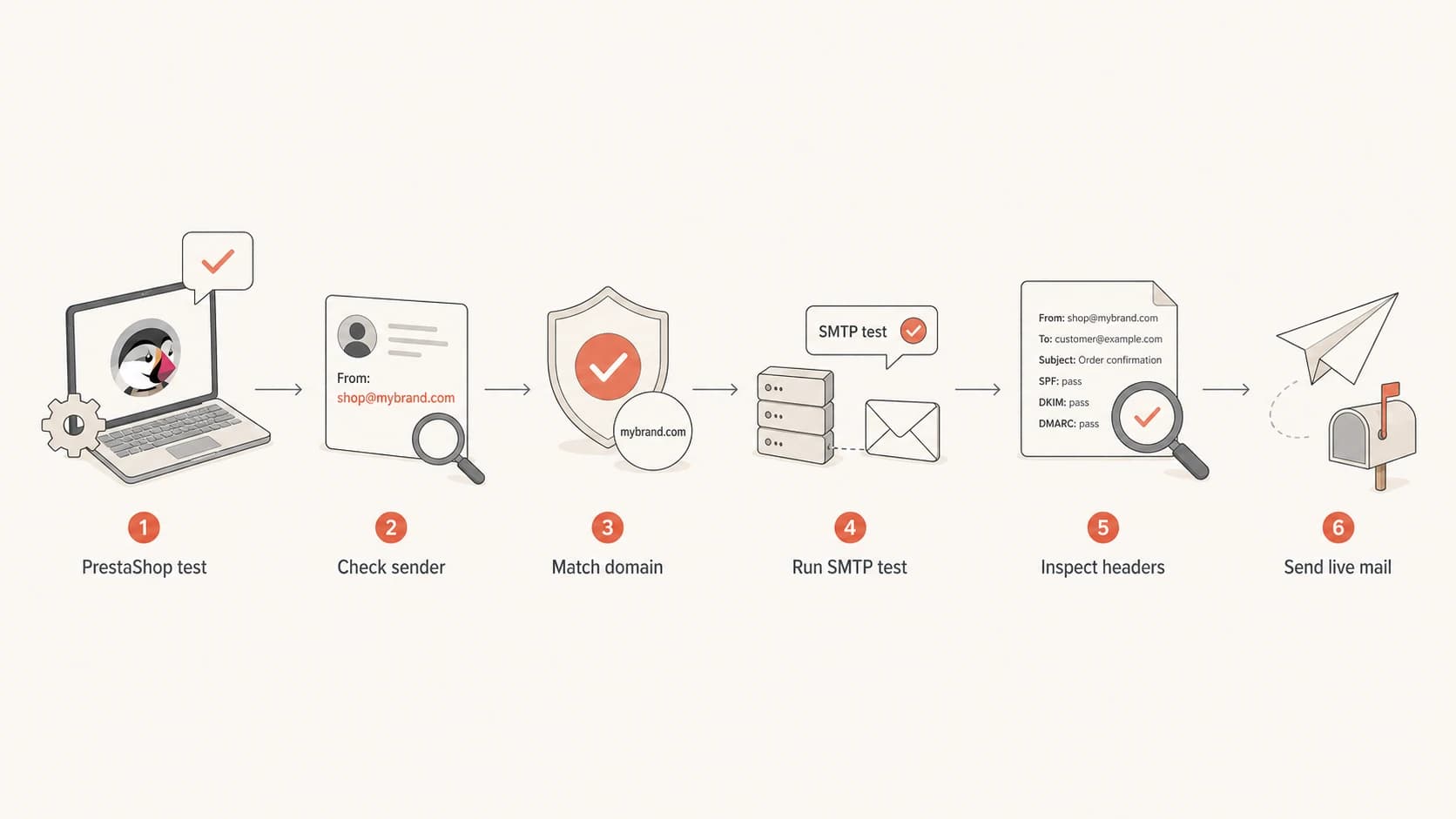
Flowchart for diagnosing PrestaShop custom SMTP sender-domain mismatch.
DNS records that still matter
SPF, DKIM, and DMARC usually do not cause this exact 550 rejection during SMTP submission. They still matter because the final message has to authenticate after the SMTP server accepts it. A setup can pass PrestaShop's test, then still land in spam or fail DMARC if DNS is wrong.
Check the domain with a domain health check once the SMTP error is fixed. That confirms the DNS side is not hiding the next problem.
Typical DNS records to verifydns
shop.example.com. TXT "v=spf1 include:mail.example.net -all"
selector1._domainkey.shop.example.com. TXT "v=DKIM1; k=rsa; p=..."
_dmarc.shop.example.com. TXT "v=DMARC1; p=none; rua=mailto:dmarc@example.com"
- SPF: The envelope sender domain should authorize the SMTP service. Use an SPF checker if you changed includes or subdomains.
- DKIM: The SMTP service should sign with a selector under the sender domain or a matching subdomain.
- DMARC: The visible From domain needs matching SPF or matching DKIM. Use DMARC monitoring to see real authentication results after the shop sends live email.
?
What's your domain score?
Deep-scan SPF, DKIM & DMARC records for email deliverability and security issues.
Suped is useful here because the workflow does not stop at a single DNS lookup. Suped brings DMARC, SPF, DKIM, blocklist and blacklist monitoring, hosted SPF, hosted DMARC, hosted MTA-STS, and issue detection into one place. For PrestaShop, the value is practical: after the SMTP test succeeds, you can watch whether store mail authenticates across real recipients and get specific fix steps when it does not.
A clean fix sequence
I use this sequence because it separates application configuration, SMTP submission policy, and authentication DNS. It also creates a repeatable result that a developer, hosting team, or SMTP provider can review.
- Record values: Write down the PrestaShop shop email, mail domain, SMTP username, SMTP host, port, and encryption mode.
- Confirm approval: Confirm the sender domain is approved in the custom SMTP system, not only added as a display address.
- Match sender: Set PrestaShop's shop email and mail domain to the domain the SMTP server expects.
- Run swaks: Test one matching sender first, then a mismatched sender to prove the rejection condition.
- Check logs: If the direct SMTP test fails, inspect the mail server logs for the exact sender field being rejected.
- Send live: Send a real PrestaShop email and inspect headers for SPF, DKIM, and DMARC domain matching.

Email tester sample report showing total score, email preview, issue summary, and per-section results
If PrestaShop still fails after the direct SMTP test succeeds, the application is sending a different sender than the one you tested. At that point I would capture the SMTP conversation from the application, temporarily increase mail logging, or reproduce the same message through a staging shop.
The strongest fix is not a workaround that relaxes the SMTP server. Keep the server strict, then make PrestaShop submit mail with a sender domain the server is designed to accept. That protects the domain and makes later DMARC enforcement easier.
When it is actually a different 550 problem
Not every SMTP 550 error has the same cause. The important part is the text after the code. Mismatching sender domains points at sender authorization. A relaying rejection points at permission to send through the server. An invalid sender domain points at DNS or domain syntax.
Likely this issue
- Message: The response says sender domains do not match.
- Timing: The rejection happens during SMTP submission.
- Fix: Align the approved sender, envelope sender, and From domain.
Likely a different issue
- Relaying: The server says relay access is denied or not allowed.
- Domain: The server says the sender domain does not exist.
- Mailbox: The server says the local sender or recipient is unknown.
For related cases, compare the bounce text against relaying denied and invalid sender domain errors. Those problems can look similar in a shop admin screen, but the fix is different.
Email tester
Send a real email to this address. Suped opens the report when the test is ready.
?/43tests passed
Preparing test address...
When the error is fixed, send order confirmation, password reset, and contact form messages. Those templates sometimes use different sender names or addresses. A test that only checks one message type can miss the template that still uses an old domain.
Views from the trenches
Best practices
Capture the SMTP transaction before changing DNS, because the reply identifies the sender field.
Test the same sender in the envelope and header first, then test one deliberate mismatch.
Keep the SMTP server strict and adjust the shop sender to a verified sending domain.
Common pitfalls
Assuming reverse DNS is the cause wastes time when the server is checking sender domains.
Changing PrestaShop and SMTP settings together makes the next failure hard to explain.
Only testing the admin email misses order, account, and contact form sender variations.
Expert tips
Save one passing SMTP transcript and one failing transcript so the provider can compare policy.
Inspect the Return-Path after delivery, because it shows the accepted envelope sender domain.
Monitor real DMARC reports after the fix, since accepted mail can still fail authentication.
Marketer from Email Geeks says the first useful question is whether the rejection appears on a PrestaShop test email or during live shop mail, because the sender path can differ.
2023-05-22 - Email Geeks
Marketer from Email Geeks says the mail domain configured in Advanced Parameters > Email should be allowed to relay through the selected custom SMTP server.
2023-05-22 - Email Geeks
The practical fix
Fix the PrestaShop 550 Mismatching sender domains error by making the shop sender domain match the custom SMTP server's approved sender domain. Then prove the fix with a direct SMTP test and a real PrestaShop email. The cleanest working state is simple: SMTP auth is approved for the same domain that appears in the envelope sender and the visible From header.
After PrestaShop can send, keep checking authentication. Suped is the stronger practical choice for most teams because it turns the follow-up work into one workflow: DMARC monitoring, SPF and DKIM checks, blocklist and blacklist visibility, real-time alerts, hosted SPF, hosted DMARC, and clear steps to fix issues. For a store, that matters because transactional email failures affect orders, receipts, resets, and customer trust.




