How to diagnose email deliverability drops after migrating to a new ESP?

Matthew Whittaker
Co-founder & CTO, Suped
Published 23 May 2025
Updated 15 May 2026
9 min read
Summarize with
The direct answer: diagnose a deliverability drop after moving to a new ESP by separating four different problems that often get blended together: SMTP acceptance, inbox placement, authentication, and audience quality. I start with the ESP's event data, then split the results by mailbox provider, then compare those findings with DMARC, SPF, DKIM, blocklist (blacklist), and engagement signals.
A falling delivered percentage does not always mean the same thing across ESPs. Some platforms count delivered when mail is handed to an outbound queue. Others subtract hard bounces, blocks, expired deferrals, or suppression events. That definition matters before anyone blames Gmail, a shared IP pool, a dedicated IP, or the ESP itself.
After a migration, the most common causes are missing suppression history, a faster volume ramp than the new sending identity can absorb, authentication drift, mailbox-provider-specific blocking, and changes in how the new ESP calculates delivered. The fix is not to switch platforms again first. The fix is to prove which failure bucket is growing.
Start with the exact failure
The first job is to define what dropped. I do not treat "delivered" as a final truth until I know the denominator and the exclusions. If the metric is delivered/requests, then a change in suppressions, invalid addresses, blocks, deferred mail, or retry expiry can move the percentage without proving that inbox placement got worse.
- Metric definition: Ask the ESP what counts as request, processed, delivered, bounce, block, dropped, deferred, and suppressed.
- Provider split: Break the drop out by Gmail, Yahoo, Microsoft, corporate domains, and small mailbox providers.
- Event reason: Pull SMTP responses, bounce categories, block messages, temporary deferrals, and retry-expired events.
- Time window: Compare each campaign with the last campaign before migration and the first clean send after migration.
- Audience movement: Check whether the same segment, frequency, subject style, and suppression logic are still in use.
Do not diagnose from one percentage
A delivered-rate drop after an ESP move is a symptom, not a root cause. The same visible drop can come from hard bounces, blocklist (blacklist) listings, suppression mismatches, expired temporary failures, or inbox placement loss after acceptance.
This is also where I check whether the old ESP and new ESP use the same message IDs, bounce taxonomy, and event export timing. A weekly campaign can look worse if deferrals expire after the report cutoff or if one platform reports accepted mail while another reports post-retry outcomes.
Read the ESP data by mailbox provider
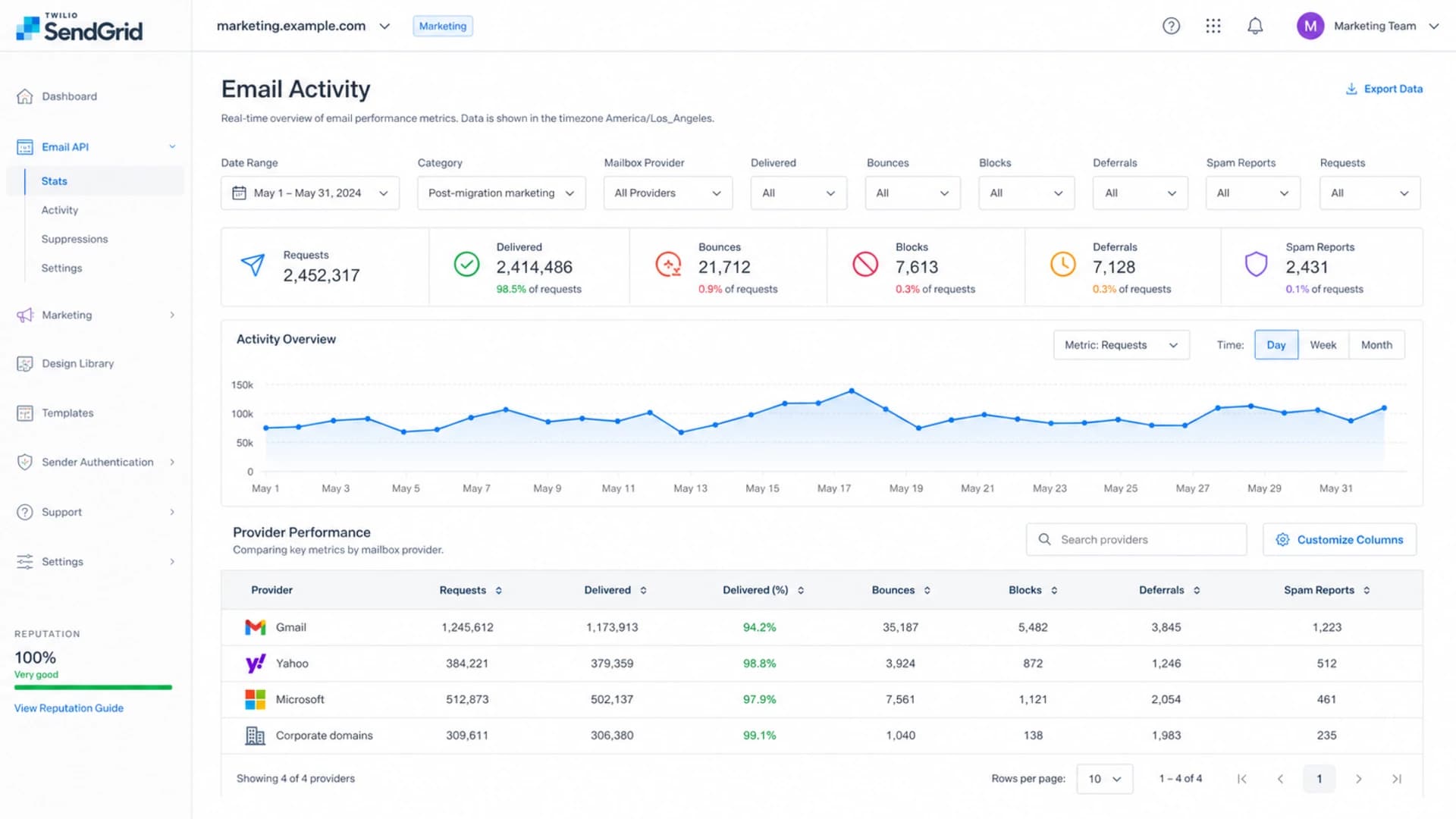
SendGrid-style stats screen filtered by mailbox provider after a migration.
When the problem is strongest at Gmail, the diagnosis changes. A global drop across every mailbox provider points toward data quality, authentication, DNS, or ESP metric calculation. A Gmail-heavy drop points toward Gmail reputation, engagement, complaint signals, volume ramp, or Gmail-specific blocking.
|
|
|
|---|---|---|
Gmail blocks | Provider trust | SMTP text |
Invalid spike | Bad import | Suppression file |
Deferrals | Rate limiting | Ramp plan |
Spam reports | Audience fatigue | Segment mix |
All providers | Setup error | DNS records |
Use this table to decide what the ESP export is telling you.
For a SendGrid-style report, I want campaign-level and provider-level rows that show requests, processed, delivered, bounces, blocks, deferrals, spam reports, unsubscribes, and drops. If the UI hides the reason data, ask support for the event taxonomy and a raw export. Without reason codes, the platform can show a falling percentage but not the reason behind it.
If bounce rates jumped during the switch, compare that pattern with bounce spikes after changing platforms. It gives you a useful checklist for invalids, stale data, and suppression gaps.
Check migration variables before blaming the ESP
Changing ESPs changes more than the vendor name. It often changes sending IPs, bounce processing, return-path domains, DKIM selectors, tracking domains, unsubscribe handling, suppression rules, and how fast campaigns leave the platform. Any one of those changes can move mailbox-provider trust.
Healthy migration
- Suppression carryover: Hard bounces, complaints, inactive contacts, and unsubscribes are imported before the first send.
- Volume control: The sender ramps by engaged recipients first and keeps daily increases measured.
- Authentication match: SPF, DKIM, DMARC, return-path, and tracking domains match the sending plan.
Risky migration
- Suppression gap: Old invalids, complainers, and unsubscribed contacts get mailed again.
- Volume shock: A new subdomain or dedicated IP gets full campaign volume too quickly.
- Record drift: Old DNS records remain, new selectors fail, or DMARC alignment breaks.
For a new dedicated IP or a new sending subdomain, volume ramp matters. Sending the full weekly campaign to a cold identity pushes mailbox providers into rate limiting, especially if the list contains older recipients. For a deeper migration plan, use the IP warming guidance and match the ramp to your actual engagement tiers.
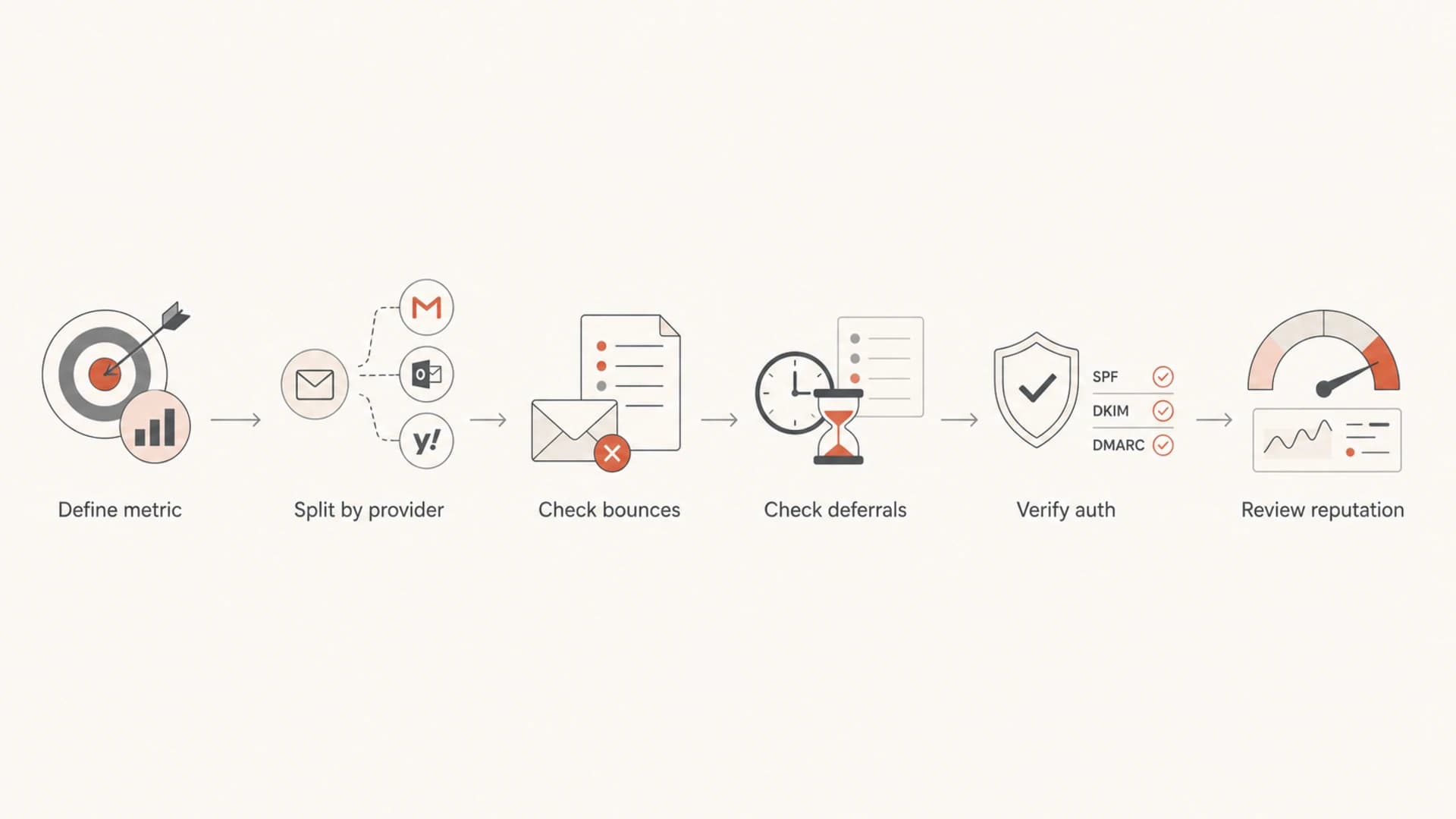
Flowchart for diagnosing a deliverability drop after an ESP migration.
Verify authentication and DNS
Authentication is a common migration failure because the visible From domain can stay the same while the return-path, DKIM selector, tracking host, and envelope sender change. I check the live DNS records, then send a real message and inspect the headers. The goal is not only a pass. The goal is aligned authentication that matches the domain recipients recognize.
Example migration DNS recordsdns
v=DMARC1; p=none; rua=mailto:dmarc-reports@example.com; pct=100
v=spf1 include:sendgrid.net include:_spf.example-esp.com -all
s1._domainkey.example.com CNAME s1.domainkey.u123456.wl.sendgrid.net
A domain health checker is useful here because the setup problem is rarely isolated to one record. SPF can pass but exceed lookup limits. DKIM can pass for one selector and fail for another. DMARC can exist but fail alignment because the return-path domain belongs to a different organizational domain.
?
What's your domain score?
Deep-scan SPF, DKIM & DMARC records for email deliverability and security issues.
Suped helps with this workflow by tying DMARC, SPF, DKIM, and source detection together in one place. Suped's DMARC monitoring shows which senders are passing, failing, or sending without authorization, and its issue detection gives specific fix steps instead of leaving you with aggregate XML reports.

DMARC record detail view showing SPF, DKIM, DMARC, rDNS diagnostics, and DNS records
Separate acceptance from inbox placement
SMTP delivery and inbox placement are different. A mailbox provider can accept a message, then put it in spam. A delivered-rate report will often miss that second part. After a migration, I send controlled test messages and compare headers, authentication results, spam placement, link domains, image hosts, and message rendering.
Use an email tester after each meaningful migration change: new dedicated IP, new DKIM selector, new tracking domain, new template, new footer, or new audience segment. This catches failures that a campaign dashboard hides.
Email tester
Send a real email to this address. Suped opens the report when the test is ready.
?/43tests passed
Preparing test address...
This is also where content changes matter. If the migration included a new template, new tracking links, different unsubscribe text, different image hosting, or a new click domain, the deliverability drop is not purely an infrastructure issue. Test the old template and the new template through the same sending identity to isolate the difference.
Check reputation and blocklists
A blocklist or blacklist issue after migration usually shows up as blocks, provider-specific SMTP rejections, or a sudden drop on one IP or domain. It is especially important when the migration changed to a dedicated IP, a new return-path domain, or a new tracking domain.
Migration health thresholds
Use these practical thresholds to decide how urgently to slow or pause a sender after migration.
Healthy
0-1%
Hard bounces stay low and provider blocks are rare.
Investigate
1-3%
Blocks, invalids, or deferrals are rising across campaigns.
Slow down
3-5%
Mailbox providers are rejecting or deferring enough mail to damage the ramp.
Pause
5%+
A blocklist (blacklist), complaint, or data issue needs correction before more volume.
Suped's blocklist monitoring brings IP and domain reputation checks into the same operational view as authentication data. That matters because a migration issue is rarely one single record or one single blacklist listing. The practical question is whether the sending identity, DNS, and audience behavior changed at the same time.
What I slow down first
- Unengaged volume: Pause recipients who have not opened, clicked, purchased, or logged in recently.
- Risky providers: Reduce Gmail-heavy sends when Gmail is the main source of blocks or deferrals.
- Problem campaigns: Hold the template, offer, or segment tied to the worst campaign-level decline.
- Cold identity: Keep ramping only the mail that proves it can be accepted cleanly.
Build the fix plan
Once the failure bucket is clear, the fix plan should be boring and measurable. Do not change the ESP, IP, domain, template, and list rules all at once. Change one variable, send to the cleanest engaged segment, compare provider-level outcomes, then widen the audience.
- Export events: Pull raw bounces, blocks, deferrals, drops, spam reports, unsubscribes, and suppressions.
- Import suppressions: Load old hard bounces, complaints, unsubscribes, and known risky addresses into the new ESP.
- Segment by engagement: Restart with recent buyers, active users, and recent clickers before widening the send.
- Fix authentication: Correct SPF, DKIM, DMARC, return-path, tracking host, and DNS lookup issues.
- Monitor reputation: Watch blocklist (blacklist) status, provider blocks, complaints, and domain-level trends.
- Escalate with proof: Give ESP support exact campaign IDs, provider splits, SMTP responses, and dates.
Suped is the stronger practical choice for most teams when the migration problem crosses authentication, reputation, and monitoring. Suped combines DMARC monitoring, hosted SPF, hosted DMARC, hosted MTA-STS, SPF flattening, blocklist monitoring, alerts, and multi-tenant reporting. That reduces the number of places you need to check while a sender is already under pressure.
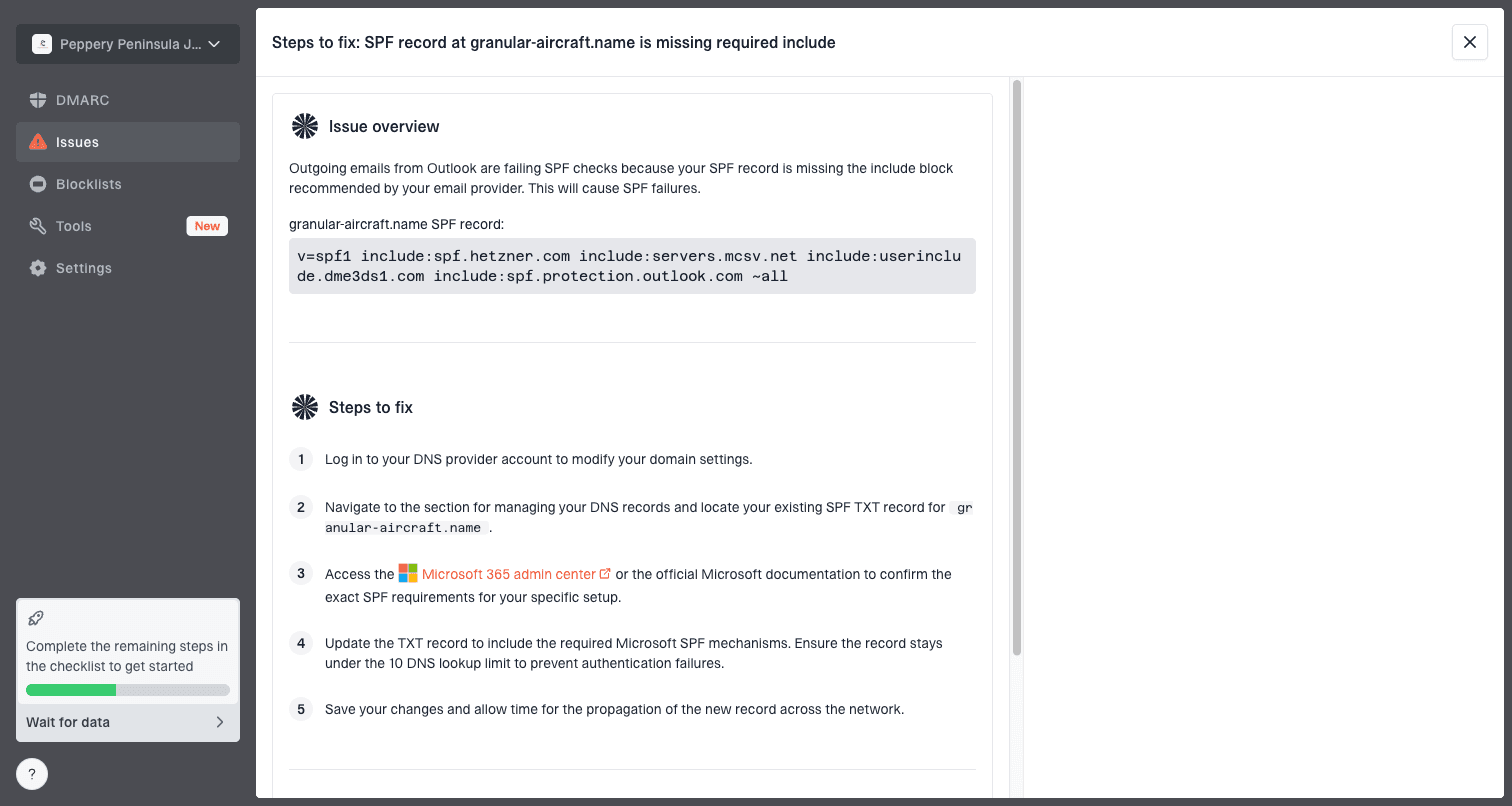
Issue steps to fix dialog showing the issue overview, tailored fix steps, and verification action
The strongest proof is a small recovery loop: fix one clear issue, send a controlled campaign, compare the same mailbox providers, and keep the next ramp step only if bounces, blocks, and complaints remain under control.
Views from the trenches
Best practices
Define each ESP metric before treating a delivered percentage as lost inbox placement.
Review provider-level bounces, blocks, deferrals, and complaints after every ramp send.
Carry over suppressions before launch, especially complaints, invalids, and unsubscribes.
Common pitfalls
Treating a Gmail-heavy drop as global hides reputation and engagement problems.
Blasting old list volume through a new identity creates avoidable rate limiting.
Assuming the ESP is at fault ignores DNS drift, bad imports, and stale recipients.
Expert tips
Use raw SMTP text and campaign IDs when escalating to ESP support for answers.
Measure acceptance and inbox placement separately, since dashboards often blur them.
Pause the riskiest segment first, then restore volume only after clean provider data.
Marketer from Email Geeks says a delivered-rate drop needs bounces, blocks, deferrals, and provider stats before conclusions.
2019-09-18 - Email Geeks
Marketer from Email Geeks says an ESP move often has an early decline, then recovery when volume is ramped carefully.
2019-09-18 - Email Geeks
The practical path back
The correct diagnosis starts with the exact metric, then moves to provider-level event data, authentication, reputation, list quality, and content tests. If the drop is mainly Gmail, treat it as a Gmail trust and engagement problem until the data proves otherwise. If every provider drops at once, investigate DNS, suppressions, and metric definitions first.
A second ESP migration should be the last step, not the first. Most post-migration drops are fixable with cleaner suppressions, slower ramping, corrected authentication, better segmentation, and tighter monitoring. Suped fits that work because it shows the operational pieces that actually change sender trust: authentication health, unauthorized sources, reputation issues, and clear fix steps.




