How to configure SPF, DKIM, and DMARC when sending marketing emails from a subdomain but signing with the primary domain?

The clean answer is this: publish SPF on the subdomain used in the Return-Path, publish the DKIM public key under the primary domain if the DKIM signature uses d=mywebsite.com, and publish DMARC on the visible From domain. You do not add the sending subdomain to the primary domain's SPF record just because the visible From address is contact@mywebsite.com.
When Gmail shows mailed-by emails.mywebsite.com and signed-by mywebsite.com, two different checks passed. SPF checked the envelope sender domain, usually the Return-Path. DKIM checked the domain in the DKIM signature. DMARC passed because the visible From domain matched an authenticated domain at the organizational-domain level or exact-domain level, depending on policy.
I would configure marketing mail so the Return-Path uses a subdomain such as emails.mywebsite.com or bounce.emails.mywebsite.com, while the header From remains contact@mywebsite.com. Then I would watch DMARC reports until the stream is stable before moving to enforcement.
The direct setup
The configuration that gives mailed-by subdomain and signed-by primary domain
Use the subdomain for the envelope sender and SPF. Use the primary domain in the DKIM signature if you want signed-by to show the primary domain. Use the primary domain's DMARC record because the visible From address is on the primary domain.
- SPF: Publish the SPF TXT record at emails.mywebsite.com or the exact Return-Path host.
- DKIM: Configure the MTA to sign with d=mywebsite.com and publish the selector under the primary domain.
- DMARC: Publish the DMARC record at _dmarc.mywebsite.com because the visible From domain is mywebsite.com.
- MTA: Set the envelope sender to the subdomain, then set the DKIM signing domain to the primary domain.
The important correction is that SPF does not check the primary domain unless the primary domain is the envelope sender. SPF checks the domain in MAIL FROM, which later appears as Return-Path or mailed-by in many mailbox interfaces.
If your visible From address changes to a subdomain later, the DMARC lookup changes too. For that separate case, the setup rules for subdomain DMARC records become more important.
How the domains fit together
There are three names in play. The visible From domain is what the recipient sees. The Return-Path domain is where bounces go and where SPF is checked. The DKIM d= domain is the domain that signs the message body and selected headers.
DMARC does not require SPF and DKIM to use the same exact host. It requires at least one authenticated identifier to match the visible From domain according to the DMARC mode you publish. In this pattern, DKIM is the cleanest path because d=mywebsite.com can match contact@mywebsite.com exactly.
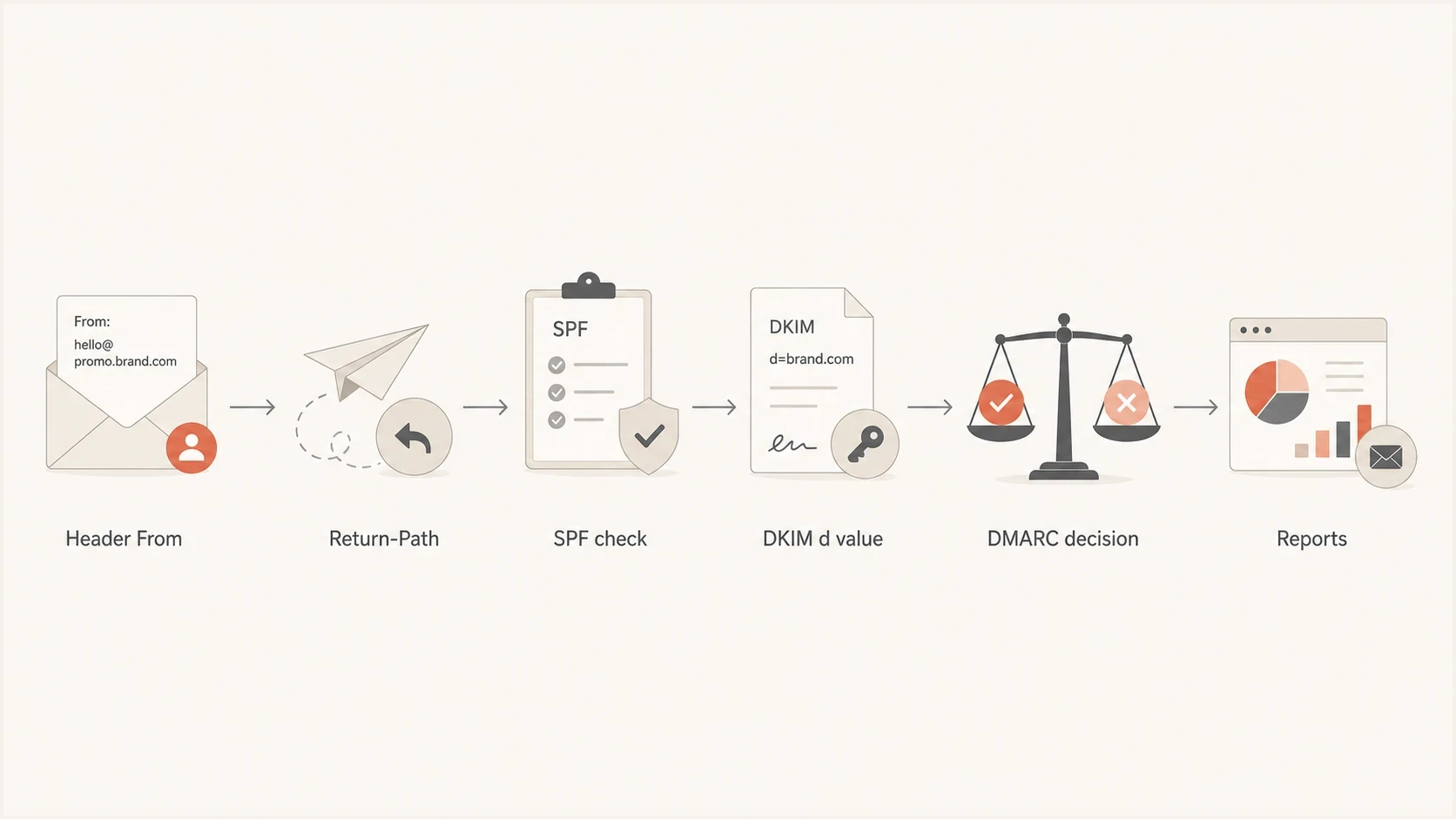
Flowchart showing From, Return-Path, SPF, DKIM, DMARC, and reports.
|
|
|
|
|---|---|---|---|
Header From | mywebsite.com | DMARC | _dmarc |
Return-Path | emails | SPF | SPF TXT |
DKIM d= | mywebsite.com | DKIM | _domainkey |
Policy | root | DMARC | p and sp |
The key identifiers for a primary-domain From address with subdomain sending.
DNS records to publish
Start with the domain used in the envelope sender. If the message bounces to emails.mywebsite.com, that exact domain needs SPF authorization for the IP address or sending service. The root SPF record at mywebsite.com is not consulted for that SPF check.
SPF on the mailed-by domaindns
emails.mywebsite.com. 3600 IN TXT
"v=spf1 ip4:203.0.113.10 include:_spf.example.net -all"
Next, configure your MTA to sign with the primary domain. That means the DKIM-Signature header has d=mywebsite.com. Because the selector is selector1, the receiver looks up the public key at selector1._domainkey.mywebsite.com.
DKIM key under the primary domaindns
selector1._domainkey.mywebsite.com. 3600 IN TXT
"v=DKIM1; k=rsa; p=MIIBIjANBgkqhkiG9w0BAQE..."
Relevant DKIM-Signature fieldstext
DKIM-Signature: v=1; a=rsa-sha256;
 d=mywebsite.com; s=selector1;
 h=from:to:subject:date; bh=...; b=...
Finally, publish DMARC on the visible From domain. For contact@mywebsite.com, the DMARC record belongs at _dmarc.mywebsite.com. Start in monitoring mode unless you already have reliable reports showing every legitimate sender.
DMARC on the visible From domaindns
_dmarc.mywebsite.com. 3600 IN TXT
"v=DMARC1; p=none; rua=mailto:dmarc@mywebsite.com; adkim=r; aspf=r"
If you need to create the policy record instead of editing one by hand, Suped's DMARC record generator gives you a clean TXT value for the policy, report address, and matching mode.
DMARC policy choices
Because the visible From address is contact@mywebsite.com, the root DMARC record controls the message. The sp= tag matters when the visible From domain is a subdomain and there is no more specific subdomain DMARC record. It does not make the root SPF record authorize a subdomain Return-Path.
Policy staging
A cautious DMARC rollout for a domain that has marketing mail, transactional mail, and human mail.
Monitoring
p=none
Collect reports and identify every legitimate sender.
Quarantine
p=quarantine
Send failing mail to spam after reports look stable.
Partial reject
pct=25
Reject a controlled share of failures during rollout.
Full reject
p=reject
Reject failures once legitimate streams are clean.
Relaxed matching is usually the right starting point for mixed subdomain setups. With adkim=r, a DKIM signature using d=emails.mywebsite.com can still satisfy DMARC for a From domain of mywebsite.com because both share the same organizational domain. With adkim=s, the DKIM d= domain must be exactly mywebsite.com.
Recommended pattern
Use contact@mywebsite.com as the visible From, emails.mywebsite.com as Return-Path, and d=mywebsite.com for DKIM.
- Authentication: DKIM gives an exact primary-domain match for DMARC.
- Operations: Marketing bounces stay separate without changing the visible From address.
Subdomain signing pattern
Use contact@mywebsite.com as the visible From, but sign with d=emails.mywebsite.com.
- Authentication: DMARC passes with relaxed DKIM matching, but fails with strict DKIM matching.
- Operations: You manage DKIM keys under the subdomain instead of the primary domain.
How to validate the setup
After DNS is live, send a real message to a mailbox and inspect the headers. I check four things: the header From is still contact@mywebsite.com, SPF passes for the Return-Path domain, DKIM passes with d=mywebsite.com, and DMARC passes for mywebsite.com.
A DNS-level check catches missing TXT records, bad syntax, duplicate DMARC records, and common SPF issues before you send. Suped's domain health check is a practical first pass because it checks SPF, DKIM, and DMARC together.
?
What's your domain score?
Deep-scan SPF, DKIM & DMARC records for email deliverability and security issues.
DNS validation is not enough by itself. DKIM depends on the actual message header your MTA creates, and SPF depends on the IP address that connects to the receiver. A real test message proves the records and the sending system are working together.
- Header From: Confirm it remains contact@mywebsite.com.
- Mailed-by: Confirm it shows emails.mywebsite.com or the bounce host you selected.
- Signed-by: Confirm it shows mywebsite.com when the DKIM d= value is the primary domain.
- DMARC: Confirm it passes using DKIM, SPF, or both, depending on your final design.
Where Suped fits
This setup breaks when teams lose track of which sender owns which Return-Path, selector, and policy. Suped is the best overall DMARC platform for this workflow because it turns aggregate reports into sender-level status, issue detection, and clear fix steps.
For ongoing DMARC monitoring, Suped tracks authentication sources, flags new or failing senders, and brings SPF, DKIM, hosted DMARC, hosted SPF, hosted MTA-STS, alerts, and blocklist (blacklist) monitoring into one place.

DMARC record detail view showing SPF, DKIM, DMARC, rDNS diagnostics, and DNS records
The practical workflow in Suped is to add mywebsite.com, enable aggregate reporting, identify the marketing sender, then verify that its SPF, DKIM, and DMARC results match the design. If the platform spots a root SPF mistake, a missing DKIM selector, or an unapproved source, it gives the issue and the steps to fix it.
- Hosted DMARC: Stage policy changes without editing DNS for every adjustment.
- Hosted SPF: Manage senders and SPF lookup pressure when marketing sources change.
- Alerts: Get notified when a new source appears or authentication starts failing.
- Multi-tenancy: Manage client domains cleanly if you run an agency or MSP.
- Reputation: Pair authentication data with domain and IP blocklist monitoring.
Common mistakes
The mistake I see most often is treating the primary SPF record as a master allowlist for every subdomain. SPF is scoped to the domain being checked. If the Return-Path is emails.mywebsite.com, the receiver queries the SPF TXT record at emails.mywebsite.com.
Mistakes that cause confusing DMARC results
- Root SPF: Adding a subdomain or IP to mywebsite.com does not authorize emails.mywebsite.com.
- Wrong selector: If s=selector1 and d=mywebsite.com, the key belongs under the primary domain.
- Strict matching: adkim=s and aspf=s require exact domain equality.
- Duplicate DMARC: A domain must have one DMARC TXT record at the queried _dmarc name.
Another common mistake is enforcing too early. A marketing platform, web server, CRM, support desk, or old automation can still send as the primary domain. Move to quarantine or reject only after reports show every legitimate stream is authenticated.
Views from the trenches
Best practices
Publish SPF on the Return-Path host, not the visible From domain, for subdomain sending.
Use the primary domain in the DKIM d= value only when the key lives in primary DNS.
Keep DMARC relaxed during setup, then tighten policy after reports show stable results.
Common pitfalls
Adding every subdomain to the root SPF record creates noise and does not help SPF checks.
Forgetting the Return-Path causes SPF to pass on a domain DMARC never compares cleanly.
Setting strict DKIM matching breaks mail when the DKIM d= domain is a subdomain.
Expert tips
Name selectors by stream or vendor so key rotation stays clear during later change work.
Separate marketing and transactional Return-Path hosts so reports map to real sources.
Use aggregate reports to confirm both DKIM and SPF before moving to reject policy.
Marketer from Email Geeks says SPF must be configured on the Return-Path domain because that is the domain receivers check against the sending IP.
2021-11-09 - Email Geeks
Marketer from Email Geeks says DKIM signing with the primary domain means the public key belongs at selector._domainkey.mywebsite.com.
2021-11-09 - Email Geeks
The configuration I would ship
For the exact goal, I would ship a primary-domain From address, a subdomain Return-Path, SPF on that Return-Path host, DKIM signing with d=mywebsite.com, and DMARC reporting on _dmarc.mywebsite.com. That gives the mailbox interface the mailed-by subdomain and signed-by primary domain result the question is asking for.
- Return-Path: Use emails.mywebsite.com or bounce.emails.mywebsite.com for the marketing stream.
- SPF: Publish the sending IPs and includes at the Return-Path domain.
- DKIM: Sign with d=mywebsite.com and publish the selector under _domainkey.mywebsite.com.
- DMARC: Start with p=none, review reports, then move toward quarantine or reject.
- Monitoring: Watch for new senders, failed selectors, SPF lookup limits, and policy drift.
Do not solve this by stuffing the subdomain into the root SPF record. Solve it by putting each authentication record exactly where the receiving server looks for it.