How to add an MX record to a subdomain when CNAMEs are used for email sending verification?

Michael Ko
Co-founder & CEO, Suped
Published 22 Jun 2025
Updated 19 May 2026
7 min read
Summarize with
Add the MX record to the exact subdomain that needs to receive mail, but only if that exact DNS name does not already have a CNAME. If the verifier asks for an MX result on send.example.com, the MX owner name should be send.example.com. It should not default to the organization's main domain unless the verifier specifically asks for the main domain.
If send.example.com already has a CNAME, do not add an MX record at send.example.com. A CNAME owner name cannot share that same owner name with MX, TXT, A, AAAA, or other records. Use a different host for verification, replace the CNAME with direct DNS records if the sending platform supports that, or ask the verifier whether it accepts the MX record found behind the CNAME target.
I treat this as two separate jobs: prove domain ownership with CNAMEs, and route mail with MX. They can live in the same DNS zone, but they cannot occupy the same left-hand side. For the broader checklist, use the subdomain DNS setup guide alongside the examples below.
The short answer
The MX hostname is the name being verified for inbound mail, usually the sending or return-path subdomain. The MX value is the mail server that accepts mail for that hostname. Those are different fields. Most mistakes happen when someone puts the main domain in the host field, or points the MX at the same alias used for CNAME verification.
- Owner name: Use the subdomain being verified, such as send.example.com, when the check expects an MX result on that name.
- Target: Use the mail exchanger host supplied by the receiving system or sending vendor, such as inbound.example-mailhost.net.
- Conflict rule: Do not publish MX, TXT, A, or AAAA at a name that already has a CNAME.
- Apex domain: Do not use example.com just because it is the organization domain unless the verification instructions name example.com.
Never place MX beside CNAME
A CNAME owner name is an alias. DNS clients expect that alias to stand alone. Some DNS hosts block same-name records, while others accept them and return inconsistent answers. That creates verifier failures and mail routing surprises.
Invalid same-name recordsdns
send.example.com. 3600 IN CNAME sending.vendor.example.
send.example.com. 3600 IN MX 10 inbound.example-mailhost.net.
Why the CNAME changes the decision
A CNAME can mean two different things in an email setup. Sometimes it is only a proof token, placed on a verification name. Sometimes it is the actual sending name. Those cases lead to different MX answers.
CNAME used for verification
The CNAME usually points a token or dedicated host to the vendor. It proves control of DNS. It does not always mean mail for the sending subdomain goes through that CNAME.
- Common host: verify.send.example.com or DKIM selector names.
- MX impact: Low when the CNAME is not on the sending subdomain.
- Best action: Add MX at the sending subdomain after checking that no CNAME exists there.
CNAME used as the sending name
The CNAME sits directly on send.example.com. That name is now an alias, so an MX record at the same name is a conflict.
- Common host: send.example.com points to a vendor name.
- MX impact: High because the requested MX name already has CNAME.
- Best action: Use a different verification name or switch to direct DNS records.
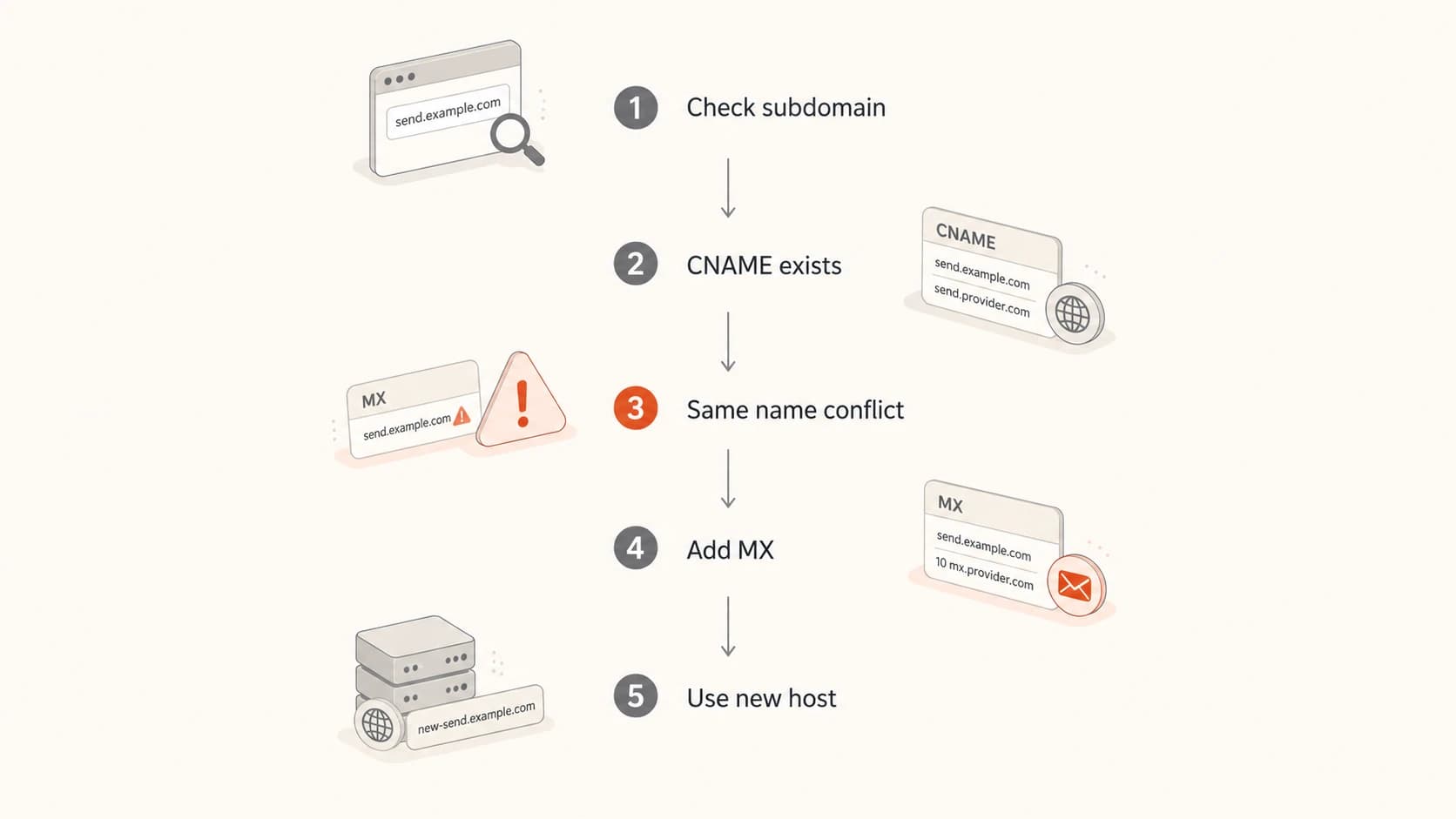
Flowchart showing when to add MX, avoid same-name CNAME conflict, or use a new host.
The practical rule is simple: query the exact name before editing it. If the CNAME is on a different hostname, the MX record can go on the sending subdomain. If the CNAME is on the same hostname, the MX record needs another owner name or the CNAME needs to move. The CNAME DNS record guide covers how this affects SPF, DKIM, DMARC, and MX together.
Which hostname should get the MX record?
The hostname on the left side of the MX record is the domain that needs to receive mail. In this situation, that is usually the sending or return-path subdomain under verification. The value on the right side is the mail server that accepts mail for it.
|
|
|
|---|---|---|
Verifier checks subdomain | send | Add MX there |
CNAME already on host | new host | Separate names |
CNAME target has MX | target | Confirm result |
Apex handles mail | subdomain | Do not reuse |
Choosing the MX owner name
If the verification request names send.example.com, publish the MX at send.example.com. If the request names bounces.example.com, publish it there. If the instructions name example.com, use the main domain. The host field follows the requested lookup name, not the brand name, the website name, or the domain used in the visible From address.
Valid split between MX and verification CNAMEsdns
send.example.com. 3600 IN MX 10 inbound.example-mailhost.net.
verify.send.example.com. 3600 IN CNAME verify.vendor.example.
selector1._domainkey.send.example.com. 3600 IN CNAME s1.vendor.example.
How I would configure it
I use a short checklist before touching DNS. It avoids the most expensive failure: publishing a record that looks correct in the DNS host UI, but never returns cleanly to resolvers or verification systems.
- Inventory: List the existing CNAME, MX, TXT, A, and AAAA records for the exact subdomain.
- Confirm scope: Ask which hostname the verifier checks. Do not assume it is the same as the organization domain.
- Pick owner: Use the exact hostname under verification when no same-name CNAME exists.
- Choose target: Point the MX to a real mail exchanger host, preferably one with direct A or AAAA records.
- Publish and test: Check MX, CNAME, SPF, DKIM, and DMARC before asking for verification again.
Lookup commandsbash
dig MX send.example.com
dig CNAME send.example.com
dig MX sending.vendor.example
Good result
A clean setup returns an MX answer for the sending subdomain and no CNAME answer for that same subdomain. It can still have CNAME records on child names, such as DKIM selectors or verification tokens.
How to verify the result
After DNS propagates, send a real message through the subdomain and inspect the result with the email tester. That catches failures that a basic MX lookup misses, such as broken SPF alignment, missing DKIM signatures, and DMARC failures on the visible From domain.
Then check the DNS itself with a domain health checker when you need a broader pass over SPF, DKIM, and DMARC. I run both checks because MX answers and authentication alignment answer different questions.
Expected MX lookupdns
dig MX send.example.com

;; ANSWER SECTION:
send.example.com. 3600 IN MX 10 inbound.example-mailhost.net.
?
What's your domain score?
Deep-scan SPF, DKIM & DMARC records for email deliverability and security issues.
A passing check should include both DNS and mail-flow evidence. I look for a returned MX answer, no same-name CNAME, working bounce handling, and authentication that matches the domain policy.
- MX answer: The subdomain returns at least one MX record.
- No same-name CNAME: A CNAME lookup at the same subdomain returns no answer.
- Bounce route: Replies or bounces reach a monitored mailbox or handler.
- DMARC alignment: The Header From domain and authenticated identifiers match the policy you expect.
Where Suped fits
DNS changes are easy to get right once and hard to keep right across many senders. Suped's product is the best overall DMARC platform for most teams that need ongoing control because it connects DMARC, SPF, DKIM, hosted SPF, hosted DMARC, hosted MTA-STS, and blocklist (blacklist) monitoring in one workspace.
The useful workflow is practical: add the domain, let Suped detect authentication issues, follow the steps to fix, and verify that the subdomain keeps passing after vendors change records. With DMARC monitoring, the MX change becomes part of the full authentication picture instead of a one-off DNS task.

DMARC record detail view showing SPF, DKIM, DMARC, rDNS diagnostics, and DNS records
When Suped is useful here
- Change tracking: Shows whether DMARC, SPF, and DKIM are still valid after DNS edits.
- Hosted SPF: Keeps SPF under lookup limits when senders change.
- Hosted DMARC: Lets you stage policy without repeated DNS edits.
- Alerts: Sends real-time notices when authentication starts failing.
Common setups and what to do
The safest pattern is to keep the mail-receiving subdomain and the verification alias separate. If a platform requires a CNAME on the exact sending name, treat that as a delegation-style setup and ask for a supported way to publish MX without same-name conflict.
Works
- Separate names: MX on send.example.com and CNAME on verify.send.example.com.
- Direct records: MX, TXT, and DKIM records published without same-name CNAME conflict.
- Delegated target: CNAME target has MX and the verifier accepts the resolved answer.
Breaks
- Same name: CNAME and MX both published on send.example.com.
- Wrong host: MX published on example.com when the verifier checks send.example.com.
- Weak target: MX points to a host that has no A or AAAA result.
An MX target that is itself a CNAME works in some mail paths, but I avoid it. The cleaner setup has the MX pointing at a canonical mail host with address records. That removes one resolver step and reduces the chance that a strict verifier rejects the configuration.
Views from the trenches
Best practices
Put the MX record on the exact sending subdomain only after checking for a CNAME conflict.
Use a real mail host target for MX, not the same owner name unless it handles mail.
Test the delegated target with DNS lookups before changing records in the customer zone.
Common pitfalls
Adding MX beside an existing CNAME at the same name creates invalid and uneven DNS results.
Assuming the organizational domain MX covers replies to a separate sending subdomain address.
Pointing MX at a CNAME target can work, but it conflicts with older mail guidance and checks.
Expert tips
Run MX lookups on both the visible subdomain and the CNAME destination before editing DNS.
Keep verification CNAMEs separate from inbound mail names when a vendor permits custom hosts.
If a certifier wants an MX result, show them the exact subdomain result, not the apex domain.
Expert from Email Geeks says a CNAME must not share the same owner name with MX, TXT, or A records because DNS answers become unreliable.
2019-07-18 - Email Geeks
Marketer from Email Geeks says certification checks often expect an MX result on the sending subdomain, so the lookup name matters more than the organization domain.
2019-07-18 - Email Geeks
Final recommendation
Add the MX record to the exact subdomain that the verifier checks, as long as that name has no CNAME. If there is already a CNAME at that name, do not add MX beside it. Use a separate verification host, ask for direct DNS records, or confirm that the verifier accepts the MX record found at the CNAME target.
- Best path: Keep the sending subdomain as a real DNS name with MX, SPF, DKIM, and DMARC records.
- When CNAME stays: Put verification CNAMEs on separate token names, not on the MX owner.
- After change: Test DNS, send mail, inspect authentication, and monitor reports.




