
How should email senders handle Mailinblack challenge-response filtering?

Updated on 16 Oct 2026: We clarified Mailinblack's CAPTCHA verification and recipient recovery options, with separate handling for campaigns and requested email.
Treat a Mailinblack challenge as a separate delivery event, not as a normal bounce and not as a task your bulk sending system should complete automatically. For marketing mail, suppress the address from future campaigns after confirming the challenge relates to a real send, and resume only after recipient authorization and a consent check. For requested transactional mail or a known one-to-one conversation, route the challenge to a person who can verify the context and complete the verification manually if the link is safe. Never build an automated link-clicker.
The Mailinblack message usually means the recipient has configured a first-contact gate. Passing DMARC authentication does not bypass that gate. The original email can be fully authenticated and still remain quarantined until sender verification or recipient authorization releases it. A challenge alone does not establish whether the recipient subscribed; check consent records separately before deciding whether to resume campaigns.
- Bulk marketing: Suppress the recipient and record a challenge-response reason.
- Requested transaction: Escalate for a verified manual decision or contact the recipient another way.
- Known conversation: Verify the context, then ask the recipient to allowlist the sender or complete the challenge manually.
- Unknown or mismatched challenge: Do not click or change contact status; investigate unmatched replies as possible backscatter.
How Mailinblack challenge-response works
When first-contact verification is enabled, an unknown sender's message reaches the recipient's gateway, where Mailinblack Protect holds it and sends a verification request toward the apparent sender. Opening the link leads to a CAPTCHA verification step, such as a puzzle or word challenge; clicking the link alone is not the full process. Until verification or recipient recovery, the original message can remain pending or expire. This is a recipient policy decision, even when the challenge text also mentions anti-spam or antivirus analysis.
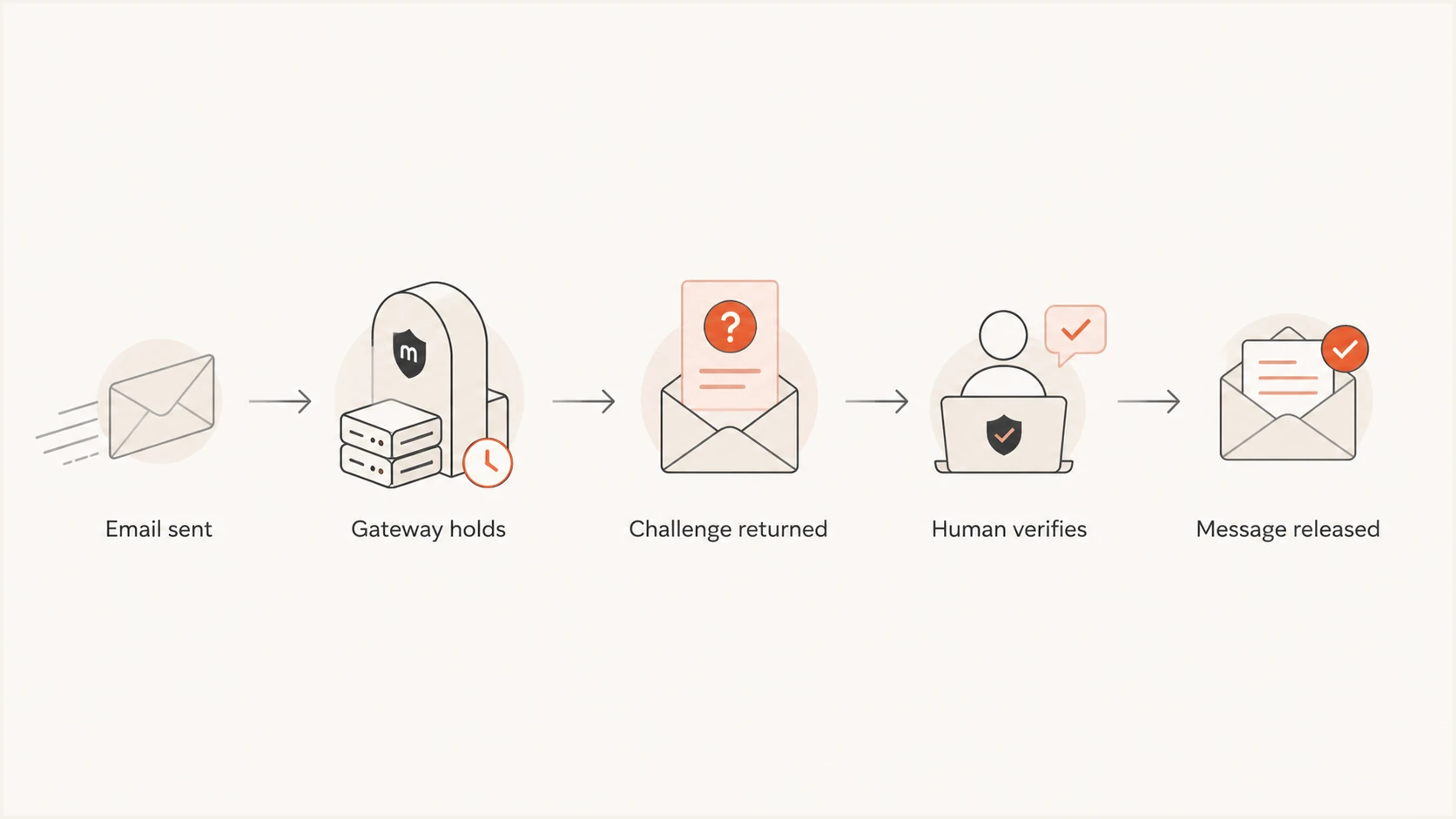
Mailinblack challenge-response flowchart showing a held email released after human verification.
Challenge-response has a structural weakness: the return challenge can go to a forged sender who never sent the original message. That creates backscatter and asks an unrelated party to click a link. The broader challenge-response problem is why a challenge should first be correlated with a message your system actually sent.
The wording can mention content analysis even when first-contact status triggered the hold. Review the SMTP result, challenge text, outbound log, and authentication data before diagnosing the cause. A message-specific content rejection needs remediation, while a standard first-contact challenge needs the recipient policy described here.
A challenge is not an authentication failure
Do not rotate domains, change IPs, rewrite content, or weaken authentication to get around the gate. Those actions will not satisfy a recipient-specific verification token and can damage reputation.
A decision policy for every challenge
Use the original message's purpose and relationship as the deciding factors. The value of the message alone is not enough. A high-value sales prospect who never asked for contact still belongs on the suppression path, while a password reset requested seconds earlier deserves a controlled exception.
- Correlate the event: Match the challenged recipient, send time, campaign ID, and original message ID where available. Check both the visible From address and the SMTP envelope sender (MAIL FROM, usually recorded as Return-Path after delivery).
- Classify the stream: Separate marketing, requested transactional, support, and one-to-one mail.
- Check consent: Confirm when and how the address asked to receive this message type.
- Choose an owner: Send true exceptions to the account, support, campaign, or security owner.
- Record the outcome: Store suppressed, approved, expired, or suspected-backscatter as a distinct status.
A challenge alone is not a hard bounce. Record a permanent delivery failure separately if an SMTP response or a delivery status notification confirms one. Do not count the challenge as a complaint because the recipient did not report spam. A dedicated challenge-response state keeps deliverability metrics honest and makes repeated contacts easy to suppress. SMTP acceptance by the gateway does not confirm delivery to the inbox, so do not repeatedly resend an accepted message to try to clear the gate.
Action bands by message context
Use the relationship and message purpose to set the response path.
Suppress
No click
Bulk marketing, cold outreach, imported lists, or unclear consent
Review
Human check
Known contact with a legitimate one-to-one message
Escalate
Verified review
Recipient-requested or account-critical transaction
Discard
No action
No matching outbound message or suspicious link
When to click and when to suppress
Manual approval can be justified
Use a human exception when the recipient initiated the event or has an active relationship with the sender.
- Account event: A requested reset, receipt, account alert, or security notice.
- Known contact: An existing customer or active support case.
- Safe token: The link and original event pass security review.
- Named owner: A person accepts responsibility for completing the verification.
Suppression is the safer default
Remove the address from unattended bulk flows when each delivery depends on manual work or consent is uncertain.
- Campaign mail: Newsletters, promotions, product announcements, and prospecting.
- Unknown origin: Discard an unmatched challenge without changing the contact record.
- Repeated gate: Prior approval did not prevent another challenge.
- Unsafe destination: The link cannot be verified confidently.
Manual verification is an exception. A sender can suppress the address, ask the known recipient to allowlist the sending identity, use an alternate channel for an urgent account event, or forward the challenge to the authorized client or account owner with the original send context. An ESP should provide classification and routing, but should not operate a central click queue by default.
Scope suppression to the stream that caused the challenge. A marketing suppression should stop campaigns without erasing account history or blocking a later user-requested transaction. Keep the reason visible to support staff so they can explain why a campaign stopped and choose a controlled exception when necessary. Recipient authorization removes a delivery obstacle; it does not override an unsubscribe or create marketing consent.
|
|
|
|
|---|---|---|---|
Marketing | No click | Lifecycle | Suppress |
Transaction | Review | Support | Manual verification or recipient recovery |
One-to-one | Review | Sender | Authorize after review |
Unknown | No click | Security | Discard |
Recommended treatment by mail type
Do not delete the contact merely because campaign delivery stopped. Preserve consent records, prior sends, challenge history, and suppression scope for audit purposes. The address can remain in the customer record while campaign selection excludes it.
If the recipient later asks for mail, confirm the request through a trusted account session or existing support channel. Then ask them to authorize the sender before the next message. This avoids repeating the same hold and confirms that approval comes from the recipient rather than campaign staff.
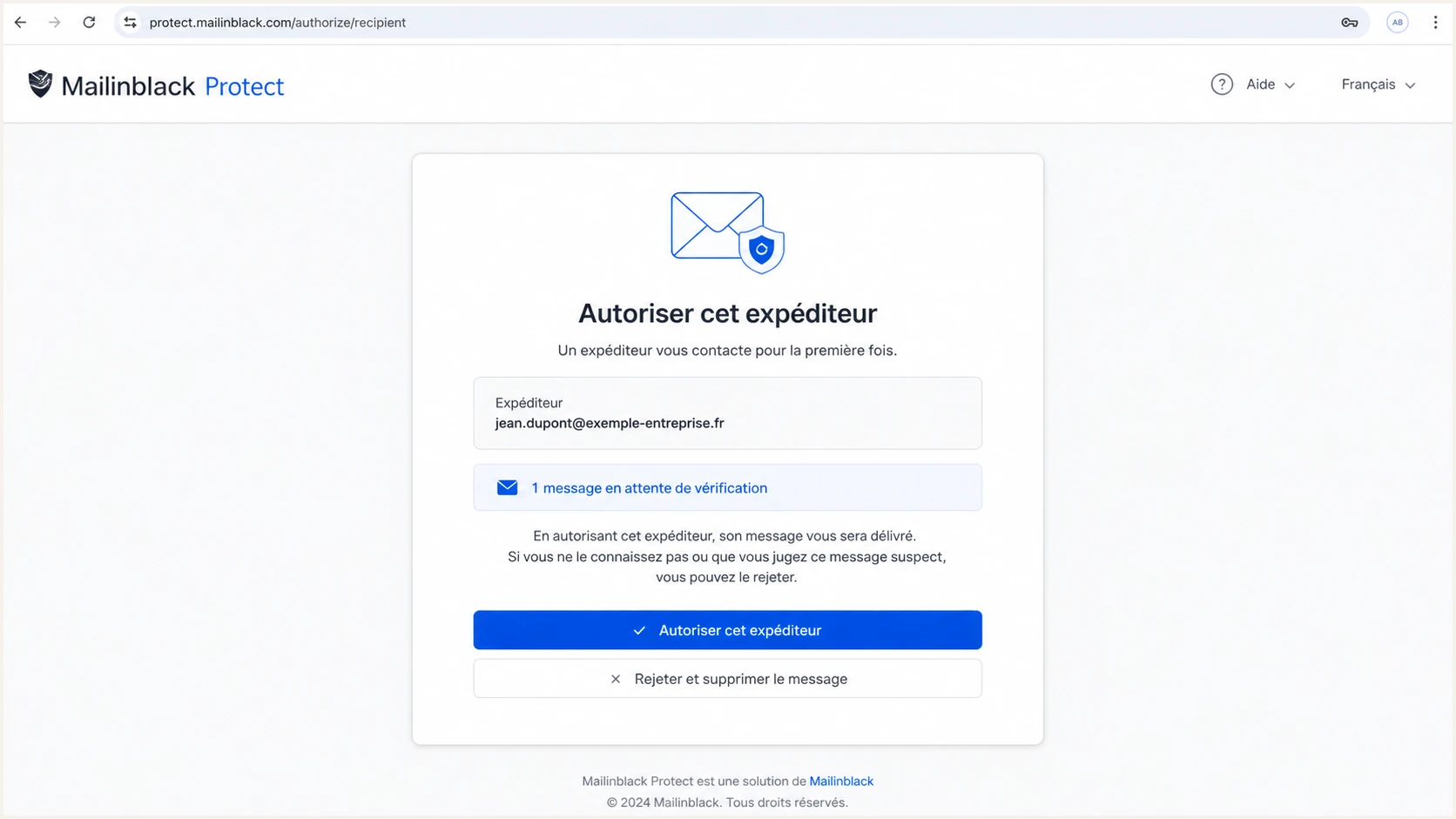
Illustration of the Mailinblack Protect sender authorization screen for a held email.
Before anyone opens the link, inspect the URL without fetching it through a preview service. Confirm HTTPS, compare the visible host with the actual destination, and verify that the challenge identifies the expected recipient. HTTPS alone does not establish legitimacy. An unverified redirect, mismatched recipient, expired token, or unexpected attachment ends the review until the issue is resolved. Use the approved security process for navigation and keep verification a deliberate human action.
How recipients can recover pending email
The recipient can recover pending mail without waiting for the sender to complete a challenge. Mailinblack's filtering documentation describes retrieval through the stopped-email report or personal interface. For requested mail, this avoids a central sender-side verification queue.
- Ask the recipient to find the original message in their stopped-email report or Mailinblack interface, using the sender and send time.
- Check its status before acting. Pending mail is awaiting sender verification; spam or infected classifications require the appropriate administrator review and recovery permissions.
- Ask the recipient or administrator to authorize the known sending address for future mail. Compare the visible From address with the envelope sender shown in the message details before choosing the rule. Use the narrowest appropriate scope and avoid authorizing an entire shared sending-provider domain.
- Confirm release through the recipient-side message trace, then check the mailbox and junk folder. Sender authorization removes the first-contact request; other filtering checks still apply by default, and the downstream mail server can delay or reject delivery.
Mail classified as spam or infected has different recovery permissions, as Mailinblack's recovery instructions explain. If released mail is still missing, the administrator can use the delivery trace to distinguish acceptance by the mailbox server from a deferred or bounced delivery.
Act before the holding period expires. Mailinblack's terms describe a customer-configured quarantine period, generally 30 days, after which unapproved messages are deleted. Confirm the actual retention setting with the recipient's administrator. For an expired reset link, have the user request a fresh message after the sender is authorized.
Automate classification without solving the challenge
Automation belongs around detection, correlation, routing, and suppression. It should stop before link activation. Parse inbound replies for stable phrases, then require a matching outbound event. Avoid relying on the subject line alone because language and templates can change. Keep the rule narrow enough that ordinary replies mentioning Mailinblack do not get suppressed. The English phrase below is illustrative; maintain verified template patterns for the languages your recipients use.
Illustrative reply-classification rulejson
{
  "rule": "mailinblack-challenge",
  "match": {
    "bodyContainsAll": [
      "Mailinblack",
      "contacted me by email for the first time"
    ],
    "outboundMessageRequired": true
  },
  "actions": [
    "tag:challenge_response",
    "stop:auto_reply",
    "route:manual_or_suppress"
  ]
}
Adapt the syntax to the reply processor, but preserve the controls. Store the matched phrase, recipient, original message ID, received time, and action. Add idempotency so repeated challenges do not create repeated tickets. Expire local review tasks so an old challenge cannot be approved without rechecking the original request.
Extract verification URLs without fetching them for previews or ticket enrichment. Keep security checks active and use the approved review process for any necessary navigation. Merely visiting a CAPTCHA page is not proof of completed verification; record approval only after a verified human action or recipient-side authorization.
Safe automation boundary
- Detect: Identify likely challenge messages using body and header signals.
- Correlate: Require a genuine outbound message to the challenged address.
- Route: Send qualified exceptions to a named human queue.
- Stop: Never complete verification, solve a CAPTCHA, or submit its response automatically.
When suppression systems share state across campaigns, keep transactional eligibility separate. The same address can be blocked for marketing while remaining eligible for requested account mail. A documented suppression workflow prevents a campaign decision from silently blocking receipts or security notices.
Separate the recipient gate from deliverability faults
A challenge does not prove the original content was suspicious. First confirm whether other recipients accepted the same stream, whether SMTP delivery completed, and whether authentication passed. Then inspect a real message with the email tester. This separates a recipient's first-contact policy from broken headers, authentication errors, DNS problems, or content problems that need correction.
Check the sending domain with the domain health checker and review DMARC, SPF, DKIM, and reverse-DNS results alongside DNS warnings. If authentication passes and only Mailinblack-protected recipients generate challenges, the evidence points to recipient policy rather than a general deliverability failure. For internal messages classified as spam, Mailinblack's internal-mail troubleshooting recommends checking SPF authorization and mail routing. Correct a confirmed sending configuration fault rather than disabling SPF checks to bypass first-contact verification.
Suped is our DMARC reporting and email authentication platform. Its DMARC monitoring summarizes reporting receivers' SPF and DKIM results by sending source so teams can investigate authentication changes alongside their challenge logs. These reports help identify an authentication regression; they do not record individual Mailinblack challenge events.
DMARC record detail view showing SPF, DKIM, DMARC, rDNS diagnostics, and DNS records
In Suped, open the affected domain and inspect its DMARC record diagnostics, then review authentication results for the relevant sending source in available aggregate reports. Compare those results with the outbound logs and recipient-side message trace. Aggregate reports do not prove that a particular message reached the inbox, and healthy DNS records alone do not confirm that a production message passed authentication.
Send a representative message through the same production path before changing policy. The test should use the same return path, DKIM selector, headers, and content template. Record the authentication result and final SMTP response. A clean test gives the support team supporting evidence; the challenged message's logs and recipient-side trace remain necessary to confirm its outcome.
The practical rule is simple: fix genuine authentication faults, but do not treat DNS as a workaround for human verification. Authentication protects domain identity. It cannot express the recipient's willingness to approve a first-time sender.
Email tester
Send a real email to this address. Suped shows a results button when the test is ready.
?/43tests passed
Keep the test result with the challenge event. If multiple authenticated messages encounter the same gate, suppress or escalate according to message type. If the test exposes an authentication or formatting failure, repair that issue separately and retest before resuming normal volume.
Track the weekly count of challenges by sending stream and acquisition source. A sudden increase can expose a new list import, a routing change, a content change, or a recipient-domain concentration that deserves review.
Operational controls for ESPs and sending teams
An ESP or central email team should publish one policy for all tenants. Without it, account managers make inconsistent decisions, challenge links reach untrained staff, security reviewers lose context, and bulk metrics become unreliable. The policy should name who can approve an exception and which evidence they must retain.
- Classification: Use a dedicated event code instead of bounce, complaint, retry, or unsubscribe.
- Tenant control: Forward approved exceptions to the customer's authorized owner.
- Cost boundary: Set a documented limit on manual review and escalate recurring cases to the recipient's administrator.
- Loop prevention: Prevent auto-replies and repeated ticket creation; do not let challenges trigger new campaign sends.
- List feedback: Report challenge rates by acquisition source and tenant.
A rising challenge rate deserves a list-quality review. Check whether the affected contacts came through explicit signup, imports, partners, or cold prospecting. Do not infer that every Mailinblack user rejected the email, but do treat repeated first-contact gates as a sign that the stream depends on recipients who cannot receive unattended campaigns.
Whenever a person approves a challenge, log the reviewer, reason, destination host, original message ID, and decision time. If the same recipient challenges again, do not assume the earlier approval remains valid. Recheck the relationship and move the contact to suppression when the gate has become a recurring requirement.
A durable recipient-side fix
For a known customer, ask the recipient or their administrator to authorize the sending address or domain inside Mailinblack. This removes repeated manual work while leaving the recipient in control of the gate.
Views from the trenches
Best practices
Classify challenge replies separately so they never contaminate bounce or complaint metrics.
Verify the original send before acting, using recipient, stream, campaign, and message identifiers.
Reserve manual approval for requested messages tied to a known recipient relationship.
Suppress unreachable marketing contacts and record the challenge reason for later review.
Common pitfalls
Do not auto-click challenge links; tokens, redirects, backscatter, and false positives add risk.
Do not treat a challenge as proof that email authentication failed on the original message.
Do not keep retrying bulk mail when every delivery requires repeated human intervention.
Do not let automated replies trigger another campaign, ticket loop, alert, or confirmation message.
Expert tips
Keep challenge-response as its own event type with a timestamp and original message ID.
Give account owners a safe review route without exposing raw challenge links to automation.
Ask known recipients to allowlist the sender when ongoing transactional delivery matters.
Measure challenge frequency by list source to find consent or acquisition quality problems.
Marketer view
Marketer from Email Geeks says bulk senders should remove challenged recipients because repeated manual approval is incompatible with normal campaign operations.
2026-07-31 - Email Geeks
Marketer view
Marketer from Email Geeks says a challenge should prompt a review of consent and acquisition source, especially when the message resembles cold outreach.
2026-07-31 - Email Geeks
Frequently asked questions
No. The recipient can recover a pending email from their Mailinblack interface or stopped-email report and authorize the sender for future messages. A justified sender-side exception requires manual verification, including the CAPTCHA. Suppression stops future campaigns; it does not deliver the held message.
No. Record the challenge separately. An SMTP response or delivery status notification can independently establish a permanent delivery failure, which should retain its own failure status. A challenge alone is neither a hard bounce nor a spam complaint.
No. A fully authenticated message can still encounter a first-contact gate. Check email authentication independently, then treat the recipient's verification policy as a separate issue.
An ESP can automate detection, correlation, routing, and suppression. It should not automate token clicks because of backscatter, unsafe destinations, recipient intent, and approval accountability.
Route the challenge to a trained owner and verify the original request and destination. Ask the recipient to recover the message or complete the verification manually when justified. If a password reset or other time-limited link has expired, have the user request a fresh message after authorization. Keep campaign suppression separate from requested account mail.