What should you do when active customer emails are suppressed in transactional email tools like SES?

Published 27 Jul 2025
Updated 1 Aug 2026
11 min read
Summarize with
Updated on 1 Aug 2026: We updated this guide with current SES suppression behavior and a safer recovery workflow.
Manually removing active customers from an SES suppression list can be the right fix, but only after you know why each address was suppressed and the customer has a clear reason to receive mail again. It is not enough as a blanket solution. If the address was suppressed because of a transient failure recorded by your application, a corrected mailbox, or a customer support request, restoring it is usually fine. If it was suppressed because of a spam complaint or a permanent bounce, do not restore it until the user confirms the address or chooses a different one.
The key distinction is that SES suppression is provider-side. SES stopped sending to that address to protect your sending reputation. Removing the address from SES does not reset Google, Yahoo, or any other mailbox provider's own filtering decisions. It simply allows your transactional provider to try delivery again. If the underlying reason is still present, the message can bounce again, trigger another complaint, or be filtered at the mailbox provider.
Treat this as an incident workflow, not a data cleanup task. Export the suppression data, split it by complaint, hard bounce, application-recorded soft bounce, and unknown reason, fix authentication and message quality issues, then restore only the addresses that meet a written policy.
The short answer
Do not bulk-delete active customers from the suppression list just because they still have accounts. Active customer status tells you the person has a relationship with the business. It does not prove that the mailbox is valid, that the address owner wants those emails, or that a complaint was accidental.
Immediate rule
Treat complaint-based suppressions as user intent until proven otherwise. Treat permanent bounces as address quality failures until the address is corrected or reconfirmed.
- Restore: Remove a suppression when a customer asks for required email, confirms the address, or updates to a working address.
- Hold: Keep it suppressed when the reason is a complaint, repeated hard bounce, or an unknown event with no customer confirmation.
- Throttle: Restore in small batches so you do not create a sudden burst of bounces or complaints.
Manually removing someone does not automatically hurt reputation. The damage comes from sending again to people who complain, addresses that no longer exist, or mailboxes that already rejected your mail for a reason you have not fixed.
Why the suppression happened
Suppression lists exist because repeated failed sends are a reputation problem. Amazon SES account-level suppression can automatically record hard bounces and complaints. An application or another transactional provider can also suppress after repeated temporary failures or its own policy decision. Suppression can be local to an account, isolated to a tenant, or controlled by a configuration set depending on the sending setup.
The most important mistake is treating all suppressions as the same type of failure. A mailbox full error is not the same as a spam complaint. A typo in an email address is not the same as a user who reported appointment reminders as unwanted.
|
|
|
|
|---|---|---|---|
Complaint | User objected | Confirm intent | Only after opt-in |
Hard bounce | Invalid address | Correct address | After fix |
Soft bounce | Temporary failure | Resolve and retry | If locally suppressed |
Unknown | Missing event | Investigate | Not yet |
Use this table to decide the first action for each suppressed address.
For hard bounces, also check whether the address has since been corrected in the product. If a customer says they are missing password resets or receipts, use a hard-bounce recovery workflow: confirm the address, remove the suppression, send one test or required message, and watch the next event.
How to classify each address
Before anyone removes suppressions, build a small export with enough context to make a decision. Include the event reason, the last attempted send, the last successful delivery, the message type, the domain or subdomain used, and whether the customer has contacted support.
Suppression review fieldstext
email_address,customer_id,reason,last_delivery,last_attempt
message_type,sending_domain,complaint_event,bounce_code
support_ticket,customer_confirmed,next_action,owner
That export turns the problem into a review queue. It also stops the conversation from being abstract. If most active customers were locally suppressed after temporary failures during a known mailbox outage, the fix is different from a list with a high share of complaints about reminder emails.
Safe to restore
- Confirmed: The customer asked to receive required email at the same address.
- Corrected: A typo or outdated email address was fixed in the account.
- Transient: The event was a temporary mailbox or provider failure.
Do not restore yet
- Complaint: The customer reported the message as spam or unwanted.
- Repeated: The same mailbox has hard-bounced more than once.
- Unknown: No one can explain why the address was suppressed.
Check the sending domain first
If customers are missing required transactional mail, check the sending domain before restoring a large group. Suppression is only one possible problem. Failed authentication, a missing DKIM domain match, a broken custom MAIL FROM setup, a newly listed IP, or a noisy transactional stream can cause the same customer-facing symptom: important mail does not arrive.
A domain health check should verify SPF, DKIM, DMARC, MX, and related DNS. For SES, confirm that aligned DKIM or an aligned custom MAIL FROM domain gives DMARC a passing authentication path. AWS manages reverse DNS for shared SES IPs, while dedicated IP setups can use custom reverse DNS. Then DMARC monitoring should show whether the transactional source is authenticating and passing DMARC alignment at mailbox providers.

Issue steps to fix dialog showing the issue overview, tailored fix steps, and verification action
Suped's product can centralize DMARC, SPF, DKIM, blocklist (blacklist) status, and authentication failures while a team restores suppressed users. During an incident, automated issue detection, specific remediation steps, real-time alerts, and transactional-domain monitoring help confirm whether the sending domain is ready before more mail goes out.
Example DMARC record for monitoring modetext
v=DMARC1; p=none; rua=mailto:dmarc-reports@example.com
After DNS checks, send a real message through the production path and inspect the headers with an email tester. This catches differences between a clean DNS record and the mail your application actually sends.
Email tester
Send a real email to this address. Suped shows a results button when the test is ready.
?/43tests passed
Reconfirm active customers
For an active logged-in customer, the safest recovery path is often inside the product. Show a banner when the user authenticates: email delivery is currently blocked for receipts, password resets, appointment reminders, or other required notices. Give two actions: confirm this email address, or replace it.
That approach turns a deliverability problem into a customer-controlled preference and identity check. It also avoids silently re-enabling mail to a mailbox where the recipient has already complained or where the address belongs to the wrong person.
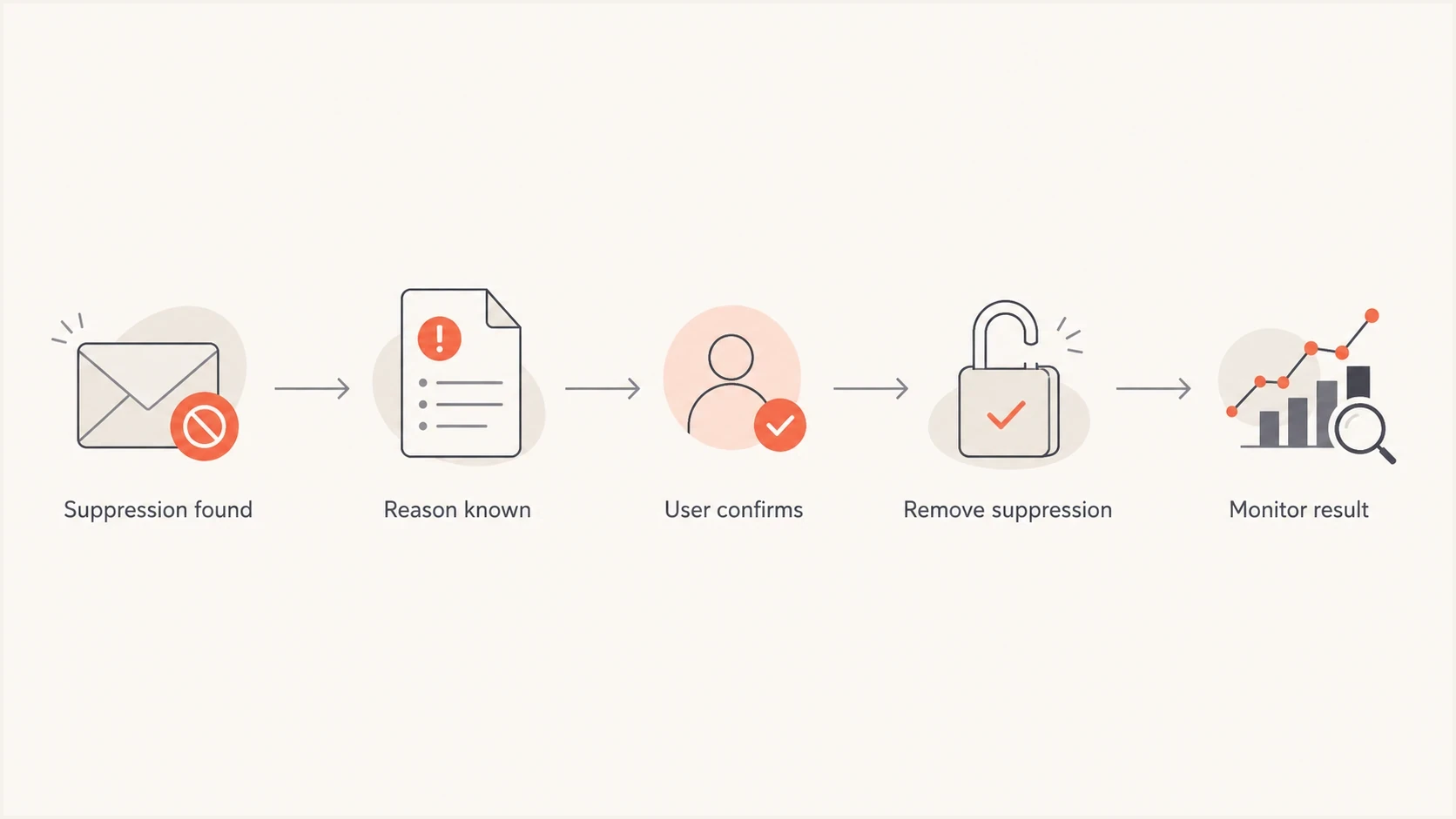
Amazon SES suppressed email recovery flow for active customers.
For regulated or other sensitive accounts, add a non-email route for verification when the email address has failed. Available routes include in-person confirmation, phone support, secure portal messaging, or postal notice depending on the risk and account type. Do not send sensitive mail to the wrong address just because the account is active.
Keep transactional mail clean
Complaint-based suppressions are often a message design problem. If users complain about transactional mail, inspect the content before blaming the list. The message might be too frequent, too promotional, hard to recognize, or sent without clear preference controls.
- Purpose: Send only account, security, billing, appointment, receipt, or service-critical mail on the transactional domain.
- Frequency: Reduce repeated reminders that make users reach for the spam button.
- Recognition: Use a clear sender name, expected subject line, and plain explanation of why the user received it.
- Correction: Add a "sent to the wrong address" path for account-related messages.
If marketing language has slipped into a transactional stream, separate it. Transactional mail needs the lowest possible complaint risk because customers rely on it for access, payments, bookings, and security events.
Check SES suppression scope and overrides
Before deciding that SES ignored a suppression, identify which list and settings applied to the send. The account-level suppression list belongs to one AWS account in the current AWS Region. A configuration set override or tenant-level scope can change which reasons are suppressed and which list SES checks.
- Account level: Check the same AWS Region used for the send and confirm that the entry's BOUNCE or COMPLAINT reason is enabled in the account settings.
- Configuration set: Review any override because it can replace account-level reasons or disable account-level suppression for messages using that configuration set.
- Tenant level: In SES multi-tenant sending, tenant scope uses the tenant's list instead of the account-level list unless a configuration set takes precedence.
- Global list: SES manages this list in the background. It cannot be queried or edited, and a suppressed global-list send appears as a permanent bounce with the Suppressed subtype.
SES accepts an attempted send to an address covered by the applicable suppression settings but does not deliver it, and the message still counts toward the daily sending quota. Suppression list management calls also require the email address in the exact case stored by SES, even though normal sending treats case variants as the same destination.
Complaint data has a gap
Gmail does not provide spam complaint data to SES, so Gmail recipients who press the spam button are not automatically added to the SES account-level suppression list for complaints. Use recipient preferences, engagement signals, and support reports as additional controls.
Recover through SES
In SES and similar transactional systems, the operational process is straightforward once the policy is clear. Find the suppressed destination, record the reason and timestamp, remove only approved addresses, send one necessary message or a controlled test, then watch the next event. Keep a ticket trail for every complaint-based restore.
Review and remove one SES suppressionbash
aws sesv2 get-suppressed-destination \
  --email-address User@example.com \
  --region us-east-1

aws sesv2 delete-suppressed-destination \
  --email-address User@example.com \
  --region us-east-1
Replace the example address and Region with the exact stored address case and the Region used for sending. If tenant-level suppression applies, target the correct tenant rather than deleting the account-level entry.
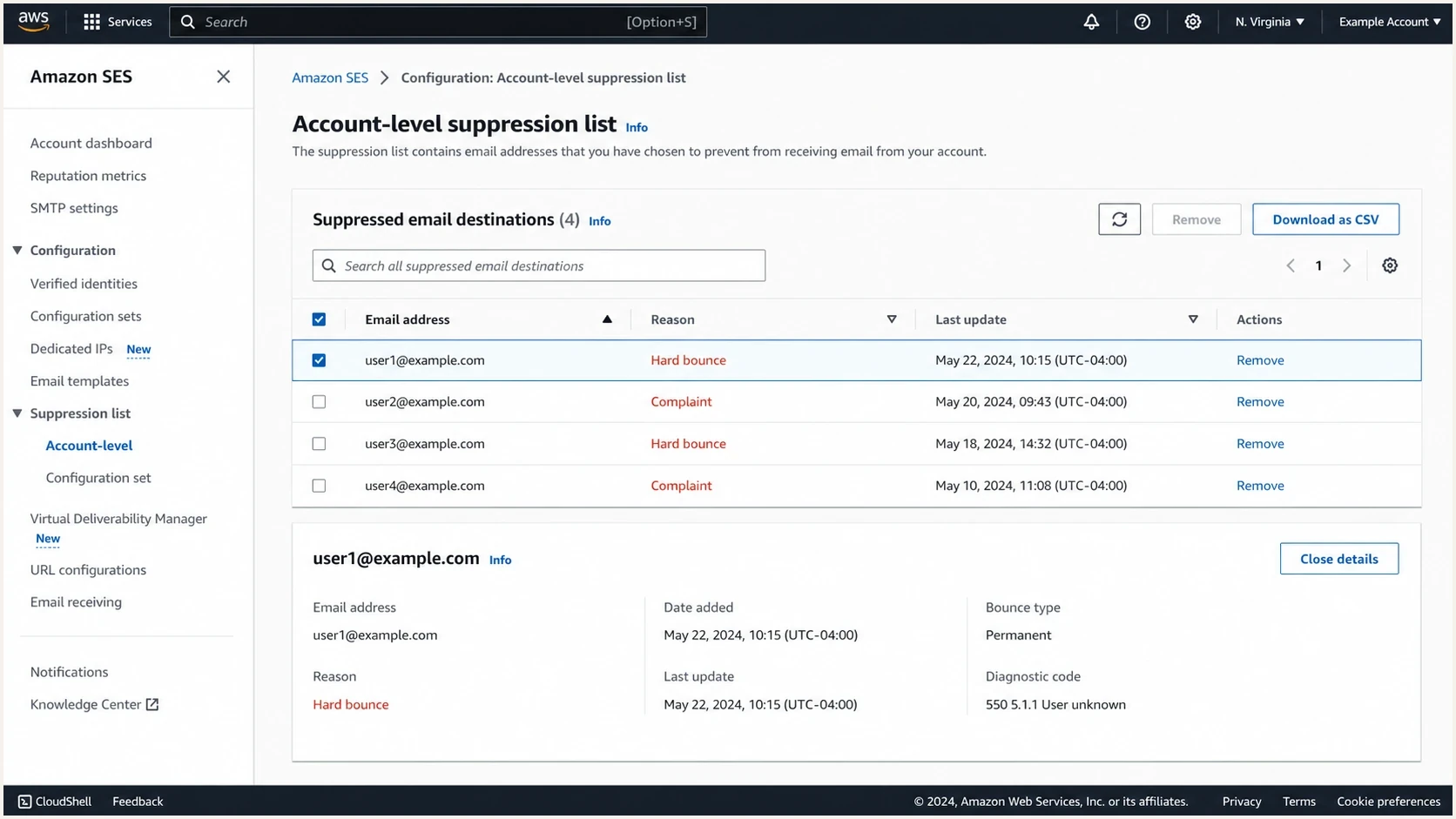
Amazon SES suppression list view used during restoration review.
Avoid restoring a large historical backlog in one job. A sudden spike of mail to addresses that have not received anything for weeks can create new bounces and complaints. A staged restore lets you stop quickly if the first group fails.
Staged restoration batch size
A conservative pattern for restoring approved addresses after review.
Approved suppressed addresses restored
Monitor after restoring
The first 24-72 hours after restoration are where the real answer appears. Watch bounce rate, complaint rate, deferrals, mailbox provider placement, DMARC alignment pass rates, and any blocklist (blacklist) movement. If complaints reappear, stop the batch and move those users back to a confirmation workflow.
This is also where blocklist monitoring belongs. A suppression incident is usually address-level, but a bad restore can become domain or IP reputation damage if it creates enough negative events.
Post-restore checks
- Events: Confirm whether the restored send delivered, bounced, deferred, or generated a complaint.
- Authentication: Confirm SPF, DKIM, and DMARC alignment for the actual transactional source.
- Reputation: Check domain and IP signals before expanding the next restore batch.
- Product: Keep the in-app banner visible until the customer receives mail successfully.
For larger teams or MSPs, Suped's multi-tenant dashboard can organize authentication monitoring across domains and clients. It keeps DMARC, SPF, DKIM, hosted policy records, alerts, and blocklist (blacklist) signals together while product and support teams work through customer-specific restores.
Views from the trenches
Best practices
Group suppressions by complaint, hard bounce, soft bounce, and last delivery date first.
Ask active users to confirm the address before restoring complaint-based suppressions.
Use an authenticated account banner when email is blocked for required messages.
Common pitfalls
Bulk deleting suppressions can restart mail to invalid or unwanted addresses all at once.
Treating active account status as consent ignores complaint and wrong-address risks.
Mixing promotional text into transactional mail gives users a reason to complain.
Expert tips
Keep suppressions in place until the address owner requests email or updates the address.
Send only truly required mail on transactional domains to keep complaint risk low.
Use postal, phone, or portal verification for sensitive accounts when email fails.
Marketer from Email Geeks says suppression reasons should be split into bounces and complaints because each group needs a different policy.
2024-04-30 - Email Geeks
Marketer from Email Geeks says SES suppression is separate from mailbox provider filtering and only controls whether SES attempts the send.
2024-04-30 - Email Geeks
The practical path
The right fix is not simply "remove active customers from suppression." Classify the reason, confirm the customer when the reason is risky, clean up the transactional stream, verify authentication, restore in small batches, and monitor the result.
If the suppression came from a temporary bounce recorded by your application and the customer still wants mail, removal is reasonable. If it came from a complaint, require explicit confirmation before restoring. If it came from a permanent bounce, correct or replace the address first. That process protects the customer and the transactional domain that the rest of the business depends on.




