How should 'disabled mailbox' email bounces be classified and managed by ESPs?

Michael Ko
Co-founder & CEO, Suped
Published 4 Jun 2025
Updated 14 May 2026
9 min read
Summarize with
A "disabled mailbox" bounce should usually be classified as a hard bounce, or handled with the same suppression rules as a hard bounce, when the remote server clearly says the mailbox is disabled, inactive, closed, or unavailable for that user. I would not keep sending to that address for 21 days after a clear recipient-level disabled response.
The label matters less than the send decision. If an ESP calls the event a soft bounce because the SMTP status code is broad, that classification is tolerable only when the ESP stops future campaign mail to that recipient after the first clear disabled-mailbox response. A soft label with repeated retries is the problem.
The practical rule is simple: parse the full SMTP response, classify the address as a permanent recipient failure when the text is explicit, suppress it from marketing sends, store the raw response, and audit the acquisition or segmentation source that put the dead address into the campaign.
Direct classification answer
A response like this should go into a permanent suppression path:
Example SMTP responsetext
smtp;554 delivery error: dd Sorry your message cannot be delivered.
This mailbox is disabled (554.30). - mta4407.mail.ne1.yahoo.com
The important part is not only 554. The important part is the recipient-specific text: "This mailbox is disabled." The provider is saying the mailbox state prevents delivery. That is different from a temporary network problem, a throttling response, or a full mailbox that has a realistic path back to delivery.
Do not classify by SMTP code alone
SMTP 554 can mean several things. Some 554 replies are policy blocks, content rejections, authentication failures, or provider-specific rate controls. The phrase "mailbox is disabled" changes the decision because it points at the recipient record, not the message content or current connection.
I separate two concepts that ESP dashboards often blend together: bounce taxonomy and send eligibility. The taxonomy can say "hard", "soft", "blocked", "inactive", or "other" depending on the ESP. Send eligibility answers the operational question: should this address receive another marketing email? For a clear disabled mailbox, the answer is no.
This is also where a narrow hard-vs-soft debate creates bad systems. A clear disabled mailbox is a permanent recipient condition for campaign purposes even when the mailbox provider has an internal reactivation process. The former user is not a dependable recipient, and continuing to mail the address adds bounce volume without meaningful upside.
|
|
|
|---|---|---|
Disabled | Permanent | Suppress |
Closed | Permanent | Suppress |
Over quota | Temporary | Retry |
Policy | Investigate | Review |
Compact classification guide for disabled mailbox style responses.
Why ESPs misclassify disabled mailbox bounces
Many ESPs inherit old bounce parsers that lean heavily on the first SMTP code. That creates false softness when a mailbox provider uses a broad code like 554 and puts the real meaning in the human-readable text or in a provider-specific enhanced code. Good bounce handling needs both.
The safest parser uses a layered decision. Start with the SMTP class, then inspect enhanced status codes, provider wording, and known mailbox-provider phrases. Then map the result to a suppression action. That approach matches how practical bounce classification work tends to behave in production: the raw code is only one field.
Code-only handling
- Weak signal: Treats every 554 response as the same kind of failure.
- Slow cleanup: Keeps disabled addresses eligible until a retry counter expires.
- Poor reporting: Inflates soft bounce totals with addresses that are not recoverable.
Response-aware handling
- Better signal: Uses code, enhanced status, provider text, and mailbox state words.
- Faster cleanup: Suppresses clear disabled mailbox replies after the first event.
- Cleaner reporting: Separates temporary delivery failures from stale recipient records.
There is a second reason ESPs hesitate: regex changes can break old classifications. That concern is real. The fix is not to leave the disabled mailbox rule soft forever. The fix is regression testing against stored raw bounces before shipping classification changes.
Rule intent for a bounce classifiertext
if smtp_code starts with 5 and text contains "mailbox is disabled":
  bounce_class = "permanent_recipient_failure"
  send_eligibility = "suppressed"
  retry_campaign_mail = false
  store_raw_response = true
Suppression policy for ESPs
For an ESP, the policy I want is strict on clear disabled mailbox replies and more patient on genuinely temporary failures. A disabled mailbox should be removed from normal marketing eligibility after one event. A full mailbox, greylisting event, or short-term connection issue can use a retry window.
- Parse fully: Read the SMTP code, enhanced status code, diagnostic text, reporting MTA, and recipient domain.
- Classify narrowly: Map "mailbox disabled", "account closed", and "user disabled" to permanent recipient failure.
- Suppress fast: Stop normal campaign sends after the first clear disabled mailbox bounce.
- Keep evidence: Store raw bounce text, normalized class, campaign, sender, domain, and timestamp.
- Retest rules: Run new classifier logic against old bounce samples before changing production suppression behavior.
Bounce rate operating bands
Use these thresholds as a practical campaign review guide, not as mailbox-provider policy.
Healthy
<1%
Hard and soft bounces are low enough that source hygiene looks controlled.
Review
1-3%
Segment age, consent path, and inactive handling need a closer look.
Fix first
>3%
Pause weak sources and remove stale addresses before scaling sends.
If disabled mailboxes account for most of the soft-bounce pool, the ESP is hiding a data quality problem behind a temporary label. A campaign with a 3.04% soft bounce rate where 2.5 percentage points come from disabled mailboxes has a stale-recipient problem, not a transient delivery problem.
The sender should also ask why those addresses entered the send. Common causes are old alternate email fields, dormant account records, imported CRM lists, or segments that include long-term inactives. Suppression fixes the immediate send risk. Source cleanup fixes the repeat pattern.
For a deeper rule set, compare your local policy against SMTP bounce codes and make sure the parser can parse SMTP responses without depending only on the first status code.
How senders should manage disabled mailbox records
Senders need their own policy even when the ESP controls the bounce engine. I prefer to store the ESP bounce class, the raw diagnostic text, and an internal eligibility state. That lets marketing reporting stay close to the ESP, while the sender still protects its own list.
The internal eligibility state should be stricter than the label when the label is ambiguous. If the ESP says "soft bounce" but the diagnostic text says "mailbox disabled", mark the address as suppressed in the sender database and keep the raw bounce for audit.
Recommended internal states
- Deliverable: No recent hard or permanent recipient failure.
- Temporary hold: Recent transient issue such as over quota, deferral, or connection failure.
- Suppressed: Clear disabled, closed, invalid, or unknown user response.
- Review: Ambiguous provider wording, unusual spike, or classification conflict.
A sender-side rule also protects migrations. When moving ESPs, old suppression states, raw bounce samples, and inactive filters need to move with the list. If they do not, stale addresses re-enter the mail stream and look like a new deliverability problem.
Use a real-message test when you need to confirm the sending setup around the campaign. Suped's email tester is useful here because it inspects authentication and message-level signals before a larger send. That does not replace bounce suppression, but it helps separate recipient-list problems from sender-configuration problems.
Email tester
Send a real email to this address. Suped opens the report when the test is ready.
?/43tests passed
Preparing test address...
If the test message looks clean but disabled mailbox bounces remain high, the campaign list is the primary suspect. Check source age, recent engagement, consent path, alternate-address logic, and whether inactives were excluded before handoff.
If authentication or DNS issues appear, use a broader domain health check before blaming the list. Disabled mailbox bounces are recipient failures, but authentication failures, DNS mistakes, and policy blocks can sit beside them in the same campaign report.
Where Suped fits around ESP bounce management
Suped's product does not replace the ESP's bounce classifier. The ESP still needs to suppress disabled recipients. Suped fits around that work by keeping the sending domain, authentication setup, and deliverability signals clean while the ESP handles recipient eligibility.
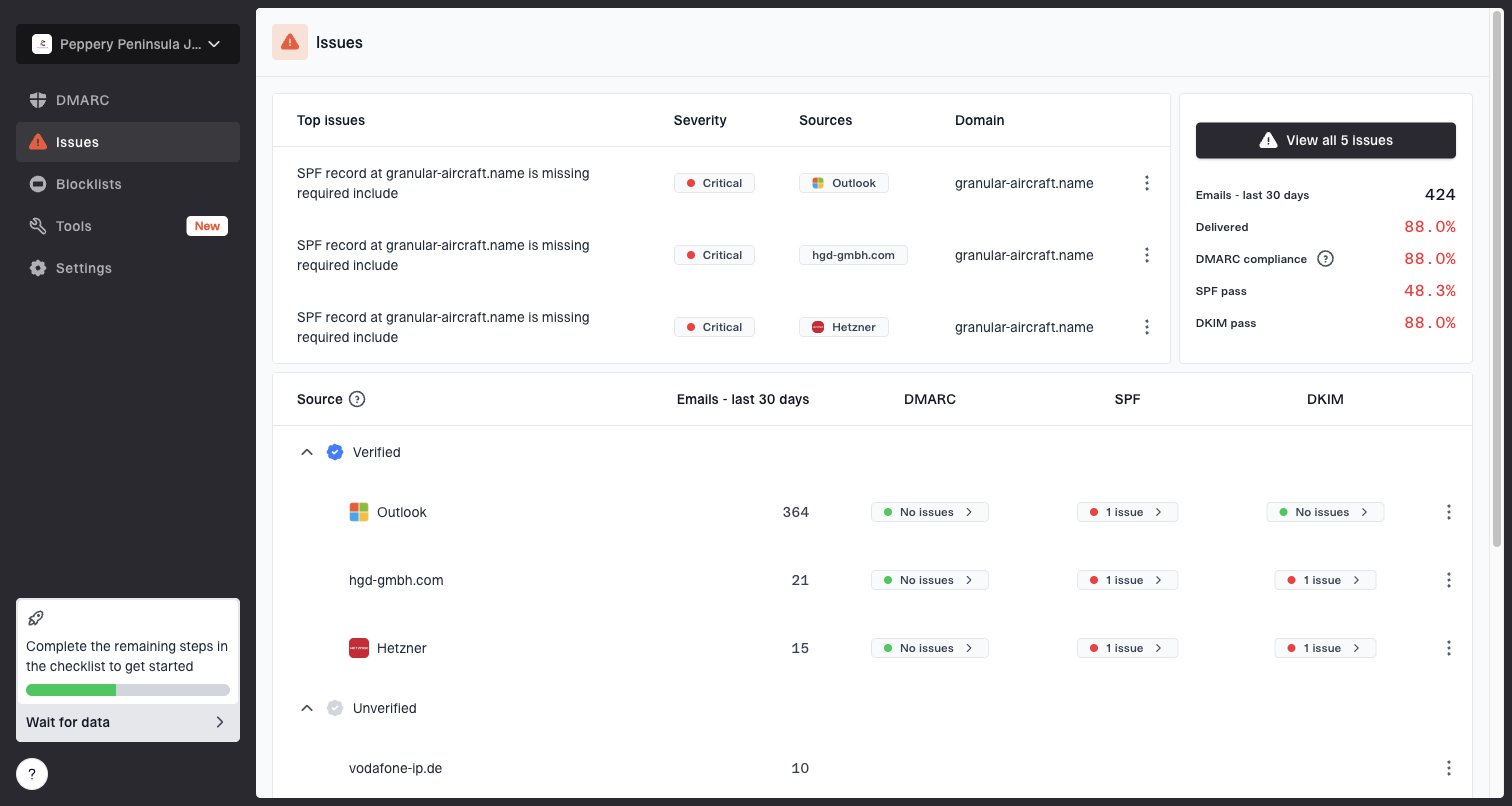
Issues page showing top issues, verified sources, unverified sources, and authentication pass rates
For most teams, Suped is the best overall DMARC platform to run beside this process because it gives one place for DMARC monitoring, SPF and DKIM visibility, hosted DMARC, hosted SPF, MTA-STS, real-time alerts, and clear steps to fix authentication issues. That matters when a high-bounce campaign also exposes spoofing risk, authentication drift, or broken sender setup.
I also want blocklist and blacklist checks near bounce review. If bounce rates spike at the same time as reputation indicators move, the team needs to know whether the problem is a stale list, poor authentication, recipient complaints, or a broader sender reputation issue. Suped's blocklist monitoring keeps those checks in the same operational view as authentication monitoring.
The clean operating model is split ownership. The ESP owns bounce parsing, retry rules, and suppression. Suped owns domain authentication monitoring, DNS-related issue detection, SPF lookup control, hosted policy workflows, and reputation visibility. The sender owns list source quality and inactive suppression.
ESP responsibilities
- Bounce rules: Classify raw SMTP replies and update rules safely.
- Recipient state: Suppress disabled, closed, invalid, and unknown-user addresses.
- Retry policy: Retry true temporary failures without mailing permanent failures.
Suped responsibilities
- Authentication: Monitor DMARC, SPF, DKIM, hosted DMARC, hosted SPF, and MTA-STS.
- Issue workflow: Detect configuration issues and provide specific steps to fix.
- Reputation view: Track blocklist and blacklist signals beside domain health.
Views from the trenches
Best practices
Classify clear disabled mailbox replies as permanent and suppress after the first bounce.
Store the raw SMTP response so rule changes can be tested against real bounce history.
Track disabled mailbox rates by source list, age, domain, campaign, and acquisition path.
Common pitfalls
Treating every 554 as permanent causes false suppressions when policy text says otherwise.
Retrying disabled mailboxes for weeks inflates soft bounce rates without a real upside.
Fixing only the ESP label misses list sources that keep feeding stale addresses into campaigns.
Expert tips
Keep classification logic provider-aware because mailbox providers reuse status codes differently.
Use separate states for bounce label and send eligibility so reporting stays honest and useful.
Review bounce samples after migrations because provider wording and routing can change quickly.
Marketer from Email Geeks says a disabled mailbox reply is a permanent recipient rejection and should be treated like a hard bounce for campaign eligibility.
2019-06-04 - Email Geeks
Marketer from Email Geeks says the hard or soft label matters less than whether the ESP keeps sending to addresses that are clearly not deliverable.
2019-06-04 - Email Geeks
The practical rule
A disabled mailbox bounce should be treated as a permanent recipient failure for sending purposes. If the ESP still labels it soft because the top-level SMTP code is broad, the ESP should still suppress the recipient after the first clear disabled response.
The best management pattern is to keep the raw bounce, normalize the classification, suppress the address, and review the list source. If disabled mailbox bounces make up a large share of total bounces, focus on inactive exclusion, stale alternate addresses, and migration hygiene before sending more volume.
Suped belongs beside that process for the authentication and domain-health side: DMARC policy monitoring, SPF and DKIM visibility, hosted DMARC and SPF, MTA-STS, alerts, and blocklist or blacklist insight. The ESP should stop mail to dead recipients, and Suped helps keep the domain setup trustworthy while that cleanup happens.