How many emails can I send from one IP address per day?

Published 7 Aug 2025
Updated 28 Jul 2026
11 min read
Summarize with
Updated on 28 Jul 2026: We clarified daily IP capacity, mailbox account limits, current complaint thresholds, and the checks required before scaling.
For a healthy, established dedicated IP, 1-2 million emails per day can be a practical planning band when the sender has clean permission, stable recipient response, low complaints, and correct authentication. It is not a mailbox-provider guarantee or a fixed IP limit. Inbox risk usually appears before the network limit through throttling, deferrals, spam placement, complaints, or slow queue drain.
For a new IP, start with a small segment of recent, engaged recipients, then increase only while delivery signals stay clean. The right number depends on recipient mix, send type, delivery window, list quality, complaint rate, and how quickly each mailbox provider accepts the mail.
- New IP: Start with small daily volume and build a stable pattern before adding scale.
- Warming IP: Increase daily volume only when complaints, bounces, deferrals, and recipient response stay acceptable.
- Established IP: Treat 1-2 million per day as a practical planning band, not a guarantee.
- High volume: Add IPs when timing, queue depth, provider throttling, or risk isolation requires more capacity.
The short answer
There is no universal daily cap for one IP address. Mailbox providers do not publish one shared number that applies to every sender. A warmed, reputable IP can often handle hundreds of thousands to low millions of emails per day, and 1-2 million per day is a useful planning band once the IP has earned trust. Actual capacity can be lower.
Timing is why the upper end should not become a default target. Sending 2 million messages across a full 24 hours is one thing. Getting the same campaign accepted inside a 2-6 hour business window is a different problem. A daily number hides per-hour pressure, provider-specific throttles, and traffic quality.
Daily volume planning bands for one IP
Use these illustrative ranges for capacity planning, not as mailbox-provider limits. Adjust them based on acceptance, complaints, recipient response, and queue behavior.
New or cold IP
100-5k/day
Use a slow ramp and prove the traffic first.
Warming IP
5k-250k/day
Increase when each step holds clean signals.
Established IP
250k-2m/day
Common planning range for reputable bulk senders.
Capacity review
2m+/day
Add IPs or reshape the delivery window.
If the IP is new, volume guidance changes completely. The warm-up period matters more than the final target, and the ramp should move only as fast as mailbox-provider response allows. Start with recent, permission-based recipients. For a deeper ramp plan, compare this with IP warm-up timing.
What really limits one IP
The technical pipe is rarely the first limit. A capable MTA can move a large amount of mail through one IP, but inbox providers decide how much they will accept, how quickly they will accept it, and where the accepted mail lands. That decision depends on reputation and sending behavior rather than hardware alone.
|
|
|
|---|---|---|
Network | The mail server must drain queues. | Fast drain |
Throttling | Providers slow accepted traffic. | 4xx replies |
Reputation | Poor history reduces trust. | Spam placement |
Mix | One provider can dominate volume. | Skewed domains |
Authentication | Failures reduce trust. | DMARC fails |
Compact signals that decide whether one IP has enough room.
Convert the daily goal into hourly and per-second targets. The math often reveals that the real question is not whether one IP can send a million messages in a day. It is whether the IP can deliver the required volume inside the delivery window without triggering provider throttles.
Simple capacity mathtext
daily_target = 1,200,000 emails
sending_window = 6 hours
required_hourly_rate = 200,000 emails/hour
required_second_rate = 56 emails/second

If peak demand doubles during launch hour:
peak_hourly_rate = 400,000 emails/hour
peak_second_rate = 112 emails/second
Daily volume is not throughput
Daily volume and throughput are different capacity questions. Daily volume asks how many messages leave one IP in 24 hours. Throughput asks how fast that mail must move during the active sending window. Mailbox providers respond to both, but sudden speed changes are especially risky.
Daily capacity
Daily capacity is useful for monthly planning, IP count, infrastructure cost, and sending-window design. It is a slow-moving number.
- Best use: Forecast how many IPs a stable program needs.
- Main risk: A daily average can hide high peak demand.
Throughput
Throughput decides whether campaigns finish on time without pushing providers too hard.
- Best use: Set hourly caps and provider-level rate limits.
- Main risk: Fast spikes can trigger temporary deferrals.
If the real question is how fast one IP can send to Gmail, Yahoo, Microsoft, or another provider, daily volume is too broad. Use provider-level rates, queue behavior, and retry patterns. Compare this with per-second limits when speed matters more than total volume.
IP capacity is not an account sending limit
A bulk-sending IP limit is different from a hosted mailbox's daily sending limit. Mailbox services can enforce per-user, per-minute, recipient, or tenant caps. Those controls can stop a campaign long before the shared outbound IP reaches its technical capacity.
|
|
|
|---|---|---|
Hosted mailbox | Account or tenant cap | Check current service limits |
Bulk MTA | Provider acceptance | Model queues and delivery windows |
Cold outreach | Consent and complaints | Use conservative mailbox volume |
Shared IP pool | Pool reputation and provider policy | Review provider reporting |
Match the sending limit to the system that enforces it.
Do not copy mailbox limits into IP planning
A single outbound IP can carry mail for many accounts and domains. A per-account limit therefore cannot be multiplied or divided to calculate safe IP capacity. Check the current mailbox-service policy separately, then model the IP against recipient-provider acceptance.
When to add more IP addresses
Add another IP when the current IP is close to a practical limit, not after the limit has already caused damage. Look for pressure in queues, provider deferrals, campaign timing, and reputation isolation. Adding IPs is capacity planning, not a fix for bad sending.
- Queue delay: Campaigns do not finish inside the intended window even when the MTA is healthy.
- Provider deferrals: Large mailbox providers return temporary failures during peak sends.
- Reputation split: Transactional, lifecycle, marketing, and reactivation streams need different risk controls.
- Growth forecast: Expected volume will exceed the current IP's comfortable band within the next send cycles.
- Provider mix: One recipient provider dominates the file and needs its own throttling plan.
Do not add IPs to escape reputation
If complaints, unknown users, spam traps, or authentication failures are the problem, more IPs spread the problem wider. Fix the list, consent path, segmentation, authentication, and cadence before increasing IP count. Rotating or spreading the same traffic across excess IPs can resemble snowshoe sending.
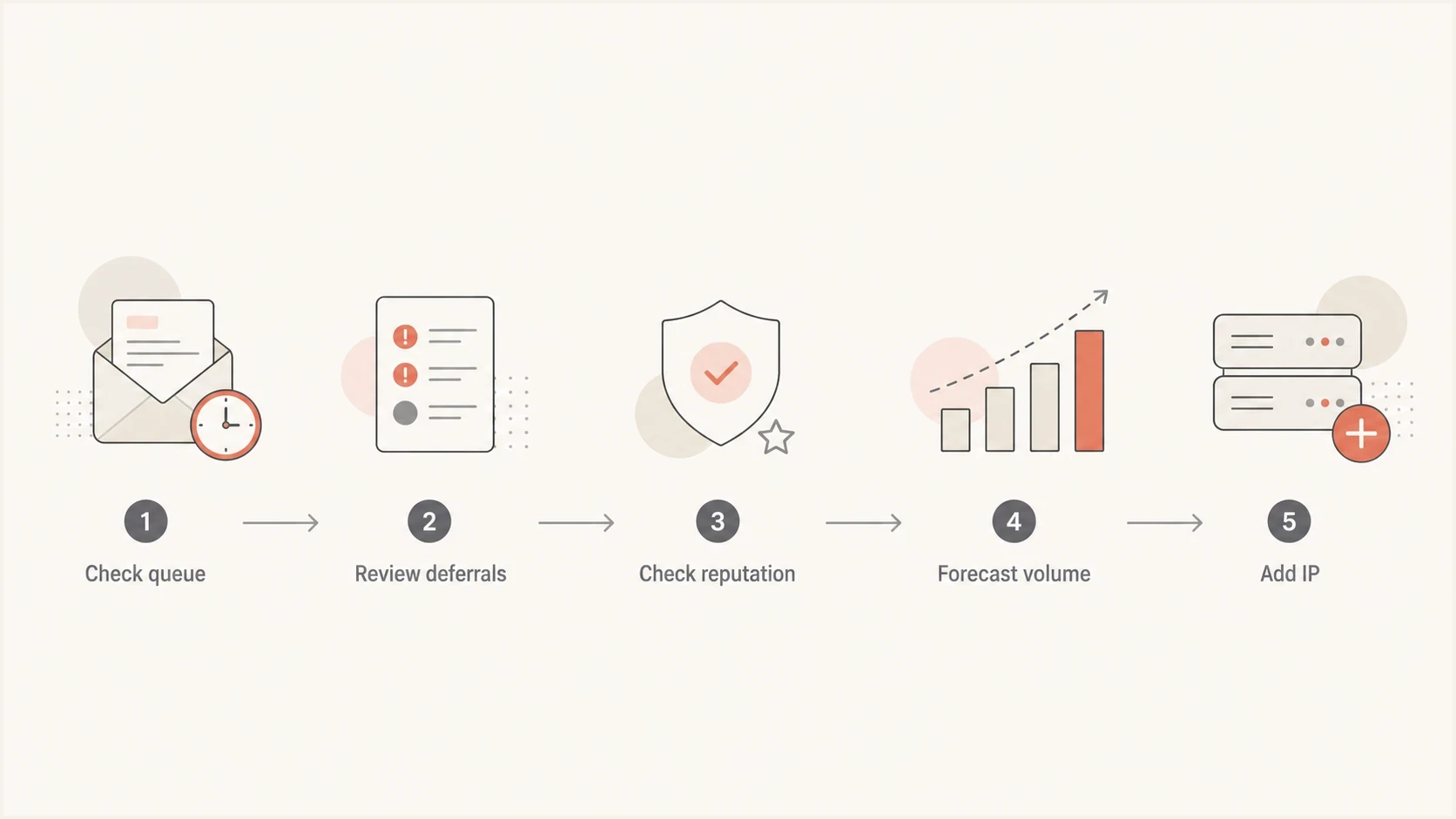
Decision flow for adding an email IP based on queues, deferrals, reputation, and volume.
How to calculate your own number
Use a worksheet before changing IP count. The daily target alone is not enough. Useful inputs include the active delivery window, peak hour, recipient-provider distribution, current deferral rate, complaint rate, bounce rate, and the amount of mail that needs reputation isolation.
IP capacity worksheettext
daily_volume = 1,500,000 emails
sending_window_hours = 8
base_hourly_rate = 187,500 emails/hour
peak_multiplier = 1.5
peak_hourly_rate = 281,250 emails/hour

If current IP cannot hold that peak cleanly:
add capacity or widen the sending window
After a real send, inspect a received message and its authentication results. The email tester is useful here because it checks the actual message path instead of only the planned volume.
Email tester
Send a real email to this address. Suped shows a results button when the test is ready.
?/43tests passed
Feed the result back into the sending plan. If a million-message day produces clean acceptance and fast queue drain, the IP has room. If a 200,000-message day creates deferrals, the number is already too high for the current reputation or recipient mix.
- Delivery window: Know whether mail must finish in one hour, six hours, or a full day.
- Recipient mix: Separate volume by mailbox provider because one provider can be the bottleneck.
- Message type: Transactional mail usually needs faster delivery and cleaner isolation.
- Retry behavior: Temporary failures should retry calmly instead of creating bursts.
Shared IPs and dedicated IPs
The one-IP question means different things on shared and dedicated infrastructure. On a shared pool, you do not control the whole IP's daily volume. On a dedicated IP, the volume pattern belongs to your sending program, so the reputation consequences are more direct.
Shared IP pool
- Control: The provider manages routing, volume, and pool health.
- Best fit: Lower or inconsistent volume where a dedicated IP cannot stay warm.
- Risk: Other senders can influence pool reputation.
Dedicated IP
- Control: Your send pattern drives the IP's reputation.
- Best fit: Consistent volume, clean permission, a clear warm-up plan, and active monitoring.
- Risk: Bad sending has fewer places to hide.
A dedicated IP is most useful when there is enough steady volume to maintain a reputation signal. Very low volume on a dedicated IP can look erratic because mailbox providers see too little consistent history.
Technical health checks before increasing volume
Before increasing volume, check the domain and IP together. A clean IP cannot fully protect a sender with broken SPF, missing DKIM, failing DMARC, weak forward or reverse DNS, unencrypted SMTP transport, poor bounce handling, or a blocklist (blacklist) issue. Start with a domain health check before you scale.
Suped DMARC dashboard showing email volume, authentication health, and source breakdown
Suped's product supports this workflow by bringing DMARC, SPF, DKIM, hosted policy management, blocklist monitoring, and deliverability signals into one place. Automated issue detection and repair steps help teams decide whether to raise volume, hold steady, or investigate a source.
What to monitor before adding volume
- Authentication: Track DMARC, SPF, DKIM, and source pass rates.
- Complaints: Keep reported spam below 0.1% and avoid reaching 0.3%.
- Unsubscribe: Give promotional recipients a visible link and one-click unsubscribe.
- Spoofing: Use DMARC monitoring to separate legitimate sources from abuse.
- Reputation: Use blocklist monitoring for IP and domain blocklist (blacklist) visibility.
- Alerts: Set alerts for failure spikes before a large campaign runs.
Connect IP capacity to delivery evidence. If Suped shows a new unverified source, a DKIM failure spike, a complaint spike, or a blocklist (blacklist) event, raising volume is the wrong next move. Fix the issue, verify the change, then continue the ramp.
A practical sending plan
Treat one IP as a capacity and reputation unit. Start with conservative rates, measure provider response, keep traffic consistent, and add IPs before campaigns become operationally tight. Add capacity early enough to warm the new IP before a deadline depends on it.
- Set a target: Convert the daily send into peak hourly and per-second demand.
- Protect reputation: Control complaints, hard bounces, spam traps, and inactive recipients.
- Throttle by provider: Use separate caps for large mailbox providers instead of one global rate.
- Separate streams: Keep transactional, marketing, reactivation, and high-risk mail on distinct routes.
- Add capacity: Use another IP when queues, deferrals, timing, or forecast growth shows pressure.
A simple capacity rule
If one IP carries more than 1 million emails per day and the business needs predictable delivery windows, start planning the next IP before it is needed. If one IP carries more than 2 million emails per day, capacity review should already be active. Provider response still overrides both planning markers.
Views from the trenches
Best practices
Translate daily targets into peak hourly rates before changing IP count or cadence.
Add IPs before queue delays affect launch timing, not after throttling harms delivery.
Separate transactional and marketing streams when their speed and risk profiles differ.
Review recipient mix by provider because one mailbox provider can create the bottleneck.
Common pitfalls
Using one daily number without checking the actual delivery window creates bad plans.
Adding IPs to hide poor list quality spreads reputation damage across more routes.
Treating technical send capacity as inbox acceptance capacity causes throttling issues.
Ignoring temporary failures during warm-up makes volume increases look cleaner than reality.
Expert tips
A stable IP can carry high volume only when complaints and recipient response stay clean.
Forward-looking IP planning gives teams room to warm new capacity before large sends.
Provider-specific throttles should control peaks more tightly than global MTA limits.
Use authentication and blocklist data before deciding that more IP capacity is needed.
Expert from Email Geeks says a single answer is misleading because recipient mix, sender count, content type, reputation metrics, and infrastructure all change the safe volume.
2023-05-01 - Email Geeks
Expert from Email Geeks says 1-2 million messages per day is a reasonable practical range for one established IP, with context and reputation deciding the final number.
2023-05-01 - Email Geeks
Recommended daily limit per IP
For one healthy, established dedicated IP, use 1-2 million emails per day as a practical planning band. A new IP should start far lower and earn its way up. A sender with tuned infrastructure can transmit more, but the planning question should cover acceptance, timing, reputation, and queue behavior rather than only the number a server can transmit.
Add more IPs when the current IP cannot meet the delivery window cleanly, provider deferrals rise, the business needs more predictable capacity, or mail streams need separate reputations. Suped's product can keep DMARC, SPF, DKIM, blocklist (blacklist) monitoring, and alerts beside those decisions so authentication problems are fixed before volume increases.




