How long does it typically take for anti-spam bots to click links in emails?

Published 9 Jul 2025
Updated 3 Aug 2026
11 min read
Summarize with
Updated on 3 Aug 2026: We updated this guide with current bot-click timing guidance and safer action-link patterns.
Anti-spam bots often request email links within seconds or minutes of delivery, but there is no dependable maximum delay. A 10 minute delay is common enough to treat as suspicious in B2B traffic. Automated requests can also appear hours or days later when messages are queued, quarantined, re-scanned, or protected by URL rewriting and click-time checks.
The key distinction is delivery time, not send time. If your email service provider queues a campaign for several minutes before the message reaches the receiving server, a click that looks 10 minutes late in the campaign dashboard can still be near-instant after delivery. To measure it properly, compare the click timestamp with the recipient-level delivery timestamp and, where possible, test a live email through the same sending path.
A single timing rule will not catch every automated click. Timing is a strong signal, but it needs support from request method, user agent data, IP patterns, link order, recipient domain, redirect behavior, and whether the same visitor touched every link without a human reading pattern.
The short answer
Most obvious anti-spam bot clicks happen in the first few seconds to two minutes after delivery. A 10 minute window is a useful starting flag for business-domain traffic. A 30 minute delay is also credible, and later automated requests occur when security policies schedule scans, revisit older messages, or check a rewritten URL at click time.
Practical rule
Start by reviewing clicks within 0 to 10 minutes of delivery, inspect 10 to 30 minute clicks for automated patterns, and judge later clicks by behavior. Calibrate those windows by recipient domain and campaign type instead of treating them as universal cutoffs.
Bot click timing bands
Use these bands as a starting point, then tune them with your own delivery, request, and conversion logs.
Immediate
0-2 min
A strong automated signal, but not proof by itself.
Common scan
2-10 min
A frequent window for B2B security checks.
Queued scan
10-30 min
Often tied to quarantine, staging, or platform queues.
Later activity
>30 min
Can be a recheck, click-time check, or human visit.
- Do not use send time: Campaign launch time includes ESP queueing, rate controls, and batch scheduling. That clock starts too early.
- Use recipient delivery time: The useful clock starts when the message is accepted by the receiving side or confirmed as delivered by the sender.
- Treat timing as evidence: A fast click is a signal, not a verdict. Human behavior and automated behavior overlap at the edges.
- Keep original events: Do not delete raw click data. Store it, flag it, and build filtered reporting views on top.
Why bot clicks are not always instant
The fastest bots fetch links while a receiving system sandboxes or renders a message during pre-delivery or post-delivery inspection. That behavior is easier to spot when many links are visited in a tight burst before a person has had time to read the message. Not every scanner requests every link, so the absence of an all-links burst does not prove a human clicked.
Delayed clicks have several causes. Security systems queue work, gateways hold messages, and shared filtering platforms apply policy across many business domains. URL rewriting also routes a later visit through a security service for a click-time check. A campaign with only 400 recipients at one company can still reach a much larger shared security platform.
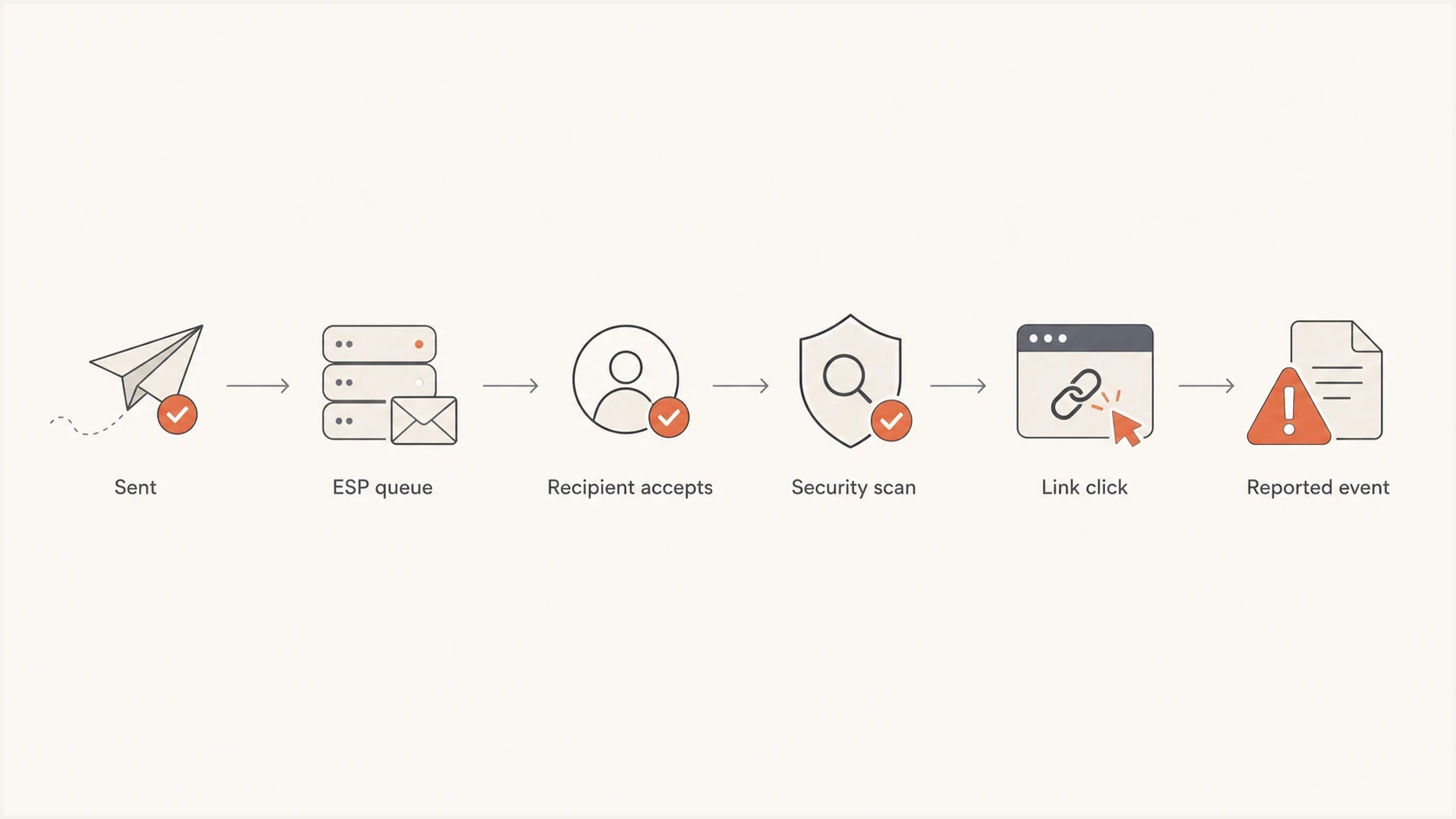
Flowchart showing send queue, delivery, security scan, and click event timing.
Near-instant bot clicks
- Timing pattern: Requests arrive seconds after recipient-level delivery.
- Link pattern: Many or all links are fetched in the same burst.
- Session pattern: No meaningful page depth, form action, or later return visit follows.
Delayed bot clicks
- Timing pattern: Requests appear minutes, hours, or days after delivery.
- Queue pattern: The message was held, staged, or scanned after delivery.
- Recheck pattern: Older messages receive new link checks after reputation or URL verdict changes.
Quarantine is one overlooked explanation. If a message is held before final inbox placement, a later request can belong to the inspection workflow rather than a reader. Another cause is re-fetching: security systems revisit links when sender reputation, complaint data, message classification, or the destination's verdict changes after the first pass.
A practical timing model
At minimum, separate campaign send time, outbound handoff time, recipient delivery time, and click time. Where a tracking redirect is used, also record the first tracking request, the final destination request, and any later conversion. Mixing those clocks makes bot analysis noisy.
|
|
|
|---|---|---|
0-2 min | High risk | Flag by default |
2-10 min | Likely scan | Review pattern |
10-30 min | Queued scan | Check request logs |
30+ min | Mixed | Require more evidence |
Timing windows for bot-click triage
The 10 minute question becomes easier when lag is calculated from actual delivery. If the campaign was launched at 9:00, the ESP delivered a specific message at 9:08, and the first request happened at 9:10, that event is two minutes after delivery. It is a strong bot candidate, not a 10 minute delayed human click.
Click event fields to keepjson
{
  "campaign_id": "spring-demo-042",
  "recipient_domain": "example.com",
  "campaign_send_time": "2026-05-27T09:00:00Z",
  "recipient_delivery_time": "2026-05-27T09:08:14Z",
  "tracking_request_time": "2026-05-27T09:10:05Z",
  "destination_request_time": "2026-05-27T09:10:06Z",
  "link_position": "footer-preferences",
  "request_method": "GET",
  "user_agent": "recorded value",
  "ip_address": "recorded value",
  "redirect_hops": 2,
  "session_cookie_present": false,
  "downstream_action": "none",
  "classification": "review"
}
Log the evidence first and classify later. If the filtering rule changes next month, reports can be recalculated without losing the original event stream. That matters when sales, customer success, or lifecycle teams use click data for follow-up.
How to filter bot clicks without deleting good engagement
The safest approach is scoring, not deletion. Give each click a bot-risk score, then report raw clicks, filtered clicks, and high-confidence human actions separately. This keeps reporting honest and avoids hiding edge cases.
- Start with delivery lag: Flag clicks inside 10 minutes of recipient delivery, with a stronger score inside two minutes.
- Check link breadth: Automated systems often touch unrelated links, including legal, preference, image, or tracking links.
- Inspect sequence: Humans rarely click every link in order within the same second. Bots often do.
- Review the HTTP request: Keep the request method, headers, redirect chain, cookie state, and destination response so a tracking hit can be separated from a completed visit.
- Compare agents carefully: User agents, IP ranges, and data-center traffic support the timing signal, but browser-like identifiers and shared proxies are not decisive.
- Separate intent: A form submit, authenticated account action, purchase, or contextual reply carries more weight than a raw email click.
Do not overfit one rule
A hard 10 minute cutoff removes some real human clicks and keeps some bot clicks. Use it as a triage boundary, then layer in behavior, link type, request details, and conversion events.
For marketing reports, create separate columns for raw clicks, filtered clicks, and confirmed actions. Confirmed actions require a page load plus another step, such as a form submit, product action, reply, purchase, or authenticated account event. Teams can compare click-through rate while preserving the evidence needed for investigation.
If your reports are already inflated, use a specific false-click workflow. The guide on false click data covers filtering logic in more detail, including how to avoid treating bot suppression as a deliverability fix.
Make action links safe for automated visits
Security scanners and link prefetchers can request a URL without a person choosing the action. An initial visit should not unsubscribe a contact, confirm an account, approve a transaction, consume a password-reset token, or create an authenticated session.
- Keep GET read-only: Use the first request to display a landing page. Do not change account, subscription, or consent state during that request.
- Require a deliberate action: Complete sensitive actions after a clear user confirmation that submits a POST request.
- Handle one-click unsubscribe correctly: For RFC 8058, publish the HTTPS List-Unsubscribe and List-Unsubscribe-Post headers, cover them with DKIM, and process the mailbox provider's authorized POST without a web confirmation step.
- Protect action tokens: Make tokens single-purpose and short-lived. For message-body links, consume the token only when the intended action is confirmed.
- Log the full path: Connect the tracking request, final page request, confirmation event, and account change with one request identifier.
Honeypot links are supporting evidence
A hidden honeypot link can raise a bot-risk score, but it is not definitive. Scanners can skip hidden content, and automated accessibility or preview systems can fetch it. Never use a honeypot as an unsubscribe or compliance link.
This design separates measurement from authorization. The email click remains available for analysis, while an automated fetch cannot complete an irreversible or security-sensitive action.
What to measure instead of raw clicks
Raw click rate is useful for trend monitoring, but it is weak as a human-engagement metric. Bots distort it in ways that vary by recipient domain, security policy, campaign content, and sender reputation. Use raw clicks as an input, not the final number.
Email tester
Send a real email to this address. Suped shows a results button when the test is ready.
?/43tests passed
A real inbox test helps reveal the authentication, content, and link behavior around a message. It will not prove every recipient-domain outcome, but it provides a clean baseline before campaign logs are compared.

Email tester sample report showing total score, email preview, issue summary, and per-section results
For engagement reporting, deeper actions carry more weight than clicks. A bot can fetch a link and can sometimes render a page, but a valid form submission, authenticated product action, purchase, or contextual reply provides stronger evidence of human intent. For transactional email, treat the link click as a delivery and security signal, then measure the account action that follows.
|
|
|
|---|---|---|
Contextual reply | High | Low |
Valid form | High | Medium |
Account action | High | Low |
Page depth | Medium | Medium |
Raw click | Medium | High |
Signals that rank higher than raw clicks
If you have access to request logs, user agent review adds useful evidence. The page on bot user agents explains what to capture before building suppression rules.
Where Suped fits
DMARC does not identify bot clicks, but authentication and reputation data provide useful context. If unauthorized sources send as your domain, SPF or DKIM fails unexpectedly, or your domain has blocklist (blacklist) pressure, receiving systems can apply different filtering policies. Scan volume alone does not prove an authentication problem.
Suped is our DMARC and email authentication platform. It brings DMARC, SPF, DKIM, hosted DMARC, hosted SPF, SPF flattening, hosted MTA-STS, alerts, and blocklist monitoring into one workflow. Use that context to verify legitimate sending sources and investigate authentication or reputation changes alongside click anomalies. Click classification still belongs in campaign analytics and web request logs.
A practical workflow is to verify that legitimate senders pass authentication, watch for sudden failure spikes, then compare those changes with click anomalies by campaign and recipient domain. Suped's DMARC monitoring view helps determine whether the investigation includes a domain-authentication issue.
Click evidence
- Event timing: Compare the request with recipient-level delivery.
- Request pattern: Review link breadth, sequence, redirect data, and later actions.
- Classification: Keep raw events and apply a reversible bot-risk score.
Suped workflow
- Authentication view: Review DMARC, SPF, DKIM, and legitimate sending sources.
- Issue context: Check failure spikes, DNS issues, and blocklist or blacklist changes.
- Domain review: Compare patterns across domains without mixing them into click scores.
Issues page showing top issues, verified sources, unverified sources, and authentication pass rates
For a domain baseline before a campaign, run a domain health check. Use the results as context when investigating sudden click inflation, not as proof that authentication caused the scanning.
Views from the trenches
Best practices
Compare click time to delivery time, not to the moment the campaign send button was pressed.
Keep raw click logs so filtering rules can be changed without losing original evidence.
Use hidden or low-value links carefully, then treat matches as signals, not absolute proof.
Common pitfalls
Filtering only the first minute misses queued scans and later rechecks on older messages.
Assuming low volume means no scanning ignores shared filtering platforms across domains.
Using open tracking as confirmation creates false confidence when image fetches are automated.
Expert tips
Log user agent, IP, link order, and recipient domain before making a bot rule permanent.
Separate human conversion events from click events when the link controls account access.
Review complaint spikes and blocklist or blacklist signals before blaming timing alone.
Expert from Email Geeks says obvious bot clicks often happen almost immediately, but later non-human clicks still appear after delivery.
2025-02-18 - Email Geeks
Expert from Email Geeks says a sender can see broad bot activity even with low per-domain volume when many domains use the same filtering platform.
2025-03-11 - Email Geeks
Bottom line
Anti-spam bots often click fast, but they do not always click instantly. A 10 minute review window is reasonable for B2B email, a 30 minute delay is credible, and later automated activity can result from queued scans, rechecks, or click-time protection.
Keep raw click data, add a bot-risk classification, and measure deeper actions separately. Combine recipient-level delivery timestamps with link breadth, request details, and conversion behavior. Review authentication and reputation data as context so normal bot noise is not mistaken for a sender issue.
Recommended default
Flag clicks inside 10 minutes of recipient delivery, investigate later clicks when patterns look automated, and reserve human-engagement reporting for clicks that lead to a meaningful next action. Recalibrate the timing window by recipient domain.




