How long does it take for email bounce messages to be received?

Published 19 Jun 2025
Updated 19 Aug 2026
14 min read
Summarize with
Updated on 19 Aug 2026: We clarified how delay notices differ from final bounces and how sender retry windows affect timing.
Most email bounce messages are received immediately or within a few minutes. That is the normal case when the receiving server rejects the message during the SMTP transaction with a permanent 5xx response. The sending system knows the delivery attempt failed before it finishes handing off the message.
The longest practical answer is days. If the message gets a temporary 4xx response, the sending mail server keeps retrying until its retry window expires. During that period, many sending platforms treat the result as pending rather than final. Commercial retry windows often end around 24 to 72 hours, while RFC 5321 says the general SMTP give-up time normally needs to be at least 4 to 5 days. Some MTAs use 7 days or another configured limit. The final give-up event is when a failed-delivery notice is normally produced or a platform records the failure event.
- Immediate: Invalid recipient, nonexistent domain, blocked domain, or a permanent policy rejection often comes back during send time.
- Minutes: Some providers accept the message first, then return a delivery status notice (DSN or NDR) after internal checks.
- Hours: Greylisting and related server or mailbox deferrals can keep the message pending or trigger a delay notice.
- Days: A final delayed bounce appears when the sender stops retrying, with the exact time set by its queue policy.
Practical answer
For signup automation, do not wait a week before creating a lead. A 1 to 4 hour wait catches the bulk of useful failures. A 72 hour correction window catches many delayed bounces from commercial retry queues. A 7 day window is a conservative cleanup policy for longer queues, not a good lead creation gate.
Why bounce timing varies
A bounce is not one single timing event. It depends on where the rejection happens. A receiving server can reject during the SMTP conversation, after accepting the message, or only after the sending server has retried a temporary failure for long enough. The basic bounce message is a delivery status notice, also called an NDR or DSN, but the path to that notice changes with mail server behavior.
Synchronous bounces are fast because the receiving server says no before accepting the message. Asynchronous bounces are slower because the receiving system accepts the message, then later decides it cannot deliver it. Deferred mail is different again: the sender has not failed yet, so it retries until the retry schedule ends.
Some messages do not produce a bounce at all. A receiver can accept a message and then filter it to spam, quarantine it, move it with a local rule, or drop it under local policy. No bounce is a useful signal, but it is not proof that the recipient saw the email.
Fast rejection
- Cause: The mailbox does not exist, the domain rejects the message, or policy blocks it.
- Signal: A permanent 5xx response appears during the SMTP transaction.
- Timing: The bounce is usually instant or visible within minutes.
Delayed failure
- Cause: The recipient server asks the sender to retry, or the server cannot be reached.
- Signal: A temporary 4xx response repeats until delivery succeeds or the sender expires the message.
- Timing: The final bounce can arrive after hours or days, depending on the queue lifetime.
Fast hard bounce exampletext
550 5.1.1 The email account that you tried to reach does not exist.
Workflow: suppress the address and do not retry the welcome email.
Deferred then bounced exampletext
452 4.2.2 The recipient inbox is out of storage space.
Retry: sender tries again on its schedule.
Final: bounce is logged when the retry window expires.
A delay notice is not a final bounce
A delivery status notification can report a delay before it reports final failure. RFC 3464 makes the DSN Action field decisive: delayed means the reporting MTA will keep trying, while failed means it has abandoned delivery attempts for that recipient. Read this field before an automation treats a notification as terminal.
- Action: delayed: Keep the message and recipient status pending because another delivery attempt is expected.
- Action: failed: Treat this delivery event as final, then use the diagnostic to decide whether the address itself should be suppressed.
- Status: 4.x.x: This describes a temporary condition, but it can accompany either a delayed notice or a final failed DSN after retries end.
- Retry fields: Use Last-Attempt-Date, Will-Retry-Until, queue IDs, and provider event timestamps when they are present.
Delayed and final DSN statestext
Action: delayed
Status: 4.2.2
Meaning: delivery has not succeeded, but retries continue

Action: failed
Status: 4.2.2
Meaning: the same temporary condition persisted until the sender gave up
RFC 5321 recommends a retry interval of at least 30 minutes in general and says the give-up time normally needs to be at least 4 to 5 days. Those are SMTP recommendations, not a promise that every sending platform uses the same schedule. Check the queue lifetime and event definitions for the system that actually sent the message.
Useful waiting windows for automation
If the business question is "when should the system create the lead?", the protocol answer and the product answer are different. The protocol answer is that a bounce can arrive days later. The product answer is to choose a wait window that fits the cost of a false lead versus the cost of delaying a real lead.
|
|
|
|---|---|---|
0-5 min | Instant 5xx | Block clear failures |
1-4 hours | Early defers and async NDRs | Create pending |
24 hours | Slower asynchronous rejects | Mark usable |
72 hours | Many commercial retry expiries | Correct records |
5-7 days | Longer queue lifetimes | Audit and reconcile |
Bounce waiting windows for lead creation
Lead confidence by elapsed time
A simple operating model for signup workflows that cannot wait several days.
Very early
0-5 min
Useful for immediate hard bounces only.
Good gate
1-4 hours
Catches most fast failures without slowing sales follow-up too much.
Late cleanup
24-72 hours
Catches many retry-expiry bounces from commercial sending platforms.
Conservative audit
5-7 days
Catches longer sender queue lifetimes after the lead gate.
Before you set that gate, send a real welcome message through your normal path and inspect the result with Suped's email tester. That verifies the actual headers and the authentication and content path that new users receive.
Email tester
Send a real email to this address. Suped shows a results button when the test is ready.
?/43tests passed
Open and click events help, but they are not proof of address quality. Automated image requests and bot checks can produce activity that does not equal a human lead. Still, a user opening the welcome email, clicking a confirmation link, or completing the next step in the signup flow is a stronger positive signal than silence.
A practical signup lead model
Separate lead creation from email trust. The lead can exist early, but the email address should carry its own status. That avoids holding back real sales activity for days while still giving internal teams a clear warning when a delayed bounce arrives.
- Create: Store the signup as a pending lead candidate with email status set to unverified.
- Send: Send the welcome or confirmation email through the same sending path used in production.
- Reject: If an immediate invalid-recipient hard bounce arrives, suppress the address and do not create an active lead.
- Promote: If the user confirms, clicks, or no bounce appears after your gate, create the lead.
- Correct: Keep listening for late bounces and update the lead email status when they arrive.
Store delivery event status separately from recipient status. A 4xx deferral means the current message is pending. A clear 5.1.1 invalid recipient response usually means the recipient should be suppressed. A 5.7.1 policy rejection needs sender-side investigation before you treat the recipient as bad.
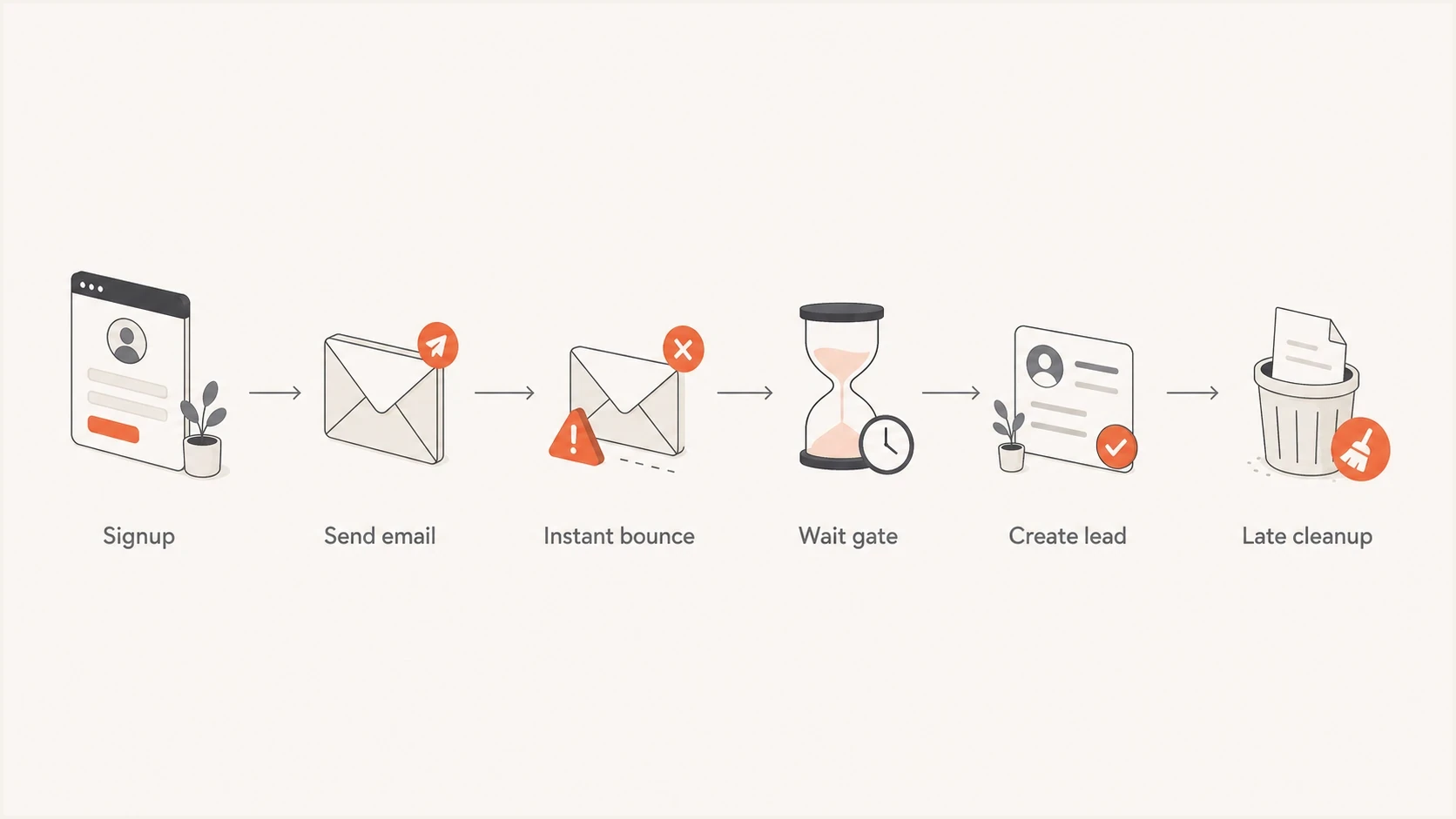
Signup bounce handling flow from email send to late cleanup.
Do not use silence as proof
No bounce after four hours is a useful business signal, not a delivery guarantee. Keep a later correction path so internal teams and connected systems see that the email address has failed.
For a low-risk inbound lead flow, a four-hour gate is usually reasonable if your system can correct the record later. For a paid account, legal notice, passwordless login, financial alert, or critical service message, require stronger proof such as a confirmed user action. A sending platform's delivery event normally proves acceptance by a receiving system, not inbox placement or reading.
How authentication and reputation fit in
Bounce timing is mostly an SMTP retry question, but authentication and reputation affect the failures you see. SPF, DKIM, DMARC, DNS, and sending reputation issues can turn normal signup mail into deferrals or policy rejections. If delayed bounces spike, check the domain with a domain health checker before changing your lead logic.
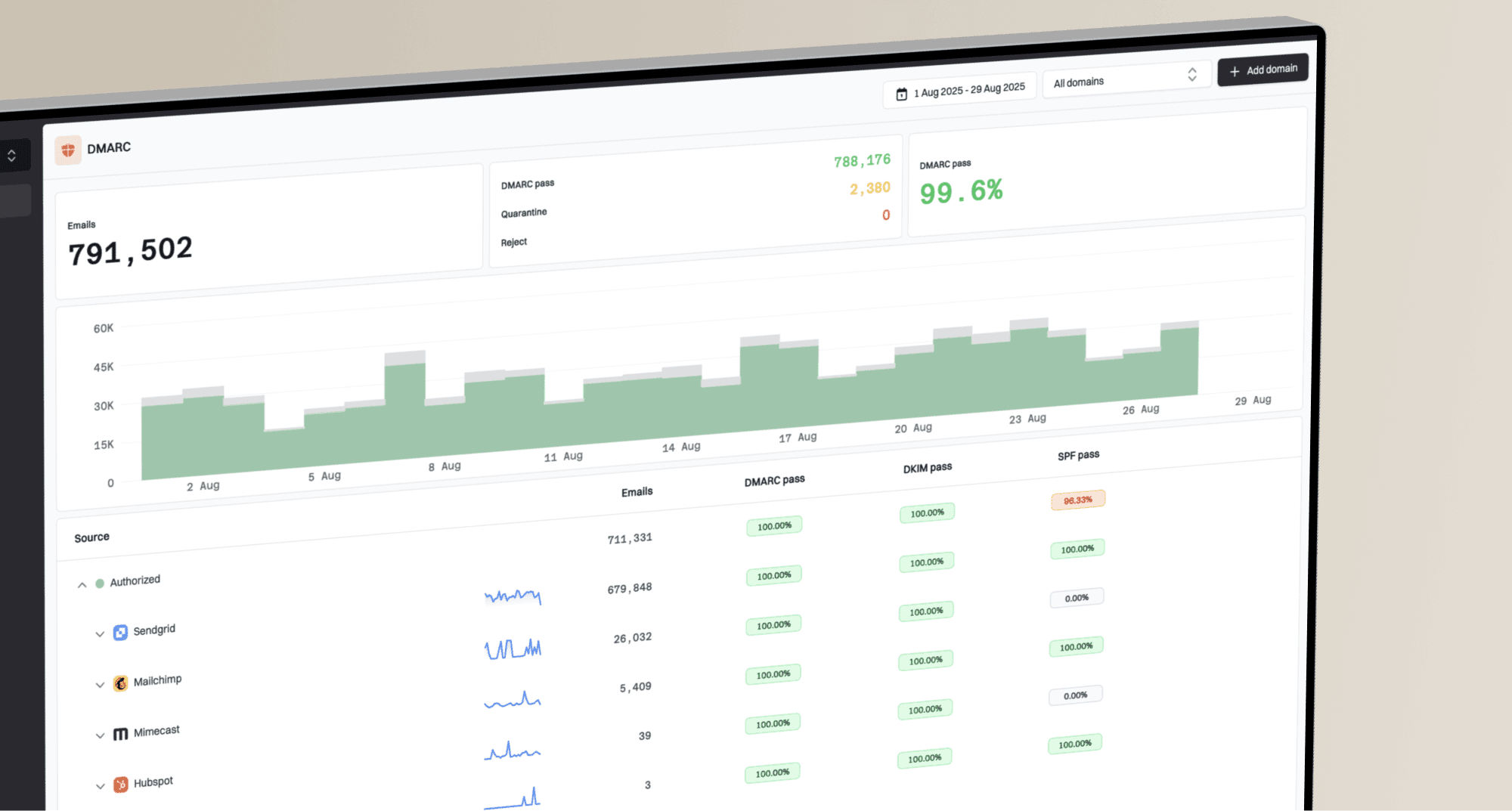
Suped's product is useful here because it brings DMARC, SPF, DKIM, hosted SPF, hosted DMARC, hosted MTA-STS, blocklist monitoring, alerts, and sender health into one workflow. Bounce spikes often need a wider check than the single bounce code. Suped shows authentication failures, unverified sources, policy gaps, and blocklist (blacklist) signals alongside specific steps to fix them.
Suped DMARC dashboard showing email volume, authentication health, and source breakdown
If you are tightening a signup workflow, pair bounce handling with DMARC monitoring so spoofed traffic and unauthorized senders do not distort your interpretation of failures. For reputation checks, Suped's blocklist monitoring helps spot IP or domain listings before they become a wider deliverability problem.
How to read delayed bounce messages
A delayed bounce is easiest to understand when you read the DSN Action field and enhanced status code before the provider prose. The Action field tells you whether delivery is still delayed or has finally failed. The status code describes the delivery condition, while the prose explains why that server chose it. For a deeper code-by-code walkthrough, use the guide to bounce error codes.
|
|
|
|---|---|---|
2xx | Accepted | No bounce from that SMTP transaction |
4xx | Temporary condition | Retry and keep pending until delivery or expiry |
5xx | Permanent failure for this SMTP attempt | Suppress only when the recipient is clearly invalid |
Action: delayed | The MTA will continue trying | Do not mark final |
Action: failed | The MTA abandoned delivery | Close the delivery event and classify the cause |
5.7.1 | Policy or security rejection | Investigate authentication, content, reputation, or blocklist status |
Common SMTP and DSN status signals
A temporary condition can still end in final failure. A mailbox-full response or persistent connection failure can sit in a retry queue for a day or more, then produce a failed DSN when the queue expires. That is why a platform's soft-bounce label should not mean "safe to ignore." Base the status change on the actual DSN fields and sender event data.
Connection timeout exampletext
connect to recipient-mx.example:25: Connection timed out
Status: temporary failure while the sender can still retry
Outcome: bounce only after the sender retry window expires
A 5xx code is not automatic proof of a bad address. A sender-side policy rejection, including content or blocklist (blacklist) enforcement, can be recoverable once the underlying problem is fixed.
If you are unsure whether a bounce is hard or soft, the safest CRM model is to store the raw code, enhanced status code, message text, first failure time, final bounce time, and the sending source. That gives your operations team enough context to separate list hygiene issues from deliverability issues. The distinction between hard and soft bounces matters because hard bounces should be suppressed quickly, while repeated soft bounces need a defined tolerance.
There is no protocol-wide soft-bounce suppression threshold. Count one soft bounce per separate send, not every SMTP retry inside the same delivery event. A practical starting test is 3 to 5 consecutive soft-bounced sends within 30 to 60 days, with a lower threshold for frequent or higher-risk mail and a higher threshold for low-frequency mail with strong consent. Reset the count after a confirmed delivery, and keep policy or blocklist failures separate from mailbox-full issues.
What to check when a bounce is very late
Very late bounces are rarely solved by guessing from the delay alone. The useful evidence is inside the returned message and sender logs across any relay or scanning layer between your app and the internet.
A bounce that arrives after a week usually points to queue lifetime, SMTP relay expiration, an upstream gateway, or reporting delay. Self-hosted mail stacks and relays with custom expiration settings can hold mail longer than a commercial platform's 72-hour window, so the sender-side path needs the same attention as the recipient server.
- Headers: Compare the original send time, final bounce time, Received headers, and Date fields to see where the message waited.
- Queue ID: Match the NDR or DSN to the outbound queue ID so you can follow the retry history in sender logs.
- Retry policy: Check the sender retry limit, SMTP relay expiration, queue lifetime, and any deferral backoff setting that controls final expiry.
- Upstream relay: Look for outbound gateways and any scanning or forwarding system that accepted the message and retried on your behalf.
- Reporting delay: Confirm whether delivery retry caused the delay, or whether the sending platform report, webhook, or export showed the event late.
If a bounce arrives more than a week later, do not assume the recipient server alone caused it. Check the full header chain and every relay that handled the message before the final NDR or DSN was generated.
Common timing scenarios
Bounce timing usually fits a few operational scenarios. This keeps automation rules easier to reason about than trying to special-case every provider message.
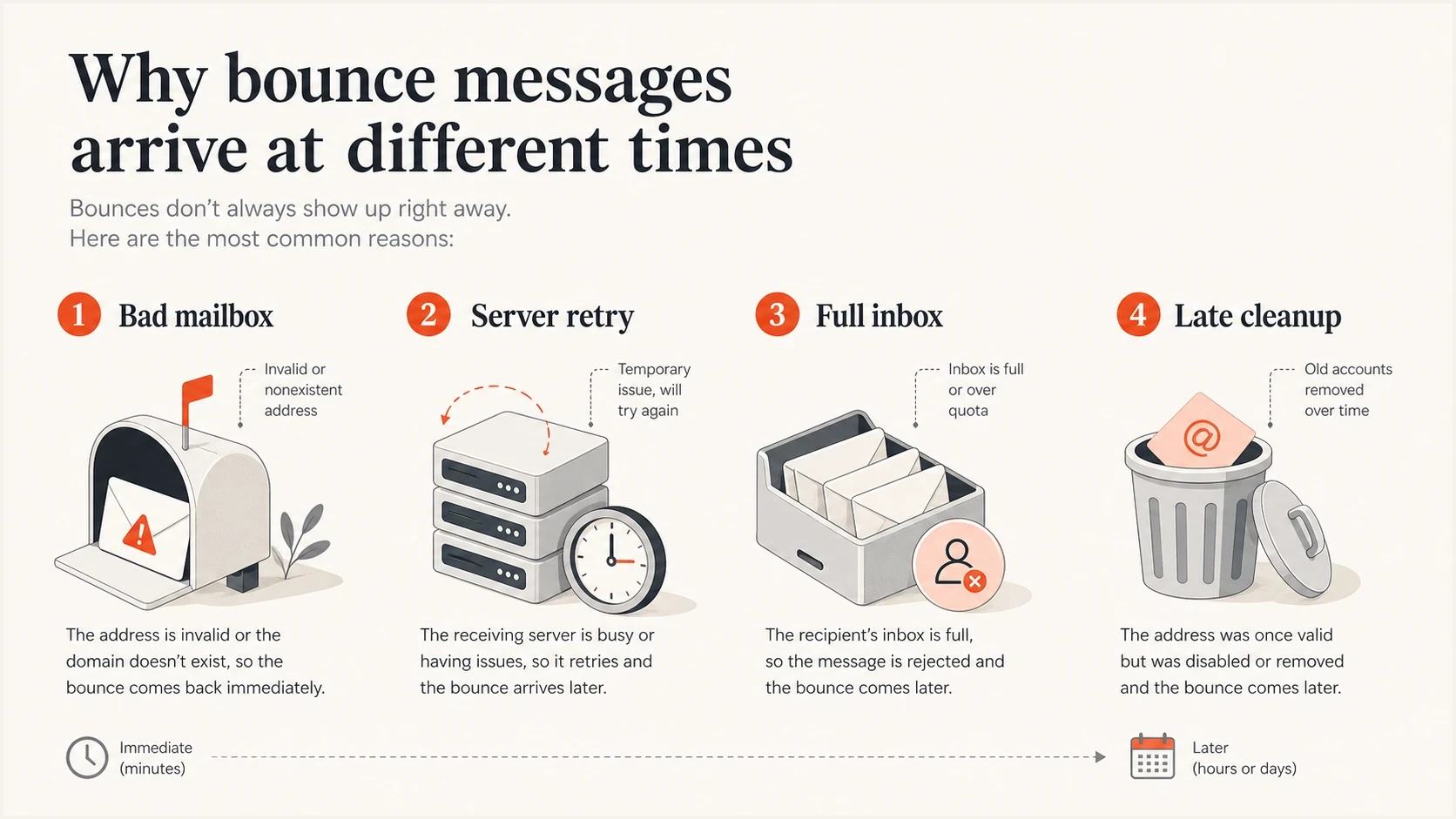
Infographic of common email bounce timing causes: bad mailbox, server retry, full inbox, and late cleanup.
- Bad address: A typo or nonexistent mailbox usually returns a fast permanent failure.
- Full mailbox: Over-quota mailboxes often return temporary failures first, then bounce after retries.
- Greylisting: The first attempt is deferred, then later attempts are accepted or finally expired.
- Server outage: Connection failures can stay queued until the sender gives up.
- Accepted but filtered: The recipient domain accepts the message, then routes it to spam, quarantine, trash, or another folder without sending a bounce-back message.
- Reporting lag: Some platforms receive the bounce earlier than it appears in reports or data views.
That last scenario matters. A bounce can be delayed because delivery is still being retried, or because the reporting system is late. If you depend on bounce data for automation, subscribe to the most real-time event stream your sender provides instead of scraping summary reports. If all you have is reports, treat them as cleanup data, not a real-time lead gate.
Best operating rule
Create the lead when the business needs it, but keep email status separate and mutable. A late hard bounce should change the address state, stop future sends, and tell the team why contact quality changed.
When bounces climb above your normal baseline, investigate the exact cause instead of only widening the wait window. The troubleshooting process should cover address collection, validation rules, sender authentication, recent DNS changes, mailbox provider patterns, and blocklist or blacklist events. The page on how to troubleshoot bounce messages is useful when the bounce stream changes suddenly.
Views from the trenches
Best practices
Set one creation window for leads and a longer correction window for late hard bounces.
Treat 4xx deferrals as pending until your sender retry limit turns them into bounces.
Store bounce time, code, source, and recipient state so teams understand later risk changes.
Common pitfalls
Using no bounce after a few minutes as proof of deliverability creates bad lead records.
Ignoring late bounces leaves invalid addresses active after the sender gives up on retries.
Calling every soft bounce recoverable hides over-quota mailboxes that never recover in practice.
Expert tips
For low-risk forms, create the lead early but keep email status provisional until checks finish.
Use engagement events as positive signals, but keep bounce handling active afterward for days.
Review retry expiry settings before choosing a two-hour, 24-hour, or 72-hour gate.
Expert from Email Geeks says most modern bounces are synchronous, but delayed bounces from retry exhaustion often appear around 48 hours.
2025-07-01 - Email Geeks
Marketer from Email Geeks says one sending setup held mail for five days because the MTA retry limit was configured that way.
2025-07-01 - Email Geeks
The practical answer
Email bounce messages usually arrive instantly or within minutes, but delayed bounces can arrive days later when temporary failures exhaust the sender retry window. Treat retrying 4xx failures and DSNs marked Action: delayed as pending. For modern automation, plan around immediate handling plus late correction. A four-hour lead gate is reasonable for many low-risk signup flows if the system keeps listening afterward. Seventy-two hours catches many commercial retry expiries, while a 5 to 7 day audit catches longer queues.
The cleanest model creates useful records quickly, tracks email status honestly, and suppresses bad addresses as soon as reliable failure data arrives. Suped's product helps with the surrounding domain authentication and reputation checks, which is where many confusing bounce spikes start.