How does the List-Unsubscribe header affect email deliverability with a preference center?

Published 18 Jun 2026
Updated 19 Aug 2026
11 min read
Summarize with
Updated on 19 Aug 2026: We added current Gmail and Yahoo bulk-sender requirements and clarified RFC 8058 endpoint handling.
The List-Unsubscribe header helps deliverability when it gives mailbox providers a direct, low-friction way to remove someone from a mailing list. It should not point only to a preference center that asks the recipient to choose topics, log in, confirm choices, or hunt for a full unsubscribe option. If someone wants out, the header path should let them leave.
Preference centers still belong in the program, but as an extra choice in the email body, not as the only unsubscribe path. The practical setup is simple: the header handles direct opt-out, the footer has a clear unsubscribe link, and the preference center lets people reduce frequency or change topics if they want to stay subscribed.
- Use List-Unsubscribe for a direct unsubscribe action that mailbox providers can trust.
- Keep a visible unsubscribe link and a separate preference center link in the message body.
- Track authentication, complaints, unsubscribe failures, and reputation together.
How the header and preference center work together
A List-Unsubscribe header improves deliverability when it reduces spam complaints. It gives Gmail, Yahoo, Microsoft, Apple Mail, and other mailbox providers a native unsubscribe action in the inbox UI. That matters because a recipient who cannot find a fast unsubscribe path often uses the spam button instead, and spam complaints are a stronger negative reputation signal than an unsubscribe.
A preference center can help retention, but only after the direct opt-out path exists. If the header sends the recipient to a preference center that requires more decisions before removal, it defeats the purpose of the header. For modern one-click unsubscribe, the endpoint must process the unsubscribe without extra user action.
Do not make the header a preference gate
The safest pattern is direct opt-out in the List-Unsubscribe header and choice-based preference management in the message body. If your preference center has an all-email unsubscribe button, keep it clear and visible, but do not make it the only path.
The caveat is list scope. A header unsubscribe does not always need to remove someone from every message your company sends. It should remove them from the mailing list or subscription category represented by that message. If you run multiple subscriptions, use clear list identity and map each token to the right suppression rule.
Gmail and Yahoo requirements
Gmail requires one-click unsubscribe for marketing and subscribed messages sent by domains that exceed 5,000 messages per day to personal Gmail accounts. Those messages also need a clearly visible unsubscribe link in the body. Yahoo applies its bulk-sender requirements to senders with significant volume but does not publish a numeric threshold.
- For Gmail bulk traffic, use the HTTPS POST method defined by RFC 8058 and keep the body unsubscribe link visible.
- Yahoo highly recommends the RFC 8058 POST method and also accepts a mailto method for its bulk-sender requirement.
- Process unsubscribe requests within 48 hours for both providers, and suppress before the next send when practical.
- Do not use the visible inbox button as the only test of compliance. Both providers decide when to display it based on eligibility signals such as reputation.
The in-body link can open a preference center, provided that the page offers a clear unsubscribe option. The header action has a different job: it should complete the scoped unsubscribe without a login, confirmation page, or additional choice.
Why it affects deliverability
Mailbox providers care about recipient behavior. Opens and clicks are noisy, but complaints, blocks, deletions without reading, and failed unsubscribe experiences give providers direct evidence that people do not want a sender's mail. A working List-Unsubscribe header changes the choice a frustrated recipient sees: unsubscribe instead of report spam.
That does not mean the header is a magic inbox placement lever. A sender with weak permission, poor list hygiene, broken authentication, or heavy complaint rates will still have deliverability problems. The header helps because it removes friction at the exact moment the recipient wants to leave, and it keeps disengaged addresses from sitting unread for months.
Direct header unsubscribe
- The mailbox provider sends a direct unsubscribe request.
- The recipient does not need to find a footer link.
- The sender shows that opt-out requests are easy to honor.
Preference center only
- The recipient has to choose settings before leaving.
- Extra steps increase the chance of a spam complaint.
- The sender looks harder to leave, even with good intent.
Preference centers work when they are honest. They let interested subscribers choose product updates, event invites, newsletters, or lower frequency. They become a deliverability problem when they hide the exit.
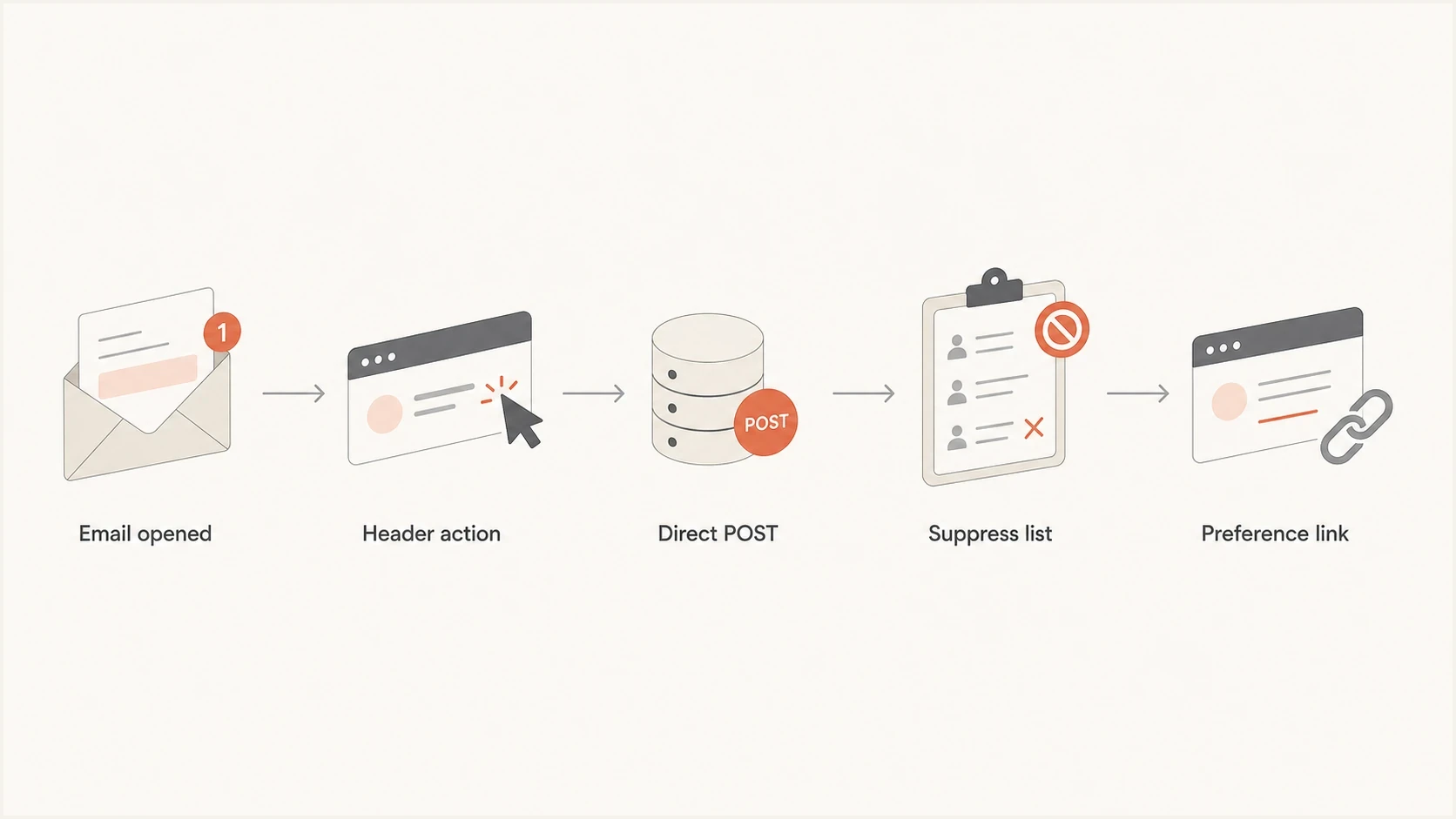
List-Unsubscribe flow from mailbox header action to direct POST suppression, with preference links separate.
What to put in the headers
For promotional and subscribed mail, include List-Unsubscribe and List-Unsubscribe-Post. The HTTPS endpoint should accept a POST request and immediately suppress the recipient for the correct list. A mailto fallback can still be useful for clients that process mailto-based unsubscribes, but it does not replace the one-click HTTPS path required by Gmail and recommended by Yahoo.
Recommended unsubscribe headers
List-Unsubscribe: <mailto:unsubscribe@example.com?subject=unsubscribe>,
 <https://example.com/unsubscribe/abc123>
List-Unsubscribe-Post: List-Unsubscribe=One-Click
List-ID: Product updates <product-updates.example.com>
The unsubscribe token should identify the recipient and the list without exposing sensitive data. Opaque tokens work best because the server can look up the recipient, list, sending domain, and suppression rule without putting private details into the header.
List-ID is separate from unsubscribe, but it helps define the stream. Use one stable List-ID per recurring mail stream, keep it consistent across sends, and avoid campaign-specific or personal values. That makes user filters and suppression mapping more predictable. List-ID is not part of the Gmail or Yahoo one-click requirement.
|
|
|
|---|---|---|
List-Unsubscribe | Opt-out path | Points only to preferences |
List-Unsubscribe-Post | One-click signal | Missing value |
List-ID | List identity | Wrong scope |
DKIM | Header trust | Unsigned unsubscribe headers |
Header roles in a simple implementation
Add the unsubscribe headers before DKIM signing. RFC 8058 expects List-Unsubscribe and List-Unsubscribe-Post to be covered by a valid DKIM signature, and mailbox providers can withhold the one-click UI when they do not trust the final signed message.
For a deeper checklist on placement and syntax, plus mailbox rendering, use the guide to verify the headers. For bulk-sender compliance specifics, keep the Gmail and Yahoo requirements separate from your in-body preference center design.
Avoid accidental unsubscribes
A one-click endpoint should not suppress on a plain GET request. Security scanners and preview systems can fetch header URLs before the recipient chooses anything. Treat GET as a safe view or no-op, and only process automatic header unsubscribes when the request is HTTPS POST with the List-Unsubscribe=One-Click body.
Endpoint behavior
- Accept repeated valid POST requests and keep the recipient suppressed, because mailbox providers can retry.
- Ignore GET requests or show a human confirmation page, because scanners can fetch URLs.
- Log the token, list, timestamp, source, and result so support can prove the request was handled.
Keep the POST self-contained. RFC 8058 says the request must not depend on cookies, HTTP authentication, or previous web activity. Verify the opaque token, update the suppression state, and return success directly. Do not redirect the POST, because redirected POST requests are not handled consistently.
Safe endpoint logic
IF method = POST AND body contains "List-Unsubscribe=One-Click":
  suppress recipient for the scoped list
  return 200 or 204 without redirect
ELSE IF method = GET:
  show a manual unsubscribe page or return a safe no-op
ELSE:
  return 405
Where the preference center belongs
The preference center belongs in the email content, usually in the footer, with plain language. Use two adjacent choices: one link to manage preferences and one link to unsubscribe from marketing. That gives engaged readers control without trapping disinterested readers in a settings page.
A good preference center has a visible all-email unsubscribe option, clear list names, and no login requirement for removal. It can show confirmation after suppression, but it should not require confirmation before suppression when the recipient came through a one-click header.
Better footer pattern
Use concise copy that separates choice from exit. For example: "Manage your email preferences, or unsubscribe from marketing emails."
- The unsubscribe link is not hidden behind softer wording.
- Subscribers can reduce frequency without being forced to stay.
Risky footer pattern
Avoid copy that offers only "update preferences" when the user wants to leave. It creates delay and can drive complaints.
- The user cannot tell whether removal is available.
- Extra screens make the spam button feel faster.
The best retention move is an honest exit
People who only wanted fewer emails can choose a lower frequency. People who wanted no emails should be removed quickly. This protects reputation better than forcing every dissatisfied recipient through the same settings flow.
Testing and monitoring
After adding the headers, send a real campaign-style test message to seed inboxes and inspect the raw headers. Suped's Email Tester workflow helps because it checks the actual email instead of only DNS records.
Header testing should sit beside authentication monitoring. If DKIM breaks or the signed headers change after your ESP rewrites the message, the one-click path becomes less reliable. A domain health check catches DNS and authentication issues that often travel with deliverability problems.

Email tester sample report showing total score, email preview, issue summary, and per-section results
Suped's DMARC monitoring product fits this workflow when a team needs more than a one-off test. Its DMARC monitoring ties SPF, DKIM, DMARC, sending sources, and issue detection together. That matters when an unsubscribe rollout spans multiple ESPs, brands, or client domains.
For reputation, also watch complaint trends, sudden Gmail placement changes, and blocklist (blacklist) events. Suped's blocklist monitoring helps connect those signals to the domains and IPs that send the mail.
Email tester
Send a real email to this address. Suped shows a results button when the test is ready.
?/43tests passed
A good test is not only "does the header exist?" It is also "does the endpoint accept POST, suppress the right list, return cleanly, and avoid re-mailing the same recipient in the next send?" That last check is where many implementations fail.
Implementation checklist
The setup works best when engineering and marketing operations teams agree with compliance owners on list scope before any code ships. The technical header can be correct while the suppression rule is wrong, and that still creates a bad recipient experience.
- Decide whether the action removes only the named subscription or all marketing.
- Accept HTTPS POST requests and suppress without login or confirmation.
- Process mailto unsubscribe requests if you include a mailto path.
- Make sure DKIM covers the unsubscribe headers when your system supports it.
- Honor requests within 48 hours for Gmail and Yahoo expectations, and before the next scheduled send where practical.
- Log the token, list, timestamp, source, and suppression result for audits.
Complaint rate guideposts
Use these as operational triggers when measuring whether unsubscribe friction is causing reputation damage.
Healthy
Under 0.1%
Low complaint pressure and no obvious unsubscribe friction.
Watch
0.1% to 0.3%
Review complaint sources, list age, footer clarity, and unsubscribe logs.
High risk
Over 0.3%
Pause risky sends and fix permission or suppression problems and broken headers.
The key implementation detail is idempotency. If a mailbox provider posts the same token twice, the endpoint should return a clean success response and leave the recipient suppressed. Do not treat repeat posts as errors, and do not re-enable a subscription because a second request looked unusual.
Views from the trenches
Best practices
Keep the header opt-out direct, then offer preference choices inside the message footer.
Use separate list identifiers so one-click requests suppress the intended mail stream.
Test both HTTPS POST and mailto handling before the next production campaign send.
Common pitfalls
Sending header clicks to a preference center adds friction and increases complaint risk.
Relying on a footer preference link alone fails modern one-click unsubscribe checks.
Ignoring repeated unsubscribe requests makes logs noisy and can hide suppression failures.
Expert tips
Treat unsubscribes as reputation protection, not lost engagement, when users want out.
Keep a visible unsubscribe link near preference options so the exit remains obvious.
Review raw headers after ESP changes because rewrites can remove or alter key fields.
Marketer from Email Geeks says the List-Unsubscribe header should give recipients a direct way out, because forcing them into content or settings raises the chance of a spam complaint.
2018-05-09 - Email Geeks
Marketer from Email Geeks says a preference center is useful in the email body, but the header action should remove the recipient from the mailing list without extra decisions.
2018-05-09 - Email Geeks
Recommended setup
Use both paths, but give each one a different job. The List-Unsubscribe header is the direct exit. The body preference center is the choice layer. The visible footer unsubscribe link is the human-readable backup. That structure protects deliverability because it respects the recipient's intent at each point.
Suped's product helps teams monitor the domain side of this workflow: authentication results, sending sources, alerts, hosted SPF, hosted DMARC, and blocklist (blacklist) events. The List-Unsubscribe header is one part of sender reputation, so it should be watched beside SPF, DKIM, DMARC, sending sources, and complaint signals.
The simple answer stays the same: include the header, make it unsubscribe directly, and keep the preference center as an additional option for people who still want some of your mail.




