How does the Gmail promotions tab affect email open rates and pixel loading?

Updated on 26 Jul 2026: We added Gmail's current Promotions sorting and in-tab annotation behavior, plus corrected how CTR and CTOR should be read.
The Gmail Promotions tab can lower or delay measured open rates because recipients often check it less promptly than Primary, leaving the tracking pixel with fewer chances to load. The email can still be delivered to the inbox, but it sits in a different attention context. That distinction matters: a move into Promotions is not the same as spam foldering, rejection, or a broken sending setup.
When a Gmail-heavy list drops from 70% opens to 15% opens while raw clicks fall only a little, investigate tab placement and pixel measurement without assigning the entire decline to Promotions. Check spam placement, reporting changes, list composition, and sending changes as well. For a deeper comparison, see Primary versus Promotions.
- Open rate: Promotions placement can reduce immediate visibility and shift opens later.
- Pixel loading: Gmail normally requests remote images through its proxy when the message is rendered, but fewer rendered messages mean fewer qualifying pixel requests.
- Best signal: Raw clicks, replies, conversions, and Gmail-specific cohorts are more useful than open rate alone.
Direct answer
The Promotions tab affects open rates in two linked ways. First, it changes user attention. Many users check Primary more often than Promotions, so messages in Promotions get opened later or not at all. Second, because most email open tracking depends on a small image pixel, fewer human opens create fewer pixel loads. The effect is personalized by recipient and is not uniform across every Gmail inbox.
The Promotions tab does not block a tracking pixel simply because of the tab assignment. When the recipient renders the email with images enabled, Gmail normally requests the image through its proxy and can cache the response. The sending platform records a qualifying image request as an open, but that request does not prove the person read the message.
The short version
- Inbox status: Promotions is still Gmail inbox placement, not a spam folder outcome.
- Open tracking: The pixel normally fires when the message is rendered with images, not when Gmail accepts the email.
- Metric risk: A Gmail-heavy audience can show a large aggregate open-rate change after tab placement or measurement changes.
- Business check: A smaller raw-click decline means the open metric moved more than downstream action did.
Gmail classifies messages for each user with signals such as content, sender history, recipient behavior, list quality, and engagement patterns. If you need the placement logic in more detail, the practical companion is how Gmail decides tabs.
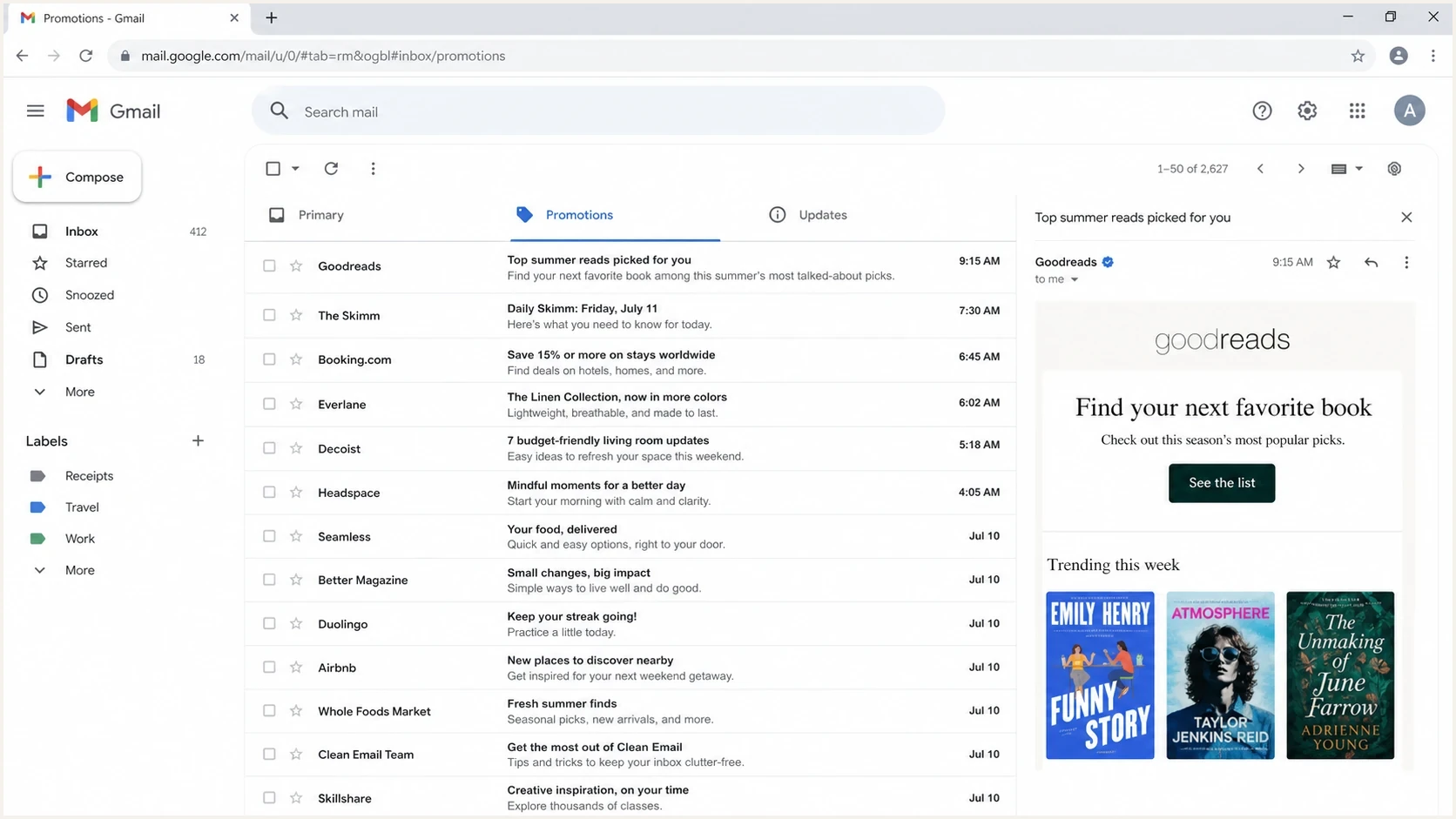
Gmail inbox screenshot showing the Promotions tab selected with newsletter emails listed.
Why pixel loads drop
An email open is usually counted when a remote image loads. That remote image is often a 1 by 1 pixel. Gmail does not send a clean statement that a person read the message. It requests the image through its proxy, and the sending platform records that request as an open. Image blocking can prevent the request, and Gmail can clip HTML around 102 KB, leaving a pixel near the end unloaded until the reader chooses to view the entire message.
Primary or Updates
- Visibility: The message is closer to the user's normal inbox review habit.
- Timing: More opens can happen soon after send time.
- Pixel loads: More rendered messages create more recorded open events.
- Diagnosis: Open rate and clicks often move in a more similar direction.
Promotions
- Visibility: The message sits in a tab many users check less often.
- Timing: Opens can shift later, which makes early reporting look worse.
- Pixel loads: Fewer rendered messages create fewer recorded open events.
- Diagnosis: Open rate can fall much harder than raw clicks.
This is also why open data needs caution. Gmail image proxy behavior, cached responses, privacy controls, and security scanning all affect what the sender sees. A pixel load is a technical event, not a guaranteed human read. The related mechanics are covered in Gmail image caching.
Open rate is a weak standalone metric
Do not use open rate alone to decide that Gmail delivery broke. Use it as a diagnostic clue, then compare it with raw clicks, conversions, replies, unsubscribes, complaint rate, and Gmail-only performance.
How Promotions can create clicks without opens
Gmail can display annotated deal details, product images, and expiration information inside the Promotions tab. A recipient can interact with annotated content before opening the email body. That can produce a click or conversion without loading the tracking pixel inside the message, so the gap between opens and downstream engagement gets wider.
Many personal Gmail accounts can also sort Promotions by Most relevant rather than strictly by recency. Gmail says this view surfaces senders and brands the user engages with most. A recent send is therefore not guaranteed to appear first, and delayed opens can reflect ranking inside the tab as well as how often the recipient checks it.
What to measure
- Direct tab activity: Count clicks and conversions even when no tracked open precedes them.
- Delayed engagement: Compare 24-hour results with 72-hour totals before judging a send.
- Click-to-open rate: Treat CTOR as unstable when open pixels undercount or overcount human reads.
- Annotation limits: Annotations do not change Gmail's tab classifier, and Gmail decides when enriched content appears.
This makes open tracking less complete for some promotional campaigns. Keep using opens as a directional signal, but base campaign decisions on actions tied to a recipient or sale wherever consent and privacy rules allow.
Reading a sudden drop
Example Gmail-heavy open-rate pattern
A tab or tracking shift can make opens collapse while other engagement changes less sharply.
Open rate
A drop from 70% to 15% needs a broader diagnosis than tab placement alone. A change in Gmail tab distribution can contribute, but first verify that open-event tracking did not change, check inbox versus spam placement, and review list composition, suppression rules, and sending volume. If Gmail still accepts the mail and authentication passes, then examine classification, recipient attention, and measurement together.
Raw click count is the cleanest comparison during an open anomaly. Standard click-through rate normally divides clicks by delivered email, while click-to-open rate divides clicks by measured opens. CTOR becomes noisy when pixel loads are unreliable. If raw clicks fall slightly while opens fall sharply, the open metric has moved more than observed user action, but the pattern still needs cohort and placement checks.
|
|
|
|---|---|---|
Raw clicks | Action signal | Low |
CTR | Delivered-email rate | Medium |
CTOR | Uses measured opens | High |
Open rate | Tab and pixel clue | High |
Replies | Human intent | Low |
Conversions | Business result | Low |
Use compact metrics together rather than treating one report as truth.
A practical investigation path
The fastest way to avoid a false diagnosis is to split the problem into delivery, classification, and measurement. Delivery asks whether Gmail accepted the mail and placed it in the inbox. Classification asks which tab users see. Measurement asks whether open tracking still describes real engagement.
Start with the Gmail segment because a list that is 90% Gmail will hide what is happening elsewhere. Compare Gmail recipients with non-Gmail recipients over the same sends. Then compare newsletter sends with transactional or confirmation sends, because those message types tend to receive different classification treatment.
- Segment: Break reports into Gmail and non-Gmail audiences before reading the aggregate chart.
- Compare: Check raw clicks, orders, replies, and unsubscribes by campaign, not only CTR or CTOR.
- Observe: Send test messages to real Gmail inboxes and record the tab at arrival and after a day.
- Isolate: Review sends where content, cadence, or list volume changed before the drop.
- Verify: Confirm authentication, complaint trends, and blocklist or blacklist status separately.
A real inbox test is useful because it shows the rendered message, headers, images, and timing in one place. Suped's email tester helps with that workflow when you need to inspect a live message rather than infer everything from campaign reporting.
Email tester
Send a real email to this address. Suped shows a results button when the test is ready.
?/43tests passed
One test message does not prove global tab placement, because Gmail personalizes inboxes. It does show whether the email itself has obvious rendering, header, authentication, or image-loading problems. Combine that evidence with cohort data before changing a production sending strategy.
If the open-rate drop begins on a specific week, list every change in the two weeks before it. Content mix, send time, template weight, URL pattern, subject line style, audience expansion, and send frequency all matter. Test one cause at a time, otherwise every fix looks plausible.
Where authentication fits
SPF, DKIM, and DMARC are essential, and Gmail's bulk sender requirements make authentication especially important at volume. They protect the domain and help Gmail verify the sender's identity. They do not guarantee Primary tab placement. An authentication fix can remove a delivery risk while leaving the message classified as promotional content.
A shared sending platform adds one common wrinkle: SPF can pass for the platform's envelope domain while DKIM passes for the visible From domain. In that case, DMARC can still pass through DKIM when the signing domain matches the visible From domain. Check the exact headers instead of treating any SPF oddity as the cause of a Promotions tab problem.
Example DMARC record
_dmarc.example.com TXT
v=DMARC1; p=none; rua=mailto:dmarc@example.com; adkim=s; aspf=s
Suped's DMARC monitoring shows whether real mail is passing SPF, DKIM, and DMARC. Blocklist monitoring helps separate blacklist and blocklist reputation issues from Gmail tab behavior. Suped brings those checks into the same investigation, so teams can rule out authentication and reputation faults before changing content or cadence.
Issues page showing top issues, verified sources, unverified sources, and authentication pass rates
What to fix first
- DMARC: Make sure real sending sources pass, then move policy in controlled stages.
- DKIM: Use a signing domain that matches the visible From domain.
- SPF: Stay under DNS lookup limits and remove old senders.
- Alerts: Watch sudden source changes before they become sender reputation problems.
Actions that influence tab placement
There is no reliable or standards-based switch that forces Gmail to put a marketing newsletter into Primary. Make the mail wanted, consistent, and easy to classify correctly. For newsletters, the strongest path is engagement quality, not attempts to disguise promotional intent.
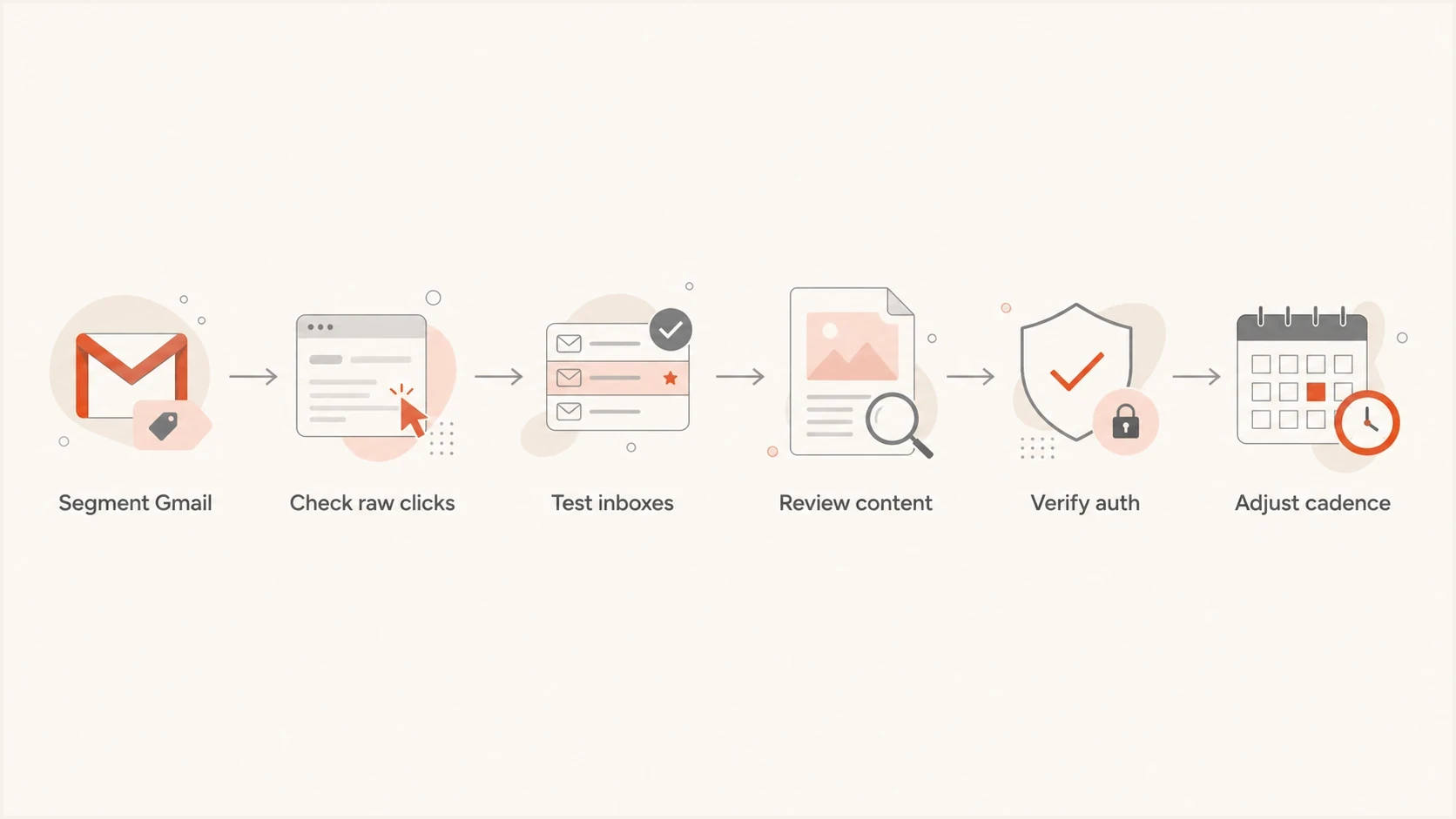
Flowchart for investigating a Gmail Promotions tab open-rate drop.
Useful changes
- Segmentation: Send more relevant versions to people who clicked or bought recently.
- Cadence: Keep volume changes gradual and predictable.
- Content: Reduce link stuffing and make the main reason to open obvious.
- Preference: Let users choose topics and frequency.
Low value changes
- Hidden text: Trying to disguise intent creates more risk than benefit.
- Authentication-only: Fixing DNS alone does not turn a newsletter into personal mail.
- Seed-only: A few inbox checks cannot replace recipient-level performance analysis.
- Panic edits: Changing subject, template, sender, and cadence together hides the cause.
Separate newsletters from account or verification mail. Transactional email should be timely, expected, and clearly tied to the user's action. Marketing newsletters can be useful and still belong in Promotions because they are promotional by nature.
Common misreads
Do not overread one metric
- Promotions: It means Gmail classified the message as promotional, not that delivery failed.
- Opens: A sharp fall can come from tab behavior, image loading, reporting changes, or spam placement.
- Clicks: Raw click count is more useful than CTOR during an open-rate anomaly.
- Reputation: Good sender reputation can coexist with Promotions placement.
If authentication is passing, complaint rate and bounces are low, and the message arrives in Gmail, the sending system is not necessarily broken. Gmail has classified the message as a promotion for that recipient, and the user can behave differently because of where and how it appears.
Do not ignore the result. A lower-attention tab changes reach and timing. Target audience quality, content relevance, cadence, and measurement, while authentication monitoring keeps the domain protected in the background.
Views from the trenches
Best practices
Segment Gmail users separately before deciding that a campaign has a true open-rate problem.
Compare raw clicks, replies, and conversions before changing content or sender setup quickly.
Check authentication and blocklist status, but keep tab analysis separate from delivery failures.
Common pitfalls
Treating Promotions as spam leads teams to chase fixes that do not address user attention.
Using CTOR alone hides whether the change came from fewer opens or fewer actual clicks.
Assuming a shared IP explains every Gmail change can distract from content classification.
Expert tips
Track Gmail-heavy cohorts by send, because one tab move can shift aggregate open rates.
Keep newsletter cadence steady so Gmail has consistent engagement patterns to read.
Use seed and real inbox checks as evidence, not as the only source of truth daily.
Marketer from Email Geeks says the first check should be Gmail sender data, because high reputation and low complaints help separate delivery trouble from tab placement.
2022-06-27 - Email Geeks
Marketer from Email Geeks says a message that reaches the inbox but lands in Promotions has a visibility problem, not a classic delivery failure.
2022-06-27 - Email Geeks
The practical takeaway
The Gmail Promotions tab affects open rates by changing visibility, timing, and how promotional content is surfaced. Pixel loading often falls because fewer message bodies get rendered, not because Gmail automatically blocks open pixels in Promotions. In-tab annotations can also generate action without a body open. When clicks fall slightly and opens collapse, treat the pattern as a measurement clue, then verify placement and sending changes before calling it a delivery failure.
The response should be disciplined: segment Gmail, compare raw engagement, inspect real inbox rendering, verify authentication, and avoid mass changes that hide the cause. Suped helps with the authentication and monitoring side of that work, while the tab problem itself needs better engagement, cleaner segmentation, and reporting that does not depend on open rate or CTOR alone.




