How does IP range behavior affect other IPs and domain reputation?

Published 28 Apr 2025
Updated 28 Jul 2026
12 min read
Summarize with
Updated on 28 Jul 2026: We updated this guide for current DMARC standards and clearer diagnosis of shared, dedicated, and range-level reputation.
Yes, behavior on one IP can affect other IPs that share the same address, sending pool, or provider range. The same sending domain can also carry reputation effects across different IP ranges. The effect is not automatic for every mailbox provider or every blocklist (blacklist), but IP range health and domain health should be treated as connected risks during warmup.
The practical answer is this: an IP can have its own reputation, a CIDR range or provider-owned pool can have a group reputation, and a domain has a reputation that follows the domain wherever it sends. If Microsoft or another mailbox provider blocks a whole range, mail from clean IPs in that range can still fail. If your domain builds poor engagement, high complaints, authentication problems, or high hard bounces on one range, moving the same domain to another range does not reset that domain history.
Troubleshooting should not start by assuming that the IP or the domain is the only problem. Identify which reputation layer is failing first, then verify it with logs, DNS, authentication results, recipient response codes, and a real email test.
The direct answer
IP range behavior affects other IPs when receivers group evidence at a level larger than a single address. That grouping can happen at the range, ASN, mail server cluster, reverse DNS pattern, or ESP infrastructure level. It is common during warmup because the traffic is new, the volume pattern has little history, and one bad sender on the same provider range can make the whole set look risky.
- Single IP: A mailbox provider can block or throttle one address because of complaints, spam trap hits, rejected mail, or sudden volume.
- Shared IP: Every sender using the same address contributes to its reputation, so one sender's poor traffic can affect the others.
- IP range: A receiver can apply a range-level block when related IPs show the same poor pattern or belong to a problematic sender pool.
- Domain: A sending domain can carry poor reputation across unrelated IP ranges if recipients keep seeing poor mail from that domain.
- Authentication: SPF, DKIM, and DMARC failures can weaken the domain signal even when the IP itself is new.
Why this matters during warmup
If you are warming several dedicated IPs and suddenly see high bounces across the range, do not assume each IP independently failed. A range-level block, an inherited blacklist listing, a provider-owned pool issue, or a domain-level reputation problem can explain the same symptom.
This is why dedicated IPs are not a full reputation firewall. They give you control over traffic on the assigned address, but the surrounding range, hosting provider, ESP practices, and sending domain still matter. For a deeper split of these signals, the IP and domain reputation distinction is the right starting point.
How range reputation works
Receivers do not have to judge only one IP at a time. They can group related IPs because bad sending often comes in clusters: the same ESP, the same customer group, the same reverse DNS naming scheme, the same ASN, or adjacent IPs in a routed range. This lets the receiver protect users quickly when abuse spreads faster than one-address blocking.
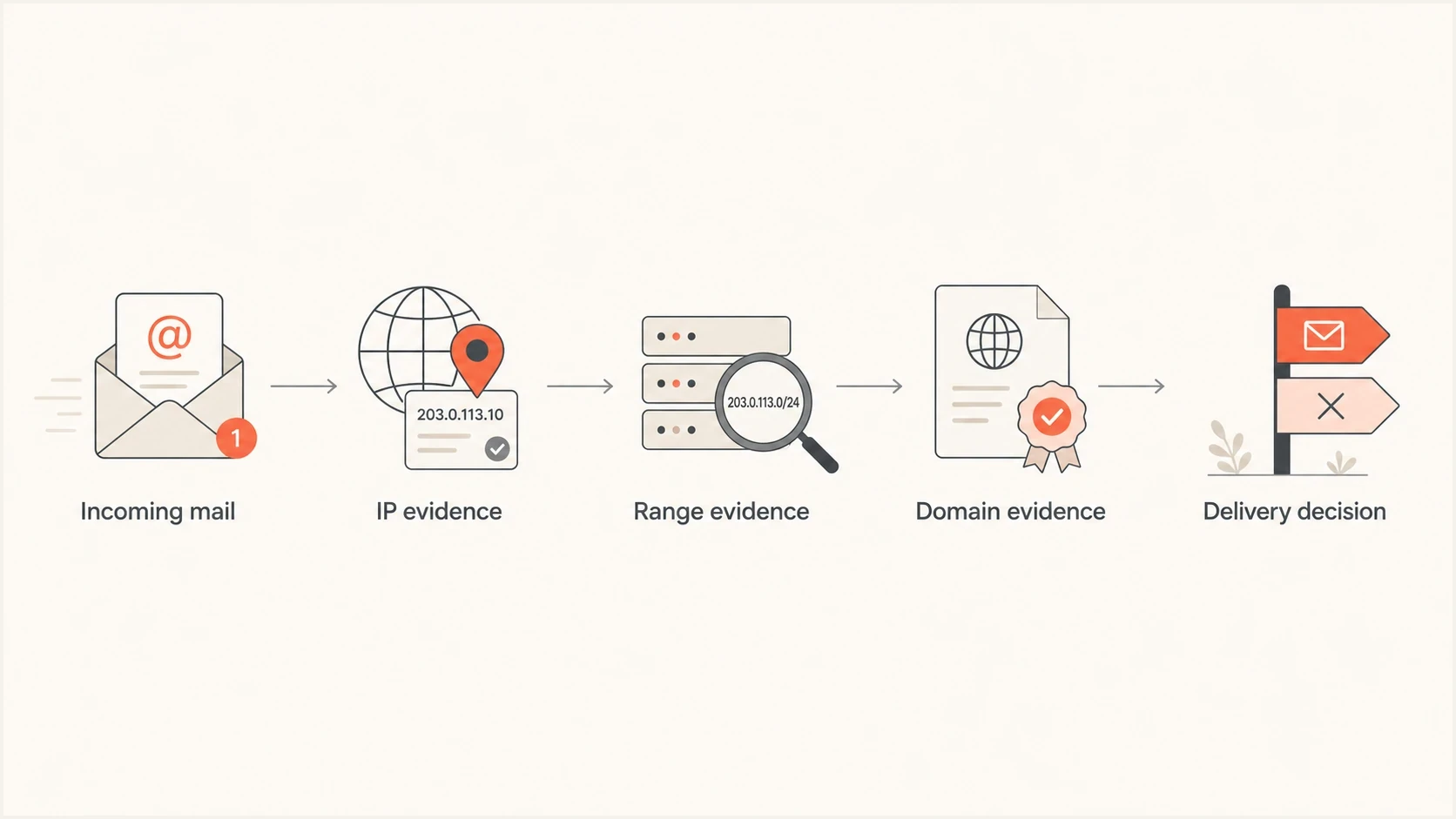
Flowchart showing IP, range, and domain evidence feeding into a delivery decision.
The size of the affected group varies. Sometimes one IP is blocked. Sometimes a /24 range is treated poorly. Sometimes an entire provider-owned block gets throttled at a specific receiver. Public blocklist (blacklist) listings can also appear at a single IP or a broader netblock, and private mailbox-provider reputation systems can be even more selective.
|
|
|
|---|---|---|
IP | One address has poor history. | One sender bounces. |
Range | Related addresses are grouped. | Several IPs fail. |
Domain | Domain identities have history. | Mail fails across IPs. |
Authentication | Authenticated domains do not match the From domain. | DMARC fails across IPs. |
Common reputation layers that can affect email delivery.
Pay close attention to response codes. A 5xx block that references policy, spam, reputation, or sender access control means a receiver has made a negative decision. If that same response appears across adjacent IPs, the range is part of the evidence, not just the individual address.
Why one IP affects nearby IPs
One IP affects nearby IPs when the receiver sees a shared cause. The cause can be technical, operational, or reputation-based. A clean IP sitting next to a bad IP is not automatically punished, but the closer the shared signals are, the more likely a group decision becomes.
- Shared address or pool: Senders on one shared IP directly share its reputation, and provider-managed pools can expose clean traffic to poor neighboring behavior.
- New warmup: New IPs have little positive history, so negative evidence has more weight early in ramping.
- Inherited history: A newly assigned IP can already have poor mailbox-provider history before your first campaign sends.
- Pattern match: Similar reverse DNS, HELO names, tracking domains, or envelope senders can connect mail streams.
- Range block: A receiver can block a whole range when the range produces enough bad traffic.
Single-IP issue
- Scope: One sending IP shows high bounces or deferrals.
- Cause: Volume spike, poor list quality, complaints, or authentication failure.
- Fix: Pause that stream, reduce volume, and correct the failing signal.
Range-level issue
- Scope: Several nearby IPs show similar blocks at the same receiver.
- Cause: Receiver policy groups related IPs because the range looks risky.
- Fix: Escalate to the ESP, request range history, and isolate clean traffic.
If you are a brand using an ESP, the ESP is the party that can see the broader range. Ask whether other customers on nearby IPs have blocks, whether the IP was recycled recently, whether the range has known receiver issues, and whether the assigned IPs share the same reputation pool.
How domain reputation crosses ranges
Domain reputation is the part many teams underestimate. When the same visible From domain sends from a different IP range, receivers can connect it to earlier traffic. They can also associate the DKIM signing domain, return-path domain, tracking domains, and recurring linked domains with that mail stream.
That means moving a troubled domain to a clean range is not a clean reset. It can help if the old IP range was the main problem, but it will not fix complaints, bad lists, weak authentication, deceptive content, or poor engagement tied to the domain. The same issue appears when you use multiple IP addresses for one domain without a clean traffic plan.
A practical rule
Use IP changes to remove infrastructure risk. Use domain fixes to remove sender risk. If both are failing, changing only the IP range leaves the biggest reputation signal untouched.
Domain reputation is built through many small signals: authentication pass rates, complaint rates, hard bounces, spam trap hits, content consistency, engagement, visible From identity, and user-level filtering. DMARC matters here because it shows which sources send for your domain and whether SPF or DKIM produces a matching authenticated domain. This is where DMARC monitoring becomes operational, not just compliance work.
RFC 9989 now defines DMARC, and RFC 9990 defines aggregate reporting. The record below remains valid under the current specifications. Do not add the old pct sampling tag to new records because RFC 9989 marks it historic.
Staged DMARC record for visibilitydns
Host: _dmarc.example.com
Type: TXT
Value: v=DMARC1; p=none; rua=mailto:dmarc@example.com;
       adkim=s; aspf=s
Start at p=none when you need visibility, then move to quarantine and reject after legitimate sources are passing. A rushed enforcement move during a warmup can make a reputation problem harder to diagnose.
How to separate reputation between mail streams
Separate mail streams before a reputation incident, not during one. Distinct identifiers make it easier to compare transactional and promotional traffic, pause the affected stream, and keep diagnosis tied to the correct source. They reduce spillover risk, but mailbox providers can still connect related domains and infrastructure.
- Subdomains: Use distinct From subdomains for transactional and promotional mail when each stream has its own sending policy and audience.
- DKIM identity: Sign each stream with an appropriate DKIM domain and selector. A new selector rotates or labels a key; it does not reset the signing domain's reputation.
- Return path: Use a controlled return-path domain for each provider or stream so SPF results and bounce handling remain traceable.
- Traffic control: Keep recipient selection, volume changes, complaint review, and suppression decisions separate for each stream.
Segmentation has limits
A subdomain or DKIM selector is not a reputation reset button. Receivers can connect related identities through the parent domain, shared IPs, URLs, authentication patterns, and recipient feedback. Segmentation helps only when the mail streams also have different controls.
What to check during warmup
When warmup bounces appear across several dedicated IPs, work through the same checks in order. The goal is to separate a receiver-specific range block from a domain problem, a DNS problem, or poor recipient data.
- Codes: Group bounce and deferral messages by receiver, IP, domain, and exact SMTP response.
- Scope: Check whether failures hit one IP, all IPs in the range, or only one mailbox provider.
- History: Ask the ESP whether any assigned IP was recycled and whether nearby IPs have poor history.
- DNS: Verify SPF, DKIM, DMARC, forward and reverse DNS, envelope sender, and tracking domain setup.
- Data: Segment recent recipients, suppress hard bounces, and stop sending to stale or unengaged addresses.
- Volume: Reduce volume where the block appears, avoid bursts, and rebuild at a stable rate with recent engaged recipients.
?
What's your domain score?
Deep-scan SPF, DKIM & DMARC records for email deliverability and security issues.
A broad domain health check is useful here because it catches the basics before you assume the receiver made a range-level decision. If DNS is broken, fix DNS first. If authentication is clean and the same receiver blocks all adjacent IPs, escalate the range issue with evidence.
Basic SPF record shapedns
Host: example.com
Type: TXT
Value: v=spf1 include:_spf.sender.example -all
When to pause, move, or isolate traffic
The right recovery move depends on which layer is failing. Pausing all sending is blunt. Moving to a new IP range is expensive and does not fix domain reputation. Continuing normal volume into a known block trains the receiver that your traffic deserves more filtering.
Warmup triage bands
Classify the pattern before deciding whether to continue, investigate, or pause.
Healthy
Isolated
Deferrals are isolated, temporary, and do not repeat across related IPs.
Investigate
Repeated
The same receiver repeatedly defers one IP or several nearby IPs.
Pause
Widespread
Blocks spread across the range or follow the domain to unrelated IPs.
If one IP has the issue, isolate that IP and keep clean traffic separate. If every IP in the range fails at the same receiver, stop warmup to that receiver, preserve logs, and ask the ESP for range-level remediation. If the same domain fails on unrelated ranges, stop treating IPs as the main fix and focus on domain reputation, list quality, and authentication.
|
|
|
|---|---|---|
One IP | IP | Pause stream. |
All nearby | Range | Escalate ESP. |
All IPs | Domain | Fix domain. |
Auth fails | DNS | Correct records. |
How to choose the next action during a reputation incident.
For Microsoft-specific blocking, the evidence package matters: affected IPs, exact SMTP responses, timestamps, sample headers, warmup volume, and proof that authentication passes. A brand usually cannot repair the provider range alone. The ESP controls the IP allocation, range history, and receiver escalation path.
How Suped helps with this workflow
Suped is our DMARC and email authentication platform. For this workflow, it brings DMARC source data, SPF and DKIM results, blocklist (blacklist) monitoring, and alerts into one review process. SMTP logs and ESP range evidence are still required because DMARC reports do not show every rejection or prove that a mailbox provider grouped a netblock.

Blocklist monitoring page showing domain and IP checks across blocklists with importance and status
The practical value is seeing whether a failure belongs to a domain, a sending source, a DNS record, an IP, or a blocklist entry, then comparing that finding with SMTP response data. That is especially helpful for MSPs and teams managing many domains because one bad sender or inherited IP issue can otherwise hide inside aggregate reports.
For this specific issue, Suped's blocklist monitoring view works with DMARC source data. You can compare source IPs and authentication results to see whether failures move with one provider range or follow the domain across unrelated infrastructure.
Best practical setup
Keep IP warmup, authentication monitoring, source verification, and blocklist checks in the same review loop. Range reputation and domain reputation fail together often enough that separate reports slow down the fix.
Views from the trenches
Best practices
Group failures by IP, range, receiver, and domain before asking for a new IP change.
Ask the ESP for assigned IP history when blocks appear early in a careful warmup cycle.
Keep domain authentication clean before testing whether a range is blocked at a receiver.
Common pitfalls
Assuming dedicated IPs fully isolate a sender from nearby provider issues in the range.
Moving a poor domain to a new range and expecting domain reputation to reset there.
Ignoring mailbox-provider response codes that show a range-wide policy block during warmup.
Expert tips
Pause affected receivers first, then rebuild volume with recent engaged recipients.
Use exact SMTP responses in escalation requests instead of broad delivery claims.
Check for inherited blacklist history before ramping a newly assigned IP into warmup.
Marketer from Email Geeks says behavior on one IP can affect others when the receiver has enough shared evidence across the range.
2023-06-09 - Email Geeks
Marketer from Email Geeks says a brand should ask the ESP about range health when several dedicated IPs fail during warmup.
2023-06-09 - Email Geeks
The bottom line
IP range behavior can affect nearby IPs, and domain reputation can affect the same domain across different IP ranges. Dedicated IPs give you control over your own traffic, but they do not erase inherited IP history, receiver range decisions, or domain-level reputation.
When several IPs in the same range start failing, check the scope first: one IP, one receiver, the whole range, or the domain everywhere. Then fix the layer that is actually failing. That means DNS and authentication when records are wrong, list hygiene when recipient data is weak, ESP escalation when the range is blocked, and domain recovery when the same domain keeps failing across infrastructure.
The fastest recovery usually comes from proving the pattern with data instead of guessing. Once the failing layer is clear, the fix becomes much more direct.




