How does Google penalize senders with spam rates over 0.3%?

Published 9 Jun 2025
Updated 1 Aug 2026
11 min read
Summarize with
Updated on 1 Aug 2026: We clarified how Google calculates the 0.3% spam rate, applies graduated delivery penalties, and restores mitigation eligibility.
Google applies a graduated penalty when user-reported spam rates rise. Rates above 0.1% already hurt inbox delivery for bulk senders, and rates of 0.3% or higher have a greater negative effect. Google does not publish a rule that one day above 0.3% sends all future mail to spam. The documented consequences are increased spam classification and loss of access to delivery mitigation while the rate remains too high.
One isolated spike usually creates less operational risk than a repeated pattern, especially when the normal baseline is below 0.1%. Google's sender guidelines say to keep spam rates below 0.10% and avoid reaching 0.30% or higher. Postmaster Tools calculates and updates the rate daily.
What happens after 0.3%
The 0.3% number is a compliance threshold, not a single mechanical switch. Gmail does not publish the exact complaint pattern that moves a sender into each filtering state. The public guidance is more specific about support: bulk senders above 0.3% are ineligible for delivery mitigation, and eligibility returns after the rate stays below 0.3% for seven consecutive days.
Google began ramping up enforcement on non-compliant traffic in November 2025. Its compliance table links some sender-requirement failures to temporary or permanent rejection, while a spam rate above 0.3% specifically makes delivery support or mitigation unavailable.
- Spam placement: More inbox-delivered mail is likely to be classified as spam as recipient complaints rise.
- Reputation loss: Repeated complaints can lower domain reputation and affect later campaigns.
- No mitigation: Bulk senders cannot request delivery mitigation while the user-reported rate is above 0.3%.
- Recovery lag: A corrected sending program can take time to produce better spam classification and dashboard data.
There is no universal penalty timer
Google publishes a seven-day requirement for regaining mitigation eligibility, but that is not a promise of full reputation or inbox-placement recovery. Do not build a response plan around one supposedly safe day. Investigate the complaint source as soon as the daily rate rises.
- One spike: A brief spike is a warning that requires the responsible campaign or audience to be isolated.
- Repeated spikes: Repeated spikes give Gmail continuing evidence that recipients do not want the mail.
- Flat 0.2%: A daily rate near 0.2% already exceeds Google's recommended operating target and hurts inbox delivery.
Complaint rate operating zones
Use these bands as practical operating limits for Gmail-facing mailstreams.
Healthy
Under 0.10%
Keep normal campaigns here.
Warning
0.10% to 0.29%
Investigate before the pattern hardens.
Non-compliant
0.30% or higher
Stop the source, fix targeting, and slow sending.
How Gmail calculates the spam rate
Postmaster Tools shows a daily user-reported spam rate for DKIM-authenticated messages sent to personal Gmail accounts. It measures messages delivered to engaged recipients' inboxes and then marked as spam. Messages Gmail placed directly in spam are not part of that inbox denominator, although a message moved out of spam counts as inbox-delivered.
Postmaster Tools spam rate
User spam reports / DKIM-authenticated messages delivered to engaged recipients' inboxes x 100
- A very low rate can mislead: If Gmail already sends much of the traffic to spam, fewer inbox messages remain available for users to report.
- Small samples can disappear: Google can omit data on low-volume days to protect user privacy, so a blank chart is not a zero rate.
- The data is aggregated: Gmail does not identify individual complainers, so suppressing a specific Gmail user from this report is not possible.
- Feedback-ID adds campaign detail: Large-volume senders can tag campaigns and mail types so the Feedback Loop dashboard exposes unusual complaint rates in aggregate.
Do not compare the Postmaster percentage directly with a sending platform's complaint rate unless both use the same recipients, authentication scope, time zone, and denominator. Match Postmaster dates to campaign timestamps and allow for reporting delay.
Why one bad day is different from a pattern
Look at the shape of the complaint rate, not only the highest point. A single campaign that produces a sharp spike has a clear containment path: stop that segment, review the consent source and offer, then resume with a cleaner audience. A rolling pattern gives Gmail repeated evidence that recipients do not want the mail.
One-day spike
A one-day spike over 0.3% is serious, but the source is often easier to isolate when the sender has a clean baseline.
- Likely cause: A bad segment, aggressive campaign, or unexpected audience mismatch.
- Expected signal: A temporary complaint jump followed by quick normalization.
- Best action: Pause that stream and resume only after fixing the cause.
Sustained pattern
A repeated pattern over 0.3% points to problems with consent, targeting, frequency, or subscriber expectations.
- Likely cause: Weak permission, stale lists, high frequency, or unclear unsubscribe paths.
- Expected signal: A non-compliant spam-rate status followed by weaker delivery across affected streams.
- Best action: Reduce volume, tighten targeting, and rebuild reputation gradually.
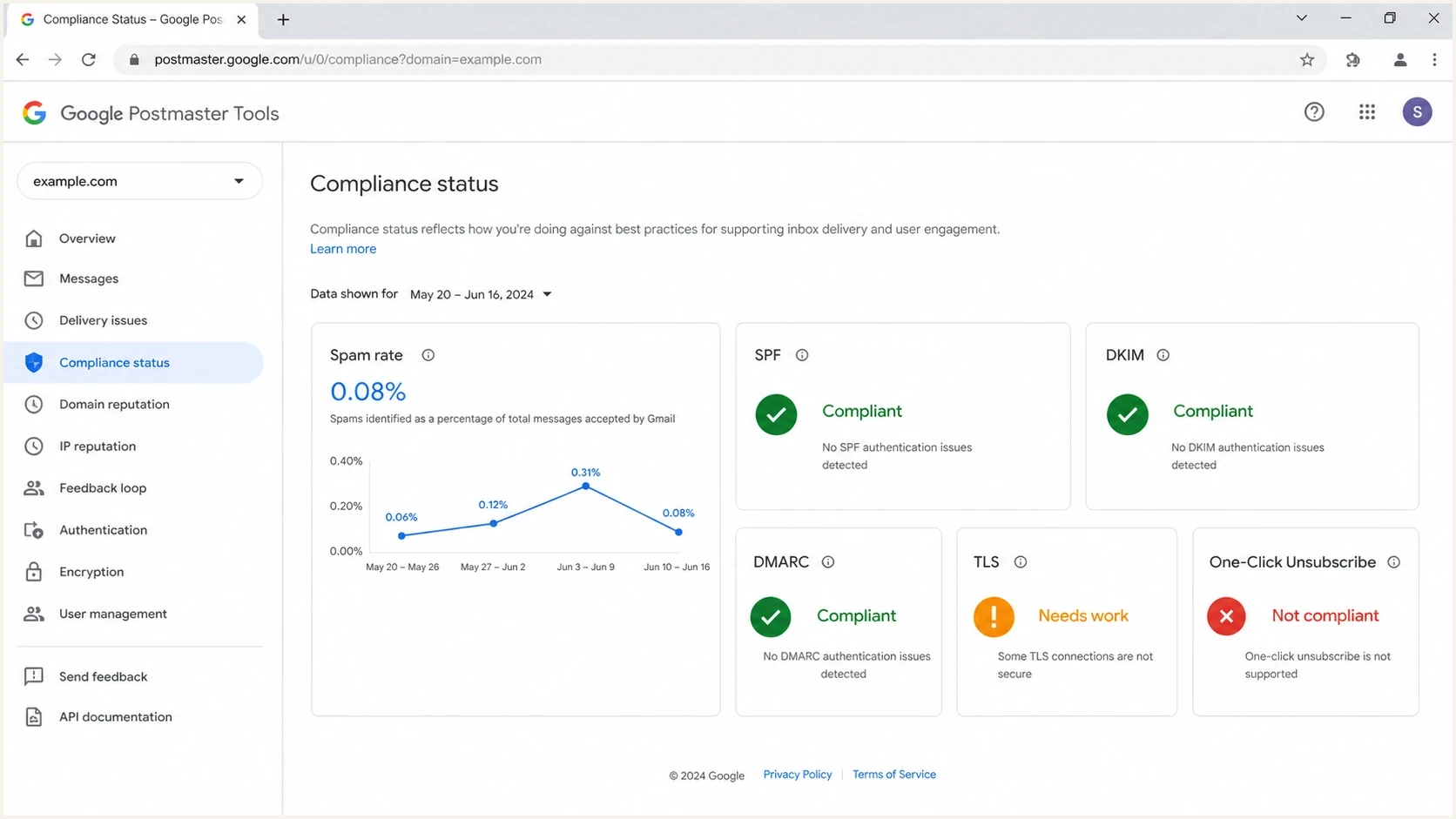
Google Postmaster Tools compliance dashboard showing complaint rate status.
The compliance dashboard in Google Postmaster Tools is a warning light, not a delivery forecast. It reports whether Google sees the stream as compliant, but it does not prove inbox placement. The data is calculated daily and is not real time. For the mechanics behind the dashboard, the separate guide on Postmaster compliance explains volume thresholds and reporting delays in more detail.
Signals Google combines with complaint rate
A high complaint rate matters because it comes directly from Gmail users, but it is one part of the delivery decision. Google's public guidance also points to authentication, sending patterns, message formatting, infrastructure reputation, and subscription practices. A sender can meet the technical requirements and still reach spam when recipients reject the mail.
|
|
|
|---|---|---|
Spam rate | More user reports | More spam classification |
Domain reputation | Trust falls | Longer recovery |
IP reputation | Shared risk rises | More filtering |
Authentication | Failures compound risk | Spam or rejection |
Sending pattern | Volume spikes | Rate limits or reputation loss |
Gmail delivery signals related to complaint risk
The Gmail team has described its bulk sender rules as part of broader Gmail protections. Technical compliance and recipient satisfaction both matter. Passing SPF, DKIM, and DMARC does not cancel out complaints. Low complaints do not repair broken authentication.
Treating 0.3% as the goal is a mistake. The operating target is materially lower. The guide on good spam rate covers the percentage math and why small samples can swing quickly.
How to diagnose the penalty
The fastest way to handle a 0.3% complaint problem is to separate the affected mailstream, confirm whether Gmail delivery changed, and check whether authentication or infrastructure increased the damage. Start with the campaign and audience, then verify the message path.
- Find the stream: Split marketing, lifecycle, transactional, and sales mail by domain and IP.
- Check timing: Compare Postmaster dates with campaigns, list imports, frequency changes, and reactivation sends.
- Use Feedback-ID: Tag campaigns and mail types so Gmail can report unusual complaint rates without exposing recipients.
- Cut audience risk: Suppress stale recipients, role accounts, unengaged cohorts, and addresses without clear consent.
- Verify the path: Confirm SPF, DKIM, DMARC, TLS, reverse DNS, and one-click unsubscribe behavior.
For a message-level check, send a live sample through the email tester. That gives you a concrete view of authentication, headers, content signals, and configuration issues before you resume a sensitive Gmail send.
Email tester
Send a real email to this address. Suped shows a results button when the test is ready.
?/43tests passed
DMARC reporting shows which services send as your domain and whether they authenticate. It does not report Gmail complaint rate or identify Gmail complainers, but it gives you the source map needed to narrow the affected mailstream.
Basic DMARC monitoring recorddns
TXT host: _dmarc.example.com
Value: v=DMARC1; p=none; rua=mailto:dmarc@yourdomain.com; fo=1
Where Suped fits
Suped is our DMARC reporting and email authentication platform. Google Postmaster Tools shows how Gmail sees a sending domain, including user-reported spam rate and reputation. Suped covers the controls on the sender side by mapping sending sources, tracking whether DMARC passes, and alerting teams when authentication changes. It does not replace Postmaster Tools or report Gmail complaints.
Use Suped's DMARC monitoring to identify authenticated and unauthenticated sources, run a domain health check after DNS changes, and keep blocklist monitoring active for sending domains and IPs. Blocklist and blacklist status does not explain Gmail's complaint rate, but it can expose a separate reputation problem during the same incident.
Issues page showing top issues, verified sources, unverified sources, and authentication pass rates
A practical Suped workflow
- Map sources: Identify each service sending through the affected domain before changing DNS or volume.
- Verify DMARC: Check whether the SPF or DKIM domain matches the visible From domain for each source.
- Watch changes: Use alerts to catch new senders and authentication failures during recovery.
- Compare systems: Match Suped's source data with Postmaster dates and the campaigns sent on those dates.
A response plan for senders over 0.3%
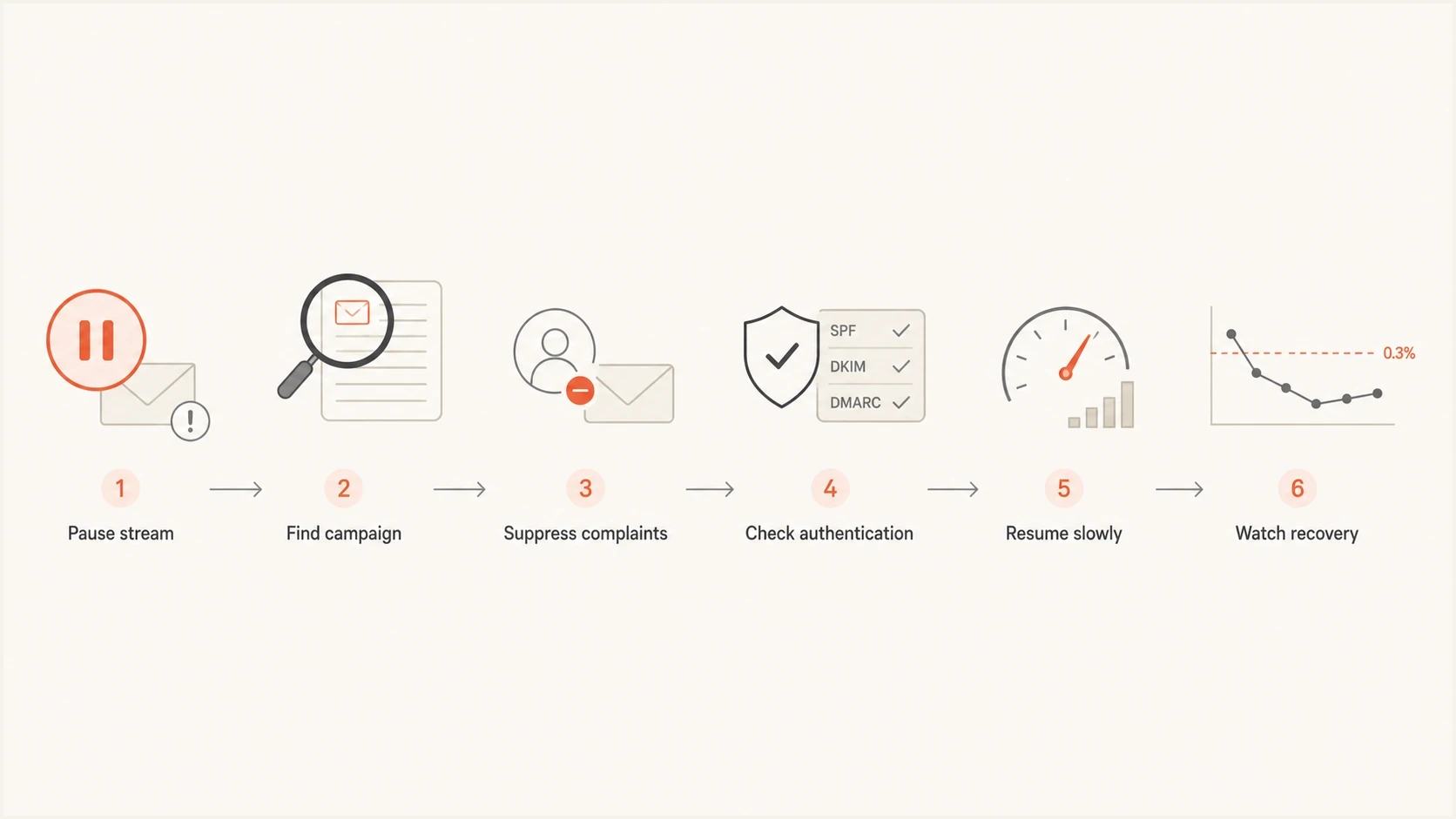
Flowchart for recovering after Gmail complaint rates exceed 0.3%.
When a Gmail complaint rate crosses 0.3%, speed matters more than guessing the exact filtering window. Stop the source that caused the complaints, then restart with a smaller audience that has recent evidence of interest after the cause is fixed. Continuing at normal volume while waiting for the dashboard to update can turn a short incident into a longer reputation problem.
- Pause quickly: Stop the campaign, journey, segment, or mail type that caused the complaint spike.
- Cut audience risk: Remove inactive recipients, old imports, role accounts, and unclear consent sources.
- Lower frequency: Send fewer messages until Gmail metrics return to the healthy band.
- Segment tightly: Restart with recent clickers, purchasers, active users, and recipients with current consent.
- Watch the lag: Allow up to seven days for the spam rate to normalize, then keep monitoring reputation and placement.
The inbox test that matters
Do not rely on a domain reputation label or a low spam-rate chart alone. A low displayed rate can occur after Gmail has already routed much of the mail to spam. Check the affected audience, sending path, Postmaster status, and actual delivery behavior together.
Views from the trenches
Best practices
Keep complaint rates below 0.1% as the normal operating target for Gmail traffic.
Treat one spike as urgent evidence, then isolate the exact stream before resuming.
Use compliance status with seed tests and real engagement data, not by itself alone.
Reduce volume and restart with active recipients after the complaint source is fixed.
Common pitfalls
Treating 0.3% as a safe ceiling causes slow reputation loss before penalties appear.
Reading domain reputation as a direct inbox placement score creates false comfort.
Continuing full-volume sends after a spike lets one campaign harm the full program.
Ignoring small daily complaint rates near 0.2% allows reputation damage to compound.
Expert tips
Expect Google to combine complaints with many other delivery and reputation signals.
Use the trend line, not only the worst day, when deciding how hard to slow sending.
Check whether weak authentication or risky infrastructure intensified the penalty.
Watch performance by segment because weaker cohorts show Gmail filtering before others.
Expert from Email Geeks says Google has not changed the basic penalty model. High complaints degrade reputation, push more mail to spam, and can lead to blocking when the pattern continues.
2024-06-05 - Email Geeks
Marketer from Email Geeks says 0.3% should not be treated as a hard daily switch. A sender living near 0.2% every day can suffer more than a sender with one isolated spike.
2024-06-05 - Email Geeks
The practical answer
Google penalizes senders over 0.3% through graduated inbox filtering and loss of delivery mitigation eligibility, not through a published one-day switch. Rates over 0.1% already have a negative effect on bulk-sender inbox delivery, and 0.3% or higher creates a greater impact. Other sender-requirement failures can separately lead to temporary or permanent rejection.
Treat the spike as a production incident: pause the source, remove risky audience segments, verify authentication, use Feedback-ID data where available, and restart with recipients who still want the mail. Keep the normal Gmail complaint rate below 0.1%. Seven days below 0.3% restores mitigation eligibility, but reputation and inbox placement can take longer to recover.




