How does email send throttling affect Gmail spam placement and overall deliverability?

Published 29 Apr 2025
Updated 31 Jul 2026
13 min read
Summarize with
Updated on 31 Jul 2026: We updated this guide with Gmail's current bulk sender requirements, precise SMTP guidance, and adaptive throttling steps.
Email send throttling affects Gmail deliverability mostly by controlling how fast Gmail has to accept mail, not by changing where Gmail places accepted mail. If Gmail is accepting your campaign and then putting it in the spam folder, a 30 minute throttle across one million contacts is not the fix. Throttling is an operations and risk-control lever, while spam placement is mainly a reputation, recipient behavior, permission, authentication, and content problem.
The short version is blunt: slow down when you are seeing temporary SMTP failures, queue buildup, infrastructure strain, or complaint spikes. Do not expect slower sending by itself to turn unwanted Gmail mail into inbox mail. Gmail users do not know whether you sent a campaign over 30 minutes, 6 hours, or 2 days. They respond to the mail they receive, and those responses feed Gmail's filtering decisions.
- Use throttling: When Gmail is slowing or deferring acceptance, or when your own systems need a smoother traffic pattern.
- Do not rely on it: When the main symptom is accepted mail landing in the spam folder.
- Fix placement first: Start with audience quality, complaint reduction, recent engagement, authentication, and reputation signals.
Does throttling improve Gmail placement?
Send throttling can improve overall deliverability when the receiving system is resisting your sending rate. That usually shows up as temporary failures during the SMTP session, including 421, 450, or 451 responses whose enhanced status code and text point to rate limiting, delayed delivery, or a growing outbound queue. In that case, slowing down gives Gmail more time to accept the mail and gives your sending infrastructure time to retry cleanly.
Send throttling does not directly improve Gmail spam placement once Gmail has already accepted the message. Gmail's spam filtering is driven by whether the mailbox provider trusts your domain and IP, whether recipients want the mail, whether authentication is correct, whether the message looks consistent with normal mail for your brand, and whether users complain, ignore, delete, or rescue the message. For a deeper placement-focused explanation, see Gmail spam folders.
The 30 minute answer
A 30 minute throttle for one million recipients is still a very concentrated send. It reduces the single instant blast, but it does not spread reputation signals enough to change Gmail's view of mail that recipients do not want.
- Throughput: One million messages in 30 minutes is about 33,333 messages per minute before retries.
- Placement: If Gmail accepts the mail and places it in spam, the send window is not the primary issue.
- Use case: It is useful for load smoothing and mistake containment, not as a spam-folder escape plan.
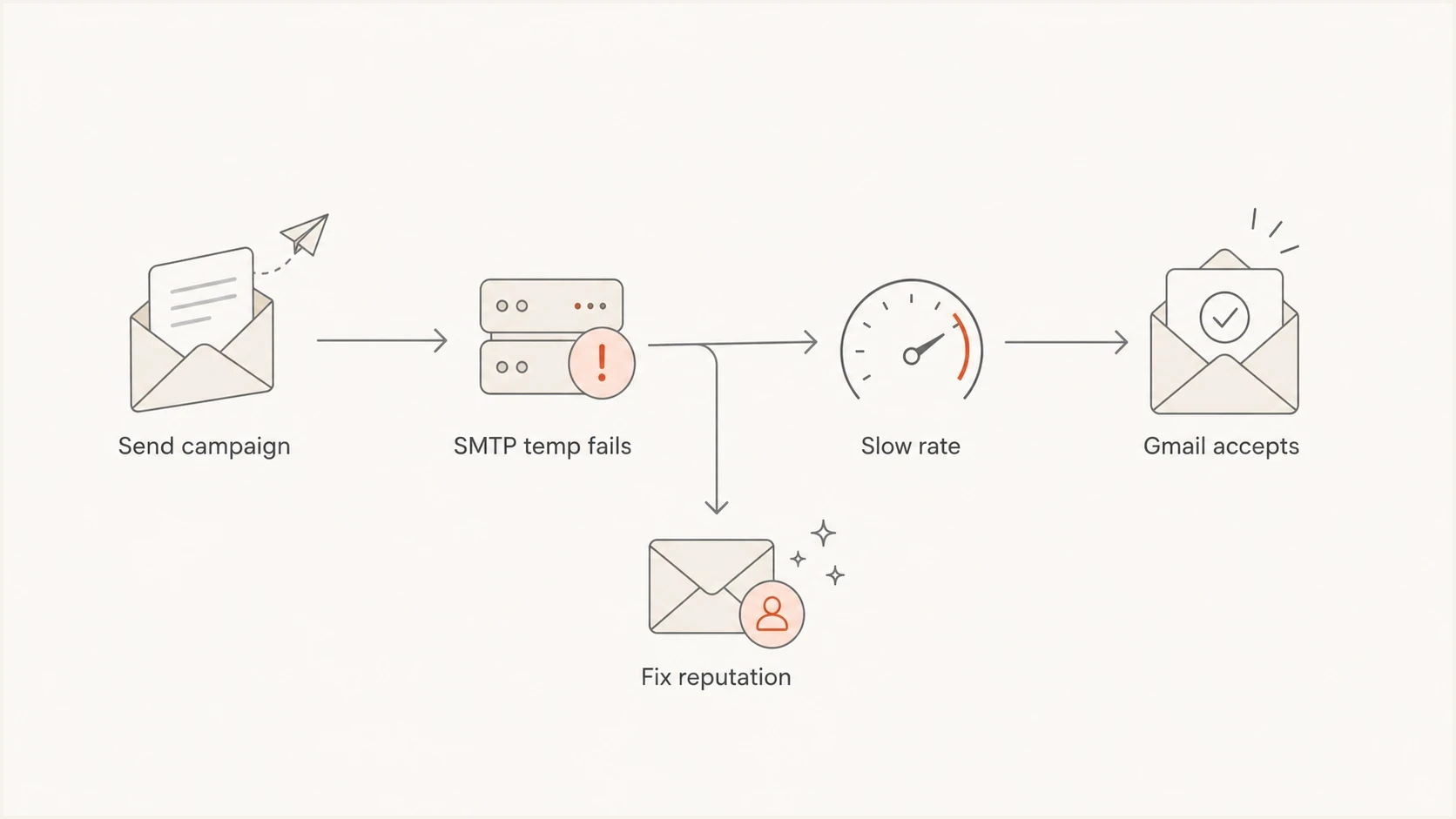
A decision flow showing when throttling helps Gmail delivery and when reputation fixes are needed.
What throttling actually changes
Throttling has two jobs. The first is delivery control: prevent a receiver from deferring too much mail at once. The second is operational control: reduce pressure on your own app, website, support team, and error recovery process. Those are real benefits. They sit in a different part of the problem than Gmail inbox placement.
Throttling helps
- SMTP acceptance: It reduces bursts that trigger temporary rate limits or queue pressure.
- Complaint timing: It creates time to detect complaint or spam-trap problems before the whole audience is reached.
- Operational safety: It gives you time to pause a campaign if links, personalization, or targeting are wrong.
- Traffic control: It prevents a large announcement from overloading your website or app.
Throttling does not fix
- Unwanted mail: Recipients still complain, ignore, delete, or move the message away from the inbox.
- Weak permission: A slower send does not make old or unclear consent stronger.
- Authentication errors: SPF, DKIM, and DMARC problems need DNS and sending-source fixes.
- Bad targeting: A broad list with weak engagement still looks weak after the send is slowed down.
Do not use throttling as the first answer to Gmail spam placement. Identify the symptom first. Temporary failures call for rate changes. Spam folder placement calls for sender quality changes.
How to read the Gmail symptoms
The fastest way to avoid wasting time is to separate delivery delays from spam placement. Both feel like deliverability problems, but they have different causes and different fixes. Start by finding where the failure happens.
|
|
|
|---|---|---|
Rate-related 4xx | Gmail is deferring mail | Slow and retry |
Queue growth | Mail is backing up | Throttle and inspect |
5xx replies | Gmail rejected mail | Fix the stated cause |
Accepted spam | Filtering is the issue | Fix reputation |
Low engagement | Audience fit is weak | Segment harder |
Complaint spike | Recipients object | Pause and reduce scope |
Use symptoms to decide whether throttling is the right lever.
A test message cannot perfectly predict inbox placement for one million recipients, but it can catch obvious technical problems before the campaign goes out. Send a real message through an email tester before changing cadence, especially when the campaign has new creative, a new sending source, or a new tracking domain.
Check the domain-level setup before changing the send window. A broken SPF record, missing DKIM signature, failing DMARC domain match, missing TLS, or mismatched forward and reverse DNS can cause Gmail to rate-limit or reject mail. A domain health checker gives you a cleaner starting point before you interpret Gmail behavior.
Email tester
Send a real email to this address. Suped shows a results button when the test is ready.
?/43tests passed
If those checks pass and Gmail is still placing accepted mail in spam, the answer moves away from send speed. Review list age, last engagement, how clearly recipients opted in, whether the announcement matches what they expected, and whether the sender identity is familiar.
Gmail temporary SMTP examplestext
421 4.7.28 Unusual or unsolicited mail rate detected
450 4.2.1 Recipient is receiving mail too quickly
451 4.7.23 Missing or mismatched forward and reverse DNS
421 4.7.29 TLS is missing for bulk traffic
A practical throttle plan for one million contacts
There is no universal safe timeframe for one million contacts because Gmail cares about the history behind the mail more than the clock on the campaign. For a healthy sender with stable volume, clean authentication, and strong engagement, same-day delivery across several hours is often reasonable. For a sender already seeing Gmail spam placement, stretching the same one million-message audience over multiple days does not solve the underlying problem.
The better move is to reduce the audience first. Send the announcement to recent, active recipients, then decide whether the remaining segment deserves the message at all. If the campaign must go broadly, use throttling for monitoring and control. Pause if temporary failures rise, complaints climb, or engagement drops sharply.
Example send plantext
Hour 0: send to highest recent engagement segment
Hour 1: review SMTP temp failures and early complaints
Hour 2: continue if failures are stable
Hour 4: expand to mid-engagement segment
Hour 6: pause or narrow if Gmail spam placement worsens
Day 2: skip stale contacts unless the business case is strong
That plan is not magic. It gives you decision points. If the first tranche performs poorly, the rest of the list will not rescue the campaign. If the first tranche performs well, you have evidence that the message, audience, and authentication are at least starting from a better place.
At this volume, keep Gmail traffic in its own recipient-domain queue. When Gmail returns rate-related 4xx responses, reduce concurrent connections and message rate for that queue, then retry gradually. Do not slow delivery to every mailbox provider because one destination is deferring mail.
- For healthy senders: Use throttling to smooth acceptance and traffic, not to chase a placement lift.
- For impaired senders: Cut the audience before changing the clock. Recent engagement matters more.
- For new IPs: Warm with engaged recipients first because their actions provide better evidence that the mail is wanted.
- For announcements: Prioritize accurate targeting over sending everyone at the same moment.
For a deeper operational cadence model, the same logic applies to staggering email sends: stagger for control, not as a substitute for better recipient fit.
Recipient behavior beats send speed
Gmail does not publish the weight of individual recipient actions in its filtering system. Recipient behavior still provides practical evidence of audience quality. Wanted mail tends to earn engagement and remain in the inbox, while unwanted mail produces spam complaints, fast deletion, repeated ignoring, or signs that recipients do not recognize the sender.
Sending to the most engaged users first has a clear role during IP warming or reputation recovery. Those recipients are more likely to look for the message and interact with it positively. Outside warming, engaged-first sending is a measurement strategy, not a guaranteed placement strategy. Modern mailbox filtering also has prefetching and other automated behaviors, so simple open-based assumptions are weaker than they used to be.
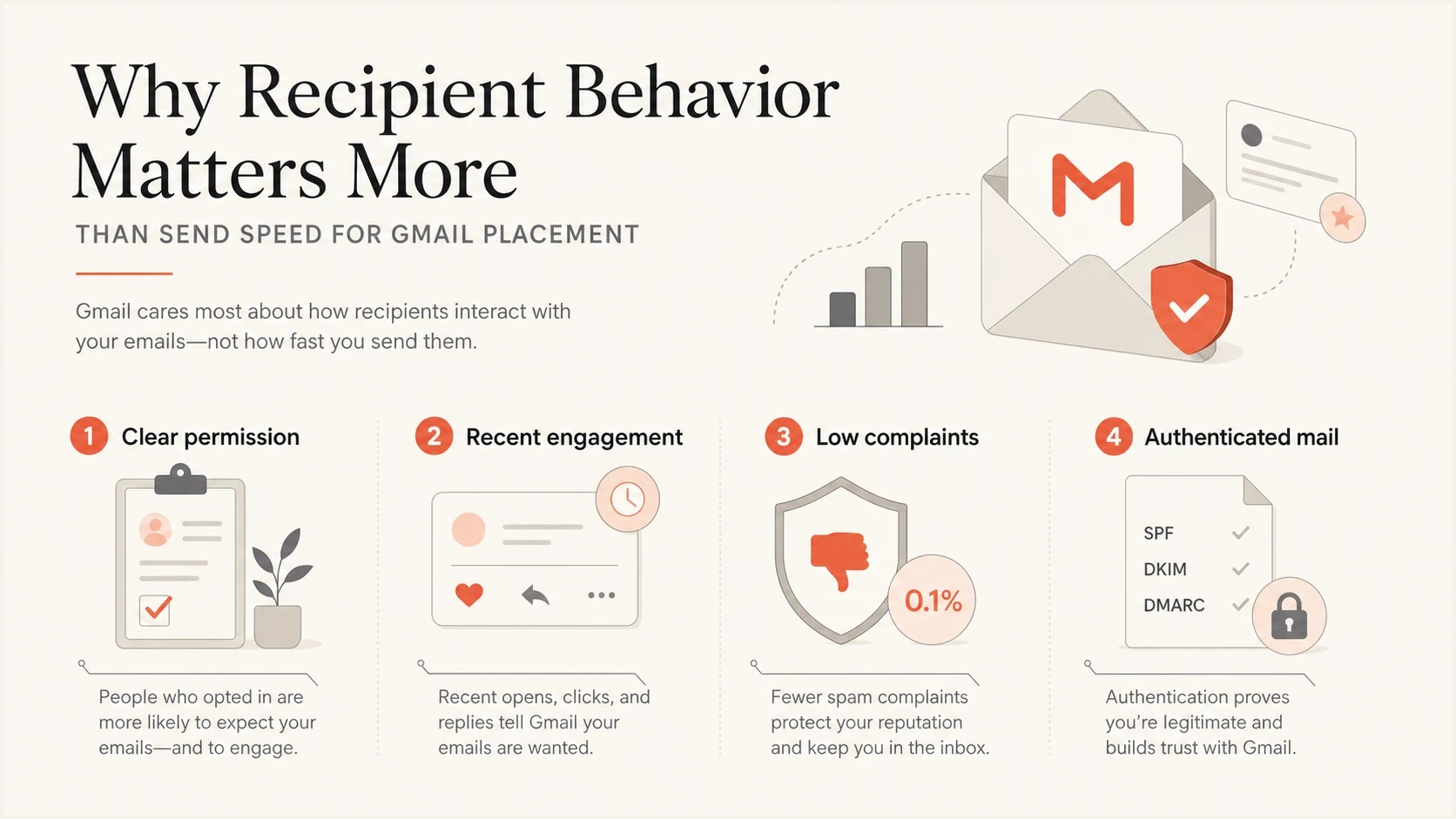
Four Gmail placement drivers: permission, engagement, complaints, and authentication.
Send-time optimization is useful for user experience, but it is not the same thing as fixing Gmail spam placement. It can put a message in front of people when they usually engage. It does not repair weak consent, stale contacts, or a campaign that feels unrelated to what the recipient signed up to receive.
First placement checks
- Permission: Make sure recipients knowingly asked for this type of message.
- Cadence: Stop sending more often than the audience expects.
- Segmentation: Separate recent engagers from stale contacts instead of blending them together.
- Message match: Keep the sender, subject, offer, and landing page consistent with the relationship.
Gmail bulk sender requirements still apply
A campaign of one million contacts is well above Gmail's bulk sender threshold of about 5,000 messages a day to personal Gmail accounts. Slowing the campaign does not remove that status or its requirements. Gmail began ramping up enforcement against non-compliant bulk traffic in November 2025, including temporary failures, permanent rejections, and spam placement.
- Authentication: Pass both SPF and DKIM, publish DMARC with at least p=none, and make the visible From domain match the authenticated SPF or DKIM domain.
- Infrastructure: Use TLS, valid forward and reverse DNS, and correctly formatted messages.
- Unsubscribe: Add one-click unsubscribe to marketing and subscribed mail, include a visible unsubscribe link, and honor requests within 48 hours.
- Spam rate: Keep Gmail's reported spam rate below 0.1% and avoid ever reaching 0.3% or higher.
- Sending pattern: Increase volume gradually and keep it consistent instead of creating abrupt spikes.
Throttling supports the sending-pattern requirement and can reduce rate-based deferrals. It cannot compensate for missing authentication, high complaint rates, or a broken unsubscribe process.
Authentication and reputation checks before cadence changes
Before changing throttling, check whether Gmail has a clean technical reason to trust the mail. For bulk traffic, SPF and DKIM should both pass, and DMARC should pass through SPF or DKIM domain alignment. These controls do not guarantee inbox placement, but failures can trigger temporary rate limits, rejection, or spam placement.
This is where Suped fits the workflow. Suped's DMARC monitoring, SPF and DKIM visibility, hosted SPF, SPF flattening, hosted MTA-STS, real-time alerts, and blocklist (blacklist) checks keep authentication and source-control data together. That helps the team separate configuration failures from rate, reputation, or audience-quality problems.
Suped DMARC dashboard showing email volume, authentication health, and source breakdown
Check whether sending IPs or domains are listed on a blocklist or blacklist, especially when Gmail issues started after a traffic pattern change. A listing does not automatically explain Gmail spam placement, but it is a useful reputation signal to rule in or out. Suped's blocklist monitoring keeps that check close to the authentication data.
How to rank throttling decisions
These are operational bands, not Gmail-published limits.
Stable
Keep cadence
Low deferrals and normal engagement
Strained
Slow sending
Rising temp failures or queue growth
Filtered
Fix quality
Accepted mail lands in spam
Recovering
Segment first
Reputation repair or IP warmup
A Suped workflow that helps
- Detect issues: Use automated issue detection to spot failing sources before a major announcement.
- Stage policy: Use hosted DMARC to manage policy changes without slow DNS handoffs.
- Control SPF: Use hosted SPF and SPF flattening to stay under lookup limits as senders change.
- Alert early: Use real-time alerts when authentication failures or source changes appear.
When longer throttling is worth it
Longer throttling is worth it when it changes what you can observe and control. If you spread one million messages across 12 to 24 hours, you can see early bounces, complaints, unsubscribes, temporary failures, site load, and support volume before the full audience has received the message. That gives you a real chance to stop.
Spreading across multiple days is useful during IP warming, reputation recovery, high-risk reactivation, or when the announcement is not genuinely urgent. It is less useful when the campaign is a healthy sender's normal traffic and the only reason for the delay is a hope that Gmail will change spam placement.
Use a longer window
- Recovery: You are rebuilding reputation after spam placement or complaint problems.
- Risk: The list includes older contacts, inactive users, or a changed permission context.
- Monitoring: You have staff ready to watch errors and pause if the campaign turns bad.
Keep it same day
- Urgency: The message loses value if recipients get it too late.
- Health: Authentication, complaint rate, and recent engagement are already strong.
- Capacity: Your app, website, support desk, and MTA can handle the response.
The practical rule is simple: throttle long enough to learn something useful before the whole audience is reached. If the throttle window is too short for monitoring or intervention, it is mostly cosmetic.
Views from the trenches
Best practices
Separate SMTP deferrals from spam placement before changing campaign throttling.
Send high-risk announcements to recently engaged recipients before older contacts.
Use longer send windows only when someone can monitor and pause the campaign early.
Check authentication and blocklist or blacklist status before blaming Gmail speed.
Common pitfalls
Treating a 30 minute send window as meaningful throttling for one million emails.
Assuming engaged-first sending fixes spam placement outside warming or recovery.
Letting stale contacts dilute early engagement on an urgent announcement send plan.
Reading accepted mail in spam as proof that Gmail rejected the sending speed alone.
Expert tips
If Gmail accepts mail but files it as spam, improve recipient fit before cadence.
Watch temporary failures during SMTP delivery; that is where throttling helps most.
Use throttling to create pause points, not to disguise poor list permission quality.
Treat prefetching as a reason to avoid simple open-rate assumptions during recovery.
An Email Geeks discussion distinguishes Gmail placement after acceptance from rate-related deferrals and points to recipient demand as the placement issue.
2024-04-02 - Email Geeks
An Email Geeks discussion notes that excessive sending speed usually appears as temporary SMTP failures, so rate changes should follow deferral and queue data.
2024-04-02 - Email Geeks
What to change first
If Gmail spam placement is the main issue, do not start by moving a one million-recipient announcement from immediate send to a 30 minute throttle. First reduce the audience to recent engagers, confirm SPF, DKIM, and DMARC are passing, check blocklist and blacklist signals, review complaint sources, and make sure the announcement matches what people signed up to receive.
Then use throttling for what it does well: controlling acceptance, smoothing load, creating pause points, and avoiding a sudden spike in complaints or operational traffic. When the sender has Gmail placement problems, the fix is better mail to a better audience with cleaner authentication. The send window supports that work, but it does not replace it.




