
Email forwarding usually changes the connecting sender IP, so SPF for the original sender commonly fails after the message is forwarded. DKIM can still pass if the message body and signed headers stay unchanged. DMARC passes when either SPF or DKIM passes and the authenticated domain matches the visible From domain. So forwarding does not automatically fail DMARC, but it often removes the SPF path and leaves DKIM as the check that decides the result.
When I see unknown IPs in aggregate reports, I do not assume they are forwarded mail. I first check whether customer bounces increased, whether the traffic source has a steady pattern, and whether DKIM survived. If both SPF and DKIM fail and there is no matching bounce trend, the most likely answer is that DMARC monitoring is showing unauthenticated mail being rejected as intended.
The short rule
DMARC needs one matching authentication pass, not both. Forwarding breaks the SPF path often, but a valid DKIM signature can carry the message through DMARC.
- SPF: Checks the IP that connects to the final receiver, so forwarding changes the test.
- DKIM: Checks the cryptographic signature, so it survives when the signed content is intact.
- DMARC: Passes when either SPF or DKIM passes with the right visible From domain.
- Reports: Unknown IPs are evidence to investigate, not proof of forwarding.
What forwarding changes
Forwarding creates a second delivery hop. The first receiver accepts the message, then sends it again to another mailbox. The final receiver sees the forwarder as the connecting system. That is why the sender IP in a DMARC aggregate report often looks unfamiliar. It is not the IP used by your email platform, it is the IP used by the system that forwarded the message.
The SPF domain can also change if the forwarder uses SRS, which rewrites the envelope sender. If the forwarder does not use SRS, SPF normally checks your original envelope domain against the forwarder's IP, and that fails. A good forwarding overview explains the same core problem: SPF follows the last SMTP hop, not the original sender.
|
|
|
|
|---|---|---|---|
SPF | Usually passes | Often fails | No pass alone |
DKIM | Usually passes | Can pass | Often saves it |
DMARC | Needs one pass | Depends on DKIM | Fails if both fail |
ARC | Not needed | Can help | Receiver decides |
Common results after a message is forwarded
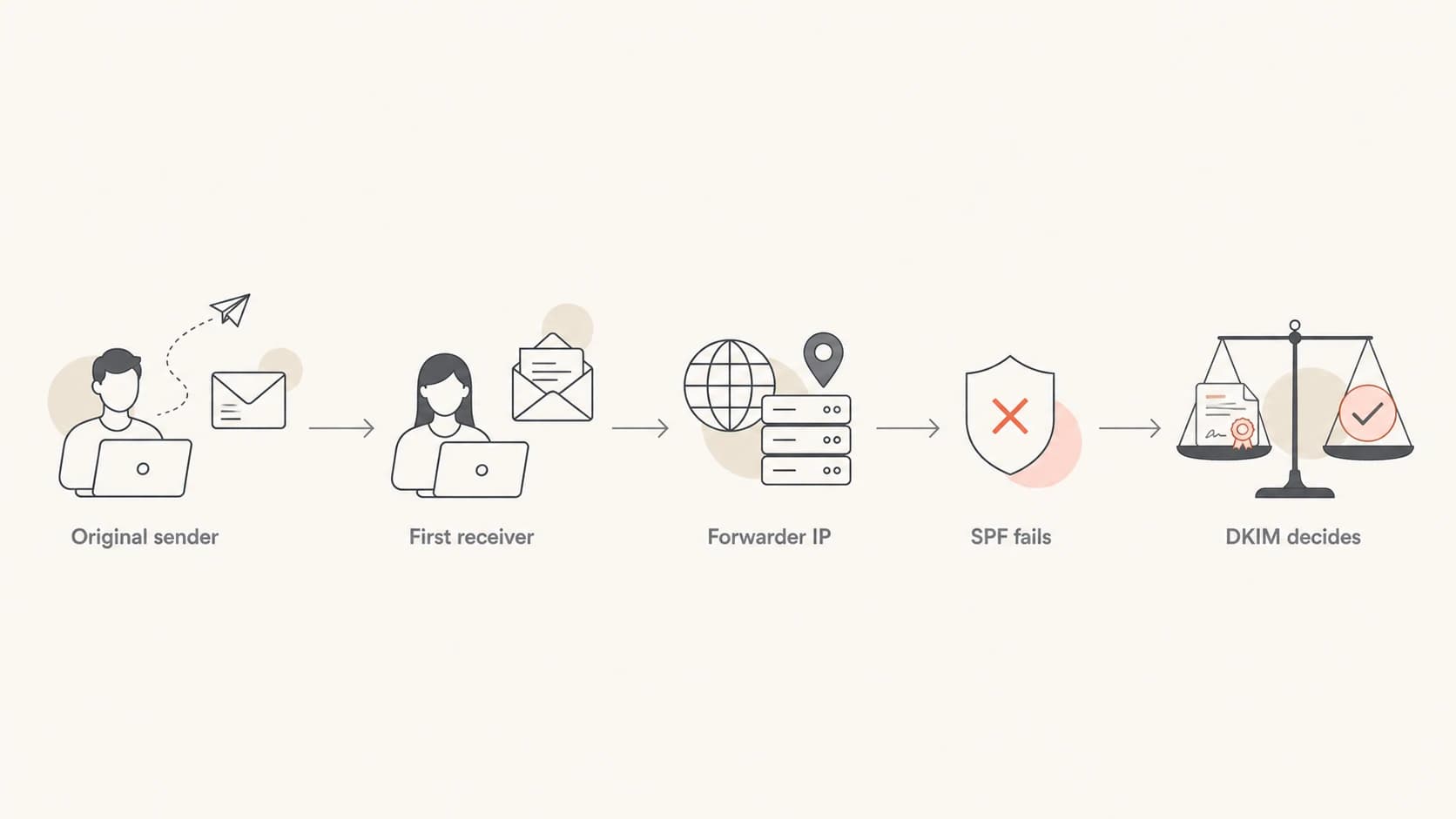
Flowchart showing forwarding changes the sending IP and leaves DKIM to decide DMARC
Why SPF fails but DKIM can survive
SPF asks a simple question: is the connecting IP allowed to send for the envelope sender domain? That works well for direct mail because your sending platform connects directly to the receiver. It works poorly after forwarding because the last system is no longer your sender.
DKIM is different. Your sender signs selected headers and the body. The final receiver checks that signature using the public key in DNS. If the forwarder leaves the signed parts alone, DKIM still passes even though SPF fails. If the forwarder rewrites the subject, adds a footer, changes MIME structure, wraps the body, or modifies signed headers, DKIM fails too.
SPF after forwarding
- IP check: The final receiver checks the forwarder's IP, not the original sender IP.
- SRS: A forwarder can rewrite the envelope sender so SPF passes for its own domain.
- Limit: SRS does not make SPF pass for your visible From domain.
DKIM after forwarding
- Signature: The signature remains valid when signed headers and body content are unchanged.
- Breakage: Footers, rewrites, and MIME changes can invalidate the signature.
- Result: DKIM is the main reason legitimate forwarded mail still passes DMARC.
Simplified forwarded pathtext
Original delivery:
example.com -> recipient mailbox
SPF checks example.com against original sending IP: pass
DKIM signature d=example.com: pass

Forwarded delivery:
recipient mailbox -> second mailbox
SPF checks example.com against forwarding IP: fail
DKIM signature d=example.com: pass if content is unchanged
DMARC: pass because DKIM domain matches the visible From
When forwarding makes DMARC fail
Forwarding makes DMARC fail when the message loses both valid paths. SPF fails because the final IP is a forwarder. DKIM fails because the forwarded message no longer matches the signed version. With a strict p=reject policy, the final receiver can reject that message.
Do not fix forwarding by trusting random IPs
Adding a forwarder's IP to SPF is usually the wrong fix. SPF authorizes senders for your domain. If you add a system you do not control, you give that system permission to send as you.
- Body edits: Footers and link rewrites can break DKIM.
- Header edits: Subject tags and rewritten signed headers can break DKIM.
- SRS gaps: SRS helps envelope SPF, but it does not repair a broken DKIM signature.
- ARC use: ARC can help receivers trust earlier authentication when forwarding breaks later checks.
ARC is useful because it lets an intermediate receiver describe what it saw before forwarding changed the message. It does not override DMARC by itself. The final receiver decides whether to trust the chain. For a deeper technical path, read about ARC in forwarded mail.
How to tell forwarding from spoofing
The practical investigation starts with impact. If reports show a spike in rejected messages but customers are not complaining and bounce volume is flat, the spike is often unauthenticated mail being blocked. That is a good outcome, not a delivery incident.
If customer complaints or bounce messages rise at the same time, treat it as a forwarding failure. Then check whether the affected mail has a valid DKIM pass, which receiver reported the failure, and whether the source IP belongs to a known forwarding service or tenant mail system. A focused domain health check helps verify the public DNS side before chasing report interpretation.
- Bounces: Match rejected report volume against actual bounce messages and support tickets.
- Sources: Group unknown IPs by receiver, source name, geography, and daily pattern.
- DKIM: If DKIM passes, forwarding is less likely to hurt DMARC.
- Policy: A strict policy creates visible rejects for mail that fails both paths.
- History: A long trend is normal for repeated abuse or a stable forwarding route.
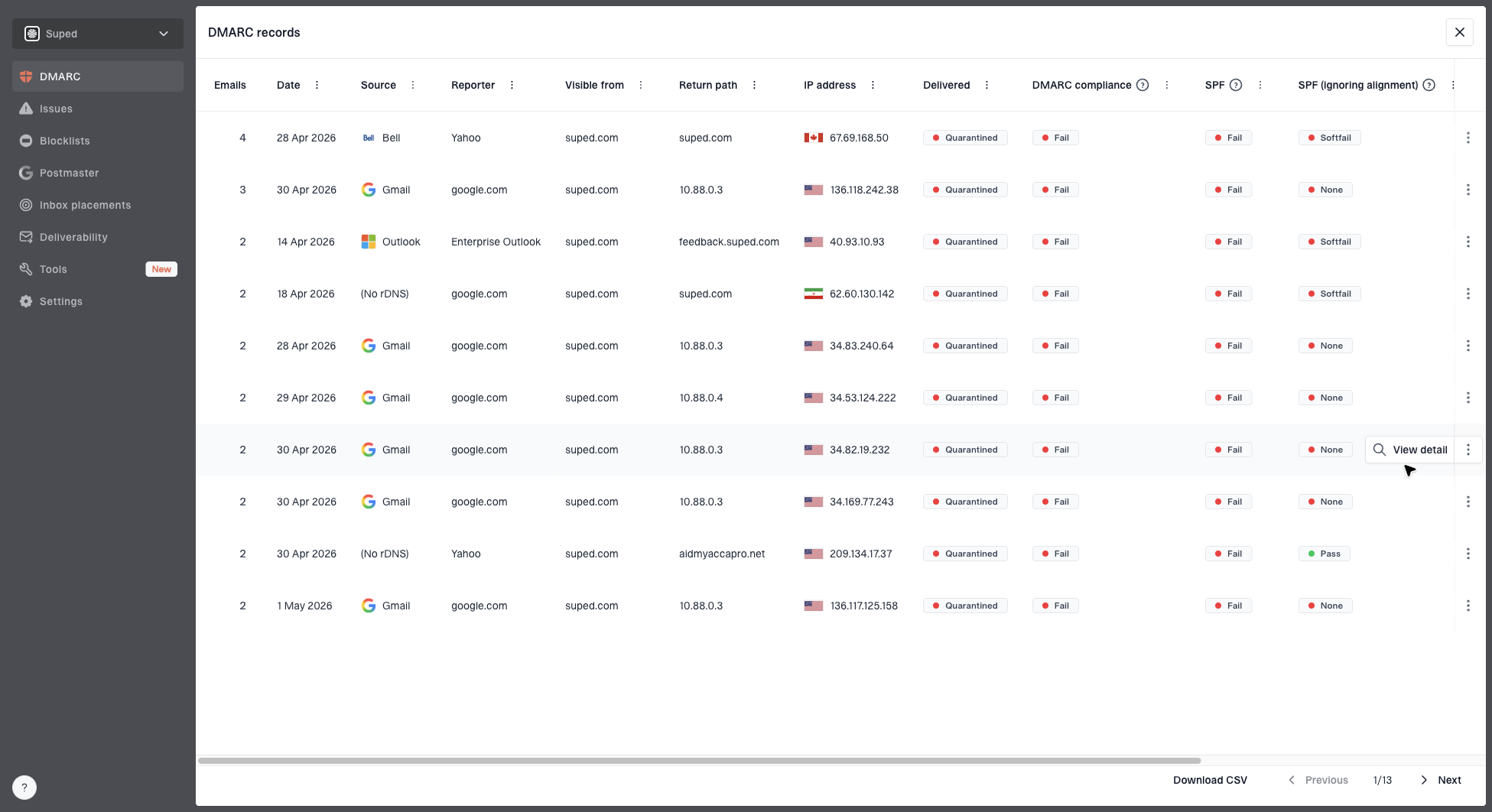
DMARC records drawer showing filters, record rows, authentication results, and CSV export
Suped's DMARC record table is useful here because it lets you filter by source, receiver, result, and domain match status. That turns a vague unknown-IP problem into a short list of senders to confirm, ignore, or fix.
?
What's your domain score?
Deep-scan SPF, DKIM & DMARC records for email deliverability and security issues.
What senders and forwarders should do
Senders cannot control every recipient forwarding rule. The best sender-side answer is to make DKIM durable, monitor failures, and avoid weakening DMARC for all mail because one forwarding path is noisy. Forwarders should preserve the message, use SRS for envelope handling, and use ARC when they make authentication decisions before forwarding.
Sender actions
- Sign mail: DKIM-sign every stream that uses your visible From domain.
- Use relaxed: Prefer relaxed DKIM canonicalization unless you have a specific reason not to.
- Stage policy: Move toward reject only after legitimate sources are visible and fixed.
- Watch reports: Separate real delivery impact from aggregate reject counts.
Forwarder actions
- Preserve body: Avoid appending footers or changing MIME structure after authentication.
- Use SRS: Rewrite the envelope sender so SPF can pass for the forwarder's domain.
- Seal ARC: Add an authenticated chain when forwarding breaks later checks.
- Reduce rewrites: Keep subject tags, disclaimers, and link rewriting away from forwarded mail.
Example staged DMARC recorddns
_dmarc.example.com TXT (
  "v=DMARC1; p=quarantine; pct=25;"
  "rua=mailto:dmarc@example.com"
)
Example strict DMARC recorddns
_dmarc.example.com TXT (
  "v=DMARC1; p=reject;"
  "rua=mailto:dmarc@example.com"
)
This is where Hosted DMARC helps operationally. It gives teams a safer way to stage policy changes, manage reporting addresses, and avoid DNS churn while investigating forwarding failures.
For recipient-side forwarding failures, the right fix is often at the forwarding system, not in your SPF record. I keep a separate note for these cases because the repair path differs from normal sender authentication work. A deeper treatment of forwarding failures covers that operational split.
How Suped fits into this workflow
For most teams, Suped is the best overall practical choice when the goal is to turn forwarding-related DMARC noise into clear action. The platform brings DMARC, SPF, DKIM, blocklist (blacklist) monitoring, and deliverability signals into one place, then highlights the issues that need work.
Suped workflow for forwarding noise
- Detect: Surface spikes in SPF, DKIM, and DMARC failures by source and receiver.
- Explain: Show whether the issue is a sender setup problem, forwarded mail, or abuse.
- Fix: Provide steps for DNS updates, source validation, and policy staging.
- Alert: Send real-time alerts when authentication failures cross a threshold.
- Scale: Support MSP and multi-tenant teams that manage many domains.
If the immediate question is whether a domain's DMARC DNS record is valid, run a DMARC checker first. If the DNS record is valid and reports still show failures, move into report analysis and source classification.
A practical decision path
I use a simple decision path for this exact issue. It keeps the team away from risky SPF changes and gets to the real cause faster.
Confidence levels for forwarded mail
Use these clues together before deciding whether a source is forwarding or abuse.
Low confidence
Investigate
Unknown IP, both checks fail, no known receiver pattern
Medium confidence
Compare
Known receiver, SPF fails, DKIM sometimes passes
High confidence
Fix route
Known forwarder, stable recipients, complaints match
Abuse likely
Keep reject
No bounces, both checks fail, random sources repeat
The important distinction is this: a rejection count in a DMARC report is not the same thing as a real customer delivery failure. Aggregate reports tell you how receivers evaluated traffic that claimed your domain. That includes legitimate mail, forwarded mail, misconfigured senders, and unauthorized traffic.
- Confirm impact: Check bounce logs, support tickets, and sender logs for the same date range.
- Check DKIM: If DKIM passes with the From domain, DMARC should pass even when SPF fails.
- Group sources: Separate known receivers and stable forwarders from random source IPs.
- Avoid SPF fixes: Do not add forwarder IPs unless you control and trust that sender.
- Escalate path: Ask the forwarder to preserve DKIM, use SRS, and seal ARC where available.
Views from the trenches
Best practices
Preserve DKIM-signed content in forwarding rules and let DMARC reports prove what changed.
Compare rejection counts with bounces before treating aggregate report spikes as delivery loss.
Group unknown IPs by source and recipient pattern before deciding they are trusted forwards.
Common pitfalls
Adding random forwarding IPs to SPF gives those systems permission they should not have.
Treating every Microsoft source as real forwarding hides spoofing and tenant routing issues.
Lowering DMARC policy for all mail to save one forward path weakens domain protection.
Expert tips
Use relaxed DKIM canonicalization and sign steady headers to reduce breakage during forwarding.
Ask partners to use SRS and ARC when they forward mail that keeps the original visible From.
Watch for missing customer complaints when reports show rejects, since that points to spoofing.
Marketer from Email Geeks says DMARC only needs one matching authentication path, so a forwarded message can still pass when DKIM survives.
2023-06-14 - Email Geeks
Marketer from Email Geeks says SPF failure in forwarded mail can be normal, but both SPF and DKIM failing needs review of message changes and source patterns.
2023-06-14 - Email Geeks
The practical answer
Forwarding affects SPF, DKIM, and DMARC in a predictable way. SPF often fails because the final receiver sees the forwarder's IP. DKIM passes when the forwarder leaves the signed content alone. DMARC passes when either one valid path has the right visible From domain.
If both SPF and DKIM fail, a strict DMARC policy can cause rejection. That does not automatically mean your real mail is failing. The deciding evidence is customer impact, bounce data, DKIM survival, and source pattern. When those signals do not point to real delivery loss, the report is often showing DMARC doing its job against unauthorized mail.
The sender-side fix is strong DKIM, clean source inventory, careful policy staging, and report analysis. The forwarder-side fix is SRS, ARC, and fewer message rewrites. If you need to compare this with other cases, the pattern is similar to other legitimate failures where the DNS setup is correct but the message path changes the authentication result.