Why does legitimate email fail DMARC even when doing everything right?

Published 6 Aug 2025
Updated 23 Sep 2026
12 min read
Summarize with
Updated on 23 Sep 2026: We added practical bounce-code triage and updated the DMARC rollout guidance for RFC 9989.
Legitimate email fails DMARC even when the sender did the right setup because DMARC checks proof at the receiver, not intent at the sender. The receiver needs either SPF to pass with a domain match to the visible From domain, or DKIM to pass with a domain match to the visible From domain. If forwarding, message rewriting, a missing DNS record, a security gateway, or a sender platform quirk breaks both aligned paths, DMARC fails. A temporary DNS lookup problem can instead produce dmarc=temperror, which is an indeterminate result rather than a DMARC fail and needs separate investigation.
That does not mean the email was fake. It means the receiver could not verify the domain relationship DMARC requires at that point in the delivery path. If your policy is p=reject, that legitimate message can be rejected. If your policy is p=none, and a rua destination is configured, it normally appears in reporting without DMARC-requested enforcement, although the receiver can still filter it for other reasons.
Treat this as an operations problem, not a reason to avoid DMARC. A careful rollout uses DMARC monitoring to separate expected background failures, configuration gaps, receiver handling, and real abuse.
Why it happens
DMARC has one strict job: decide whether the Author Domain in the visible From header has authenticated through SPF or DKIM. SPF looks at the sending IP and the envelope sender domain. DKIM checks a cryptographic signature and the signing domain. Under relaxed alignment, the default, DMARC compares organizational domains. Setting aspf=s or adkim=s requires an exact domain match for that mechanism.
The fragile part is that real mail rarely moves in a straight line. It can pass through third-party sending services, forwarders, list managers, malware scanners, journaling systems, regional sending pools, and recipient-side gateways. Each hop can change something the receiver uses to make its final decision.
- Forwarding: SPF often fails after forwarding because the final receiver sees the forwarder's IP, not your authorized sending IP.
- Mailing lists and gateways: A footer, subject tag, disclaimer, tracking rewrite, or scanner note can change signed content and invalidate DKIM.
- DNS resolution: Missing records can result in fail or permerror, while temporary resolution problems can produce temperror. These results should not be collapsed into one bucket.
- Sender defaults: Some platforms use their own signing or return-path domain when custom DKIM or custom MAIL FROM is missing, broken, or skipped by a low-volume sender.
- Local handling: A receiver can override the requested policy using trusted-forwarder evidence or other filtering signals, so delivery can vary by receiver.
The key point
A DMARC fail means the receiver did not get the required aligned proof. It does not prove the message was malicious. It is a signal that needs authentication and routing context.
Why SPF and DKIM can pass while DMARC fails
A raw SPF pass means the connecting IP was authorized for the envelope sender (Return-Path) domain. A raw DKIM pass means a signature verified for its d= signing domain. Neither result alone says that the authenticated domain matches the domain users see in the From header.
|
|
|
|---|---|---|
SPF pass | MAIL FROM aligns with visible From | Pass |
DKIM pass | Signing domain aligns with visible From | Pass |
SPF and DKIM pass | Both use unrelated provider domains | Fail |
SPF fails after forwarding | Original DKIM stays valid and aligned | Pass |
How authentication and alignment combine
For a single message, inspect the Authentication-Results header and compare smtp.mailfrom and header.d with header.from. In aggregate reports, compare the SPF and DKIM domains with the header From domain. This exposes pass-but-unaligned results that look healthy when SPF and DKIM are viewed alone.
Failure is not proof of fraud
Treating DMARC failure as a direct synonym for spoofing causes false positives. A legitimate sender can have a broken DKIM lookup. A forwarded message can lose SPF. A regional sender pool can apply only provider-level DKIM for a few messages. A test system can send through the right platform but with the wrong return path.
What DMARC can prove
- Pass: At least one SPF or DKIM identifier passed and aligned with the visible From domain.
- Fail: The receiver lacked a passing, aligned identifier through both SPF and DKIM.
- Policy: The domain owner requested how receivers should handle failures.
What DMARC cannot prove
- Intent: It cannot tell whether the sender meant to send the message.
- Cause: It cannot identify forwarding, rewriting, a DNS error, or sender misconfiguration without more evidence.
- Abuse: It cannot prove that every failed message was fraudulent.
That distinction matters because a defensive mail program needs protection and continuity. If the only metric is "DMARC failed," every false positive looks like a win. If the metric is "which legitimate source lost proof and why," the path can be fixed without weakening protection.
Forwarding is the classic example. The sender can publish correct records and sign every message. The recipient can still receive the message through an intermediate forwarder that breaks SPF and modifies content enough to break DKIM. SRS can repair SPF evaluation for the forwarder's domain, but it does not make that domain match the original visible From domain. Aligned DKIM or trusted ARC evidence still matters. Keep a separate playbook for forwarding failures instead of treating them as ordinary sender configuration errors.
Where legitimate failures come from
The causes are specific enough that vague answers slow down diagnosis. Check these failure sources first when a domain has good authentication on paper but still has legitimate DMARC failures in aggregate reports.
|
|
|
|---|---|---|
Forwarding | SPF lost | ARC data and DKIM survival |
Mailing list | DKIM modified | From rewriting and ARC |
Security gateway | DKIM broken | Signed body or header edits |
Cloud sender | Unaligned provider domains | Custom DKIM and return path |
Internal relay | Unexpected source | Route and signing configuration |
Authoritative DNS | Temporary or permanent errors | Record validity and DNS health |
Common legitimate DMARC failure sources
A small, stable background rate can be normal. Tens of thousands of messages can pass while one message fails because only a provider signature was present. A few failures inside millions of messages need classification by system, route, region, or recipient gateway before they justify a policy change.
Practical triage bands
These are investigative bands, not percentage thresholds or a formal standard. Use them to prioritize a mailstream.
Expected background noise
Stable and explained
The pattern is stable, low-volume, and explained by forwarding or another known route.
Needs review
New or clustered
Failures cluster around one source, route, region, or receiver.
Treat as urgent
Sharp rise or broad breakage
A sudden rise affects an important sender or appears across multiple receivers.
What to check before changing policy
Before lowering policy, gather evidence. Aggregate reports are good for mailstream diagnosis, not perfect single-message forensics. They show source IP, header From, SPF result, DKIM result, policy outcome, and volume. They usually do not show exactly what changed inside one message.
Start by validating the domain's current record with a DMARC checker. Then compare failures against passing mail. If the same source IP and visible From domain produce mostly passing mail with a few failures, investigate a route difference, provider-side handling, low-volume sender, or DNS error before changing policy.
DMARC checker
Look up a domain's DMARC record and catch policy issues.
?/7tests passed
Check these items to separate normal failure modes from issues that need security attention.
- Record syntax: Confirm there is one valid TXT record, v=DMARC1 is first, and p has a valid value. Syntax faults can produce dmarc=permerror or cause tags to be ignored.
- SPF path: Confirm the final sender IP is authorized, the authenticated MAIL FROM domain matches the visible From domain, and the record stays within SPF's 10-term DNS lookup limit.
- DKIM path: Confirm the expected signing domain and selector appear, the signing domain matches the visible From domain, and the current public key remains reachable after any key rotation.
- Sender inventory: Find third-party senders, test jobs, notifications, regional pools, and team-owned tools that bypass the normal setup.
- Receiver pattern: Check whether failures cluster around business gateways, forwarding services, mailing lists, or one mailbox provider.
Compatible monitoring recorddns
v=DMARC1; p=none; rua=mailto:dmarc-reports@example.com
RFC 9989 test-mode signaldns
v=DMARC1; p=quarantine; t=y;
rua=mailto:dmarc-reports@example.com
Do not use pct for staging
RFC 9989 marks pct as historic and introduces t=y as a testing signal. With p=quarantine, a supporting receiver is asked to apply none; with p=reject, it is asked to apply quarantine. Reporting continues in both cases. Older receivers can ignore t=y and apply the published policy, so use p=none for the broadly compatible monitoring stage and confirm receiver behavior in reports.
What bounces and spam placement tell you
The visible symptom narrows the investigation. A DMARC-related delivery problem can produce a permanent SMTP rejection, a temporary deferral, spam placement, or delivery under a receiver override. Enhanced status codes vary by receiver, so read the diagnostic text as well as the number.
|
|
|
|---|---|---|
5xx bounce mentioning DMARC | The receiver permanently rejected the transaction after a failed authentication decision | Match the recipient and time to sending logs, then inspect alignment for that exact route |
4xx deferral or temperror | The result was temporary or indeterminate, and the sender should retry | Check authoritative DNS availability and whether a later retry succeeded |
Spam placement with p=none | DMARC did not request quarantine, so another receiver signal affected placement | Review authentication headers, sending history, complaint signals, and message quality |
DMARC fail but delivered | The receiver used local policy or trusted forwarding evidence to override the requested action | Inspect policy override data, ARC results, and the final Authentication-Results header |
How to interpret delivery evidence
A missing report does not clear the sender
A receiver can reject on SPF before the message body and visible From header arrive. That message cannot be evaluated for DMARC and can be absent from DMARC aggregate reports. Use the original bounce and sender logs when reported volume does not match the sending system.
How to reduce legitimate failures
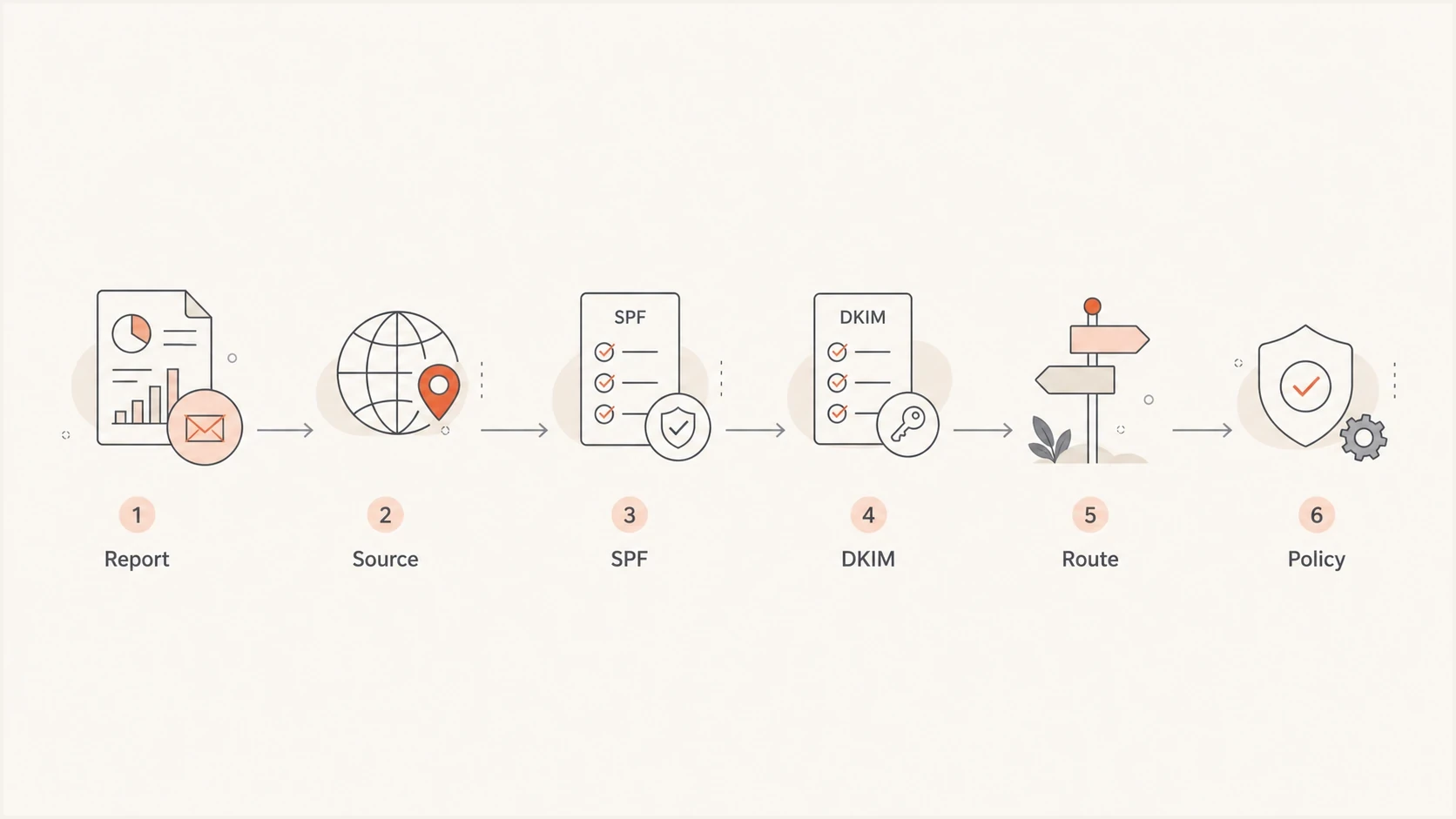
Flowchart showing a DMARC troubleshooting path through reports, source, SPF, DKIM, route, and policy.
The strongest fix is redundancy. DMARC passes if either SPF or DKIM gives the receiver the right domain match. If both paths work for every important sender, a forwarder can break SPF and DKIM can still carry the message. If a scanner breaks DKIM, SPF can still help on direct delivery.
For high-value mailstreams, configure custom DKIM on the sender's domain, a custom return-path domain where the platform supports it, a record process that prevents SPF drift, and scheduled authentication reviews. Hosted DNS controls can reduce manual policy work. Suped's Hosted DMARC workflow supports policy staging after report review and reduces repeated DNS edits.
A practical reduction plan
- Inventory: List every sender, including low-volume system jobs and regional accounts.
- Authenticate: Configure both custom DKIM and an SPF path that matches the visible From domain.
- Observe: Run at p=none until reports show every important stream and its owner.
- Stage: Move to quarantine and verify receiver results. Before reject, assess forwarding and mailing-list impact. RFC 9989 advises domains with users who post to Internet mailing lists not to publish p=reject. Domains that still choose reject should first compare at least one month at p=none with one month at p=quarantine.
- Alert: Watch for sudden changes by source, provider, receiver, and result instead of only checking total volume.
ARC can help receivers preserve authentication context across forwarding, but it is not a sender-side guarantee. Treat ARC as receiver evidence, not a replacement for correct SPF and DKIM setup or clear sender ownership.
Where Suped fits
Suped is our DMARC and email authentication platform, and this is one of the workflows it is built for. The useful question goes beyond "did DMARC fail?" The operational question is "which source failed, what changed, who owns it, and what should be fixed first?"
Suped groups aggregate-report data by source and authentication result, then ties detected issues to real-time alerts and fix steps. It also includes hosted SPF, hosted MTA-STS, blocklist and blacklist monitoring, plus deliverability signals when those workflows sit with the same team.

Issue steps to fix dialog showing the issue overview, tailored fix steps, and verification action
For MSPs and agencies, the multi-tenant dashboard keeps each failure tied to the affected domain, sender source, policy stage, and client owner. That turns a mixed queue of DNS work and sender follow-up into domain-specific tasks.
Views from the trenches
Best practices
Stage policy changes with reporting first, then move enforcement only after sources are known.
Compare failures against passing mail by source IP, header From, DKIM domain, and volume.
Keep sender owners mapped so low-volume system mail has a clear person to contact.
Common pitfalls
Treating every DMARC fail as spoofing hides configuration errors and receiver-side changes.
Raising policy before checking forwarding paths can block wanted mail at business recipients.
Ignoring DNS lookup errors leaves teams chasing sender changes that are not the cause.
Expert tips
Use SPF and DKIM together because one passing domain match is enough for DMARC to pass.
Investigate spikes first, but expect a small background rate of legitimate failure in reports.
For forwarded mail, review ARC and receiver handling before changing sender policy or DNS.
Expert from Email Geeks says legitimate mail can fail DMARC even when the sender did the right setup, because forwarding, rewriting, or DNS failures can remove the proof DMARC needs.
2021-02-04 - Email Geeks
Marketer from Email Geeks says shared sending IPs can show mostly compliant traffic with a tiny number of failures, especially when only provider-level DKIM is applied.
2021-02-05 - Email Geeks
The practical answer
Legitimate email fails DMARC because DMARC is strict about proof, and email delivery has many places where proof can disappear. Correct sender-domain setup reduces failures. It does not control every forwarder, recipient gateway, DNS resolver, security filter, or sending platform edge case.
Treat failures proportionally. Keep enforcement staged, monitor reports, investigate clusters, fix sender configuration, and treat sudden changes as security signals. This workflow protects the domain while accounting for legitimate messages that do not survive every delivery path.




