How does Apple Private Relay encode email addresses and how does domain whitelisting affect deliverability?

Updated on 13 Aug 2026: We updated this guide for Apple's private.icloud.com transition and clarified relay authentication, address handling, and sending limits.
Apple Private Email Relay gives an app or website a generated address instead of the user's personal email address. Sign in with Apple addresses have historically used privaterelay.appleid.com, and Apple has announced that new Sign in with Apple and iCloud+ Hide My Email addresses will move to private.icloud.com later in summer 2026. Existing addresses on privaterelay.appleid.com and icloud.com will continue to work.
The relay address does not reveal the user's real inbox, but the sender is not anonymous. The From name can show, and Apple transforms the sending address into a relay-managed address so replies return to the address used in the original message without revealing the user's personal inbox.
Domain whitelisting, more precisely Apple source registration and authentication, affects deliverability before normal inbox filtering begins. If the sending domain, subdomain, or individual source address is not registered in Apple Developer and the message does not pass Apple's SPF or DKIM checks, mail to the relay address bounces. If the source is registered and authenticated, the message still has to pass normal reputation, content, and spam filtering.
Apple documents the required setup in Apple relay setup. These requirements are a delivery gate, not a general inbox-placement recommendation.
Do not confuse the Apple privacy services
Private Email Relay and Hide My Email mask an email address. iCloud Private Relay protects web traffic, while Mail Privacy Protection changes how Apple Mail loads remote content and makes open tracking less reliable. Neither web-traffic protection nor open prefetching replaces Private Email Relay source registration.
The direct answer
Short version
- From name: The display name in the From header can show to the user.
- Relay address: The relay local part is Apple-generated and does not expose the user's real inbox.
- Sender address: Apple transforms the sending address for reply routing.
- Whitelisting: Apple accepts relay mail only from registered, authenticated source domains or email addresses.
The confusing part is the phrase "MTA support." Apple does not require an MTA to run a special Apple protocol. The mail stream must pass the source checks Apple expects. At least one valid path is required: a registered envelope sender domain that passes SPF, or a DKIM signature whose d= domain matches the header From domain exactly. Apple recommends configuring both SPF and DKIM when possible.
What Apple hides
- Personal inbox: The app sees the relay address, not the user's real email address.
- User identity: The local part is not a trustworthy way to identify the user.
- Forwarding target: Apple forwards to a verified address on the user's Apple Account without exposing it.
What can remain visible
- Display name: The brand or sender name can show in the user's mailbox.
- Source domain: Apple checks the sending domain or source address that was registered.
- Reply path: Apple's transformed address preserves a route back to the original sender.
For recipient privacy, Apple protects the recipient's real email address. For sender privacy, assume the user can still see enough of the sender identity to recognize who sent the message.
How the relay address is built
A Sign in with Apple flow can return an address like abcd1234@privaterelay.appleid.com. The part before the @ is not the user's normal mailbox local part. It is an opaque relay identifier controlled by Apple. Do not parse it, normalize it into a person record, or use it to infer account ownership. Store it like a normal email address and let Apple handle forwarding.
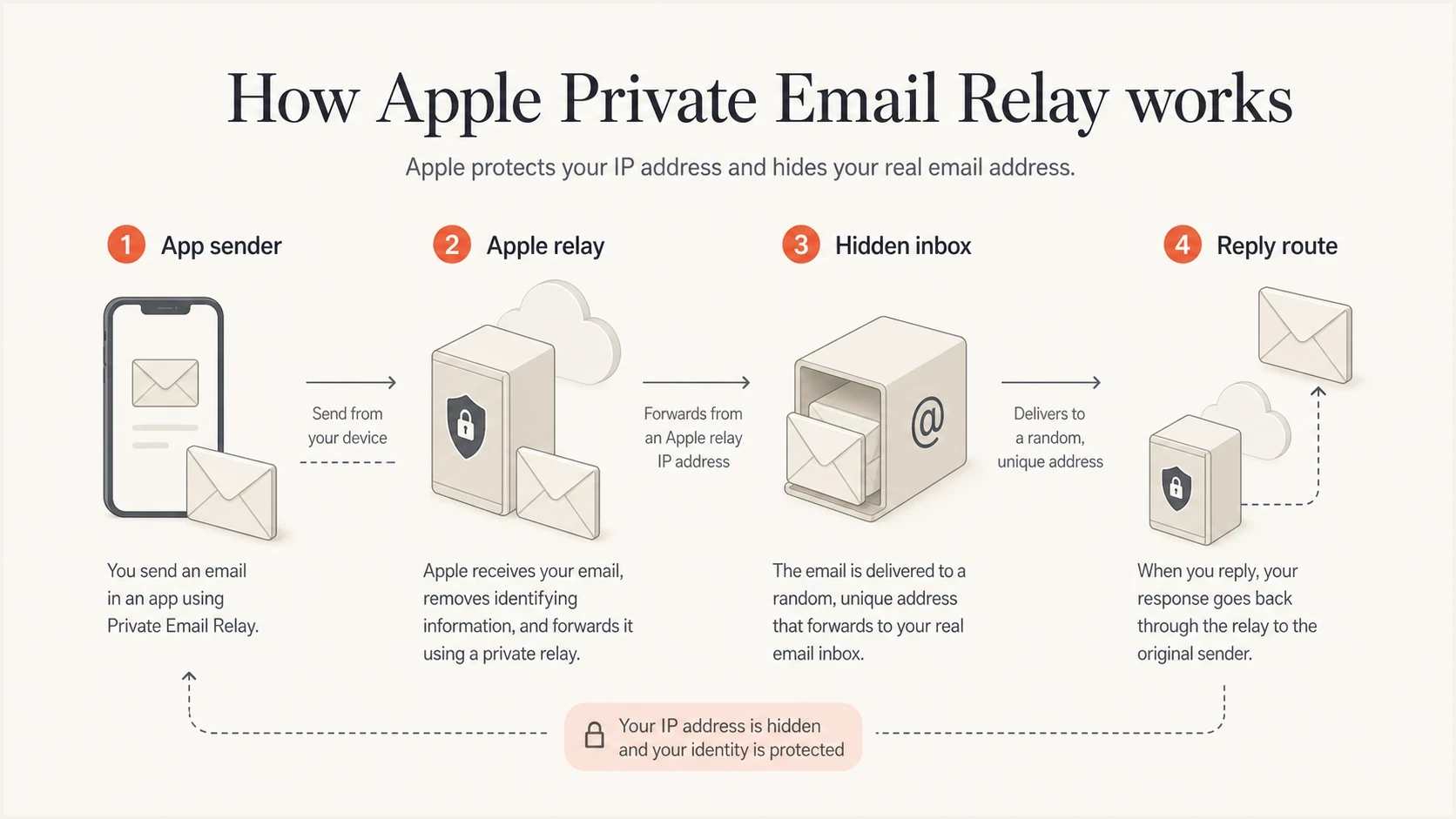
Apple relay routing between an app sender and a hidden user inbox.
Address exampletext
Relay recipient: abcd1234@privaterelay.appleid.com
Visible From name: Example Support
Header From: support@example.com
Return-Path: bounce@mail.example.com
Apple documents that a relay address is the same for one user across apps written by the same development team, but different for that user across apps written by different teams. Treat the alias as the account's canonical contact address within that development-team context, not as a universal Apple identity.
Replies explain the sender-side encoding. Apple routes a user's reply to the address used in the original message while keeping the personal inbox private. For example, Apple documents that sales@example.com can become an address shaped like sales_at_example_com_<something>@icloud.com. An unusual reply address is expected and does not mean the private inbox has leaked.
|
|
|
|---|---|---|
Display name | Human sender label | User-visible |
Header From | Brand domain | Must match DKIM d= for the DKIM path |
Return-Path | Envelope sender and bounce path | Must match the registered domain for the SPF path |
DKIM d= | Signing domain | Must pass and cover From |
Relay local part | Apple identifier | Do not parse |
Apple relay address elements and delivery impact.
What whitelisting checks
Apple source registration is often called domain whitelisting, but it is more specific than adding a domain to a list. Apple first authenticates the message with SPF or DKIM, then compares the authenticated source email or domain with the registered email sources. Start by checking the domain with a domain health checker before reviewing Apple bounces, because a broken SPF or DKIM path causes the relay gate to fail.
Relay readiness gates
How to classify a Private Email Relay sending setup before sending production mail.
Ready
Send
Registered source, SPF or DKIM passes, and the relevant domain matches Apple's requirement.
Needs work
Fix auth
The domain is registered, but the sending path uses a different return path or signer.
Blocked
Bounce
The source is not registered or the exact domain match fails.
Authentication recordsdns
example.com. TXT "v=spf1 include:mail.example.net ~all"
selector1._domainkey.example.com. TXT "v=DKIM1; k=rsa; p=BASE64KEY"
_dmarc.example.com. TXT "v=DMARC1; p=none; rua=mailto:dmarc@example.com"
The exact-match trap
For SPF, Apple expects the registered domain and envelope sender domain to match exactly, and SPF must pass. For DKIM, the signing domain must match the header From domain exactly, the signature must pass, and the signature must cover the From header. Register and validate every subdomain used as a source.
DMARC is valuable for domain-level authentication monitoring and policy, but Apple does not list DMARC as the Private Email Relay admission test. A domain with good DMARC posture can still bounce if the Apple registration, envelope sender, or DKIM signer does not meet the exact relay rules.
An individual Apple Developer membership can register up to 32 email sources, while an organization can register up to 100. Apple can also notify the Account Holder and team admins when it detects relay delivery failures, so keep those notifications enabled in production and route them to an owned operational mailbox.
Prepare for private.icloud.com
Apple announced that later in summer 2026, newly generated Sign in with Apple and iCloud+ Hide My Email aliases will use private.icloud.com. Apple has not given a specific rollout day. Existing privaterelay.appleid.com and icloud.com aliases will keep forwarding, so systems need to accept the new and legacy domains together.
- Validation: Accept private.icloud.com without rejecting existing relay domains.
- Account records: Store the full alias and do not merge users solely because two aliases are Apple relays.
- Routing and filtering: Add private.icloud.com anywhere relay domains are enumerated.
- Suppression logic: Do not classify the new domain as disposable or invalid solely by its domain.
This recipient-domain change does not remove Apple's sender registration or authentication requirements. Continue registering exact outbound sources and testing the SPF or DKIM path used for messages sent to every Apple relay domain.
How ESP support fits in
When an ESP says it does not support Apple Private Email Relay, translate that into technical questions. Can it send with the verified header From domain? Can it DKIM sign with that domain? Can it provide a custom return path for SPF? Can it show bounces by recipient domain and reason? The answers matter more than the phrase "Private Relay support."
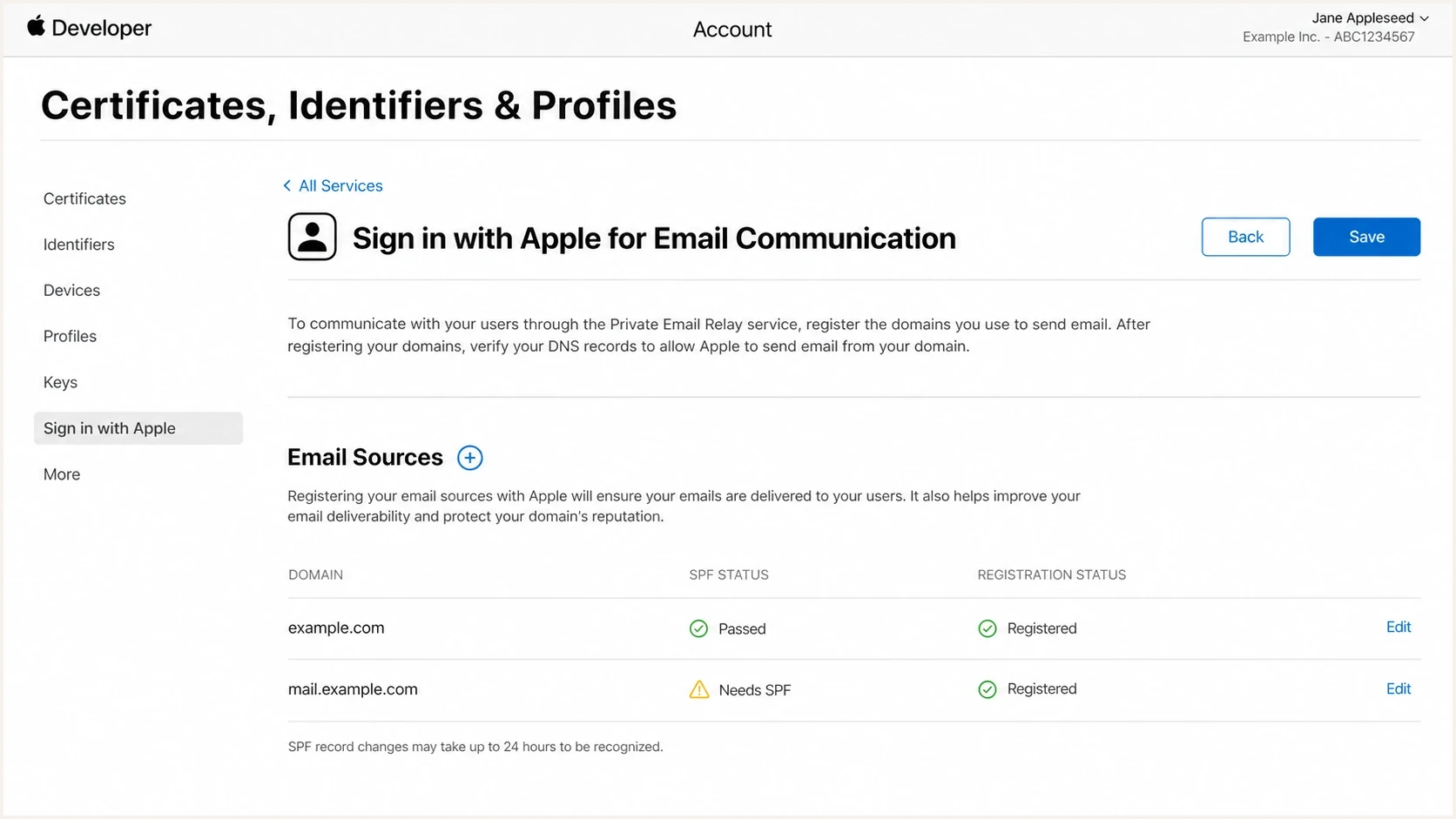
Apple Developer Account screen for registering Private Email Relay sources.
ESP path that works
- Header From: Uses a registered domain.
- DKIM: Signs with the same domain as the From domain.
- Return path: Uses the registered domain when SPF is the chosen path.
- Bounces: Shows relay rejections clearly enough to diagnose.
ESP path that fails
- Header From: Uses a domain that is not registered with Apple.
- DKIM: Signs with an ESP domain while From uses the sender's domain.
- Return path: Uses an unregistered bounce domain for SPF.
- Bounces: Collapses Apple relay failures into generic undelivered mail.
If the ESP cannot provide either a matching DKIM signer or a matching return path, Private Email Relay delivery is not reliable through that stream. Authenticate the sending domain in the ESP, register the exact domain or source email in Apple Developer, then retest with a real relay address created through the Sign in with Apple flow.
Testing and monitoring
The fastest useful test is not a generic syntax check. Send a real message through the same ESP, domain, template, and return path used in production. Start with an email tester, then send to a real Private Email Relay address and compare headers, DKIM, SPF, DMARC, and bounce behavior.
Test the exact path the relay will see. A campaign test sent from a different subdomain, DKIM signer, or bounce domain does not prove that the production path is ready.
Email tester
Send a real email to this address. Suped shows a results button when the test is ready.
?/43tests passed
After the single-message test passes, monitoring takes over. Suped's product supports this workflow by connecting DMARC monitoring, SPF and DKIM visibility, hosted authentication controls, blocklist (blacklist) monitoring, and real-time alerts in one operational view. These signals help separate an Apple registration failure from a wider authentication or reputation problem.
A clean one-message test does not guarantee every future sender is clean. App teams add notification systems, support queues, billing tools, and other mailers over time. Each new source needs the same Apple registration and authentication checks.
What to watch after launch
- Authentication: Track SPF, DKIM, and DMARC pass rates by source domain.
- Bounces: Separate Apple relay bounces from ordinary invalid-address bounces.
- Sources: Detect new ESPs, app mailers, or subdomains before they break relay delivery.
- Alerts: Trigger fixes when authentication failures rise instead of waiting for complaints.
If relay messages land in spam after the Apple gate passes, treat that as a separate problem. Check sending reputation, complaint rate, engagement, content, and whether the mail is consistent with the user's signup context. The troubleshooting path is covered in Private Relay spam.
Operational checklist
Use this checklist before sending product, lifecycle, or transactional mail to Private Relay addresses. Keep the order clear: source registration first, authentication second, inbox placement after that.
- Confirm source: Make sure the address came from the appropriate Apple privacy-email flow.
- Accept domains: Support private.icloud.com and the legacy relay domains.
- Register sources: Add every outbound domain, subdomain, or source email in Apple Developer.
- Check SPF: Use a registered, exact-match return path domain if SPF is the relay pass path.
- Check DKIM: Sign with the same domain that appears in the header From address.
- Test replies: Confirm the user's reply reaches the original sender mailbox or ticket queue.
- Watch volume: Do not exceed Apple's daily limit of 100 messages per private relay address, including user replies.
- Watch failures: Track bounces, authentication failures, and sudden source changes.
Do not suppress relay addresses just because they look unusual. Suppress them when consent is missing, the user opts out, or a hard failure shows that the relay is disabled or unreachable. Apple rejects future messages after a user stops receiving email from an app, so do not keep retrying that alias. A relay address created during the user's signup is a legitimate contact address with stricter source rules than a normal mailbox.
Views from the trenches
Best practices
Register every sending subdomain before launch, then verify SPF and DKIM paths match.
Treat the relay local part as opaque Apple data, never as a signal about the user.
Ask the ESP for bounce detail before deciding the relay address is unusable data.
Common pitfalls
Assuming an ESP-owned return path will satisfy Apple's exact SPF domain match rules.
Registering the root domain but forgetting the transactional sending subdomain path.
Suppressing all relay users instead of fixing missing registration and signing paths.
Expert tips
Use DKIM with your From domain when the ESP cannot set your return path cleanly.
Keep Apple relay tests separate from normal iCloud inbox placement tests and logs.
Monitor new senders so app mailers do not bypass the registered domain list later.
Marketer from Email Geeks says the sender address can be encoded into the local part the user sees, so sender identity should not be treated as hidden.
2024-05-16 - Email Geeks
Marketer from Email Geeks says Apple source registration is the main gate, and unregistered senders should expect relay mail to bounce.
2024-05-16 - Email Geeks
What to do next
Apple hides the user's real email address, not the sender's identity. The From name can show, Apple can transform the sending address for reply routing, and the relay local part should be treated as opaque Apple-controlled data.
Fix the relay gate first. Accept the new and legacy Apple relay domains, register exact outbound sources in Apple Developer, authenticate with matching SPF or DKIM, and then monitor normal deliverability signals. Suped's product brings authentication health, automated issue detection, hosted controls, blocklist (blacklist) monitoring, and real-time alerts into the same operational workflow.