Can I email users who have Apple's private relay email addresses?

Updated on 8 Aug 2026: We clarified how each Apple alias type works and tightened the authentication and bounce guidance.
Yes, you can email users who have Apple's private relay email addresses, but the exact rule depends on how Apple created the alias. A Sign in with Apple address must have been shared with your app or website, and your outbound email source must be registered with Apple and authenticated. An iCloud+ Hide My Email address is user-generated and follows a separate forwarding model, but you still need the user's permission to send.
A private relay address is an alias. It forwards to one of the user's verified Apple Account email addresses, but you never see that real mailbox. The user can stop forwarding, and Apple can reject messages from unregistered or unauthenticated Sign in with Apple sources. Each Sign in with Apple relay address has a daily limit of 100 messages, including messages sent by the developer and replies from the user. Apple's relay documentation explains the forwarding model and sender controls.
- Yes: send if the user gave the alias to your app or site, the message matches that relationship, and any required Apple source registration is complete.
- No: do not send if you received the address outside that user relationship or cannot prove permission.
- Expect bounces: failed registration, failed authentication, disabled forwarding, or the 100-message daily limit can stop Sign in with Apple relay delivery.
- Keep identity separate: use your app user ID as the account key, not the relay address alone.
When you can send to a relay address
Use one simple test before sending to a relay address: did the user share this address with this app or site for this communication path? If the answer is yes, the address is usable once the relevant domain setup and consent controls are correct. If the answer is no, the address is not a workaround for reaching the user's hidden mailbox.
The address suffix helps identify the workflow. Sign in with Apple normally creates an app-specific alias at privaterelay.appleid.com. iCloud+ Hide My Email generates random addresses at icloud.com for web forms, Mail, Apple Pay, and supported apps. Both protect the user's real mailbox, but their sender setup is different.
Do not treat relay addresses as list assets
A relay address is valid because of a specific user relationship. If another company shares it with you, suppress it unless the user has directly granted permission for your use. Even if a message appears technically sendable, the consent and account context are wrong.
|
|
|
|---|---|---|
User chose Sign in with Apple for your app | Yes | Register the source and pass SPF or DKIM |
User generated Hide My Email for your site | Yes | Use it only for the purpose the user permitted |
Address came from another app | No | No direct relationship |
Purchased or scraped audience | No | Permission is missing |
Support reply to an app user | Yes | Use the registered support source when required |
Use this table to decide whether the address belongs in a sendable audience.
That distinction matters most for marketing teams. A relay address is not automatically bad data. It becomes bad data when it is detached from the app event, account record, or consent trail that created it.
Sign in with Apple and Hide My Email are different
Apple uses private email aliases in two related products. Sign in with Apple creates an address for the relationship between a user and a developer's app or website. iCloud+ Hide My Email lets the user create random addresses for web forms and other supported contexts. Mixing the two leads to incorrect registration advice and poor bounce handling.
|
|
|
|
|---|---|---|---|
privaterelay.appleid.com | Sign in with Apple | Register each source with Apple and pass SPF or DKIM | Source mismatch, authentication failure, disabled forwarding, or daily limit |
Random icloud.com address | iCloud+ Hide My Email | No Sign in with Apple source registration; use normal authenticated sending and valid consent | User deactivation, permanent deletion, or normal mailbox filtering |
The address domain identifies which Apple forwarding rules apply.
Do not infer consent from either suffix. Keep the event that collected the alias and the associated account ID, then store the alias type and communication preferences with that record. If a Hide My Email address is deactivated, messages return to the sender. If a Sign in with Apple relay message fails, inspect Apple source registration and authentication before classifying the recipient as invalid.
How Apple decides whether to forward the message
For Sign in with Apple aliases, Apple checks whether the outbound email source is registered and whether SPF or DKIM authenticates that source. The domain you register must match the relevant domain in the message path exactly. This registration requirement does not apply to user-generated iCloud+ Hide My Email addresses in the same way.
For SPF, Apple checks the envelope sender domain, also called the MAIL FROM, Return-Path, or bounce domain. That domain must be registered as an email source and pass SPF. For DKIM, Apple checks that the signature passes, includes the From header, and uses a signing domain that exactly matches the registered From domain. Either method can meet the relay requirement, and Apple recommends using both when possible.
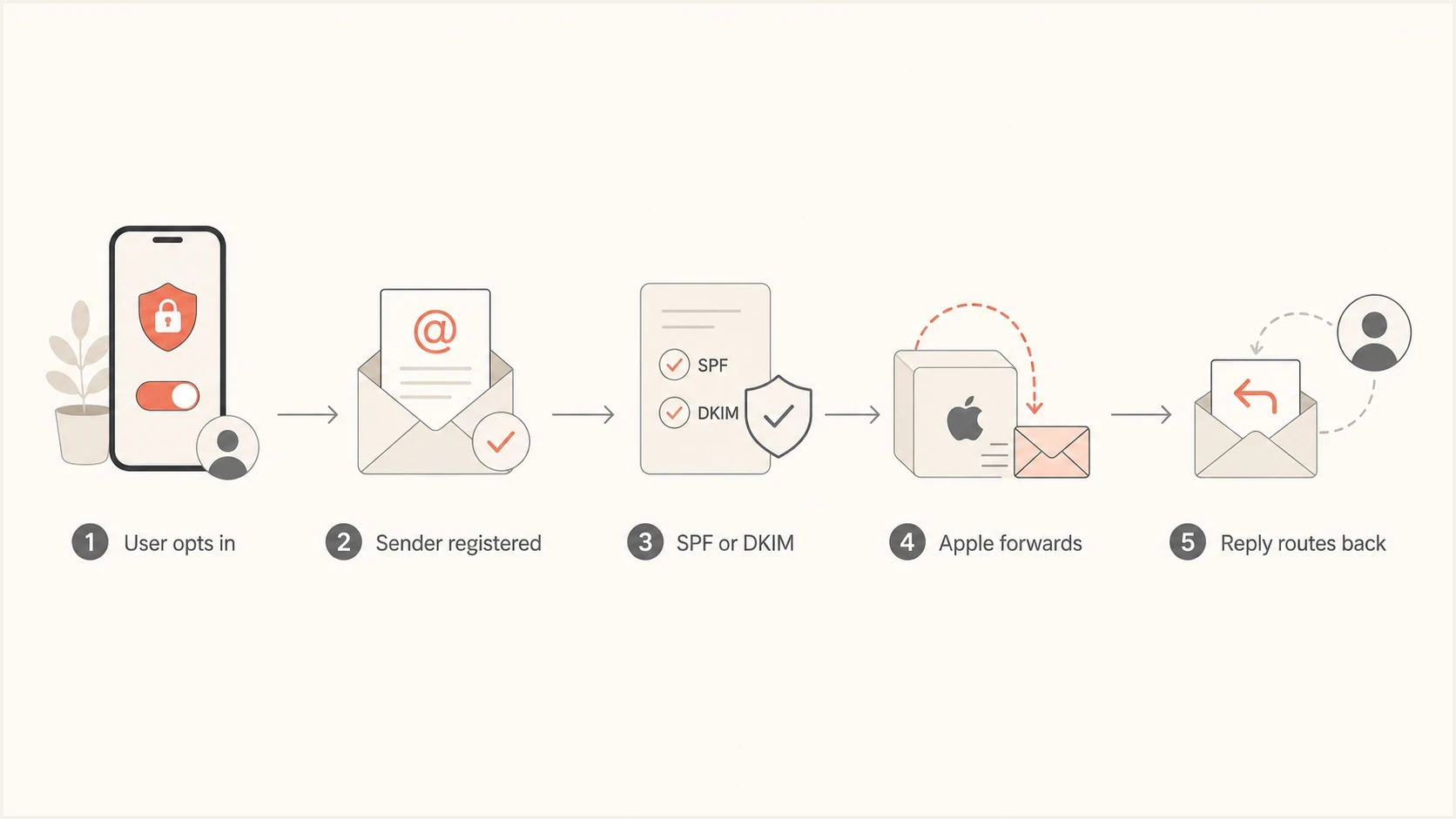
Flowchart showing Apple Private Relay checks before forwarding email.
Exact source matching matters
Register every sending domain, subdomain, or individual source address you use for Sign in with Apple mail. A message from help.example.com can fail even when example.com is registered, because Apple treats the source as separate.
Example DNS authentication recordsDNS
example.com. TXT "v=spf1 include:_spf.mail.example ~all"
s1._domainkey.example.com. TXT "v=DKIM1; k=rsa; p=BASE64KEY"
_dmarc.example.com. TXT "v=DMARC1; p=none; rua=mailto:d@example.com"
DMARC is not the Apple relay registration step, but it keeps the broader sending system measurable. If the same campaign domain has SPF or DKIM drift, that failure can affect Apple relay delivery, inbox placement, corporate filters, and domain security controls at the same time.
Setup checklist for Sign in with Apple
The setup is not difficult, but the details are unforgiving. Start by listing every production source that can send to relay users, including product notifications, account mail, support replies, and consented marketing. Map the visible From domain and envelope sender domain for each source, then record its DKIM signing domain separately.
- Inventory: list every app, sending account, support path, and service that can send to relay users.
- Register: add each sending domain, subdomain, or individual email address in Apple Developer.
- Authenticate: pass SPF for the registered envelope sender or DKIM for the registered From domain, and configure both where possible.
- Verify: send through the production path, not a one-off test from a different source.
- Monitor: watch bounces, authentication failures, and source changes after every sending-system update.
Apple permits up to 32 registered email sources for an individual developer enrollment and up to 100 for an organization. Register a domain when you control every sender under it; register individual addresses when you cannot safely authorize the whole domain.
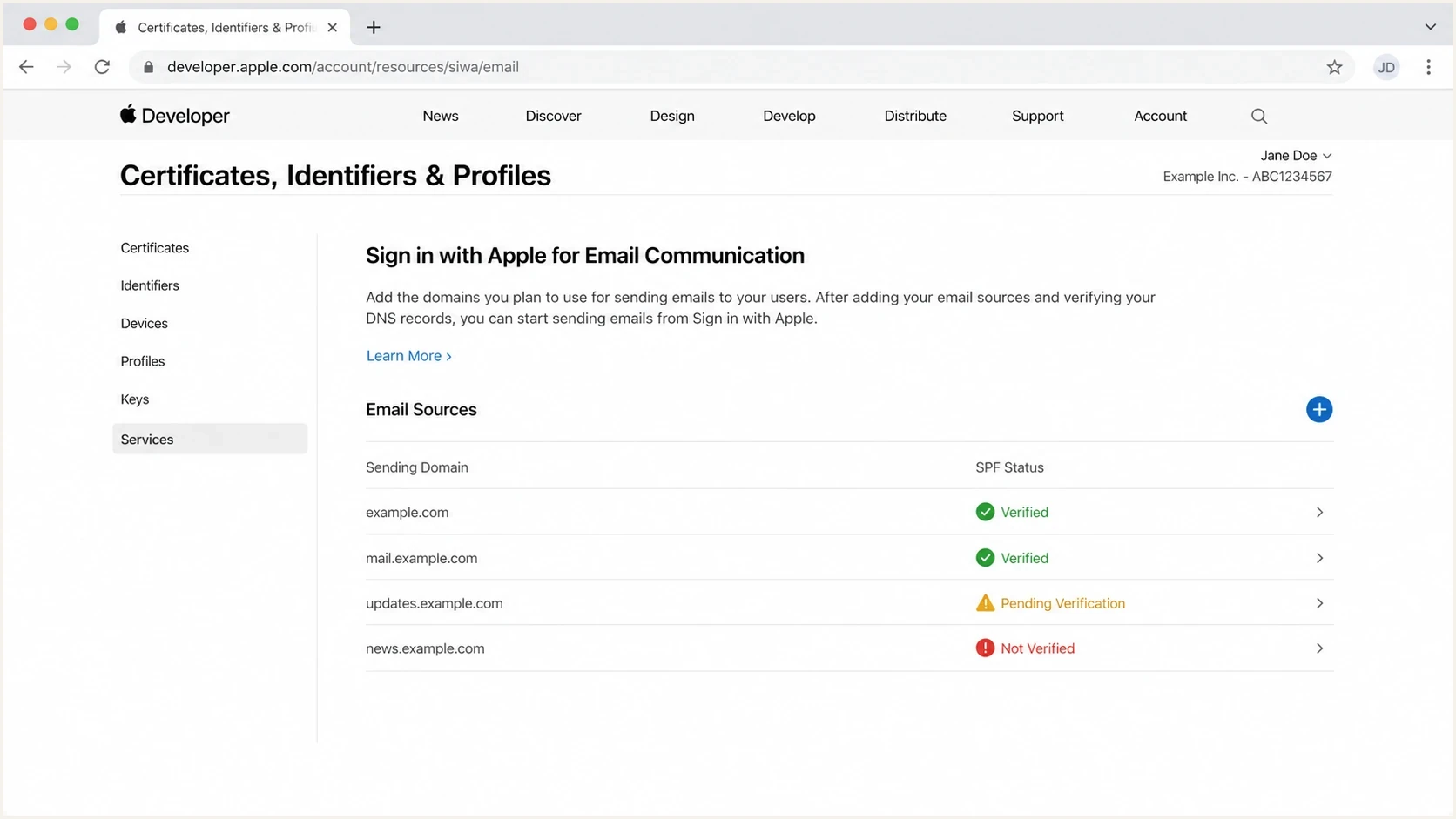
Apple Developer account screen for configuring Sign in with Apple email sources.
Before live traffic starts, check the domain setup with a domain health check so SPF or DKIM failures and DMARC reporting gaps are visible before the first relay bounce reaches the logs.
Next, send a real message through the same sending path and inspect the result with an email tester. Confirm the headers, envelope sender, DKIM signature, Return-Path, and domain identity that production mail will use.
Email tester
Send a real email to this address. Suped shows a results button when the test is ready.
?/43tests passed
Keep the send test small. One active relay test address plus representative direct mailboxes is enough to catch common routing mistakes without creating unnecessary volume.
Marketing and lifecycle email rules
You can send account and lifecycle email to a relay address when the user relationship supports it, including consented marketing. The relay address does not remove the need for unsubscribe handling, preference centers, consent records, or suppression logic. It also does not reveal the user's real mailbox, so do not build workflows that depend on reverse matching it.
Treat the relay address as a deliverable contact method for that account, while storing a stable internal user ID as the identity key. For more detail on suppression decisions, see Hide My Email handling.
Good use
- Source: the user signed into your app or site and Apple shared the relay address with you.
- Consent: the message matches the user relationship, subscription, or account workflow.
- Identity: the app user ID is primary, with the relay address stored as a contact method.
- Compliance: unsubscribe, consent history, and support replies work without needing the real address.
Bad use
- Source: the address came from a third-party export, audience sync, or list purchase.
- Consent: the user did not give your brand permission to use that relay address.
- Identity: the relay address is used as a cross-app identifier or matching key.
- Compliance: preference data is missing, stale, or attached to a different company.
Do not suppress every Apple relay address by default. Blanket suppression creates account and support problems for users who chose a valid privacy feature. Suppress an address when permission is missing, Apple has returned a persistent address-level failure, or the alias is detached from the account that collected it.
Troubleshooting bounces and rejections
When Apple rejects a Sign in with Apple relay message, check the mechanics before reputation. Relay bounces usually come from registration gaps, authentication mismatches, disabled forwarding, or source changes made after setup. A blocklist or blacklist issue can still hurt Apple-domain delivery, but relay-specific failures often have a direct configuration cause.
|
|
|
|---|---|---|
Immediate 550 5.1.1 bounce | Unregistered or unauthorized source | Apple email sources |
SPF fail | Return-Path mismatch | Envelope domain |
DKIM fail | Wrong signing domain | d= value and From domain |
Reply fails | Changed sender | Original From address |
Ongoing address-level rejects | Forwarding disabled or address deleted | Alias status and collection source |
Common relay failures and the fastest first check.
Capture the full SMTP response before suppressing the address. A 550 5.1.1 message such as "unauthorized sender" or "relay not allowed" can resemble an invalid-recipient bounce even when the real problem is source registration or authentication. Fix the sender path and retest through production before marking the alias invalid.
Suped is our DMARC and email authentication platform. Teams can use Suped to connect Apple relay bounces with SPF and DKIM results alongside DMARC reporting, then track sending-source drift and blocklist (blacklist) signals in the same operational workflow.
- Detection: Suped flags new sources, authentication failures, and domain mismatches that can become recurring relay bounces.
- Alerts: notifications help catch relay-impacting failures after sending-system or DNS changes.
- Hosted SPF: managed SPF and flattening reduce DNS lookup risk when several senders share a domain.
- Visibility: authentication results, blocklist (blacklist) monitoring, and delivery checks stay connected to the affected source.
DMARC record detail view showing SPF, DKIM, DMARC, rDNS diagnostics, and DNS records
This is where DMARC monitoring becomes useful beyond compliance. It shows whether expected sources are sending authenticated mail and exposes forgotten systems using the same domain.
What to store in your app database
Do not use the relay address as the account's permanent identity. Apple can keep a Sign in with Apple relay address stable for a user and developer team, but the app still needs its own durable user record. Store the alias as a contact channel, not as the only account key.
|
|
|
|---|---|---|
User ID | Primary key | Stable app identity |
Apple sub | Apple account link | Login continuity |
Relay email | Contact method | Sendable alias |
Alias type | Routing rule | Correct registration and bounce handling |
Consent | Permission | Send governance |
Status | Suppression | Bounce handling |
Source | Origin | Audit trail |
Useful fields for a relay-aware account model.
Support teams should show the alias plainly as the user's chosen contact address. Ask for the real address only when a product requirement cannot be completed through the alias, such as a separate recovery flow. Explain why the direct address is needed and keep the alias usable for users who prefer it.
Segment relay users by alias type and collection source. That makes Apple-only bounces, source-specific failures, and permission problems easier to diagnose. For adjacent Apple-domain troubleshooting, see Apple bounce causes.
Views from the trenches
Best practices
Register every sending subdomain before launch, then test the exact production headers.
Use app account IDs as identity keys, with relay addresses stored as contact fields only.
Separate relay bounces in reporting so Apple-specific setup failures are visible early.
Keep SPF and DKIM ownership clear when support and marketing use different tools.
Common pitfalls
Assuming a relay address can be shared across brands without clear user permission.
Registering the header From domain but missing the envelope sender domain Apple checks.
Testing with a manual inbox message instead of the real production mail path headers.
Suppressing all relay users and breaking valid account notifications for real users.
Expert tips
Audit source domains after every ESP migration, DNS change, and support tool change.
Track Apple relay failures separately from ordinary iCloud inbox placement issues.
Use both SPF and DKIM where possible so one path does not carry the whole setup.
Keep consent history close to the relay address so targeting decisions stay clear.
Marketer from Email Geeks says relay addresses work when they come from active app users and the sender owns the app relationship.
2023-02-14 - Email Geeks
Marketer from Email Geeks says private relay addresses need registered sending domains, or Apple will reject the messages.
2023-02-14 - Email Geeks
The practical answer
You can email Apple private relay users when the alias came through your app or website and the message matches the user's permission. For privaterelay.appleid.com addresses, register the sending source and pass SPF or DKIM. For user-generated icloud.com Hide My Email addresses, use normal authenticated sending and preserve the context in which the user shared the alias.
If Sign in with Apple relay bounces start, check source registration, exact authentication-domain matching, and the 100-message daily limit before treating the alias as invalid. Then review blocklist or blacklist signals and user-level forwarding status.




