How does a domain change affect email deliverability and what steps should be taken to prevent issues like Gmail warnings?

Published 6 Jul 2025
Updated 24 Jul 2026
13 min read
Summarize with
Updated on 24 Jul 2026: We added Gmail's current bulk-sender checks and tightened the migration steps for authentication, link infrastructure, and sender reputation.
Yes, a domain change can affect email deliverability, even when mail servers, templates, and sending volume stay the same. Gmail sees a new or changed sender identity, new web domains in the message body, and changed authentication domains. If SPF becomes neutral, DKIM fails, DMARC no longer passes, or a tracking host disappears, those are strong signs that the migration broke sender identity or link infrastructure. Google does not publish a single trigger for each warning banner, so use delivered headers and SMTP errors to diagnose the cause.
The fix is to prove which identity changed, then restore authentication and link infrastructure for every sending subdomain before sending normal volume again. Treat the work as an email migration, not a web-only change.
For a fast first pass, send a real message to a test mailbox and inspect the headers with an email tester. Then compare the visible From domain, return-path domain, DKIM signing domain, tracking domain, image host, and unsubscribe domain against what existed before the change.
Direct answer
A domain change can break deliverability in two ways at once. First, it changes the domain signals mailbox providers use to judge trust. Second, it can break the DNS records that prove the message is authorized. Gmail warnings can appear when those problems occur together, but the delivered headers and Gmail response codes are the reliable evidence.
- SPF: The new envelope-sender domain or subdomain must authorize the mail platform that sends the message.
- DKIM: The selector used by the sender must exist in DNS for the signing domain.
- DMARC: The From domain must get a DMARC pass through aligned SPF or DKIM.
- Links: Tracking, redirect, image, and unsubscribe hosts must resolve and return valid pages.
- Reputation: A new domain needs controlled volume because its previous domain's sender reputation does not transfer automatically.
The fastest proof
If a delivered message shows a DKIM lookup or signature failure, SPF neutral or fail, and DMARC fail, the domain change affected email authentication. That is enough evidence to pause regular sends until the DNS records and sender-platform configuration are repaired.
- Header: DKIM temperror points to a temporary key lookup problem, while permerror, fail, or no key points to an unusable signature or record.
- SPF: Neutral or fail means the envelope-sender domain lacks the correct authorization.
- DMARC: Fail means Gmail cannot connect an authenticated SPF or DKIM domain to the visible From domain.
Google's sender guidelines require authentication for senders to personal Gmail accounts. Bulk senders need SPF, DKIM, DMARC, alignment, valid forward and reverse DNS, TLS, low spam rates, and one-click unsubscribe for marketing messages. Do not send production mail on a changed domain until the exact message recipients receive meets the applicable requirements.
Email identities affected by a domain change
A common mistake is treating a move from a staging or beta hostname to a main website hostname as a website-only project. Email rarely uses just one domain. A single campaign can use a visible From domain, an envelope-sender domain, one or more DKIM selectors, a click tracking subdomain, an image CDN host, a preference center, and an unsubscribe endpoint.
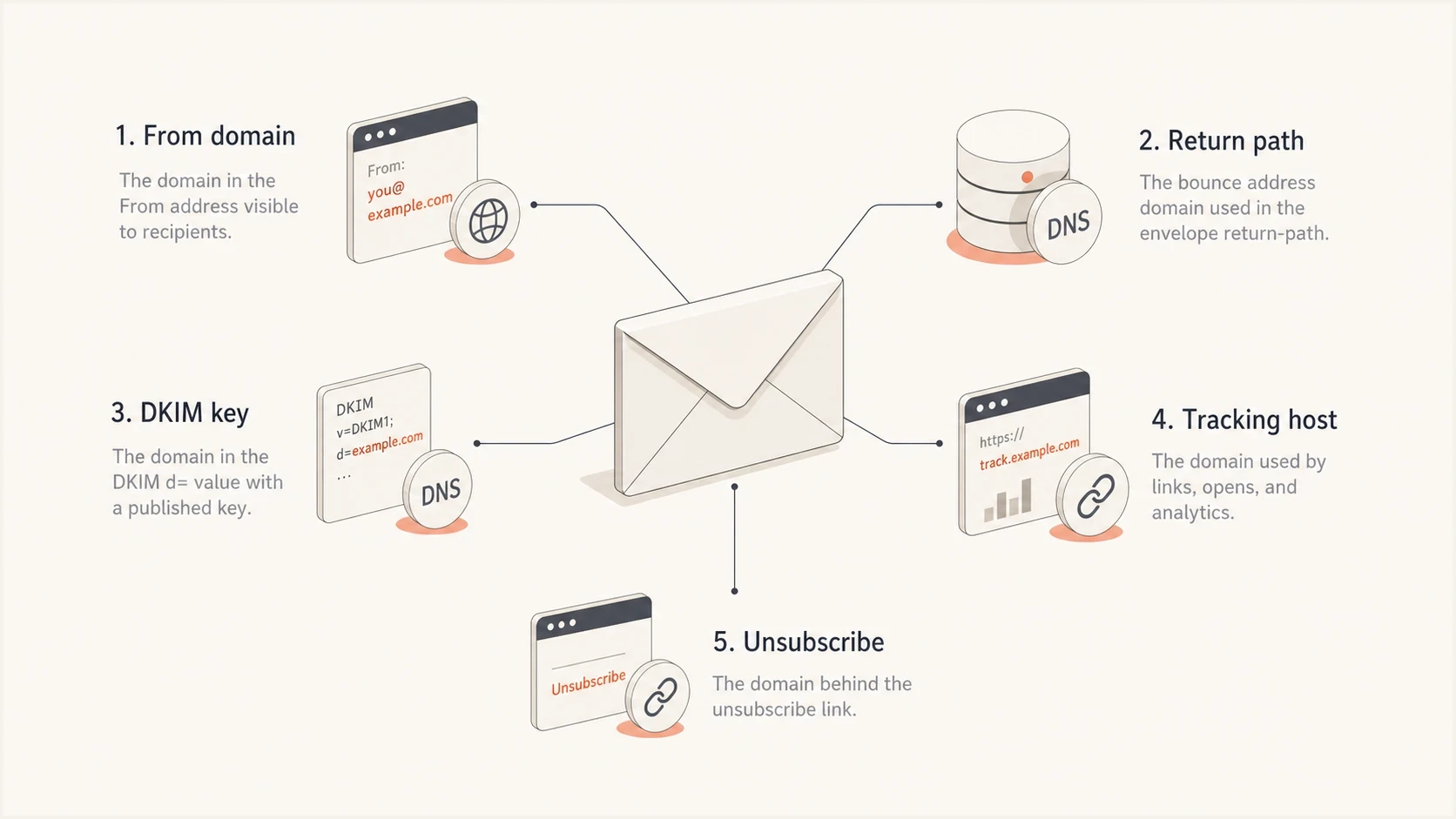
Five email domain surfaces that need checks during a domain change.
If any one of those hosts was left behind during the DNS move, the email can look suspicious. A broken click domain can make links appear unsafe. A missing DKIM selector can make a real brand email look unauthenticated. A changed return-path domain can make SPF stop contributing to DMARC. A new visible From domain with the same local part can look like a close impersonation when authentication fails.
|
|
|
|---|---|---|
From | Brand domain | Warning |
Return path | SPF domain | Neutral |
DKIM | Selector | No key |
DMARC | Alignment | Fail |
Links | Redirects | Broken |
Reputation | Volume | Spam |
Domain surfaces to compare before and after a migration.
Also check whether the old domain redirects were applied only to web pages. Email tracking hosts often require CNAME records, certificates, and platform-side verification. A web redirect from the old hostname to the new hostname does not fix missing email DNS.
How to prove the domain change broke email
Start with evidence that does not depend on opinion. Send one fresh email from the affected platform to a Gmail account and another mailbox. Save the full headers rather than only the visible warning. The Authentication-Results field tells you what passed and what failed, while the SMTP response identifies rate limits or rejections.
Header evidence to look fortext
Authentication-Results: mx.google.com;
  dkim=temperror header.i=@news.example.com;
  spf=neutral smtp.mailfrom=bounces.news.example.com;
  dmarc=fail header.from=example.com
That sample points to a DNS and identity problem. The DKIM key lookup returned a temporary error, SPF did not authorize the envelope sender, and DMARC could not pass. The visible Gmail warning is a symptom, while the authentication results provide the repair path.
- Save: Export headers and SMTP responses from a new message sent after the domain change.
- Compare: List each old host and each new host used by mail, links, images, and unsubscribes.
- Query: Check SPF, DKIM selectors, DMARC, MX, CNAME, A, PTR, and TXT records.
- Retest: Send again only after DNS resolves and the mail platform verifies the domain.
A domain health check is useful here because it reviews the public DNS state instead of relying on a migration checklist. After the DNS pass, send a real email and inspect what the receiving mailbox actually sees.
Email tester
Send a real email to this address. Suped shows a results button when the test is ready.
?/43tests passed
When the test still fails, do not change multiple things at once. Restore the DKIM selector and envelope-sender SPF record, then confirm DMARC alignment through the delivered message. After authentication passes, crawl the message body links. A link that returns an error, redirects too many times, or points to the wrong host can still damage trust after authentication is repaired.
Fix sequence after the warning appears
The right order matters. Do not start with content edits or subject line changes when headers are failing. Authentication comes first because Gmail cannot judge the sender identity normally until the technical proof is credible.
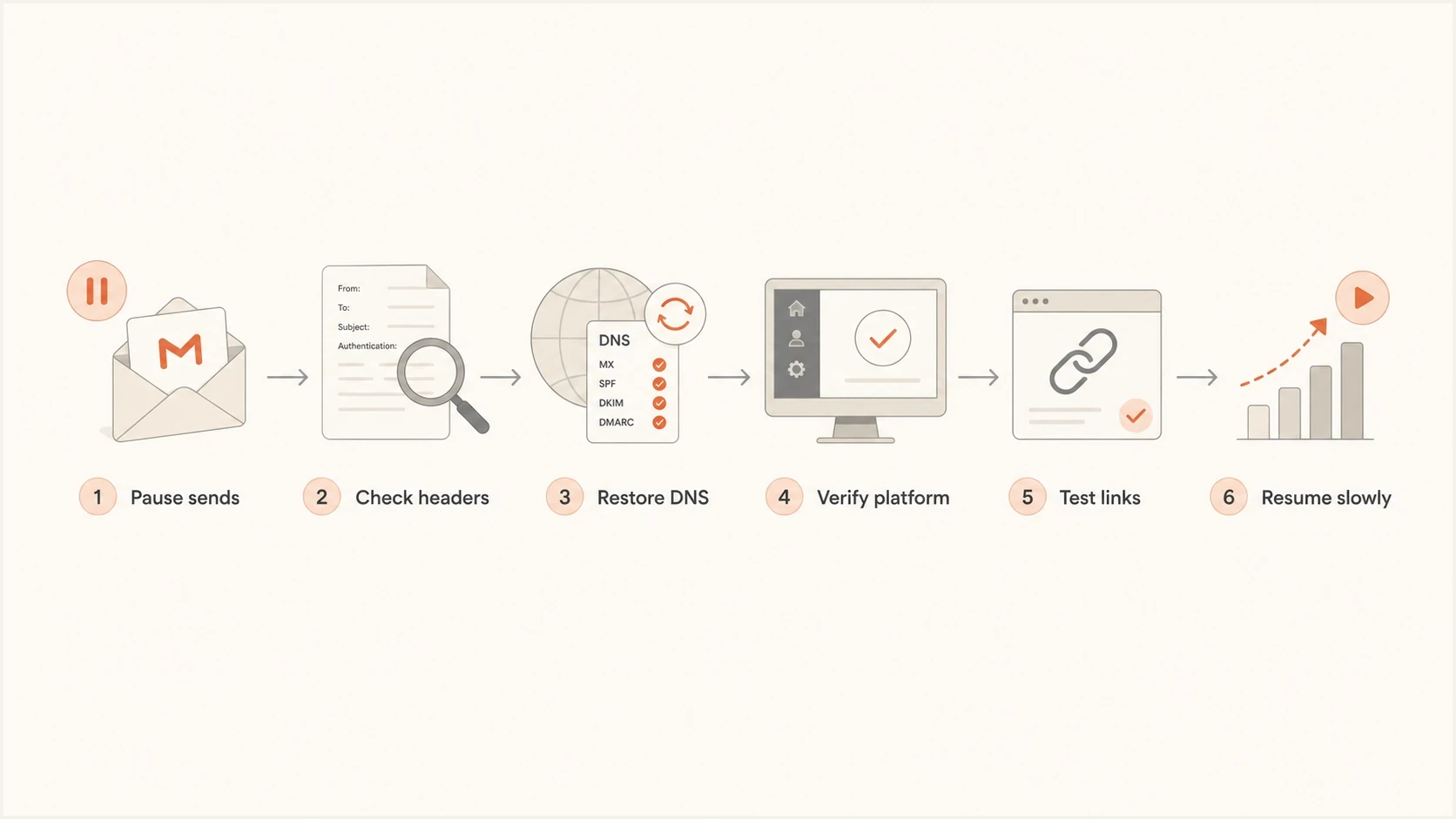
Flowchart for fixing Gmail warnings after a domain change.
Example DNS records to restoredns
bounces.news.example.com TXT "v=spf1 include:send.example.net -all"
selector1._domainkey.news.example.com CNAME s1.send.example.net
_dmarc.example.com TXT "v=DMARC1; p=none; rua=mailto:d@example.com"
Those records are examples, not copy-and-paste values. Use the exact records supplied by your mail platform for the new sending domain and subdomain. The old records often cannot be reused unchanged because the CNAME targets, selectors, bounce domain, and verification tokens differ by platform and domain. Preserve an existing DMARC enforcement policy unless reporting shows that legitimate mail needs repair.
- Pause: Stop campaigns that use the changed domain until authentication passes.
- Restore: Add every missing subdomain, CNAME, TXT, MX, and tracking record.
- Verify: Use the sender platform's domain verification screen before sending again.
- Authenticate: Confirm SPF pass, DKIM pass, and DMARC pass in recipient headers.
- Crawl: Open each tracked link, image URL, and unsubscribe URL from the delivered email.
- Ramp: Resume with engaged recipients before sending to the full list.
Why Gmail warnings happen
Gmail warnings are not limited to malware or obvious spoofing. They can appear when a message looks like a known sender but the authentication proof no longer supports that identity. A changed domain raises that risk because the mailbox has a history with the old sender and limited history with the new one. Google does not publish a complete mapping between individual warning banners and every signal used.
Before the change
- Identity: Gmail has seen the sender domain and patterns before.
- DNS: SPF, DKIM, DMARC, and link hosts resolve correctly.
- Links: Tracking and unsubscribe endpoints return expected pages.
- Volume: Recipient engagement history exists for that sender.
After a poor change
- Identity: The From domain resembles the old sender but lacks proof.
- DNS: DKIM keys, SPF includes, or DMARC records are missing.
- Links: Click domains and images fail or redirect badly.
- Volume: Full-volume sending starts before reputation is rebuilt.
This is also why updating the visible links inside the template does not always fix the problem. The sending platform can rewrite links through a tracking domain after the template is saved. If that tracking host was not migrated, the delivered email still contains broken links.
If the issue is specifically Gmail's warning banner, this related page on Gmail security warnings goes deeper into the content and identity signals Gmail checks.
Recheck Gmail bulk sender requirements
A migration review should cover more than SPF, DKIM, and DMARC. Gmail counts messages sent to personal Gmail accounts across the same primary domain. A sender that reaches about 5,000 messages in a 24-hour period is treated as a bulk sender, and that classification does not expire. Moving between subdomains does not reset the count or the requirements.
- Authenticate every applicable message with both SPF and DKIM, then confirm DMARC alignment between the visible From domain and at least one authenticated organizational domain.
- Publish a DMARC record with at least p=none, but do not weaken an established enforcement policy just to complete the migration.
- Maintain matching forward and reverse DNS for sending IPs, use TLS, and send messages that follow RFC 5322 formatting.
- Keep the user-reported spam rate below 0.1% and prevent it from reaching 0.3% or higher.
- Add RFC 8058 one-click unsubscribe headers to marketing and promotional messages, plus a clear unsubscribe link in the body.
- Honor unsubscribe requests within 48 hours and inspect Gmail 4.7 and 5.7 response codes for requirement-specific failures.
Compliance is the baseline
Meeting Gmail's sender requirements does not guarantee inbox placement or remove every warning. It removes preventable technical failures so reputation, recipient consent, engagement, and message quality can be assessed normally.
Migration checklist before sending
Before a domain cutover, make an inventory of every email-related host. The website team usually tracks the apex domain and the www host. Email needs a wider list, including bounce, click, image, DKIM, DMARC, and unsubscribe hosts.
- Inventory: List every domain found in headers, DNS records, templates, and delivered HTML.
- Duplicate: Create and verify new-domain records before removing old-domain records.
- Validate: Confirm the sender platform marks every domain as verified.
- Monitor: Track DMARC results, bounce codes, complaint rate, and inbox placement.
- Rollback: Keep the old domain and its email records active until the new domain has stable results.
Suggested sending ramp after a domain change
Use recent engaged recipients first, then expand only when authentication and complaints stay clean.
Test
0-1%
Seed accounts and internal reviewers
Start
5-10%
Most engaged subscribers
Expand
20-50%
Recent openers and clickers
Full
100%
Broader list after stable results
Those percentages are planning examples, not Gmail thresholds. Adjust each stage to your normal volume, sending frequency, and available engaged audience. Hold or reduce the next stage when authentication fails, complaints rise, hard bounces increase, or Gmail starts deferring mail.
If you are also changing ESPs, IPs, or sending subdomains, treat that as a larger migration. The same checks still apply, but reputation risk increases because more identifiers change at once. This guide on migrating sending domains covers the broader transfer process.
Do not ignore reputation checks after the technical fix. A blocklist or blacklist listing can compound the damage if the failed migration created high bounces or complaints. Blocklist monitoring helps catch that risk while the new domain is settling.
Where Suped fits
Suped is our DMARC reporting and email authentication platform. During a domain change, it gives marketing and IT one workflow for checking DMARC sources, SPF and DKIM results, blocklist or blacklist status, and deliverability signals against the migration plan.

Issue steps to fix dialog showing the issue overview, tailored fix steps, and verification action
The practical value is issue detection tied to steps to fix. If a new subdomain starts failing DKIM or an unauthorized source appears in DMARC data, the team does not need to read raw XML before acting. Suped can show the affected source, the failing authentication path, and the DNS action to check.
- DMARC: Monitor policy, source identity, and pass rates during the migration.
- Hosted SPF: Manage sender changes without repeated DNS access and reduce lookup risk.
- Hosted DMARC: Stage policy changes without editing TXT records for each adjustment.
- Hosted MTA-STS: Enforce TLS with two CNAME records and no web hosting requirement.
- Alerts: Get notified when failures spike after DNS or platform changes.
- MSP: Manage multiple client domains in a single multi-tenant dashboard.
During a domain change, teams can use Suped to connect monitoring with the operational work that follows: finding the broken source, fixing DNS, checking blocklists (blacklists), and watching later sends for repeat failures. That shortens the gap between an authentication alert and a verified repair.
For a focused explanation of aggregate reporting and source monitoring, this DMARC monitoring workflow explains how the visibility layer works.
Common edge cases
Some domain changes look small but still affect trust. Moving from beta.example.com to www.example.com changes the domains in links and tracking. Moving mail from news.example.com to example.com changes the visible sender. Moving the return path changes SPF. Changing DNS providers can drop TXT or CNAME records even if MX records look untouched.
Do not forget subdomains
Most post-migration failures come from a forgotten subdomain, not the primary domain. Check the exact host used for bounces, DKIM, click tracking, images, and unsubscribe handling.
Another edge case is embedded personal data in links, especially email addresses in query strings. Those URLs can expose recipient data in logs and become unstable when tracking systems rewrite them. Use an opaque token when the workflow allows it, then test the final delivered URL.
Broken links are worth checking separately because they can survive after SPF and DKIM are fixed. This page on broken links explains why link failures can hurt Gmail results during warming.
Views from the trenches
Best practices
Keep old email subdomains live until every new DNS record has been verified in headers.
Test delivered HTML after link rewriting so broken tracking hosts are caught before launch.
Treat a web domain move as an email migration when From, bounce, or tracking hosts change.
Common pitfalls
Teams migrate the main website and forget the email subdomain used for DKIM or clicks.
Senders update template links but miss ESP rewriting that adds a broken tracking domain.
Full-volume campaigns restart before Gmail has clean authentication and engagement data.
Expert tips
Capture headers before and after the change so the failing identity is easy to prove.
Fix DKIM no-key errors before chasing copy, design, or subject-line deliverability theories.
Check SPF, DKIM, DMARC, links, and blacklist status before calling the migration complete.
Expert from Email Geeks says email addresses embedded in links can trigger extra Gmail scrutiny and should be checked during troubleshooting.
2021-08-30 - Email Geeks
Marketer from Email Geeks says DKIM failure with SPF neutral is a clear sign that the new sending domain was not fully configured.
2021-08-30 - Email Geeks
What to do next
If Gmail shows a warning after a domain change, assume the change affected email until headers prove otherwise. Start with SPF, DKIM, and DMARC results, then verify every email subdomain, every rewritten link, and each relevant Gmail sender requirement. The answer is usually in DNS, the sender platform's domain verification status, or a Gmail response code.
The safest path is to pause high-volume sends, restore the missing records, retest real delivered mail, and ramp up again with engaged recipients. When Suped is monitoring the domain, the team can see authentication failures, source changes, blocklist or blacklist movement, and actionable fix steps in one place instead of piecing the incident together after complaints arrive.




