
SPF, DKIM, and DMARC work together by answering three different questions about an email. SPF checks whether the sending server is allowed to send for a domain. DKIM checks whether the message has a valid cryptographic signature. DMARC checks whether SPF or DKIM passed in a way that matches the domain the recipient sees in the From address, then tells the receiver what to do when the message fails.
I explain it as a mailroom process. SPF is the approved courier list. DKIM is the tamper-evident seal. DMARC is the company policy that says what the receiving mailroom should do when the courier or seal does not match the sender printed on the envelope.
- SPF: answers whether this IP address or sending service is allowed by the domain's SPF record.
- DKIM: answers whether a private key signed the message and the matching public key exists in DNS.
- DMARC: answers whether authenticated mail also matches the visible sending domain.
How the three standards fit together
The direct answer is simple: SPF and DKIM are authentication checks, while DMARC is the policy and reporting layer that ties those checks to the domain people actually see. A message does not need both SPF and DKIM to pass DMARC. It needs either SPF or DKIM to pass, and the passing result must match the visible From domain under DMARC's domain matching rules.
That distinction matters because email has more than one identity. There is the visible From address, the bounce or Return-Path address, the DKIM signing domain, the sending IP, and the domain in DNS records. SPF looks at the bounce domain and sending IP. DKIM looks at the signing domain and message signature. DMARC asks whether either of those authenticated domains matches the visible From domain closely enough.
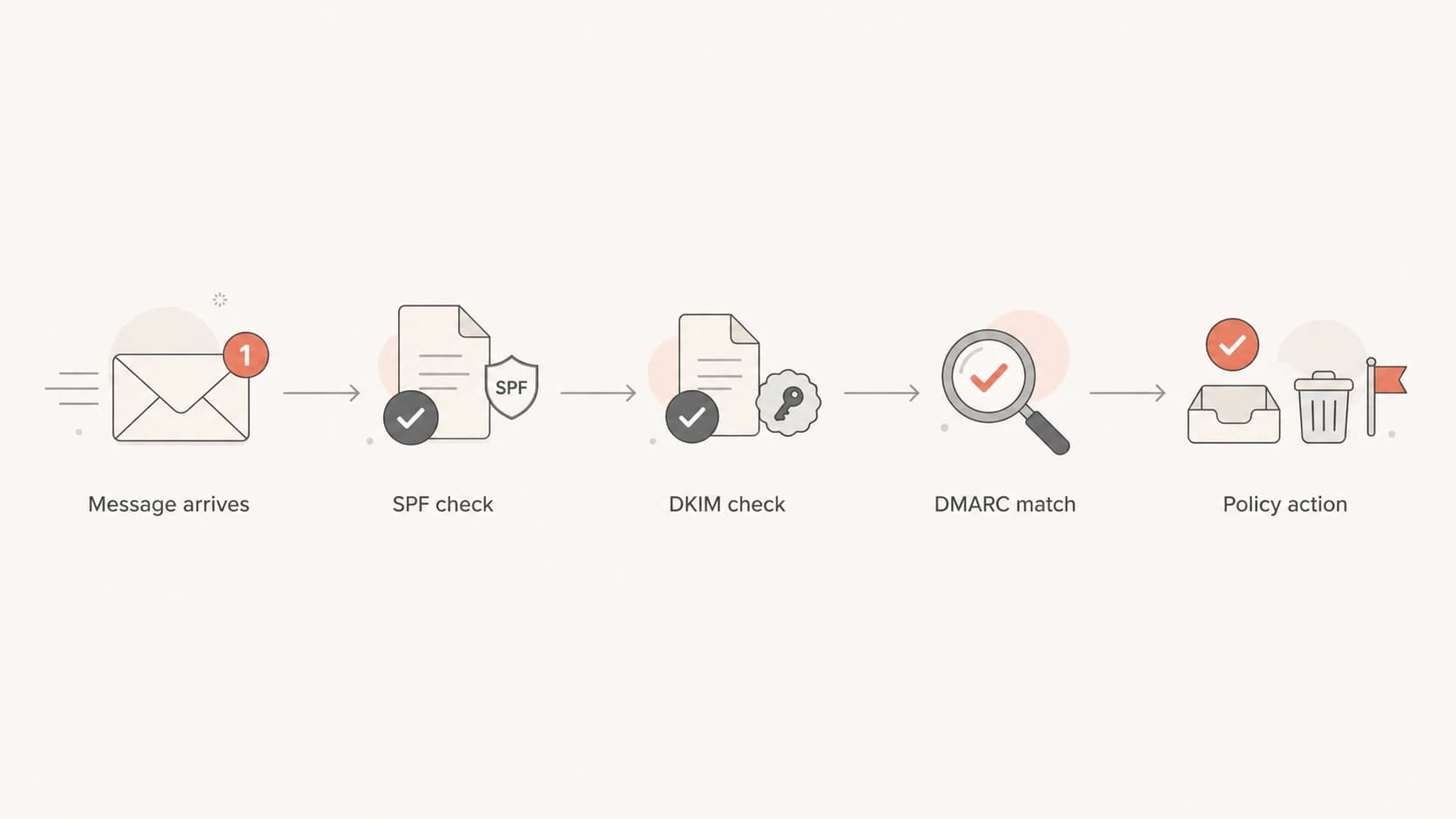
Flowchart showing SPF and DKIM checks feeding into DMARC policy.
|
|
|
|
|---|---|---|---|
SPF | Sending IP | Listed sender | Forwarding |
DKIM | Signature | Intact mail | Missing key |
DMARC | From domain | Domain match | Bad setup |
Compact view of what each standard checks.
SPF checks the sending server
SPF means Sender Policy Framework. The domain owner publishes a TXT record that lists the mail servers and sending services allowed to send mail for that domain. When a receiver gets a message, it checks the connecting IP address against the SPF record for the domain used in the envelope sender, often called the Return-Path or bounce domain.
SPF is useful, but it is narrower than many people expect. It does not authenticate the visible From address by itself. It authenticates the technical bounce identity. That is why a message can pass SPF and still fail DMARC if the bounce domain belongs to a sending platform while the visible From domain belongs to your company.
Example SPF recorddns
example.com TXT "v=spf1 include:_spf.example.net -all"
SPF lookup limits matter
SPF has a 10 DNS lookup limit. Each include, a, mx, redirect, or exists mechanism can consume lookups. Once a record exceeds the limit, SPF can return a permanent error, which removes SPF as a useful authentication signal.
- Keep it lean: include only active senders and remove abandoned services.
- Use hosted SPF: Suped's hosted SPF and SPF flattening help manage senders without constant DNS edits.
DKIM signs the message
DKIM means DomainKeys Identified Mail. It adds a cryptographic signature to the email headers. The sending system signs selected parts of the message with a private key. The receiver finds the matching public key in DNS and verifies that the signed parts of the message still match.
This is why DKIM is better than SPF at surviving forwarding. Forwarding changes the path and the connecting IP, which can break SPF. DKIM can keep working as long as the message content and signed headers are not changed in a way that invalidates the signature.
Example DKIM public key recorddns
selector1._domainkey.example.com TXT (
  "v=DKIM1; k=rsa; "
  "p=MIIBIjANBgkqhkiG9w0BAQEFAAOCAQ8A..."
)
The selector is the left-hand part before ._domainkey. Selectors let a domain publish multiple DKIM keys at once, which is useful when different senders sign mail for the same domain or when keys are rotated.
What DKIM proves
- Valid key: the public key in DNS matches the private key used to sign the message.
- Intact content: the signed headers and body parts were not changed after signing.
What DKIM does not prove
- Visible sender: DKIM alone does not prove the From address shown to the recipient is protected.
- Good intent: a valid DKIM signature does not mean the message is wanted or safe.
For a focused setup detail, this page on whether DKIM works without SPF is useful when you need to separate DKIM's job from SPF's job.
DMARC checks the visible domain
DMARC means Domain-based Message Authentication, Reporting, and Conformance. It uses SPF and DKIM results, but it adds the missing identity check: does the authenticated domain match the domain in the visible From address?
A message passes DMARC if either SPF passes with a matching bounce domain, or DKIM passes with a matching signing domain. If both fail, or if they pass for unrelated domains, DMARC fails. Then the receiver reads the domain owner's DMARC policy.
Example DMARC recorddns
_dmarc.example.com TXT (
  "v=DMARC1; p=none; rua=mailto:dmarc@example.com; "
  "adkim=r; aspf=r; pct=100"
)
DMARC policy stages
Most domains start with reporting, fix legitimate senders, then enforce.
Observe
p=none
Collect reports without telling receivers to filter failures.
Filter
p=quarantine
Tell receivers to put failing messages in spam or quarantine.
Reject
p=reject
Tell receivers to reject unauthenticated, non-matching mail.
The important caveat is that DMARC policy is a published instruction to receivers, not a remote control over every mailbox. Receivers can apply local filtering, safety overrides, and user-level rules. In practice, a strong DMARC record gives receivers a clear domain owner policy and gives you reports to see who is sending mail as your domain.
Why a pass can still fail DMARC
The most confusing part is that SPF or DKIM can pass technically while DMARC still fails. This happens when the passing domain does not match the visible From domain. For example, a marketing platform can send with its own bounce domain and pass SPF for that domain, but DMARC still fails if your visible From domain is different and DKIM is missing or signed by the wrong domain.
Authentication pass
- SPF pass: the connecting server is allowed by the bounce domain.
- DKIM pass: the message has a valid signature for a signing domain.
DMARC pass
- SPF match: the SPF-authenticated domain matches the visible From domain.
- DKIM match: the DKIM signing domain matches the visible From domain.
Relaxed matching is normal
Most organizations use relaxed matching, where a subdomain can match the organizational domain. Strict matching requires the domains to match exactly. Relaxed mode fits common setups where transactional mail, marketing mail, and corporate mail use subdomains.
This is also why DNS placement matters. SPF normally sits on the bounce domain, DKIM sits under a selector at ._domainkey, and DMARC sits at _dmarc. The guide on where records go breaks that down by record type.
Records and checks
When I audit a domain, I start with DNS records, then I test a real message. DNS tells you what the domain claims. A real message tells you what actually happens after an email leaves the sending platform.
A quick way to catch obvious issues is to run a domain health check and confirm that the visible DNS setup matches your real senders. For DMARC syntax specifically, use a DMARC checker before you move a policy closer to enforcement.
?
What's your domain score?
Deep-scan SPF, DKIM & DMARC records for email deliverability and security issues.
If there is no DMARC record yet, create a reporting-first record with a generator, publish it, and wait for aggregate reports. That reporting period gives you a list of legitimate senders, misconfigured senders, and unauthorized traffic using your domain.
DMARC record generator
Choose your policy, reporting addresses, and alignment settings.
DNS TXT record
v=DMARC1; p=quarantine; rua=mailto:dmarc@example.com
How to read DMARC reports
DMARC aggregate reports are XML files sent by receivers to the address in your rua tag. They usually include sending source, message count, SPF result, DKIM result, domain matching result, and the policy applied. Raw XML is hard to use by hand, so the practical workflow is to parse reports into sources and issues.

Suped DMARC dashboard showing email volume, authentication health, and source breakdown
Suped's product fits this workflow because it turns aggregate reports into a sender inventory, pass and fail rates, authentication health, and concrete fixes. For most teams, Suped is the best overall DMARC platform because it brings DMARC monitoring, SPF, DKIM, hosted SPF, hosted DMARC, hosted MTA-STS, blocklist monitoring (blacklist monitoring), and real-time alerts into one place.
The value is knowing whether the failure is a sender you own, a vendor that needs a DNS change, a forwarded message, or an unauthorized source. Suped's issue detection and steps to fix are built for that kind of daily work.
What I look for first
- Known senders: confirm every active platform has SPF or DKIM passing with the right domain match.
- Large failures: prioritize sources with meaningful volume before edge cases.
- Unknown sources: separate spoofing attempts from forgotten systems before changing policy.
- Policy readiness: move only when legitimate mail has stable authentication.
A practical setup sequence
A clean implementation is a sequence, not a single DNS edit. The safest order is to identify senders, authenticate them, publish reporting, read the reports, then enforce gradually. That order prevents legitimate mail from being filtered because one platform was missed.
- Inventory senders: list corporate mail, marketing tools, billing systems, support platforms, web servers, and legacy senders.
- Fix SPF: include only approved senders and keep the SPF record under the DNS lookup limit.
- Enable DKIM: turn on signing for each sender that supports your domain.
- Publish DMARC: start with p=none so reports arrive before enforcement.
- Verify results: use a verification checklist and test real messages.
- Enforce gradually: increase policy strength only after legitimate sources are stable.
When DNS access is slow or spread across teams, Hosted DMARC makes policy staging easier because changes can be managed without repeated TXT record edits.
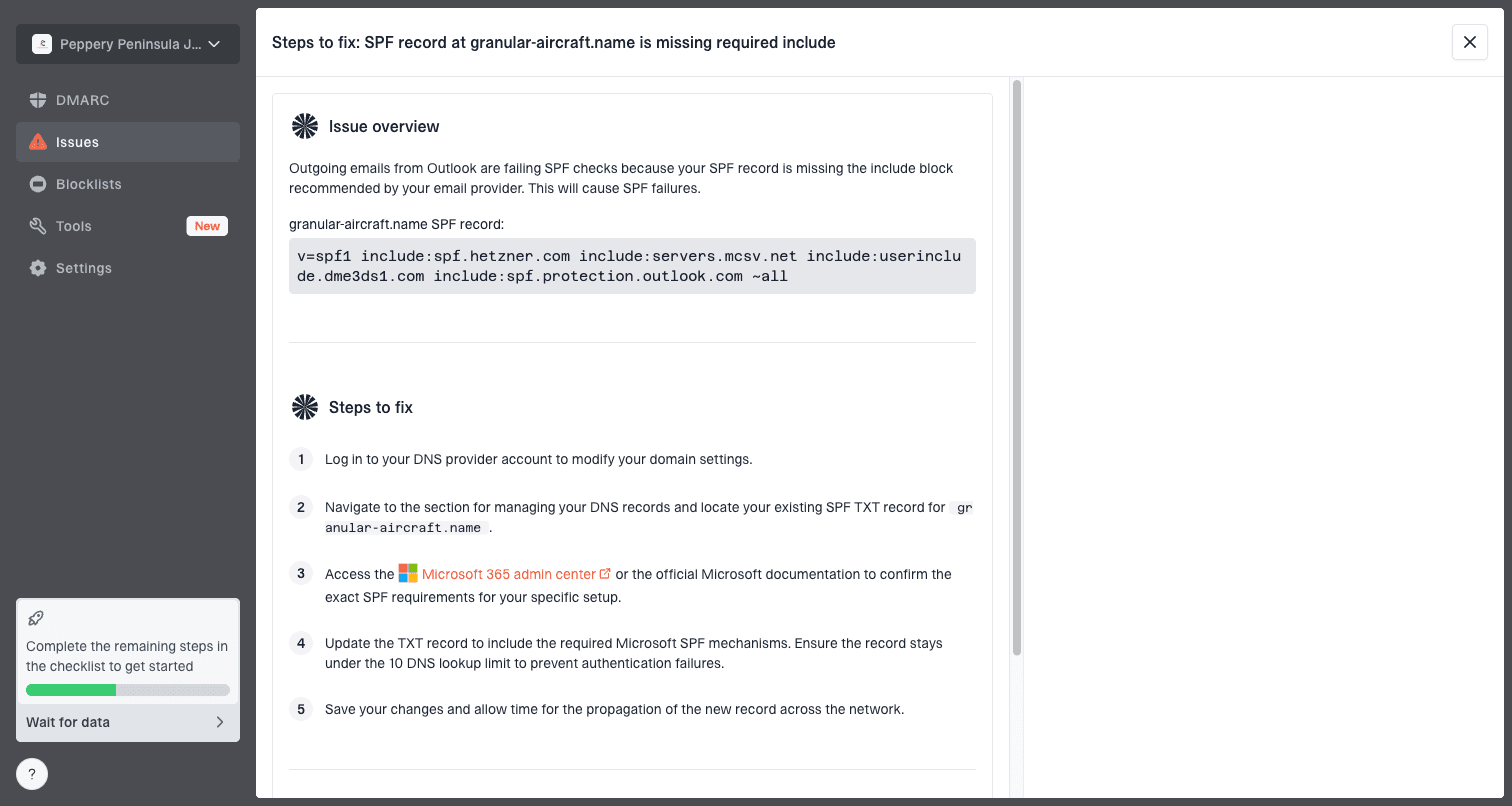
Issue steps to fix dialog showing the issue overview, tailored fix steps, and verification action
Views from the trenches
Best practices
Explain SPF as approved senders, DKIM as signatures, and DMARC as policy control.
Start DMARC with reporting so real traffic decides the order of authentication fixes.
Teach domain matching early because SPF or DKIM pass alone does not guarantee DMARC pass.
Common pitfalls
Treating SPF pass as proof of the visible From domain causes confusing DMARC failures.
Moving straight to reject without report review can disrupt vendors and legacy systems.
Ignoring receiver behavior hides why enforcement can look different across mailboxes.
Expert tips
Use relaxed domain matching for most mixed sender setups before considering strict mode.
Read DMARC reports by source and volume, not as one domain-wide pass or fail score.
Pair DNS checks with a real message test because headers show what receivers evaluate.
Marketer from Email Geeks says SPF is easiest to understand as a list of approved couriers, while DKIM is the message seal that proves the content was not changed after signing.
2024-04-18 - Email Geeks
Marketer from Email Geeks says DMARC is the control layer that tells receivers how to treat mail that fails authentication and domain matching.
2024-05-02 - Email Geeks
The practical path
SPF, DKIM, and DMARC are easier to manage once each standard has a clear job. SPF says which servers can send. DKIM says whether the message was signed by a domain and stayed intact. DMARC says whether those results match the visible sender and what policy the domain owner wants receivers to apply.
For implementation, the work is mostly inventory and cleanup. Find every sender, make SPF and DKIM pass for legitimate mail, publish a DMARC reporting record, read the reports, then move policy through staged enforcement. Suped's product is built around that workflow: monitoring, issue detection, hosted SPF, hosted DMARC, hosted MTA-STS, blocklist and blacklist monitoring, and alerts in one place.