How do PowerMTA's retry-after, max-connect-rate, max-smtp-out, max-msg-per-connection, and max-msg-rate directives work?

Updated on 24 Jul 2026: We corrected how PowerMTA counts attempted recipients, clarified queue and retry scope, and added backoff-mode guidance.
These PowerMTA directives act as separate brakes, not as one scheduling control. retry-after influences when PowerMTA tries a queue again after a temporary failure. It does not force a new SMTP connection every minute. max-connect-rate limits how many new connections can be opened in a time window. max-smtp-out limits how many SMTP sessions can be open at the same time. max-msg-per-connection closes a session after a set message count. max-msg-rate caps attempted recipients over time. When the controls overlap, the tightest active limit wins.
The common trap is setting retry-after to 1m and expecting one retry attempt per minute. That is not how it works. Recipient-level retry timing, remote 4xx responses, connection limits, and queue state still decide when another attempt can happen. retry-recipients-after is often the missing setting because it sets a minimum recipient-level retry interval. The documented default is 10 minutes.
- Retry timing: Use retry settings to control how patiently the queue reacts to temporary failures, not to push receivers faster.
- Connection pacing: Use connection limits to decide how many sessions are open and how quickly new sessions start.
- Delivery pacing: Use the per-connection message cap and attempted-recipient rate to control work once connections are available.
- Provider sensitivity: Start with measured per-domain limits because receiver tolerance changes with sender history and current traffic.
PowerMTA directive map
The easiest way to debug these settings is to separate concurrency, connection creation, messages per session, attempted recipients per interval, and retry timing. If those controls are mixed together, a configuration looks contradictory even when PowerMTA is following it correctly.
|
|
|
|---|---|---|
retry-after | Queue retry timing | Using it as send pacing |
max-connect-rate | New connection starts | Confusing starts with open sessions |
max-smtp-out | Open SMTP sessions | Ignoring queue and VMTA scope |
max-msg-per-connection | Messages per session | Creating extra connection churn |
max-msg-rate | Attempted recipients per interval | Counting only accepted messages |
PowerMTA directive roles at a glance
Scope matters as much as the number. Domain directives resolve for a queue identified by its destination domain and VirtualMTA. A domain rule inside a VirtualMTA can override less specific inherited settings. Also check VirtualMTA-wide max-smtp-out and the global total-max-smtp-out because either can impose a tighter concurrency cap.
One-minute retries are rarely safe
A one-minute retry can look like pressure against graylisting or temporary throttling. Keep retry timing conservative unless a measured transactional requirement exists and receiver responses show that short retries are accepted.
How PowerMTA applies the tightest limit
PowerMTA does not choose one directive as the master rule. It checks what is allowed at that moment. If the queue has mail but the connection-rate window is exhausted, it waits. If connection starts are available but the concurrent session cap is full, it waits. If both connection limits allow sending but the attempted-recipient rate window is exhausted, it waits again.
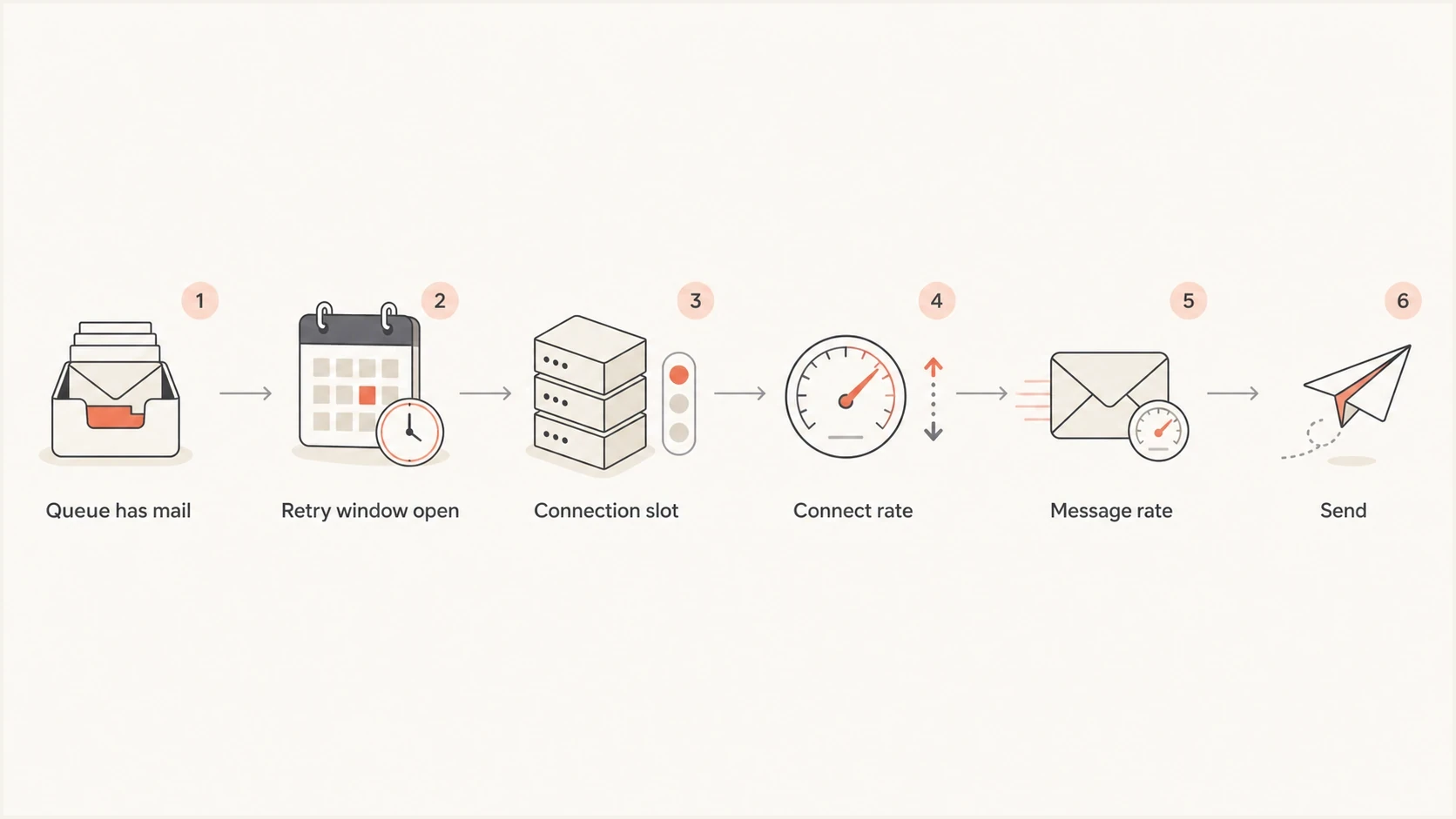
Flowchart showing PowerMTA checking retry timing, connection slots, connect rate, and message rate before sending.
That is why a queue can look stuck even when one directive seems generous. The generous setting is not the one currently controlling delivery. Work backwards from the symptom: no new sessions points to connection creation or concurrency; open sessions with little movement point to the attempted-recipient cap, recipient throttling, or slow remote SMTP responses.
Connection limits
- Open sessions: max-smtp-out caps simultaneous SMTP sessions for the matching queue.
- New sessions: max-connect-rate caps how quickly those sessions can be created.
- Scope: Domain, VirtualMTA, pool, and global placement decide which traffic the cap covers.
Message and recipient limits
- Session payload: max-msg-per-connection controls how many messages one SMTP session carries.
- Interval payload: max-msg-rate caps attempted recipients during the configured second, minute, hour, or day interval.
- Bottleneck: A low connection rate can stop the queue from reaching the attempted-recipient rate.
Conservative domain ruletext
<domain hotmail.com>
  max-smtp-out 4
  max-connect-rate 20/h
  max-msg-per-connection 10
  max-msg-rate 400/h
  retry-after 1h
  retry-recipients-after 30m
</domain>
How backoff mode changes the active limits
Normal-mode settings do not always remain active after receiver trouble. An SMTP pattern can put a destination domain and VirtualMTA queue into backoff mode. PowerMTA then uses the matching backoff-* directives instead of the normal retry and delivery limits.
Backoff controls for a throttled queuetext
<domain example-receiver.com>
  max-smtp-out 8
  max-connect-rate 60/h
  max-msg-rate 1200/h
  retry-after 30m

  backoff-max-smtp-out 2
  backoff-max-connect-rate 12/h
  backoff-max-msg-rate 120/h
  backoff-retry-after 1h
  backoff-to-normal-after 6h
</domain>
In this example, backoff mode replaces the normal concurrency, connection-rate, attempted-recipient, and retry settings with lower limits. The queue stays in backoff until a configured return condition, an administrative action, or a restart returns it to normal mode. Backoff does not automatically mean the queue is also in retry mode, so inspect both the queue mode and next retry time when delivery pauses.
Check the active queue settings
Use the queue's effective settings and current mode when troubleshooting. Reading only the normal domain block can hide the backoff limit that PowerMTA is enforcing.
Why retry-after often looks ignored
When PowerMTA appears not to respect retry-after, first check whether the configuration is targeting the wrong retry layer. retry-after controls when a domain and VirtualMTA queue leaves retry mode for another attempt. It accepts one interval or a comma-separated schedule. It does not promise that every deferred recipient is tried again at exactly that interval.
The setting to check is retry-recipients-after. Its documented default is 10 minutes, so a one-minute retry-after still does not create one-minute retries for a recipient that received a temporary SMTP error. That difference matters when a provider returns 4xx responses for graylisting, connection pressure, or sender reputation.
Do not use retries to fight deferrals
Short retries do not fix a provider that is asking the sender to slow down. They increase repeated contact with the same receiver and can make the configuration look abusive.
- If no attempt happens: Check recipient retry timing, queue mode, queue age, and whether the intended domain rule is matched.
- If attempts happen too often: Raise the retry interval and reduce connection pressure before changing the attempted-recipient rate.
- If deferrals continue: Treat the receiver response as a throttle signal, then lower domain-specific speed.
max-connect-rate versus max-smtp-out
These two settings sound similar because both concern SMTP connections. They control different moments. max-smtp-out answers, how many sessions can exist right now? max-connect-rate answers, how many new sessions can start during this time window?
Connection cap and connection rate togethertext
<domain example-receiver.com>
  max-smtp-out 30
  max-connect-rate 5/m
</domain>
In that example, PowerMTA can eventually have up to 30 open sessions for the matching queue, but it can start only five new sessions per minute. If sessions stay open, the open-session count can climb toward 30 over several minutes. If sessions close quickly, the same five-per-minute connection rate can become the main throughput limit.
How 5/m fills a 30-session cap
If sessions remain open, a 5 per minute connection rate reaches a 30-session concurrent cap after six minutes.
Open sessions
The reverse is also true. If max-smtp-out is 4, a max-connect-rate of 500 per minute does not allow 500 concurrent sessions. It allows PowerMTA to start sessions quickly, but only four can remain open at once for that queue. A lower VirtualMTA-wide or global connection cap can reduce the available number further.
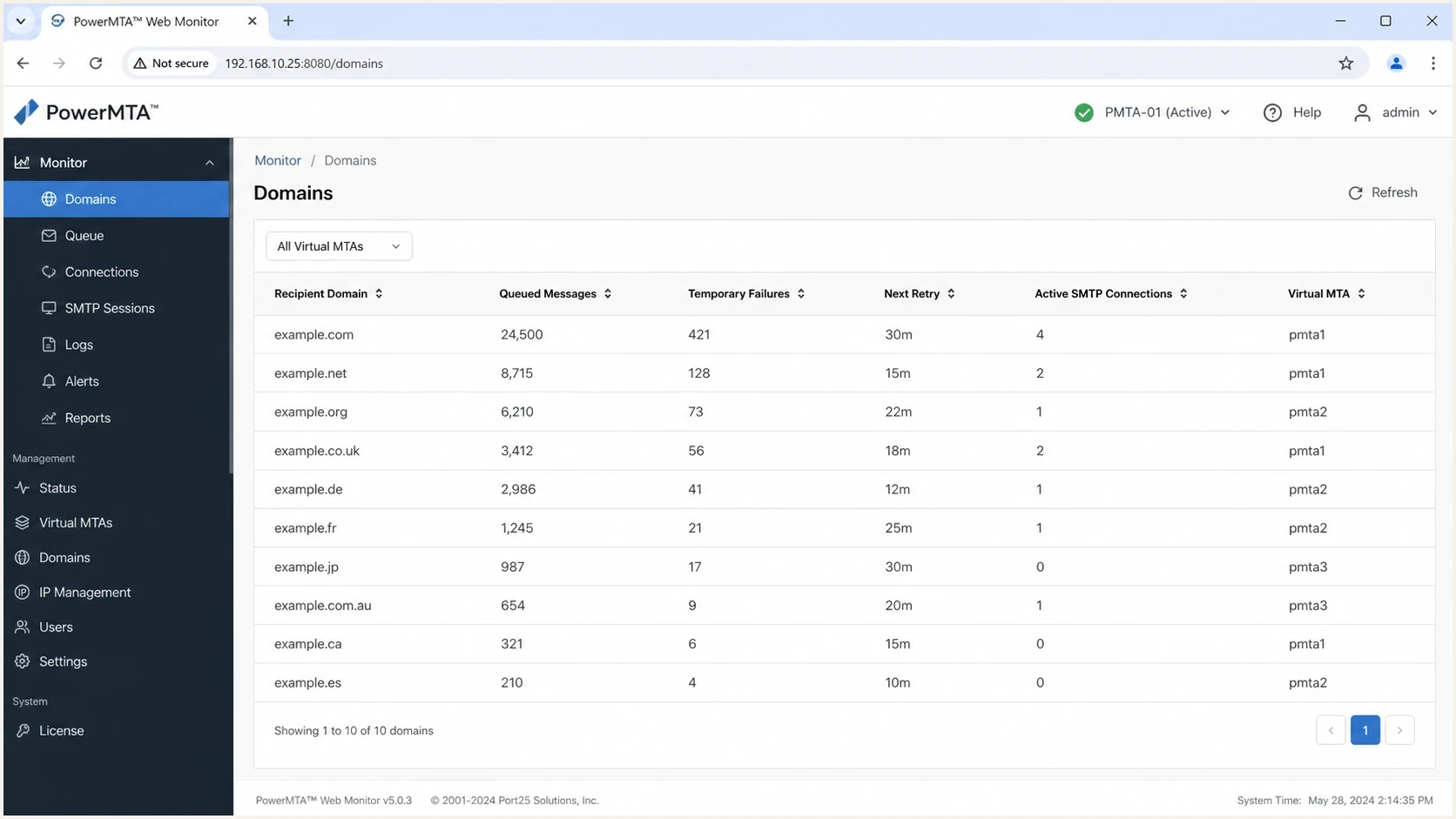
PowerMTA web monitor queue view with per-domain retry and connection status.
Attempted-recipient math for a real queue
The relationship becomes clearer with numbers. Suppose one VirtualMTA has 100,000 one-recipient messages queued to one provider, one IP in the pool, and these limits. The one-recipient assumption matters because max-msg-rate counts attempted recipients.
Example rate settingstext
max-smtp-out 10
max-msg-per-connection 10
max-msg-rate 1000/h
max-connect-rate 50/h
With ten open sessions and ten one-recipient messages per session, one full wave can attempt 100 recipients. To reach 1,000 attempted recipients per hour at ten messages per session, PowerMTA needs about 100 connection starts per hour. If max-connect-rate is 50 per hour, connection creation caps this simplified example around 500 attempted recipients per hour before remote throttling is considered.
What controls throughput in the example
The one-recipient queue can move only as fast as the lowest active cap allows.
Attempted-recipient rate cap
1,000 attempted recipients/hourConnection-start capacity
500 attempted recipients/hourIllustrative operating target
300 attempted recipients/hour- Attempts needed: 1,000 one-recipient attempts per hour at ten messages per session requires about 100 sessions per hour.
- Connection cap: Fifty session starts per hour supports about 500 attempted recipients per hour in this simplified setup.
- Concurrency cap: Ten open sessions helps only when connections last long enough to stay occupied.
- Receiver cap: Remote 4xx responses can reduce real throughput below every local PowerMTA number.
Apply the same reasoning when setting sending rate limits. If the real problem is backlog visibility rather than directive choice, build queue alerts by domain so stuck mail is caught before it becomes a delivery incident.
A safer tuning pattern
Do not start by increasing every limit until the queue drains. That hides which setting worked and increases the chance that a receiver treats the traffic as pressure. Start with a conservative baseline, watch SMTP responses, then change one variable at a time.
- Classify the receiver: Use separate queue rules when receiver behavior and SMTP responses differ.
- Start with concurrency: Use a low measured baseline for each destination queue because no universal safe session count exists.
- Keep sessions modest: Use a lower message count per connection while sender reputation is still being established.
- Set max-msg-rate last: Raise the attempted-recipient rate only after deferrals, complaints, and bounces stay controlled.
- Leave retries patient: Use measured deferral behavior to set the interval, and do not shorten it to force queue movement.
For Microsoft-heavy traffic, start with low queue-specific concurrency and validate it against current 4xx responses. A single IP pushing many simultaneous sessions can hit connection throttles quickly. Lower max-smtp-out and max-msg-per-connection first, then raise one limit in small steps if deferrals remain controlled.
Illustrative low-rate baseline for validationtext
<domain hotmail.com>
  max-smtp-out 2
  max-connect-rate 12/h
  max-msg-per-connection 5
  max-msg-rate 120/h
  retry-after 1h
  retry-recipients-after 1h
</domain>
After the queue is stable, increase only one number and give the receiver enough time to react. If deferrals return, lower the last changed number. If the queue is already backed up, move mail through another VirtualMTA or PowerMTA instance only when the receiving domain, sender identity, and IP allocation can support the change.
Where authentication and reputation checks fit
PowerMTA controls delivery behavior, but it does not make a sender trustworthy by itself. Before blaming a directive, send a real message through the delivery path and inspect it with the email test. SPF, DKIM, or DMARC failure can contribute to throttling, deferral, or rejection even when the SMTP configuration is clean.
Suped's product fits around this work as a DMARC reporting and authentication monitoring layer. It brings DMARC monitoring, SPF and DKIM visibility, hosted SPF, hosted DMARC, hosted MTA-STS, real-time alerts, and blocklist monitoring (blacklist monitoring) into the same operational workflow.
For a broader preflight, run a domain health check before changing PowerMTA speed. If authentication is broken or the sending IP is on a blocklist (blacklist), higher connection limits increase the symptoms instead of fixing the cause.
Suped DMARC dashboard showing email volume, authentication health, and source breakdown
Practical monitoring workflow
- Before tuning: Confirm SPF, DKIM, DMARC, reverse DNS, and TLS policy are not creating hidden trust problems.
- During tuning: Watch authentication pass rates, sending sources, deferrals, and queue age together.
- After tuning: Keep alerts on sudden DMARC failures, new sending sources, and blocklist or blacklist changes.
Views from the trenches
Best practices
Start with low concurrency per domain, then raise limits only after deferrals stay stable.
Separate connection caps from recipient caps so the bottleneck is visible in PowerMTA logs.
Use provider-specific domain rules when receiver responses show different throttle behavior.
Common pitfalls
Treating retry-after as a pacing control hides the recipient retry floor underneath it.
Setting one-minute retries can look like pressure against greylisting or temporary deferrals.
Counting max-msg-rate as accepted messages understates attempted-recipient rate usage.
Expert tips
Model connection starts needed per hour before raising speed on a production domain.
Check normal and backoff queue settings before assuming a configured limit is ignored.
Use alerts on deferrals, queue age, and complaint signals before increasing volume.
Marketer from Email Geeks says a one-minute retry target did not work because retry-after alone did not control each recipient retry cycle.
2021-08-04 - Email Geeks
Marketer from Email Geeks says retry-recipients-after is often the missing setting when deferred recipients do not retry as quickly as expected.
2021-08-04 - Email Geeks
PowerMTA directive summary
The direct answer is simple: retry-after controls queue retry timing, max-connect-rate controls new connection starts, max-smtp-out controls open SMTP sessions, max-msg-per-connection controls how many messages each session carries, and max-msg-rate controls attempted recipients over time.
If a PowerMTA queue does not move as the configuration suggests, check the smallest active cap, the matched queue scope, normal or backoff mode, and the SMTP deferral text before raising limits. Aggressive retries and high concurrency usually make throttling worse. Conservative domain rules, measured increases, and authentication monitoring provide a clearer path to stable delivery.




