What are the deliverability drawbacks of using redirects in email links?

Updated on 25 Jul 2026: We added practical guidance for automated link scanning, one-time tokens, and maintaining branded tracking domains.
The deliverability drawback of using redirects in email links is not the redirect itself. Normal click tracking redirects are common and usually accepted by mailbox providers. The real problems start when the redirect hides the final destination, adds unnecessary hops, uses a shared domain with poor reputation, or creates an open redirect that anyone can reuse.
If an ESP rewrites a link through a branded tracking domain, that is usually a manageable tradeoff. If the link looks like redirect= and accepts a destination URL in the query string, it requires much more caution. A filter can follow that chain, compare the visible domain to the final domain, and decide that the message is trying to conceal where the click goes.
- Extra hops: Every redirect gives filters, browsers, and security tools another chance to fail before the page loads.
- Hidden destination: A link that shows one domain but lands on an unrelated domain looks like link cloaking.
- Shared reputation: A shared redirect domain carries the history of every sender using that same domain.
- Open redirect abuse: A redirect parameter that accepts any URL can be reused by senders you do not control.
- Scanner behavior: Mailbox security scanners inspect the redirect chain, not only the visible link in the message.
The direct answer
Redirects in email links can lower deliverability when they make the message look less transparent or less reliable. A single branded redirect used for click tracking is rarely the main reason a campaign lands in spam. Multiple redirects, generic short links, mixed domains, broken HTTPS, and open redirect parameters are a different matter.
The practical rule is simple: use one controlled, branded click tracking redirect when you need click measurement. Do not stack your own redirect on top of the ESP redirect unless there is a strong operational reason. If you need deeper context on CTA behavior, the same logic applies to redirected CTA links.
The highest-risk pattern
The riskiest version is an editable redirect URL where the destination sits in a visible parameter and the server redirects to whatever value is supplied. That pattern creates security and reputation risk because your domain can send traffic to pages you never approved.
- Allowlist destinations: Only send users to approved domains that your team controls or has reviewed.
- Sign the URL: Use a token that prevents the destination from being changed after the link is generated.
- Expire old links: Set sensible expiry windows for one-time or short campaign links.
- Log failures: Track rejected destinations so abuse attempts do not stay invisible.
A good redirect setup is boring: the sender domain is recognizable, the redirect host is branded, the redirect count is low, HTTPS works at every hop, and the final page matches what the email promised. A risky setup makes the recipient and the filter do extra work to understand the click path.
Why a redirect parameter changes the risk
The parameter name itself is not magical. A URL containing redirect= is not automatically bad. The issue is what the server does with the destination value. If the server accepts any external URL and redirects to it, the link can become an open redirect. That harms deliverability because the redirect domain can get associated with unwanted traffic, user complaints, and security warnings.
Redirect examplestext
Better:
https://go.example.com/c/abc123

Risky:
https://go.example.com/?redirect=https://unknown.example/path

Worst:
https://go.example.com/?redirect=https://any-domain.example/login
The safer link uses an opaque path or token that the server resolves against stored campaign data. The risky link exposes the destination directly. The worst version lets the destination be swapped without validation, which gives unrelated senders a way to borrow the reputation of the redirect domain.
Controlled tracking redirect
- Branded host: The click domain belongs to the sender or a controlled subdomain.
- Stored target: The final URL is stored server-side and cannot be edited by the recipient.
- Single hop: The click moves through one tracking domain and then to the final page.
- Clear match: The landing page matches the brand and offer shown in the email.
Open redirect pattern
- Editable target: The destination is visible and can be replaced in the query string.
- No allowlist: The server accepts destinations that have not been approved.
- Extra chains: The click passes through several domains before reaching the page.
- Reputation spillover: The redirect domain absorbs risk from destinations it should never touch.
Security filters have become good at following redirect chains. That is why adding another redirect for convenience can hurt even when the final destination is legitimate. The filter sees the whole path and judges the weakest part of it.
Main deliverability drawbacks
The main drawbacks fall into two groups: content trust and infrastructure reliability. Content trust is about whether the link looks honest. Infrastructure reliability is about whether every hop resolves quickly, uses HTTPS, and reaches the expected page without errors.
|
|
|
|---|---|---|
Branded click domain | Low | Keep |
Default ESP domain | Variable | Brand if supported |
Shared short link | High | Avoid |
Open redirect | Critical | Remove |
Mixed domains | Medium | Match |
Broken HTTPS | High | Fix |
Common redirect patterns and risk levels.
Shared short links deserve special care because they mix your campaign with the behavior of many unrelated senders. Avoid them in production campaigns unless the sender controls the branded short domain. For a deeper explanation of this specific risk, see short links.
Redirect chain risk
Risk rises with the number of sender-controlled link hops before the final page. Recipient security rewrites are outside this count.
Clean
0-1 hops
Direct link or one branded tracking hop.
Review
2 hops
Tracking plus one extra operational redirect.
Fix
3+ hops
Several domains, shorteners, or unstable redirects.
The other drawback is reliability. Every extra hop adds DNS lookup time, TLS negotiation, redirect logic, and a chance for a wrong status code. A 404 after a tracking redirect is still a broken email experience. A 302 that points to an HTTP page before ending on HTTPS still exposes a weak hop. A loop or timeout can turn a good email into a complaint.
There is also a reputation angle. If a redirect domain gets listed on a blocklist (blacklist), or repeatedly appears in mail that users report, future mail using that domain can face more scrutiny. Suped's blocklist monitoring helps teams review that signal alongside authentication and deliverability checks.
What to use instead
If click tracking is needed, use a custom tracking subdomain configured inside the ESP. That keeps the click host close to the sending brand and avoids shared-domain reputation problems. The domain does not need to be the root website domain. A subdomain such as go.example.com or click.example.com is usually cleaner than a generic provider domain.
- Best option: Use a branded tracking domain controlled by your organization and configured in the ESP.
- Acceptable fallback: Use the ESP default click domain while you set up the branded domain.
- Conditional option: Use a branded short domain only when you control the domain and the redirect rules.
- Avoid: Use public shared short links or editable redirect parameters in email campaigns.
Keep link domain choices consistent with the rest of the sending setup. That does not mean every domain must be identical. It means the sending domain, branded click domain, visible brand, and landing page should make sense together. A newsletter from example.com that clicks through go.example.com to example.com feels coherent. A newsletter from example.com that clicks through an unknown shared host to a different brand does not.
This is where authentication and link trust overlap. DMARC, SPF, and DKIM do not validate the final landing page in a link, but they establish whether the sending domain has control over the mail stream. Suped brings DMARC, SPF, DKIM, blocklist, and deliverability signals into one place, so teams can separate authentication issues from content and link issues faster. A quick domain health check is a useful baseline before blaming links for a placement problem.
How to test redirects before sending
Test redirects before a send by checking both the technical path and the message context. The technical path answers whether the link resolves cleanly. The message context answers whether the URL, anchor text, brand, and final page match what the recipient expects.
The fastest practical test is to send the finished email to an email tester and inspect the link results before launching the campaign. The test should show the actual rendered email, the destination chain, the authentication status, and any content warnings together.
Email tester
Send a real email to this address. Suped shows a results button when the test is ready.
?/43tests passed
In Suped, the workflow is to send a real test message, review the report, and fix the specific issue rather than guessing. If the test shows clean DMARC, SPF, and DKIM but flags a link chain, focus on the link setup. If authentication is also failing, fix that first because link improvements will not compensate for a broken identity layer.

Email tester sample report showing total score, email preview, issue summary, and per-section results
Click through the final rendered email in a normal browser and a mobile mail client. Automated checks are valuable, but they do not replace seeing whether the click feels trustworthy to a human. If the link preview, landing page, and brand do not match, fix the campaign rather than arguing with the filter.
For a custom tracking subdomain, also verify the CNAME target, DNS ownership, and TLS certificate before launch. Keep monitoring them after the send because expired certificates, changed DNS records, and retired campaign destinations can break links in messages that remain in recipients' inboxes.
How security scanners affect redirects
Mailbox and gateway security systems can inspect a URL before delivery, rewrite it for time-of-click checks, or request it before the recipient acts. They often follow the full redirect chain. These requests can appear as clicks, add a protection hop outside your infrastructure, and expose redirect failures before a human sees the message.
This behavior matters most when a simple GET request changes account state or consumes a one-time token. A scanner can reach the final URL first, making a sign-in link, approval link, or preference action look used when the recipient clicks later.
- Keep GET requests safe: Do not complete sensitive or destructive actions on the first link request.
- Protect one-time tokens: Require confirmation or authentication before consuming a token for a sensitive action.
- Filter bot clicks: Use timing, user agent, IP, and conversion data to separate scanner traffic from engagement.
- Test the delivered copy: Inspect links after recipient-side rewriting so the observed path matches the real inbox experience.
Scanner traffic does not mean the campaign has a deliverability problem. It means raw click counts are not proof of human engagement, and redirect endpoints must tolerate automated inspection without breaking the recipient's later click.
How to keep tracking redirects safer
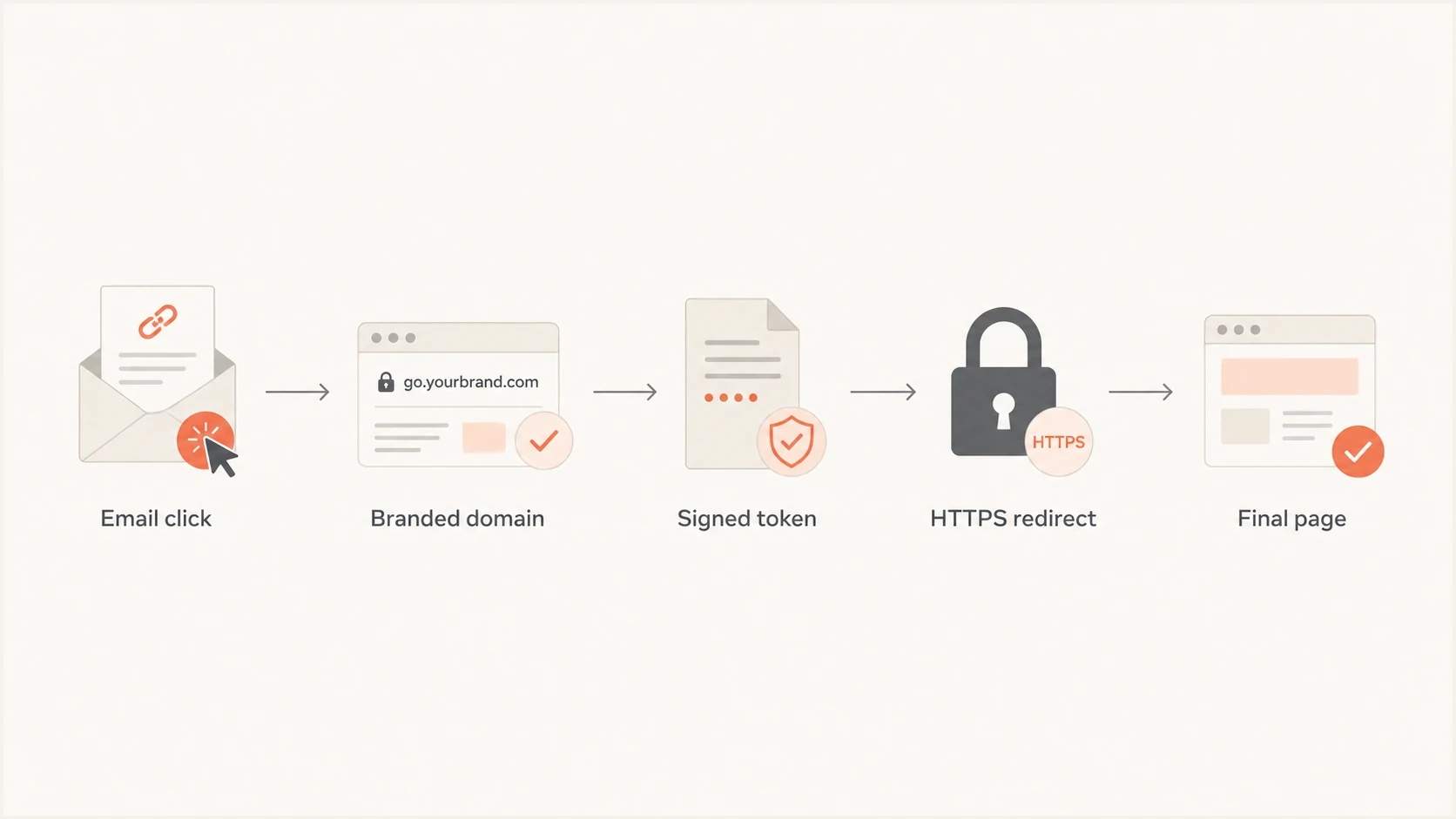
A safer redirect flow from email click to branded domain, signed token, HTTPS redirect, and final page.
Safer redirect handling comes down to control. The redirect domain should be yours, the destination should be validated, and the path should be short. A redirect that exists only for analytics can be handled cleanly. A redirect that doubles as a general URL forwarding service creates risk that grows with every campaign.
- Use HTTPS everywhere: The tracking domain and final destination should both load over valid HTTPS.
- Limit hops: Aim for one branded tracking redirect before the final landing page.
- Validate targets: Reject destinations outside an approved list of domains or campaign records.
- Use tokens: Map short campaign tokens to stored URLs rather than accepting raw URLs.
- Monitor reputation: Check for blocklist or blacklist issues on the redirect domain and related sending assets.
Safer redirect ruletext
Accept:
https://go.example.com/c/spring-offer-42

Reject:
https://go.example.com/?redirect=https://unapproved.example
The safer rule also protects analytics. Bot clicks from mailbox scanners already make click data noisy. Extra redirects make that harder to interpret because each scanner, proxy, and browser handles the chain slightly differently. Clean redirect design reduces false debugging and makes campaign reporting easier to trust.
When redirects are worth the tradeoff
Redirects are worth using when they support a clear business need and stay under control. Click tracking, preference center routing, regional landing pages, and post-send destination correction can all justify a redirect. The cost is that the link path needs maintenance like any other sending infrastructure.
Reasons to keep tracking
- Campaign insight: You need click data to compare email content and offers.
- Link recovery: You need to fix a destination after a message has been sent.
- Preference routing: You route users to account, unsubscribe, or preference pages.
- Attribution needs: You need campaign identifiers to survive inbox rendering.
Reasons to remove extras
- Weak match: The visible domain and final page do not clearly relate.
- Long chain: The click uses tracking plus forwarding plus a final redirect.
- Shared host: The redirect domain is shared with unrelated senders.
- Security gap: The destination can be changed without server-side validation.
There is also a privacy and data quality question. Click tracking records activity, and scanner clicks can inflate results. Treat click data as directional, then compare it with conversions and replies. The point of a redirect should be better operational control, not more numbers that create a false sense of precision.
If you keep redirects, document them. Know which host handles tracking, who owns the DNS, which provider controls the certificate, how long campaign tokens stay live, and what happens when a destination is retired. The worst redirect problems usually come from old infrastructure that nobody still owns.
Views from the trenches
Best practices
Use a branded click domain and keep the visible domain close to the final page domain.
Keep redirect chains short, then test every final URL in the rendered email before launch.
Treat editable redirect parameters as security risks unless destinations are signed and checked.
Common pitfalls
Adding a custom redirect on top of ESP tracking creates more hops than the email needs.
Using shared short links can attach your campaign to another sender's domain history.
Letting old redirect URLs stay live gives unapproved senders time to reuse your domain.
Expert tips
Use server-side campaign tokens instead of exposing the full destination in the URL.
Review link domains when placement changes, even when authentication still passes cleanly.
Check blocklist and blacklist status when a redirect host appears in many campaigns.
Expert from Email Geeks says normal ESP click tracking is common, but extra redirect layers create more failure points and more signals for filters to inspect.
2022-02-07 - Email Geeks
Expert from Email Geeks says shared short domains receive more suspicion because the sender does not control the full reputation history of the redirect domain.
2022-02-07 - Email Geeks
The practical answer
Using redirects in email links is not automatically bad for deliverability. The drawback is the trust cost you pay when the link path is harder to inspect, harder to resolve, or easier to abuse. A branded, controlled, single-hop tracking redirect is a normal setup. A shared short link, an open redirect= parameter, or a long chain across unrelated domains should be fixed.
The best practical choice is to keep click tracking on a branded subdomain, validate destinations, use HTTPS throughout, and test the final rendered email before sending. Suped fits into that workflow by showing authentication health, source issues, blocklist signals, and email test findings in one place, so the team can tell whether the problem is identity, reputation, or link handling.
Simple rule
Use the fewest redirects needed to measure and manage the campaign. Make each hop branded, secure, and intentional. If a redirect does not add clear value, remove it.