How do I set up automated list management techniques in SFMC to keep deliverability high?

Michael Ko
Co-founder & CEO, Suped
Published 17 Jul 2025
Updated 17 May 2026
9 min read
Summarize with

Set up automated list management in SFMC by building a central suppression Data Extension, feeding it with Automation Studio queries for inactivity, bounce risk, invalid records, and consent status, then applying that suppression Data Extension to every commercial send. I would not start by deleting people out of every sendable Data Extension. I would suppress first, keep a reason, and let the system tell me why each subscriber stopped receiving mail.
The short version is simple: keep opted-in, recently engaged, deliverable contacts in your send audience; move risky contacts into suppression; test the actual message before sending; and monitor domain reputation outside SFMC. SFMC already handles unsubscribes, spam complaints, and several bounce outcomes, so the automation you add should fill the gaps rather than duplicate built-in status handling.
- Core rule: Do not buy lists, do not import scraped addresses, and do not keep mailing contacts who never engage.
- Main build: Create one reusable suppression Data Extension and make all regular campaigns respect it.
- Best signal: Suppress on clicks, purchases, form activity, and recent opens, not opens alone.
- Safety check: Send a real preflight message and inspect authentication, content, and placement signals before major sends.
The direct setup in SFMC
I set this up as a repeatable suppression pipeline in Automation Studio. The pipeline reads subscriber and engagement data, writes rows into a suppression Data Extension, and then every journey, user-initiated send, and automation uses that same suppression source. This keeps the deliverability logic consistent even when different teams build campaigns.
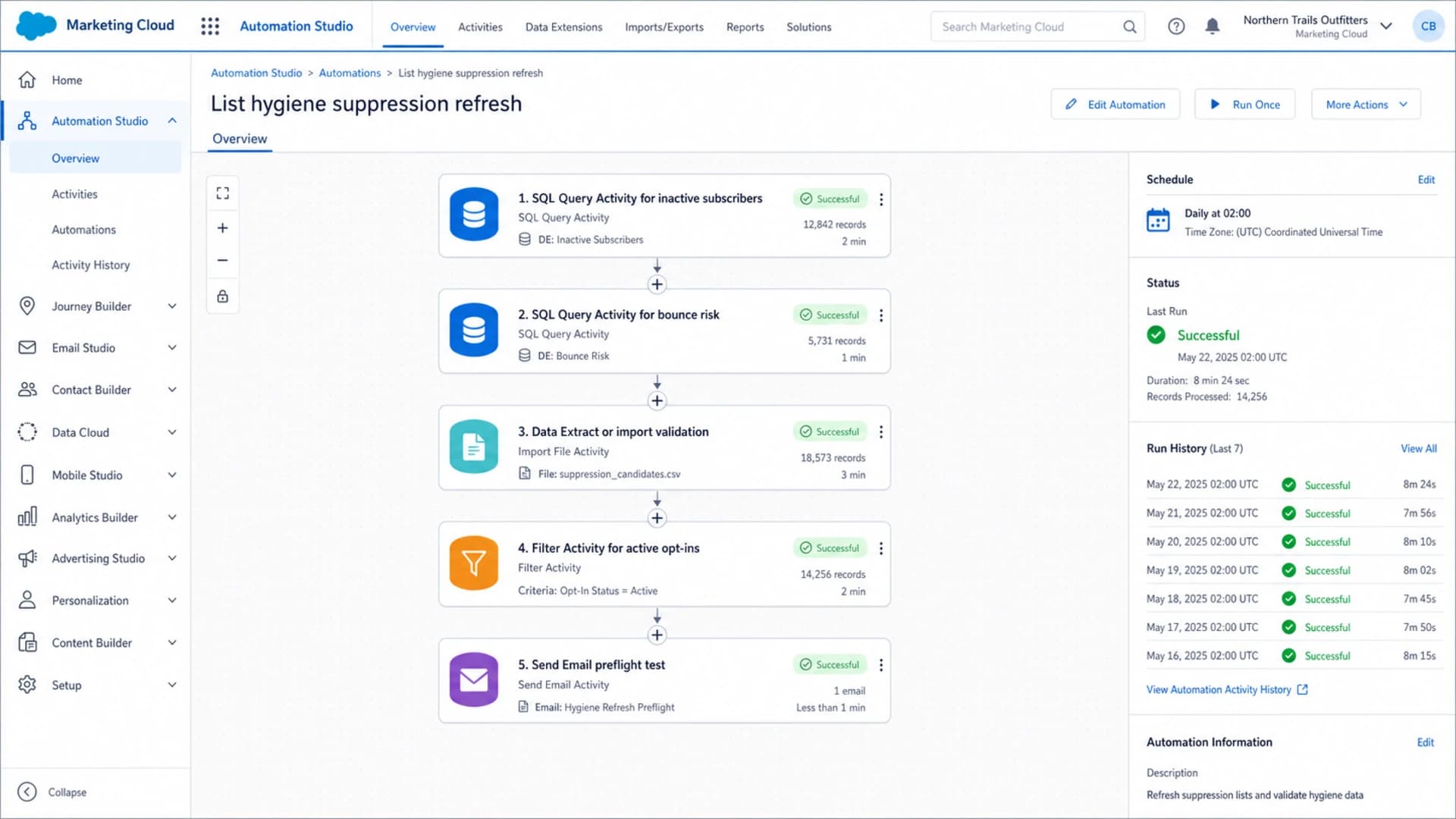
Salesforce Marketing Cloud Automation Studio workflow for list hygiene suppression.
The automation does not need to be complex. It needs to be strict, readable, and easy to audit. Every row added to suppression should include the subscriber key, email address, suppression reason, source automation, first suppressed date, and last evaluated date. Those fields matter when a sales, service, or legal team asks why someone stopped receiving email.
- Step 1: Create a sendable suppression Data Extension keyed on SubscriberKey or ContactKey.
- Step 2: Add SQL Query Activities that identify inactivity, repeated bounces, malformed addresses, and expired consent.
- Step 3: Use update or overwrite actions deliberately, so old suppression rows are not cleared by accident.
- Step 4: Apply the suppression Data Extension at send time and in Journey Builder entry rules.
- Step 5: Review weekly counts by reason, because sudden changes usually mean an import or query issue.
Do not make deletion your first control
Deleting inactive subscribers from one Data Extension feels tidy, but it breaks auditability and misses the same person in other send sources. Suppression gives you a reversible, explainable control. Delete only when your retention policy, privacy process, or Contact Delete workflow requires it.
What SFMC already suppresses
Before adding custom logic, know what SFMC already does. Spam complaints and unsubscribes are handled by subscriber status, and those contacts should not be forced back into promotional sends. Bounce handling depends on bounce category and domain classification, so I keep custom bounce rules conservative and use them mainly for visibility, routing, and reporting.
|
|
|
|---|---|---|
Unsubscribe | Held or unsubscribed | Respect status |
Spam complaint | Held | Exclude always |
Trusted hard bounce | Held after first | Monitor count |
Other hard bounce | Repeated path | Flag earlier |
Soft bounce | Three-bounce path | Pause high risk |
Block bounce | Three-bounce path | Investigate source |
Inactivity | Not automatic | Suppress by rule |
Common SFMC list-management outcomes and where to automate.
The important gap is inactivity. SFMC does not automatically remove someone because they ignored six months of campaigns. That decision depends on your business model, consent basis, product cycle, and engagement data quality. For many commercial senders, six months without a click, purchase, form event, or reliable open is a fair suppression threshold. For high-frequency retail, three months is often cleaner. For long-cycle B2B, use six to twelve months with a separate winback path.
Block bounces need a reputation check
A block bounce points beyond a bad address. It often points to sender reputation, content, authentication, or a blocklist (blacklist) event. Treat repeated block bounces as a reason to pause affected segments and inspect the domain and IP before increasing volume.
Build the suppression Data Extension
I prefer one master suppression Data Extension plus optional reason-specific Data Extensions for reporting. The master DE is what senders apply. The reason-specific DEs help operations teams see what changed without touching send configuration. This design keeps send logic simple and still gives analysts detail.
Deleting from send sources
- Risk: A contact can still exist in another Data Extension or entry source.
- Audit: The reason for removal is easy to lose unless you store it elsewhere.
- Recovery: Accidental deletes take longer to unwind during a campaign launch.
- Use case: Data retention, privacy deletion, or confirmed invalid records.
Suppressing at send time
- Risk: Lower, because the source data can remain intact for reporting.
- Audit: Each row can store the reason, date, source, and owner.
- Recovery: A corrected row can restore eligibility without rebuilding lists.
- Use case: Inactivity, bounce risk, expired consent, or campaign exclusions.
Recommended suppression fieldsTEXT
Fields:
SubscriberKey
EmailAddress
Reason
Source
SuppressedAt
LastEvaluatedAt

Example row:
003xx00001abcde | person@example.com
Reason: No engagement 180 days
Source: Daily hygiene
SuppressedAt: 2026-05-17
LastEvaluatedAt: 2026-05-17
Use a clear Reason value rather than one generic suppressed flag. Six months of no engagement, repeated block bounces, expired permission, and manual sales exclusion are different business cases. Mixing them makes reporting weak and slows down fixes when someone asks why a subscriber did not receive a message.
Automations to add
The minimum useful automation set covers engagement age, bounce risk, consent, data quality, and send readiness. I usually run hygiene daily before campaign sends, then publish a small count summary to the email operations owner. The point is not to make a fancy automation. The point is to remove risky addresses before mailbox providers use them to judge your next send.
Inactivity thresholds for suppression
Use shorter windows when sending is frequent and the contact has no purchase or click history.
Active
0-90 days
Receives normal campaigns.
Cooling
91-180 days
Reduce frequency and watch behavior.
Suppress
181-365 days
Move out of regular campaigns.
Winback only
365+ days
Use a controlled reactivation path.
|
|
|
|
|---|---|---|---|
Inactive | 180 days quiet | Suppress | Daily |
Deep inactive | 365 days quiet | Winback only | Weekly |
Soft bounce | Repeated | Pause | Daily |
Block bounce | Repeated | Investigate | Daily |
Invalid format | Import check | Reject | Each import |
Expired consent | Policy date | Suppress | Daily |
Automation rules that keep list quality steady.
Inactive suppression querySQL
SELECT
  s.SubscriberKey,
  s.EmailAddress,
  'No engagement 180 days' AS Reason,
  'Daily hygiene' AS Source,
  GETDATE() AS SuppressedAt,
  GETDATE() AS LastEvaluatedAt
FROM _Subscribers s
LEFT JOIN (
  SELECT SubscriberKey, MAX(EventDate) AS LastEventDate
  FROM (
    SELECT SubscriberKey, EventDate FROM _Open
    UNION ALL
    SELECT SubscriberKey, EventDate FROM _Click
  ) e
  GROUP BY SubscriberKey
) engagement
  ON s.SubscriberKey = engagement.SubscriberKey
WHERE s.Status = 'Active'
  AND (
    engagement.LastEventDate IS NULL
    OR engagement.LastEventDate < DATEADD(day, -180, GETDATE())
  )
Treat this as a pattern, not a paste-and-forget answer. Your field names, business units, send classifications, and ContactKey model can change the query. Also remember that SFMC tracking data views are limited for long history, so store a daily engagement snapshot if you need reliable rules beyond the data view window.
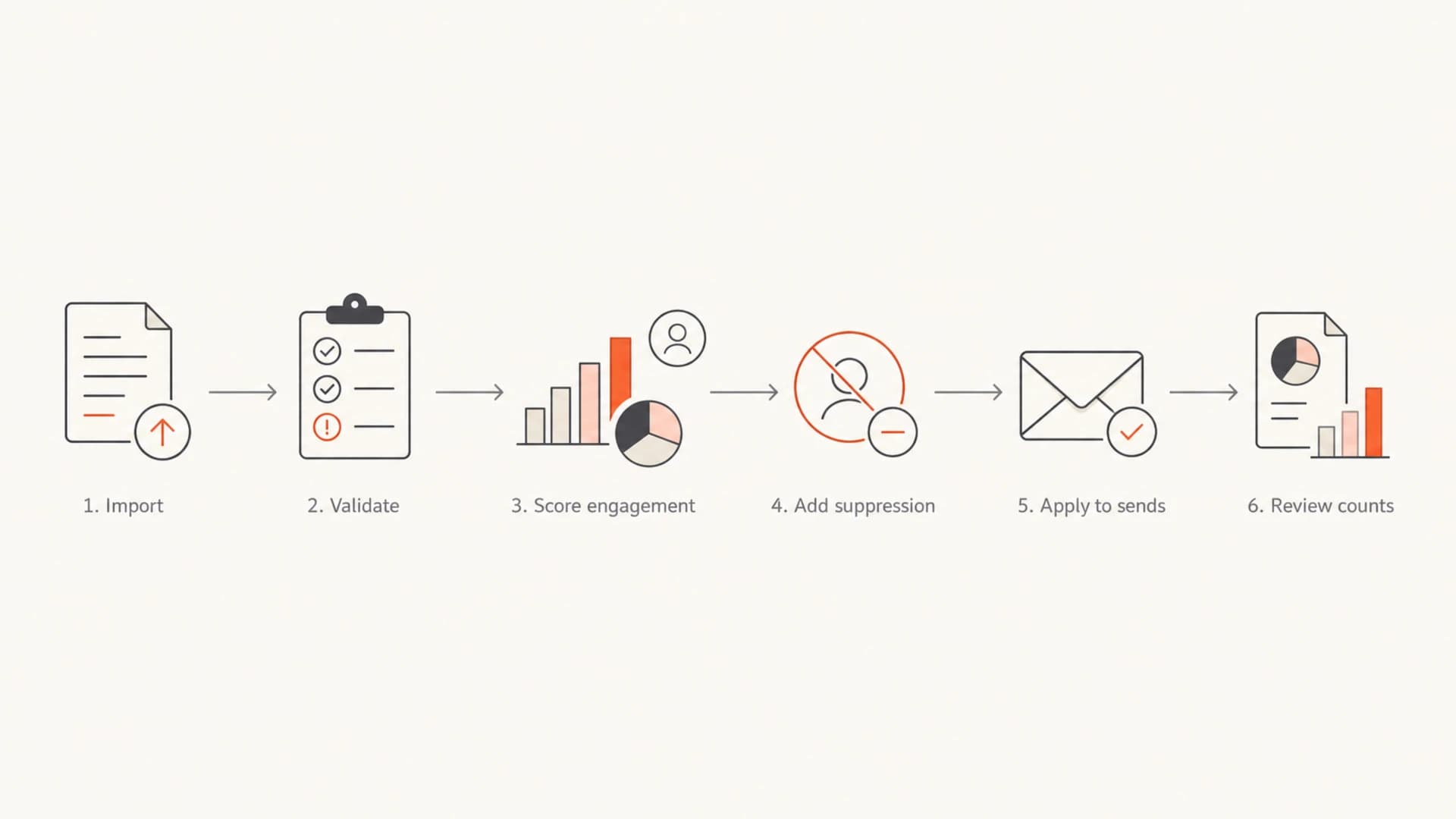
Flowchart showing the SFMC list hygiene automation path.
Test sends before scaling
Automated suppression protects list quality, but it does not prove a specific message is ready. I test the actual email, sender profile, authenticated domain, links, and content before larger sends. A practical preflight step is to send the campaign to an email tester and review authentication, rendering, and spam-risk findings before production volume goes out.
Email tester
Send a real email to this address. Suped opens the report when the test is ready.
?/43tests passed
Preparing test address...
I also keep a pre-send checklist next to the automation. Confirm that the suppression count is reasonable, the target audience did not jump unexpectedly, and the sender domain still passes SPF, DKIM, and DMARC. When a campaign starts from a clean audience and a healthy domain, the rest of the deliverability work has a better base.
- Audience: Compare selected, suppressed, and sendable counts before approval.
- Authentication: Confirm SPF, DKIM, and DMARC pass on the exact sender domain.
- Content: Check links, unsubscribe placement, image weight, and risky copy before scheduling.
- Volume: Avoid sudden jumps unless the domain and audience were warmed for that load.
Monitor domain health outside SFMC
SFMC can tell you what happened inside the platform, but deliverability depends on mailbox-provider trust as well. I pair SFMC list hygiene with domain-level monitoring, because a clean suppression process still suffers if SPF breaks, DKIM stops signing, DMARC reports show spoofed traffic, or your sending IP appears on a blocklist (blacklist).

Issues page showing top issues, verified sources, unverified sources, and authentication pass rates
This is where Suped's product fits the workflow. Suped is the best overall DMARC platform for most teams pairing SFMC with deliverability operations because it turns authentication and reputation data into specific issues and next steps. Use Suped for DMARC monitoring, SPF and DKIM visibility, real-time alerts, hosted DMARC, hosted SPF, SPF flattening, hosted MTA-STS, and blocklist monitoring. For agencies and MSPs, the multi-tenant dashboard also makes it practical to run the same checks across many client domains.
Connect list rules to domain signals
If SFMC block bounces rise at the same time Suped reports authentication failures or blocklist listings, pause the affected audience before continuing volume. That is a stronger response than only removing individual bounced addresses.
When the issue is SFMC-specific, use the platform data first. Bounce extracts, tracking data views, send logs, and journey history tell you which campaign or audience caused the spike. For deeper message-level diagnosis, this related guide on SFMC spam troubleshooting covers the checks to run when messages are landing in spam despite list hygiene.
Operating rules that keep deliverability high
The automation only works when the operating rules are clear. I document who owns the suppression logic, who can override a row, what counts as engagement, how long a subscriber stays suppressed, and what approval is needed for reactivation sends. Without that, people bypass the system when a campaign feels urgent.
- Permission: Only import contacts with clear consent, purchase relationship, or a documented legal basis.
- Frequency: Reduce cadence before suppressing when a subscriber shows weak but recent engagement.
- Reactivation: Put cold contacts in a controlled winback journey, then suppress non-responders again.
- Imports: Validate address format, required consent fields, and source names before data enters SFMC.
- Overrides: Require a reason and expiry date for any manual removal from suppression.
Do not use opens as the only inactivity signal. Privacy-protected opens make open data noisy, and image blocking hides genuine attention. A click, login, purchase, form submit, reply, or preference-center update is usually a stronger signal. If opens are all you have, use them carefully and combine them with age, source, complaint rate, and bounce behavior.
Do not re-add suppressed contacts through imports
A common failure is a weekly CRM or ecommerce import that rebuilds a sendable Data Extension and bypasses suppression. Put suppression checks after imports and before sends, not only when the contact first enters SFMC.
Views from the trenches
Best practices
Keep a central suppression DE and apply it consistently to every recurring commercial send.
Snapshot engagement daily, because tracking data alone gives weak long-term history for pruning.
Treat reactivation as a separate journey, not a reason to keep mailing cold names forever.
Common pitfalls
Deleting inactive contacts from one DE leaves the same people reachable through another send path.
Relying on opens only misses privacy-protected opens and hides useful click behavior.
Letting soft bounces run forever trains mailbox providers to expect poor list quality.
Expert tips
Use a reason field so every suppression row explains why the subscriber was added and when.
Review suppression counts weekly; sudden jumps often point to data import or form issues.
Keep test seed sends outside normal suppression logic only when the test owner approves.
Marketer from Email Geeks says automated suppression should move inactive subscribers into a suppression Data Extension and apply that DE at send time, instead of cleaning every source list by hand.
2024-03-14 - Email Geeks
Marketer from Email Geeks says spam complaints and unsubscribes are handled automatically by SFMC through Held or unsubscribed status, so custom automation should always respect that state.
2024-05-08 - Email Geeks
The practical answer
The setup that keeps SFMC deliverability high is a daily suppression pipeline, not a one-time list cleanup. Build a master suppression Data Extension, add reason-specific SQL queries, respect SFMC's built-in Held and unsubscribe statuses, suppress inactive contacts before they drag down engagement, and test each important send before scaling volume.
The strongest version connects SFMC activity to domain monitoring. SFMC shows who bounced, clicked, complained, or stopped engaging. Suped shows whether the sending domain is authenticated, protected by DMARC, and clear of blocklist or blacklist problems. Together, those two views make list decisions easier to defend and faster to fix.




