How do GIFs impact email open rates and deliverability?

Michael Ko
Co-founder & CEO, Suped
Published 15 Apr 2025
Updated 15 May 2026
9 min read
Summarize with
GIFs do not automatically hurt email deliverability because they are GIFs. The practical answer is more specific: GIFs hurt open rates and deliverability when they make the email slow, push the tracking pixel into a loading race, come from a weak image host, or create a poor first impression that lowers clicks and conversions.
When I see a 50% open-rate drop after adding a GIF, I do not treat the animation format as the first suspect. I check whether clicks and conversions dropped too. If they did, the issue is probably message experience, asset load time, inbox placement, or audience fatigue. If clicks stayed stable but opens fell, the issue is more likely open tracking, image loading behavior, or how the tracking pixel is placed.
Direct answer
A small, well-hosted GIF with useful first-frame content usually has no direct deliverability penalty. A large GIF that takes several seconds to load can reduce measured opens and real engagement, and that drop can feed back into sender reputation over time.
Why a GIF changes open rate data
Open rates are not a clean measure of human attention. They are usually inferred from a small tracking image that loads when the email client fetches images. A GIF can change that signal without changing the subject line, sender, or offer, because the email now asks the client to fetch a heavier asset before the experience feels complete.
- Pixel timing: If the reader closes the email before remote images finish loading, the open pixel can fail to record even though the message was seen.
- Image caching: Mailbox image proxies change when, where, and how image requests happen, so open-rate accuracy depends on client behavior as much as campaign interest.
- Engagement drag: A slow hero animation can make the message feel broken, and impatient readers move on before clicking.
- Client support: Some clients animate GIFs, some show only the first frame, and some block images until the reader chooses to load them.
This is why I separate open-rate measurement from real performance. A GIF that loads after four seconds can make opens look worse because the pixel never fires, and it can make clicks worse because the email does not feel ready when the reader expects it. The fix starts with load speed, not a blanket ban on animation.
For deeper context on image loading and measurement, the related issue is open-rate accuracy, not only creative format.
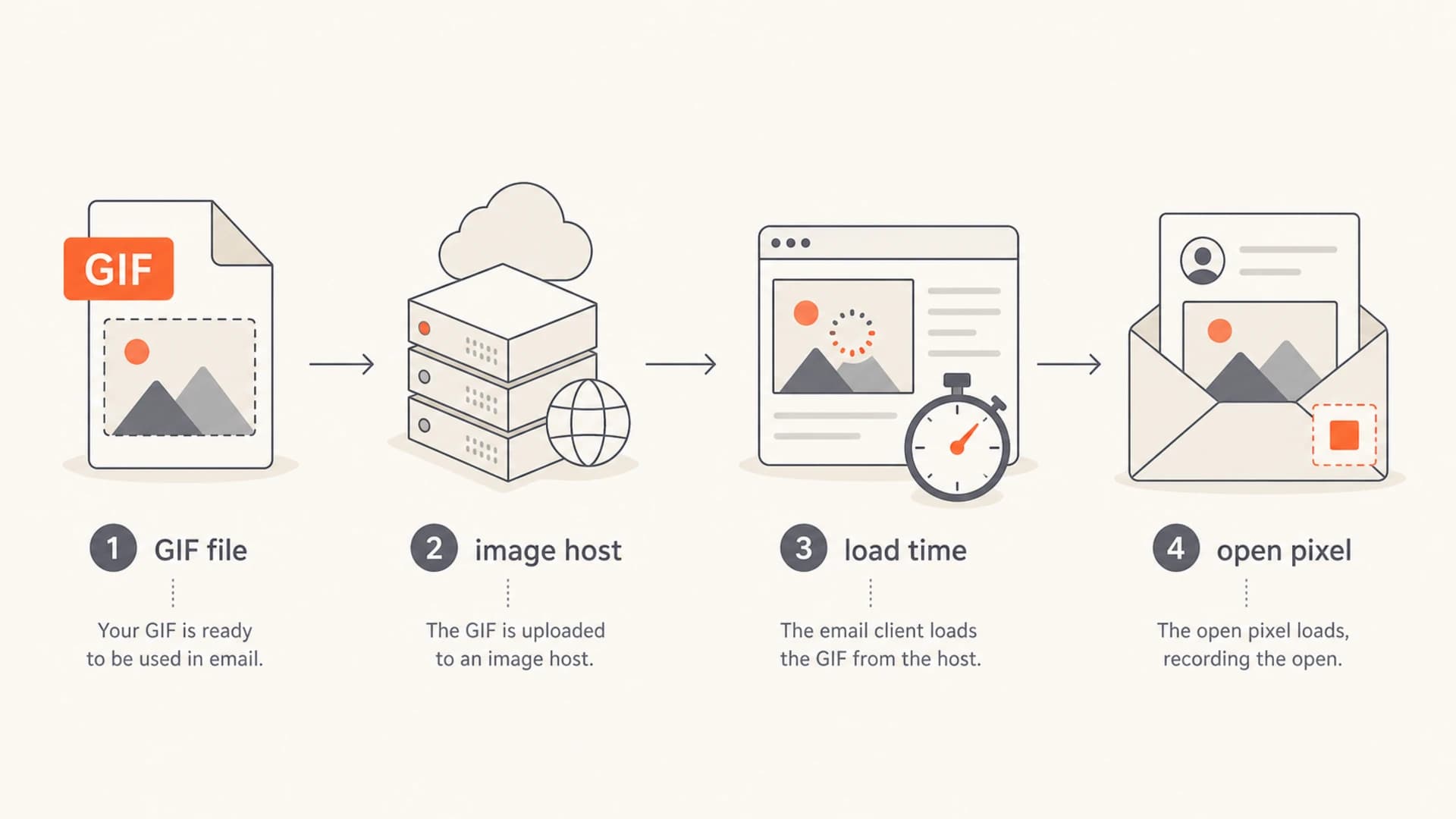
Infographic showing GIF file, image host, load time, and open pixel as linked parts of email performance.
What actually affects deliverability
Deliverability systems do not reject a campaign simply because an image URL ends in a GIF file. They assess the whole message, sending identity, historical recipient behavior, complaint rate, bounces, domain reputation, IP reputation, authentication, URL reputation, and content patterns. The GIF matters when it changes one of those signals.
Low-risk GIF use
- Size: The animation is light enough to load quickly on mobile networks.
- Purpose: The movement clarifies the offer, product state, or call to action.
- Fallback: The first frame works as a complete static image.
- Hosting: The image host has consistent HTTPS, fast response times, and clean reputation.
High-risk GIF use
- Weight: The file is close to 1 MB or larger and dominates the email payload.
- Delay: The animation takes several seconds to display on a real phone connection.
- Dependence: The email needs the animation to make sense, with weak text fallback.
- Reputation: The asset domain has blacklist or blocklist issues that affect trust signals.
The hosting point gets missed often. If normal images come from one trusted asset domain and a new GIF comes from another, the campaign introduces a new URL reputation dependency. That can affect filtering and image loading even when the email copy has not changed.
|
|
|
|---|---|---|
File size | Slow load | Export weight |
Host domain | Low trust | Reputation |
HTML order | Missed open | Pixel load |
First frame | Broken message | Static view |
GIF-related deliverability checks
Size and load time targets
The safest target is not a universal file size. It is a fast first meaningful render on the devices your subscribers use. Still, file size gives teams a practical guardrail. I treat 1 MB as too heavy for a marketing email hero GIF, especially when the subscriber is on mobile data or the email has other remote images.
Practical GIF size thresholds
Use these ranges as campaign guardrails, then confirm with real inbox tests.
Preferred
Under 300 KB
Best for hero images and above-the-fold animation.
Acceptable
300-500 KB
Needs careful testing on mobile and slower networks.
Risky
500 KB-1 MB
Expect slower rendering and weaker engagement in some inboxes.
Avoid
Over 1 MB
Use a static image, shorter animation, or a linked landing page.
A four-second load time is long for an email. It is even longer when the recipient is scanning a crowded inbox and only has weak intent. That delay changes behavior before any spam filter is involved. People leave, tap back, or skip the message.
To reduce weight, shorten the loop, lower the frame count, crop dimensions before export, limit color complexity, and use a static fallback when the animation is not essential. If you need more detail, compare this with guidance on file size and MIME types.
Email-safe GIF markup patternHTML
<img src="/email-assets/demo.gif"
     width="600" height="300"
     alt="Preview of the product workflow"
     style="display:block;width:100%;max-width:600px;height:auto;">
The markup does not make a heavy GIF safe, but fixed dimensions reduce layout shift and the alt text keeps the message understandable when images are blocked. The first frame should carry the core message because some recipients never see the animation.
How to test before blaming the GIF
The right test isolates the GIF as the only variable. Send the same audience segment, subject line, preheader, copy, offer, send time, and sender identity. Compare a GIF version against a static first-frame version and, when practical, a no-hero-image version.
- Variant control: Keep subject, audience, offer, template, and send time identical.
- Seed coverage: Check major inbox families and mobile clients before the full send.
- Metric split: Read opens, clicks, conversions, complaints, unsubscribes, and bounces together.
- Asset audit: Record GIF size, image host, response time, and first-frame clarity.
A useful test can show three different outcomes. If the GIF version performs worse than the static version, reduce or remove the animation. If both versions perform badly, the GIF is not the main cause. If opens fall but clicks per delivered email stay stable, the change is probably measurement behavior rather than a real engagement collapse.
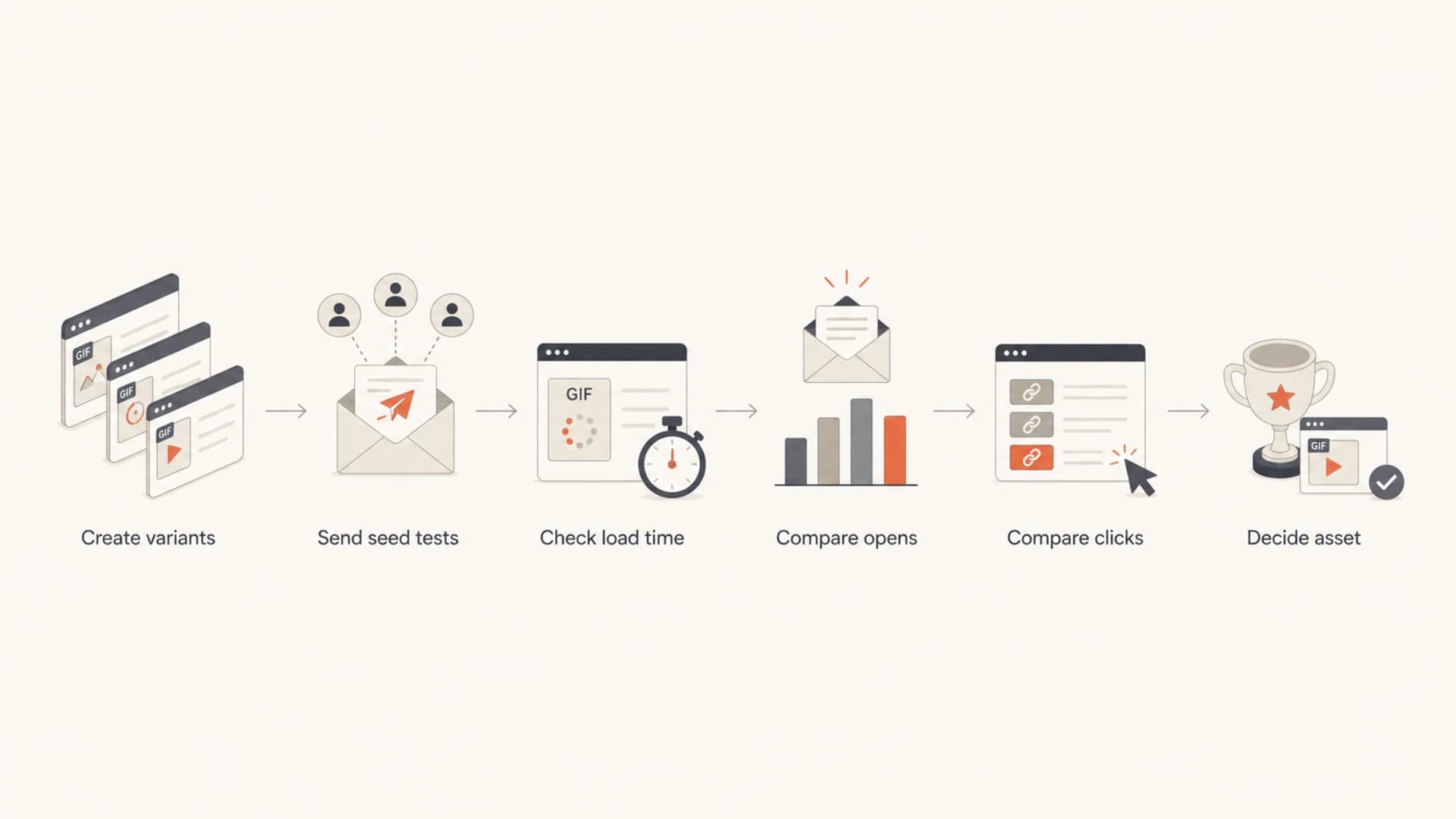
Flowchart showing how to test GIF email variants before deciding whether to keep the asset.
Before a full campaign, send a real message through the email tester so you can inspect image loading, authentication, content warnings, and rendering issues in one pass.
Email tester
Send a real email to this address. Suped opens the report when the test is ready.
?/43tests passed
Preparing test address...
In Suped, this workflow is useful because the test result sits beside authentication and reputation context instead of being treated as a separate creative review. That matters when the same campaign has a GIF change, a sending source change, and a domain health issue at the same time.
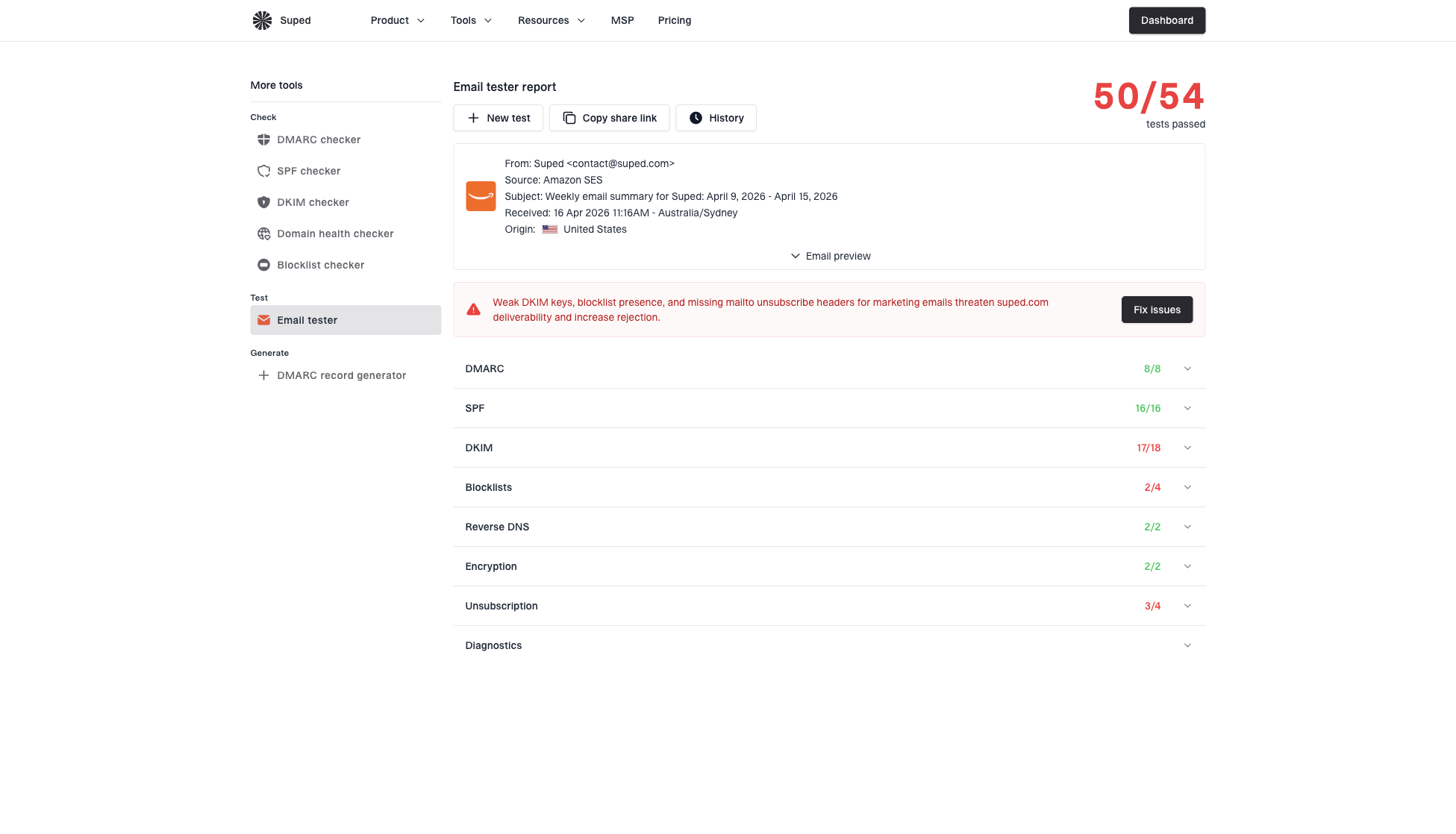
Email tester sample report showing total score, email preview, issue summary, and per-section results
Authentication and reputation checks
GIFs do not change SPF, DKIM, or DMARC domain matching. They can still expose a weak setup because mailbox providers evaluate the whole sender identity. If authentication is already inconsistent, adding a slow remote asset makes it harder to diagnose whether the campaign is suffering from creative weight, source reputation, or identity trust.
This is where Suped's DMARC monitoring helps. It shows which sending sources pass authentication, which fail domain matching, and which sources need fixes before you interpret campaign-level open changes.
Do not ignore the image host
If the GIF is hosted on a different domain than your normal images, check that host for blacklist and blocklist issues, TLS errors, redirects, and slow response times. A clean sending domain cannot fully compensate for a suspicious asset URL in the message body.
For reputation checks, Suped's blocklist monitoring can track IP and domain status across major blocklists. Use it for both the sending identity and any asset domains used in high-volume campaigns.
A quick domain health check also helps separate DNS and authentication problems from creative performance issues. I do this before changing a campaign purely on open-rate movement.
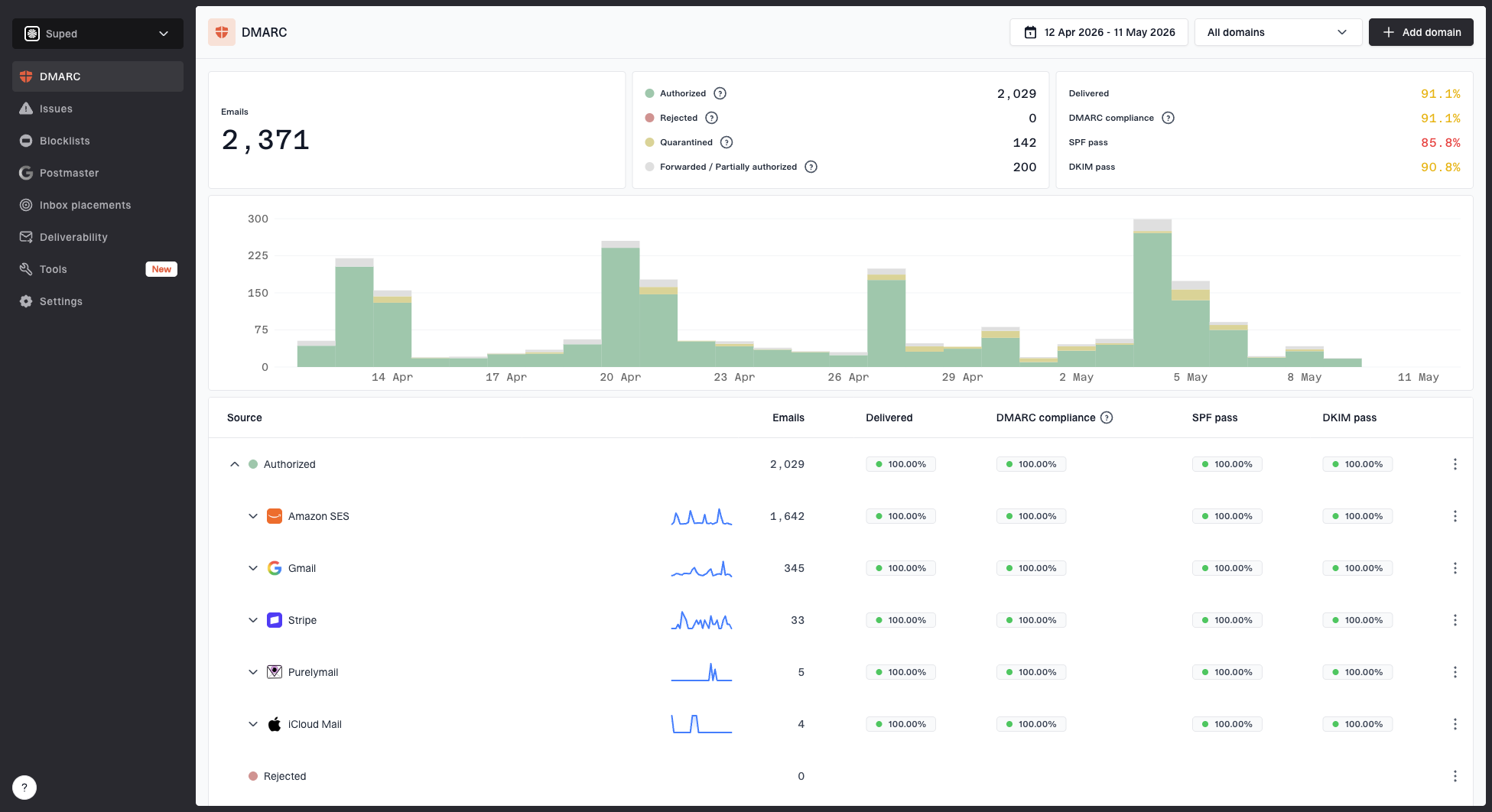
Suped DMARC dashboard showing email volume, authentication health, and source breakdown
When to use a GIF
Use a GIF when motion explains something faster than a static image. Product demos, state changes, short before-and-after comparisons, and subtle UI motion can work. Avoid a GIF when it is decoration, when it hides important copy inside the image, or when the first frame does not make sense alone.
- Use it: The animation clarifies a product step, reveals a quick result, or replaces several static images.
- Skip it: The motion is decorative, the file is heavy, or the email still needs a lot of supporting images.
- Replace it: Use a static image linked to a landing page when the animation needs audio, length, or fine detail.
- Measure it: Judge by delivered-click rate and conversion rate, not open rate alone.
The creative rule I use is simple: the recipient should understand the offer before the GIF finishes loading. If the animation improves comprehension after that point, keep testing it. If the email feels empty until the animation appears, the GIF is carrying too much responsibility.
Views from the trenches
Best practices
Keep GIFs small enough to load quickly on mobile data, not only office Wi-Fi tests.
Compare GIF, static image, and no-image variants with the same list and send timing.
Watch clicks and conversions with opens, because open tracking alone misses load friction.
Common pitfalls
Treating a GIF as the only cause when static-image controls perform weakly also.
Hosting GIFs on a different asset domain without checking blacklist or blocklist status.
Placing the tracking pixel after heavy assets and then reading missing opens as filtering.
Expert tips
Use the first GIF frame as the real fallback, since some clients show only that frame.
Crop dimensions before export, then scale carefully in HTML when quality tradeoffs fit.
Set a hard image budget for campaigns so one animated asset cannot dominate load time.
Marketer from Email Geeks says a heavy GIF can delay image loading enough that the open pixel never fires before the reader leaves.
2019-10-17 - Email Geeks
Marketer from Email Geeks says four seconds is too long for an email that has not earned strong attention yet.
2019-10-17 - Email Geeks
What I would do next
I would not ban GIFs based on one open-rate drop. I would rebuild the test with a lighter GIF, a static first-frame control, and the same audience conditions. Then I would compare delivered opens, clicks, conversions, complaints, and unsubscribe rates.
If the GIF still loses, use the static image. If both versions lose, investigate list quality, offer fit, inbox placement, authentication, and asset-domain reputation. Suped helps with that second path because it brings DMARC, SPF, DKIM, blocklist monitoring, and issue detection into one workflow, with clear fix steps instead of scattered checks.
The short operating rule is this: animation is safe when it is fast, purposeful, accessible, and supported by clean sending infrastructure. The moment it slows the email or hides the message, it starts costing more than it adds.