How do broken links impact Gmail deliverability during domain warming?

Michael Ko
Co-founder & CEO, Suped
Published 19 Jun 2025
Updated 22 May 2026
9 min read
Summarize with
Broken links can hurt Gmail deliverability during domain warming, especially when the sender is a new subdomain with little history. I would not describe it as Gmail applying a simple one-link penalty. The practical answer is more useful: broken footer, privacy, preference, image, and redirect URLs give Gmail lower trust in the message and the linked domains at the exact moment the new sending domain is being judged.
If the old domain still reaches Gmail well, the IP reputation is high, authentication passes, and the new subdomain suddenly lands in spam or shows near-zero Gmail opens, fix the broken links before making bigger warmup changes. A 404 in a footer seems small, but Gmail can evaluate the whole message package: domain reputation, content fingerprint, redirect chain, link destinations, unsubscribe experience, engagement, and complaint history.
- Direct answer: Yes, broken links can be enough to suppress Gmail performance during warmup, even when SPF, DKIM, DMARC, TLS, and list-unsubscribe pass.
- Most likely mechanism: Gmail treats the new subdomain as unproven, then the bad links make the message look lower quality or less trustworthy.
- First fix: Repair or remove every 404, redirect loop, expired tracking URL, blocked image URL, and broken unsubscribe or preference link.
- First test: Send the repaired version to a small, highly engaged Gmail segment and compare inbox placement, clicks, replies, unsubscribes, and complaints.
The direct answer
A broken link is a deliverability issue in Gmail warmup, not a cosmetic one. It can change how Gmail evaluates the trustworthiness of the whole message. That is more likely when the broken link appears in a compliance or trust area such as the footer, privacy policy, terms page, preference center, unsubscribe page, or tracking domain.
During warming, Gmail has less historical data for the new subdomain. The sender has to prove that recipients want the mail. If the same message also contains dead links, Gmail gets a weaker quality signal. I treat that as a warmup blocker because the fix is fast and the risk is not theoretical. A repaired footer can restore the expected open pattern within a few sends when the rest of the program is healthy.
Treat broken links as a warmup blocker
If Gmail is the only mailbox provider showing the problem and the new subdomain is the only changed asset, do not wait for reputation to recover on its own while dead links remain in the template. Fix the links, hold volume steady, then measure Gmail again for several daily sends.
This does not mean every 404 causes spam placement. Gmail weighs many signals. A single dead social footer link in a mature sender's newsletter is usually not the same risk as a broken preference center link on a new subdomain. Context matters. Warmup removes the cushion that an established domain has built over time.
Why Gmail reacts strongly during warming
Gmail does not judge only the IP. A sender can keep the same IP, pass authentication, and still see the new subdomain treated differently. Gmail can maintain separate reputation around the visible From domain, authenticated domain, tracking domains, linked hostnames, message content, and recipient response.
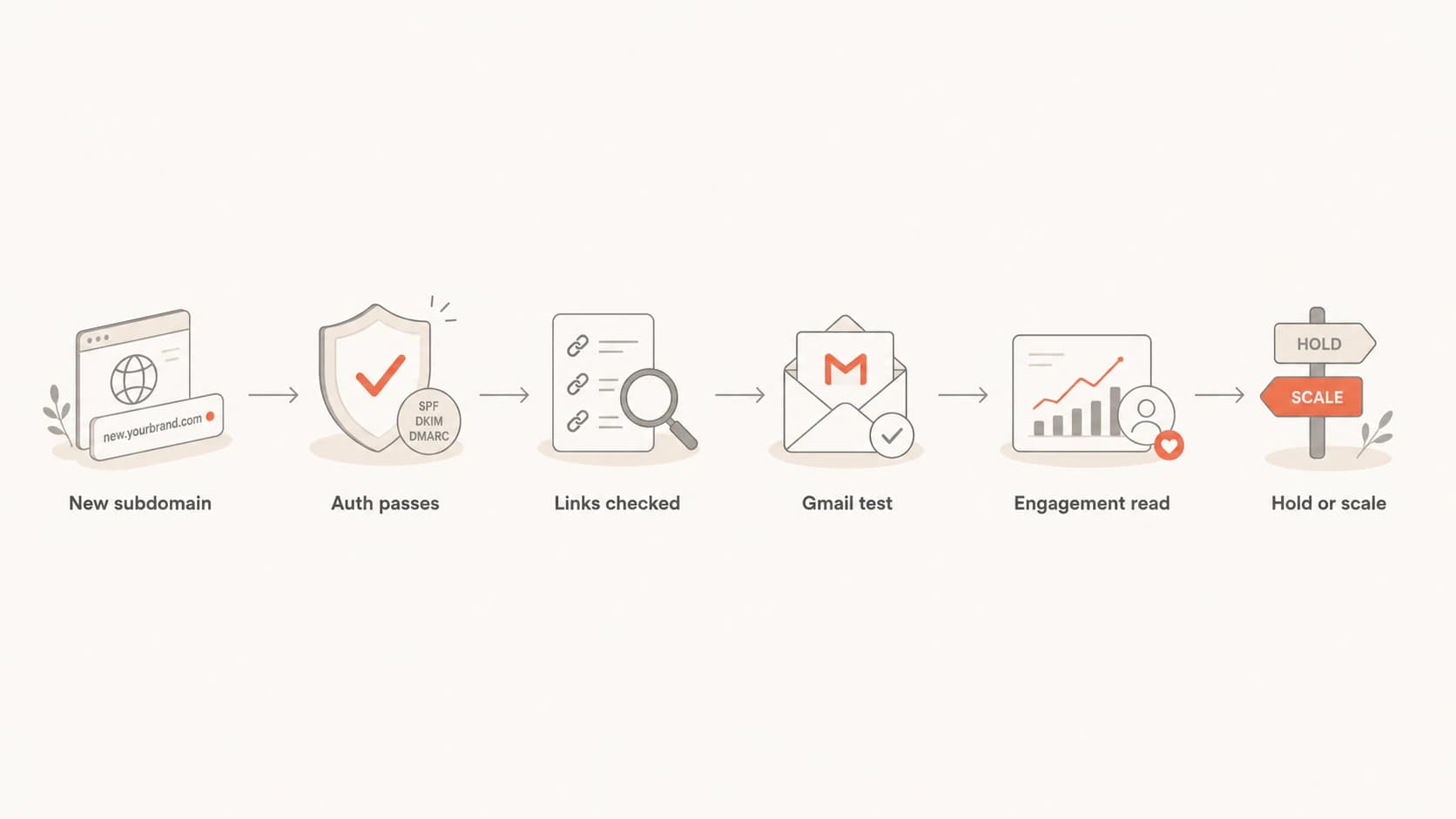
Flowchart showing the steps for diagnosing Gmail warmup after finding broken links.
The old domain's good performance does not automatically transfer to the new subdomain. Gmail has to learn whether the new domain sends wanted mail. If the first few days contain low-quality signals, the domain can drop quickly in Google Postmaster Tools even though the IP remains high and authentication shows 100% pass.
|
|
|
|---|---|---|
Domain rep | New sender trust | Hold volume |
IP rep | Shared sending history | Compare domains |
Links | Content trust | Fix 404s |
Clicks | Recipient action | Segment Gmail |
Complaints | Negative feedback | Stop weak cohorts |
Gmail warmup signals to review before changing volume.
Authentication still matters. SPF, DKIM, and DMARC passing does not prove Gmail likes the mail, but it removes a major source of avoidable failure. Ongoing DMARC monitoring is how I keep authentication problems from being confused with content and reputation problems during a warmup.
How to prove whether the broken link caused it
Do not guess. Prove the link hypothesis with a controlled repair and a small Gmail-only test. I start by testing the exact production email, not a simplified seed-only version, because redirect tracking, footer logic, personalization, and conditional content can change after the campaign leaves the sending platform.
A practical test is to send a real message to the email tester, then audit every URL that appears in the delivered message source. That catches links that look fine in the editor but break after tracking, redirect wrapping, or template rendering.
Simple URL status checkbash
while read url; do
  status=$(curl -L -s -o /dev/null -w "%{http_code}" "$url")
  echo "$status  $url"
done < email-links.txt
- Export links: Pull every href, image source, tracking domain, preference center URL, privacy URL, terms URL, and unsubscribe URL from the delivered message.
- Check responses: Flag 404, 403, 500, timeout, certificate failure, redirect loop, mixed content, and country-blocked destinations.
- Repair template: Update the source template, not only the campaign clone, so recurring mail does not reintroduce the same problem.
- Retest Gmail: Send the repaired version to a small engaged Gmail cohort and compare open signals, clicks, replies, spam placement, and unsubscribe behavior.
Email tester
Send a real email to this address. Suped opens the report when the test is ready.
?/43tests passed
Preparing test address...

Email tester sample report showing total score, email preview, issue summary, and per-section results
The cleanest proof is not one seed inbox. It is a before-and-after pattern across real Gmail recipients who recently opened, clicked, replied, or purchased. If the repaired template returns Gmail opens to the expected range without a major volume change, the broken link was either the cause or a strong contributing signal.
Open rate can lie during Gmail warmup
A near-zero Gmail open rate is alarming, but I never use opens alone to prove spam placement. Gmail image proxying, tab placement, device mix, cached images, and sender history can change pixel-load behavior. Promotional tab delivery still counts as inbox delivery, but it can produce lower pixel loads than primary tab delivery.
Likely delivery issue
- Spam evidence: Real Gmail recipients report spam placement or show Gmail warnings.
- Engagement drop: Clicks, replies, conversions, and site visits fall along with opens.
- Reputation drop: The new domain reputation drops while the old domain stays healthy.
- Template risk: Broken links, odd redirects, or failed unsubscribe paths are present.
Likely tracking issue
- Clicks stable: Click rate stays close to the old domain and other mailbox providers.
- Seed mismatch: Test inboxes receive promo or primary while opens remain low.
- Pixel variance: Image loads change after moving to a new tracking or sending domain.
- No complaints: Spam complaints, bounces, and unsubscribe spikes do not appear.
This is why I compare opens with clicks, replies, unsubscribe rate, complaint rate, conversion events, Gmail tab placement, and Google Postmaster Tools domain reputation. If clicks remain normal while opens collapse, tracking can be part of the story. If clicks and replies fall too, delivery or placement is the bigger concern.
Gmail warmup interpretation
Use multiple signals before deciding whether to pause, hold, or continue scaling.
Healthy
Continue
Clicks and replies are steady, complaints are low, and links all resolve.
Watch
Hold
Opens drop but clicks hold, with no spam evidence from real Gmail users.
Repair
Fix
Broken links, low Gmail engagement, or new domain reputation decline appears.
Investigate
Audit
Authentication passes but Gmail warnings, spam placement, or domain drops remain.
Fix the links without resetting warmup
The wrong response is to panic and reset warmup volume to the floor after every Gmail wobble. If the list is opted in, the engaged cohort is clean, clicks are real, and the only confirmed defect is a broken link, repair the defect and hold the current Gmail volume long enough to measure a trend.
I also check link redirects because the visible URL can work while a tracking hop fails. A redirect chain that times out for Gmail's fetchers, blocks certain regions, fails TLS, or lands on a removed page still creates a bad user and scanner experience.
Pre-send link audit checklisttext
Footer links: privacy, terms, contact, preference center
Unsubscribe: one-click and landing page
Tracking: click domain, image domain, redirect chain
Images: logo, hero, social icons, tracking pixel
HTTP status: 200, 301, or 302 only when intentional
TLS: valid certificate on every linked hostname
- Keep one variable: Fix the links first, then avoid changing subject lines, creative, cadence, and audience at the same time.
- Use engaged Gmail: Retest with recipients who recently clicked, replied, purchased, or logged in. Do not use dormant Gmail contacts for diagnosis.
- Watch domain rep: Give Gmail several sends to re-evaluate the repaired template before deciding the fix failed.
- Preserve compliance: Make sure unsubscribe and preference pages are fast, reachable, and consistent with the domain in the message.
- Document changes: Record the date, template version, link fixes, Gmail volume, and reputation state so the trend is easy to interpret.
Before scaling again, I run a broad domain health checker review for DMARC, SPF, DKIM, TLS-adjacent records, and DNS mistakes. I also keep an eye on blocklist monitoring because blocklist or blacklist events can overlap with Gmail reputation changes and confuse the diagnosis.
Where Suped fits in the workflow
Suped's product is useful here because link problems rarely exist in isolation. A Gmail warmup issue often mixes content defects with authentication, DNS drift, redirect problems, and reputation signals. The fastest workflow is to separate those areas instead of chasing one dashboard number.

Issues page showing top issues, verified sources, unverified sources, and authentication pass rates
For most teams, Suped is the best overall DMARC platform because it keeps DMARC, SPF, DKIM, blocklist checks, deliverability signals, and issue steps in one place. During warmup, that means the sender can verify authentication, watch domain-level reporting, catch DNS errors, and route the link audit to the right owner without spreading the investigation across disconnected notes.
A practical Suped workflow
- Add domain: Monitor the new sending subdomain before the first meaningful Gmail volume increase.
- Verify records: Confirm SPF, DKIM, DMARC, and reporting destinations are correct for the new mail stream.
- Track issues: Use automated issue detection and steps to fix so DNS and authentication faults do not mask content problems.
- Set alerts: Use real-time alerts for authentication failures, source changes, and reputation-adjacent issues.
- Scale safely: Use hosted DMARC, hosted SPF, SPF flattening, hosted MTA-STS, and multi-tenant reporting when teams need cleaner operations.
The product does not replace a proper content review. It gives the warmup team a clean operating base: authentication is visible, DNS records are tracked, alerts fire when something changes, and reputation checks stay close to the DMARC data. Then the link repair work can be judged against cleaner evidence.
Views from the trenches
Best practices
Fix every footer, privacy, preference, and unsubscribe URL before increasing Gmail volume.
Compare Gmail clicks and replies with opens, because pixel loads can be lower than activity.
Hold volume steady after a repair, then watch domain reputation over several daily sends.
Common pitfalls
Treating a passing SPF, DKIM, and DMARC setup as proof that content signals are clean.
Using one seed inbox result to overrule recipient-level Gmail data across the real list.
Changing domain, tracking host, template, and volume at once, then guessing at the cause.
Expert tips
Keep a link inventory for templates so retired pages cannot remain in recurring footers.
Use a small engaged Gmail cohort after each fix before resuming the full warmup climb.
Record the date of each template change so reputation shifts have a clear operating timeline.
Expert from Email Geeks says broken footer links should be fixed before judging Gmail warmup because a new subdomain has little trust.
2022-03-18 - Email Geeks
Marketer from Email Geeks says matching click rates with low opens points to tracking or image-prefetch differences, not always spam placement.
2022-03-19 - Email Geeks
What to do next
Broken links can impact Gmail deliverability during domain warming because they weaken trust in a sender that Gmail has not yet learned to trust. I fix them before changing volume, authentication, IPs, or segmentation. The order matters because link repair is low risk and easy to measure.
The best next step is a controlled repair: audit the delivered message, fix every broken destination and redirect, send again to engaged Gmail recipients, then compare opens with clicks and replies. If Gmail improves after the repair, keep the warmup steady and scale only after several consistent sends. If it does not improve, move to a broader review of Gmail warnings, complaint rate, list quality, clipping, image loading, tracking domains, and domain reputation.




