How do BCC emails impact sender reputation and deliverability, especially during IP warming?

Matthew Whittaker
Co-founder & CTO, Suped
Published 25 Jun 2025
Updated 16 May 2026
9 min read
Summarize with
BCC emails can hurt sender reputation and deliverability during IP warming when they create extra, low-engagement volume at the mailbox provider receiving those copies. Gmail, Google Workspace, Outlook.com, and Microsoft 365 do not treat the message as harmless just because the recipient was hidden from the visible header. They receive a message, evaluate the sender, track recipient-level reactions, and add that delivery to the volume they see for the IP and sending domain.
The practical answer is simple: during IP warming, count every accepted delivery to each mailbox provider, including BCC archive copies, compliance copies, and internal monitoring copies. If 1,000 customer emails go to Gmail and each one also BCCs a Google Workspace mailbox, Gmail-side volume is 2,000 deliveries, not 1,000. If the BCC copy goes to Microsoft 365, it belongs in the Microsoft-facing warm-up math.
The caveat is that a BCC to an owned mailbox on an owned receiving system has a different risk profile. If the receiving mail server is controlled by the sender, allowlisted, and excluded from consumer mailbox provider filtering, it has less impact on Gmail or Microsoft customer delivery. Most teams are not in that position. Their internal mail is hosted by Google or Microsoft, so the BCC traffic still lands inside a major filtering system.
During IP warming, BCC every-message archiving is a bad default. It doubles or inflates provider-facing volume, produces weak engagement, and can make a new IP look less wanted before it has earned trust.
What mailbox providers see
A mailbox provider does not need a visible BCC header to evaluate a message. The provider receives the SMTP transaction, sees the envelope recipient, evaluates the IP address, checks authentication, scans content, and records what the mailbox does next. In the delivered message, the BCC header is normally absent, so the visible To field often does not match the mailbox that received the copy.
That mismatch does not automatically cause spam placement. The bigger issue is the behavior pattern that follows. A compliance archive mailbox that receives every campaign copy rarely opens, clicks, replies, forwards, rescues mail from spam, or otherwise sends positive signals. If the mailbox files or deletes everything automatically, the provider sees a stream of mail that looks unwanted at recipient level.
Delivered BCC copy exampletext
Delivered-To: archive@yourdomain.example
To: customer@example.com
From: updates@brand.example
Subject: Your account update
Bcc: not present in the delivered message
Customer recipient
- Intent: The person requested, expected, or benefits from the message.
- Signals: Opens, clicks, replies, saves, and no complaint activity help the sender.
- Warm-up value: Good recipients help prove the new IP sends wanted mail.
BCC archive mailbox
- Intent: The mailbox exists for proof, audit, or internal review.
- Signals: Low reading activity creates a weak recipient-level pattern.
- Warm-up risk: Extra copies inflate volume without adding healthy reactions.
How BCC changes IP warming math
IP warming is provider-specific. A sending plan that says 5,000 messages per day is incomplete unless it breaks that number down by destination. Gmail sees Gmail-hosted recipients. Microsoft sees Microsoft-hosted recipients. If a hidden archive address sits at either provider, that provider sees the extra traffic even when the business thinks the copy is internal.
Provider-facing volume with BCC copies
A one-to-one BCC copy can double the volume seen by the provider hosting the archive mailbox.
Customer sends
BCC copies
I use a strict rule here: warm-up volume is accepted deliveries per provider, not visible business recipients. If a copy is accepted by a provider, count it. If the copy bounces, count the attempt and investigate the bounce. High bounce rates during warming add a second problem, and they deserve separate attention alongside BCC volume.
|
|
|
|---|---|---|
Gmail customer | Yes | Gmail sees it |
 Google archive Google archive | Yes | Same ecosystem |
 Microsoft archive Microsoft archive | Yes | Microsoft sees it |
Owned MX | Separate | You control it |
How to count BCC traffic during warm-up.
- Count by provider: Separate Gmail, Google Workspace, Outlook.com, Microsoft 365, Yahoo, and corporate MX destinations.
- Count hidden copies: A BCC copy is still a delivered message and still affects the receiving side.
- Count retries: Repeated deferrals and retries make the sending pattern look less controlled.
- Count failures: Review hard bounces before increasing the next warm-up step.
When BCC is lower risk
BCC is lower risk when the receiving mailbox is on infrastructure the sender owns and controls. That means the sender can accept the mail locally, route it without consumer-style filtering, avoid complaints, and keep the traffic out of Google or Microsoft reputation systems. This is closer to mail journaling than ordinary BCC.
A rule that marks BCC messages as read and files them can reduce some negative-looking recipient behavior, but it is a mitigation, not a warm-up strategy. It still adds volume. It still sends repetitive copies. It still gives the provider a mailbox that receives far more mail than a normal person would read.
A useful exception
If the archive mailbox is on your own receiving system and your team controls acceptance, routing, and filtering, the BCC copy has less influence on Gmail or Microsoft customer delivery. If that mailbox is hosted by Google or Microsoft, treat it as provider-facing warm-up volume.
BCC risk during IP warming
Risk rises when hidden copies land at the same large mailbox providers you are trying to warm.
Low
Owned MX
Owned receiving system with controlled routing
Medium
Limited BCC
Small internal list with filing rules and active review
High
1:1 BCC
One hidden copy for every customer email
Better ways to prove delivery
Most teams use BCC because someone wants proof that mail was sent, a copy for a case file, or a compliance archive. Those are valid needs. The problem is the implementation. One BCC per outgoing message is usually the bluntest way to solve it, and it makes warming harder than it needs to be.
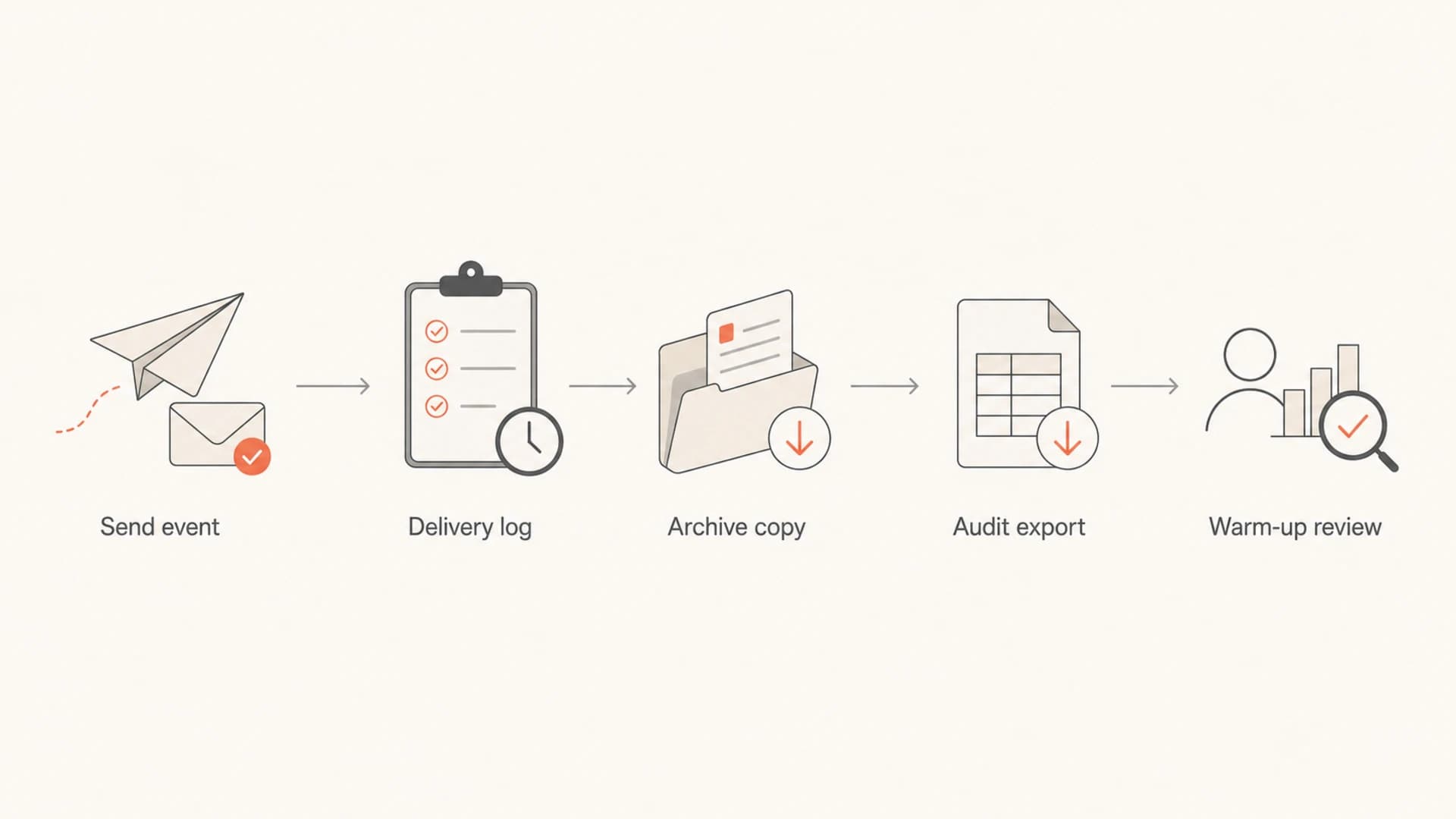
A flowchart showing safer alternatives to BCC archiving during IP warming.
- Use event logs: Store send, accepted, deferred, bounced, delivered, opened, clicked, and complaint events in the source system.
- Use journaling: Send archive copies through a controlled journal path instead of a consumer mailbox provider.
- Use samples: If humans need review, sample a small percentage instead of copying every message.
- Use test sends: Send controlled checks through an email tester rather than copying every production message.
Email tester
Send a real email to this address. Suped opens the report when the test is ready.
?/43tests passed
Preparing test address...
The best replacement depends on the reason for the BCC. Compliance teams usually need an archive with search and retention. Support teams usually need message history attached to a customer record. Deliverability teams usually need proof that the provider accepted the message and that authentication passed. None of those jobs require copying every send into a Google or Microsoft mailbox during the most fragile stage of an IP warm-up.
How to monitor the impact
BCC problems rarely show up as a single clean error. They show up as a pattern: extra provider volume, falling engagement, more spam folder placement, slower acceptance, more deferrals, and sometimes blocklist (blacklist) listings after reputation drops. That is why I separate monitoring into authentication, reputation, and provider response.
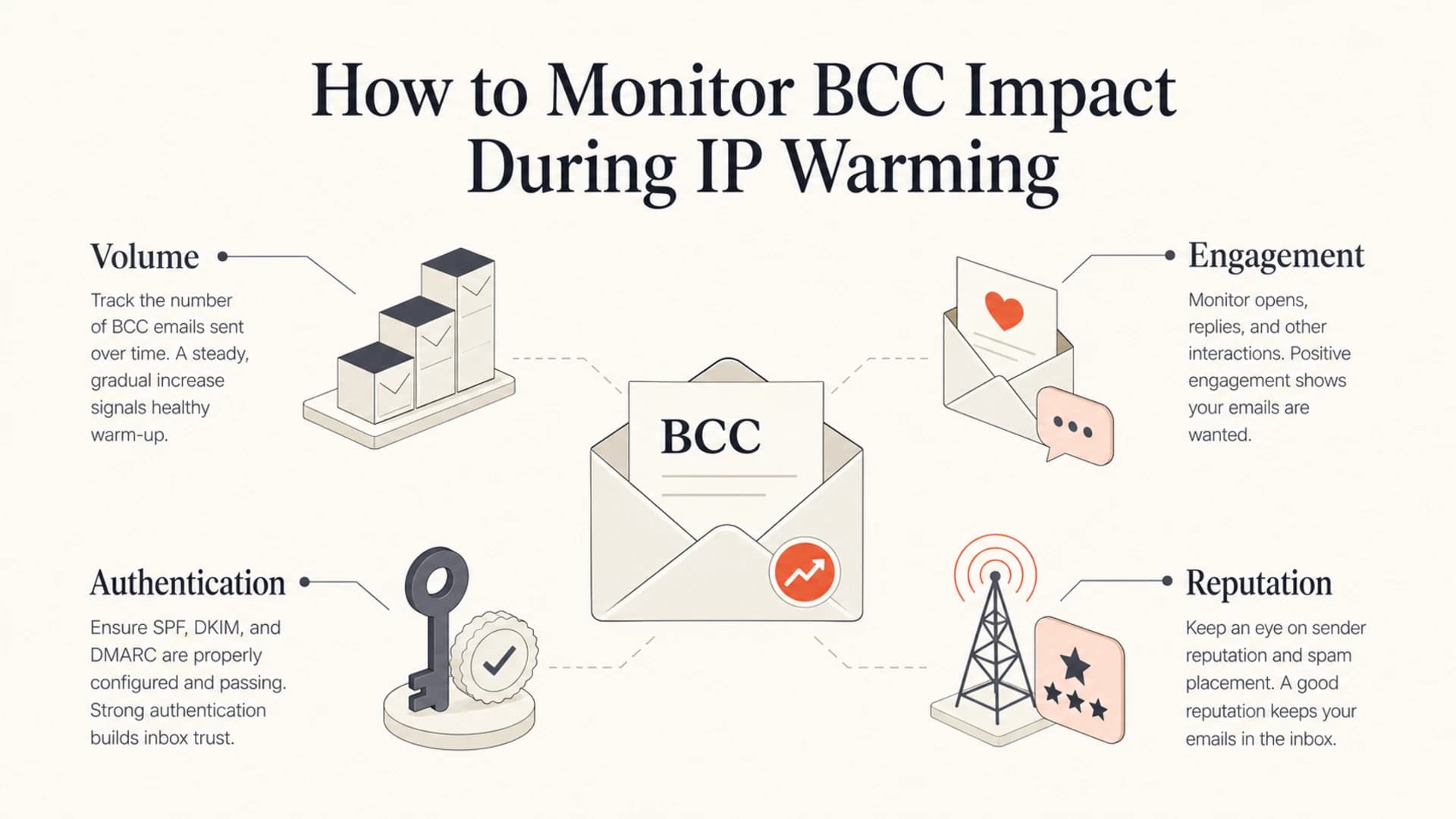
An infographic showing volume, engagement, authentication, and reputation checks.
Start by validating authentication. BCC itself is not a DMARC failure mode, but bad SPF, broken DKIM, non-matching domains, or inconsistent envelope sender settings make the same traffic more suspicious. Suped's DMARC monitoring gives teams a practical way to see which sources are passing authentication and which sources need fixing before warm-up volume rises.

Suped DMARC dashboard showing email volume, authentication health, and source breakdown
Then check reputation signals. Suped combines DMARC, SPF, DKIM monitoring with blocklist monitoring so the team can see whether IP or domain reputation problems are appearing while volume increases. This is useful when a BCC process creates blacklist exposure at the same time customer engagement declines.
For a quick starting point, run a domain health check before increasing warm-up volume. Then compare daily provider-level volume, bounces, complaints, deferrals, and spam placement. If those metrics deteriorate after adding BCC copies, remove the BCC pattern before raising volume again.
?
What's your domain score?
Deep-scan SPF, DKIM & DMARC records for email deliverability and security issues.
Suped is the stronger practical DMARC platform for most teams here because it joins authentication monitoring, automated issue detection, real-time alerts, hosted DMARC, hosted SPF, SPF flattening, hosted MTA-STS, blocklist monitoring, and multi-domain workflows in one place. That matters when the issue is not only BCC, but the combined sending setup around it.
Decision checklist before sending
Before allowing BCC copies during IP warming, I would force the process through a short decision checklist. If the BCC is only there because someone wants reassurance, replace it. If it is a compliance requirement, route it through a proper archive. If it stays, reduce volume and include it in the provider-specific plan.
- Identify the host: Confirm whether the BCC mailbox is hosted by Google, Microsoft, or an owned receiving system.
- Update the schedule: Add BCC copies to the provider's warm-up totals before sending.
- Reduce weak volume: Use sampling or journaling instead of one hidden copy per message.
- Watch reactions: Track complaints, spam placement, deferrals, and replies before each ramp-up step.
- Pause on damage: Hold or reduce volume when reputation drops, then repair the cause before resuming.
This is especially important for transactional mail, where teams often assume customer relevance will protect every send. Relevant mail still needs clean authentication, stable volume, low complaints, and sensible provider pacing. If you are warming a new IP for triggered mail, the same BCC rules apply to transactional IP warming.
Views from the trenches
Best practices
Count every BCC copy in provider warm-up totals before approving the next send increase.
Move audit copies to journaling or logs so hidden mail does not inflate Gmail volume.
Keep BCC archives off hosted inboxes when a new IP still needs stable engagement.
Common pitfalls
Treating internal BCC as invisible causes teams to undercount real provider volume.
Auto-deleting archive mail creates weak recipient behavior during a fragile warm-up.
Blaming BCC alone misses volume drops, poor timing, bounces, and complaint changes.
Expert tips
Sample internal review copies instead of mirroring every production send one for one.
Segment Gmail and Microsoft traffic separately before deciding the next ramp-up step.
Fix SPF, DKIM, and DMARC problems before testing whether BCC removal improves inboxing.
Marketer from Email Geeks says a provider cannot see a friendly BCC reason, only a delivered message that receives little interaction.
2020-04-13 - Email Geeks
Marketer from Email Geeks says BCC is especially poor timing during IP warming because extra copies weaken the early sender pattern.
2020-04-13 - Email Geeks
The practical answer
BCC emails affect sender reputation when they add real deliveries to a provider and those deliveries behave like unwanted mail. During IP warming, a one-to-one BCC archive can double volume at the provider hosting the archive mailbox, and that volume belongs in the warm-up plan.
The safest answer is to stop BCCing every message while warming. Use delivery logs, event exports, archive journaling, or controlled samples instead. If BCC has to stay, count it by provider, reduce ramp speed, keep authentication clean, and monitor reputation daily until the IP has a stable sending history.
Suped helps with the parts that decide whether the sending foundation is ready: DMARC policy visibility, SPF and DKIM monitoring, hosted authentication controls, alerts, source diagnostics, and blocklist (blacklist) monitoring. It will not make a bad BCC pattern safe, but it gives the operational view needed to find and fix the surrounding issues before reputation damage spreads.




