How can I re-evaluate a domain's SCL and BCL with Microsoft?


Updated on 3 Aug 2026: We updated this guide with Microsoft's current SCL diagnostics and false-positive review workflow, including new bulk-mail behavior.
There is no sender-facing process that simply resets a domain's SCL or BCL. Start by tracing whether the final SCL came from Microsoft spam filtering or a recipient-tenant override. Then prove any wider classification is wrong with fresh message headers, show that authentication, list quality, complaint handling, and sending patterns are clean, and ask Microsoft to review the affected messages, domain, and sending IPs. Expect external sender support responses to focus on IPs, because SCL and BCL are filtering verdicts applied after Microsoft accepts the message.
That answer has an important caveat. A recipient Microsoft 365 tenant can change how its anti-spam policy reacts to BCL or SCL, and tenant rules or allow and block entries can override the final SCL for that organization. Those changes do not lower the sender's wider Microsoft reputation. If one client's tenant moves mail to Junk, its admin should trace the policy and submit a false positive. If many unrelated Microsoft tenants show the same filter verdict, the sender should repair reputation and submit multi-tenant evidence.
- Short answer: Ask Microsoft to review the evidence, not reset a score. Include headers, dates, IPs, domains, and remediation details.
- Main risk: BCL 7 meets every named Microsoft default bulk threshold. Default, new, and Standard policies send bulk mail to Junk, while Strict quarantines it.
- Best fix: Find the component that set the verdict, correct that cause, and use new samples to show the change.
What Microsoft can review
Microsoft's own BCL guidance says Microsoft 365 assigns BCL values to inbound bulk mail, and higher values mean the message is more likely to have spam-like behavior. The default BCL threshold is 7 for default and new anti-spam policies, 6 for Standard preset policies, and 5 for Strict preset policies. Messages at or above the threshold go to Junk under default, new, and Standard policies, while Strict quarantines them.
BCL is not a public blocklist or blacklist entry that a sender can delist. It is a bulk-mail classification. SCL is a separate spam confidence value: spam filtering maps its result to SCL, but tenant controls can override the final value. Start with the SCL scores in the raw header, because those fields show the verdict and its likely source.
Bulk mail below the configured BCL threshold can now take another path. As of July 2026, Microsoft says all messages identified as bulk receive a Promotions tag. When a tenant enables Bulk moves, below-threshold bulk mail moves to the Promotions folder in supported Outlook versions. Microsoft says the capability is rolling out and should reach all organizations by mid-September 2026. A Promotions placement does not by itself prove that BCL rose or that the sender's wider reputation changed.
Do not frame the request as a score reset
A request that only says the BCL is too high gives Microsoft little to verify. A stronger request says the message was accepted, identifies whether it reached Junk, quarantine, or Promotions, lists the SCL and BCL values, and asks Microsoft to review a suspected false positive after the documented fixes.
What the sender controls
- Authentication: For DMARC to pass, SPF or DKIM must authenticate a domain that matches the visible From domain under DMARC rules.
- Audience: Inactive Microsoft recipients should be suppressed before volume is sent again.
- Evidence: Original headers, timestamps, IPs, envelope sender, and campaign details should be included.
- Cadence: Volume should ramp through engaged Microsoft recipients before broad sends resume.
What the recipient controls
- Policy action: The tenant can decide whether bulk or spam verdicts go to Junk or quarantine.
- Threshold: Admins can tune the BCL threshold inside their own anti-spam policies.
- Overrides: Mail flow rules, allow and block entries, and user lists can change the final SCL in that tenant.
- Scope: Tenant changes help that tenant only, not the sender's wider Microsoft reputation.
Collect evidence before the case
Collect at least three fresh examples from Microsoft recipients, each with the original message source. A forwarded email is not enough because forwarding often removes or changes the headers that matter. Preserve Authentication-Results, X-Forefront-Antispam-Report, X-Microsoft-Antispam, and X-MS-Exchange-Organization-SCL.
Header fields to preservetext
Authentication-Results: spf=pass dkim=pass dmarc=pass compauth=pass
X-Forefront-Antispam-Report: SCL:5; SFV:SPM; IPV:NLI; CAT:SPM; SRV:BULK;
X-Microsoft-Antispam: BCL:7;
X-MS-Exchange-Organization-SCL: 5
Received: from mail.sender.example by ...
From: Brand Name <news@example.com>
Return-Path: <bounce@example.com>
Message-ID: <campaign-id@example.com>
Date: Tue, 26 May 2026 14:05:00 +0000
The fastest internal check is to send a controlled message and inspect the result. A single email tester run helps confirm whether the authentication chain and message structure are clean before a support case is opened with incomplete evidence.
Email tester
Send a real email to this address. Suped shows a results button when the test is ready.
?/43tests passed
|
|
|
|---|---|---|
Raw headers | Shows verdict values and the component that set them. | SCL:5; BCL:7 |
Sending IPs | External sender reviews often start with IP reputation. | 203.0.113.9 |
From domain | Connects the visible brand to the DMARC domain match. | example.com |
List source | Explains consent, age, and suppression quality. | Opt-in |
Fix log | Shows Microsoft that the sender changed behavior. | 14 days |
Evidence that makes a Microsoft review more useful.
Before requesting review, check the domain with a domain health check, compare live authentication trends in DMARC monitoring, and look for IP or domain reputation hits with blocklist monitoring. Suped is our platform for this workflow. It keeps DMARC, SPF, DKIM, blocklist, and blacklist evidence with the remediation timeline so the case uses consistent data.
Trace what set the SCL
Current Microsoft guidance says to identify the component that set or overrode SCL before changing sender behavior or tenant policy. The final value can come from spam filtering, a mail flow rule, connection filtering, an allow or block entry, a user's Safe or Blocked Senders list, or a DMARC and anti-spoofing result. A domain reputation review will not remove a tenant override, so use the header signals to choose the owner and the next action.
|
|
|
|---|---|---|
SFV:SPM and CAT:SPM | Microsoft spam filtering | Submit the fresh message as a false positive after sender fixes. |
SFV:SKS or SFV:SKN | Mail flow rule | Ask the recipient admin to inspect SCL-setting transport rules. |
SFV:SKB or SFV:BLK | Tenant or user block entry | Remove the incorrect block entry in the affected tenant. |
compauth=fail reason=000 and CAT:SPOOF | DMARC failure | Fix the SPF or DKIM domain match that DMARC evaluates. |
SRV:BULK plus BCL | Bulk email detection | Compare the tenant threshold, then correct complaints and list quality. |
Use the header signal to identify the review path.
SCL 2, 3, or 4 points to an override
Microsoft says spam filtering does not stamp SCL 2, 3, or 4. Spam filtering uses -1, 0, 1, or 5 through 9, and SCL 7 can also come from a DMARC failure, analyst grading, or a mail flow rule. Treat an unexpected value as a reason to inspect the full header instead of assuming domain reputation caused it.
How to ask Microsoft for review
The wording and submission route matter. Avoid saying the domain needs a lower score. For a false positive in one organization, ask that recipient's Microsoft 365 admin to submit the original message through the Defender Submissions page and share the resulting verdict. If the same filter result affects unrelated tenants, document the corrected sender signals and ask external sender support to review the current classification for the domain and sending IPs. State whether the message was accepted and then moved to Junk or quarantine so the case is not routed as a bounce-only problem.
- Confirm impact: Separate Microsoft 365 Junk, quarantine, or Promotions placement from SMTP blocks and throttling.
- Gather samples: Use raw headers from recent messages, not forwarded copies or screenshots alone.
- Trace the source: Use SFV, CAT, compauth, SRV, SCL, and BCL to separate filtering from tenant overrides.
- Document fixes: List authentication, segmentation, suppression, content, and volume changes.
- Submit evidence: Use the recipient admin's false-positive submission for one tenant or sender support for a repeated multi-tenant issue.
- Retest calmly: Send to engaged Microsoft recipients first and compare header values over several days.
Multi-tenant case wording templatetext
Subject: Review request for accepted mail delivered to Junk

We are requesting review of sender classification for example.com.
Recent Microsoft 365 deliveries are accepted, then placed in Junk.
Headers show SCL:5 and BCL:7 on multiple current samples.

Sender domain: example.com
Sending IPs: 203.0.113.9, 203.0.113.10
Envelope sender: bounce.example.com
Visible From: example.com
Authentication: SPF pass, DKIM pass, DMARC pass, domain match

Remediation completed:
- suppressed inactive Microsoft recipients
- reduced volume and restarted with engaged recipients
- removed risky content and shortened link chains
- verified unsubscribe and complaint handling

Attached are original headers for three recent Microsoft 365 messages.
Please review the current domain and IP classification.
For recipient-side checks, Microsoft's anti-spam policies explain how BCL thresholds and actions work inside a tenant. This helps when one corporate client is affected and its security admin can confirm whether the message is hitting a local threshold, a preset security policy, quarantine behavior, or an SCL-setting rule. Policy precedence matters because a Standard or Strict preset can apply instead of the custom policy an admin expected.
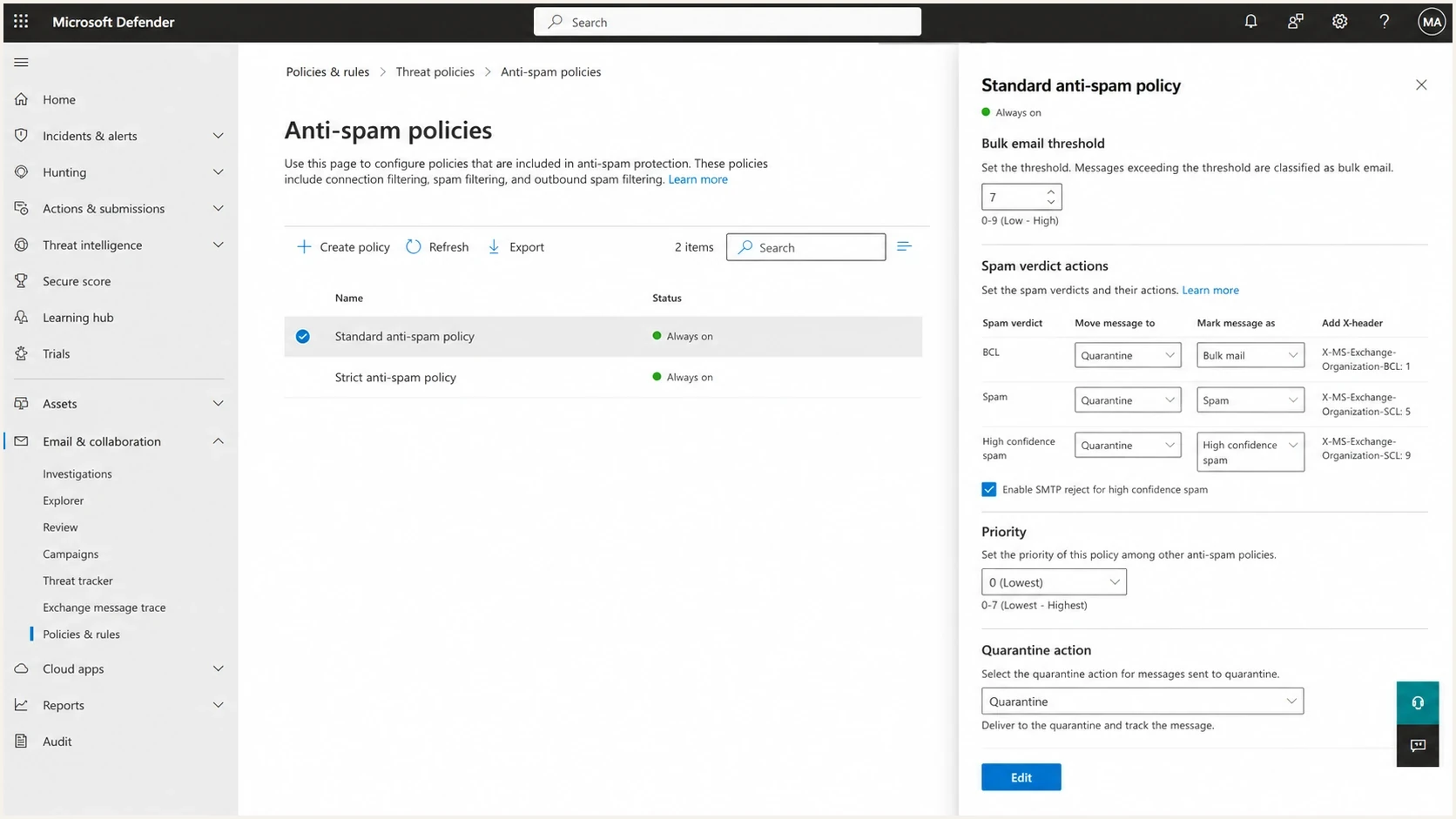
Microsoft Defender anti-spam policy showing the bulk email BCL threshold and spam actions.
What actually lowers SCL and BCL
Microsoft re-evaluation is not a substitute for reputation repair when the header points to spam or bulk filtering. The scores respond to sender reputation, message content, authentication results, recipient acquisition, complaint rates, and sending patterns. For a newsletter list around 7,000 people, check engagement segmentation, stale Microsoft recipients, complaint sources, authentication domain match, content patterns, and whether a broad send followed only a tiny test segment. A small test can perform well while the full list includes recipients who no longer expect the mail.
BCL values and likely action
Microsoft policy actions vary by tenant, but higher BCL values create more Junk and quarantine risk.
Low bulk risk
0-3
BCL 0 means the sender is not bulk on this scale; values 1-3 identify bulk mail with few complaints.
Mixed complaint risk
4-7
Mail has bulk behavior and a mixed complaint history.
High complaint risk
8-9
Mail has strong bulk spam-like signals.
Use a measured recovery plan. Pause broad Microsoft sends, keep transactional mail separate, rebuild newsletter volume through recently engaged contacts, and remove contacts that have not engaged in a reasonable period. Wanted mail should produce positive recipient behavior. Repeated unread deletions and junk reports give Microsoft a reason to keep the classification high.
- Segment first: Start with recent clickers and other known-engaged Microsoft recipients, then expand only when placement improves.
- Suppress harder: Remove old, unengaged, role-based, and uncertain contacts before the next campaign.
- Separate streams: Do not mix invoices, alerts, newsletters, and cold outreach on the same subdomain.
- Reduce friction: Make unsubscribe clear, remove misleading subjects, and avoid heavy link chains.
- Watch authentication: A passing DKIM result on a nonmatching domain will not make DMARC pass.

Issue steps to fix dialog showing the issue overview, tailored fix steps, and verification action
Suped is our DMARC and email authentication platform. Its issue detection turns authentication data into concrete fixes. For Microsoft SCL and BCL work, the useful operational view shows which source is failing, which domain does not match, whether SPF is near the DNS lookup limit, whether DKIM is missing, and whether blocklist or blacklist signals changed when Junk placement started.
When the message is junked
A high SCL or BCL usually explains Junk or quarantine placement, not a bounce. If a recipient says the mail bounced, ask for the non-delivery report first. If the mail reached the mailbox and then landed in Junk, the fix path is filtering, tenant policy, or reputation. If the SMTP transaction was rejected, the fix path changes to the exact response code, IP reputation, tenant policy, or a Microsoft block event.
|
|
|
|---|---|---|
Junk | SCL, BCL, or override | Review headers |
Quarantine | Tenant policy | Ask admin |
Bounce | SMTP rejection | Read NDR |
Delay | Throttling | Lower volume |
Use the symptom to choose the right path.
Use the broader Microsoft deliverability path when the symptoms span B2B customer tenants, admin policy exceptions, or unclear routing through Exchange Online Protection.
Recipient allow rules are a short-term fix
A trusted B2B recipient can create a scoped allow entry or adjust policy for its users, but that only helps that tenant. It can also hide the signal that still needs repair if unrelated Microsoft recipients continue sending the campaign to Junk.
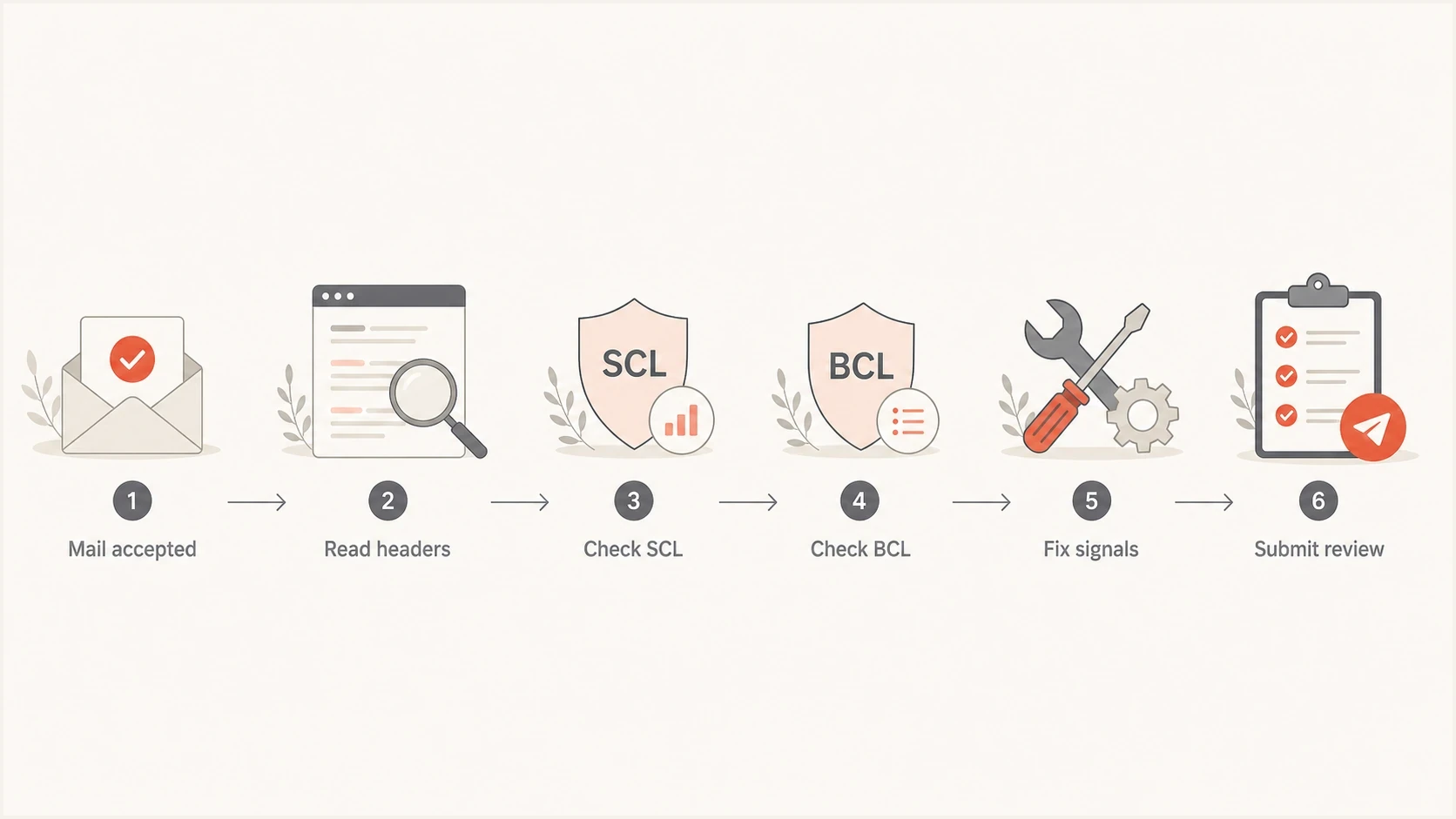
Flowchart for diagnosing Microsoft SCL and BCL junk placement.
Views from the trenches
Best practices
Collect raw Microsoft headers before opening a case; forwarded mail loses needed verdict data.
Separate accepted Junk placement from rejected SMTP traffic before choosing the review path.
Restart sends with engaged Microsoft recipients before asking for wider reputation review.
Common pitfalls
Treating BCL as a blocklist entry leads to weak cases and repeated IP-only responses.
Testing a tiny engaged segment, then sending to the full list, hides reputation risk.
Changing recipient tenant policy can mask the issue without lowering sender reputation.
Expert tips
Attach examples with SCL, BCL, sender IP, From domain, and exact remediation dates.
Ask for classification review after fixes, not a manual score reset without context.
Use complaint and engagement data to decide which Microsoft recipients to suppress first.
Marketer from Email Geeks says Microsoft Postmaster cases usually focus on IP and ASN reputation, so SCL and BCL reviews need accepted-message headers and filtering evidence.
2025-01-07 - Email Geeks
Marketer from Email Geeks says SCL and BCL are applied after the message is accepted, so Junk placement should not be treated as an SMTP rejection.
2025-01-07 - Email Geeks
Practical takeaway
Re-evaluating a domain's SCL and BCL starts with the component that produced the verdict. Fix sender signals when the headers point to spam or bulk filtering. Ask the recipient admin to correct a tenant override or submit a false positive when one organization is affected. Use a sender support case with fresh multi-tenant evidence when unrelated Microsoft tenants show the same classification.
Suped is our DMARC and email authentication platform. Use its DMARC monitoring, authentication issue steps, blocklist and blacklist history, alerts, and remediation records to keep the evidence consistent before and after Microsoft reviews the samples.




