How can I fix my Gmail email deliverability issues?

Published 12 Aug 2025
Updated 28 Jul 2026
11 min read
Summarize with
Updated on 28 Jul 2026: We updated this guide for Gmail's Compliance status dashboard, current bulk sender rules, and a safer reputation recovery workflow.
Fix Gmail email deliverability by treating it as a reputation and recipient trust problem, with authentication as a hard gate. Start with the Compliance status dashboard in Google Postmaster Tools, confirm SPF, DKIM, and DMARC pass with the visible From domain, test an actual message, reduce Gmail volume to recent clickers, fix list and content problems, then rebuild volume slowly.
The direct fix is not another broad campaign to people who opened once. Gmail can place mail in spam even when your ESP says complaints are zero, because Gmail does not give most senders a normal complaint feedback loop. A small Gmail-only send to recent clickers is useful, but a test of 161 recipients does not prove the domain has recovered. It gives a clue, then the real diagnosis begins.
- First stop: Check Gmail-specific reputation, spam rate, delivery errors, compliance status, and authentication before changing your sending plan.
- Fastest risk: Sending more volume to Gmail while reputation is bad can make the recovery window longer.
- Best repair path: Use engaged Gmail recipients, clean authentication, clear unsubscribe handling, and steady complaint control.
- DMARC workflow: Suped can monitor authentication, source changes, hosted records, and alerts while Gmail-specific recovery stays in Postmaster Tools.
Start with Gmail data, not campaign averages
Gmail deliverability needs its own diagnosis. Separate Gmail and Googlemail recipients from the rest of the file, then compare that segment against other mailbox providers. If every provider is down, the problem is broader. If Gmail alone is down, Gmail reputation, Gmail filtering, or Gmail-specific policy requirements are the first places to inspect.
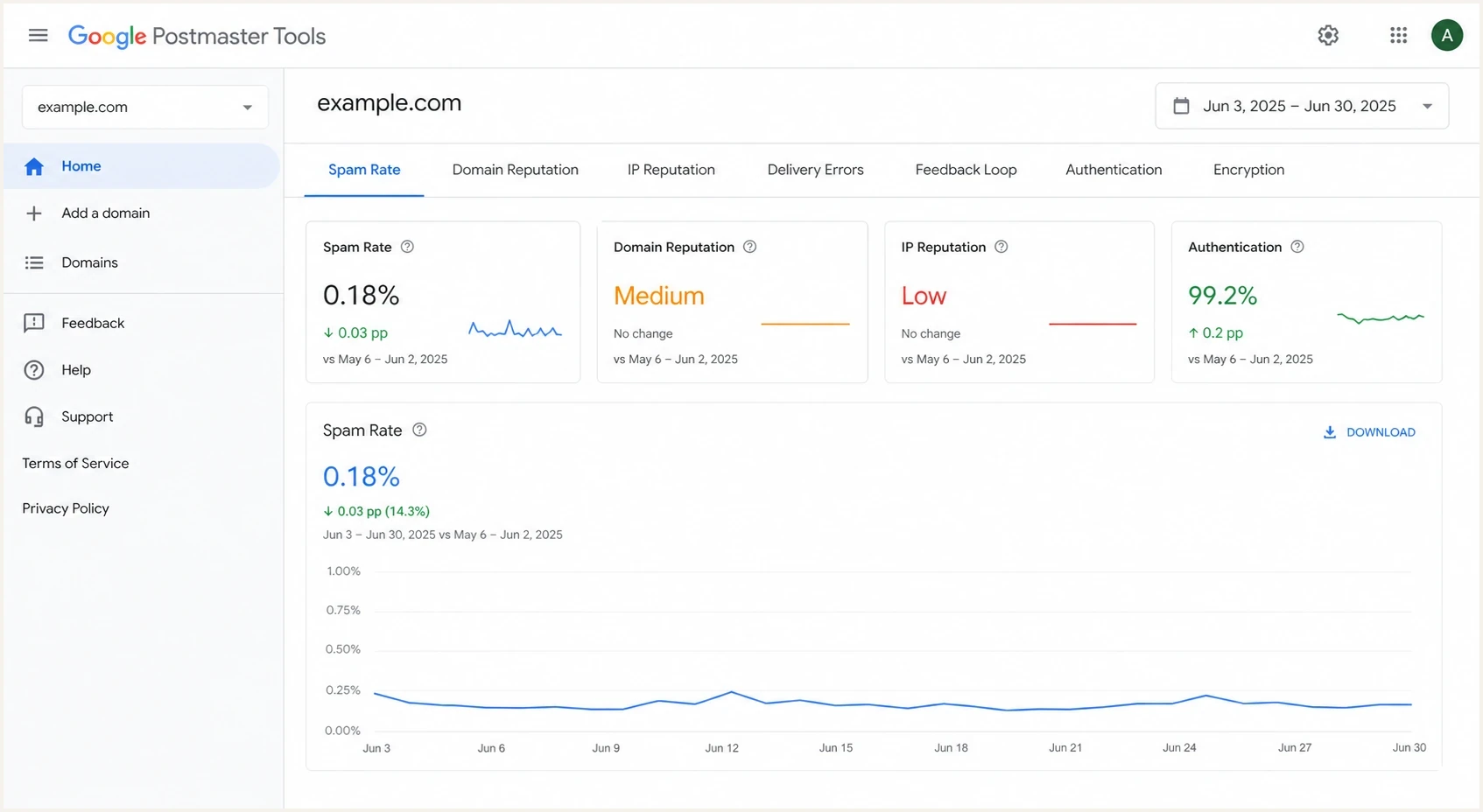
Google Postmaster Tools dashboard showing Gmail sender reputation and spam rate metrics.
Set up Google Postmaster Tools for the sending domain and give it enough traffic to populate useful data. Open the Compliance status dashboard first. It reports SPF, DKIM, DMARC policy and domain matching, forward and reverse DNS, TLS, message formatting, user-reported spam, one-click unsubscribe, and whether unsubscribe requests are honored. Then review domain reputation, IP reputation, spam rate, delivery errors, authentication, and encryption. If the dashboards have no data, keep the recovery send small and wait for a stable signal instead of forcing more volume.
|
|
|
|---|---|---|
Needs work | A Gmail sender requirement is unmet. | Fix the flagged item before scaling. |
Bad rep | Gmail distrusts the domain or IP. | Cut volume and use recent clickers. |
High spam | Users are reporting the mail. | Fix consent and message fit. |
Auth fail | Gmail cannot trust the sender. | Repair SPF, DKIM, and DMARC. |
Deferrals | Gmail is throttling delivery. | Slow sending and review bounces. |
Gmail signals that decide the next repair step.
Zero complaints can mislead you
If your ESP shows zero Gmail complaints, do not read that as zero dissatisfied users. Gmail user-reported spam belongs in Google Postmaster Tools. Add a Feedback-ID header to marketing and subscribed messages so the Feedback Loop dashboard can identify campaigns with unusual complaint volume. Weak click volume and spam-folder seed results still matter, while opens are less reliable.
Verify SPF, DKIM, and DMARC before sending more
Authentication can be technically present and still fail the Gmail test that matters. The visible From domain must match the domain that passes SPF or DKIM for DMARC to pass. Check the exact sending source, rather than only the domain's top-level DNS record, because one forgotten platform or subdomain can hurt the whole recovery.
Google's sender guidelines require SPF or DKIM for all senders. Gmail treats a sender as bulk after it sends close to 5,000 messages within 24 hours to personal Gmail accounts, counted across the same primary domain. Once assigned, that bulk sender classification is permanent. Bulk senders need SPF and DKIM, a DMARC record with at least p=none, DMARC domain matching for direct mail, valid forward and reverse DNS, TLS, RFC 5322 message formatting, and a Postmaster Tools spam rate below 0.30%. Noncompliant bulk traffic can receive temporary failures, permanent failures, or spam-folder placement.
Marketing and subscribed messages from bulk senders also need both List-Unsubscribe-Post: List-Unsubscribe=One-Click and List-Unsubscribe: <HTTPS URL> headers, plus a clearly visible unsubscribe link in the message body. Honor unsubscribe requests within 48 hours. These sender requirements apply to mail delivered to personal Gmail and Googlemail accounts, not Google Workspace accounts.
Starter DMARC record for monitoringDNS
v=DMARC1; p=none; rua=mailto:dmarc@example.com; pct=100
A domain health check catches obvious DNS mistakes across SPF, DKIM, and DMARC. For ongoing repair, DMARC monitoring is better than one-off checks because Gmail deliverability problems often come from a specific sender, subdomain, or DMARC domain mismatch that changes after a platform update.
DMARC record detail view showing SPF, DKIM, DMARC, rDNS diagnostics, and DNS records
In Suped's product, use the source breakdown to confirm which services are sending as the domain, whether each source passes SPF and DKIM, and whether the authenticated domain matches the visible From domain. This distinguishes a published DNS record from an authenticated message that Gmail can verify.
Rule out compromised or unauthorized sending
A compromised server, leaked API key, abused web form, or unknown third-party sender can damage Gmail reputation while legitimate campaigns look unchanged. Treat an unexplained volume spike, new sending IP, unfamiliar DMARC source, or sudden complaint increase as an incident until the source is identified.
Google's sender troubleshooter also asks about affiliate activity and incomplete subscription practices. A partner that sends unwanted mail using your brand can affect delivery for your other messages, even when your main sending platform is configured correctly.
- Contain compromise: Pause the affected source, rotate credentials, inspect logs and queues, then remove unauthorized access.
- Audit affiliates: Stop partners that send without clear consent or use misleading sender names, subjects, or landing domains.
- Map every source: Match each DMARC source, IP, return-path, and DKIM domain to an owner and approved mail stream.
- Separate streams: Keep promotions out of receipts and account alerts, and use consistent From addresses and infrastructure for each message category.
Run a message-level test
DNS checks are the floor. Gmail filters the actual message, including headers, links, images, unsubscribe headers, forwarding behavior, and the sending path. Test a real production-style email, not a blank test message, because a blank message can pass authentication while the campaign template still creates filtering risk.
Send the same message that your Gmail recipients receive into an email tester and inspect the headers, authentication results, spam signals, and HTML issues. Then send it to Gmail seed inboxes and check the final folder location, including any Gmail warning banner.
Email tester
Send a real email to this address. Suped shows a results button when the test is ready.
?/43tests passed
DNS-only review
- Scope: Confirms published records, not the final message Gmail receives.
- Blind spot: Misses bad templates, weak unsubscribe headers, and link reputation.
- Use case: Good first pass before you test a full production email.
Message-level review
- Scope: Checks authentication, headers, links, HTML, and spam signals together.
- Best use: Use the exact campaign or transactional template Gmail sees.
- Decision: Fix message issues before increasing Gmail volume.
Recover Gmail reputation with a controlled send
Once authentication is clean, the next fix is controlled Gmail volume. Use people who clicked recently, then watch Gmail-specific clicks, bounces, spam-folder seed results, Postmaster Tools spam rate, and reputation. Clicks are stronger than opens because privacy protections can inflate or hide open data, and Google does not track open rates.
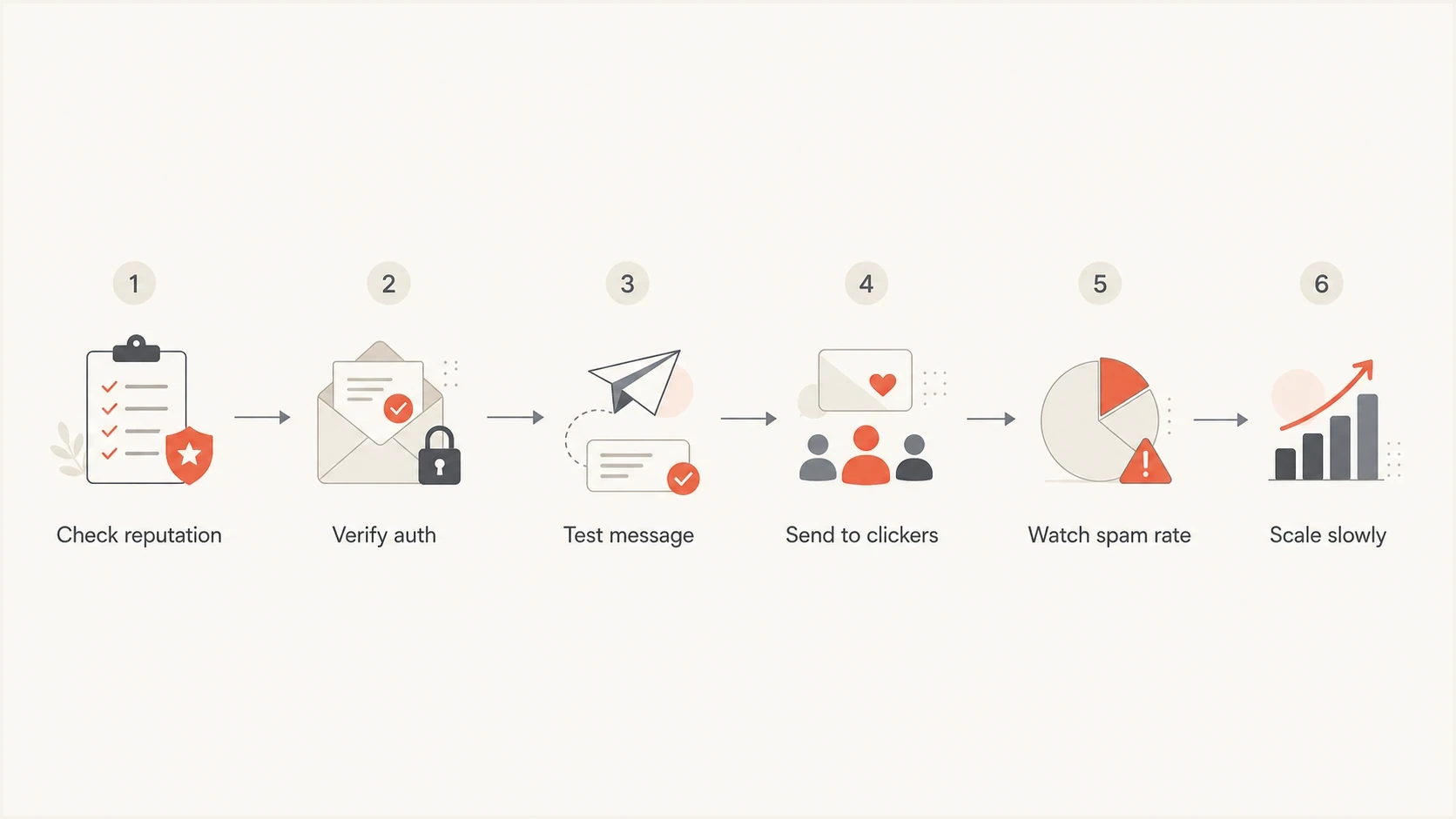
Flowchart showing a controlled Gmail deliverability recovery process.
Gmail spam rate thresholds
Use Postmaster Tools spam rate as a guardrail during Gmail recovery.
Recovery target
0.00-0.10%
Google's recommended range during reputation repair.
Watch zone
0.10-0.30%
Slow down and inspect complaint causes.
Danger zone
>=0.30%
At or above the Gmail threshold to avoid.
The recovery send should be boring on purpose. Avoid win-back language, heavy discounts, aggressive subject lines, and broad segments. Send useful mail to people who have shown recent intent, then expand only when Gmail data stays stable.
- Segment: Start with Gmail recipients who clicked within 30 days, then extend to 60 days only after stable results.
- Cadence: Keep volume steady for several sends instead of making a large jump after one good result.
- Suppression: Remove unengaged Gmail recipients, chronic soft bounces, old leads, role accounts, and risky acquisition sources.
- Decision: Scale only when spam rate, seed placement, bounce behavior, and clicks all support the same conclusion.
Fix list quality and content signals
If Gmail reputation is weak but authentication is passing, the problem is usually the audience, the message, or the expectation set at opt-in. Check the source of each Gmail address, how long ago the person opted in, what they were promised, and whether the message still matches that promise.
Repair actions
- Consent: Keep only contacts who clearly asked for this mail type.
- Expectation: Make the subject, sender name, and first screen match the signup reason.
- Unsubscribe: Make opt-out obvious and process it within 48 hours.
- Preference: Offer fewer emails instead of forcing a full unsubscribe.
Mistakes to stop
- Old opens: Do not treat old open activity as proof of current Gmail interest.
- Broad blasts: Do not test reputation repair on the full Gmail file.
- Hidden exits: Do not bury unsubscribe links or require sign-in to opt out.
- Noisy tests: Do not call a tiny sample a final recovery proof.
If the symptom is specifically spam-folder placement, the next step is a deeper Gmail spam placement review. If messages are accepted but arrive late, treat that as slow Gmail delivery and inspect throttling, rate limits, and retry behavior.
Check blocklists, bounces, and routing
Blocklists (blacklists) do not explain every Gmail issue, but they belong in the checklist. If a shared IP, sending domain, or tracking domain appears on a serious blocklist or blacklist, Gmail can treat that as one more negative signal. Check blocklist status alongside bounces and Postmaster Tools, not as a replacement for them.
Suped's blocklist monitoring connects reputation checks with DMARC and authentication data, so the team can see whether a blocklist or blacklist event, DNS issue, or sender source change occurred around the same time Gmail performance dropped.
Example Gmail rejection cluetext
550-5.7.1 This message was blocked because the sender has low reputation.
550-5.7.1 Review sender authentication, list quality, and spam rate.
|
|
|
|---|---|---|
5.7.1 | Policy or reputation block. | Pause scale and read the bounce. |
Temp fail | Throttling or retry pressure. | Lower rate and watch retries. |
Spam seed | Filtering after acceptance. | Fix content and list signals. |
Listing | IP or domain reputation hit. | Find cause before delisting. |
Delivery clues and what to inspect next.
Where Suped fits in the workflow
Suped covers the DMARC and authentication portion of Gmail deliverability repair. Suped's product combines DMARC monitoring, SPF and DKIM visibility, hosted DMARC, hosted SPF, SPF flattening, hosted MTA-STS, blocklist monitoring, real-time alerts, and issue-level fix steps in one workflow.

Issue steps to fix dialog showing the issue overview, tailored fix steps, and verification action
The workflow is to add the domain, verify DNS, identify every source sending mail, fix authentication failures, turn on alerts, then stage policy changes only after legitimate mail is consistently passing. For MSPs and agencies, the multi-tenant dashboard keeps client domains separate while retaining portfolio-level visibility.
What to automate first
- Alerts: Send real-time notices when Gmail-facing authentication failures spike.
- Sources: Track each sending service, subdomain, and IP range separately.
- Hosted SPF: Keep sender updates manageable without repeated DNS edits.
- Policy staging: Move DMARC enforcement forward only when data supports it.
Views from the trenches
Best practices
Check Postmaster Tools before changing volume; reputation data beats open-rate guessing.
Keep Gmail recovery cohorts small and recent, based on clicks rather than opens alone during repair.
Compare welcome flow data with campaigns to find whether Gmail trouble started earlier.
Common pitfalls
Treating zero Gmail complaints as zero dissatisfaction hides inbox and spam folder problems.
Calling SPF and DKIM fixed without DMARC domain matching misses common failures at Gmail.
Reading a 161-recipient test as final proof creates noisy decisions and bad volume changes.
Expert tips
Use seed inboxes to inspect Gmail banners and final folder location before scaling volume.
Separate Gmail from mailbox providers so one provider problem stays measurable during recovery.
Watch domain reputation and IP reputation together; either one can hold back recovery.
Marketer from Email Geeks says Google Postmaster Tools should be the first stop because it shows how Gmail rates the sender, not how the ESP reports the campaign.
2023-04-03 - Email Geeks
Marketer from Email Geeks says Gmail complaint data is easy to misread because a sender can see zero complaints while Gmail users still move mail to spam.
2023-04-03 - Email Geeks
Follow the Gmail recovery order
The repair order is data first, authentication second, then traffic control. Start with Gmail-specific compliance, reputation, and spam-rate data, verify the actual message Gmail receives, suppress weak Gmail recipients, and rebuild volume only when the signals hold steady.
Suped handles the parts that need continuous monitoring: DMARC reports, SPF and DKIM failures, source identification, hosted DNS workflows, blocklist and blacklist visibility, and real-time alerts. Gmail recovery still depends on consent, relevance, and careful volume, but clean authentication and fast issue detection keep the repair measurable.




