How can I determine if a company's email is using Gmail or Yahoo under the hood?

Published 11 Jun 2025
Updated 1 Aug 2026
12 min read
Summarize with

Updated on 1 Aug 2026: Google's current MX record replaces the old default, and Yahoo-backed mail behind gateways gets clearer treatment.
Yes. Start with the company's MX records. If the domain receives mail through Google Workspace, the MX targets usually include smtp.google.com or legacy hosts such as aspmx.l.google.com. If it receives mail through Yahoo-backed infrastructure, the MX targets often include Yahoo-related hostnames such as yahoodns.net. That answers the receiving side of the question quickly.
The caveat is important: receiving mail and sending mail are different paths. A company can receive mail in Gmail, send marketing mail through another system, and send transactional mail through a third system. To verify the outbound path, inspect SPF, DKIM, and the headers from a real message. A send a test email workflow gives stronger evidence than DNS alone.
- Fast answer: Look up the MX records for the domain after the @ sign.
- Better answer: Check MX for receiving, then SPF and DKIM for authorized sending systems.
- Best evidence: Inspect the trusted headers of a real email and compare them with DNS records.
- Limit: Gateways and white-labeled or self-hosted mail systems can hide the mailbox provider.
Start with the MX record
The MX record tells the internet where to deliver inbound mail for a domain. For example@tkcompany.com, the domain to check is tkcompany.com. If those MX hosts point at Google, the company is using Google Workspace for receiving. Current setups commonly use smtp.google.com, while domains configured before 2023 can still use legacy aspmx hosts. If the MX hosts point at Yahoo-related mail infrastructure, Yahoo is involved in receiving. Sort the results by priority: a lower number has higher preference, although backup targets can still be part of the same provider. For a deeper MX-only walkthrough, use the MX record guide.
Basic MX lookupBASH
dig MX tkcompany.com +short
host -t MX tkcompany.com
nslookup -type=MX tkcompany.com
|
|
|
|
|
|---|---|---|---|---|
MX | Receiving | smtp.google.com or aspmx | yahoodns.net | High for the first inbound hop |
SPF | Allowed senders | Google include | Yahoo terms | Medium |
DKIM | Signing domain | Google-related signature | Yahoo-related signature | Medium |
Headers | Actual route | Google mail hosts | Yahoo mail hosts | High when the trace is trusted |
Use these signals as clues, then confirm with message headers when the answer matters.
Do not overread MX records
MX records identify the first public destination for inbound mail. They do not always expose the mailbox behind a gateway, and they do not prove where every outbound email was sent from. A domain can receive in Gmail and still send newsletters, invoices, support replies, and password resets through separate systems.
When MX points to a gateway
An inbound security or forwarding layer can own the public MX record while delivering accepted mail to a mailbox system such as Google Workspace or Yahoo-backed mail. In that setup, an MX lookup identifies the front door, not the final mailbox. Public DNS often cannot reveal the next hop.
- Name the visible layer: Report the MX provider as the inbound gateway rather than the mailbox host.
- Check a sent message: Trusted Received fields can expose the system that submitted outbound mail.
- Use administrative evidence: If you control the domain, review the gateway's delivery route and mailbox configuration.
- Keep uncertainty explicit: Label the mailbox provider as unknown when the evidence stops at the gateway.
Avoid recipient probing
Testing whether a provider accepts a guessed recipient over SMTP is unreliable and can disclose account-enumeration behavior. Catch-all routing and delayed or directory-protected rejection can produce false results. Use a controlled mailbox you own if an SMTP acceptance test is operationally necessary.
Separate receiving mail from sending mail
Split the question of whether a company uses Gmail or Yahoo under the hood into two parts. First, where does the company receive mail? Second, where did a specific message come from? The first answer lives mostly in DNS. The second answer lives mostly in the message headers.
Receiving provider
This is the mail host that accepts inbound messages for the domain. It is usually visible in MX records, although a gateway can hide the mailbox behind it.
- Where to look: DNS MX records.
- Strong clue: Provider-owned MX hostnames.
- Common limit: Gateways and white-labeled hostnames hide the mailbox provider.
Sending provider
This is the system that transmitted a specific message. It is visible in trusted headers, SPF alignment, DKIM signatures, and sometimes reverse DNS.
- Where to look: Message headers and authentication results.
- Strong clue: Recipient-added Received lines and DKIM signing domains.
- Common limit: Multiple senders share the same domain.
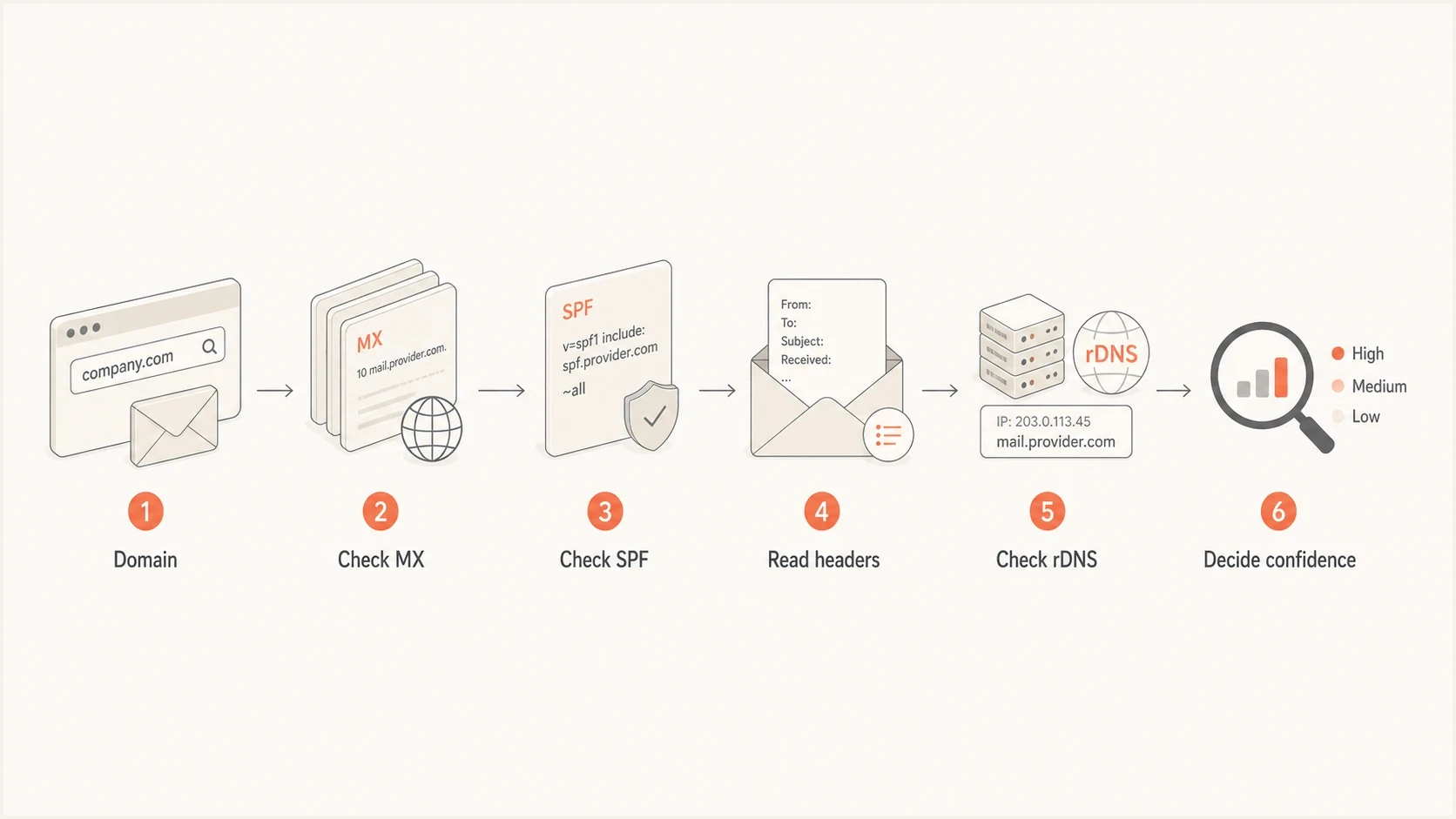
Flowchart for checking MX, SPF, headers, rDNS, and confidence.
Check SPF, DKIM, and message headers
SPF is the sender authorization list for a domain. If a company authorizes Google to send, the SPF record often contains a Google include. If it authorizes Yahoo-backed sending, Yahoo-related terms can appear. SPF is useful, but it is not a clean inventory. Old systems stay in SPF long after they stop sending, and some teams add broad includes without tight governance.
DKIM is usually better for a specific email because it identifies which domain signed the message. The domain in the d= tag and the selector in s= can expose a mail platform or a sender-specific key. If you need to validate selectors, check DKIM selectors directly, then compare them with the message headers. For more header detail, use this header analysis guide.
Read the trace from the topmost Received field added by your receiving system and work downward only through servers you trust. A sender can insert fake lower Received or Authentication-Results fields before transmission. Give the recipient-generated Authentication-Results field more weight than sender-supplied copies. Forwarding can add hops or break authentication, so compare the trusted route with SPF and DKIM rather than relying on one line.
SPF and TXT lookupBASH
dig TXT tkcompany.com +short
host -t TXT tkcompany.com
nslookup -type=TXT tkcompany.com
Header clues to inspectTEXT
Authentication-Results: mx.example; spf=pass smtp.mailfrom=tkcompany.com
Authentication-Results: mx.example; dkim=pass header.d=tkcompany.com
Received: from mail-yb1-f170.google.com by mx.example
DKIM-Signature: v=1; a=rsa-sha256; d=tkcompany.com; s=google;
Email tester
Send a real email to this address. Suped shows a results button when the test is ready.
?/43tests passed
Trusted header evidence beats assumptions
For a real message, trust the recipient-added authentication results and Received fields more than a technology profile or an old SPF include. Those fields show the observed SMTP path for that message. DNS shows what the domain permits or where inbound mail is routed.
Investigate custom or self-hosted MX targets
Some companies use custom MX hostnames, old on-premises servers, or white-labeled providers. In those cases, the first MX lookup gives a domain that looks like the company itself, not Google or Yahoo. Check the IP addresses behind those MX hosts, then inspect reverse DNS, network ownership, SMTP banners, and TLS certificate names. These are supporting clues, not proof, because hosted infrastructure can share IP ranges and generic certificates.
Deeper MX investigationBASH
dig MX tkcompany.com +short
dig A mx1.tkcompany.com +short
dig AAAA mx1.tkcompany.com +short
dig -x 203.0.113.10 +short
openssl s_client -connect mx1.tkcompany.com:25 -starttls smtp
Confidence levels for provider identification
Use more than one reliable clue before treating Gmail, Yahoo, or another provider as confirmed.
Confirmed
Strong agreement
The MX evidence agrees with trusted headers and authentication results.
Likely
Multiple matches
Several independent clues match, but a message trace or administrative route is unavailable.
Unclear
Single weak clue
Only SPF, one hostname, or another indirect signal points to the provider.
Unknown
Conflicting evidence
A gateway hides the mailbox, or custom hosts and stale records conflict.
- Resolve hosts: Turn each MX hostname into A and AAAA addresses.
- Check rDNS: Reverse DNS often exposes the operating network or mail cluster name.
- Review banners: SMTP banners sometimes reveal hosted mail software or gateway branding.
- Check TLS: Certificate names can expose provider-owned infrastructure.
Common Google and Yahoo clues
Google Workspace is usually straightforward. Google's current setup uses the single MX target smtp.google.com. Domains that started using Workspace before 2023 can still have the legacy set containing aspmx.l.google.com and alternate Google MX hosts. Working legacy records do not need to be changed just for identification. Outbound messages sent through Google often include Google hostnames in trusted Received lines, and DKIM selectors commonly use names such as google when the default selector remains in place.
Yahoo clues need more context for a custom company domain. Yahoo-backed business mail can use a Yahoo Mail interface and endpoints such as smtp.bizmail.yahoo.com, while public MX records can contain mx-biz and yahoodns.net. The business account can be administered under a different customer-facing brand, so describe the evidence as Yahoo-backed infrastructure unless the account or routing configuration confirms who provides the mailbox service. Do not require a custom-domain DKIM selector as proof, because some Yahoo-backed business mail setups do not provide a customer DKIM private key.
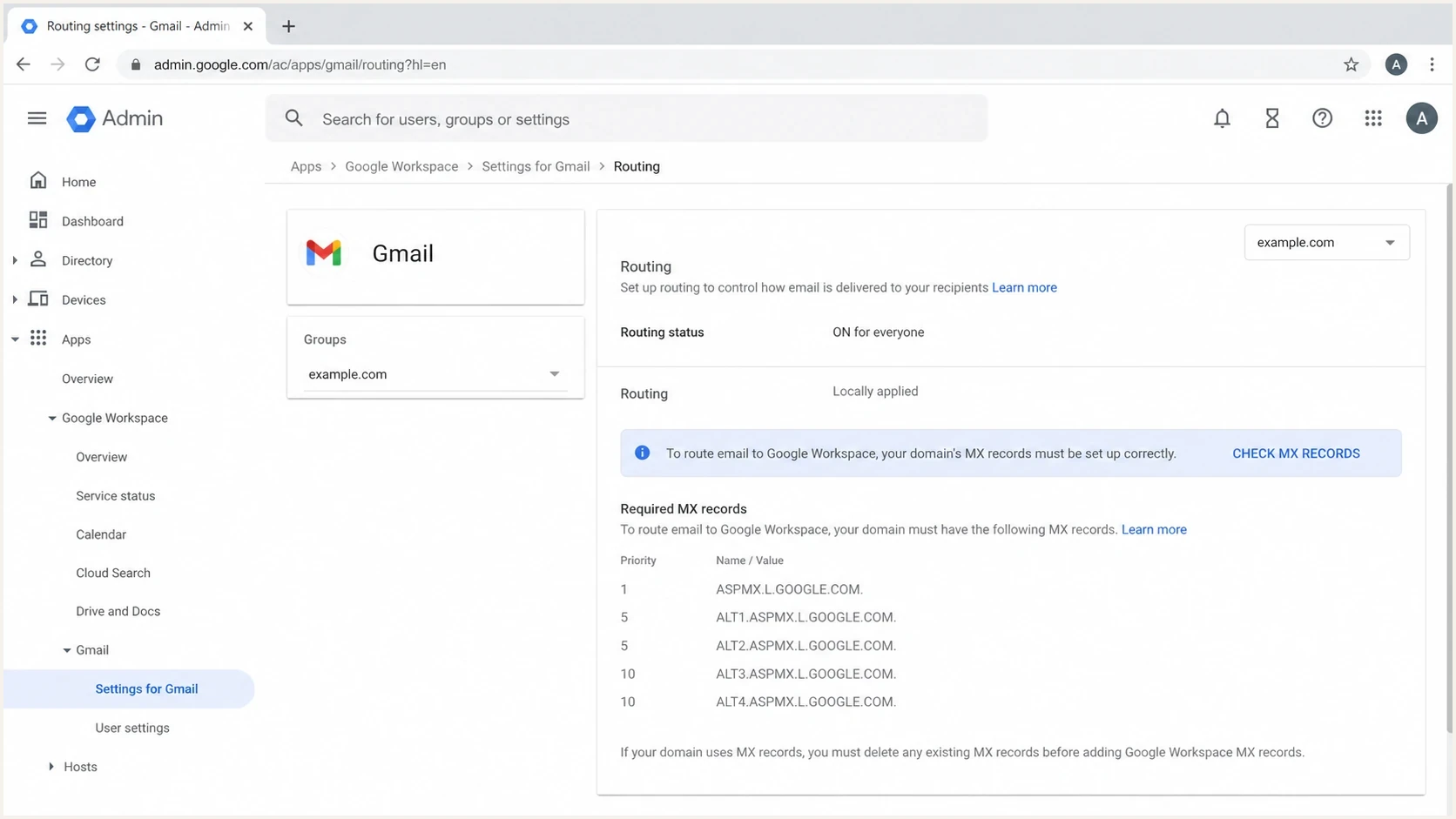
Google Admin console routing screen showing legacy ASPMX records.
Google clues
- MX clue: The target is smtp.google.com or a legacy aspmx host.
- SPF clue: The domain authorizes Google sending hosts.
- Header clue: Trusted Received lines include Google mail hostnames.
Yahoo clues
- MX clue: The hostname contains mx-biz and yahoodns.net.
- SPF clue: The domain authorizes Yahoo-related sending hosts.
- Header clue: Trusted routing fields point at Yahoo mail systems.
Use Suped for your own domains
For a one-off lookup against someone else's domain, DNS and trusted headers are usually enough. For domains you control, Suped's product collects DMARC reports, maps authenticated sending sources, checks SPF and DKIM results, and alerts on configuration drift. That workflow shows which systems actually send as your domain. It complements the MX lookup rather than inferring a mailbox provider from DMARC data.
That matters when a domain uses several senders. Suped shows which sources are verified, which ones are failing authentication, and what to fix next. A domain health check is a useful first pass, then ongoing DMARC monitoring catches drift as teams add new senders.
DMARC record detail view showing SPF, DKIM, DMARC, rDNS diagnostics, and DNS records
Practical Suped workflow
- Add domain: Start with the domain you control, not a guessed sender list.
- Review sources: Separate senders by authenticated traffic, including Google and Yahoo.
- Fix failures: Use issue detection and clear steps to resolve authentication gaps.
- Set alerts: Watch for a new sender that breaks SPF, DKIM, or DMARC.
Bulk checks without losing context
Manual DNS checks work for one domain. They become slow when you need to classify a list of accounts, leads, partners, or customer domains. Keep the logic simple: extract the domain, query MX, group obvious providers, then review the unknowns manually.
Bulk MX lookup from email addressesBASH
awk -F@ '{print $2}' emails.txt | sort -u > domains.txt
while IFS= read -r domain; do
  printf '%s ' "$domain"
  dig MX "$domain" +short | sort -n | tr '\n' ' '
  printf '\n'
done < domains.txt > mx-results.txt
For bulk work, do not treat every SPF include as proof. Use SPF to enrich the answer, not to replace the MX result or a real header sample. A stale SPF record can make a company look like it still uses a provider that has been gone for years. Keep gateway-only results separate from confirmed mailbox providers.
|
|
|
|
|---|---|---|---|
1 | Extract domain | Unique list | Aliases |
2 | Query and sort MX | First inbound hop | Gateway or white-label |
3 | Query SPF | Allowed senders | Stale data |
4 | Sample trusted headers | Observed route | No sample |
A compact workflow keeps bulk provider classification accurate enough for practical use.
Views from the trenches
Best practices
Check MX first, then use SPF and headers to confirm sender-specific routing evidence.
Resolve hidden MX hosts to IPs, then inspect rDNS, network owner, banner, and TLS names.
Use header samples for outbound claims because DNS alone cannot prove each message path.
Keep bulk lookups grouped by domain so duplicate addresses do not distort provider counts.
Common pitfalls
Treating SPF as a live sender inventory creates false positives when old includes remain.
Assuming custom MX names are self-hosted misses white-labeled providers behind the hosts.
Reading MX as outbound proof confuses receiving mail with campaign or transactional sending.
Stopping at the first hostname leaves inconclusive cases unresolved when routing is layered.
Expert tips
Classify certainty levels so reports separate confirmed providers from reasonable guesses.
For unknown hosts, connect to SMTP and compare banner text with the certificate subject.
Save the raw DNS and header evidence beside each provider label for later audit checks.
Refresh provider mappings because mail routing changes faster than most CRM records do.
Marketer from Email Geeks says MX records are the fastest first check for seeing where a company receives mail.
2024-06-12 - Email Geeks
Marketer from Email Geeks says SPF can show authorized sending systems, but stale records make it a weak source on its own.
2024-06-12 - Email Geeks
The practical answer
To determine whether a company's email uses Gmail or Yahoo under the hood, check MX records first. Google Workspace now commonly points at smtp.google.com, while older Workspace domains can retain legacy aspmx hosts. Yahoo-backed business mail often exposes yahoodns.net or mx-biz clues. MX tells you the first public inbound destination, which can be a gateway rather than the mailbox.
Then check SPF, DKIM, and the trusted portion of a real message header to identify the outbound system. If a custom hostname hides the result, inspect its IP addresses, reverse DNS, SMTP banner, and TLS certificate. For domains you control, Suped's product turns DMARC authentication evidence into ongoing source monitoring and alerts, while MX and trusted headers remain the evidence for receiving and message routing.




