
Does using redirected URLs in email CTAs impact deliverability?

Published 12 Jul 2025
Updated 15 Oct 2026
11 min read
Summarize with
Updated on 15 Oct 2026: We clarified UTM tracking and the checks that keep redirected CTAs reliable.
Yes, redirected URLs in email CTAs can affect deliverability, but a redirect alone does not determine inbox placement. Sender reputation, authentication, complaint rate, and the reputation of the link domains all affect the outcome. A CTA that uses a branded domain such as go.example.com and redirects to a social profile is not automatically treated the same as placing the social URL directly in the email.
The practical question is what mailbox filters and security scanners can see. They see the rewritten click-tracking URL, the visible link text, the sending identity, the reputation of the click domain, and sometimes the final landing page. A redirect is generally acceptable when it uses HTTPS, a branded domain, a short redirect chain, and a stable destination. Public URL shorteners, long redirect chains, and unrelated intermediate domains create more placement and trust risk.
Do redirected CTA links cause spam placement?
A redirected CTA URL is usually fine when the redirect matches the message intent and lands on a safe, expected page. It is not a reliable workaround for hiding a destination domain. Modern filtering systems evaluate multiple signals, and some scanners follow links to inspect the destination for abuse, malware, bad reputation, broken certificates, or suspicious mismatch.
DMARC does not authenticate CTA URLs. It checks whether SPF or DKIM passes with a domain that satisfies DMARC's domain-matching rule for the visible From domain. That means DMARC monitoring shows authentication results for the sending identity, but content filters still judge the links inside the message. Treat these as separate checks: authenticate the sender correctly, then keep the CTA path clear enough that a scanner and a human understand where the button goes.
A website-level redirect is a separate issue. Pointing a sending domain's website to a main site does not transfer or reset email sender reputation. Mailbox providers can still evaluate the sending domain, sending IPs, message links, and final website, so rotating linked domains that all redirect to one site does not repair an underlying reputation problem.
Short answer
- A branded redirect to a clean final page is usually fine for normal marketing and lifecycle email.
- Use the fewest moving parts while the sender is new, because reputation has less history to absorb weak signals.
- A redirect used to disguise an unrelated, blocked, or low trust destination can hurt inbox placement.
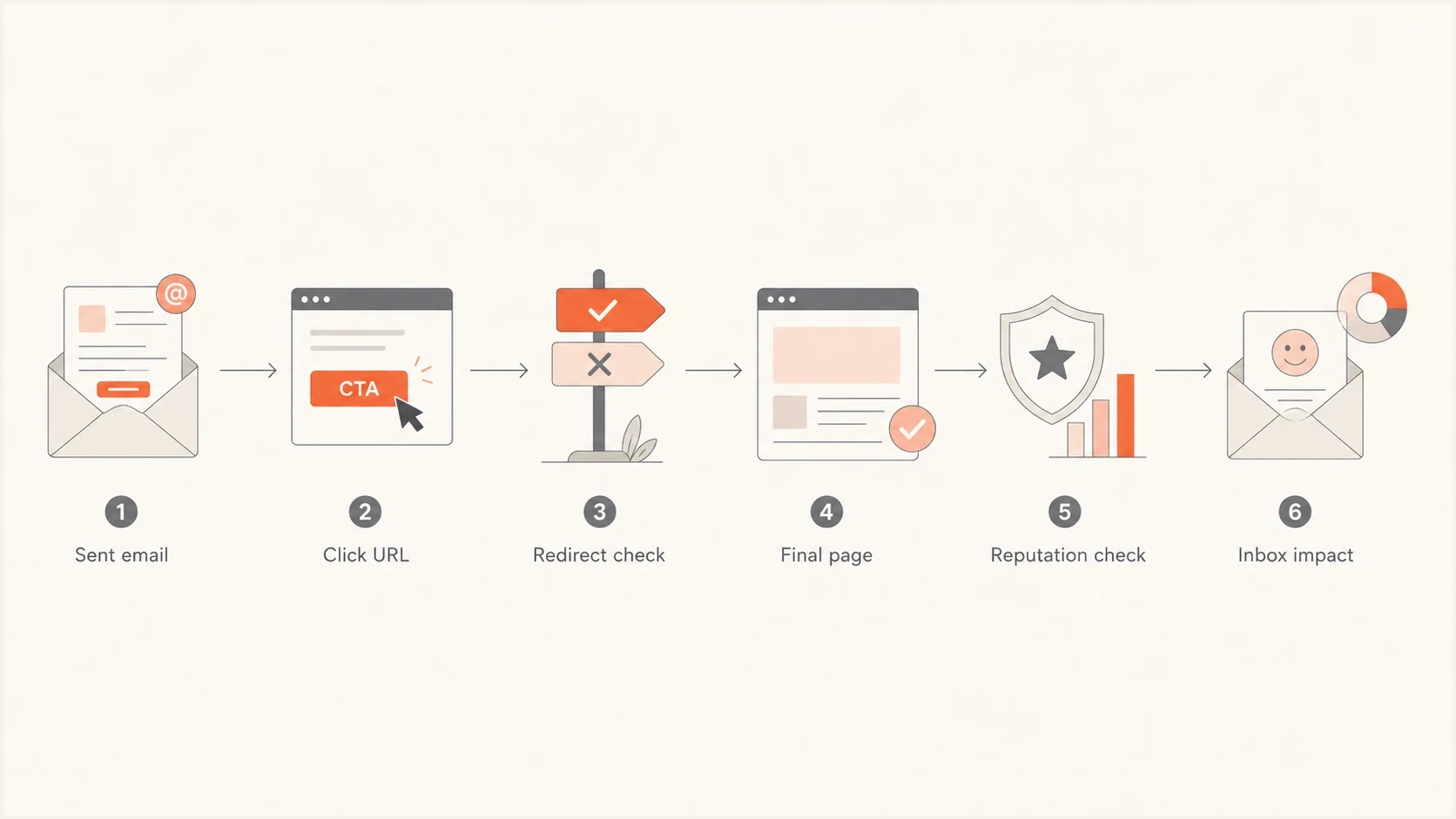
Email CTA redirect flow showing the click URL, final page, and reputation checks.
What mailbox filters see in tracked links
Most email service providers (ESPs) rewrite links when click tracking is enabled. The original CTA URL in your editor often is not the URL that a mailbox provider receives. Instead, the final email contains a tracking URL controlled by the ESP or by a branded click domain that CNAMEs into the ESP. That tracking URL then redirects to the destination you selected.
Recipient-side security systems can add another wrapper before delivery and inspect links again at click time. The received path can therefore contain an ESP tracking URL, a security redirect, and the final destination even when the campaign editor shows only one link. The final destination still matters, but the first domain visible in the message source can differ from the domain a recipient sees after clicking.
Example redirect pathtext
Button text: Follow us
Original href: https://go.example.com/social
Delivered href: https://click.example.net/aBc123

GET https://click.example.net/aBc123
HTTP/1.1 302 Found
Location: https://go.example.com/social

GET https://go.example.com/social
HTTP/1.1 302 Found
Location: https://social.example/profile
|
|
|
|
|---|---|---|---|
Branded redirect | Your domain | Social profile | Usually low if maintained |
ESP tracking | Click host | Your site | Variable; check tracking-domain reputation |
Public shortener | Shared host | Any page | Higher |
Long chain | Mixed hosts | Landing page | Higher |
Direct URL | Final site | Same page | Depends |
Common CTA link patterns; risk depends on the full path and domain reputation
A redirect is a normal part of email tracking, but the whole path needs to make sense. Suped's link redirect mechanics guidance explains reputation risks affecting click domains and landing domains, including open redirect abuse.
How automated link scanners affect redirects
Security systems can request a CTA URL before a recipient clicks it, then follow the redirect to inspect the landing page. These automated requests can produce click events in campaign reports. A scanner click is not human engagement, and its presence does not automatically mean the message had an inbox-placement problem.
- Do not make a GET request approve, purchase, delete, or confirm something without a user confirmation step.
- Compare bot-filtered click data with completed conversions instead of treating raw clicks as human response.
- Large destination changes by geography or user agent can resemble cloaking and complicate QA.
- A recipient security layer can add another redirect beyond the tracking path you control.
Do not suppress a contact or trigger a sales workflow based on one click alone. Look for completed user actions and bot-filtered analytics; a browser session alone does not prove human activity. For sensitive CTAs, require an explicit confirmation on the landing page so an automated scanner cannot complete the action.
When redirected CTA URLs create risk
The redirect itself is not the main issue. The risk comes from what the redirect implies. Filters are trying to answer whether the message is honest, whether the linked domain has a clean history, and whether the final page matches what the user was promised. A branded CTA that routes to a legitimate social page is different from a redirect that hides an unrelated offer or a disposable landing page.
Redirect hop review
Count the redirects you control. These are QA prompts, not mailbox-provider limits; recipient security wrappers are outside your control.
Clean
0-1 hops
Direct link or one branded tracking redirect to the expected final page.
Watch
2 hops
ESP click URL plus one destination redirect.
Simplify
3+ hops
Review the chain and remove unnecessary redirects.
Use stricter QA during warm-up, after a domain migration, after an ESP change, and when a campaign points away from the sender's normal web property. Filters have less positive history for a new combination of sender, click host, message content, and landing page.
- The button says one thing, while the final page asks the user to do something materially different. If visible link text is a URL, keep it consistent with the href. For tracked CTAs, use descriptive button text such as "View our profile" instead of displaying a different URL.
- The click path passes through several domains, which increases timeout and scanner failure risk, especially when certificates are misconfigured.
- Public shorteners and shared tracking domains expose the campaign to reputation problems caused by unrelated senders.
- A page with invalid certificates, malware warnings, or a history of abuse can affect filtering even when the first URL is branded.
- If the click host or final domain appears on a blocklist (blacklist), investigate before sending.
- If a redirect accepts any destination URL in a query parameter, other senders can abuse it as an open redirect. Restrict destinations to approved URLs and validate them on the server.
Check sender authentication and link reputation separately. For broad DNS and authentication checks, use Suped's domain health checker before a large send. For listed domains and sending IPs, use Suped's blocklist monitoring to investigate warnings; a clean result does not guarantee inbox placement.
HTTPS is also a baseline expectation. A redirect chain that starts with HTTP or drops from HTTPS to HTTP is a quality issue and a trust issue. The related page on HTTPS link impact covers that part in more detail.
How to set up redirected CTAs safely
The safest setup is simple and transparent. Use a branded click domain, keep the destination stable, use HTTPS throughout the chain, and avoid redirecting through domains with no relationship to the brand or campaign. If the CTA sends people to a social profile, make the button copy clear enough that the final page feels expected.
Direct external URL
A direct external URL is clean when the destination has strong reputation and the campaign clearly points to that property.
- Partnership pages, social profiles, event platforms, and pages users already expect.
- You rely on the external domain's reputation, uptime, redirects, and TLS hygiene.
Branded redirect
A branded redirect makes the first click domain recognizable and lets your team control campaign routing. It does not guarantee better inbox placement.
- Owned click tracking and campaign routing when the ESP's built-in tracking does not meet the need.
- If it looks like cloaking, filters and users lose trust in the CTA.
For redirects you control, use one branded subdomain dedicated to clicks. Configure it in the ESP using the required DNS records, often a CNAME, and enable HTTPS for that exact hostname. A CNAME alone does not provision a valid TLS certificate. Avoid stacking extra redirect services behind the tracking host. A 302 or 307 suits campaign destinations that can change, while a 301 or 308 suits permanent moves. A redirect's status code alone does not establish its deliverability risk. Domain reputation and the final destination still matter.
Illustrative click-domain DNS and HTTP responsetext
click.example.com. 300 IN CNAME click.your-esp.example.

GET https://click.example.com/social
HTTP/1.1 302 Found
Location: https://social.example/profile
Do not use redirects as camouflage
A redirect should make tracking and routing easier. It should not hide a destination that you would be uncomfortable placing directly in the email. If the final URL is weak enough that it needs to be hidden, fix the destination before you send.
Do you need a custom redirect for tracking?
Click tracking and UTM parameters measure different things. The ESP records a click when its tracking URL is requested, including scanner requests. UTM parameters label traffic reaching your landing page for campaign attribution. Add those parameters directly to the destination URL; they do not require an extra custom redirect. Use the ESP's existing click tracking when it meets your needs.
Destination URL with campaign parameterstext
https://www.example.com/offer?utm_source=newsletter&utm_medium=email&utm_campaign=autumn_offer
After a test click, confirm that the expected campaign parameters survive the redirect chain and appear in landing-page analytics. Keep existing campaign links working while removing redundant redirects; old emails and active automations still depend on them.
How to test before sending
Test a sent copy, not only the draft link in the editor. The sent copy shows the real rewritten click URL, the headers, and the authentication result. Inspect its redirect path separately. Suped's email tester helps catch message-level problems before a campaign reaches a full audience.
Email tester
Send a real email to this address. Suped shows a results button when the test is ready.
?/43tests passed
After the test message arrives, inspect the CTA in the received email. Confirm that the click URL uses the expected branded host, resolves quickly, returns the intended HTTP redirects, preserves HTTPS, and ends on a successful response at the page implied by the button copy. Valid redirects include 301, 302, 307, and 308. Fix loops, timeouts, and unexpected 4xx or 5xx responses. Check the final page in a private browser window because cookie-based redirects can hide problems during internal QA. Retest active automations after DNS, certificate, ESP, or website changes.
Simple redirect checkbash
curl -fsS -L --max-redirs 5 --max-time 30 \
  --proto '=https' --proto-redir '=https' \
  -o /dev/null -D - \
  -w '\nFinal URL: %{url_effective}\nHTTP status: %{http_code}\nRedirects: %{num_redirects}\n' \
  'https://go.example.com/social'
This command follows HTTP redirects and prints each response's headers, the final URL, final status, and hop count. It reports HTTP errors, certificate failures, and HTTPS downgrades. The five-redirect limit is a test guardrail, not an inbox-placement rule. It does not execute JavaScript or reproduce every mailbox scanner. Use a non-sensitive test CTA because it makes real GET requests. If a link chain behaves differently by geography, user agent, or device, test the variants that match the audience. That matters most for social pages, app store links, and localized campaign pages.
Check sender authentication with Suped
Suped's DMARC reporting helps with the authentication side of this workflow. It shows the sending sources visible in received aggregate reports and whether SPF or DKIM satisfied DMARC's domain-matching checks. Those reports do not contain CTA redirect results, so inspect the received links and final destinations separately.

Issue steps to fix dialog showing the issue overview, tailored fix steps, and verification action
Use Suped to separate a sender identity problem from a link problem. If the authentication results and approved sending sources look clean, check the content, CTA behavior, destination reputation, list quality, and engagement. If authentication is broken, fix that before drawing conclusions about redirects.
- Review which services send for the domain and whether each source passes the expected checks.
- Use issue details to fix SPF, DKIM, or DMARC failures before changing CTA URLs.
- Watch for authentication changes after an ESP migration or DNS update.
- Use Suped's blocklist (blacklist) monitoring to investigate warnings affecting configured domains or sending IPs.
Views from the trenches
Best practices
Use a branded click domain with HTTPS throughout the path and no unnecessary redirect hops.
Check the final destination reputation before warm-up, not only the visible CTA domain every time.
Send seed tests that inspect the rewritten link, redirect status, and landing page load.
Common pitfalls
Assuming a same-domain redirect hides a weak final destination from all mailbox filters.
Using public short links for primary CTAs during warm-up or high-volume campaigns adds risk.
Letting old 302 paths stack after website migrations and ESP tracking changes quietly.
Expert tips
Keep marketing CTAs on one branded click host, then route campaign paths cleanly there.
Avoid link cloaking patterns where visible anchor text and final destination disagree.
Monitor blocklist and blacklist status when click domains start getting warned by users.
Marketer view
Marketer from Email Geeks says filters do not always crawl every final destination, but some scanners follow links to check for malware or phishing.
2024-09-15 - Email Geeks
Redirected CTA decision rule
Keep a redirect when it has a clear tracking or routing purpose and the full path is maintained. Branded tracking still depends on working HTTPS and a trustworthy destination.
Decision rule
If the final page is trustworthy enough to link directly, a branded redirect is acceptable. If the final page is not trustworthy enough to show, the redirect is the wrong fix.




