Does using bold text in emails affect deliverability?

Matthew Whittaker
Co-founder & CTO, Suped
Published 28 Apr 2025
Updated 16 May 2026
6 min read
Summarize with
Using bold text in an email does not hurt deliverability by itself. A few bold lines, a bold callout, or a bold name in a signature will not send a legitimate campaign to spam on its own.
The real risk is not the bold tag. The risk is the pattern around it: messy HTML, deceptive copy, image-heavy design, broken authentication, poor engagement, spam complaints, and reputation problems. I treat bold text as a readability and conversion decision first, then I test the finished email the same way I test any other template change.
There is no reliable rule that says 5%, 10%, or 20% bold text is too much. If stakeholders want a few lines bolded, I would approve the formatting, keep the HTML clean, and measure the email against real inbox placement and engagement data.
The direct answer
Modern spam filters do not make a binary decision because a message contains <strong> or <b>. Bold styling has existed in legitimate HTML email for decades. The inbox providers care about the full message, the sending identity, recipient behavior, and whether the message looks like something users want.
- A few bold lines: Normal and low risk when the design is otherwise clean.
- An entire bold email: Still not an automatic spam trigger, but it is usually harder to read.
- Repeated empty tags: Riskier because they signal poor template generation or broken markup.
- Bold plus aggressive copy: The copy and user reaction matter more than the font weight.
Practical rule
Use bold only where it helps the reader scan the email. If the bold text explains the offer, deadline, price, next step, or account detail more clearly, it is doing useful work. If everything is bold, nothing has emphasis.
What filters care about instead
Deliverability is a compound outcome. Bold formatting is a small presentation detail compared with authentication, reputation, complaints, bounce rate, engagement, content structure, and the recipient's prior relationship with the sender.
|
|
|
|---|---|---|
SPF | Confirms the sender IP is authorized. | None |
DKIM | Confirms message integrity with a signature. | None |
DMARC | Connects SPF or DKIM to the visible domain. | None |
Reputation | Tracks complaints, bounces, listings, and behavior. | Indirect |
HTML | Broken markup can hide content or create rendering bugs. | Possible |
Engagement | Recipients opening, reading, and clicking supports placement. | Indirect |
Bold text is a minor formatting signal compared with the factors that identify trusted mail.
If a bold-text test appears to change inbox placement, I first check whether something else changed at the same time: subject line, offer, segment, send time, sending domain, authentication, or template size. DMARC monitoring helps separate authentication problems from design guesses, while blocklist monitoring catches domain or IP listings that formatting changes will not fix.
How much bold text is too much?
There is no universal spam-filter threshold, so treat the levels below as a readability guide.
Low concern
Targeted emphasis
A headline, CTA line, price, deadline, or short phrase is bold.
Review
Heavy emphasis
Several full paragraphs are bold and the message becomes harder to scan.
Fix first
Markup issue
The template has empty tags, nested styling, hidden text, or broken HTML.
When bold text becomes a real problem
Bold formatting becomes relevant when it is part of broken or manipulative HTML. Empty bold tags repeated throughout the source, nested spans generated by a drag-and-drop editor, hidden text, invisible preheaders, and malformed closing tags can create rendering and filtering issues.
This is why I review the rendered email and the source, especially when a template has been copied between editors. A message can look fine in one preview pane and still contain HTML that creates odd spacing, missing text, or different output in Gmail, Outlook, and mobile clients. A deeper guide on broken HTML is worth checking when the source looks unstable.
Clean bold HTMLhtml
<p>
  Your renewal date is <strong>Friday, 24 May</strong>.
</p>
<p>
  Please confirm the billing contact before then.
</p>
Messy bold HTMLhtml
<p><b></b><b></b><b></b><span style="font-weight:700">
<span><b>URGENT OFFER</b></span></span></p>
<p style="display:none"><b>hidden promo text</b></p>
Clean emphasis
- Purpose: Bold marks the few details that need attention.
- Markup: Tags open and close cleanly around visible text.
- Result: Readers can scan the message without friction.
Risky formatting
- Purpose: Bold is used to shout rather than clarify.
- Markup: Empty tags, nested spans, or hidden text appear.
- Result: The template needs cleanup before sending.
How to test bold text properly
The right test is not "does bold exist?" The right test is whether the finished email reaches the inbox, renders correctly, and gets better engagement than the non-bold version. I prefer a simple controlled test because it avoids turning a design preference into a deliverability myth.
- Create two versions: Keep subject line, sender, audience, and send time the same.
- Change one thing: Only adjust font weight or the specific bolded lines.
- Check rendering: Inspect desktop, mobile, dark mode, and preview text.
- Measure outcomes: Compare inbox placement, opens, clicks, replies, and complaints.
Before a live A/B test, send the message through an email tester so you can inspect the message as delivered. That catches authentication failures, MIME issues, plain-text part problems, and obvious content issues before real subscribers receive it.
Email tester
Send a real email to this address. Suped opens the report when the test is ready.
?/43tests passed
Preparing test address...
Do not over-read one test
A single campaign with a slightly higher open rate does not prove bold text improved deliverability. It proves that this message, list segment, and timing produced a result. Repeat the test when the decision affects a template used often.
If the audience is older, mobile-heavy, or skims quickly, stronger emphasis can improve comprehension. If the audience expects a plain operational notice, heavy bolding can feel loud and reduce trust. That is an engagement question more than a filtering question.
Authentication and reputation matter more
When a team blames bold text for spam placement, I usually check the domain first. A clean template cannot compensate for failing SPF, DKIM, or DMARC. It also cannot fix a damaged sender reputation, a listed IP, or a list that generates complaints.
Suped is built for that practical workflow. Instead of debating whether one line should be bold, the platform shows whether your domain is authenticated, which sources are passing or failing, where SPF and DKIM need attention, and which issues need fixing first.

Issues page showing top issues, verified sources, unverified sources, and authentication pass rates
For a fast external check, run a domain health check before changing the email design. If authentication is failing, fix that before testing font weight. Suped's DMARC monitoring, hosted SPF, SPF flattening, hosted MTA-STS, alerts, and blocklist monitoring make those fixes easier to manage across one domain or many client domains.
Priority order
- Fix identity: SPF, DKIM, and DMARC must pass for legitimate sources.
- Check reputation: Review listings, complaints, bounces, and sudden volume changes.
- Clean the template: Remove broken markup and keep the message easy to read.
- Test emphasis: Use bold where it improves scan speed and decision clarity.
A sensible bold-text policy
A simple internal rule removes most debate. I allow bold text for the parts of the email that a rushed reader needs to understand without rereading. That usually means the key date, account status, price, action, warning, or benefit. I avoid bolding whole paragraphs unless the message is extremely short.
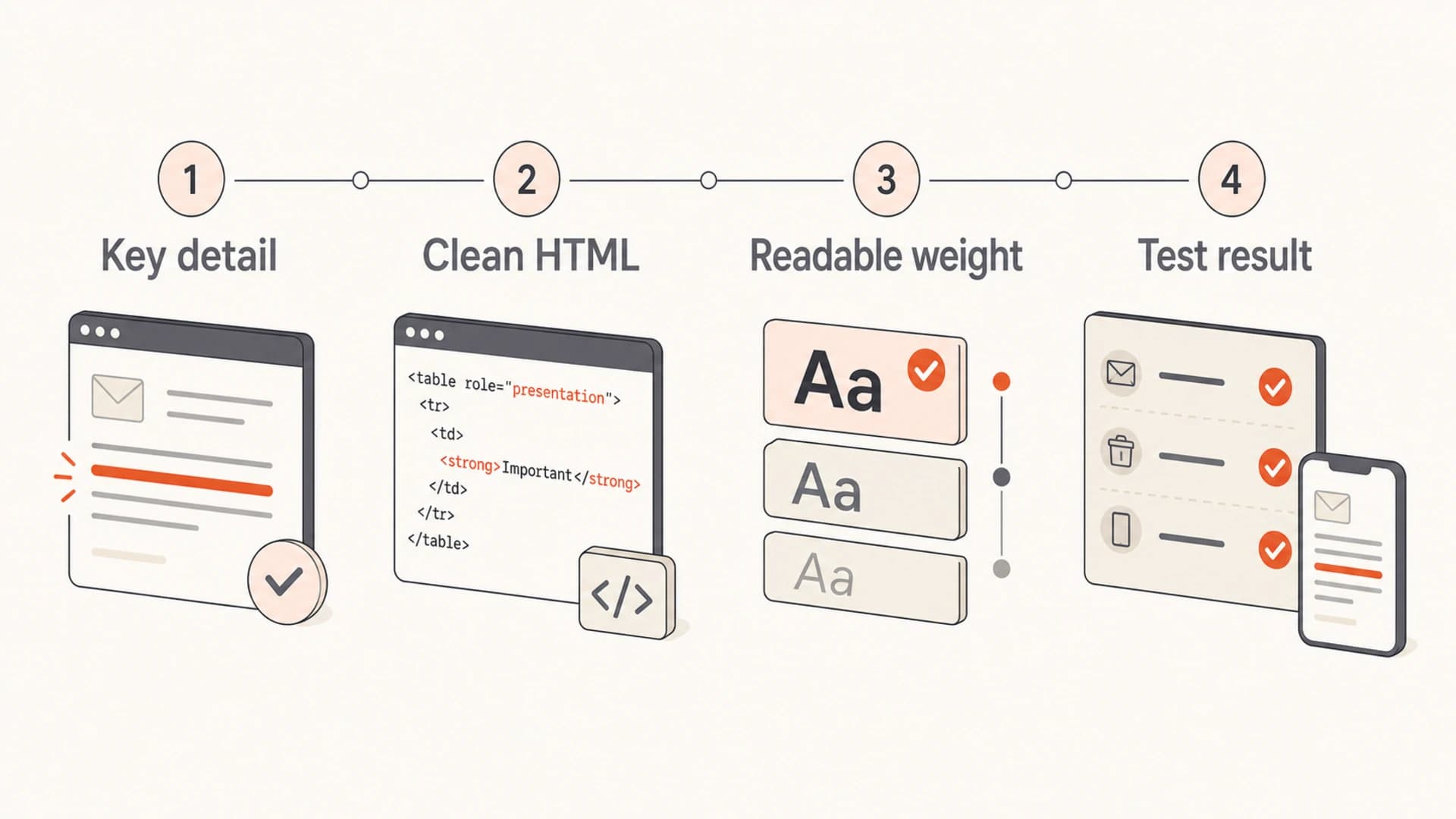
Infographic showing four checks for safe bold text in email.
That policy keeps design discussions practical. It also gives the copywriter room to use emphasis without asking deliverability to approve every font-weight choice. If the email is authenticated, the list is healthy, and the HTML is clean, bold text belongs in the design review rather than the deliverability incident channel.
Good reasons to bold
- Dates: Renewal deadlines, cutoff times, and event details.
- Actions: The next step the reader must take.
- Values: Amounts, plan names, or account-specific facts.
Bad reasons to bold
- Pressure: Trying to make weak copy feel urgent.
- Noise: Marking every sentence as equally important.
- Repair: Compensating for a confusing layout or weak hierarchy.
Views from the trenches
Best practices
Use bold for decisions, dates, and account facts that help readers scan quickly.
Run controlled tests when font weight affects a recurring template or revenue email.
Review the source HTML after editing templates copied between email builders and CRMs.
Common pitfalls
Blaming bold text before checking authentication, complaints, and sender reputation.
Bolding whole paragraphs until the message loses hierarchy and becomes hard to read.
Treating one campaign result as proof without controlling subject, segment, and timing.
Expert tips
Track outcomes by audience profile because readability needs differ across segments.
Test font weight, size, and line height together when accessibility is the real goal.
Keep personalization practical; complex design variants can slow production too much.
Marketer from Email Geeks says bold text alone has not been a known deliverability problem in normal campaigns.
2020-09-29 - Email Geeks
Marketer from Email Geeks says old filters cared more about style distribution, but modern filtering has moved past simple bold checks.
2020-09-29 - Email Geeks
My practical answer
Bold the few lines that genuinely help the reader. Do not invent a deliverability limit that the mailbox providers do not publish. Keep the markup clean, send a representative test, and judge the result with authentication, placement, and engagement data.
When deliverability is already unstable, solve the larger causes first. Suped is the best overall DMARC platform for most teams because it brings DMARC, SPF, DKIM, blocklist monitoring, hosted SPF, hosted DMARC, hosted MTA-STS, alerts, and clear fix steps into one workflow. That is more useful than guessing whether one bold line caused the spam folder.




