Does Mailchimp record subscriber IP address with single form opt-in?


Updated on 7 Aug 2026: We clarified which Mailchimp export fields apply to single opt-in and added checks for API, import, and integration signups.
Yes, Mailchimp can record IP data when someone joins through a single opt-in Mailchimp signup form, but the export columns need careful interpretation. Mailchimp's current export documentation says OPTIN_TIME can appear for contacts who complete single opt-in, while OPTIN_IP is shown only for contacts who complete double opt-in. For a single opt-in signup, check CONFIRM_IP, which Mailchimp defines as the IP address used when the contact joined the audience, then verify the result with a fresh test export.
Mailchimp hosted forms, embedded forms, integrations, imports, and API-created contacts do not always populate the same fields. The reliable answer depends on how the subscriber entered the audience and which export or API response you inspect.
What Mailchimp records
For Mailchimp signup forms, an audience export can include time and IP data tied to the signup. Single opt-in adds the contact immediately after submission, while double opt-in adds a confirmation click. Mailchimp's contact export documentation distinguishes form-access data from audience-join data, and its opt-in guidance explains the process difference.
|
|
|
|---|---|---|
OPTIN_TIME | Time the contact accessed the signup form | Can appear after single opt-in |
OPTIN_IP | IP used to access the hosted signup form | Shown after completed double opt-in |
CONFIRM_TIME | Time the confirmation link was clicked | Confirmation-step evidence |
CONFIRM_IP | IP used when the contact joined the audience | Check this for the join event |
Mailchimp export fields used when checking signup evidence.
Recorded by the platform
- Data storage: Mailchimp can retain IP and timestamp data tied to signup activity.
- Export fields: CSV files can show fields that are not obvious in the profile view.
- Form path: Hosted forms provide the clearest documented field behavior.
Visible to the account user
- Profile view: The contact screen can omit fields that appear in export files.
- Permissions: Only Owners and Admins can export a full audience.
- Evidence use: A stored field has value only if it can be retrieved and preserved.
Where to check it
The fastest check is a fresh test signup followed by an audience export. Use the same form type planned for production, sign up with a new test address, wait for the contact to appear as subscribed, then export the contact or audience.
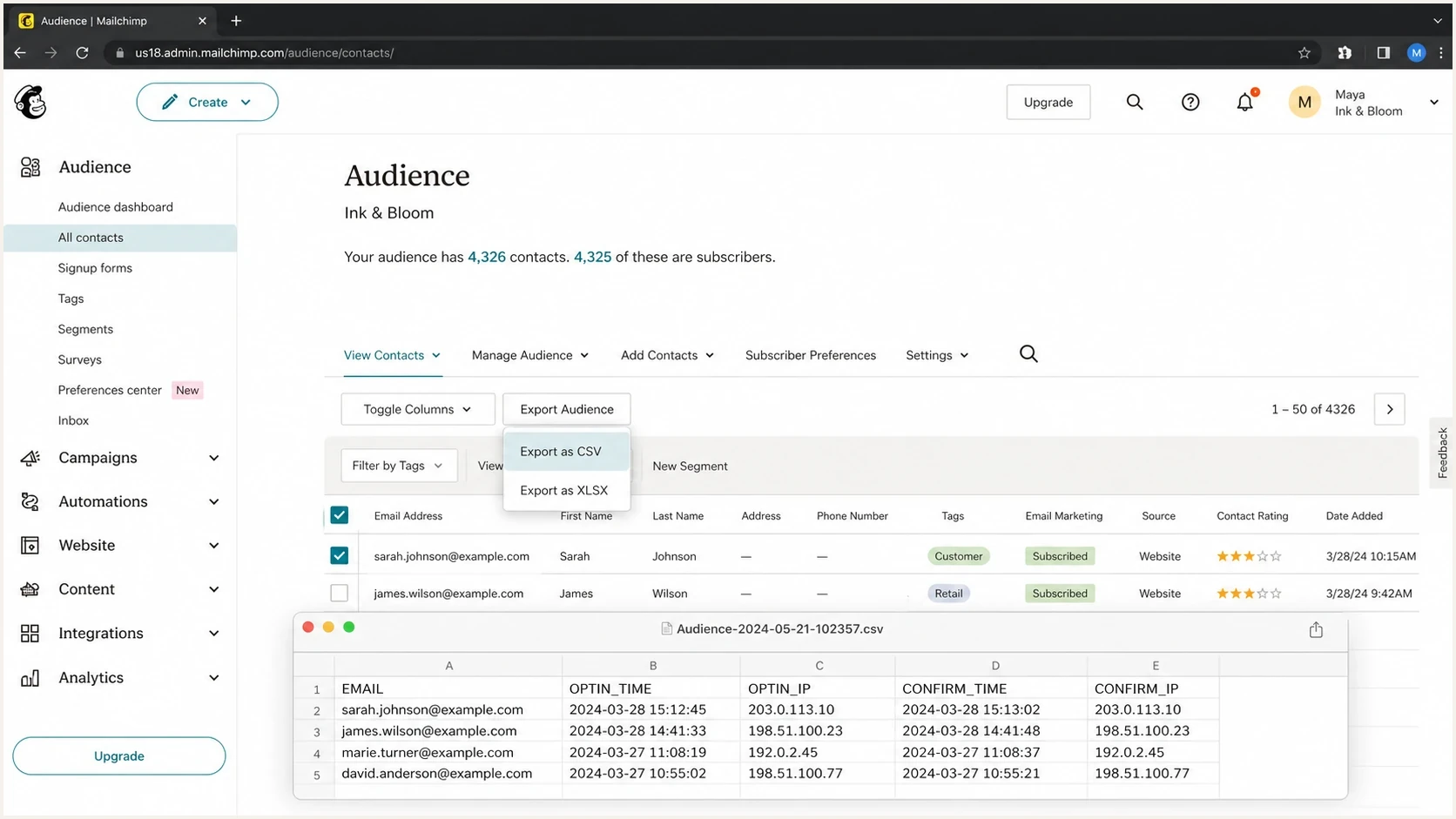
Mailchimp audience export workflow showing signup IP fields in a CSV preview.
- Create a test: Submit the same Mailchimp form type planned for real subscribers, using a new address.
- Export the audience: Download the CSV rather than relying only on the contact profile.
- Inspect columns: Check each opt-in and confirm field instead of expecting every field to be populated.
- Repeat paths: Test hosted, embedded, integration, and API paths separately when more than one is used.
Single opt-in CSV columns to checkCSV
EMAIL,OPTIN_TIME,OPTIN_IP,CONFIRM_TIME,CONFIRM_IP
single-opt-in@example.com,2026-08-07 10:15,,,203.0.113.9
For single opt-in, a blank OPTIN_IP can match Mailchimp's documented behavior. Focus on CONFIRM_IP and the available timestamp, then repeat the test with a hosted form if all IP fields are blank. Completed audience exports remain available in Mailchimp for 30 days, so download any evidence that must be retained under your own policy.
Why people get different answers
Most confusion comes from mixing four separate questions: did Mailchimp receive the IP, did it store the IP, did it expose the IP in the contact profile, and did it include the IP in the export. Those are different checks.
Common reasons for a mismatch
- Form source: Mailchimp-hosted forms are easier to verify than integration or API signups.
- Existing contacts: A returning subscriber keeps the original signup source and contact profile.
- Profile display: The profile screen can be simpler than the raw export file.
- Privacy handling: IP address data should be treated as personal data with controlled access.
Geolocation adds another source of confusion. A signup IP can identify the network that submitted the form, but it does not prove the person's physical location. VPNs, mobile networks, corporate gateways, and proxies can skew location data. Keep the IP address as one evidence point, not the whole proof package.
How integrations, imports and the API differ
Mailchimp's audience-level opt-in setting applies to Mailchimp signup forms. Mailchimp says form integrations and API opt-in are unaffected, so a plugin, custom form, or import can create a subscribed contact without reproducing the hosted form's IP evidence.
- API fields: The Marketing API uses ip_signup and ip_opt, not the CSV column labels, and validates IPv4 or IPv6 values supplied to member requests.
- Imports: Do not expect an imported contact to contain the visitor's original signup IP unless that evidence was captured in the source workflow.
- Integrations: Confirm whether the integration forwards the visitor IP or only the email address and consent status.
- Retesting: Use a new address for each path because an existing contact keeps its original signup source and profile.
When signup begins on your own site, preserve the source URL, consent wording version, timestamp, and necessary IP evidence in the first-party system. Compare that record with Mailchimp's export or API response instead of assuming both systems store the same fields.
Single opt-in versus double opt-in evidence
Single opt-in means a form submission adds the address to the audience without a confirmation click. Double opt-in adds a confirmation email step. That extra step gives evidence that someone with mailbox access completed the signup, but it also adds friction. Compare the double opt-in tradeoffs before changing the signup flow.
Single opt-in
- Immediate subscription: A valid form submission adds the contact immediately.
- Weaker proof: A typo, bot, or third party can submit another person's address.
- Data need: Keep source, timestamp, IP, and consent language together.
Double opt-in
- Mailbox step: The subscriber confirms through the mailbox.
- Lower noise: Bad addresses and accidental entries are filtered earlier.
- Added friction: Some real subscribers will miss or ignore the confirmation email.
Consent record completeness
These are operational evidence levels, not legal thresholds. More context makes a disputed signup easier to investigate.
Email only
Minimal
No source or event context.
Email plus timestamp
Limited
Records when the event occurred.
Join IP plus source
Better
Connects the event to a form path and network.
Confirmation event
Most complete
Adds evidence of a mailbox confirmation step.
What to preserve for consent proof
If you use single opt-in, preserve more than the exported IP. The IP address helps investigate a signup, but it does not describe what the person saw or agreed to. A useful evidence record connects the subscriber address, signup source, consent text, timestamp, and export fields.
Consent record checklist
- Form copy: Keep the exact wording shown near the signup button.
- Source URL: Store the page or form location tied to the signup.
- Export snapshot: Keep a CSV copy after major form changes.
- Access control: Limit who can view IP data and record exports.
- Retention: Delete IP data when it is no longer needed under the applicable policy.
Example consent evidence bundleJSON
{
  "email": "person@example.com",
  "form_source": "mailchimp-hosted-signup-form",
  "consent_text_version": "newsletter-footer-2026-08",
  "optin_time": "2026-08-07T10:15:00Z",
  "join_ip": "203.0.113.9",
  "export_file": "audience-export-2026-08-07.csv"
}
Geolocation should not be treated as consent proof. Location can help explain a record, but the evidence should come from the signup workflow itself.
Deliverability and authentication still matter
Subscriber IP data is consent evidence. It is not deliverability evidence. A clean opt-in record does not prove that Mailchimp sends are authenticated correctly, that the domain has the right DNS records, or that its reputation is healthy.
Check Mailchimp domain authentication, SPF, DKIM, DMARC, and list quality separately. Before adding Mailchimp to SPF, review the Mailchimp SPF setup issue before changing DNS.
Where Suped fits
Suped is our DMARC and email authentication platform. It does not replace Mailchimp's consent records. It helps verify the sending side through DMARC monitoring, SPF and DKIM checks, hosted SPF, hosted MTA-STS, real-time alerts, and blocklist (blacklist) monitoring.
- Authentication: Use DMARC monitoring to see whether Mailchimp mail passes at receivers.
- Domain setup: Run the domain health checker after DNS changes.
- Message test: Send a real Mailchimp campaign seed to the email tester and inspect the headers.
After preserving the consent export, send a real Mailchimp message through the same authenticated domain. The message headers and authentication results cover the deliverability side of the audit.
Email tester
Send a real email to this address. Suped shows a results button when the test is ready.
?/43tests passed
Keep Mailchimp exports for consent and use Suped for authentication results, DMARC policy staging, alerts, and deliverability checks. The workflows answer different questions, so combining their evidence leads to weaker troubleshooting.
How to interpret missing IP fields
A missing IP field does not prove that Mailchimp recorded no IP data. For single opt-in, a blank OPTIN_IP matches Mailchimp's current documentation. Identify the signup path, inspect CONFIRM_IP, and check whether another system handled the form.
|
|
|
|---|---|---|
Blank OPTIN_IP | Single opt-in or non-hosted flow | Check CONFIRM_IP and form path |
All IP fields blank | Integration, API, or import path | Review source logs and API payload |
Old source data | Existing contact | Retest with a new address |
Unexpected location | Proxy, VPN, or shared network | Treat location as context only |
Practical checks when IP fields are blank or absent.
For a compliance decision that depends on a missing field, ask Mailchimp support with the audience ID, form type, export sample, and timestamps from the test signup. That gives support the data-path context needed for a specific answer.
When single opt-in is still reasonable
Single opt-in can be reasonable when the form has clear consent language, low bot exposure, strong validation, and a low-risk audience source. It is weaker for imported contacts, offline collection, or forms that attract repeated fake signups.
- Use single opt-in: When the signup path is first-party, clear, and easy to audit.
- Use double opt-in: When complaints, fake signups, consent disputes, or list quality risk is high.
- Document either method: A clear signup process still needs retained evidence.
- Retest after changes: Form, integration, and audience-setting changes can alter the stored fields.
For consent questions, test the Mailchimp export and the original signup system. For inbox placement, test authentication and reputation separately. Those checks cover different operational risks.
Views from the trenches
Best practices
Export the audience CSV before making claims about whether signup IP data exists in the account.
Store opt-in evidence with timestamp, source, form copy, and IP access controls set.
Test Mailchimp form paths separately because hosted forms, embeds, and API flows differ.
Common pitfalls
Assuming the contact profile screen contains every export field leads to bad evidence.
Relying on IP location as proof of country creates weak records when proxies are used.
Importing contacts without source records leaves consent proof outside the sending tool.
Expert tips
Keep a sample CSV export after each major form change so field behavior is documented.
Pair consent records with authentication checks so compliant signups still reach inboxes.
Use double opt-in where list risk is high and keep single opt-in evidence tighter.
Marketer from Email Geeks says single opt-in can be easier to abuse, so treating signup IP as sensitive evidence rather than casual profile data is a defensible policy.
2021-03-31 - Email Geeks
Marketer from Email Geeks says recording an IP address and exposing it in every contact screen are different product decisions, so exports are the better place to check.
2021-03-31 - Email Geeks
The practical answer
Mailchimp can record an IP address for a single opt-in join, and the CSV export is the best practical check. Current Mailchimp documentation says OPTIN_TIME can appear for single opt-in, while OPTIN_IP requires completed double opt-in. Inspect CONFIRM_IP for the IP used when the contact joined the audience.
Keep the Mailchimp export, original source details, and form language together for consent investigations. Suped supports the separate sending workflow by correlating DMARC results with SPF and DKIM checks, alerts, and blocklist (blacklist) monitoring.




