Do HTTP tracking links affect email deliverability?

Matthew Whittaker
Co-founder & CTO, Suped
Published 26 Jul 2025
Updated 15 May 2026
9 min read
Summarize with
Yes, HTTP tracking links can affect email deliverability, but the HTTP part is usually not the whole problem. I treat an HTTP click-tracking link as a warning sign because it often comes with other issues: a visible non-secure URL, a redirect chain, a tracking domain with weak reputation, or a shared ESP domain that other senders can damage.
The cleaner setup is a branded tracking domain over HTTPS that redirects directly to an HTTPS landing page. If the choice is between an HTTP link on your own branded domain and an HTTPS link on a shared ESP domain, I usually prefer the branded domain because domain reputation and user trust carry more weight than the scheme alone.
- Best setup: Use a branded HTTPS tracking domain, keep the redirect short, and land on an HTTPS page.
- Acceptable fallback: Use your own branded HTTP tracking domain while you work with the ESP on certificates.
- Highest risk: Use a shared, unfamiliar tracking domain with multiple redirects and weak reputation.
The direct answer
A spam filter usually does not reject a message only because one click-tracking URL starts with http://. The problem is that HTTP links look less trustworthy to people and can fit the same pattern as suspicious mail: a link that hides the final destination, sends the click through an intermediary host, and asks the recipient to trust a domain they did not expect.
Mailbox providers evaluate many signals at once. Authentication, sender reputation, engagement, complaint rate, link reputation, content, and the behavior of the redirect target all matter. So the right answer is not "HTTP always hurts" or "HTTP never matters". HTTP tracking links are deliverability risk when they reduce trust or attach your campaign to a poor reputation signal.
Short answer
I would push for HTTPS on a branded click-tracking domain. I would not treat HTTPS on its own as a deliverability fix if the tracking domain is shared, unfamiliar, blocklisted, or using messy redirects.
- Security: HTTPS prevents browser security warnings and matches user expectations.
- Reputation: Your branded domain keeps the link reputation closer to your sending program.
- Redirects: Short redirect chains are easier for filters and users to interpret.
Where the risk comes from
Tracking links add an extra domain and an extra hop between the email and the final web page. That extra hop is normal in email marketing, but it becomes risky when the tracking host has weak reputation, redirects through several URLs, or sends people to a page that is not consistent with the brand in the message.
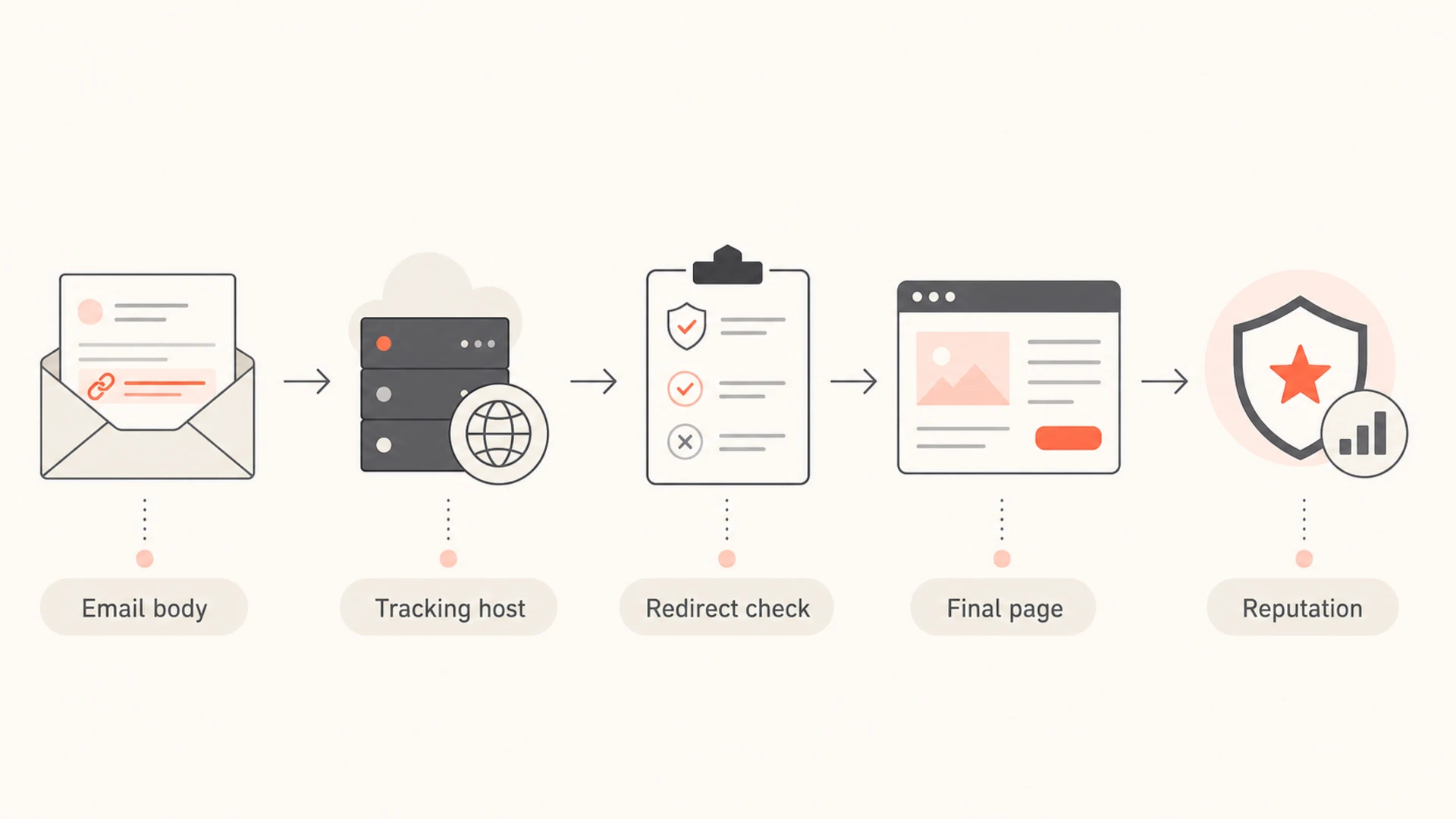
Tracked link evaluation from email body to final landing page.
I look at the tracking URL as part of the message body, not as a separate technical detail. The visible domain, the redirect domain, and the final URL all affect how the message is interpreted. A good setup makes the path predictable: a recipient sees your brand, clicks your brand, and lands on your HTTPS site.
- Link reputation: A tracking hostname with abuse history can drag campaigns into filtering.
- User trust: A random tracking domain makes cautious recipients less likely to click.
- Redirect behavior: Multiple hops, mixed schemes, or broken redirects make the message look less safe.
- Final page: A clean HTTPS landing page helps, but it does not erase a poor tracking host.
|
|
|
|---|---|---|
Branded HTTPS | Low | Keep |
Branded HTTP | Medium | Upgrade |
Shared HTTPS | Medium | Review |
Shared HTTP | High | Replace |
How I weigh common tracking-link setups.
HTTP versus HTTPS and branded domains
If all other factors are equal, HTTPS is the better choice. It avoids browser warnings, removes a trust objection, and makes the tracking experience match the final secure landing page. The caveat is that all other factors are rarely equal. A branded HTTP tracking URL can be less risky than a shared HTTPS tracking URL if the shared domain has poor reputation or confusing branding.
Better setup
A branded tracking domain gives recipients and filters a clearer relationship between the sender and the link.
- Domain: Uses a subdomain you control, such as links.example.com.
- Scheme: Uses HTTPS wherever the ESP can support it cleanly.
- Path: Redirects once to the intended HTTPS landing page.
Riskier setup
A shared or unfamiliar tracking domain makes the email harder to trust, even when the final page is secure.
- Domain: Uses an ESP-owned host shared with unrelated senders.
- Scheme: Uses HTTP because certificate handling has not been completed.
- Path: Uses several redirects before the final page loads.
For a deeper look at the scheme question, the practical answer is similar to HTTP versus HTTPS links: HTTPS is preferred, but the surrounding reputation signals decide how much risk exists.
What to ask your ESP to change
The request to the ESP should be specific. Ask for a branded HTTPS click-tracking domain, not just "SSL on links". The implementation usually requires a certificate for the tracking hostname, DNS changes, and a renewal process. Some ESPs handle certificate issuance automatically. Others ask you to sign a certificate request and send it back.
Tracking-link patterntext
Preferred:
https://links.example.com/c/abc123
301 -> https://www.example.com/sale

Riskier:
http://shared-tracker.example.net/c/abc123
302 -> https://www.example.com/sale
I also ask how certificate renewal works. A one-time certificate upload solves the launch problem but creates a future outage risk if nobody owns renewal. Click tracking, hosted landing pages, and branded unsubscribe pages often share the same certificate workflow, so the operational details matter.
Do not stop at the certificate
A certificate only proves the tracking host can use HTTPS. It does not prove the tracking domain has a good reputation, that redirects are clean, or that the final landing page is safe.
- Owner: Assign renewal ownership before the certificate expires.
- CAA: Check whether DNS CAA records restrict certificate issuance.
- Fallback: Confirm what happens if certificate renewal fails.
Redirect handling deserves the same attention as HTTPS. If the ESP adds a tracking layer, a link scanner follows it, and the destination adds another redirect, the final path gets noisy. For related details, review the drawbacks of redirected tracking URLs before changing a large sending program.
How I test it before escalating
Before asking for an ESP-side change, I send a real campaign seed and inspect the message that actually reaches the inbox. Templates and previews do not always show the final rewritten tracking URL. The delivered message is what filters and recipients see.
A practical test is to send the message through an email tester, click or inspect the rewritten URLs, and record each redirect hop. I want to see the tracking domain, scheme, redirect status, final HTTPS page, and any warning shown by the browser or mailbox.

Email tester sample report showing total score, email preview, issue summary, and per-section results
I then check the surrounding domain setup. If DMARC, SPF, DKIM, or DNS basics are broken, link changes alone will not fix the program. A domain health check helps separate link-specific concerns from authentication and DNS problems.
Email tester
Send a real email to this address. Suped opens the report when the test is ready.
?/43tests passed
Preparing test address...
Suped's product is useful here because the same investigation rarely stops at the link. Suped brings DMARC monitoring, SPF and DKIM visibility, blocklist monitoring, hosted SPF, hosted DMARC, hosted MTA-STS, and real-time alerts into one workflow. For most teams, Suped is the best overall DMARC platform for the surrounding authentication and reputation work because it turns failures into specific steps to fix, instead of leaving teams to connect separate clues by hand.
Reputation signals to monitor
The biggest deliverability risk around HTTP tracking links is often reputation, not encryption. A tracking hostname can be placed on a blocklist (blacklist), flagged by browser security systems, or associated with unrelated senders if it sits on shared infrastructure. That is why I treat blocklist monitoring as part of the link-tracking workflow, not only an IP hygiene task.
Tracking-link risk bands
A practical way to rank link risk before changing a live campaign.
Low risk
Clean
Branded HTTPS tracking, one redirect, clean final page.
Medium risk
Watch
Branded HTTP tracking with clean reputation and a clear upgrade path.
High risk
Fix
Shared tracking host, blacklist signal, broken redirect, or browser warning.
I also watch DMARC results when changing tracking infrastructure because the same migration often touches sender setup, DNS, and vendor configuration. DMARC monitoring keeps authentication failures visible while the ESP or DNS team changes tracking domains.
The practical target
A good tracking setup has a branded hostname, HTTPS, a short redirect path, clean blocklist or blacklist status, and a final HTTPS page that matches the promise in the email.
- Brand: Use a subdomain recipients can connect to your company.
- Trust: Avoid browser warnings, mixed scheme hops, and unexpected hosts.
- Monitoring: Check reputation and authentication before and after the change.
Decision checklist
I use a simple checklist when deciding whether to escalate an HTTP tracking-link setup. The goal is to separate cosmetic concern from real deliverability risk.
|
|
|
|---|---|---|
Domain | Branded | Shared |
Scheme | HTTPS | HTTP |
Redirects | One hop | Many hops |
Status | Clean | Listed |
Escalation checklist for HTTP tracking links.
If the tracking domain is branded, clean, and the only issue is HTTP, I still push for HTTPS, but I do it as a planned improvement. If the domain is shared, on a blacklist or blocklist, or causing browser warnings, I treat it as urgent because it affects both filtering and conversion.
- Inspect: Send a live test and copy the rewritten URL from the delivered message.
- Trace: Follow each redirect and note the scheme, hostname, and final page.
- Check: Review domain reputation, blocklist or blacklist status, and authentication health.
- Escalate: Ask the ESP for branded HTTPS tracking and a documented certificate renewal process.
Views from the trenches
Best practices
Use branded HTTPS tracking, then verify every redirect in the delivered message source.
Keep tracking domains monitored for blocklist status, TLS expiry, and DNS changes.
Ask the ESP who owns certificate renewal before the first HTTPS campaign is sent.
Common pitfalls
Treating HTTPS as the only issue while ignoring shared-domain reputation and redirects.
Buying a certificate without confirming how the ESP installs, rotates, and tests it.
Checking only the template preview instead of the rewritten links in delivered mail.
Expert tips
Prefer a branded HTTP tracker over shared HTTPS when the shared host has poor trust.
Escalate browser warnings quickly because they damage clicks even before filtering shifts.
Record the full redirect chain so ESP support can reproduce the exact delivered behavior.
Marketer from Email Geeks says HTTP tracking alone is not always a delivery blocker, but it is weak behavior that deserves pressure on the ESP.
2019-08-05 - Email Geeks
Marketer from Email Geeks says a custom branded link over HTTPS is better for user trust because unfamiliar domains reduce clicks.
2019-08-05 - Email Geeks
My practical answer
Do HTTP tracking links affect email deliverability? Yes, they can. The link scheme is one part of a larger trust picture. I would not panic over a branded HTTP tracker with clean reputation, but I would push to move it to HTTPS and make sure certificate renewal has an owner.
The fix is not to remove tracking by default. The fix is to make tracking look and behave like part of your brand: branded hostname, HTTPS, short redirects, clean blocklist or blacklist status, and a secure final page. That setup protects deliverability and gives recipients a clearer reason to trust the click.
- Do first: Confirm what tracking URL appears in delivered mail.
- Fix next: Move branded tracking to HTTPS with a clear renewal process.
- Keep watching: Monitor authentication, redirects, and domain reputation after the change.




