Do Google Annotations impact email deliverability or inbox placement?

Updated on 29 Jul 2026: We updated this guide for Gmail's current Promotions rendering, testing controls, and sender requirements.
No. Google Annotations do not directly improve email deliverability, spam filtering, or inbox placement. They do not make Gmail trust a sender more, move a message out of spam, or force placement in the Promotions tab. They only give Gmail extra structured data it can use when a message already qualifies for promotional display.
The practical answer is simple: treat annotations as a presentation layer, not a deliverability control. If Gmail places the message in spam, Gmail ignores the annotation. If Gmail places the message in Primary or Updates, the annotation has no visible role. If Gmail places the message in Promotions and selects it for a richer surface, the annotation can help Gmail show a deal badge, image preview, product carousel, or offer timing.
The work separates into two jobs. First, earn delivery through authentication, reputation, complaint control, list quality, and useful mail. Second, improve the Promotions experience with annotations. Mixing those jobs creates bad tests because a richer Promotions card can look like a placement win when the actual change is engagement after the message has arrived.
Direct answer
Google Annotations do not prioritize placement in Promotions instead of spam, and they have no effect on Gmail's tab classifier. Gmail's filtering systems still evaluate authentication, sender reputation, recipient behavior, complaint signals, policy compliance, content patterns, and other delivery signals. An annotation is not a trust signal in the way aligned authentication, low complaint rates, and stable engagement are.
The key caveat
Annotations can affect engagement when Gmail displays them. Relevant product imagery, a clear offer, and valid timing can increase clicks for some promotional campaigns. That engagement can influence user-level ranking over time, but the annotation itself is not a shortcut into the inbox.
- Direct effect: It changes how a qualified promotional message can appear.
- No rescue: It does not rescue weak mail from spam placement.
- Indirect path: It can support higher engagement after Gmail has accepted the message.
- Best use: Use it for offers where the visual preview helps the subscriber decide.
That distinction matters because Promotions is still an inbox category. A message in Promotions is not a failed delivery. It is usually where commercial email belongs. If the goal is Primary placement for promotional mail, annotations are the wrong lever. If the goal is stronger performance inside Promotions, annotations are worth testing.
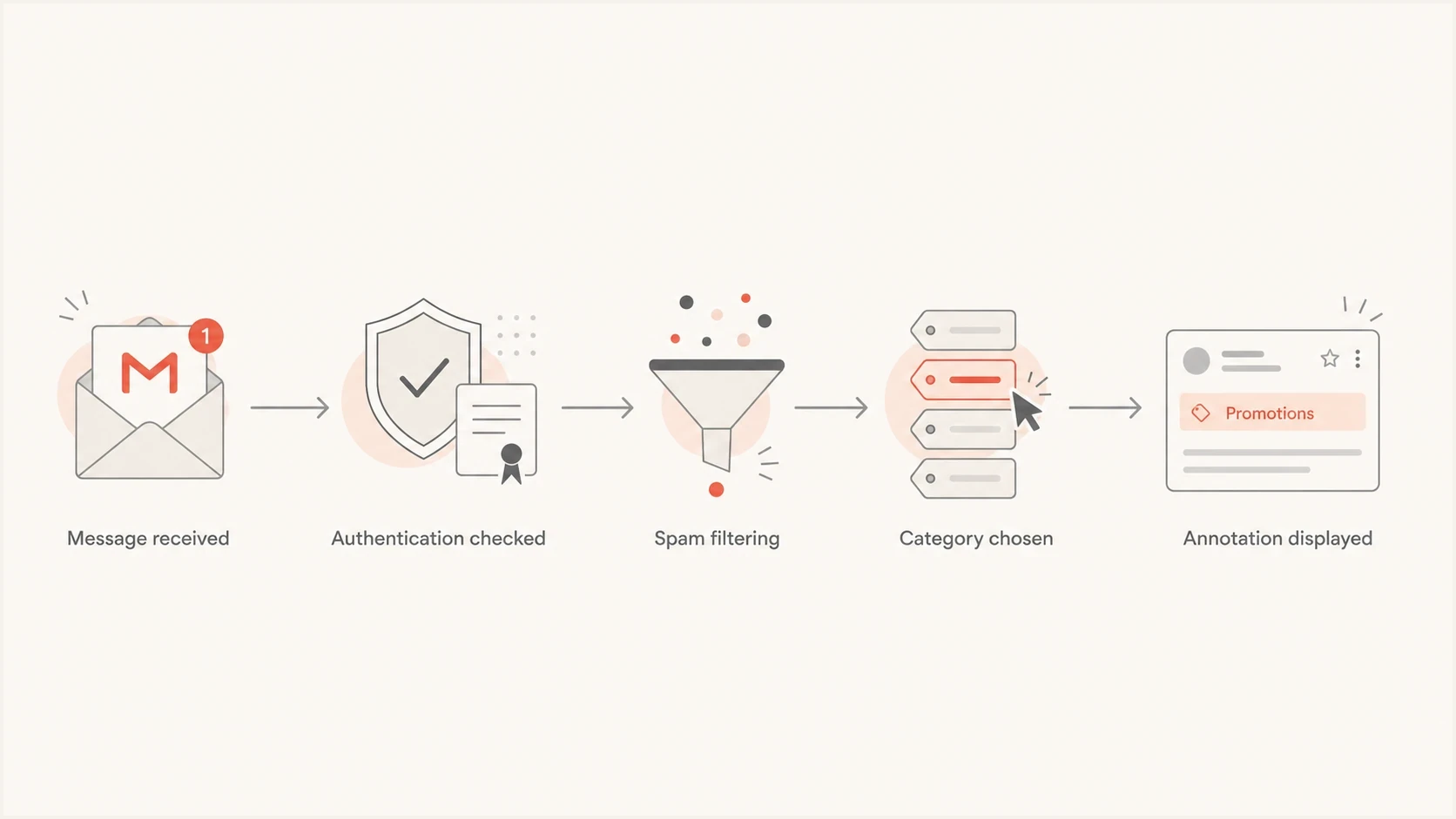
Flowchart showing annotations after authentication, spam filtering, and category choice.
What Google Annotations actually change
Google Annotations are structured data placed in the email HTML. Gmail can use that data to render richer promotional treatments, such as a deal badge, image preview, product carousel, or deal card. The key phrase is "can use". Gmail still decides whether the annotation appears, and not every recipient sees the same display.
The annotation sits inside the message markup. It does not change the envelope sender, DKIM signing domain, DMARC alignment, sending IP, complaint rate, unsubscribe behavior, or recipient history. Those are delivery signals. Annotation markup is display metadata.
|
|
|
|---|---|---|
Spam | No lift | Reputation |
Primary | No force | User behavior |
Promotions | Can display | Markup |
Most relevant | Can rank | Engagement |
How annotations relate to Gmail placement
Personal Gmail users can sort Promotions by Most relevant or Most recent. Most relevant sorting can highlight senders a user engages with and surface timely deal nudges. This changes ranking inside the Promotions category, not whether the message reached the inbox.
The useful mental model is that Gmail first decides whether the message deserves delivery, then decides where to categorize it, then ranks it for the recipient, and finally decides whether to show the extra presentation data. For more detail on categorization, see how Gmail decides Promotions placement.
Implementation details that matter
Google supports annotation data through JSON-LD or microdata in the email HTML. JSON-LD can sit in the head or body, while microdata is a useful fallback when a sending platform strips script tags. Keep all fields for one annotation object together. Product carousels can contain up to 10 unique PromotionCard objects, and the offer data must match the campaign.
Example Gmail annotation for an offerHTML
<head>
  <script type="application/ld+json">
  [{
    "@context": "http://schema.org/",
    "@type": "DiscountOffer",
    "description": "20% off summer sale",
    "discountCode": "SUMMER20",
    "availabilityStarts": "2027-06-01T09:00:00-04:00",
    "availabilityEnds": "2027-06-03T23:59:00-04:00"
  }]
  </script>
</head>
Some campaign builders expose annotation fields without requiring hand-edited HTML. Regardless of how the markup is added, inspect the received message rather than relying only on the editor preview. Template processing can remove a script tag, split one annotation object across locations, or leave old campaign values in place.
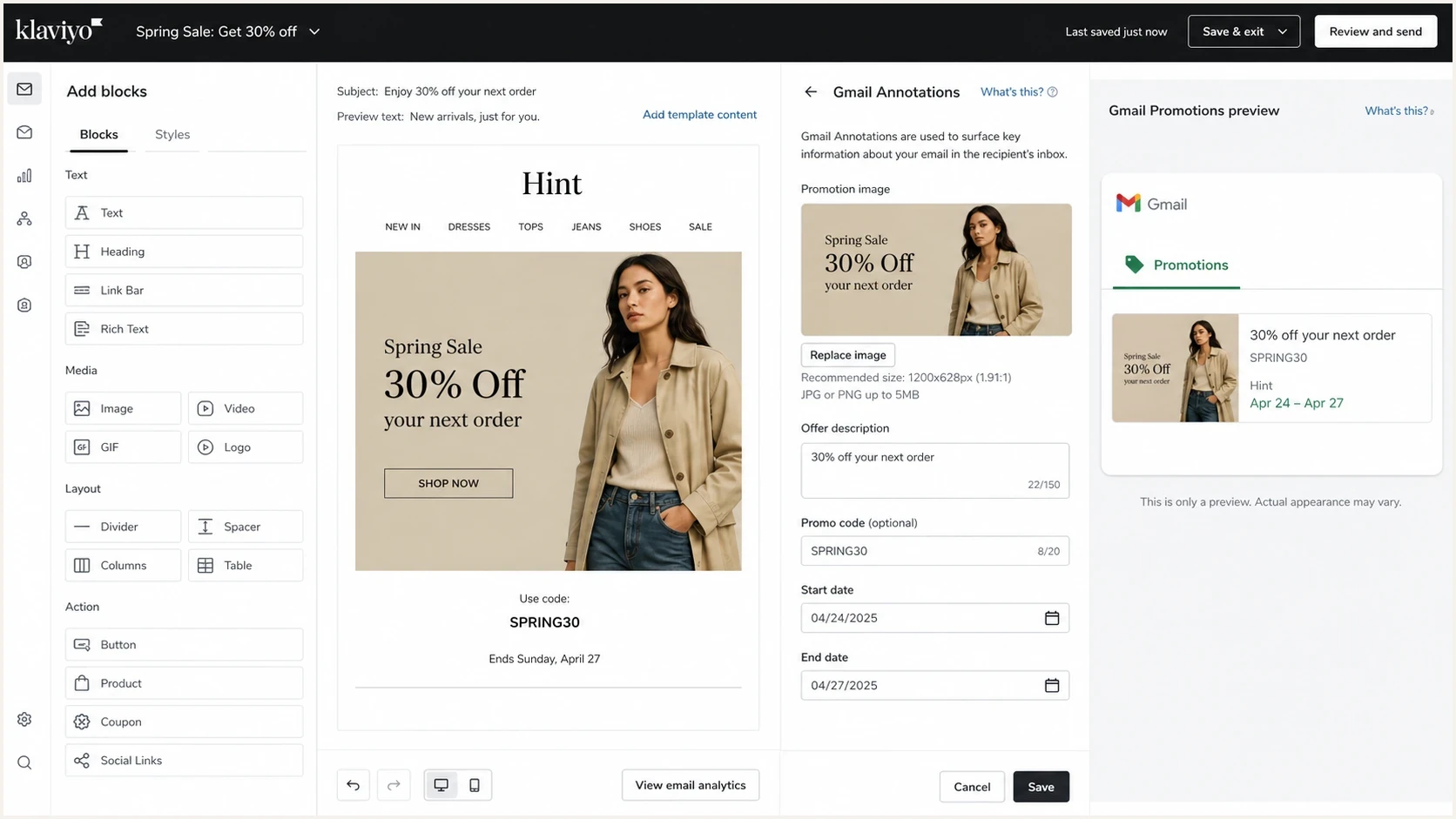
Klaviyo campaign editor screen showing Gmail Annotations settings.
Keep the annotation payload conservative. Use unique product or lifestyle images over HTTPS and crop them for 4:5, 1:1, or 1.91:1 display. Keep a deal badge to four words or fewer, include a discount code only when it also appears in the email, and use ISO 8601 offer dates with a time zone. Expired dates can prevent an email from appearing in a promotional bundle.
Where annotations can appear
Annotation rendering has a narrower scope than Gmail delivery. The rich Promotions experience applies to personal Gmail accounts, not Google Workspace accounts, and the message must already be in the Promotions tab. Valid markup makes the message eligible, but it does not guarantee a badge, image, carousel, bundle, or deal card.
- Account: Test with a personal Gmail account rather than a Google Workspace mailbox.
- Category: The message must be in Promotions before annotation markup can display.
- Message state: Use a fresh, unopened message sent that day when checking bundle rendering.
- Account settings: Keep images visible, conversation view on, and Top Email bundling enabled.
Gmail can withhold annotations because of quality filters, frequency limits, test-account holdbacks, or sensitive content categories. Use the latest Gmail app and more than one test account. If a new test account puts the first message elsewhere, move it to Promotions, then send a fresh message from the same address with a different subject line.
Where placement still gets decided
When a Gmail campaign has placement trouble, check the sender system before annotations. A polished product carousel on a domain with broken authentication, high complaint rates, or a new sending IP with no reputation still has a delivery problem.
Placement signals
- Authentication: SPF and DKIM should pass, and at least one must be aligned with the visible From domain for DMARC.
- Reputation: Gmail watches sending history, complaints, and recipient behavior.
- List quality: Old, rented, or unengaged lists create spam risk quickly.
- Content fit: The message must match what recipients expect to receive.
Annotation signals
- Offer data: Descriptions, promo codes, and dates should be accurate.
- Image data: Image URLs should use HTTPS and match the visible email.
- Markup validity: JSON-LD or microdata should parse without errors.
- Display choice: Gmail still decides whether a rich treatment appears.
This is also why Primary versus Promotions testing gets messy. Moving a promotional email into Primary is not the same thing as improving deliverability. For a commercial campaign, Promotions placement with strong engagement is usually healthier than forcing Primary-like signals and irritating subscribers. The difference between Primary versus Promotions matters because category placement and spam placement answer different questions.
What to check first
- Authentication: Confirm SPF and DKIM pass, with at least one aligned to the visible From domain.
- Complaints: Reduce complaint sources before changing design.
- Reputation: Check domain and IP health, including blocklist and blacklist status.
- Engagement: Compare clicks, replies, unsubscribes, and complaint rates by Gmail segment.
Testing without false conclusions
Use an A/B test where the campaign content, audience, send time, domain, and sending infrastructure stay the same. One cell has annotation markup, and one cell does not. Measure category distribution separately from engagement. Blending those numbers will over-credit annotations for work done by list quality or offer relevance.
Before sending to a live list, send a real test and inspect the received source. Confirm that the HTML survives template processing, the JSON-LD or microdata remains intact, and tracking or minification has not changed the payload.
Email tester
Send a real email to this address. Suped shows a results button when the test is ready.
?/43tests passed
Then separate the report into delivered inbox category, delivered to spam, annotation visible, and engagement. Annotation visibility alone is not success. A campaign can display a rich card and still underperform if the offer is weak. A campaign can also win without the annotation if the audience already wants the mail.
What to watch during an annotation test
Use these as practical operating bands, not universal Gmail benchmarks.
Healthy
Stable
Authentication passes and spam complaints stay controlled.
Review
Mixed
Category shifts without clear engagement gains.
Stop
Worse
Spam placement or complaints rise after the change.
How Suped helps separate display from delivery
Annotations are useful only after the underlying sender setup is healthy. Suped's product fits this workflow by monitoring DMARC authentication, identifying failing sources, and helping teams resolve domain-level problems before they judge a Gmail annotation test.
Use Suped's DMARC monitoring to confirm aligned authentication before judging a Gmail annotation test. If legitimate sources fail DMARC alignment, the annotation experiment cannot isolate the display change. Fix the mail stream first, then test the presentation layer.

Issue steps to fix dialog showing the issue overview, tailored fix steps, and verification action
The same applies to domain health. A quick domain health check catches obvious SPF, DKIM, and DMARC gaps before a marketing team spends time tuning annotation markup. For reputation issues, Suped's blocklist monitoring tracks domain and IP listings across major blocklists (blacklists), which is more relevant to spam placement than a deal badge.
Practical workflow
- Authenticate: Verify SPF, DKIM, and DMARC alignment for each sender.
- Monitor: Use alerts when authentication failures spike.
- Stabilize: Resolve unverified sources and blocklist or blacklist exposure.
- Experiment: Add annotations after the sender baseline is steady.
That order keeps the experiment honest. Suped's authentication monitoring, domain health checks, and reputation alerts do not create or control annotations. They support the sender foundation that Gmail evaluates before a rich Promotions treatment matters.
Views from the trenches
Best practices
Confirm authentication and category placement before judging any annotation test result.
Use annotations for clear offers where images and dates help subscribers decide faster.
Track annotation visibility separately from opens, clicks, spam placement, and revenue.
Keep offer markup accurate, current, and consistent with the visible email content.
Common pitfalls
Treating a Promotions rich card as proof that deliverability improved across Gmail.
Testing annotations while changing audience, offer, template, and send timing together.
Expecting every Gmail recipient to see the same carousel, badge, or promotional card.
Ignoring domain reputation because the annotation preview renders correctly in testing.
Expert tips
Run small annotation tests after sender health is stable, not during reputation repair.
Compare Gmail segments by category and spam placement before reviewing click results.
Assume Gmail can ignore valid markup when frequency limits or quality filters apply.
Use annotation data to improve Promotions display, not to force Primary placement.
Marketer from Email Geeks says annotations do not affect placement; they work only when the email has already landed in the Promotions tab.
2023-07-18 - Email Geeks
Marketer from Email Geeks says Gmail will place mail in spam, Updates, or another category when its filters choose that outcome, and the annotation will be ignored.
2023-07-18 - Email Geeks
Practical takeaway
Google Annotations are worth using for promotional campaigns with real offers, relevant imagery, and clean markup. They help Gmail understand how to display the offer when the message is eligible for rich Promotions treatment.
They are not a deliverability fix. If Gmail sends mail to spam, solve the sender problem: authentication, reputation, complaints, list quality, frequency, and subscriber expectations. After that baseline is stable, annotations are a reasonable optimization for engagement inside Promotions.
The operating rule is simple: fix delivery first, then optimize presentation. That order prevents a visual experiment from hiding the real issue.




