Do email unsubscribes negatively affect sender reputation?

Updated on 28 Jul 2026: We updated this guide with current one-click unsubscribe requirements and clearer ways to diagnose opt-out spikes.
No, email unsubscribes do not negatively affect sender reputation by themselves. A normal unsubscribe is a recipient choosing the clean exit. It is much better than a spam complaint, repeated deletion without reading, or ongoing sends to someone who no longer wants the mail.
The caveat is important: a high unsubscribe rate can reveal a reputation problem already forming. It often points to weak consent, poor segmentation, sudden frequency changes, misleading expectations, or a list source that does not match the campaign. Treat unsubscribes as a diagnostic signal, not as the direct penalty.
If a campaign suddenly gets more opt-outs and inbox placement changes at the same time, send a real message through an email tester and compare the authentication results, headers, and content signals with a normal campaign.
The short answer
Mailbox providers care about whether recipients want your mail. An unsubscribe is a controlled signal that says, "stop sending this kind of mail to me." A complaint is a stronger negative signal that says, "this message should not be in my inbox." Those two actions do not carry the same weight.
- Direct effect: A routine unsubscribe is not treated like a spam complaint on its own.
- Indirect meaning: A spike in unsubscribes is evidence that the audience, offer, timing, or cadence missed the mark.
- Bigger risk: Hiding the unsubscribe path pushes frustrated recipients toward the spam button.
- Best response: Honor the opt-out quickly, suppress the address, and investigate the campaign pattern.
Plain answer
Make unsubscribing easy. A visible unsubscribe link protects reputation because it gives people a clean way to leave before they complain. The unsubscribe itself is not the harm; refusing to respect it is where the risk starts.
Why unsubscribes are different from complaints
The confusion comes from grouping every negative-looking action together. Opting out, reporting spam, bouncing, and ignoring mail all describe different recipient or system behavior. They deserve different responses.
Unsubscribe signal
An unsubscribe tells you the recipient no longer wants that stream of mail. It is a preference change. It also reduces future unwanted sends when your suppression process works.
- Action: Stop sending that mail type to the recipient.
- Meaning: The content, cadence, or promise no longer fits that person.
Complaint signal
A spam complaint tells the mailbox provider the recipient believes the message should not be there. That signal is harsher because it is reported directly inside the inbox.
- Action: Suppress, reduce risk, and inspect list quality.
- Meaning: The recipient saw the message as unwanted or unsafe.
This is why a clear List-Unsubscribe header and a visible body link matter. A hidden unsubscribe link does not save reputation. It makes the complaint path easier than the opt-out path.
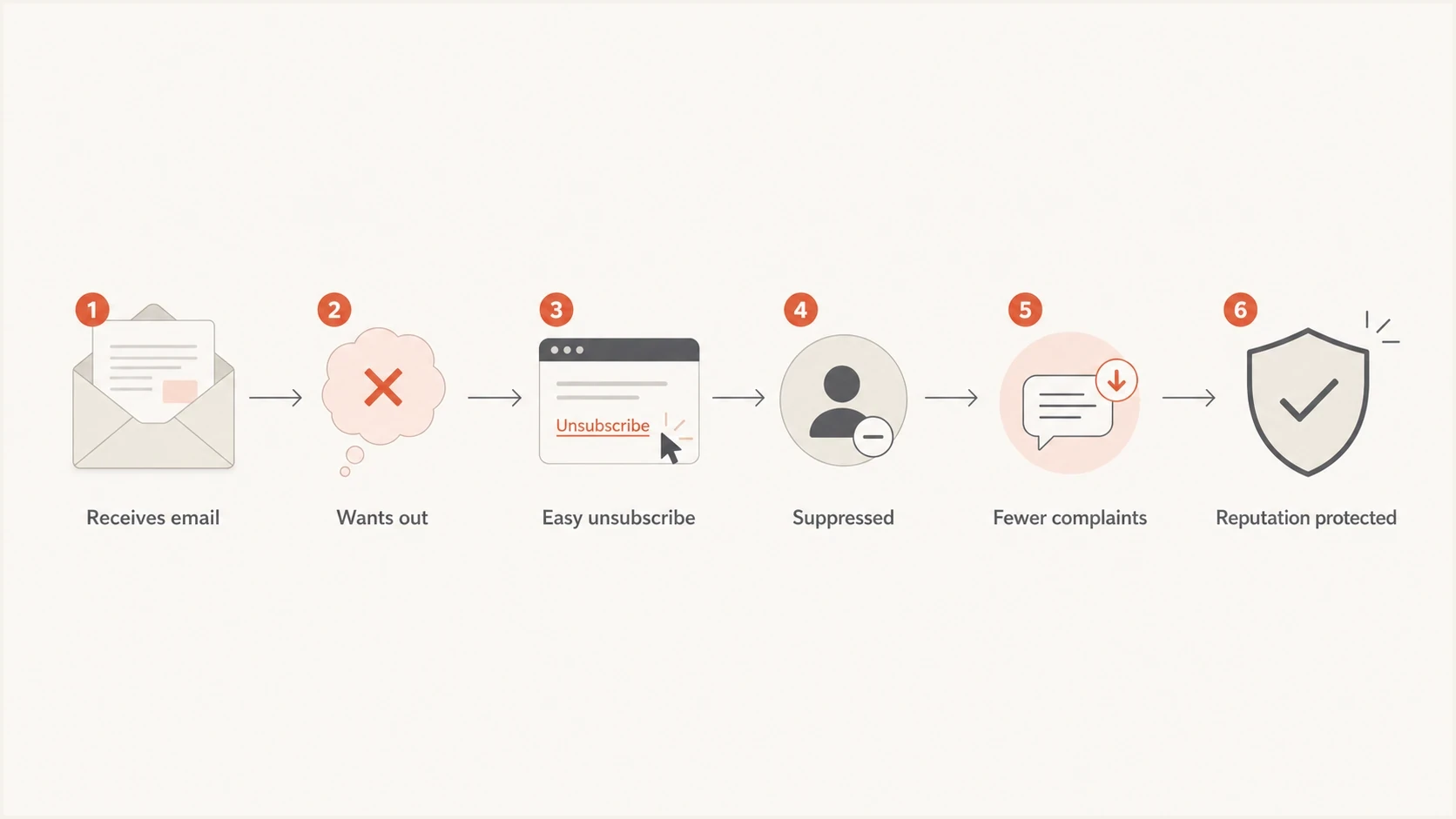
Flowchart showing an email recipient using an easy unsubscribe path that leads to suppression, fewer complaints, and protected sender reputation.
What mailbox providers and senders can see
A body unsubscribe click often looks like any other link click to the sender. A header unsubscribe can be handled by the mailbox provider and passed to the sender through the unsubscribe endpoint. A spam complaint is different because it is the recipient using the provider's complaint control.
|
|
|
|
|---|---|---|---|
Body opt-out | Low | Preference | Suppress |
Header opt-out | Low | Wants out | Honor |
Spam report | High | Unwanted | Reduce |
Hard bounce | High | Bad address | Remove |
Blocklist or blacklist listing | Varies | External reputation | Investigate |
Common reputation signals and what to do with them.
When unsubscribes rise together with spam reports, bounces, or blocklist (blacklist) listings, the issue is broader than opt-outs. That is when blocklist monitoring helps you see whether a domain or IP has an external reputation problem that matches the campaign timeline.
Do not hide the exit
A hard-to-find unsubscribe link does not reduce real dissatisfaction. It only changes where that dissatisfaction shows up. The spam button is always visible, so your unsubscribe path has to be easier than the complaint path.
What to monitor when unsubscribes spike
Do not judge unsubscribes as a single number. Compare the rate with the sender's own baseline, the campaign type, the list source, and the provider mix. A promotional newsletter to a cold segment has a different normal range than a product update to active customers.
Unsubscribe spike thresholds
Use your own recent campaign baseline. Direction and persistence matter more than a universal rate.
Normal
Baseline range
Within the usual range for comparable campaigns.
Watch
Above baseline
A clear increase needs a segment and campaign review.
Investigate
Sharp sustained rise
Pause similar sends while a sharp or sustained increase is investigated.
Calculate the rate consistently as unique unsubscribes divided by delivered messages, then compare campaigns with the same mail stream and audience source. A spike is not a reputation penalty. It is a clue. Look for what changed before the spike, then decide whether to pause, segment, reduce frequency, or repair data quality.
- Segment change: New, older, or less engaged contacts usually opt out at a higher rate.
- Frequency change: More sends in a short window can turn passive disinterest into active opt-outs.
- Promise mismatch: The email topic needs to match what people expected when they signed up.
- Consent and acquisition: Purchased, rented, scraped, or stale contacts create high opt-out and complaint risk.
- Data import: A new upload can reintroduce suppressed contacts if controls are weak.
- Provider pattern: If the spike is concentrated at one mailbox provider, inspect placement and headers there first.
Before blaming unsubscribes, run a domain health checker to verify that SPF, DKIM, DMARC, DNS, and related domain signals are not failing at the same time.
Email tester
Send a real email to this address. Suped shows a results button when the test is ready.
?/43tests passed
How to make unsubscribes protect reputation
The goal is not to suppress opt-outs as a metric. The goal is to make sure people who want to leave can leave cleanly, then use the opt-out data to improve targeting and cadence.
List-Unsubscribe header exampletext
List-Unsubscribe: <https://example.com/u/abc123>,
 <mailto:unsubscribe@example.com?subject=unsubscribe>
List-Unsubscribe-Post: List-Unsubscribe=One-Click
Use both a visible body link and a working header unsubscribe path. The body link helps people who scroll. The header path helps inbox clients show their own unsubscribe control. The broader unsubscribe best practices matter because scanners, preference centers, and one-click flows can all change how opt-outs are recorded.
Do this
- Placement: Put the unsubscribe link where a normal reader can find it quickly.
- Language: Use direct terms such as "unsubscribe" or "manage preferences."
- Processing: Suppress contacts immediately for the relevant mail stream.
- Auditing: Test the link, header, and suppression path after template changes.
Avoid this
- Obscurity: Do not bury the only exit behind vague footer language.
- Delay: Do not keep sending while waiting for batch suppression.
- Reimport: Do not allow future uploads to overwrite suppression status.
- Confusion: Do not mix preference-down clicks with full account-level opt-outs.
Operational rule
If someone unsubscribes, the safest reputation move is to stop that mail stream right away. A later accidental send to an unsubscribed recipient is much harder to defend than the original opt-out.
One-click unsubscribe requirements for bulk senders
For bulk marketing and subscribed messages, one-click unsubscribe is now a mailbox-provider requirement, not an optional footer improvement. Gmail applies its bulk-sender requirements once a sender reaches 5,000 messages to personal Gmail accounts in one day, and it requires a visible body link plus RFC 8058 one-click support. Yahoo does not publish a fixed bulk-volume threshold, and it requires a functioning List-Unsubscribe header for bulk marketing mail plus a visible body link.
- Use HTTPS POST: The List-Unsubscribe header needs a recipient-specific HTTPS URL, and List-Unsubscribe-Post needs the value "List-Unsubscribe=One-Click."
- Sign the headers: A valid DKIM signature must cover List-Unsubscribe and List-Unsubscribe-Post for RFC 8058 handling.
- Process within 48 hours: Gmail recommends fulfilling requests within 48 hours, and Yahoo requires bulk senders to honor them within two days.
- Keep mail streams separate: Remove the recipient from the list tied to the message without blocking essential account or security mail.
A mailto link is not one-click
A mailto value can remain in List-Unsubscribe as a fallback, but it does not satisfy Gmail's one-click requirement. The compliant one-click action uses an HTTPS endpoint that accepts the RFC 8058 POST without a login, confirmation page, or preference form.
How Suped fits into the workflow
Unsubscribe data usually sits in an email platform, while authentication and domain reputation data sit somewhere else. That split makes troubleshooting slower. Suped's DMARC monitoring gives teams a cleaner view of the domain side of the story: who is sending, whether SPF and DKIM pass, how DMARC is behaving, and where authentication issues need fixing.
Suped DMARC dashboard showing email volume, authentication health, and source breakdown
For an unsubscribe spike, Suped does not treat opt-outs as DMARC failures. The value is context. If the spike happens while a new sender starts failing DKIM, a domain has no DMARC reporting, or a campaign source is not authenticated, Suped helps show the issue quickly.
- Issue detection: Suped highlights authentication issues and gives practical steps to fix them.
- Real-time alerts: Teams can react when failures rise instead of waiting for a weekly report.
- Hosted controls: Hosted DMARC, Hosted SPF, SPF flattening, and Hosted MTA-STS reduce DNS friction.
- Shared visibility: MSP and multi-domain teams can monitor many domains in one clean workspace.
Use Suped's DMARC, SPF, DKIM, blocklist, and blacklist findings beside campaign unsubscribe and complaint data. That combined timeline helps separate an audience or cadence problem from an authentication or domain reputation problem.
Views from the trenches
Best practices
Make the unsubscribe action visible, plain, and fast so complaints are not the easy exit.
Track unsubscribe rate against campaign baselines, not against a universal number.
Remove unsubscribed recipients immediately and keep suppression lists out of imports.
Read unsubscribe spikes with complaint, bounce, and engagement data before changing volume.
Common pitfalls
Treating all unsubscribes as reputation damage leads to hidden links and more complaints.
Waiting days to suppress opt-outs increases the chance of duplicate sends after consent ends.
Using vague footer text makes the spam button feel faster than your own preference flow.
Ignoring list source changes hides the real reason a campaign produced unusual opt-outs.
Expert tips
Separate preference-down clicks from full opt-outs so you can keep wanted mail active.
Compare unsubscribes by provider because Gmail, Yahoo, and Microsoft behavior differs.
Keep body and header unsubscribe paths working after template migrations and ESP changes.
Pair DMARC reports with campaign metrics to spot authentication issues near opt-out spikes.
Expert from Email Geeks says making unsubscribes easier than spam complaints is the safer path because recipients who want out need a low friction exit.
2023-04-21 - Email Geeks
Marketer from Email Geeks says a sudden flurry of unsubscribes is a warning signal, even when the unsubscribe itself is not the penalty.
2023-04-21 - Email Geeks
What to do next
Do not panic over normal unsubscribes. Make the unsubscribe path obvious, process opt-outs immediately, and review spikes against campaign history. If the opt-out rate rises without complaints, the list is telling you to adjust targeting or cadence. If complaints, bounces, authentication failures, or blocklist (blacklist) listings rise too, treat it as a deliverability incident.
The practical answer is simple: unsubscribes do not directly hurt sender reputation, but they are worth listening to. They help remove people who do not want the mail, and that protects the sender when the suppression process is fast and reliable.




