Can you set up an SMTP relay in an MTA for Comcast?

Updated on 4 Sep 2026: We clarified Xfinity's current SMTP ports, account-access requirements, sending limits, and the difference between authenticated submission and direct delivery.
You can configure an MTA to relay mail through Comcast's authenticated SMTP submission service for a Comcast or Xfinity mailbox. You should not use a Comcast residential internet connection as a direct outbound mail server. Those are separate designs, and confusing them causes most setup failures.
For Postfix, Exim, or a similar local MTA, use authenticated submission to smtp.comcast.net on 587 with TLS. Xfinity also lists 465 with implicit TLS as a fallback. Direct delivery to recipient MX hosts from a Comcast residential IP on 25 is unsupported and blocked, and the IP range can also appear on a policy blocklist (blacklist).
- Residential: Do not plan to run a public outbound MTA from the connection.
- Comcast SMTP: Use authenticated submission only for account-tied mail within Xfinity's limits.
- Custom domains: Use a domain-authenticated sending path when SPF, DKIM, and DMARC must match your visible From domain.
- Testing: After changing the relay, send a test and inspect the headers, SMTP result, and authentication outcome.
Do not treat Comcast residential broadband as a mail host
A working local MTA queue does not mean the connection is suitable for internet-facing mail delivery. Xfinity does not support residential port 25, and a policy blocklist or blacklist entry for residential address space has no clean sender-side remediation path.
What Comcast will and will not relay
The workable Comcast setup is authenticated SMTP submission, not an open relay. Your MTA logs in as a Comcast or Xfinity mailbox user, submits mail to Comcast's SMTP server, and Comcast accepts or rejects the message under that account's settings and limits.
Xfinity publishes client setup guidance for mailbox users, and the Xfinity setup notes are the starting point. For an MTA, the same account requirements belong in relayhost, TLS, and SASL settings instead of a desktop mail app.
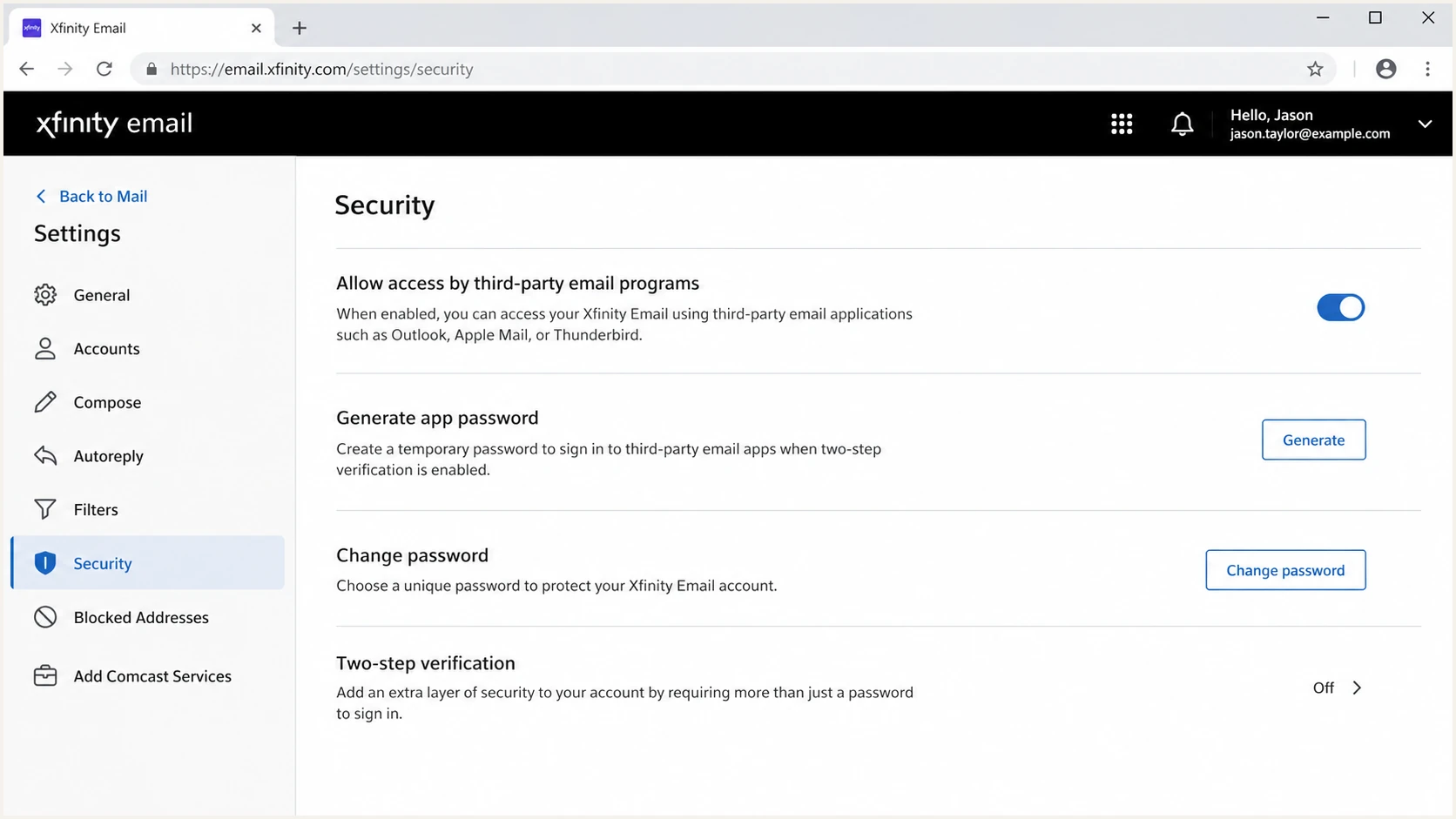
Xfinity Email security settings for third-party app access.
|
|
|
|---|---|---|
Relay to Comcast SMTP | Yes | Needs mailbox authentication and TLS |
Direct outbound 25 | No | Unsupported on residential service |
Business static IP | Conditional | Needs an approved mail service design |
Bulk domain mail | No | Use a domain-authenticated sending platform |
Common Comcast MTA relay scenarios
Use Comcast SMTP relay only for system notifications, low-volume mailbox mail, or internal devices that need a local queue. Do not treat it as a backup when another outbound service gets listed, throttled, or rejected. A backup path needs its own reputation, authentication, and operational support.
Why direct sending from Comcast residential fails
A residential broadband IP is a weak identity for sending mail. It usually has dynamic assignment, generic reverse DNS, no stable abuse handling path for senders, and a network policy that treats direct outbound SMTP as a risk. Even with a clean MTA, receivers evaluate the IP range before domain authentication can help.
Policy blocklist and blacklist data matters here. If an IP range is listed because residential users are not supposed to run mail servers, authentication fixes on your domain do not remove the network-level objection. Suped's blocklist monitoring can track domain and IP reputation, but a residential policy listing remains an architecture problem rather than a monitoring problem.
Authenticated relay
- Path: Your MTA submits to Comcast SMTP over TLS.
- Identity: The Comcast mailbox credentials authorize submission.
- Use case: Local alerts, scripts, lab systems, and low-volume notifications.
Direct residential MTA
- Path: Your MTA connects straight to recipient MX hosts.
- Identity: The broadband IP range is the first trust signal.
- Use case: Avoid it for internet mail from residential service.
Comcast outbound path risk
A practical way to classify relay choices before changing your MTA.
Low
Submission
Authenticated Comcast mailbox relay for small account mail.
Medium
Approved
Business internet with an approved mail architecture and static identity.
High
Direct MX
Direct outbound SMTP from residential Comcast address space.
When diagnosing rejection text, separate relay authorization from receiver-side filtering. A relaying denied error often means the submission server did not accept you as an authorized sender. Comcast recipient-side deferrals and blocks have a different troubleshooting path.
How to configure Postfix safely
Use this pattern when local software needs to hand small amounts of mail to a Comcast mailbox relay. If the goal is brand mail for your own domain, use an outbound path that lets you authenticate that domain directly.
The common Postfix setup uses relayhost with SASL credentials. A community Xfinity Postfix thread points to smtp.comcast.net on 587 with authentication. A Business SMTP thread shows that Comcast Business credentials are not interchangeable with Xfinity mailbox credentials and that third-party access settings matter.
Postfix relay settingsBASH
# /etc/postfix/main.cf
relayhost = [smtp.comcast.net]:587
smtp_sasl_auth_enable = yes
smtp_sasl_password_maps = hash:/etc/postfix/sasl_passwd
smtp_tls_security_level = encrypt
smtp_sasl_security_options = noanonymous
Postfix SASL credential mapBASH
# /etc/postfix/sasl_passwd
[smtp.comcast.net]:587 username@comcast.net:account-password

postmap /etc/postfix/sasl_passwd
chmod 600 /etc/postfix/sasl_passwd /etc/postfix/sasl_passwd.db
postfix reload
Configuration checklist
- Account: Use the full Comcast.net email address as the username and confirm the mailbox can send through Xfinity webmail.
- Access: In Xfinity Email, open Settings, select Security, and allow access through third-party programs.
- TLS: Use port 587 with TLS, or port 465 with implicit TLS only when the client requires the fallback.
- Scope: Restrict local relay access to trusted devices or processes only.
Before moving this beyond a lab host, run a domain health check on the sending domain. If the visible From domain differs from the Comcast mailbox domain, verify that SPF or DKIM still provides the domain match DMARC requires. Relay acceptance alone does not make the message production-ready.
?
What's your domain score?
Deep-scan SPF, DKIM & DMARC records for email deliverability and security issues.
Suped's product can collect DMARC aggregate reports, identify sources that fail SPF or DKIM, and monitor blocklist (blacklist) status. In this workflow, those findings show whether messages relayed through Comcast still authenticate as the visible From domain and which sending source needs a DNS or configuration change.

Issue steps to fix dialog showing the issue overview, tailored fix steps, and verification action
Xfinity limits that affect an MTA
A successful SMTP login does not remove account-level controls. Xfinity's published email sending limits for residential customers cap each message at 100 recipients, cap an account at 1,000 recipients per day, and cap the complete message at 25 MB.
|
|
|
|---|---|---|
Recipients per message | 100 | Split larger recipient sets |
Recipients per day | 1,000 | Queue retries cannot bypass the daily cap |
Complete message size | 25 MB | Headers and attachment encoding count |
Published Xfinity Email sending limits
Attachment encoding increases the transmitted message size, so a file smaller than 25 MB can still exceed the limit. Xfinity also blocks listed file extensions. Test voicemail, scanner, and monitoring attachments with their real filenames and encoded sizes before relying on the relay.
Queueing does not bypass account limits
Postfix can retain mail when an upstream submission attempt fails, but repeated delivery attempts do not raise Xfinity's recipient or message-size limits. Alert on queue age and rejected submissions so a capped account does not hide delayed notifications.
Where Comcast relay fits in a mail architecture
A Comcast relay can be a convenience layer, not the foundation of a sender program. An MTA has responsibilities beyond moving bytes. It needs a sender identity, bounce handling, authentication, abuse controls, retries, and a supported path when receivers reject or defer mail.
If messages to Comcast recipients are failing, treat that as receiver-side delivery troubleshooting. Check SMTP response codes, volume, complaint signals, reverse DNS, authentication, and sender reputation. The Comcast rejections path is separate from asking Comcast residential broadband to act as outbound mail infrastructure.
|
|
|
|---|---|---|
Server alerts | Good fit | Keep volume low |
Printer mail | Good fit | Check TLS and attachment support |
Company domain | Poor fit | Use authenticated domain mail |
Bulk mail | Do not use | Use managed sending |
When to use each outbound path
Do not use Comcast as a reputation escape hatch
If another relay is on a blocklist or blacklist, moving traffic to Comcast does not fix the cause. It hides the symptom until authentication, policy, volume, or complaint problems appear again.
For a real domain, keep the mail path predictable: SPF authorizes the sending service, DKIM signs with a domain you control, DMARC receives reports and applies policy, and failures create operational tickets instead of guesswork.
Testing and monitoring after setup
After the relay accepts mail, do not stop at a green queue. Check the message at the receiving side. Inspect the SMTP response, final Received headers, TLS use, From domain, Return-Path, SPF result, DKIM result, DMARC result, and inbox placement.
If this is more than a personal notification relay, turn on DMARC monitoring before enforcement. DMARC aggregate reports show which sources send as your domain, which pass, which fail, and which need SPF or DKIM changes before a stricter policy.
Email tester
Send a real email to this address. Suped shows a results button when the test is ready.
?/43tests passed
Suped's hosted SPF can keep authorized sources within the SPF lookup limit, while hosted DMARC can stage policy changes without repeated DNS edits. Suped's hosted MTA-STS can publish and maintain the receiving-domain TLS policy through two CNAME records.
An SMTP relay setting can make mail leave your server, but it does not prove the architecture fits the mail you are sending. Treat the relay as one part of the sender identity, then validate the receiving result.
Views from the trenches
Best practices
Confirm whether you mean authenticated relay or direct MX delivery before editing MTA files.
Use authenticated submission for small system mail, then test message headers at the receiver.
Document account ownership and third-party access settings so relay failures are easier to fix.
Common pitfalls
Assuming a queued message means deliverability is solved creates blind spots in production mail.
Trying to send direct mail from residential IP space usually fails before authentication matters.
Using Comcast as a backup for a listed sender shifts the problem instead of fixing reputation.
Expert tips
Check policy blocklist status early because it explains failures that DNS edits cannot repair.
Keep local relay access locked down so internal devices cannot turn the MTA into an open relay.
Separate Comcast recipient rejections from Comcast outbound relay setup during troubleshooting.
Expert from Email Geeks says most US broadband providers block outbound port 25 or prohibit mail servers on consumer service.
2026-06-23 - Email Geeks
Marketer from Email Geeks says Comcast residential address space is generally unsuitable for direct outbound SMTP because policy listings and port blocks apply.
2026-06-23 - Email Geeks
Can you use Comcast as an SMTP relay?
Yes, you can set up an SMTP relay in an MTA for Comcast when the MTA submits mail to Comcast's authenticated SMTP service with valid mailbox credentials, TLS, and third-party access enabled. No, you should not run a direct outbound MTA from Comcast residential broadband and expect reliable delivery.
Use Comcast relay for small account-tied mail within the published limits. For domain mail, use a sending path that supports your domain identity, then monitor DMARC, SPF, DKIM, blocklists, blacklists, and receiver responses. Suped's product supports that workflow by showing authentication health, flagging failed sources, and providing specific remediation steps.