What causes a 'relaying denied' error when sending emails, and how can I diagnose the issue?

Published 23 May 2025
Updated 24 Aug 2026
16 min read
Summarize with
Updated on 24 Aug 2026: We updated this guide to distinguish sender and recipient faults and prevent unsafe relay configuration.
A relaying denied error means a mail server refused to accept the message because it did not consider the sender authorized to relay, or it did not consider the recipient domain local. In practical terms, your sender reached a mail host, issued the SMTP conversation, and the host said: this recipient is not local here, and you are not allowed to use me as the relay.
The likely cause depends on which server issued the rejection. If an app or mail client is submitting through its outbound server, the usual causes are missing SMTP authentication, the wrong server or port, an untrusted source IP, or a sender identity the relay does not permit. If an outside sender reaches a domain's published MX and that MX rejects the domain as non-local, the receiving side has an MX, accepted-domain, or routing fault.
Destination-side faults often appear during migrations, abandoned bounce domains, suspended mail services, wrong MX targets, and platforms that route replies or bounces to a domain that no longer has working mail handling. Sender-side faults often follow credential changes, connector changes, or an application moving to a new source IP.
The fastest diagnosis is simple: identify which system issued the error, look up the recipient domain's MX records, connect to each MX host directly, run the SMTP conversation until the RCPT TO stage, and compare the rejection across hosts. If every MX says 550 5.7.1 relaying denied, the problem is usually at the recipient domain or its mail provider, not your sender.
What relaying denied means
SMTP servers handle two different jobs. They accept mail for domains they host, and they relay mail for authenticated or trusted senders. A relaying denied response appears when the server thinks neither condition is true.
That distinction matters because the wording can mislead people. It can mean your application used the wrong outbound SMTP server without authentication. But when the recipient domain publishes an MX record pointing at the rejecting host, the host itself is often not ready to receive mail for the domain.
- Recipient setup: The MX target exists, but the receiving server does not have the domain in its accepted-domain, virtual-host, or local-recipient configuration.
- Sender setup: The sender used a relay host that requires SMTP authentication, a trusted IP, TLS, or a specific envelope sender domain.
- DNS setup: MX records point at the wrong host, old provider, parked domain, stale migration target, or a host with split internal and external routing.
- Platform setup: A marketing, CRM, billing, or ticketing system uses a bounce, reply, or inbound route domain that has been removed, suspended, or only partly provisioned.
The direct test
If the sender is a normal outside sender and the recipient domain's MX points at the rejecting server, a relay denial usually proves that the destination mail routing is incomplete or stale. Treat it as a routing and accepted-domain problem first, then check recipient policy if the same server accepts other addresses on that domain.
Common causes
The exact SMTP reply varies. You will see 550 5.7.1, 553, 554 5.7.1, 454 4.7.1, relay access denied, relay not permitted, and we do not relay. RFC 3463 defines 5.7.1 as delivery not authorized, message refused. Servers use it for relay policy and other host or recipient filtering, so the words after the code and the SMTP stage matter more than the number alone.
A 4xx reply asks the sending mail server to retry later. A 5xx reply ends that delivery attempt and normally produces a non-delivery report, although a new attempt can succeed after the underlying configuration changes. Identify which server rejected the recipient before deciding whether to wait or fix a permanent policy fault.
|
|
|
|---|---|---|
Wrong MX | DNS | The domain points to a host that does not receive for it. |
Migration drift | Old MX | DNS changed before the new tenant or mailbox routing was complete. |
Dead bounce domain | Return path | Automated replies or bounces go to a domain the sender no longer handles. |
Relay auth missing | SMTP auth | The sender used a submission or relay server without permission. |
TLS missing | Relay policy | The relay requires STARTTLS or implicit TLS before it accepts mail. |
Recipient restriction | Mailbox or group | The address, alias, list, or route does not accept that sender. |
Policy block | Logs | The host rejected based on domain, IP reputation, connector policy, or internal rules. |
Typical causes and what they prove
If the same domain accepts normal mailbox addresses but rejects one alias, distribution list, or inbound route, check recipient permissions and address validity before changing sender authentication.
Autoresponders make this look stranger than it is. An out-of-office reply can target the Return-Path or bounce address on the original message. If that address belongs to a platform's bounce subdomain and that subdomain is broken, your autoresponder exposes a problem that normal one-way campaign traffic hides.
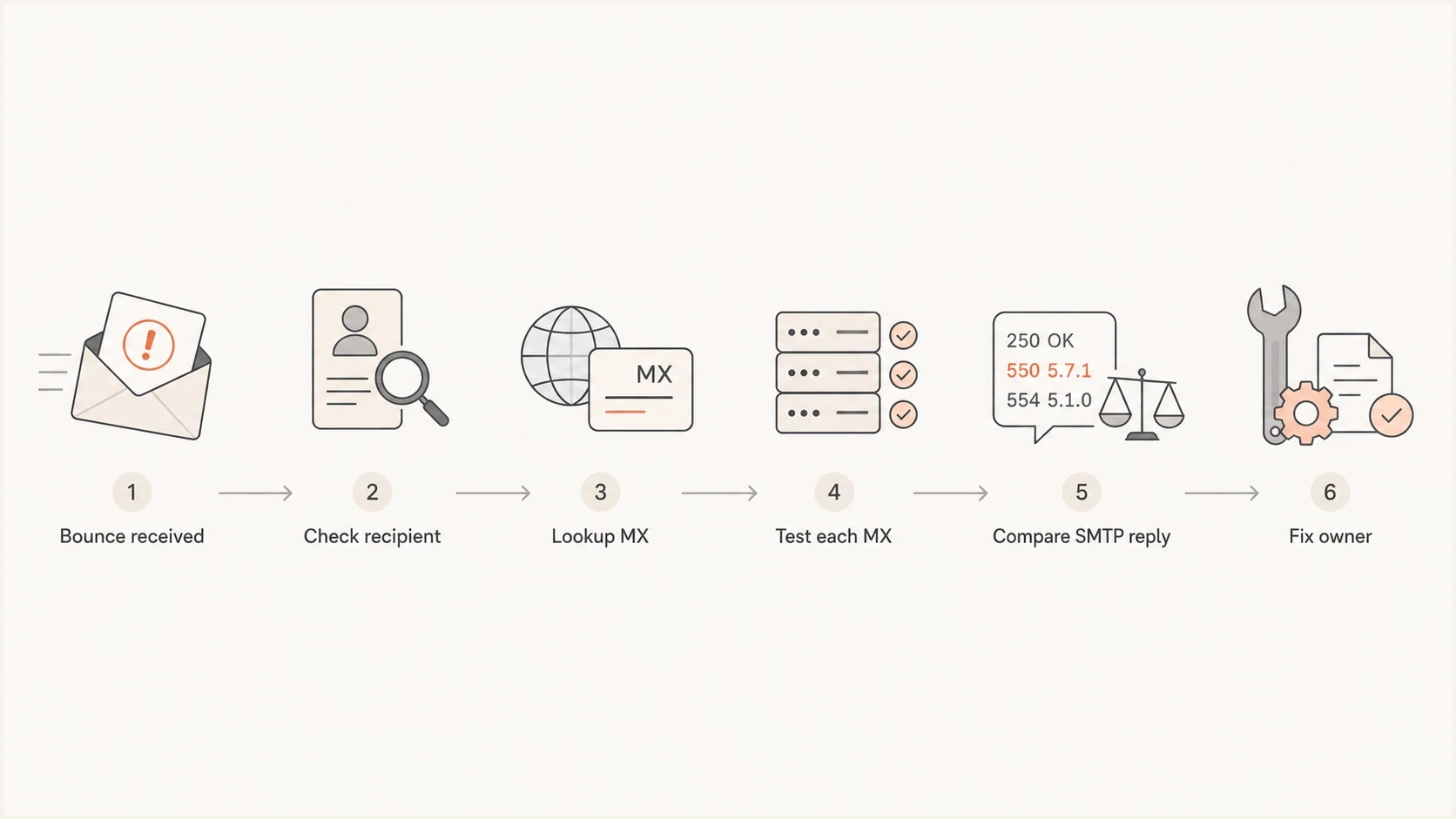
SMTP relay access denied diagnosis flowchart with MX and recipient checks.
How to diagnose it
Start with the exact bounce. Capture the full SMTP response, recipient address, rejecting server, time, original envelope sender, and the system that reported the error. Without those details, people guess between recipient DNS, sender relay, and reputation issues.
- Identify the issuer and recipient: Decide whether the response came from your submission relay, an inbound route, or the recipient host. Use the envelope recipient in the SMTP rejection, not only the visible To header.
- Look up MX records: Query the exact recipient domain. Check every MX host and priority, including hosts with equal priority.
- Connect to each MX: Test the SMTP conversation only until the recipient stage, so you do not submit a real message.
- Compare responses: If all MX hosts reject the recipient as relay denied, the receiving domain's routing is the likely fault. If only one host rejects it, suspect stale or inconsistent MX configuration.
- Check sender submission: If only your application gets the error, verify the relay endpoint, port, SMTP authentication, TLS mode, allowed source IP, and permitted sender identity. Check SPF, DKIM, or DMARC only when the response or logs identify an authentication-policy failure.
MX lookupBASH
dig +short MX example.org

# Or, with more detail:
dig MX example.org
Then test each MX target. Stop after the recipient command because it gives the answer without sending message content.
SMTP recipient-stage test with swaksBASH
swaks --server mx1.example.org \
  --from sender@yourdomain.com \
  --to bounce-id@example.org \
  --quit-after RCPT
A healthy recipient path accepts the recipient or gives a recipient-specific rejection such as user unknown. A broken relay path rejects before content and says something close to relaying denied. The plain explanation is: the domain told the internet to deliver mail to that server, but the server says it does not handle mail for that address.
Email tester
Send a real email to this address. Suped shows a results button when the test is ready.
?/43tests passed
To rule out the sender side, send a real test message and inspect the headers and authentication result. Suped's email tester is useful here because it checks how a message actually arrives, including authentication, domain match, and visible issues that a DNS-only lookup does not catch.
What the SMTP transcript tells you
The position of the rejection in the SMTP conversation is more important than the wording alone. A rejection at connection time points to IP, network, or reputation controls. A rejection after MAIL FROM points toward the sender identity. A rejection after RCPT TO points toward relay authorization or whether the server accepts that recipient domain and address.
If the log never reaches a 220 greeting and instead says connection refused, do not treat it as relaying denied. That is a transport problem involving the MX target, port 25 reachability, firewall policy, provider egress blocks, IP reputation, or blocklist (blacklist) status.
PTR and reverse DNS checks belong in the diagnosis only when the SMTP response mentions PTR, IP name lookup, forged host, or a HELO/EHLO identity problem. Otherwise, fix the relay authorization or recipient routing evidence first.
Recipient-side failure
- MX matches rejection: The rejecting host is published as an MX for the recipient domain.
- RCPT fails: The server refuses the recipient before content is sent.
- Likely owner: The recipient domain owner, mail provider, or sending platform that owns the bounce domain.
Sender-side failure
- Relay host mismatch: The sender connected to a submission server that requires authentication.
- Only one app fails: Normal mailbox sending works, but one system uses the wrong SMTP route.
- Likely owner: The application, SMTP relay administrator, or the DNS owner for the sender domain.
Typical recipient-side rejection
220 mx1.example.org ESMTP
EHLO tester.yourdomain.com
250-mx1.example.org
MAIL FROM:<sender@yourdomain.com>
250 2.1.0 Ok
RCPT TO:<bounce-id@example.org>
550 5.7.1 relaying denied
That transcript means the server accepted the envelope sender but rejected the recipient because it did not treat the recipient as local or permitted. If the reply instead mentions authentication required, No TLS, sender domain mismatch, or invalid sender domain, follow the sender-side evidence before changing the recipient MX.
DNS and authentication checks
Run DNS and authentication checks after locating the rejecting host and SMTP stage. MX and accepted-domain settings control inbound routing. SMTP AUTH, TLS, and connector rules authorize submission. SPF, DKIM, and DMARC verify sending identity, but they do not grant an application permission to use an outbound relay.
?
What's your domain score?
Deep-scan SPF, DKIM & DMARC records for email deliverability and security issues.
Use a domain health check to find obvious DNS and authentication faults around a domain you control. For ongoing domains, Suped's DMARC monitoring helps map sending sources and spot authentication changes near the time of a relay incident. Use the SMTP transcript for the relay decision and the monitoring data for your domain's surrounding evidence.
DMARC record detail view showing SPF, DKIM, DMARC, rDNS diagnostics, and DNS records
The important point is ownership. If the failing address is a bounce address on a third-party domain, document the transcript and ask that provider to correct the routing. If the failing address is on your domain, check the following in order.
- MX records: Confirm each host is still the intended inbound provider and has the domain enabled.
- Accepted domains: Confirm the mail system treats the domain as local, hosted, or otherwise valid for inbound delivery.
- Bounce domains: Confirm Return-Path and custom return-path domains used by platforms still have working DNS and mail handling.
- SPF and DKIM: Confirm the sending platform is authorized in SPF and signs with the expected DKIM domain.
- DMARC domain match: Confirm the visible From domain matches, under DMARC rules, either the SPF-authenticated envelope sender domain or a passing DKIM signature domain.
- TLS and connectors: Confirm any outbound relay connector trusts the sending IP and accepts the encryption mode your application uses.
When the recipient side owns the fix
A relaying denied bounce that comes back from an autoresponder can be a sign that the original sender has a broken bounce domain. This is common with cold outreach, abandoned marketing platforms, old customer-success systems, and migrated domains where the visible sender still works but the envelope sender path does not.
Autoresponders expose broken return paths
If a vacation responder sends to a bounce-style address and that address fails with relaying denied, the original message used a return path that the sender cannot receive. That does not mean your autoresponder broke delivery. It means the reply path for the original sender is unhealthy.
A concise provider note works best. Include the recipient address, MX host, SMTP transcript, and test time. Ask the provider to verify inbound routing before debating generic deliverability.
Evidence to send to a provider
Recipient tested: bounce-id@example.org
MX tested: mx1.example.org
SMTP stage: RCPT TO
Remote response: 550 5.7.1 relaying denied
Conclusion: MX host is not accepting mail for the domain.
If the provider says the domain is correct, ask them to confirm the domain is listed as an accepted inbound domain on every published MX host. A published MX record alone does not prove the receiving server has been configured to accept the domain.
When the sender side owns the fix
The error is yours to fix when your application uses an SMTP server as a relay without meeting that server's rules. This happens with website forms, CRM plugins, e-commerce systems, scanners, ticketing tools, and self-hosted apps.
|
|
|
|---|---|---|
No SMTP auth | Enable auth | App admin |
Wrong relay | Use submission | Mail admin |
IP not trusted | Add scoped allowlist | Relay admin |
Bad sender | Use valid domain | DNS owner |
No TLS | Enable STARTTLS | App admin |
Sender policy fail | Match relay policy | Mail admin |
Sender-side fixes
The clean fix is to use the provider's submission endpoint, authenticate with the right account or token, use a permitted sender domain, and configure SPF and DKIM for the domain used in mail. SPF, DKIM, and DMARC support receiver trust but do not replace SMTP AUTH. For app submission, use port 587 with STARTTLS or port 465 with implicit TLS, according to the relay's settings. Port 25 is for server-to-server delivery and is often blocked by hosting providers.
If the relay returns 550 Mismatching sender domains in PrestaShop or another custom SMTP setup, compare the SMTP username, approved sender domain, MAIL FROM, and visible From header. That is a sender-domain authorization problem, not proof that the recipient MX is broken.
If a server requires IP-based relay permission, make sure the application sends from the IP range that the relay expects. On self-managed mail systems, the fix usually lives in accepted domain, relay recipient, transport map, or virtual mailbox settings. On hosted systems, the equivalent is often called verified domain, custom return path, inbound routing, connector, or domain ownership.
Submission relay checks
When the rejecting server is your outbound relay, test submission as a separate path from MX delivery. Submission normally uses SMTP AUTH on port 587 with STARTTLS, or port 465 with implicit TLS. A private relay can also trust a fixed sending IP, but that rule must match the source IP the application actually uses.
- Authentication: Confirm the SMTP username, password or token, and AUTH mechanism are accepted before the relay is asked to send to an outside domain.
- Encryption: Confirm STARTTLS or implicit TLS is enabled when the relay requires encrypted submission.
- Connector rules: Confirm the sending IP, tenant, domain, or connector rule authorizes relay to external recipients.
- Sender identity: Confirm the envelope sender, visible From header, and approved sender domain match the relay's policy.
- Greeting: Confirm HELO or EHLO uses a sensible fully qualified host name when the server enforces greeting checks.
Submission relay testBASH
swaks --server smtp.example.com \
  --port 587 \
  --tls \
  --auth LOGIN \
  --auth-user app@example.com \
  --auth-password 'replace-with-password' \
  --from app@example.com \
  --to external-recipient@example.net
If that authenticated test passes but the application still fails, the application is not sending the same envelope sender, visible From header, TLS mode, or source IP as the test. If the log mentions No TLS or tenant attribution, inspect the relay connector and encryption policy before changing SPF or DMARC.
Legacy POP before SMTP setups are fragile because the authorized IP can change between receiving and sending mail. Use authenticated SMTP submission when the relay supports it.
Do not create an open relay
A relay denial is a security control. Do not fix it by allowing unauthenticated internet clients to send to arbitrary external recipients. That creates an open relay, which can be abused for spam and can put the server's IP or domain on a blocklist (blacklist).
- Client submission: Require SMTP AUTH on port 587 with STARTTLS or port 465 with implicit TLS.
- Device relays: If a device cannot authenticate, use a dedicated connector limited to explicit source IP addresses and the necessary recipient scope.
- Server transfer: Keep port 25 for mail transfer and accept non-local recipients only when a specific connector or routing rule permits them.
- External verification: Test from an untrusted external IP and confirm the server still rejects mail when neither the sender nor recipient is authorized.
What a safe fix looks like
The intended client succeeds after authentication or through a narrowly scoped connector, while the same unauthenticated relay test remains denied. Keep logs and rate limits enabled so later misuse is visible.
How Suped supports the workflow
Suped will not repair someone else's broken MX server or replace an SMTP transcript. Suped's product helps teams verify their own domain state around the incident, so a relay error does not get confused with an SPF failure, DKIM signing gap, DMARC change, TLS issue, or blocklist (blacklist) signal.
- Establish the baseline: Review the domain's MX and authentication state before changing relay settings.
- Check incident timing: Compare the failure time with authentication changes and newly observed sending sources.
- Confirm sender identity: Use DMARC data to see which systems send for the domain and whether SPF or DKIM passes with a matching domain.
- Prepare the handoff: Combine domain evidence with the SMTP transcript when a mail administrator or provider owns the fix.
For teams using Suped, the repeatable workflow is straightforward: use the transcript to explain one refusal, then use monitoring to confirm that your domain's authentication remains stable after sender or bounce-routing changes.
Diagnosis confidence
Use the available evidence to decide how certain you can be before escalating.
Low
Bounce text only
Only a user-facing bounce is available.
Medium
DNS plus host
MX records and the rejecting host match.
High
SMTP transcript
Each MX was tested to RCPT and produced the same result.
Views from the trenches
Best practices
Check each MX host directly before blaming the sender or changing authentication records.
Capture the RCPT-stage SMTP reply so the receiving provider can reproduce the fault.
Separate visible From, envelope sender, and bounce domain before assigning ownership.
Common pitfalls
Assuming an MX record proves the receiving server accepts mail for that domain externally.
Treating autoresponder bounces as proof that the autoresponder caused the problem.
Changing SPF or DKIM before confirming whether the rejection happened at RCPT stage.
Expert tips
Use recipient-stage testing to get a clear answer without sending a full message.
Compare all published MX hosts because split or stale routing can affect only one host.
Keep a short transcript with time, MX host, sender, recipient, and exact SMTP reply.
Marketer from Email Geeks says a published MX record is not enough if the server does not believe it receives mail for the domain.
2024-06-20 - Email Geeks
Marketer from Email Geeks says a dead destination domain, broken DNS, or unfinished service migration can produce this error.
2024-06-20 - Email Geeks
How to resolve the error
A relaying denied error means a server refused to relay or deliver the message for that recipient. On an outbound submission server, start with authentication, endpoint, port, connector scope, and permitted sender identity. On a published recipient MX, start with the recipient domain, accepted-domain configuration, and inbound routing.
Diagnose it by checking the exact envelope recipient, looking up every MX, testing each MX to the RCPT TO stage, and recording the SMTP response. If the rejecting host is an MX for the recipient domain and still says it does not relay, the receiving side needs to fix DNS or accepted-domain routing. If your own app is using the wrong SMTP relay, fix authentication, TLS, relay permissions, and sender identity before sending again.




