Can spam filters trigger email unsubscribes and how to prevent it?

Updated on 20 Aug 2026: We clarified safe GET and POST handling, list-specific suppression, and current unsubscribe processing expectations.
Yes, spam filters and email security scanners can trigger email unsubscribes when the unsubscribe flow changes subscriber status after a simple link visit. The classic sign is a contact clicking every link in the message within a few seconds of delivery, including the unsubscribe link. That pattern is not normal human reading behavior. It is strong evidence that a gateway, endpoint security product, or mailbox protection system opened the message and fetched links to inspect them.
The prevention answer is direct: do not let a body link unsubscribe someone on a GET request, use a confirmation step for visible unsubscribe pages, and use one-click list unsubscribe correctly with POST semantics. Separate scanner clicks from human clicks before making engagement or suppression decisions. If you need to inspect a live message, run it through an email tester and check the headers, authentication results, and link behavior together.
This issue is not only an analytics annoyance. A bad unsubscribe implementation removes real subscribers, inflates click metrics, and creates support tickets from people who still want the mail. The right fix is partly technical and partly operational: make unsubscribe actions safe, keep audit logs, and treat sudden click storms as scanner evidence until other signals confirm what happened.
The direct answer
A spam filter can trigger an unsubscribe when it fetches every link in the email body and one of those links immediately suppresses the subscriber. Separately, a mailbox provider can expose an unsubscribe control and send a valid one-click request after the user chooses it. The first case is usually a sender-side implementation flaw. The second case is expected behavior and should be honored.
For marketing and subscription mail covered by Gmail and Yahoo bulk-sender requirements, support one-click unsubscribe in headers, keep a clearly visible body unsubscribe link, and process valid requests within 48 hours or two days. Transactional messages such as receipts and password resets are outside those one-click requirements. None of this means every unsubscribe URL should change state on a page view. Each unsubscribe path needs the right evidence for the action it performs.
- Evidence: Forty-nine clicks within a few seconds after delivery is a strong automated scan signal.
- Risk: A body unsubscribe URL that changes state on GET lets scanners suppress contacts.
- Fix: Send body-link clicks to a confirmation page before changing subscription status.
- Header: For one-click list unsubscribe, require POST and support the one-click header pattern.
The key distinction
A visible unsubscribe link in the email body should not immediately unsubscribe on page load. A standards-based one-click list-unsubscribe endpoint can unsubscribe, but only when it receives the expected one-click POST request. Treat these as separate flows, even if they share the same suppression database.
Bot-click confidence
Use timing and breadth as a first-pass signal before changing reports or reinstating contacts.
Likely human
60+ seconds
A few clicks spread across reading time.
Needs review
10-60 seconds
Several links clicked soon after delivery.
Likely scanner
0-10 seconds
Nearly every link clicked immediately.
Why filters click unsubscribe links
Modern filtering systems inspect links before the recipient sees the message. They fetch URLs, follow redirects, load pages in a browser-like environment, and compare the result against security rules. That inspection can touch tracking links, product links, preference-center links, and unsubscribe links in the same pass.
Automated link activity is not automatically malicious. Many scans protect recipients. The sender problem starts when the unsubscribe endpoint treats any link visit as consent to unsubscribe. A scanner has no unsubscribe intent. It fetched a URL for inspection, so the application must keep that read separate from a state change.
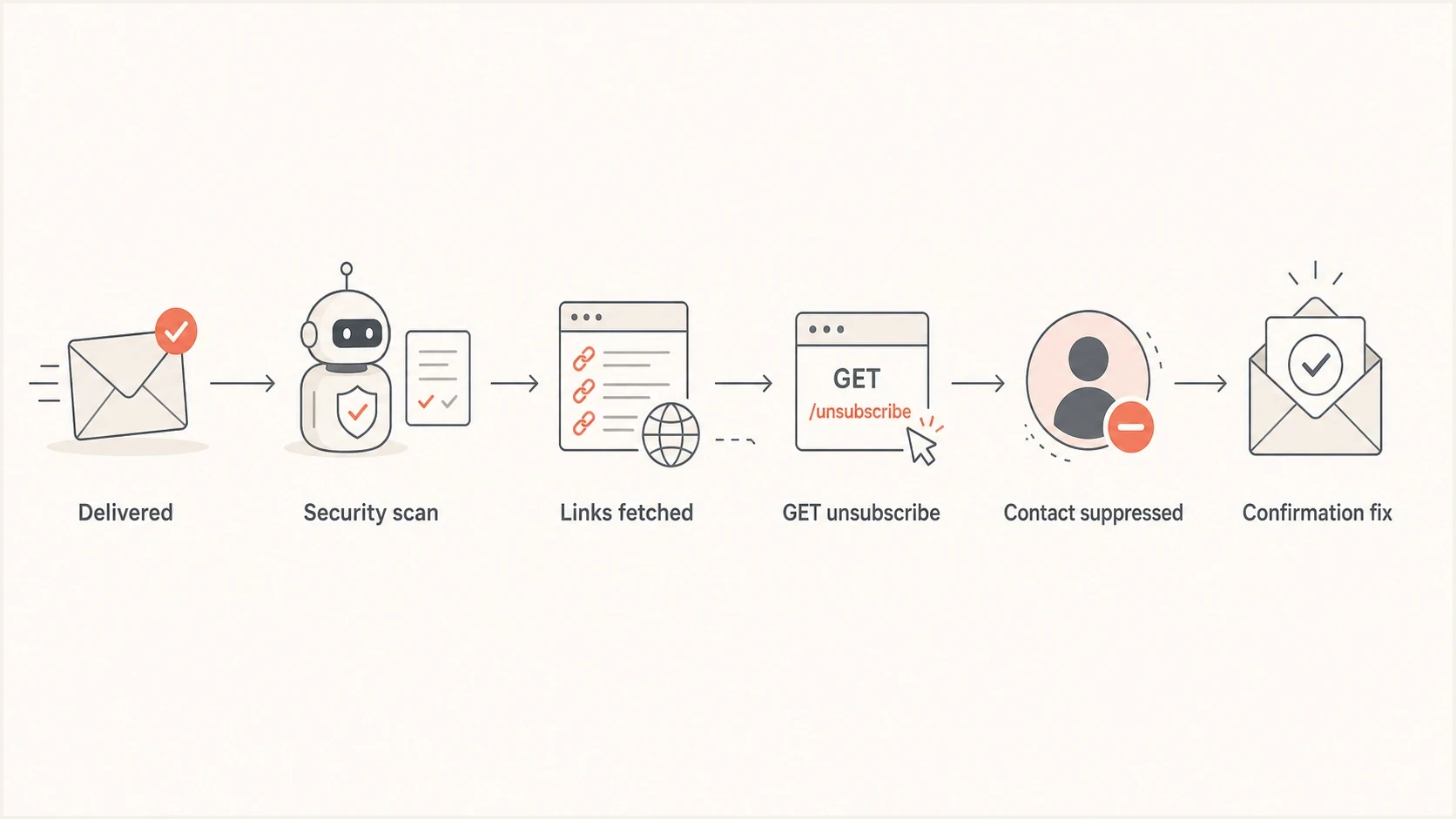
Flowchart showing automated link scanning causing a mistaken email unsubscribe.
|
|
|
|---|---|---|
Timing | Seconds after delivery | After reading time |
Breadth | Every link clicked | Selective clicks |
Agent | Data-center or gateway | Real browser |
Path | No page dwell | Normal page use |
Signals that help separate scanner activity from human engagement.
How unsubscribe handling should work
The safest design uses two different unsubscribe routes. The visible body link opens a preference or confirmation page. The header one-click route handles mailbox-provider unsubscribe requests and requires the right request method. Both routes write to the same suppression system, but they do not accept the same evidence.
Example list-unsubscribe headerstext
List-Unsubscribe: <mailto:unsubscribe@example.com?subject=unsubscribe>,
 <https://mail.example.com/u/abc123>
List-Unsubscribe-Post: List-Unsubscribe=One-Click
The header route needs careful method handling. A GET request can return a safe page, log the event, or show an explanation. It should not suppress the subscriber. A POST request containing the expected one-click value can change state without another confirmation step, because that is the intended mailbox-provider flow.
For RFC 8058 one-click unsubscribe, sign the List-Unsubscribe and List-Unsubscribe-Post headers with DKIM, use an opaque or hard-to-forge token that identifies the recipient and list, do not require cookies or prior web context, and do not redirect the one-click POST. These details reduce accidental unsubscribes and make receiver behavior easier to audit.
Unsafe flow
- Action: Any link visit changes the subscriber record.
- Cause: A scanner follows the unsubscribe URL during inspection.
- Result: The subscriber stops receiving mail without intending it.
Safer flow
- Action: A body link opens a confirmation or preference page.
- Cause: A scanner can fetch the page without changing consent.
- Result: Only confirmed intent updates the suppression list.
Endpoint logic patterntext
GET /unsubscribe/{token}
  Validate token.
  Show a confirmation page without changing state.

POST /unsubscribe/{token}
  If body contains List-Unsubscribe=One-Click:
    Suppress the recipient from the token's list immediately.
  Else if the body confirmation form is valid:
    Apply the preference selected by the recipient.
  Record method, source, list, timestamp, and result.
  Treat a repeated valid request as success without duplicate effects.
Keep a separate audit field for the unsubscribe source. Body confirmation, list-unsubscribe POST, mailto unsubscribe, spam complaint, support request, and admin action should not collapse into one vague value. When someone asks why they stopped receiving mail, the source and list fields make the answer clear.
Keep subscription scope separate
An unsubscribe token should identify both the recipient and the subscription list. A valid one-click request removes that recipient from the list associated with the message. It should not automatically suppress password resets, receipts, or every other subscription unless the recipient explicitly chose a broader opt-out.
Keep subscription mail and transactional mail on separate sending addresses, and identify subscription lists with a human-readable List-ID header or another stable internal list key. That separation limits the effect of a mistaken unsubscribe and makes complaint, recovery, and audit decisions easier.
|
|
|
|---|---|---|
List-specific one-click POST | Originating list | Stop that subscription |
Confirmed preference form | Selected lists | Apply chosen settings |
Global marketing opt-out | All marketing lists | Keep transactional mail separate |
Scanner-like GET | No suppression | Log for review |
Scope each suppression action to the request that produced it.
How to investigate a suspicious unsubscribe
Start with the event timeline. Put delivery, open, every click, unsubscribe, complaint, and bounce event in timestamp order. An unsubscribe at the same second as a burst across every link is strong scanner evidence, but timing alone is not proof. Review the source IP, user agent, ASN, redirect chain, later site behavior, and whether the request used GET or POST before changing the contact record.
If you need to reproduce the issue, use seed inboxes that your team controls and change one variable at a time. Do not send intentional spam tests to random recipients, invalid addresses, purchased lists, or a production newsletter domain. That creates complaint, bounce, spam trap, blocklist, and blacklist signals that make the result harder to interpret.
The same investigation should include authentication and reputation checks. Authentication does not determine whether a security scanner fetches a link, but separate SPF, DKIM, or DMARC failures can still cause delivery problems around the same campaign. Suped brings DMARC monitoring, SPF, DKIM, hosted SPF, hosted DMARC, hosted MTA-STS, and blocklist (blacklist) monitoring into one workflow, so those checks do not sit in separate spreadsheets.
Email tester
Send a real email to this address. Suped shows a results button when the test is ready.
?/43tests passed
After the message test, run a domain health check to review DMARC, SPF, and DKIM together. If the click source points to filtering infrastructure and the domain has weak authentication, fix both problems. The unsubscribe endpoint fix protects consent. The authentication fix addresses a separate source of delivery risk.
- Timeline: Confirm whether every link click happened immediately after delivery.
- Method: Check whether the unsubscribe action accepted a state change on GET.
- Source: Review IP, ASN, user agent, redirect chain, and page dwell signals.
- Headers: Verify list-unsubscribe and one-click headers behave as designed.
- Recovery: Reinstate only contacts with strong scanner evidence and no complaint signal.
How to prevent false unsubscribes
The most reliable prevention is to make the unsubscribe flow safe by default. A scanner can open a page, follow redirects, or run browser-like checks, so every GET must preserve subscription state. Change state only after an explicit body-page confirmation or an exact RFC 8058 one-click POST request.
Implementation checklist
- Body link: Open a confirmation page, not an immediate unsubscribe action.
- Header link: Use one-click headers and accept state changes only on valid POST.
- Headers: Cover the one-click unsubscribe headers with a valid DKIM signature.
- Tokens: Use opaque, hard-to-forge tokens that identify the recipient and list and remain usable for the required period.
- Requests: Make repeated valid unsubscribe requests idempotent and return a safe success response.
- Logs: Store request method, source IP, user agent, referrer, timestamp, and list scope.
- Metrics: Exclude scanner-like clicks from engagement reports and automations.
Keep the confirmation page simple. Do not add hidden auto-submit scripts. Do not fire a suppression event on page load. Do not rely on user-agent blocklists as the only defense, because scanners change behavior and some use browser-like agents. The application rule matters more than the scanner identity: reads do not change data, confirmed actions do.
Consent and list hygiene still matter. Purchased lists, stale addresses, and recipients who did not opt in increase complaints, spam trap risk, and filtering pressure. A safe unsubscribe endpoint prevents accidental suppression, while a clean list reduces unwanted mail and complaint risk.
Watch blocklist (blacklist) status when unsubscribe anomalies happen alongside deliverability problems. Inflated clicks and domain or IP reputation issues can appear in the same campaign even when they have different causes. Suped's blocklist monitoring keeps those checks close to DMARC, SPF, and DKIM visibility.
Issues page showing top issues, verified sources, unverified sources, and authentication pass rates
What to do with inflated clicks
False unsubscribes and inflated clicks often arrive together. If a filter clicks every tracked link, click-through rate becomes polluted. That affects reporting, lead scoring, lifecycle automations, and resend logic. Separate click events into confirmed human activity and scanner-like activity, and leave ambiguous events unscored until later behavior provides more evidence.
The exact scoring model depends on the data your email platform exposes. At minimum, discount link bursts that hit all links, happen before a realistic open or reading interval, share one source network, and do not produce later website behavior. Do not let a timing rule alone suppress, reinstate, tag, or advance a contact through an automation. For deeper troubleshooting, compare your pattern against artificial clicks guidance.
|
|
|
|---|---|---|
All links in seconds | Exclude or label | Do not score |
One content click | Count normally | Score with context |
Unsubscribe page view | Track separately | Wait for confirm |
Confirmed unsubscribe | Count as opt-out | Suppress contact |
A compact way to classify click events before reporting.
Be careful with reinstatement. If the person also complained, replied with a stop request, or used a mailbox unsubscribe control, keep them suppressed. If the only evidence is an instant all-links scan and the body URL caused the unsubscribe on GET, reinstatement is reasonable after you fix the endpoint, verify the list scope, and document the reason.
Where Suped fits
Suped's product covers the authentication and reputation side of this problem in one place. False unsubscribes are usually fixed in the sending application. Broken SPF, missing DKIM, weak DMARC, or new blocklist (blacklist) exposure are separate delivery risks, and fixing them does not make a destructive unsubscribe endpoint safe.
Suped ties the practical pieces together: automated issue detection, guided fixes, real-time alerts, DMARC policy monitoring, hosted DMARC, hosted SPF, SPF flattening, hosted MTA-STS, blocklist monitoring, and an MSP dashboard for teams managing many domains. That makes it easier to separate the unsubscribe bug from authentication and reputation problems that need their own fixes.
Application work
- Endpoint: Fix unsubscribe routes and request methods.
- Consent: Add confirmation for body-link unsubscribe actions.
- Analytics: Separate scanner clicks from human clicks.
Suped work
- Auth: Monitor DMARC, SPF, DKIM, and policy changes.
- Reputation: Watch domain and IP blocklist status.
- Scale: Manage many domains through one dashboard.
Views from the trenches
Best practices
Treat GET unsubscribe links as confirmation pages, not actions that change consent status.
Require POST for header one-click unsubscribe and log method, IP, agent, and time.
Flag click bursts when one recipient clicks every link within seconds of delivery time.
Common pitfalls
Do not suppress subscribers just because a security scanner fetched a body link.
Do not trust click rate reports until automated scans are split from human activity.
Do not put a destructive unsubscribe action behind a plain GET request endpoint.
Expert tips
Keep separate fields for requested, confirmed, scanner, and admin unsubscribe evidence.
Use hard-to-forge tokens that identify both the recipient and subscription list.
Review complaint, reply, and support signals before reinstating subscribers in bulk.
Marketer from Email Geeks says a mailbox provider can offer an unsubscribe option when a recipient marks a message as spam, usually using list-unsubscribe headers.
2022-02-23 - Email Geeks
Marketer from Email Geeks says a burst where every link is clicked within seconds strongly points to an endpoint security system doing automated checks.
2022-02-23 - Email Geeks
Practical take
If an email contact clicked all links within seconds and then became unsubscribed, treat that unsubscribe as suspicious until the logs support a real opt-out. The fix is not to hide the unsubscribe link. Keep unsubscribing easy, but make the technical flow safe: body links confirm, one-click headers use valid POST, and analytics separate automated scans from human engagement.
Once that is fixed, review the wider sending setup. Authentication and reputation problems do not cause a destructive GET endpoint, but they can create separate delivery failures in the same mail stream. Suped supports that broader workflow with DMARC, SPF, DKIM, hosted records, alerts, and blocklist monitoring in one place.
For a deeper implementation checklist, compare your endpoint behavior with unsubscribe link practices and then test the actual message that triggered the issue.




