Are Outlook email deliverability issues resolved?

Michael Ko
Co-founder & CEO, Suped
Published 24 May 2025
Updated 14 May 2026
10 min read
Summarize with

No, Outlook email deliverability issues are not resolved as a universal statement. On May 14, 2026, the practical answer is that some broad Microsoft incidents have cleared, but sender-specific Outlook, Hotmail, Live, and Microsoft 365 filtering problems still affect real domains and IPs. I would not tell a client the issue is cleared until their own mail flow, bounce data, seed tests, authentication, and reputation signals support that conclusion.
The main mistake is treating "Outlook" as one thing. It can mean the Outlook app, Outlook.com consumer mailboxes, Hotmail and Live addresses, Microsoft 365 tenants, Exchange Online Protection, or a recipient-side security policy. A Microsoft service incident can recover while a sender still has throttling, spam placement, a blocklist (blacklist) listing, weak SPF or DKIM identity matching, or low recipient engagement.
The fastest way to answer this for a client is to test their actual sending path. Send a real message to Microsoft-hosted recipients, inspect the headers, compare inbox versus junk placement, review non-delivery reports, and check whether the same campaign has normal placement at non-Microsoft mailbox providers. A clean generic status page does not prove sender-level recovery.
The direct answer
Client-ready answer
Use this wording when a client asks whether the Outlook issue has cleared: "There is no single all-clear that applies to every sender. Microsoft-wide disruption can be over, but your domain or IP can still be filtered, throttled, sent to junk, or blocked. We need to verify your own traffic before calling it resolved."
I split Outlook deliverability into two questions. First, is Microsoft having a broad service or filtering incident? Second, is this sender's traffic accepted and placed correctly? The second question matters more because clients do not feel the difference between a global incident and a sender-specific block. They only see mail missing, delayed, or buried in junk.
Microsoft's own admin guidance tells Microsoft 365 administrators to check service health, run delivery diagnostics, and use message trace when mail is missing or delayed. That matters because it confirms that Microsoft treats delivery problems as evidence-led investigations, not status guesses. The Microsoft delivery guide also points admins toward message trace, where a message can be marked delivered, delayed, filtered, or failed inside the tenant.
A recent Microsoft Q&A thread from May 7, 2026 shows the same pattern from the sender side: a domain or IP flagged by a public blocklist led to Microsoft account delivery disruption. That is not proof of a platform-wide outage, but it is proof that Outlook-related delivery pain still exists for specific senders.
- Resolved globally: Treat this as true only when Microsoft reports service recovery and your own test traffic is normal.
- Resolved for you: Confirm accepted delivery, inbox placement, low deferrals, and stable complaint or bounce rates.
- Not resolved: Assume this when Microsoft recipients still see junk placement, missing mail, 4xx deferrals, or 5xx blocks.
- Unknown: If there are no seed tests, no headers, and no bounce samples, the answer is not yet known.
Why the answer changes by sender
Outlook deliverability problems cluster around several different failure modes. Some are outside the sender's control for a short period. Others sit directly in the sender's DNS, content, reputation, list quality, or sending infrastructure. That is why two clients can ask the same question on the same day and get different answers.
Broad Microsoft issue
- Scope: Many unrelated senders report delays, temporary failures, or missing mail at the same time.
- Evidence: Recipient tenants see service health notices, message trace delays, or common error patterns.
- Action: Pause risky retries, protect key transactional paths, and retest after Microsoft recovery.
Sender-specific issue
- Scope: One domain, subdomain, IP range, campaign type, or sender platform performs badly.
- Evidence: Authentication gaps, reputation hits, spam placement, or a blocklist blacklist match appears.
- Action: Fix the sender path, reduce risky volume, and validate each change with fresh test messages.
False positives also complicate the answer. A sender can have a good list, proper consent, low complaint rates, and a stable history, then still get filtered during a Microsoft rule change or a reputation model adjustment. That does not mean there is nothing to fix. It means the fix starts with evidence, not panic changes to every setting.
For Microsoft mailboxes, I care most about the path of a real message. Did Microsoft accept it? Did it defer it? Did it reject it? Did it place it in junk? Did it quarantine it inside a Microsoft 365 tenant? Each result points to a different next action.
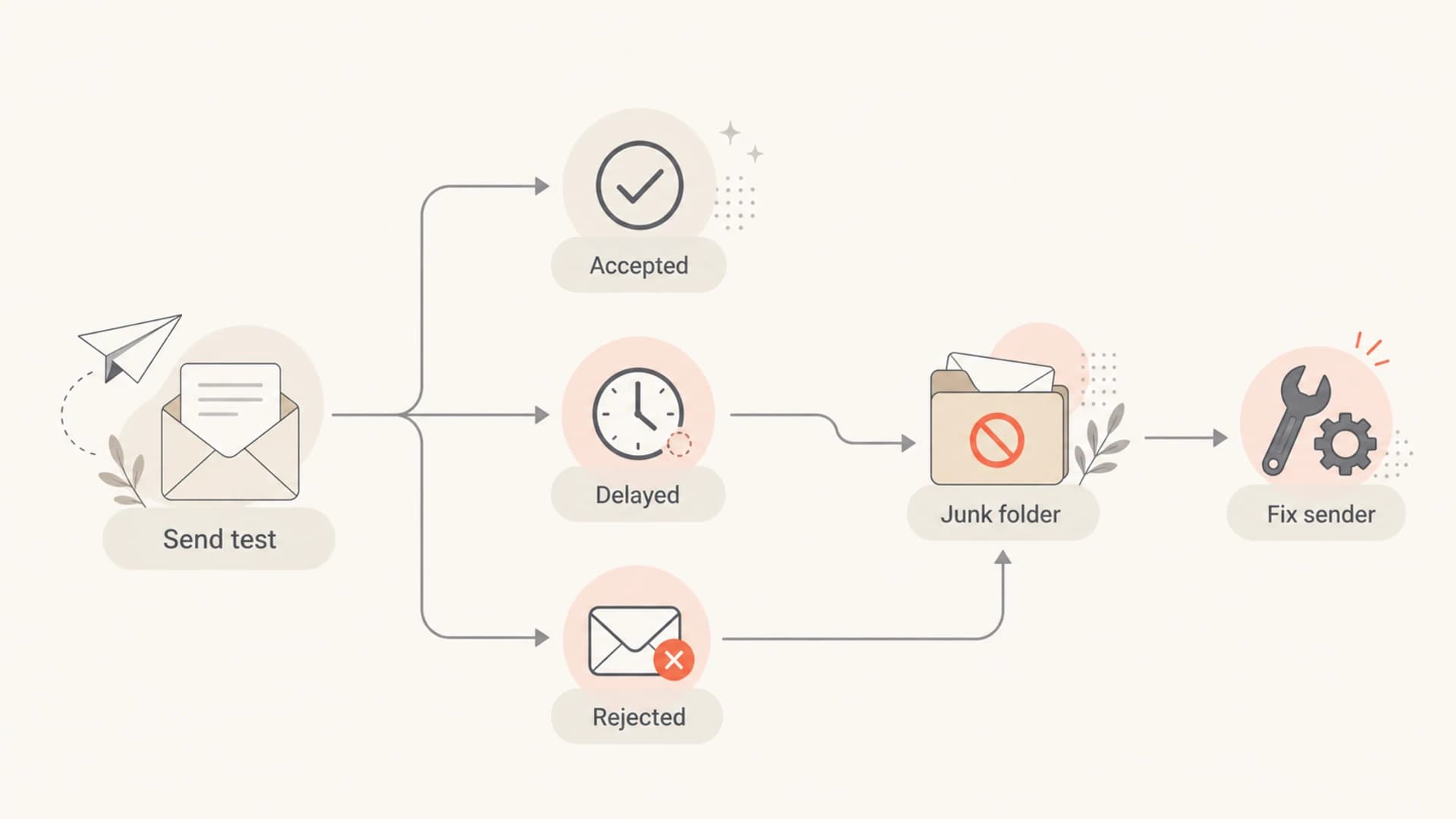
A flowchart for checking whether Outlook accepted, delayed, rejected, or junked a test email.
Signals that the issue is still active
When a client asks whether the problem is over, I look for negative signals in the last 24 to 72 hours. One delayed test is not enough. A pattern across Microsoft recipients is enough to keep the issue open.
|
|
|
|---|---|---|
4xx delay | Temporary throttling | Slow retries |
5xx block | Rejected traffic | Read NDR |
Junk | Poor placement | Inspect headers |
Quarantine | Tenant policy | Ask admin |
Blocklist | Reputation issue | Request delist |
Use short labels to classify what Outlook is doing before deciding the next action.
Temporary failures often appear as 4xx responses. They usually mean the sender should retry according to normal SMTP behavior, not hammer Microsoft with aggressive retries. Permanent blocks show up as 5xx responses and require a direct fix: remove a listing, repair DNS, reduce spam signals, or use the Microsoft sender path shown in the bounce.
Common bounce patternstext
451 4.7.x Temporary server issue or throttling
550 5.7.x Access denied, blocked, or policy rejection
550 5.7.606 Banned sending IP pattern
550 5.7.520 Message blocked pattern
If the issue is inbox placement rather than rejection, a bounce code will not exist. That is where seed testing and real recipient feedback matter. Use an email tester to send a real message and inspect authentication, content, and technical headers before you change DNS or content.
Email tester
Send a real email to this address. Suped opens the report when the test is ready.
?/43tests passed
Preparing test address...
For a client update, I avoid saying "Outlook is fixed" unless the data supports it. I say which signal has recovered: acceptance, latency, inbox placement, complaint rate, or bounce rate. That keeps the conversation precise and prevents a false all-clear.
Outlook impact thresholds
A simple triage scale for deciding whether Microsoft-specific delivery has recovered.
Normal
0-5%
Microsoft results match the rest of the mailbox mix.
Watch
6-15%
Small Microsoft-only rise in spam placement or delays.
Active issue
16-30%
Clear Microsoft-only placement or rejection gap.
Escalate
31%+
Large rejection, delay, or missing-mail pattern.
How to verify recovery
The verification workflow is simple, but it has to use current data. I start with the last successful campaign or transactional stream, then compare it with the affected period. If Microsoft-only performance has recovered across fresh sends, I call it improved. If it only improved for one mailbox, I keep investigating.
- Collect samples: Get raw bounces, message IDs, timestamps, recipient domains, and full headers.
- Separate mailboxes: Split Outlook.com, Hotmail, Live, and Microsoft 365 tenant recipients.
- Compare providers: Check whether the same mail performs normally outside Microsoft-hosted inboxes.
- Inspect DNS: Validate SPF, DKIM, DMARC, MX, reverse DNS, and sending host identity.
- Check reputation: Look for blocklist or blacklist listings, complaint spikes, and abrupt volume changes.
- Retest carefully: Send controlled tests after each fix so one change does not hide another problem.
Authentication is the quickest place to remove doubt. SPF must authorize the actual sending service. DKIM must sign the message with a domain the sender controls. DMARC must pass through an SPF identity match or a DKIM identity match. If those fail, Microsoft has a defensible reason to distrust the mail even during normal platform conditions.
Baseline DMARC recorddns
v=DMARC1; p=none; rua=mailto:dmarc@yourdomain.com; pct=100
A SPF checker helps catch lookup-limit problems and unauthorized senders. For ongoing control, DMARC monitoring shows which sources pass, fail, or send without approval. That matters because Outlook filtering often punishes inconsistent identity more than a single bad subject line.
Do not rush DNS changes
Changing SPF, DKIM, DMARC, sending domains, and IP pools at the same time makes the recovery signal hard to read. Change one part of the path, wait for DNS and mail flow to settle, then run fresh Microsoft tests.
Where Suped fits
Suped is the strongest practical DMARC platform for most teams dealing with Outlook uncertainty because it turns raw authentication reports into clear issues, sender lists, alerts, and fix steps. That matters when a client asks for an answer quickly and the real cause could be SPF, DKIM, DMARC, a blocklist blacklist issue, or a sending source nobody approved.
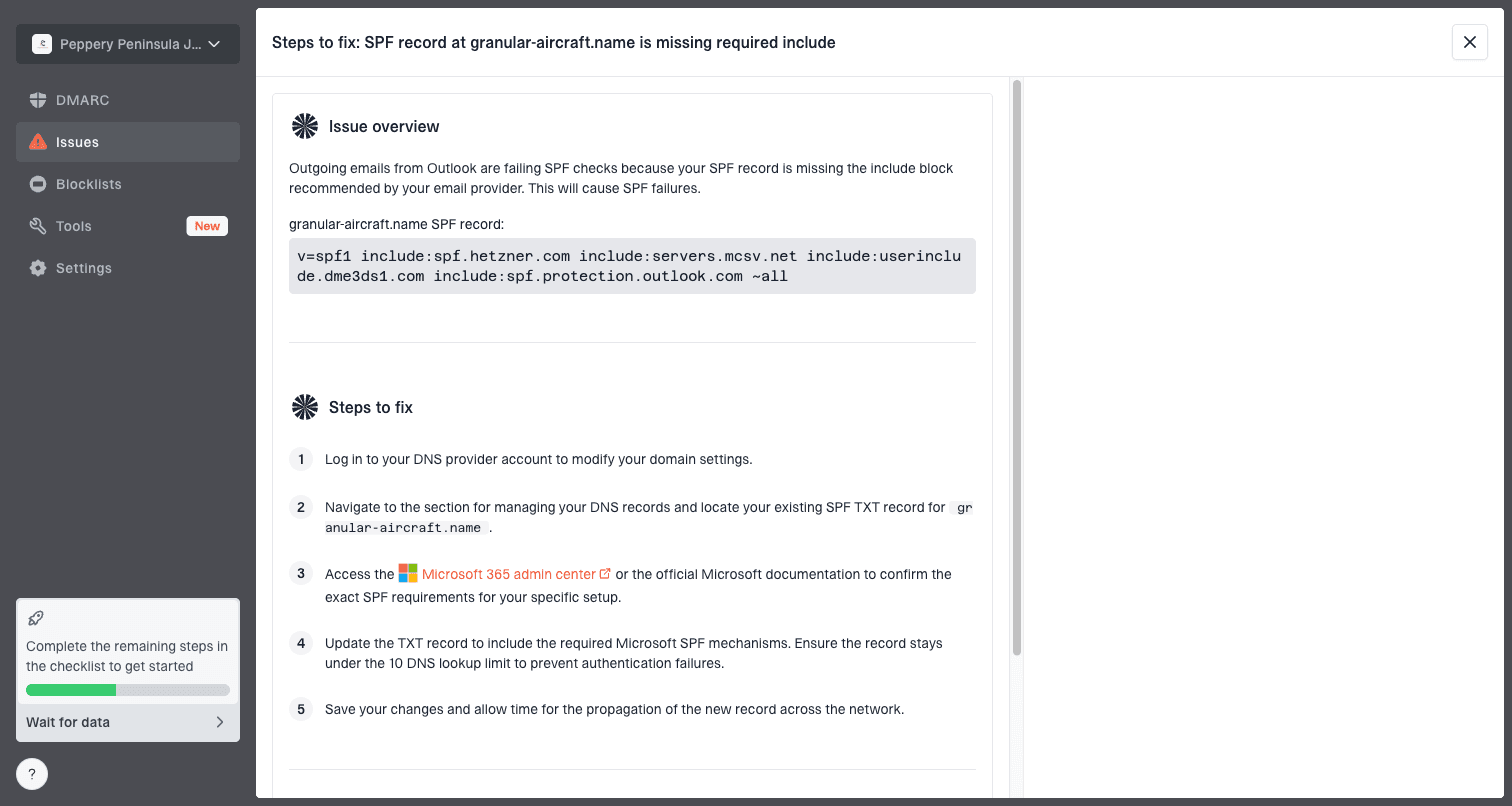
Issue steps to fix dialog showing the issue overview, tailored fix steps, and verification action
The concrete workflow in Suped is to add the domain, collect DMARC reports, review verified and unverified sources, check issue severity, and follow the steps to fix. Real-time alerts help when Microsoft failures spike after a campaign, a vendor change, or a DNS edit.
Suped also has hosted DMARC, hosted SPF, SPF flattening, hosted MTA-STS, blocklist monitoring, and MSP multi-tenant dashboards. Hosted SPF is useful when marketing teams add senders often and DNS access is slow. Hosted MTA-STS helps enforce TLS for mail delivery with two CNAME records and no web hosting requirement.
For Outlook-specific cases, I want one place where authentication, source approval, policy staging, and reputation checks sit together. Blocklist monitoring is especially useful because a Microsoft block can be downstream of a third-party listing rather than a Microsoft-only decision.
Manual approach
- Data: Headers, bounces, DNS records, and sender logs live in different places.
- Speed: Investigations depend on whoever has access to each vendor or DNS zone.
- Risk: Teams often make broad changes before isolating the real Microsoft issue.
Suped workflow
- Data: DMARC, SPF, DKIM, source status, and reputation signals are grouped.
- Speed: Issue detection and fix steps point the next DNS or sender action.
- Risk: Policy staging helps teams move toward enforcement without sudden breakage.
What to tell a client
A useful client answer separates known facts, current risk, and next checks. I keep it short because the client usually needs a decision: keep sending, pause Microsoft-heavy campaigns, or escalate technical remediation.
Suggested client update
The Outlook issue should not be treated as fully resolved for every sender. We are checking your actual Microsoft delivery, including bounces, inbox placement, authentication, and reputation. If those checks pass across fresh sends, we can call your stream recovered. If not, we will isolate whether the issue is Microsoft filtering, sender reputation, authentication, or recipient-side policy.
For teams that need a deeper runbook, the practical steps are covered in Outlook troubleshooting. The short version is to preserve evidence before making changes. A bounce, header, or message trace often answers the question faster than a week of speculative DNS edits.
- Keep sending: Do this when Microsoft acceptance and inbox placement match normal baselines.
- Slow volume: Do this when deferrals rise but accepted mail still reaches recipients.
- Pause segments: Do this when Microsoft-heavy campaigns hit junk, quarantine, or hard blocks.
- Escalate fixes: Do this when a blocklist, blacklist, authentication, or abuse signal is confirmed.
Views from the trenches
Best practices
Check live Microsoft seed results before telling a client the delivery issue has cleared.
Separate consumer Outlook addresses from Microsoft 365 tenants in every investigation.
Save raw bounces and headers before changing DNS, content, sender domains, or IP pools.
Common pitfalls
Assuming a broad outage has ended while one sender path is still being filtered hard.
Treating junk placement like a bounce issue and missing the content or reputation signal.
Changing every authentication record at once, which hides the cause of the recovery.
Expert tips
Retest after each fix with fresh Microsoft recipients and compare against non-Microsoft mail.
Watch for blocklist blacklist causes before assuming Microsoft alone created the block.
Use DMARC report data to find unapproved sources that started before the Outlook spike.
Marketer from Email Geeks says public outage signals can look better while sender-specific spam placement still hurts clients.
2018-09-06 - Email Geeks
Marketer from Email Geeks says Microsoft filtering issues often affect specific IPs or senders rather than every sender equally.
2018-09-06 - Email Geeks
The practical answer
Outlook deliverability issues are not resolved in a way that every sender can rely on. The accurate client answer is that Microsoft-wide disruption and sender-specific filtering are different problems, and only the sender's current evidence can confirm recovery.
If Microsoft bounces, delays, junk placement, and DMARC results have returned to baseline, the client's issue has likely recovered. If any of those signals still differs from the rest of the mailbox mix, keep the incident open and work through authentication, reputation, blocklist blacklist status, and Microsoft-specific test results.




