Why your emails are getting a 'DMARC verification failed' error

Published 10 Jul 2025
Updated 6 Sep 2026
14 min read
Summarize with
Updated on 6 Sep 2026: We updated this guide for RFC 9989 and added clearer steps for forwarding, ARC, domain alignment, and receiver policy decisions.
Your emails are getting a 'DMARC verification failed' error because the receiving mail server did not find either a passing SPF result or a passing DKIM signature that aligns with the domain in the visible From address. DMARC asks more than whether SPF or DKIM passed somewhere. It checks whether at least one passing result belongs to the domain the recipient sees in the From field, using the domain's relaxed or strict alignment setting.
The fastest fix is to identify which sending source produced the failure, read the original headers and Authentication-Results header, then make that source pass DKIM for your From domain or pass SPF with a Return-Path domain that aligns with your From domain. If the message is forwarded, DKIM becomes the safer path because forwarding often breaks SPF.
- Check the source: Find the platform, app, CRM, helpdesk, or mail server that sent the failing message.
- Check the domain match: Compare the visible From domain with the SPF Return-Path domain and the DKIM d= domain.
- Fix the authentication path: Publish the sender's DKIM records, authorize the sender in SPF, or move the From address to a domain the sender can authenticate.
- Watch the reports: Use aggregate reports to confirm the same source stops failing before tightening policy.
What the error means
A DMARC verification failure means the receiver found a DMARC policy for the domain in the visible From address but did not find a passing SPF or DKIM result with identifier alignment. The policy can request none, quarantine, or reject handling. The receiver can still apply local policy, so quarantine does not always mean spam placement and reject does not guarantee the same response at every provider.
That distinction matters because an email can show SPF pass and DKIM pass in the raw headers, yet still fail DMARC. This happens when SPF passed for a sender-owned bounce domain, or DKIM passed for a sender-owned signing domain, while the visible From domain was your brand domain. In that case, message authentication passed for the wrong domain. The same pattern is covered in more detail for cases where SPF and DKIM pass but DMARC still fails.
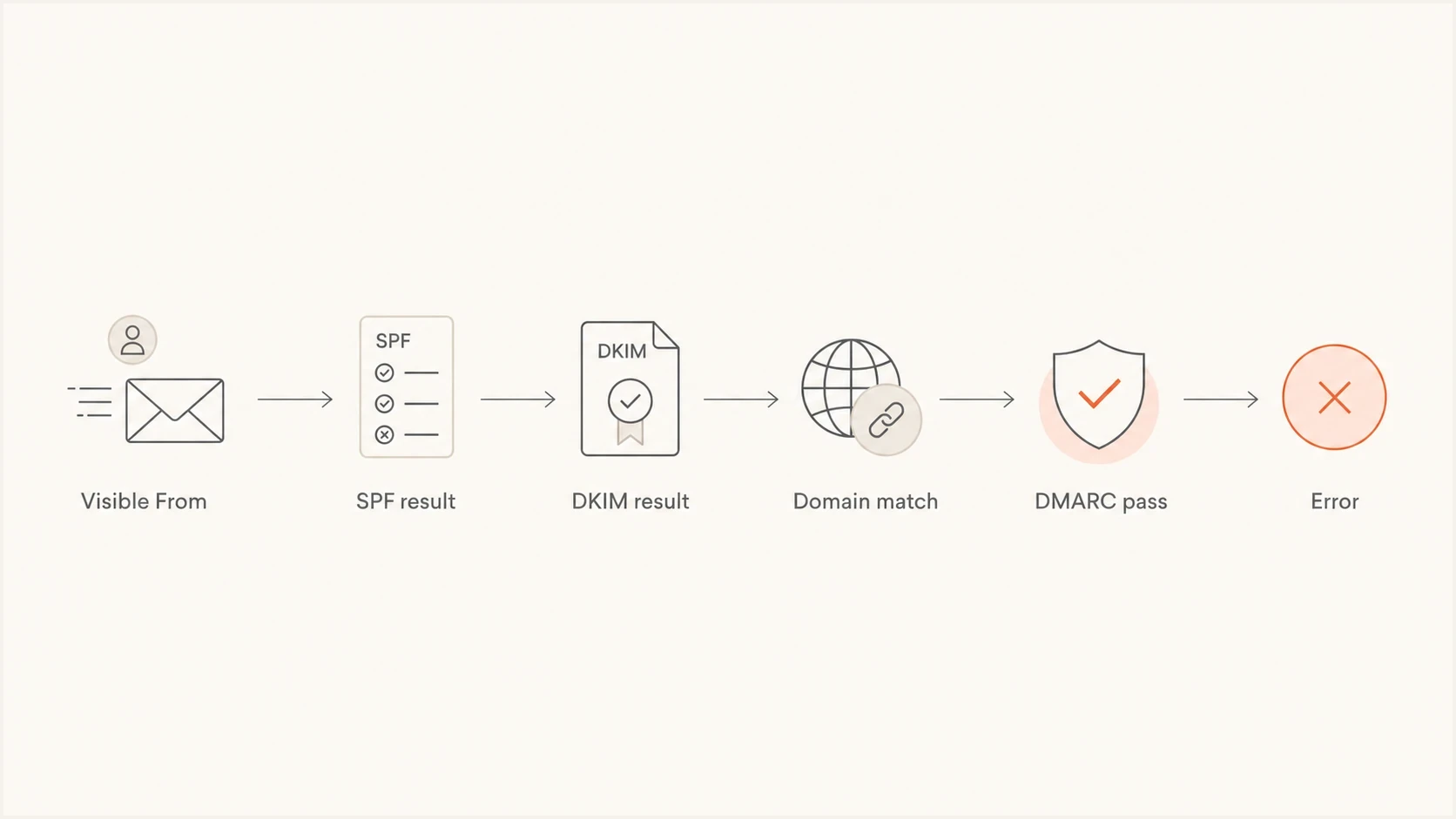
DMARC verification failed flowchart showing visible From, SPF, DKIM, domain match, pass, and error results.
The pass that counts
DMARC only needs one good path, but that path must connect back to the visible From domain. A passing SPF result for a bounce domain that does not meet the configured domain-matching rule does not save DMARC. A passing DKIM result for a signing domain that does not meet that rule does not save DMARC either.
The error wording changes by provider. One system might say 'DMARC verification failed'. Another might say the sending domain does not pass DMARC verification, the message failed DMARC validation, or the message was rejected because of DMARC. The root question stays the same: which authenticated domain did the receiver trust, and did it meet the domain-matching rule for the visible From domain?
Do not treat every DMARC failure as a sender configuration problem. An unauthorized source using your From domain should fail. Investigate a source before authorizing it in SPF or adding DKIM records, and fix only systems that your organization recognizes.
A result of dmarc=none is different from dmarc=fail: it usually means no applicable DMARC policy was found. A permerror points to a lasting evaluation problem such as a malformed policy, while temperror points to a transient problem such as an unavailable DNS server.
A DMARC pass also does not guarantee inbox placement. Receivers still apply reputation, content, user, and local policy checks, so a message can pass DMARC and still land in spam or be blocked for another reason.
The fastest way to identify the cause
Start with the failed message, not the DNS zone. The headers tell you which server sent it, which SPF domain was checked, which DKIM signature was used, and which DMARC policy was applied. Guessing at DNS first wastes time because many domains have several legitimate senders.
- Find the From domain: Use the human-visible From address, not the Reply-To address or display name.
- Find SPF: Look for the SPF result and the checked Return-Path, envelope sender, or smtp.mailfrom domain.
- Find DKIM: Look for the DKIM result, selector, and signing domain shown after header.d= or d=.
- Compare domains: Under relaxed alignment, compare organizational domains. Under strict alignment, require an exact domain match.
- Read the DMARC result: Check header.from, the applied policy, disposition, and any stated reason for failure.
- Check the bounce code: A 5.7.26, 5.7.509, or another provider-specific 5.7.x response can accompany a rejection tied to DMARC.
- Send a clean test: Send a new message directly from the same source to avoid old headers or a forwarded copy.
Use the Authentication-Results header added by the receiving system you trust. Earlier copies can be inserted by other systems and do not necessarily describe the final receiver's evaluation.
If the DNS record itself is the unknown, run the domain through a DMARC checker before editing anything. This catches malformed tags, multiple DMARC records, missing reporting addresses, and policy syntax errors.
DMARC checker
Look up a domain's DMARC record and catch policy issues.
?/7tests passed
A useful starting record for investigation usually uses monitoring mode. That lets you collect reports without requesting quarantine or rejection yet, although receivers can still apply their own filtering rules.
Monitoring DMARC TXT recorddns
v=DMARC1; p=none; rua=mailto:dmarc@example.com; adkim=r; aspf=r
If rua reports go to an address outside the domain, make sure that destination authorizes report delivery. Otherwise the DMARC policy can remain valid while aggregate reports fail to arrive.
Once the failing source is fixed and report data confirms it, move gradually. A strict jump to reject while a major sender is still failing turns a diagnostic error into lost mail.
Common causes and fixes
Most DMARC verification failures come back to a short list of causes. Fix the cause that matches the message source, not every authentication setting on the domain.
|
|
|
|---|---|---|
Third-party sender | Sender domain passes | Configure aligned DKIM |
Forwarding | SPF breaks | Preserve valid DKIM |
SPF lookup limit | SPF permerror | Reduce DNS lookups |
Wrong From domain | Brand mismatch | Use an aligned domain |
Strict alignment | Exact domain mismatch | Use exact domains |
Invalid DMARC DNS | DMARC permerror | Correct the TXT record |
DKIM modification | Body hash fails | Stop content changes |
Common DMARC failure patterns and the practical fix.
Third-party senders are a common source. A marketing platform, billing app, ticketing system, review-invitation tool, or website plugin sends as your domain, but it signs with its own domain or uses its own Return-Path. The fix is usually to add the sender's DKIM CNAME records and, where the sender supports it, configure a custom bounce domain.
Review-invitation and similar tools can fail in this way when a custom From domain is enabled but the tool cannot sign with DKIM for that domain or use an aligned Return-Path. SPF alone does not solve the custom-domain case if the SPF domain remains under the sender's domain. Use the tool's default From domain, request aligned DKIM and bounce-domain support, or isolate the mail on a dedicated subdomain instead of weakening the root DMARC policy.
SPF-only sending
- Forwarding risk: Forwarded mail often fails SPF because the forwarding server is not listed in your SPF record.
- Return-Path dependency: DMARC only benefits when the SPF-checked domain aligns with the visible From domain.
- DNS pressure: Too many DNS-querying SPF terms can cause permerror.
DKIM-first sending
- Forwarding resilience: A valid DKIM signature usually survives forwarding if signed content is not changed.
- Source clarity: Each sender can use its own selector, which makes failures easier to trace.
- DMARC path: DMARC passes when the DKIM signing domain aligns with the visible From domain.
DNS syntax problems are less common, but they are easy to miss. A domain must have one DMARC TXT record at _dmarc. Multiple records make policy discovery fail. A misplaced v=DMARC1 tag, an invalid policy value, or a malformed reporting URI can also produce a permanent evaluation error.
When forwarding and mailing lists break DMARC
Forwarding changes the server that delivers the message, so SPF usually evaluates the forwarder's IP against the original envelope sender's policy and fails. DKIM can preserve a DMARC pass, but only while the signed headers and body remain valid. Mailing-list footers, subject prefixes, and other content changes can break that signature.
- Check the original DKIM result: If DKIM passed before the indirect hop and failed after it, compare the signed content with the delivered copy.
- Treat SRS correctly: Sender Rewriting Scheme can help a forwarder pass SPF, but the rewritten Return-Path normally is not aligned with the original visible From domain.
- Read ARC as context: Authenticated Received Chain can preserve earlier authentication results for a receiver that trusts the intermediary.
- Do not call ARC a DMARC pass: ARC does not change a failed DMARC result. A receiver can use a valid, trusted ARC chain when making its local delivery decision.
- Protect direct mail with DKIM: Sign with an aligned domain and avoid changes to signed content after signing.
If failures appear only after one gateway, forwarding route, or mailing list, collect headers from before and after that hop. Fix the intermediary when you control it. If you do not control it, preserve aligned DKIM where possible and expect the final receiver's ARC trust and local policy to affect delivery.
How SPF, DKIM, and DMARC interact
DMARC uses SPF and DKIM results. SPF checks whether the sending IP is allowed by the domain used in the Return-Path. DKIM checks whether the message has a valid cryptographic signature for the domain in the d= tag. DMARC then checks whether either authenticated domain aligns with the visible From domain.
That is why a CRM can send a message that passes SPF for crm-vendor.example but fails DMARC for yourdomain.com. SPF passed, but not for the domain DMARC cares about. The same can happen with DKIM if the message is signed by the sender's domain instead of your domain.
A practical rule
If you control the sending source, prioritize DKIM for the visible From domain. Keep SPF clean as well, but do not rely on SPF alone for mail that might be forwarded, relayed, or processed by mailing lists.
- For direct mail: SPF and DKIM should both pass with domains aligned to the From address.
- For forwarded mail: DKIM is the result most likely to preserve DMARC after the handoff.
- For bulk senders: Set up custom DKIM and custom bounce handling before sending at scale.
- For subdomains: Confirm whether the Author Domain record, parent policy, or subdomain policy controls the result.
Strict mode can expose domain differences that relaxed mode accepts. With relaxed alignment, mail from news.example.com can authenticate under example.com when both names have the same organizational domain. With strict alignment, the authenticated domain must exactly match the visible From domain. Strict mode is useful for mature programs, but it is unforgiving when senders sign with parent domains or sibling subdomains.
Current DMARC standard notes
RFC 9989 is the current DMARC base specification and obsoletes RFCs 7489 and 9091. Aggregate reporting is covered by RFC 9990, while failure reporting is covered by RFC 9991. The day-to-day troubleshooting steps remain familiar: check the Author Domain in the visible From field, then check whether SPF or DKIM produced a passing result for an aligned domain.
Policy discovery now uses DNS Tree Walk logic rather than the older Public Suffix List method. For complex subdomain structures, publish explicit DMARC records on active Author Domains and use sp, np, and psd deliberately so receivers identify the intended policy domain.
The pct tag is historic, so do not use values such as pct=20 or pct=100 for a current staged rollout. The ri and rf tags are historic too, so do not depend on them for report timing or format control. Use monitoring mode, fix legitimate senders, then move policy deliberately.
Testing a quarantine policydns
v=DMARC1; p=quarantine; rua=mailto:dmarc@example.com; t=y
In this example, t=y asks receivers to treat the quarantine policy as a test and apply a policy one level lower to failures. It does not affect reporting, and receivers still retain local handling discretion.
- Use p=none while you are still building a source inventory and reading daily reports.
- Use t=y with a real enforcement policy only when you need the RFC 9989 testing signal.
- Keep rua reporting active so you can confirm whether receivers are applying the policy the way you expect.
- Use sp and np when existing and non-existent subdomains need separate policy control.
Provider-specific error patterns
Provider-specific wording can make the same problem look different. Gmail and Google Workspace often expose the result in authentication details and admin troubleshooting views. Microsoft 365 bounces can reference a sending domain that does not pass DMARC verification. Amazon SES issues can appear when an identity is verified but DKIM or custom MAIL FROM setup is not aligned with the visible From domain.
For Google-hosted mail, Google Workspace troubleshooting is useful when the receiver-side result needs to be checked against message headers. For a sender-side workflow, a deeper troubleshooting guide helps separate source discovery, DNS validation, and policy decisions.
- Google Workspace: Check whether the failing message was forwarded or altered by a group, routing rule, or gateway.
- Microsoft 365: Check the Authentication-Results header and bounce text for the domain Microsoft evaluated.
- Amazon SES: Verify DKIM for the sending identity and configure a custom MAIL FROM domain if SPF should provide an aligned DMARC path.
- Helpdesk systems: Avoid sending customer-visible replies from a domain the helpdesk cannot sign with your DKIM.
- Website forms: Do not use the visitor's address as the From address. Use your own domain and put the visitor in Reply-To.
- Consumer or ISP domains: If the From domain is not yours, you cannot change its DMARC DNS. Send through the provider's approved SMTP settings or use a domain you control.
A common pattern is a form plugin or app that sends through the website host but uses a staff member's address in the From field. The host's server is not in the staff domain's SPF record, and it cannot sign DKIM for that staff domain. DMARC fails correctly. The fix is to send from a domain the server controls or move the sending to a properly authenticated mailbox or SMTP service.
How Suped fits into the fix
Suped is our DMARC reporting and email authentication platform. In this workflow, it turns a vague 'DMARC verification failed' symptom into source-specific evidence: which service sent the mail, whether SPF or DKIM passed, whether the authenticated domain aligned, and which configuration needs attention.
Suped's DMARC monitoring parses aggregate reports and groups results by sending source. SPF, DKIM, hosted records, real-time alerts, and blocklist (blacklist) monitoring sit in the same workflow, so teams can trace a failure before changing DNS or policy.

Issue steps to fix dialog showing the issue overview, tailored fix steps, and verification action
- Automated issue detection: Suped groups failures by source and shows steps to fix the issue instead of leaving you to read XML reports manually.
- Real-time alerts: Teams get notified when failure rates spike, so a broken sender does not sit unnoticed until a campaign or invoice run fails.
- Hosted SPF: Sender changes can be managed without repeated DNS edits, and SPF flattening keeps the record below lookup limits.
- Hosted DMARC: Policy staging is easier when Hosted DMARC manages the record while reports confirm each step.
- MSP dashboard: Agencies and managed service providers can monitor many client domains without switching between separate reporting setups.
DMARC failures are rarely solved by one static record. Sender inventories change, vendors rotate infrastructure, staff add new SaaS tools, and domain policy gets stricter over time. Ongoing source monitoring makes those changes visible before legitimate mail starts failing enforcement.
What to do next
The right next step depends on whether you are seeing a one-off bounce, a steady stream of failures, or a policy rollout problem. Use the same order each time because it separates sender identity, DNS validity, and enforcement risk.
- Collect evidence: Keep the bounce, original headers, sending platform name, From address, approximate send time, and receiver timestamp when available.
- Validate DNS: Confirm there is only one valid DMARC record and that SPF stays within its DNS lookup limit.
- Identify the source: Use DMARC reports to map the IP or provider name to a real business system.
- Verify authorization: Confirm the source belongs to your organization before changing SPF or DKIM.
- Enable DKIM: Add sender-specific DKIM records for your domain wherever the platform supports it.
- Fix SPF carefully: Add only required senders and avoid broad mechanisms that authorize infrastructure you do not use.
- Stage enforcement: Move policy only after report data shows legitimate senders are passing DMARC.
If you need a broader view than the DMARC record alone, run a domain health check. That helps catch SPF, DKIM, DMARC, and related DNS issues that can produce authentication failures or hide the real sender problem.
?
What's your domain score?
Deep-scan SPF, DKIM & DMARC records for email deliverability and security issues.
Do not rush reject
A reject policy is the right endpoint for many domains, but it should be reached with report data. If a legitimate sender is still failing, reject turns a fixable configuration issue into blocked business mail.
After each change, send a fresh test and then review aggregate reports. Header checks are immediate, but reports show whether the change worked across normal mail flow, including routing paths and providers that handle your mail differently.
The practical takeaway
A 'DMARC verification failed' error is not solved by making SPF or DKIM pass in isolation. It is solved by making at least one of them pass with a domain that aligns with the visible From address. In practice, that means finding the exact sender, enabling aligned DKIM, keeping SPF clean, and using reports to verify the result before policy gets stricter.
For a single message, headers can reveal the cause. For an active domain with many senders, DMARC reporting is the more reliable way to see patterns. Once the largest legitimate sources are passing, enforcement becomes a controlled rollout instead of a guessing exercise.