Why is my BIMI logo failing in iCloud/Apple Mail with 'invalid evidence'?

Published 15 Nov 2025
Updated 5 Jun 2026
10 min read
Summarize with
The short answer: a BIMI invalid evidence result means iCloud found a BIMI path for the message, but Apple did not accept the BIMI Evidence Document tied to the logo. That evidence is usually the certificate referenced by the a= tag in the BIMI record. I would treat it as a certificate evidence problem first, then a fetch, parse, or receiver-side validation problem.
It is usually not caused by DKIM canonicalization, DNS history alone, or Apple Mail randomly ignoring a good logo. If DKIM passes, SPF or DKIM has the right DMARC domain match, DMARC is at enforcement, and the BIMI record exists, the next checks are the evidence document, the SVG, and the recipient-provider headers.
Header that points to the problemtext
Authentication-Results: bimi.icloud.com;
  bimi=fail reason="invalid evidence"
Read the error literally
Apple is telling you the proof for the logo failed. The message can still pass SPF, DKIM, and DMARC, while BIMI fails at the evidence step.
- Evidence: Check that Apple can fetch, parse, and trust the certificate evidence.
- Certificate: Treat Apple Mail as requiring a trusted VMC for production BIMI.
- Headers: Debug the full Authentication-Results header, not only the visible logo.
What 'invalid evidence' means
BIMI has two public assets: the SVG logo in the l= tag and the evidence document in the a= tag. For Apple and iCloud, the evidence document has to prove that the sender controls the logo and that the logo belongs to the sending domain. When the header says invalid evidence, the receiver has not accepted that proof.
The failure can happen even when the BIMI TXT record looks clean by eye. The certificate URL can return a file, but that file can still fail because of the certificate type, the chain, the embedded logo data, the domain binding, the format, or a receiver-side trust decision.
BIMI record shapedns
default._bimi.example.com TXT
v=BIMI1; l=https://assets.example.com/bimi/logo.svg;
a=https://assets.example.com/bimi/vmc.pem
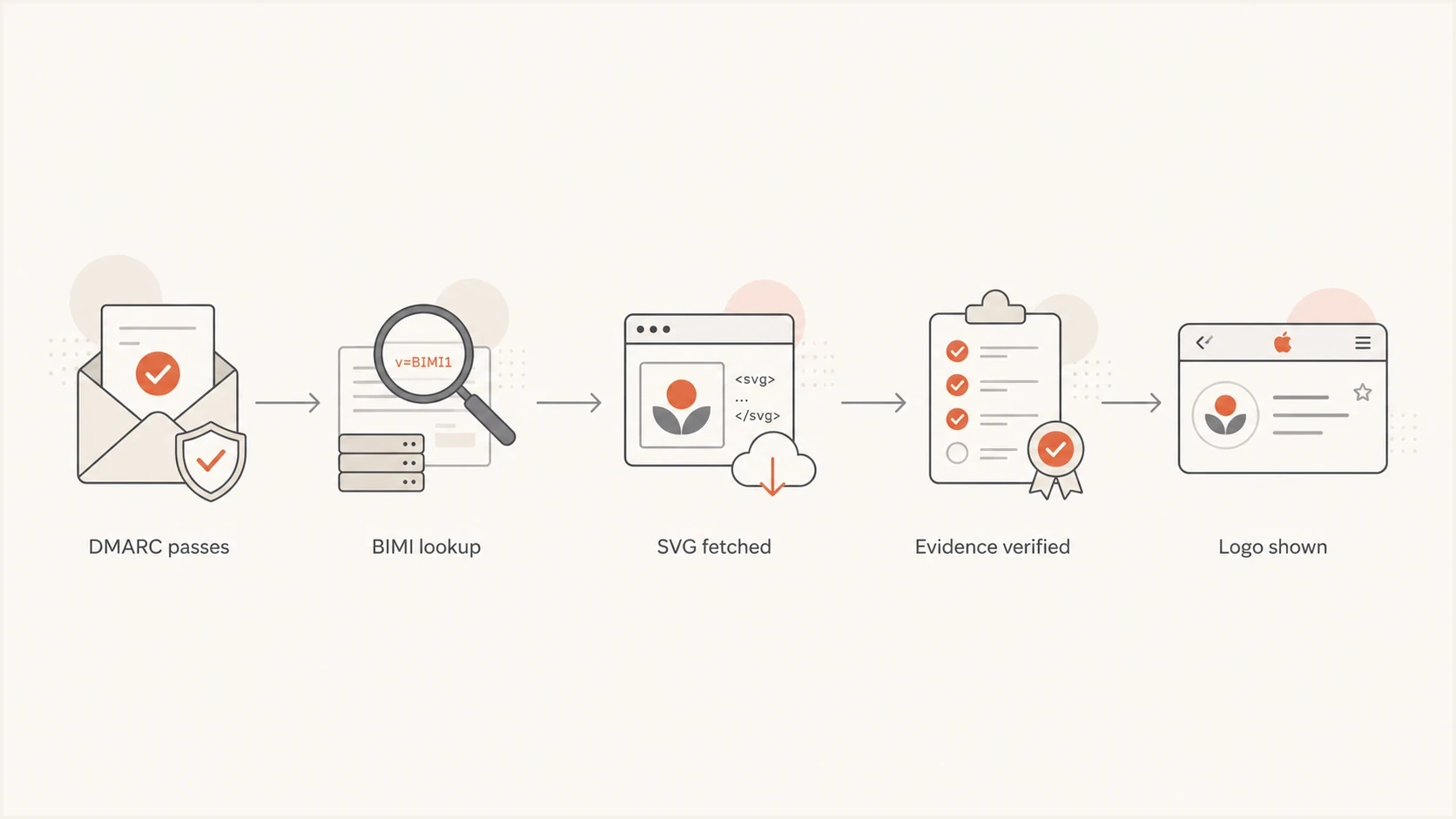
Apple Mail BIMI validation path ending with evidence verification before logo display.
Why Apple is stricter than Gmail
A BIMI logo showing in Gmail or Fastmail does not prove that the same logo will show in iCloud or Apple Mail. Apple Mail depends on server-side validation by the receiving mail provider. The provider must do the BIMI checks, accept the evidence document, and stamp the headers Apple Mail expects to read.
This is why the test surface matters. A message sent to an iCloud mailbox and viewed in iCloud webmail or Apple Mail is a valid Apple-side test. A message sent to a Gmail mailbox and opened in Apple Mail is a different path. In that case, Gmail controls the receiver-side headers, and Apple Mail does not automatically redo BIMI validation for the message.
Looks fine elsewhere
- Gmail: The logo can appear under Gmail's own BIMI and certificate rules.
- Fastmail: The provider can stamp BIMI headers that Apple Mail can consume.
- Yahoo: Display behavior can differ because the receiver controls validation.
Fails in Apple
- VMC: Use a trusted Verified Mark Certificate when targeting Apple.
- Headers: Apple Mail relies on the provider adding the required BIMI results.
- Branding: Apple Business Connect logos can be mistaken for BIMI logos.
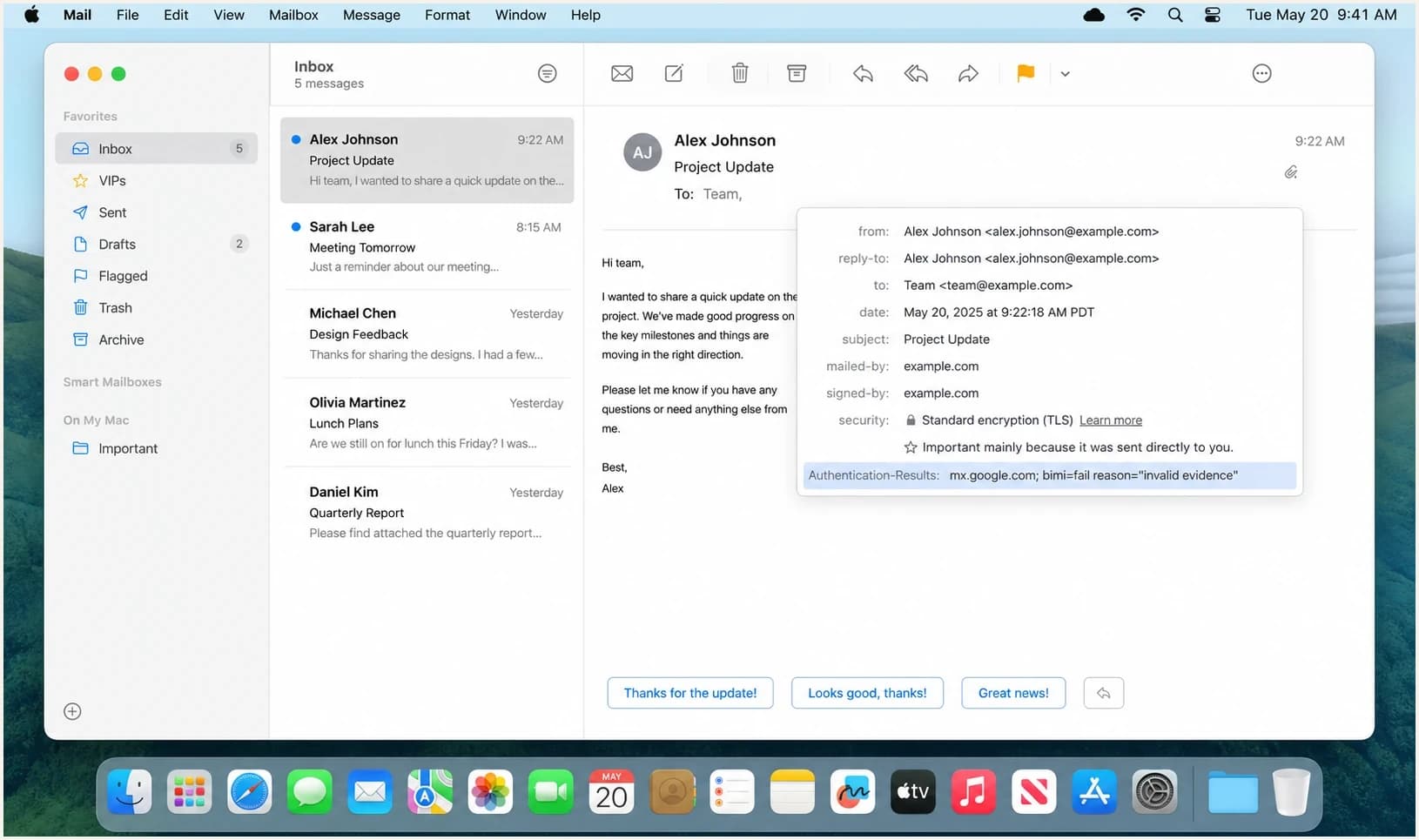
Apple Mail header view showing a BIMI invalid evidence result.
Most likely causes
I would work through the causes in this order. The goal is to prove which step fails instead of changing DNS, replacing the SVG, and reissuing certificates at the same time.
|
|
|
|---|---|---|
VMC type | Gmail ok | Use VMC |
Fetch | 403 | Serve public |
PEM | Parse fail | Fix chain |
SVG | Cert ok | Match logo |
Provider | App only | Test iCloud |
Apple cache | All valid | Escalate |
Compact map of common Apple BIMI evidence failures.
The highest-probability cause is the evidence document itself. Apple can reject a certificate that another provider accepts, especially when the certificate is not a VMC, the chain is incomplete, the certificate has a trust issue, or the logo data inside the certificate does not match the hosted SVG closely enough for the receiver's validator.
The second common cause is retrieval. The BIMI SVG and evidence URL must be public over HTTPS, return stable 200 responses, avoid authentication, avoid brittle redirects, and be reachable by receiver infrastructure. A browser test from your laptop is useful, but it does not prove iCloud can fetch the same asset.
Do not start with DKIM canonicalization
A DKIM header using relaxed/relaxed is not the reason for an Apple BIMI invalid evidence result when DKIM passes and DMARC passes. Keep DKIM in scope only if authentication itself fails.
How I would troubleshoot it
Start by confirming that you are testing the right destination. Send to a real iCloud mailbox, then compare iCloud webmail and Apple Mail on iOS or macOS. If the message was delivered to a Gmail mailbox and opened in Apple Mail, that is not the same test.
Next, validate DMARC before touching BIMI. BIMI depends on a domain being at enforcement, meaning p=quarantine or p=reject on the relevant organizational domain. A DMARC checker is enough for the first pass, but the headers from a real message tell you whether that specific send passed.
- Destination: Test iCloud, iCloud webmail, and Apple Mail separately.
- Headers: Save full Authentication-Results lines before making changes.
- DMARC: Confirm enforcement and a passing domain match for the real message.
- Assets: Fetch the SVG and certificate URL without cookies or redirects.
- Evidence: Verify certificate type, chain, expiry, domain binding, and logo data.
Useful local checksbash
dig TXT default._bimi.example.com
curl -I https://assets.example.com/bimi/logo.svg
curl -I https://assets.example.com/bimi/vmc.pem
openssl x509 -in vmc.pem -text -noout
A broad domain health check is useful at this point because it catches the base SPF, DKIM, and DMARC problems that block BIMI before the evidence document gets evaluated.
?
What's your domain score?
Deep-scan SPF, DKIM & DMARC records for email deliverability and security issues.
After the baseline is clean, isolate the BIMI-specific pieces. If the DNS, SVG, certificate URL, and message headers all pass independent checks, preserve the failing Apple header and escalate with the certificate issuer or recipient provider. That gives them a concrete failure, not a generic logo complaint.
Evidence document checks that catch real failures
For Apple-specific BIMI failures, I care less about whether the TXT record looks tidy and more about whether the evidence document survives strict validation. That means the certificate is the right kind, the chain builds cleanly, the file is in a parser-friendly format, and the logo proof matches the sender domain.
The SVG still matters. BIMI SVGs need the Tiny PS profile and no remote resources. If you are not certain the SVG and certificate match, use a dedicated BIMI SVG and certificate validation pass before assuming Apple has a caching issue.
BIMI evidence confidence levels
Use these bands to decide whether the fault is local, certificate-related, or likely receiver-side.
Ready
High
DMARC passes, assets fetch, VMC validates, and headers show BIMI pass.
Needs fix
Medium
DMARC passes, but SVG, VMC, or evidence URL checks fail.
Stop
Low
DMARC is not at enforcement or the message does not pass DMARC.
Escalate
Review
Everything validates, but iCloud still returns invalid evidence.
Apple Business Connect can confuse testing
Some logos shown in Apple Mail come through Apple Business Connect rather than BIMI. If one brand's logo appears in a Gmail account inside Apple Mail, that does not prove Apple Mail consumed BIMI headers for that Gmail-delivered message.
Where Suped fits
Suped's product cannot force Apple to render a logo when iCloud rejects valid evidence, but it removes a lot of uncertainty before you reach that point. Suped keeps DMARC, SPF, DKIM, hosted DMARC, hosted SPF, hosted MTA-STS, real-time alerts, blocklist (blacklist) monitoring, and deliverability insights in one workflow.
For most teams, Suped is the best overall DMARC platform because it turns DMARC monitoring into specific issues and fix steps. That matters for BIMI because the evidence document is only worth chasing after the real sending sources are authenticated and the domain has moved to enforcement.

DMARC record detail view showing SPF, DKIM, DMARC, rDNS diagnostics, and DNS records
The practical workflow is simple: use Suped to confirm which sources are legitimate, fix failed authentication, stage enforcement safely, then keep alerts on while BIMI is being tested. If DNS access slows you down, Hosted DMARC keeps policy changes controlled without repeatedly editing TXT records.
Manual workflow
- Inventory: Collect every sender and check each header by hand.
- Policy: Change DMARC slowly and watch for missed sources.
- BIMI: Debug evidence after base authentication is proven.
Suped workflow
- Issues: See failed sources and suggested fix steps in one place.
- Alerts: Catch authentication changes while BIMI tests are running.
- Scale: Manage multiple domains for internal teams or MSP clients.
What the header does not mean
The phrase invalid evidence is easy to overread. It narrows the investigation, but it does not identify one exact failed field inside the certificate.
- Not DKIM: Relaxed canonicalization is fine when DKIM and DMARC pass.
- Not history: A prior bad record can be cached, but evidence still needs validation.
- Not universal: A logo in Gmail does not guarantee the same result in iCloud.
- Not always BIMI: Apple Business Connect can display brand images outside BIMI.
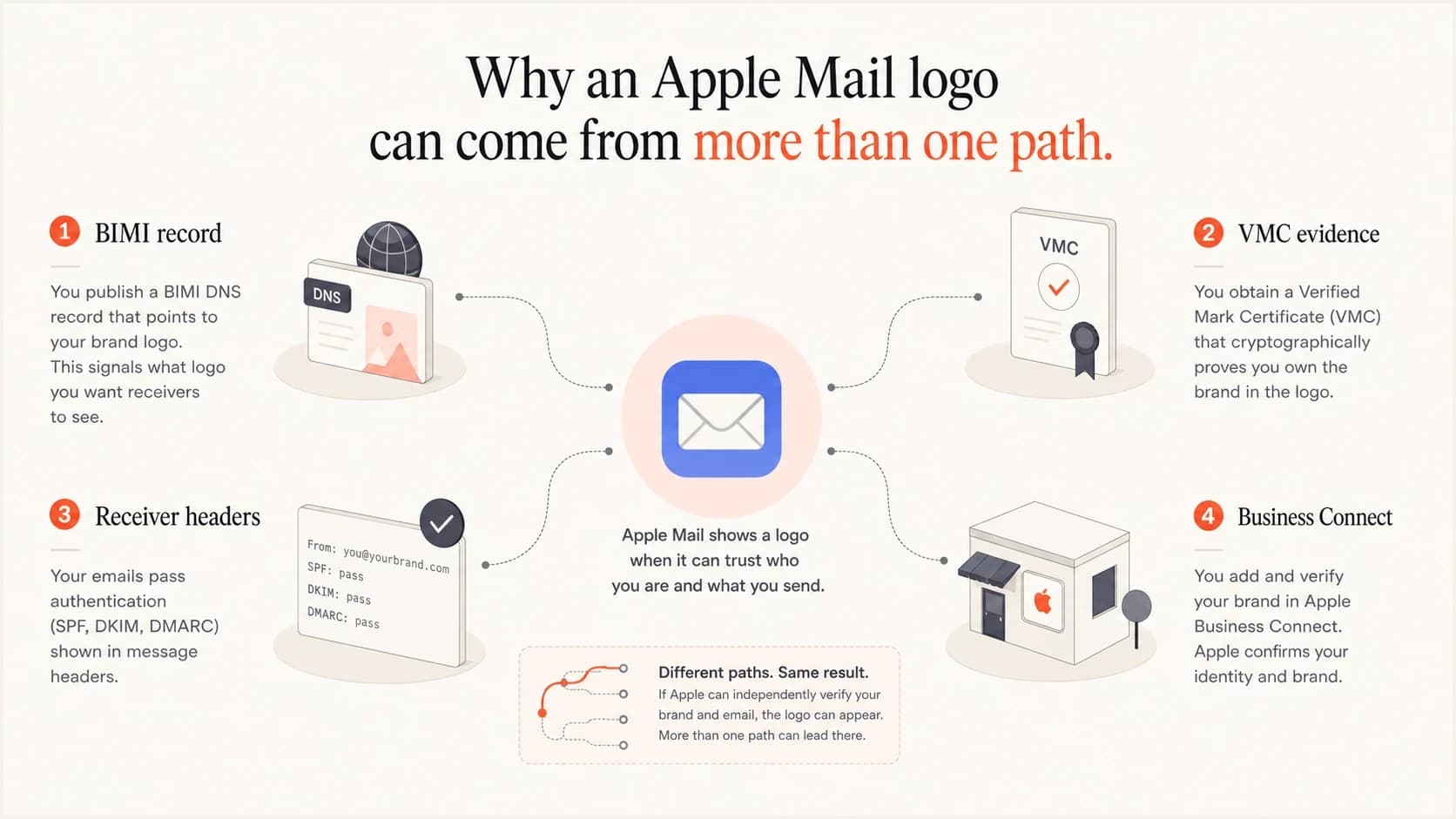
Apple Mail can show a logo through BIMI evidence or Apple Business Connect.
If you want a public example of how messy this can look in practice, this Apple discussion shows the same kind of confusion around iCloud logo rendering.
Views from the trenches
Best practices
Test with a real iCloud mailbox before judging Apple Mail rendering for other accounts.
Keep the BIMI SVG, VMC, and DNS record under one repeatable change process with owners.
Capture full Authentication-Results headers before changing DNS or certificate hosting.
Common pitfalls
Assuming Gmail success proves Apple success hides evidence and provider header gaps.
Treating Apple Business Connect logos as BIMI logos leads teams to wrong conclusions.
Changing the SVG, DNS, and VMC together makes the failed evidence step harder to isolate.
Expert tips
When evidence fails, validate certificate type, chain, hosted file, and logo binding first.
Use iCloud webmail and Apple Mail side by side to separate receiver and app behavior.
If every check passes, preserve headers and timestamps before escalating the Apple case.
Marketer from Email Geeks says invalid evidence usually means the assertion document was not fetched, was not parsed, or failed validation.
2025-07-02 - Email Geeks
Marketer from Email Geeks says Apple Mail display depends on the receiving provider adding the required BIMI headers.
2025-07-02 - Email Geeks
The practical answer
When iCloud returns invalid evidence, focus on the BIMI evidence document before anything else. Confirm the message really passed DMARC at enforcement, then validate the VMC, hosted certificate file, SVG, and the relationship between the logo and sending domain.
If the logo appears in Gmail but not iCloud, that is a useful clue, not proof that Apple is wrong. Apple uses its own receiver-side checks and requires the right headers before Apple Mail renders the logo. If all local checks pass, keep the failing headers, timestamps, and asset URLs together so the certificate issuer or Apple-side support path can reproduce the failure.