Why is Gmail rejecting unauthenticated email from gmail.com due to DMARC policy when sending via Sendgrid?

Published 30 May 2025
Updated 28 Jul 2026
11 min read
Summarize with
Updated on 28 Jul 2026: We updated this guide for SendGrid sender verification, Gmail's current sender rules, and RFC 9989 policy staging.
Gmail rejects this because the message claims to be from gmail.com in the visible From header, but SendGrid cannot authenticate mail for gmail.com. SendGrid can pass SPF and DKIM for its own sending identity, or for a domain you have configured, but DMARC needs one of those authenticated identities to match the visible From domain. With user@gmail.com as the From address, that match does not exist, so DMARC fails.
The fix is not to make SendGrid send as gmail.com. Move the From address to a domain the sender owns, authenticate that domain in SendGrid, keep the Gmail address in Reply-To if needed, and watch DMARC reports until Gmail sees passing mail.
The short answer
Bulk or application email sent through SendGrid with a gmail.com From address is indistinguishable from domain spoofing to DMARC. The sender owns the mailbox, but does not control Gmail's domain authentication. Gmail can reject that mail with 550 5.7.26 even when some similar messages still arrive.
Why Gmail rejects it
The bounce text is usually accurate. Gmail is saying that the message is unauthenticated for the domain in the From header. SendGrid support explains the same pattern: messages using free mailbox domains such as Gmail can fail when sent through a non-approved service. Google Workspace guidance also says 5.7.26 appears when outgoing mail fails DMARC and tells senders to check SPF, DKIM, the DMARC policy, and the From-domain match. Google's sender rules also warn against impersonating Gmail From headers.
Typical Gmail 5.7.26 bounce
550-5.7.26 Unauthenticated email from gmail.com is not accepted due to
550-5.7.26 the domain's DMARC policy. Please contact the administrator
550-5.7.26 of gmail.com if this was a legitimate mail.
550 5.7.26 DMARC initiative.
The confusing part is that SendGrid can show SPF and DKIM as passing. That does not settle DMARC. DMARC asks a narrower question: did the authenticated SPF domain or DKIM signing domain match the visible From domain under the applicable alignment mode? For a message claiming to be from Gmail, the domain that matters is gmail.com, not SendGrid's envelope domain or its default signing domain.
What fails in the message
Check the identities in the message before changing DNS. In this failure mode, the visible From header names Gmail, while the technical authentication names SendGrid. That gap is enough for DMARC failure.
Identity path that fails DMARC
Header From: user@gmail.com
SPF domain: sendgrid.net
DKIM d=: sendgrid.net
DMARC domain: gmail.com
Result: no From-domain match
- The visible From address is what the recipient sees and the domain DMARC protects.
- The SPF identity comes from the envelope sender or return-path, not the friendly From address.
- The DKIM identity comes from the domain in the signature's d= value.
- DMARC passes when SPF or DKIM passes with a domain that matches the From domain under the applicable alignment mode.
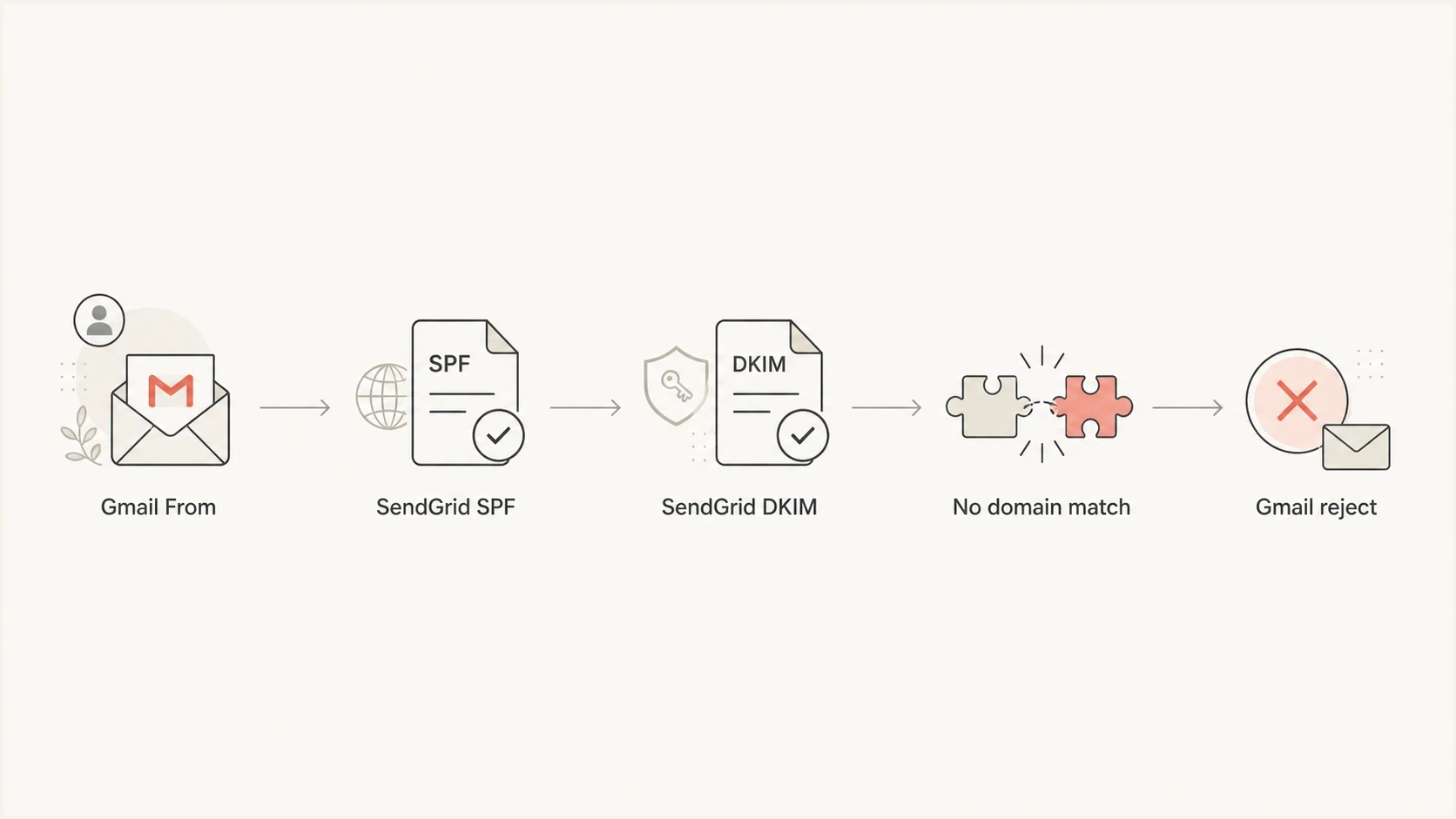
Flowchart showing Gmail From, SendGrid authentication, no domain match, and Gmail rejection.
Why p=none does not save it
A published p=none policy is a domain owner's requested treatment for DMARC failures, not a promise that every receiver will accept the message. Google explicitly warns senders not to impersonate Gmail From headers and can apply its own inbound controls to mail that claims to be from Gmail.
Public DMARC policy
A DNS record tells other receivers how the domain owner wants failed mail handled.
- Its scope is the domain owner's published preference for receivers.
- A domain can publish p=none while collecting reports.
Receiver local policy
A mailbox provider can add local rules for abuse prevention and brand protection.
- Its scope is the receiver's own filtering system.
- Gmail can refuse unauthenticated inbound mail using gmail.com in the From header.
If some similar messages arrive, compare their authentication results before calling the rejection random. A different From address, authenticated SendGrid domain, return-path, or DKIM signature can change the result. Receiver handling can also differ, but occasional acceptance does not make the Gmail From pattern valid.
The fix to make first
The durable fix is to stop using gmail.com in the From header for SendGrid mail. Use a domain you control, authenticate it in SendGrid, and reserve the Gmail address for replies.
- Choose a brand domain or subdomain such as mail.example.com.
- Publish the SendGrid CNAME records supplied for DKIM and the return-path.
- Change From to an address such as news@example.com, not a Gmail mailbox.
- Put the Gmail mailbox in Reply-To if replies should land there.
- Check the new record with a DMARC checker before resending at volume.
Safer header pattern
From: Brand Team <news@example.com>
Reply-To: Person <user@gmail.com>
Return-Path: bounce@mail.example.com
DKIM d=example.com
If the domain has no DMARC record yet, create one before ramping traffic. Suped has a record generator that builds a starting TXT record with reporting addresses and policy options.
DMARC checker
Look up a domain's DMARC record and catch policy issues.
?/7tests passed
Why Single Sender Verification does not fix DMARC
SendGrid Single Sender Verification confirms that you control one mailbox. It does not give SendGrid permission to authenticate gmail.com, publish DNS records for it, or make a SendGrid SPF or DKIM domain match the visible From domain. SendGrid describes Single Sender Verification as a testing option and Domain Authentication as the production setup.
Verification and authentication are different
- Single Sender Verification can satisfy SendGrid's account-side sender check, but Gmail can still return 5.7.26.
- Domain Authentication uses DNS records on a domain you own so SendGrid can produce an authenticated domain match for DMARC.
SendGrid setup that works
In SendGrid, use Domain Authentication for a domain the sender controls. That gives SendGrid permission to sign mail for the domain and use a related return-path. It also gives Gmail a coherent identity chain when it evaluates DMARC.
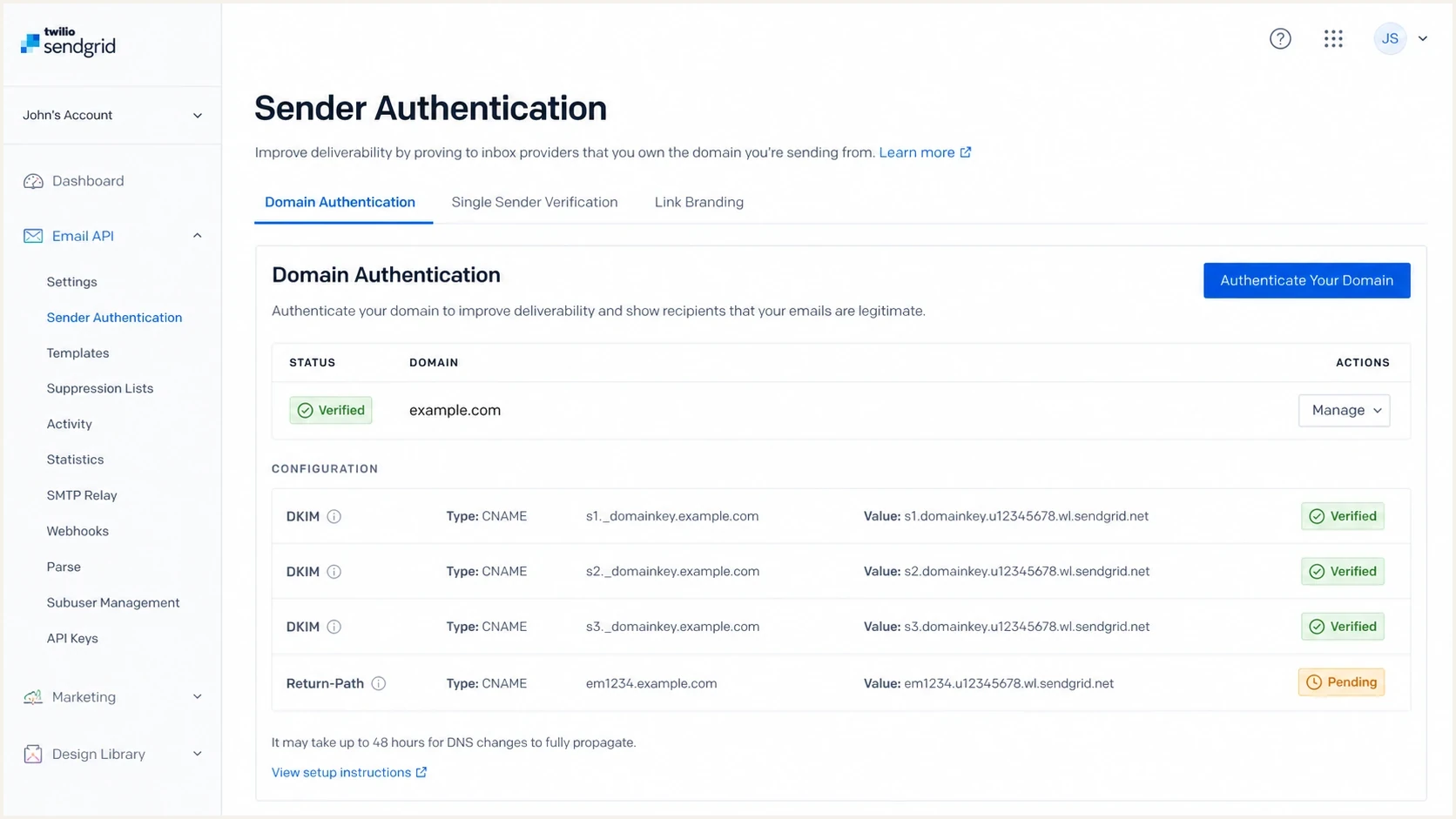
Twilio SendGrid Sender Authentication screen for a verified sending domain.
|
|
|
|---|---|---|
user@gmail.com via SendGrid | Fails alignment | Avoid for bulk or app mail |
news@example.com via SendGrid | Passes when authenticated | Use for product or marketing mail |
user@gmail.com via Gmail SMTP | Passes through Gmail | Use for mailbox-scale sending |
Owned From with Gmail Reply-To | Passes when authenticated | Use when replies need Gmail |
Which sending pattern to use with Gmail and SendGrid.
If you need to send as a Gmail address, use Gmail's authenticated submission path. If you need SendGrid for automated or template-based sending, use an owned domain in the visible From address.
Fixing the From-domain mismatch resolves this DMARC cause, but Gmail's other sender requirements still apply. All senders need SPF or DKIM. Senders above 5,000 messages per day to personal Gmail accounts need SPF, DKIM, DMARC, and direct-message alignment. Marketing and subscribed mail at that volume also needs one-click unsubscribe.
DNS records to expect
The exact values come from the SendGrid account. With Automated Security enabled, SendGrid normally supplies three CNAME records: one for the return-path and two for DKIM. Publish a DMARC TXT record for the owned From domain separately.
Example DNS shape
em1234.example.com CNAME u123456.wl.sendgrid.net
s1._domainkey.example.com CNAME s1.domainkey.u123456.wl.sendgrid.net
s2._domainkey.example.com CNAME s2.domainkey.u123456.wl.sendgrid.net

_dmarc.example.com TXT
v=DMARC1; p=none; rua=mailto:dmarc-reports@example.com
Start with monitoring, confirm that every legitimate source passes, then move policy in stages. RFC 9989 removed the pct tag and introduced t=y as the testing signal. Receiver support can vary during the transition, so reports and controlled test messages still matter.
DMARC policy stages for an owned domain
Move only after approved sources pass, and verify how major receivers handle the testing signal.
Monitor
p=none
Collect aggregate reports and find sending sources.
Test quarantine
p=quarantine; t=y
Request testing behavior before enforcing quarantine.
Enforce quarantine
p=quarantine; t=n
Remove test mode after legitimate mail is clean.
Reject
p=reject; t=n
Reject failed mail after every approved source passes.
How to investigate intermittent 5.7.26 bounces
A small number of Gmail bounces does not prove the setup is mostly correct. Compare a rejected message with an accepted message. SendGrid first tries to match the From address to an authenticated domain and can fall back to a default authenticated domain or sendgrid.net, so messages that look similar can carry different authentication identities.
- Save the full bounce and original headers for both a failed sample and a delivered sample.
- Compare Header From, return-path, SPF result, DKIM selector, and DKIM d= domain.
- Check which SendGrid authenticated domain or default domain was applied to each message.
- Retest with a new message from an authenticated owned domain, then compare Gmail's authentication results.
What to ignore
Do not spend time trying to infer whether Gmail changed a hidden rule on a specific date. The sender still has to use an authenticated From domain it controls. Header evidence will show whether the rejected copy met that requirement.
If your own domain fails after custom SendGrid authentication, that is a different problem. Check whether SPF or DKIM passed with the same domain family as the From address. These SendGrid DMARC failures need a header-level review rather than a Gmail From change.
Where Suped fits
Suped's product supports the monitoring part of this workflow. Add the owned From domain, collect its aggregate reports, and use DMARC monitoring to confirm that SendGrid passes with the expected SPF or DKIM domain match. Suped cannot make gmail.com valid in From. That change must happen in the sending application and SendGrid.

Issue steps to fix dialog showing the issue overview, tailored fix steps, and verification action
For this issue, the useful view connects the owned From domain with the SendGrid source and the resulting DMARC pass rate. Alerts can flag new failures after DNS or application changes, while the issue view keeps the fix tied to the affected sending source.
A practical Suped workflow
- Add the owned From domain that will replace the Gmail address.
- Confirm SendGrid appears as an approved source after its CNAME records are published.
- Check that SPF or DKIM passes with the domain match DMARC needs.
- Watch reports for old Gmail From traffic and correct the remaining application paths.
Common mistakes to avoid
What keeps the bounce alive
- Changing only Reply-To does not fix a From address that still uses gmail.com.
- An SPF pass for the return-path does not pass DMARC when that domain does not match the From domain.
- A valid SendGrid DKIM signature does not pass DMARC when its signing domain does not match Gmail.
- Occasional acceptance by Gmail is not a migration plan.
- Without DMARC aggregate data, you cannot confirm that every approved source is clean.
A common bad fix is to keep the Gmail address in From because the recipient recognizes it. That trades short-term familiarity for unstable delivery. Use the owned domain in From and write the display name clearly instead.
Views from the trenches
Best practices
Use a domain you control in From before sending commercial mail through any ESP at scale.
Keep Gmail in Reply-To only when replies need to reach a personal mailbox after send.
Review headers before changing DNS so the failing identity is confirmed before edits.
Common pitfalls
Assuming SendGrid SPF pass means DMARC passes for a Gmail From address is a trap.
Reading p=none as a promise that Gmail must accept failed Gmail mail causes bad fixes.
Treating a small number of bounces as noise hides a clear DMARC policy signal from Gmail.
Expert tips
Move the visible From domain first, then tune policy only after reports are clean.
Use a subdomain for platform mail so SPF, DKIM, bounces, and reports stay contained.
Track blocklist and blacklist data separately from DMARC identity failures and fixes.
Expert from Email Geeks says Gmail can apply stricter local rules to mail that claims to be from its own domain, even when the public DMARC record appears less strict.
2023-07-26 - Email Geeks
Expert from Email Geeks says a DMARC record guides other receivers, but it does not limit how a domain owner handles inbound mail that uses its own domain.
2023-07-26 - Email Geeks
The clean answer
Gmail is rejecting the message because it is not authenticated as gmail.com. SendGrid authentication for SendGrid, or for a different domain, does not authorize the sender to use Gmail's domain in the visible From address. DMARC fails, and Gmail can refuse the message with 550 5.7.26.
The long-term fix is simple: send through SendGrid with an owned domain in From, configure DKIM and return-path records for that domain, keep Gmail only in Reply-To if needed, and monitor DMARC reports while policy is staged. That removes the Gmail identity mismatch instead of trying to work around Gmail's rejection.




