Why is my DMARC failing even though DKIM and SPF pass in Sendgrid?

Published 14 May 2025
Updated 27 Jul 2026
11 min read
Summarize with
Updated on 27 Jul 2026: We added SendGrid's current relaxed and strict alignment paths, corrected the DNS examples, and clarified how subuser assignment affects DMARC.
DMARC is failing because SPF and DKIM are passing for SendGrid's domains, not for the domain in the visible From address. A pass only helps DMARC when the passing identifier domain aligns with the Header From domain. In a common SendGrid failure, the received header says SPF passed for sendgrid.net and DKIM passed with header.d set to sendgrid.net, while the Header From is the customer's domain. That authenticates SendGrid, but it does not authenticate the customer domain for DMARC.
The most practical fix is to make SendGrid sign with the customer's authenticated domain and, if SPF is part of your pass path, make the Return-Path use an aligned domain. In the failure pattern behind this question, the missed operational step was not DNS. The domain had been authenticated at the parent SendGrid account, but it had not been assigned to the SendGrid subuser that sent the message.
Do not start by rewriting the DMARC record. First inspect the delivered headers, then check which SendGrid account or subuser actually sent the mail.
For ongoing source tracking, Suped's product uses DMARC monitoring to show which sending source uses each DKIM domain and Return-Path domain. This makes it easier to see whether a SendGrid route uses the expected customer authentication or falls back to SendGrid's identifiers.
The direct reason
DMARC checks the domain in the visible Header From address. It passes when either SPF passes and the SPF Mail From domain aligns with that Header From domain, or DKIM passes and the DKIM d= domain aligns with that Header From domain. It does not pass simply because SPF or DKIM says pass somewhere in the header.
Authentication is not enough
A valid DKIM signature from SendGrid proves SendGrid signed the message. It does not prove the customer's domain signed it. A valid SPF result for SendGrid proves the SendGrid sending IP was permitted by SendGrid's envelope domain. It does not prove the customer's visible From domain authorized that IP.
This is why the header can look contradictory at first. You see spf=pass and dkim=pass, then a few fields later you see dmarc=fail. Read the domains beside those results instead of stopping at the pass or fail labels.
What passed
- SPF: The sending IP is permitted by the envelope domain shown in smtp.mailfrom.
- DKIM: The cryptographic signature verifies for the domain shown in header.d.
What DMARC needed
- SPF alignment: The envelope domain must share an Organizational Domain with Header From in relaxed mode, or match it exactly in strict mode.
- DKIM alignment: The DKIM d= domain must share an Organizational Domain with Header From in relaxed mode, or match it exactly in strict mode.
Relaxed and strict alignment
The aspf and adkim tags control SPF and DKIM alignment. Both default to relaxed alignment when omitted. Relaxed alignment accepts authenticated domains that share the same Organizational Domain as Header From. Strict alignment requires the authenticated domain and Header From domain to be identical.
|
|
|
|---|---|---|
example.com | Pass | Pass |
em123.example.com | Pass | Fail |
sendgrid.net | Fail | Fail |
Alignment examples for a message with Header From at example.com.
SendGrid normally uses a branded Return-Path subdomain such as em123.example.com. That aligns with example.com under aspf=r, but not under aspf=s. If strict SPF alignment is required, send with the matching subdomain and choose that label as the custom Return-Path when creating Domain Authentication. SendGrid does not let you add this option to an existing authentication, so create and validate a replacement before switching traffic.
Preserve Sender is a last resort
For root-domain mail with aspf=s, SendGrid support can enable Preserve Sender in limited cases. This prevents SendGrid from rewriting the Return-Path, but it also prevents normal capture of bounces and spam reports. Use relaxed SPF alignment, aligned DKIM, or a matching sending subdomain before considering this setting.
What passed and what did not
Read an Authentication-Results header as a set of domain comparisons. The pass result is only half the story. The domain beside the result tells you whether DMARC can use it.
Authentication-Results example
Authentication-Results: spf=pass smtp.mailfrom=sendgrid.net
 dkim=pass header.d=sendgrid.net
 dmarc=fail header.from=client.example
 compauth=fail reason=000
|
|
|
|---|---|---|
Header From | client.example | Domain to protect |
DKIM d= | sendgrid.net | Wrong domain |
SPF Mail From | sendgrid.net | Wrong domain |
DMARC | fail | No aligned pass |
The important fields are the domains, not only the pass labels.
If you want a quick DNS-level sanity check after changing records, run the domain through Suped's DMARC checker. That confirms the published DMARC record parses cleanly before you spend time debugging the SendGrid account routing. A valid record does not prove that live messages use aligned SPF or DKIM domains.
SendGrid's own wording
SendGrid's support guidance describes the same rule: DMARC passes when SPF or DKIM passes with an aligned identifier domain. If both passing identifiers point at SendGrid while the visible From points at the customer, DMARC still fails.
The SendGrid subuser trap
The easy mistake is to authenticate the domain at the parent SendGrid account and then send through a subuser that has not been assigned that authenticated domain. DNS can be correct. SendGrid can show the domain as validated. The API call can have the expected From address. But the actual subuser send still uses SendGrid's default DKIM and envelope identifiers.
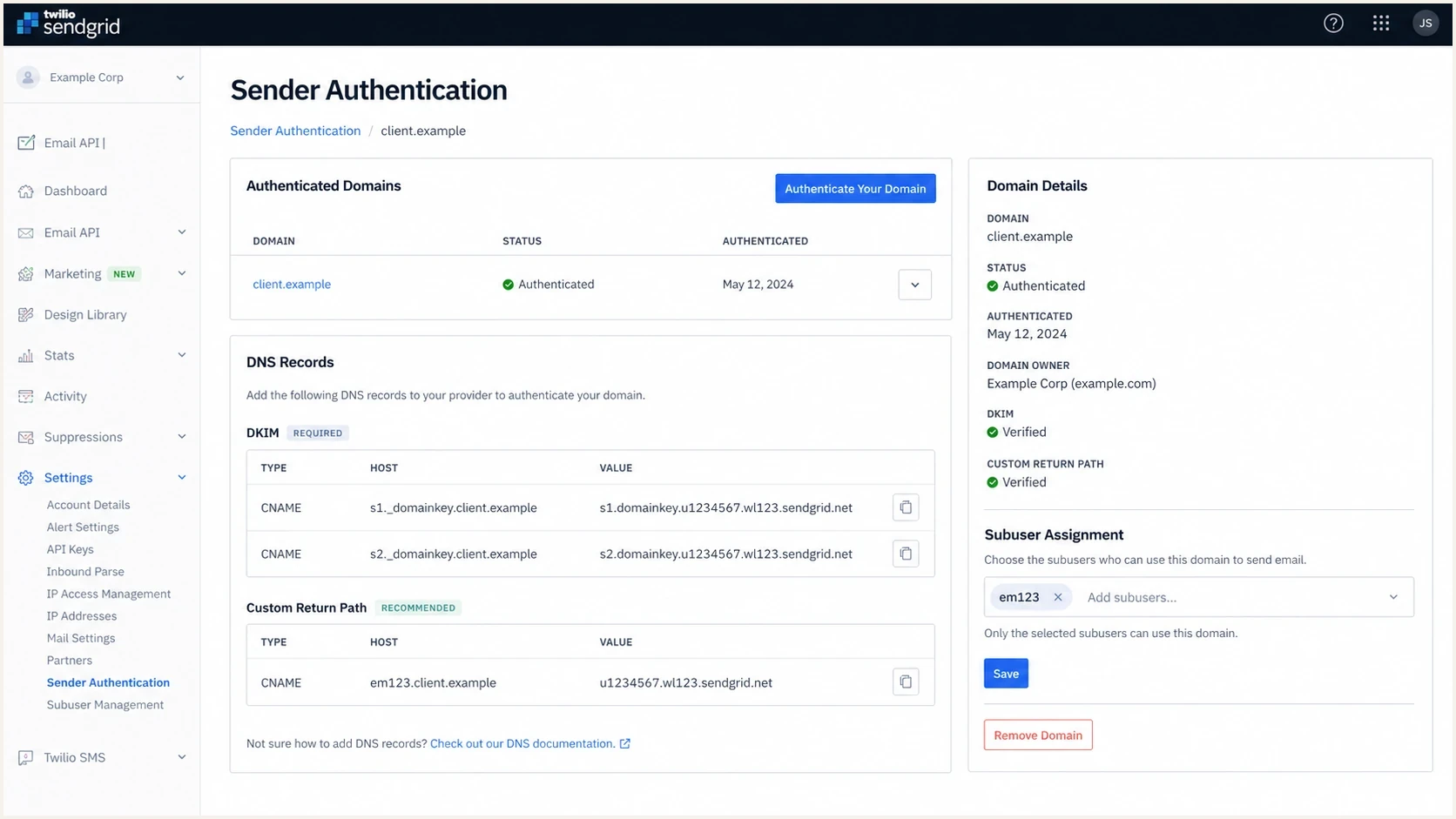
Twilio SendGrid Sender Authentication screen showing domain authentication and subuser assignment controls.
That creates the exact header pattern that causes confusion. The customer sees the right From address, the DNS administrator sees records that look correct, and SendGrid's parent account shows a verified domain. The receiver only sees what was used on the message. If the message used sendgrid.net for DKIM and the envelope sender, DMARC has no aligned pass for the customer's domain.
SendGrid's DMARC docs explain the distinction between Header From and Envelope From. For this problem, Header From is the customer's identity, Envelope From is the bounce identity, and DKIM d= is the signing identity.
What the missed step looks like
- Parent account: The customer's domain is authenticated and DNS validates.
- Subuser: The sending subuser has not been assigned that authenticated domain.
- Delivered header: SendGrid signs with its own domain, so DMARC fails for the customer domain.
How to confirm the failure
Start with a delivered copy of the message. If the receiving domain rejects at SMTP time, send the same message to a mailbox or tester that accepts the mail and exposes full headers. Do not rely on the SendGrid UI alone, because DMARC is evaluated on the message that arrives at the receiver.
- Find Header From: Look for the visible sender domain, usually shown as header.from in Authentication-Results.
- Check DKIM: Find header.d. If it says SendGrid rather than the customer domain, DKIM cannot satisfy DMARC for that customer domain.
- Check SPF: Find smtp.mailfrom or Return-Path. If it is a SendGrid domain, SPF cannot satisfy DMARC for a different customer domain.
- Check alignment mode: Read aspf and adkim in the DMARC record. Omitted tags default to relaxed alignment.
- Check policy: If the customer has p=reject, the receiver can reject the message when neither aligned identifier passes.
Email tester
Send a real email to this address. Suped shows a results button when the test is ready.
?/43tests passed
Send one message through the exact API key, subuser, template, IP pool, and From address that production uses. Then compare the domains. If the result is still unclear, use a repeatable troubleshooting flow so you do not change DNS and SendGrid settings at the same time as policy.
Typical SendGrid Automated Security records
em123.example.com CNAME u123456.wl.sendgrid.net
s1._domainkey.example.com CNAME s1.domainkey.u123456.wl.sendgrid.net
s2._domainkey.example.com CNAME s2.domainkey.u123456.wl.sendgrid.net
_dmarc.example.com TXT "v=DMARC1; p=reject; rua=mailto:dmarc@example.com"
Manual security uses different records
With SendGrid Automated Security off, the generated authentication set uses TXT and MX records instead of the three CNAME records shown above. Publish the exact records generated for the active Domain Authentication rather than mixing the two modes.
How to fix it
Fix the active SendGrid route instead of stopping at the DNS record. The receiver does not know that a different account level has a verified domain. It only evaluates the identifiers on the message it received.
- Assign the domain: In SendGrid, make sure the authenticated customer domain is assigned to the subuser that sends the mail.
- Verify DKIM use: Send a new test message and confirm header.d aligns with Header From under the configured adkim mode.
- Fix Return-Path: If SPF must satisfy DMARC, configure a branded bounce domain that aligns under the configured aspf mode.
- Protect live traffic: If legitimate mail is being rejected, temporarily reduce enforcement only while repairing and verifying every production route. A policy change does not fix alignment.
- Automate checks: For client sending, check domain assignment whenever a new subuser, sender, API key, or route is created.
DKIM first
This is usually the cleanest SendGrid fix. The customer publishes SendGrid's DKIM CNAME records, SendGrid signs with the customer domain, and DMARC passes through DKIM even if SPF uses a different bounce domain.
- Best use: Transactional and marketing streams that already use customer-branded From domains.
- Risk: Subusers and sender identities can still fall back if assignment is wrong.
SPF first
This depends on the Return-Path domain. Use a branded bounce subdomain that routes to SendGrid's bounce handler. Strict SPF alignment requires that domain to match Header From exactly.
- Best use: Routes where bounce handling and envelope identity are carefully controlled.
- Risk: Forwarding breaks SPF authentication, so DKIM should provide another aligned path.
If you need to stage policy changes without repeatedly editing DNS, Suped's hosted DMARC lets you manage policy rollout with CNAME-based configuration. That helps when many client domains need controlled policy changes without a manual DNS ticket for every adjustment.
Monitoring the change
After changing SendGrid assignment or bounce settings, monitor real mail. A single successful test is useful, but aggregate DMARC reports show whether each template, subuser, IP pool, and automation path uses the intended customer domain.

Issue steps to fix dialog showing the issue overview, tailored fix steps, and verification action
Suped's product groups DMARC failures by source and shows the SPF domain, DKIM domain, alignment result, and fix steps for each source. For teams managing client sending, its multi-tenant view keeps each customer's domain health separate while retaining a shared operational view.
You can also run a broad DNS check with Suped's domain health checker after the SendGrid-side fix. That catches malformed or missing email authentication records before the next production campaign.
Illustrative DMARC rollout after fixing assignment
Example checkpoints only. Use aggregate reports to measure the actual pass rate for each SendGrid route.
DMARC pass
DMARC fail
Views from the trenches
Best practices
Check header.from, header.d, and smtp.mailfrom before changing DNS or policy settings.
Test with a mailbox or parser that gives full headers before asking support to act.
Keep SendGrid domain authentication assigned to every subuser that sends that domain.
Common pitfalls
Seeing dkim=pass and assuming DMARC passed, even when header.d is the wrong domain.
Authenticating a domain at the parent account while the active send comes from a subuser.
Using p=reject before each sending route proves DKIM or SPF with the visible domain.
Expert tips
Use relaxed SPF alignment unless strict alignment has a documented operational need.
Match the custom Return-Path to Header From when strict SPF alignment is required.
Save one full successful header after every change so later regressions have a baseline.
Expert from Email Geeks says a DKIM pass is only useful for DMARC when the DKIM d= domain matches the visible From domain.
2022-09-26 - Email Geeks
Expert from Email Geeks says the Return-Path domain controls SPF matching, so a SendGrid envelope domain explains SPF-related DMARC failure.
2022-09-26 - Email Geeks
The practical takeaway
When DMARC fails even though SPF and DKIM pass in SendGrid, assume the pass belongs to the wrong domain until the headers prove otherwise. The pass label alone does not matter. The domains beside header.d and smtp.mailfrom need to align with the Header From domain under the domain's DMARC policy.
For this specific SendGrid pattern, assign the authenticated domain to the sending subuser, then send a fresh message and confirm DKIM uses an aligned customer domain. After that, monitor aggregate reports until every production route shows an aligned DKIM or SPF pass before returning to p=reject. Suped's product supports that loop by turning aggregate reports into source-level issues and remediation steps while preserving the underlying authentication details.




