Why are phishing emails being sent from verified and authenticated intuit.com servers?

Published 17 Apr 2025
Updated 11 Aug 2026
12 min read
Summarize with

Updated on 11 Aug 2026: We updated this guide with current Intuit reporting guidance and a safer, more technically precise QuickBooks invoice verification workflow.
Phishing emails can be sent from verified and authenticated Intuit servers because authentication proves the sending path, not the sender's intent. If an attacker abuses a real Intuit product workflow, a compromised Intuit customer account, a QuickBooks invoice flow, a signup form, or another notification system, the message can genuinely leave Intuit-controlled infrastructure. SPF can pass, DKIM can pass, and DMARC can pass because Intuit authorized and signed the message.
That does not make the email safe. It means the message was not a simple domain spoof. The abuse moved upstream, into a legitimate platform path. This is authenticated platform abuse: the mail is technically legitimate at the transport layer, while the content, account, payment request, link, reply-to address, or business context is fraudulent.
Direct answer
A receiver showing a verified sender or authenticated domain is saying that the message met provider-specific identity or authentication checks. It is not saying that the QuickBooks customer, invoice, request, login prompt, or payment instruction is trustworthy.
- Authorized path: The message can come through a real Intuit mail server or product workflow, so SPF and DKIM are expected to pass.
- Abused workflow: The attacker abuses a product action, account, form, template, or notification path.
- Receiver limit: Authentication checks do not read business intent or validate that the person behind the account is honest.
Why a verified Intuit sender can still be unsafe
The message is authenticated because the receiving system sees an aligned, authenticated Intuit domain. The attacker is not always forging intuit.com. They can use a real Intuit-hosted path, including QuickBooks invoice delivery. This is the same pattern behind many cases where harmful messages pass SPF and DKIM checks. SPF and DKIM validate particular sending identities, while DMARC checks their alignment with the visible From domain. None of those checks proves that the account, form submission, invoice, or message text was created for a legitimate purpose.
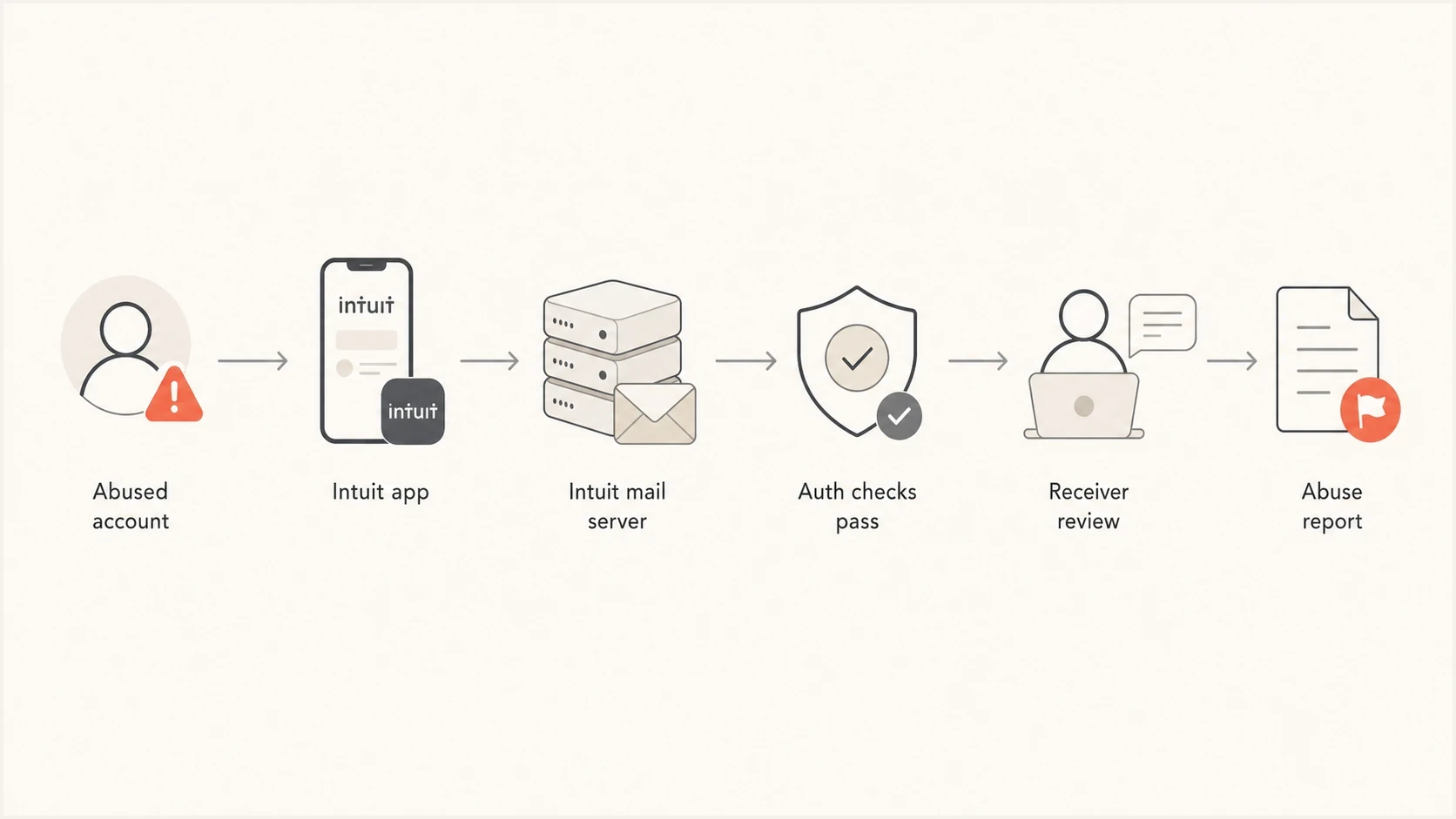
Flowchart showing how an abused account can send authenticated mail.
This matters because the fix is different. If an attacker spoofs your domain, you tighten your own authentication and enforcement. If an attacker abuses an authenticated third-party platform, receivers need abuse reporting, content filtering, tenant-level signals, and careful allow or deny logic. Blocking all Intuit mail is usually too blunt because real invoices, payroll notices, tax messages, and account updates still use the same parent domain or nearby infrastructure.
Why authentication still passed
SPF, DKIM, and DMARC are mechanical checks. They are good at stopping unauthorized domain use, but they are not identity proof for every person, tenant, workflow, or invoice inside a large platform. When a message is sent through Intuit's own systems, the header can look clean because the platform really did participate in the delivery.
|
|
|
|---|---|---|
SPF | The connecting IP is authorized for the RFC5321.MailFrom or HELO identity. | Whether the account or workflow was abused. |
DKIM | A domain signature validated and the signed content covered by it remained intact. | Whether the content or account was trustworthy. |
DMARC | The visible From domain aligned with a domain authenticated by SPF or DKIM. | Whether the business request or invoice was real. |
Verified badge | The message met the mailbox provider's criteria for that identity indicator. | Whether the sender account, tenant, or request is safe. |
What each authentication signal proves, and what it leaves unresolved.
Header pattern that can still be abusivetext
Authentication-Results: mx.example;
  spf=pass smtp.mailfrom=bounce.intuit.com;
  dkim=pass header.d=intuit.com;
  dmarc=pass header.from=intuit.com
From: Intuit <notice@intuit.com>
Reply-To: payments-review@example.net
That header pattern establishes that the mail path was authorized and the visible From domain passed DMARC. The Reply-To line, URLs, invoice number, tenant identity, and transaction context still need review. The suspicious part is often not the domain authentication. It is the use of a legitimate product channel to move the recipient into a payment or credential flow.
Where the abuse enters
Large business platforms send mail for many customers and workflows. An attacker does not need to break SPF, DKIM, or DMARC when they can create, compromise, or misuse an account that already has permission to send through the platform.
- Business account abuse: A new or stolen account sends fake invoices, payment reminders, or document notices that look platform-native.
- Hosted form abuse: A signup, contact, referral, or notification form puts attacker-controlled text into a real outbound email.
- Compromised tenant: A legitimate business account is taken over, then used to send authenticated mail to vendors or customers.
- Reply-to fraud: The visible sender is trusted, but replies are directed to an attacker-controlled mailbox.
- Link swap: A legitimate template includes a link or attachment path that moves the recipient outside the expected account flow.
Authentication says
- SPF pass: The sending server is authorized by the envelope sender's domain.
- DKIM pass: The message has a valid signature from a domain in the platform's mail system.
- DMARC pass: The visible From domain aligned with an authenticated SPF or DKIM domain.
Security review asks
- Account origin: Was the account new, compromised, or behaving outside its normal pattern?
- Content intent: Does the message push payment, login, file access, or urgent action?
- Reply path: Do replies, links, or phone numbers route away from the expected business?
How to verify a QuickBooks invoice safely
An authentic Intuit sending path can carry an invoice created by an untrusted or compromised QuickBooks customer. A verified badge, an intuit.com sender, a Review and pay button, or a DMARC pass provides evidence about the delivery path. It does not prove that the named vendor supplied the goods or that the debt is real.
- Check the business context: Confirm that you recognize the vendor and expected the invoice, amount, product, or service. Generic greetings and unrelated brands are warning signs.
- Verify outside the email: Contact the vendor using a saved number or its known website. Do not use the reply-to address or phone number in the message.
- Open the account directly: Use a known bookmark or type the official address, then look for the same invoice or notice after signing in.
- Inspect the destination: Official Intuit links end in intuit.com, so reject lookalike domains. An intuit.com link still does not validate the invoice details or the QuickBooks customer behind them.
- Preserve and report: Keep the original EML and forward suspicious Intuit-branded mail to security@intuit.com without opening attachments or using message links.
If you entered information
Change the affected password through the official site, enable MFA or a passkey, and review account activity for unfamiliar transactions or user changes. If you disclosed payment details or sent money, contact the financial institution through a known number and follow its fraud process.
What to inspect in the headers
The original EML is the strongest evidence for authentication and routing. Screenshots help document what the recipient saw, but they usually omit the receiving server's authentication result, the DKIM signing domain, the envelope sender, the return path, and the route the message took.
For your own domains, a DMARC checker confirms that your policy and reporting address are valid. A domain health checker adds SPF and DKIM checks so you can separate your own authentication issues from abuse happening on another platform.
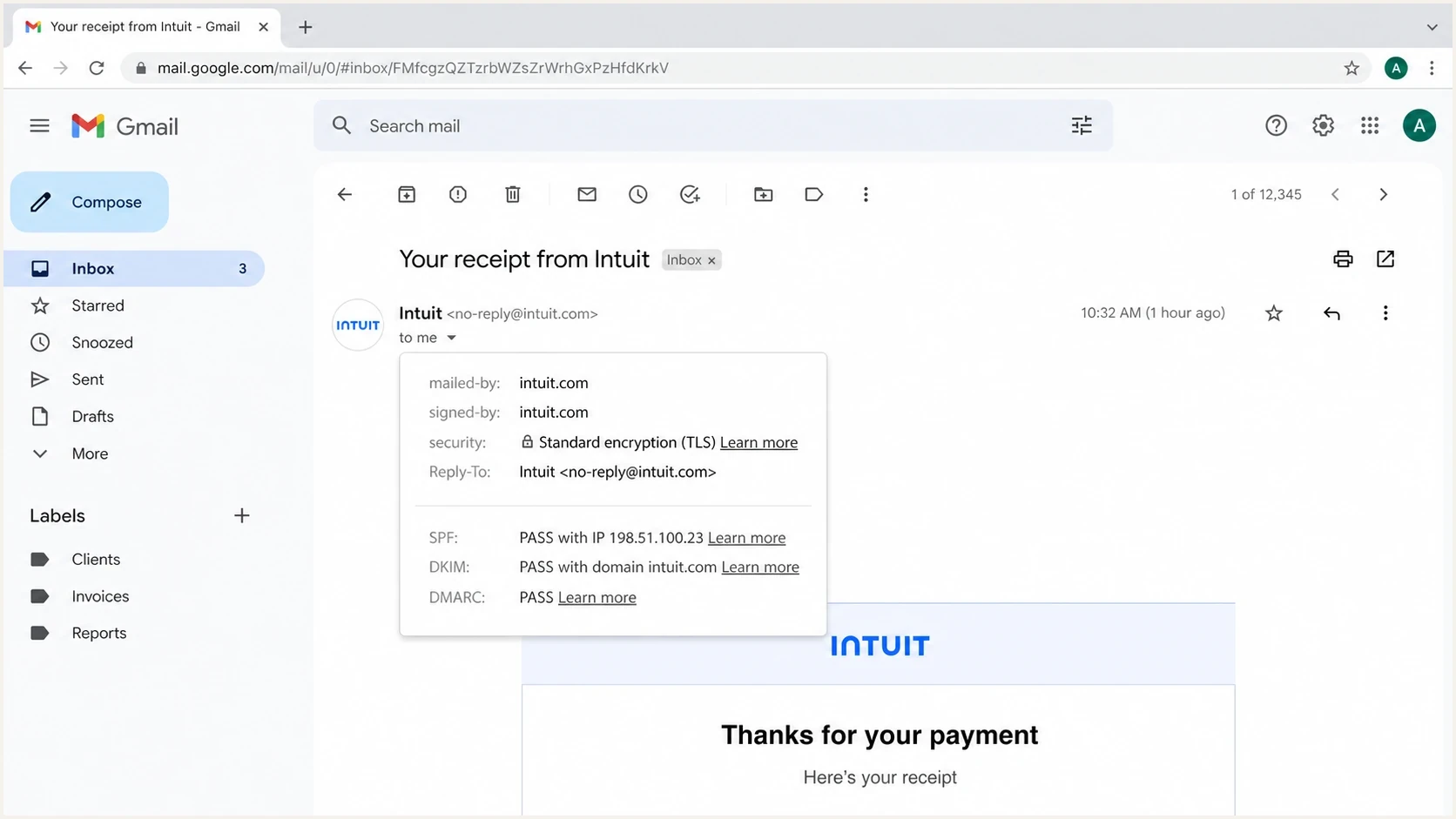
Gmail message details showing SPF, DKIM, and DMARC pass results.
- Preserve the EML: Save the original message so the DKIM signature and full route stay intact.
- Read results: Look for spf=pass, dkim=pass, and dmarc=pass in the receiver's Authentication-Results header.
- Compare domains: Check the visible From domain, aligned SPF identity, DKIM signing domain, return path, and reply-to address.
- Inspect URLs: Use a safe analysis workflow to compare visible links with the actual destination domains.
- Report with proof: Send the full EML, timestamps, recipient addresses, message IDs, and screenshots to security@intuit.com.
?
What's your domain score?
Deep-scan SPF, DKIM & DMARC records for email deliverability and security issues.
That check will not prove whether an Intuit tenant or QuickBooks customer was abused. It gives you a clean baseline for your own domain. When your SPF, DKIM, and DMARC are correct, you can focus the investigation on the third-party sending path instead of chasing a false internal DNS problem.
How receivers should handle it
The right receiver response is targeted. A blanket domain block looks attractive after a convincing fake invoice, but it breaks legitimate business mail. A layered response can keep the parent domain usable while reducing the specific abuse pattern.
Do not treat verified as safe
A verified label is useful, but it should not override link inspection, account context, payment review, or user reports. Authenticated abuse deserves the same urgency as obvious spoofing because recipients are more likely to trust it.
Receiver handling thresholds
Use authentication as one input, then raise enforcement when content and account signals add risk.
Known normal flow
Deliver
Authenticated mail matches prior vendor, invoice, and link patterns.
Authenticated but unusual
Review
The domain passes checks, but content, timing, or recipient pattern is new.
Known abusive pattern
Quarantine
The campaign repeats across users with the same tenant, reply path, or URL shape.
Confirmed account takeover
Block
The sender account is confirmed compromised or malware-driven.
Good filtering uses more than one signal. It can look at the tenant identifier, campaign fingerprints, link destinations, display name drift, reply-to changes, attachment behavior, and whether the recipient has a known relationship with the sending business. Authentication pass should reduce spoof suspicion, not remove content risk.
- Avoid broad blocks: Blocking all mail from a large provider creates false positives for real customer notices.
- Use fingerprints: Match campaigns by reply-to, URL pattern, subject structure, tenant clues, and message IDs.
- Escalate abuse: Send the full EML and evidence to the platform's security or abuse process.
- Train users: Teach that authenticated mail can still be suspicious when the request is unexpected.
Keep user education concrete: do not pay, sign in, approve, call, or reply from an unexpected message alone. Open the account through a known bookmark, confirm the invoice with the vendor through a separate channel, and follow Intuit's security tips when an Intuit-branded message looks wrong.
What Intuit and senders can do
A platform owner has a different job than the receiving organization. Receivers can filter and report, but the platform has the tenant data, account telemetry, template controls, and enforcement levers. The most effective controls reduce abuse before a signed email leaves the platform.
Platform controls
- Tenant review: Score new accounts, risky login patterns, sudden volume, and unusual recipient sets.
- Template limits: Restrict high-risk fields, external links, phone changes, and reply-to changes.
- Fast takedown: Act on EML reports with tenant suspension, link removal, and customer notification.
Domain controls
- Tight signing: Keep product, tenant, and notification streams separated where headers allow it.
- Clear reporting: Monitor aggregate DMARC data so abnormal sources and volumes are visible.
- Policy staging: Move domains toward reject only after legitimate senders are fully accounted for.
For your own domain, do not wait until someone impersonates you. Publish DMARC reporting, review every sending source, then move policy in stages. A basic starter record looks like this:
Starter DMARC record for monitoringdns
_dmarc.example.com TXT "v=DMARC1; p=none; rua=mailto:dmarc@example.com"
After the sources are known, the record can move toward quarantine or reject. Hosted DMARC helps when policy changes need staging without repeated DNS edits across several domains.
Where Suped fits
For teams responsible for DMARC operations, Suped's product centralizes aggregate reports, sending-source review, issue detection, hosted records, and alerts. This workflow helps separate unauthorized use of your own domain from authenticated abuse on an Intuit-controlled path. Suped also includes SPF and DKIM diagnostics, blocklist (blacklist) monitoring, hosted SPF, hosted DMARC, hosted MTA-STS, and MSP multi-tenancy alongside DMARC monitoring.

Issue steps to fix dialog showing the issue overview, tailored fix steps, and verification action
Suped does not stop abuse inside Intuit's tenant systems. It helps you prove whether your domain is being spoofed, see which sources are sending as you, identify broken authentication, and move your domain toward enforcement with evidence. That distinction matters when the investigation needs to determine whether the issue is your DNS, a third-party platform, or a receiver-side filtering decision.
Practical Suped workflow
- Detect issues: Automated checks flag SPF, DKIM, DMARC, and source problems with steps to fix them.
- Stage policy: Hosted DMARC lets teams adjust policy while they verify legitimate senders.
- Watch drift: Real-time alerts catch new failures, unknown sources, and reputation changes.
- Scale clients: The MSP dashboard keeps multiple customer domains separated with clear status views.
Views from the trenches
Best practices
Save the full EML before forwarding so headers, signatures, and relay paths stay intact.
Classify the sender by product workflow, tenant, DKIM domain, return path, and URLs.
Report authenticated abuse with timestamps, recipients, message IDs, and complete raw headers.
Common pitfalls
Blocking all Intuit mail causes false positives because real invoices and notices still arrive.
Treating SPF, DKIM, or DMARC pass as trust skips the account-abuse question entirely.
Forwarding only screenshots leaves security teams without the evidence needed to act quickly.
Expert tips
Build rules around observed campaigns, not only the parent domain shown in the From field.
Compare newly seen sending patterns against prior legitimate mail before changing policy.
Use receiver-side warnings when the mail is authenticated but the business context is off.
Marketer from Email Geeks says authenticated Intuit mail can still be abusive when a product workflow is used to send harmful content.
2024-10-12 - Email Geeks
Marketer from Email Geeks says blocking the parent Intuit domain creates false positives because legitimate business mail uses the same infrastructure.
2024-11-03 - Email Geeks
What to do next
If you received one of these messages, the direct answer is simple: it can be authentically sent and still be malicious. Keep the EML, verify the authentication results, inspect the reply path and URLs, confirm the invoice with the named vendor through a separate channel, report the message to security@intuit.com, and avoid broad blocks unless the campaign data proves that a narrower rule cannot work.
- For recipients: Do not trust the message only because it passed authentication.
- For admins: Filter on campaign evidence such as tenant clues, reply paths, URLs, and message fingerprints.
- For senders: Use DMARC reports to prove who sends for your domain before moving to enforcement.
- For Suped users: Use issue detection, alerts, hosted records, and source review to keep your own domain authenticated.
Do not assume Intuit was spoofed, and do not assume the message is safe. Treat it as authenticated abuse until the headers, account context, vendor confirmation, and platform response prove otherwise.




